 ROS Index

|
fss_px4_sim package from fastswarmsim repofss_bringup fss_px4_sim fss_sensing fss_time fss_time_interfaces |
ROS Distro
|
Package Summary
| Version | 0.1.4 |
| License | BSD-3-Clause |
| Build type | AMENT_CMAKE |
| Use | RECOMMENDED |
Repository Summary
| Checkout URI | https://github.com/shupx/FastSwarmSim.git |
| VCS Type | git |
| VCS Version | main |
| Last Updated | 2026-10-10 |
| Dev Status | MAINTAINED |
| Released | RELEASED |
| Contributing |
Help Wanted (-)
Good First Issues (-) Pull Requests to Review (-) |
Package Description
Maintainers
- Peixuan Shu
Authors
fss_px4_sim
This package provides a ROS 2 PX4 simulator runtime.
# Launch a single drone simulation with PX4 SITL and MAVROS Lite bridge.
ros2 launch fss_px4_sim px4_rotor_sim_single.launch.py

# Launch a multi-drone simulation.
ros2 launch fss_px4_sim px4_rotor_sim_multi.launch.py num_drones:=5

# Launch perfect MAVROS-compatible drones (No PX4 controller and dynamics, perfect tracking MAVROS commands).
ros2 launch fss_px4_sim perfect_mavros_drone_single.launch.py
ros2 launch fss_px4_sim perfect_mavros_drone_multi.launch.py num_drones:=5

# Only launch the drone visualizer node, useful for real experiments.
ros2 launch fss_px4_sim drone_visualizer.launch.py
ros2 launch fss_px4_sim drone_visualizer.launch.py num_drones:=5

# Terminal keyboard control (start PX4/MAVROS Lite first)
ros2 run fss_px4_sim keyboard_control_ros2
What it contains:
-
A tailored PX4 v1.13.3 flight controll stack. The position controller, attitude controller, state machine, and MAVLink interface are included. Although it is based on the PX4 v1.13.3 source code, the core logic remains the same across different PX4 versions, and it is expected to be compatible with most recent PX4 versions (v1.15+).
-
A MAVROS Lite bridge to expose the PX4 MAVLink interface as ROS 2 topics and services. This bridge is embedded in the PX4 simulator process by default so that no extra mavros process is needed. The bridge can also be run as a separate process, and the PX4 simulator and the MAVROS Lite bridge communicate through a loopback UDP port.
-
AN ideal dynamic model for the quadrotor, which accepts the desired angular rates and thrust from the PX4 simulator and outputs the drone’s position, velocity, attitude, and angular rates. The dynamics is integrated using odeint. The integration step size is 0.01s (100Hz).
-
(Optional) A drone visualizer node process receives MAVROS topics and publishes the drone’s URDF, history trajectory, and name markers for visualization in RViz2.
In conclusion, the conventional PX4 SITL process + MAVROS process + drone dynamics process is simplified to a single PX4 simulator process, which is more efficient. A step of simulation (10ms) only costs about 0.1ms in real time, so the simulation can run at most 100x real time speed on a normal laptop.
Terminal keyboard control
keyboard_control_ros2 is a standard-terminal rclpy node; it does not use ROS 1 or PyQt5. Run it in a separate terminal after starting a simulator with MAVROS Lite:
ros2 run fss_px4_sim keyboard_control_ros2

# Optional: control the first vehicle in a multi-drone launch.
ros2 run fss_px4_sim keyboard_control_ros2 --ros-args -r __ns:=/uav1
| Key | Action |
|---|---|
W/A/S/D |
move while held; automatically stop after release |
Q/E |
change altitude while held; automatically stop after release |
Z/C |
yaw while held; automatically stop after release |
Space or R
|
zero all velocities (hold position) |
+ / -
|
adjust translation speed by 0.1 m/s |
T |
arm via /mavros/cmd/arming
|
O |
request OFFBOARD via /mavros/set_mode after arming |
X |
stop and disarm |
Ctrl-C |
stop, request disarm, and restore terminal |
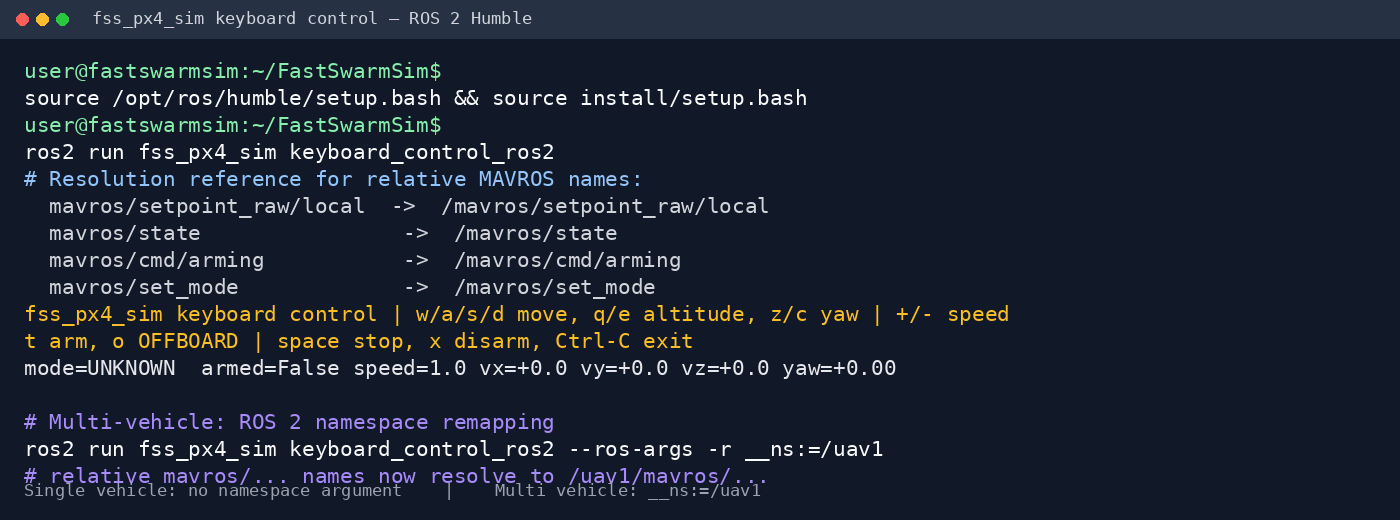
The node starts streaming neutral setpoints at 20 Hz, then requires the explicit safe sequence T, wait for armed=True, then O; it refuses an OFFBOARD request while state reports disarmed. Motion keys are treated as held keys: the terminal’s keyboard-repeat events keep the motion alive, and the controller sends a zero-velocity setpoint after 0.6 seconds without a repeat event. This is the safe terminal equivalent of stop-on-release because standard terminal input does not expose raw key-release events. The controller uses relative MAVROS names: mavros/setpoint_raw/local, mavros/state, mavros/cmd/arming, and mavros/set_mode. Therefore, the single-vehicle command resolves them to /mavros/... without any extra namespace argument. With --ros-args -r __ns:=/uav1, the same names resolve to /uav1/mavros/..., matching the multi-vehicle ROS 1-style namespace layout. On every normal exit it publishes a neutral setpoint and waits up to one second for a disarm request before restoring the terminal. Set --speed, --yaw-speed, or --initial-altitude to change control defaults. Always verify the vehicle is in a safe simulation state before arming.
The keyboard controller is intended for an interactive terminal. The following
terminal reference shows the single-vehicle command, the resolved relative
MAVROS interfaces, and the ROS 2 namespace command for /uav1. Always verify
the simulated vehicle state before arming:
What it does not simulate:
-
The attitude rate controller of the PX4 is not included on purpose, because simulating the attitude rate controller is not necessary for most applications, and it will slow down the simulation speed. The output of the PX4 simulator is thus the desired angular rates and thrust, assuming that the attitude rate is ideally responded by the drone dynamic model.
-
The full PX4 modes such as MISSION, POSCTL, STABLIZE, etc. are not included. The PX4 simulator only supports the OFFBOARD mode, which is sufficient for most applications.
-
The PX4 simulator does not simulate the sensors such as IMU, barometer, GPS, etc. Therefore, the EKF module is also not included. The pose of the drone is directly provided by the drone dynamics model. And we provide two local pose source modes: (1) mocap/vision mode (default), where the pose in /mavros/local_position/pose is relative to the global map, i.e., the world frame; (2) gps mode, where the pose in /mavros/local_position/pose is relative to the initial position of the drone.
-
The uXRCE DDS and zenoh transports are not included so far. The only transport support is the MAVLINK over mavros_lite or UDP. Since mavlink is a common protocol not only for PX4 and ROS2, but also for Ardupilot and ROS1, while DDS and zenoh are only compatible with PX4 and ROS2 now. Adding the support for DDS and zenoh is possible in the future, but it is not a priority now.
Accelerate multi-drone simulation using fss_time time coordinator
The simulation loop uses the fss_time::Rate instead of rclcpp::Rate, so it is compatible with the fss_time time coordinator, which controls the simulation clock for multiple drones using a synchronous approach (lock step). The simulation can thus run at a maximum speed of 100x real time for one drone, 20x real time for 10 drones, and 5x real time for 100 drones on a normal laptop.
-
To enable fss sim time, set the
use_fss_sim_timelaunch argument totruewhen launching the simulation. Theuse_sim_timeparameter should also be set totrueautomatically by the launch file. -
If
use_fss_sim_timeis set tofalse, the simulation will use the default ROS2 time, i.e., the /clock time ifuse_sim_time = trueand wall time ifuse_sim_time = false. The /clock topic can be published by other processes, but the lock step simulation will not be supported.
Since fss_time time coordinator supports cascade clock synchronization across multiple machines, the simulation can also run on multiple machines, with each machine simulating a subset of drones. The simulation clock is synchronized across all machines, and the maximum speed of the simulation is limited by the slowest machine.
Trouble shooting
100+ drone simulation
Simulating 100+ drones is possible, but it requires slight modification as the default ROS2 FastRTPS transport has a limit of 100 participants. Solutions:
Solution 1: tune FastRTPS participant limits
Set the mutation_tries parameter of the FastRTPS transport to a value larger than the number of nodes, e.g., 10000. Create large_scale_configuration.xml according to the ROS 2 tutorial:
```xml
File truncated at 100 lines see the full file
Changelog for package fss_px4_sim
0.1.4 (2026-09-30)
0.1.3 (2026-09-30)
0.1.2 (2026-09-18)
- fix(fss-px4-sim): stop motion after key repeat ends
- docs(fss-px4-sim): fix troubleshooting code blocks
- fix(fss-px4-sim): restore ROS namespace-based MAVROS names
- fix(fss-px4-sim): use explicit mavros topics and fix docs formatting
- chore(fss-px4-sim): remove keyboard control test
- feat(fss-px4-sim): add ROS 2 keyboard control
- fix(fss-px4-sim): disarm keyboard controller on exit
- fix(fss-px4-sim): handle keyboard controller shutdown
- docs(fss-px4-sim): fix keyboard screenshot path
- feat(fss-px4-sim): add ROS 2 keyboard control
- Contributors: Peixuan Shu
0.1.1 (2026-08-19 21:18)
- chore: bump all packages to 0.1.1 for ROS release
- Contributors: Peixuan Shu
0.1.0 (2026-08-19 20:25)
- feat: add README files for fss_px4_sim and fss_sensing packages with usage instructions and features
- feat: enhance time coordination logic with new advancement checks and update real time request handling
- feat: update CMakeLists.txt for fss_px4_sim and fss_time to include Release build type and optimize compiler flags feat: improve warning messages in MulticopterAttitudeControl and MulticopterPositionControl for loop period thresholds
- feat: enhance launch files and visualizer node for improved performance and modularity
- feat: update MAVROS node executor to MultiThreadedExecutor and add test launch file for multi-drone simulation
- feat: enhance intra-process communication for MAVROS components and update publisher options
- feat: add rclcpp_components support and refactor drone simulation nodes for improved modularity
- Add RViz configuration for PX4 drone with LIDAR visualization
- Created a new RViz configuration file [sim_px4_drone_lidar_single.rviz]{.title-ref}
- Configured panels for Displays, Selection, Tool Properties, and Views
- Set up visualization manager with grid, axes, odometry, robot model, markers, and path displays
- Defined global options including background color and fixed frame
- Included tools for interaction, camera movement, and goal setting
- refactor: remove fss_time_coordinator_endpoint from launch files and update dependencies
- feat: add startup batch size and delay parameters for drone launch configuration
- fix: update thrust scaling initialization and add error handling in setpoint_raw module refactor: improve QoS settings for publishers in sys_status module
- Enhance launch files with detailed descriptions and environment
settings
- Added descriptions to launch arguments in [perfect_mavros_drone_swarm.launch.py]{.title-ref}, [px4_rotor_sim_multi.launch.py]{.title-ref}, [px4_rotor_sim_single.launch.py]{.title-ref}, [sensing.launch.py]{.title-ref}, [parent_time_coordinator_example.launch.py]{.title-ref}, [time_coordinator.launch.py]{.title-ref}, [executor_time_test_case.launch.py]{.title-ref}, [multi_node_sim_time_test_case.launch.py]{.title-ref}, and [sleep_rate_test_case.launch.py]{.title-ref} for better clarity.
- Introduced [SetEnvironmentVariable]{.title-ref} to force colorized output in logs across multiple launch files.
- Updated launch arguments to include choices where applicable, improving validation and user experience.
- Refactored the structure of launch files for consistency and readability.
- Refactor MAVLink transport to support direct ROS interface and UDP
- Updated GlobalPosition, Imu, LocalPosition, SetpointRaw, SysStatus modules to accept MavrosLite instead of Core.
- Introduced MavlinkUdpTransport class for handling UDP communication.
- Modified MAVLINK class to support both UDP and direct ROS transport methods.
- Enhanced PX4SITL to configure MAVLink transport type via parameters.
- Implemented message exchange tests for direct transport without sockets.
- Updated px4_rotor_sim_node to integrate MAVROS Lite for direct ROS communication.
- feat: add subscription count checks before publishing joint states and markers
- Add mavros Lite modules for PX4 simulation
- Implement core functionality for MAVLink communication in [core.cpp]{.title-ref}.
- Create [global_position.cpp]{.title-ref} to handle global positioning data and publish relevant messages.
- Add [imu.cpp]{.title-ref} for processing IMU data and publishing
File truncated at 100 lines see the full file
Package Dependencies
System Dependencies
| Name |
|---|
| python3 |
Dependant Packages
| Name | Deps |
|---|---|
| fss_bringup |
Launch files
Messages
Services
Plugins
Recent questions tagged fss_px4_sim at Robotics Stack Exchange
|
|
fss_px4_sim package from fastswarmsim repofss_bringup fss_px4_sim fss_sensing fss_time fss_time_interfaces |
ROS Distro
|
Package Summary
| Version | 0.1.4 |
| License | BSD-3-Clause |
| Build type | AMENT_CMAKE |
| Use | RECOMMENDED |
Repository Summary
| Checkout URI | https://github.com/shupx/FastSwarmSim.git |
| VCS Type | git |
| VCS Version | main |
| Last Updated | 2026-10-10 |
| Dev Status | MAINTAINED |
| Released | RELEASED |
| Contributing |
Help Wanted (-)
Good First Issues (-) Pull Requests to Review (-) |
Package Description
Maintainers
- Peixuan Shu
Authors
fss_px4_sim
This package provides a ROS 2 PX4 simulator runtime.
# Launch a single drone simulation with PX4 SITL and MAVROS Lite bridge.
ros2 launch fss_px4_sim px4_rotor_sim_single.launch.py

# Launch a multi-drone simulation.
ros2 launch fss_px4_sim px4_rotor_sim_multi.launch.py num_drones:=5

# Launch perfect MAVROS-compatible drones (No PX4 controller and dynamics, perfect tracking MAVROS commands).
ros2 launch fss_px4_sim perfect_mavros_drone_single.launch.py
ros2 launch fss_px4_sim perfect_mavros_drone_multi.launch.py num_drones:=5

# Only launch the drone visualizer node, useful for real experiments.
ros2 launch fss_px4_sim drone_visualizer.launch.py
ros2 launch fss_px4_sim drone_visualizer.launch.py num_drones:=5

# Terminal keyboard control (start PX4/MAVROS Lite first)
ros2 run fss_px4_sim keyboard_control_ros2
What it contains:
-
A tailored PX4 v1.13.3 flight controll stack. The position controller, attitude controller, state machine, and MAVLink interface are included. Although it is based on the PX4 v1.13.3 source code, the core logic remains the same across different PX4 versions, and it is expected to be compatible with most recent PX4 versions (v1.15+).
-
A MAVROS Lite bridge to expose the PX4 MAVLink interface as ROS 2 topics and services. This bridge is embedded in the PX4 simulator process by default so that no extra mavros process is needed. The bridge can also be run as a separate process, and the PX4 simulator and the MAVROS Lite bridge communicate through a loopback UDP port.
-
AN ideal dynamic model for the quadrotor, which accepts the desired angular rates and thrust from the PX4 simulator and outputs the drone’s position, velocity, attitude, and angular rates. The dynamics is integrated using odeint. The integration step size is 0.01s (100Hz).
-
(Optional) A drone visualizer node process receives MAVROS topics and publishes the drone’s URDF, history trajectory, and name markers for visualization in RViz2.
In conclusion, the conventional PX4 SITL process + MAVROS process + drone dynamics process is simplified to a single PX4 simulator process, which is more efficient. A step of simulation (10ms) only costs about 0.1ms in real time, so the simulation can run at most 100x real time speed on a normal laptop.
Terminal keyboard control
keyboard_control_ros2 is a standard-terminal rclpy node; it does not use ROS 1 or PyQt5. Run it in a separate terminal after starting a simulator with MAVROS Lite:
ros2 run fss_px4_sim keyboard_control_ros2

# Optional: control the first vehicle in a multi-drone launch.
ros2 run fss_px4_sim keyboard_control_ros2 --ros-args -r __ns:=/uav1
| Key | Action |
|---|---|
W/A/S/D |
move while held; automatically stop after release |
Q/E |
change altitude while held; automatically stop after release |
Z/C |
yaw while held; automatically stop after release |
Space or R
|
zero all velocities (hold position) |
+ / -
|
adjust translation speed by 0.1 m/s |
T |
arm via /mavros/cmd/arming
|
O |
request OFFBOARD via /mavros/set_mode after arming |
X |
stop and disarm |
Ctrl-C |
stop, request disarm, and restore terminal |
The node starts streaming neutral setpoints at 20 Hz, then requires the explicit safe sequence T, wait for armed=True, then O; it refuses an OFFBOARD request while state reports disarmed. Motion keys are treated as held keys: the terminal’s keyboard-repeat events keep the motion alive, and the controller sends a zero-velocity setpoint after 0.6 seconds without a repeat event. This is the safe terminal equivalent of stop-on-release because standard terminal input does not expose raw key-release events. The controller uses relative MAVROS names: mavros/setpoint_raw/local, mavros/state, mavros/cmd/arming, and mavros/set_mode. Therefore, the single-vehicle command resolves them to /mavros/... without any extra namespace argument. With --ros-args -r __ns:=/uav1, the same names resolve to /uav1/mavros/..., matching the multi-vehicle ROS 1-style namespace layout. On every normal exit it publishes a neutral setpoint and waits up to one second for a disarm request before restoring the terminal. Set --speed, --yaw-speed, or --initial-altitude to change control defaults. Always verify the vehicle is in a safe simulation state before arming.
The keyboard controller is intended for an interactive terminal. The following
terminal reference shows the single-vehicle command, the resolved relative
MAVROS interfaces, and the ROS 2 namespace command for /uav1. Always verify
the simulated vehicle state before arming:
What it does not simulate:
-
The attitude rate controller of the PX4 is not included on purpose, because simulating the attitude rate controller is not necessary for most applications, and it will slow down the simulation speed. The output of the PX4 simulator is thus the desired angular rates and thrust, assuming that the attitude rate is ideally responded by the drone dynamic model.
-
The full PX4 modes such as MISSION, POSCTL, STABLIZE, etc. are not included. The PX4 simulator only supports the OFFBOARD mode, which is sufficient for most applications.
-
The PX4 simulator does not simulate the sensors such as IMU, barometer, GPS, etc. Therefore, the EKF module is also not included. The pose of the drone is directly provided by the drone dynamics model. And we provide two local pose source modes: (1) mocap/vision mode (default), where the pose in /mavros/local_position/pose is relative to the global map, i.e., the world frame; (2) gps mode, where the pose in /mavros/local_position/pose is relative to the initial position of the drone.
-
The uXRCE DDS and zenoh transports are not included so far. The only transport support is the MAVLINK over mavros_lite or UDP. Since mavlink is a common protocol not only for PX4 and ROS2, but also for Ardupilot and ROS1, while DDS and zenoh are only compatible with PX4 and ROS2 now. Adding the support for DDS and zenoh is possible in the future, but it is not a priority now.
Accelerate multi-drone simulation using fss_time time coordinator
The simulation loop uses the fss_time::Rate instead of rclcpp::Rate, so it is compatible with the fss_time time coordinator, which controls the simulation clock for multiple drones using a synchronous approach (lock step). The simulation can thus run at a maximum speed of 100x real time for one drone, 20x real time for 10 drones, and 5x real time for 100 drones on a normal laptop.
-
To enable fss sim time, set the
use_fss_sim_timelaunch argument totruewhen launching the simulation. Theuse_sim_timeparameter should also be set totrueautomatically by the launch file. -
If
use_fss_sim_timeis set tofalse, the simulation will use the default ROS2 time, i.e., the /clock time ifuse_sim_time = trueand wall time ifuse_sim_time = false. The /clock topic can be published by other processes, but the lock step simulation will not be supported.
Since fss_time time coordinator supports cascade clock synchronization across multiple machines, the simulation can also run on multiple machines, with each machine simulating a subset of drones. The simulation clock is synchronized across all machines, and the maximum speed of the simulation is limited by the slowest machine.
Trouble shooting
100+ drone simulation
Simulating 100+ drones is possible, but it requires slight modification as the default ROS2 FastRTPS transport has a limit of 100 participants. Solutions:
Solution 1: tune FastRTPS participant limits
Set the mutation_tries parameter of the FastRTPS transport to a value larger than the number of nodes, e.g., 10000. Create large_scale_configuration.xml according to the ROS 2 tutorial:
```xml
File truncated at 100 lines see the full file
Changelog for package fss_px4_sim
0.1.4 (2026-09-30)
0.1.3 (2026-09-30)
0.1.2 (2026-09-18)
- fix(fss-px4-sim): stop motion after key repeat ends
- docs(fss-px4-sim): fix troubleshooting code blocks
- fix(fss-px4-sim): restore ROS namespace-based MAVROS names
- fix(fss-px4-sim): use explicit mavros topics and fix docs formatting
- chore(fss-px4-sim): remove keyboard control test
- feat(fss-px4-sim): add ROS 2 keyboard control
- fix(fss-px4-sim): disarm keyboard controller on exit
- fix(fss-px4-sim): handle keyboard controller shutdown
- docs(fss-px4-sim): fix keyboard screenshot path
- feat(fss-px4-sim): add ROS 2 keyboard control
- Contributors: Peixuan Shu
0.1.1 (2026-08-19 21:18)
- chore: bump all packages to 0.1.1 for ROS release
- Contributors: Peixuan Shu
0.1.0 (2026-08-19 20:25)
- feat: add README files for fss_px4_sim and fss_sensing packages with usage instructions and features
- feat: enhance time coordination logic with new advancement checks and update real time request handling
- feat: update CMakeLists.txt for fss_px4_sim and fss_time to include Release build type and optimize compiler flags feat: improve warning messages in MulticopterAttitudeControl and MulticopterPositionControl for loop period thresholds
- feat: enhance launch files and visualizer node for improved performance and modularity
- feat: update MAVROS node executor to MultiThreadedExecutor and add test launch file for multi-drone simulation
- feat: enhance intra-process communication for MAVROS components and update publisher options
- feat: add rclcpp_components support and refactor drone simulation nodes for improved modularity
- Add RViz configuration for PX4 drone with LIDAR visualization
- Created a new RViz configuration file [sim_px4_drone_lidar_single.rviz]{.title-ref}
- Configured panels for Displays, Selection, Tool Properties, and Views
- Set up visualization manager with grid, axes, odometry, robot model, markers, and path displays
- Defined global options including background color and fixed frame
- Included tools for interaction, camera movement, and goal setting
- refactor: remove fss_time_coordinator_endpoint from launch files and update dependencies
- feat: add startup batch size and delay parameters for drone launch configuration
- fix: update thrust scaling initialization and add error handling in setpoint_raw module refactor: improve QoS settings for publishers in sys_status module
- Enhance launch files with detailed descriptions and environment
settings
- Added descriptions to launch arguments in [perfect_mavros_drone_swarm.launch.py]{.title-ref}, [px4_rotor_sim_multi.launch.py]{.title-ref}, [px4_rotor_sim_single.launch.py]{.title-ref}, [sensing.launch.py]{.title-ref}, [parent_time_coordinator_example.launch.py]{.title-ref}, [time_coordinator.launch.py]{.title-ref}, [executor_time_test_case.launch.py]{.title-ref}, [multi_node_sim_time_test_case.launch.py]{.title-ref}, and [sleep_rate_test_case.launch.py]{.title-ref} for better clarity.
- Introduced [SetEnvironmentVariable]{.title-ref} to force colorized output in logs across multiple launch files.
- Updated launch arguments to include choices where applicable, improving validation and user experience.
- Refactored the structure of launch files for consistency and readability.
- Refactor MAVLink transport to support direct ROS interface and UDP
- Updated GlobalPosition, Imu, LocalPosition, SetpointRaw, SysStatus modules to accept MavrosLite instead of Core.
- Introduced MavlinkUdpTransport class for handling UDP communication.
- Modified MAVLINK class to support both UDP and direct ROS transport methods.
- Enhanced PX4SITL to configure MAVLink transport type via parameters.
- Implemented message exchange tests for direct transport without sockets.
- Updated px4_rotor_sim_node to integrate MAVROS Lite for direct ROS communication.
- feat: add subscription count checks before publishing joint states and markers
- Add mavros Lite modules for PX4 simulation
- Implement core functionality for MAVLink communication in [core.cpp]{.title-ref}.
- Create [global_position.cpp]{.title-ref} to handle global positioning data and publish relevant messages.
- Add [imu.cpp]{.title-ref} for processing IMU data and publishing
File truncated at 100 lines see the full file
Package Dependencies
System Dependencies
| Name |
|---|
| python3 |
Dependant Packages
| Name | Deps |
|---|---|
| fss_bringup |
Launch files
Messages
Services
Plugins
Recent questions tagged fss_px4_sim at Robotics Stack Exchange
|
|
fss_px4_sim package from fastswarmsim repofss_bringup fss_px4_sim fss_sensing fss_time fss_time_interfaces |
ROS Distro
|
Package Summary
| Version | 0.1.4 |
| License | BSD-3-Clause |
| Build type | AMENT_CMAKE |
| Use | RECOMMENDED |
Repository Summary
| Checkout URI | https://github.com/shupx/FastSwarmSim.git |
| VCS Type | git |
| VCS Version | main |
| Last Updated | 2026-10-10 |
| Dev Status | MAINTAINED |
| Released | RELEASED |
| Contributing |
Help Wanted (-)
Good First Issues (-) Pull Requests to Review (-) |
Package Description
Maintainers
- Peixuan Shu
Authors
fss_px4_sim
This package provides a ROS 2 PX4 simulator runtime.
# Launch a single drone simulation with PX4 SITL and MAVROS Lite bridge.
ros2 launch fss_px4_sim px4_rotor_sim_single.launch.py

# Launch a multi-drone simulation.
ros2 launch fss_px4_sim px4_rotor_sim_multi.launch.py num_drones:=5

# Launch perfect MAVROS-compatible drones (No PX4 controller and dynamics, perfect tracking MAVROS commands).
ros2 launch fss_px4_sim perfect_mavros_drone_single.launch.py
ros2 launch fss_px4_sim perfect_mavros_drone_multi.launch.py num_drones:=5

# Only launch the drone visualizer node, useful for real experiments.
ros2 launch fss_px4_sim drone_visualizer.launch.py
ros2 launch fss_px4_sim drone_visualizer.launch.py num_drones:=5

# Terminal keyboard control (start PX4/MAVROS Lite first)
ros2 run fss_px4_sim keyboard_control_ros2
What it contains:
-
A tailored PX4 v1.13.3 flight controll stack. The position controller, attitude controller, state machine, and MAVLink interface are included. Although it is based on the PX4 v1.13.3 source code, the core logic remains the same across different PX4 versions, and it is expected to be compatible with most recent PX4 versions (v1.15+).
-
A MAVROS Lite bridge to expose the PX4 MAVLink interface as ROS 2 topics and services. This bridge is embedded in the PX4 simulator process by default so that no extra mavros process is needed. The bridge can also be run as a separate process, and the PX4 simulator and the MAVROS Lite bridge communicate through a loopback UDP port.
-
AN ideal dynamic model for the quadrotor, which accepts the desired angular rates and thrust from the PX4 simulator and outputs the drone’s position, velocity, attitude, and angular rates. The dynamics is integrated using odeint. The integration step size is 0.01s (100Hz).
-
(Optional) A drone visualizer node process receives MAVROS topics and publishes the drone’s URDF, history trajectory, and name markers for visualization in RViz2.
In conclusion, the conventional PX4 SITL process + MAVROS process + drone dynamics process is simplified to a single PX4 simulator process, which is more efficient. A step of simulation (10ms) only costs about 0.1ms in real time, so the simulation can run at most 100x real time speed on a normal laptop.
Terminal keyboard control
keyboard_control_ros2 is a standard-terminal rclpy node; it does not use ROS 1 or PyQt5. Run it in a separate terminal after starting a simulator with MAVROS Lite:
ros2 run fss_px4_sim keyboard_control_ros2

# Optional: control the first vehicle in a multi-drone launch.
ros2 run fss_px4_sim keyboard_control_ros2 --ros-args -r __ns:=/uav1
| Key | Action |
|---|---|
W/A/S/D |
move while held; automatically stop after release |
Q/E |
change altitude while held; automatically stop after release |
Z/C |
yaw while held; automatically stop after release |
Space or R
|
zero all velocities (hold position) |
+ / -
|
adjust translation speed by 0.1 m/s |
T |
arm via /mavros/cmd/arming
|
O |
request OFFBOARD via /mavros/set_mode after arming |
X |
stop and disarm |
Ctrl-C |
stop, request disarm, and restore terminal |
The node starts streaming neutral setpoints at 20 Hz, then requires the explicit safe sequence T, wait for armed=True, then O; it refuses an OFFBOARD request while state reports disarmed. Motion keys are treated as held keys: the terminal’s keyboard-repeat events keep the motion alive, and the controller sends a zero-velocity setpoint after 0.6 seconds without a repeat event. This is the safe terminal equivalent of stop-on-release because standard terminal input does not expose raw key-release events. The controller uses relative MAVROS names: mavros/setpoint_raw/local, mavros/state, mavros/cmd/arming, and mavros/set_mode. Therefore, the single-vehicle command resolves them to /mavros/... without any extra namespace argument. With --ros-args -r __ns:=/uav1, the same names resolve to /uav1/mavros/..., matching the multi-vehicle ROS 1-style namespace layout. On every normal exit it publishes a neutral setpoint and waits up to one second for a disarm request before restoring the terminal. Set --speed, --yaw-speed, or --initial-altitude to change control defaults. Always verify the vehicle is in a safe simulation state before arming.
The keyboard controller is intended for an interactive terminal. The following
terminal reference shows the single-vehicle command, the resolved relative
MAVROS interfaces, and the ROS 2 namespace command for /uav1. Always verify
the simulated vehicle state before arming:
What it does not simulate:
-
The attitude rate controller of the PX4 is not included on purpose, because simulating the attitude rate controller is not necessary for most applications, and it will slow down the simulation speed. The output of the PX4 simulator is thus the desired angular rates and thrust, assuming that the attitude rate is ideally responded by the drone dynamic model.
-
The full PX4 modes such as MISSION, POSCTL, STABLIZE, etc. are not included. The PX4 simulator only supports the OFFBOARD mode, which is sufficient for most applications.
-
The PX4 simulator does not simulate the sensors such as IMU, barometer, GPS, etc. Therefore, the EKF module is also not included. The pose of the drone is directly provided by the drone dynamics model. And we provide two local pose source modes: (1) mocap/vision mode (default), where the pose in /mavros/local_position/pose is relative to the global map, i.e., the world frame; (2) gps mode, where the pose in /mavros/local_position/pose is relative to the initial position of the drone.
-
The uXRCE DDS and zenoh transports are not included so far. The only transport support is the MAVLINK over mavros_lite or UDP. Since mavlink is a common protocol not only for PX4 and ROS2, but also for Ardupilot and ROS1, while DDS and zenoh are only compatible with PX4 and ROS2 now. Adding the support for DDS and zenoh is possible in the future, but it is not a priority now.
Accelerate multi-drone simulation using fss_time time coordinator
The simulation loop uses the fss_time::Rate instead of rclcpp::Rate, so it is compatible with the fss_time time coordinator, which controls the simulation clock for multiple drones using a synchronous approach (lock step). The simulation can thus run at a maximum speed of 100x real time for one drone, 20x real time for 10 drones, and 5x real time for 100 drones on a normal laptop.
-
To enable fss sim time, set the
use_fss_sim_timelaunch argument totruewhen launching the simulation. Theuse_sim_timeparameter should also be set totrueautomatically by the launch file. -
If
use_fss_sim_timeis set tofalse, the simulation will use the default ROS2 time, i.e., the /clock time ifuse_sim_time = trueand wall time ifuse_sim_time = false. The /clock topic can be published by other processes, but the lock step simulation will not be supported.
Since fss_time time coordinator supports cascade clock synchronization across multiple machines, the simulation can also run on multiple machines, with each machine simulating a subset of drones. The simulation clock is synchronized across all machines, and the maximum speed of the simulation is limited by the slowest machine.
Trouble shooting
100+ drone simulation
Simulating 100+ drones is possible, but it requires slight modification as the default ROS2 FastRTPS transport has a limit of 100 participants. Solutions:
Solution 1: tune FastRTPS participant limits
Set the mutation_tries parameter of the FastRTPS transport to a value larger than the number of nodes, e.g., 10000. Create large_scale_configuration.xml according to the ROS 2 tutorial:
```xml
File truncated at 100 lines see the full file
Changelog for package fss_px4_sim
0.1.4 (2026-09-30)
0.1.3 (2026-09-30)
0.1.2 (2026-09-18)
- fix(fss-px4-sim): stop motion after key repeat ends
- docs(fss-px4-sim): fix troubleshooting code blocks
- fix(fss-px4-sim): restore ROS namespace-based MAVROS names
- fix(fss-px4-sim): use explicit mavros topics and fix docs formatting
- chore(fss-px4-sim): remove keyboard control test
- feat(fss-px4-sim): add ROS 2 keyboard control
- fix(fss-px4-sim): disarm keyboard controller on exit
- fix(fss-px4-sim): handle keyboard controller shutdown
- docs(fss-px4-sim): fix keyboard screenshot path
- feat(fss-px4-sim): add ROS 2 keyboard control
- Contributors: Peixuan Shu
0.1.1 (2026-08-19 21:18)
- chore: bump all packages to 0.1.1 for ROS release
- Contributors: Peixuan Shu
0.1.0 (2026-08-19 20:25)
- feat: add README files for fss_px4_sim and fss_sensing packages with usage instructions and features
- feat: enhance time coordination logic with new advancement checks and update real time request handling
- feat: update CMakeLists.txt for fss_px4_sim and fss_time to include Release build type and optimize compiler flags feat: improve warning messages in MulticopterAttitudeControl and MulticopterPositionControl for loop period thresholds
- feat: enhance launch files and visualizer node for improved performance and modularity
- feat: update MAVROS node executor to MultiThreadedExecutor and add test launch file for multi-drone simulation
- feat: enhance intra-process communication for MAVROS components and update publisher options
- feat: add rclcpp_components support and refactor drone simulation nodes for improved modularity
- Add RViz configuration for PX4 drone with LIDAR visualization
- Created a new RViz configuration file [sim_px4_drone_lidar_single.rviz]{.title-ref}
- Configured panels for Displays, Selection, Tool Properties, and Views
- Set up visualization manager with grid, axes, odometry, robot model, markers, and path displays
- Defined global options including background color and fixed frame
- Included tools for interaction, camera movement, and goal setting
- refactor: remove fss_time_coordinator_endpoint from launch files and update dependencies
- feat: add startup batch size and delay parameters for drone launch configuration
- fix: update thrust scaling initialization and add error handling in setpoint_raw module refactor: improve QoS settings for publishers in sys_status module
- Enhance launch files with detailed descriptions and environment
settings
- Added descriptions to launch arguments in [perfect_mavros_drone_swarm.launch.py]{.title-ref}, [px4_rotor_sim_multi.launch.py]{.title-ref}, [px4_rotor_sim_single.launch.py]{.title-ref}, [sensing.launch.py]{.title-ref}, [parent_time_coordinator_example.launch.py]{.title-ref}, [time_coordinator.launch.py]{.title-ref}, [executor_time_test_case.launch.py]{.title-ref}, [multi_node_sim_time_test_case.launch.py]{.title-ref}, and [sleep_rate_test_case.launch.py]{.title-ref} for better clarity.
- Introduced [SetEnvironmentVariable]{.title-ref} to force colorized output in logs across multiple launch files.
- Updated launch arguments to include choices where applicable, improving validation and user experience.
- Refactored the structure of launch files for consistency and readability.
- Refactor MAVLink transport to support direct ROS interface and UDP
- Updated GlobalPosition, Imu, LocalPosition, SetpointRaw, SysStatus modules to accept MavrosLite instead of Core.
- Introduced MavlinkUdpTransport class for handling UDP communication.
- Modified MAVLINK class to support both UDP and direct ROS transport methods.
- Enhanced PX4SITL to configure MAVLink transport type via parameters.
- Implemented message exchange tests for direct transport without sockets.
- Updated px4_rotor_sim_node to integrate MAVROS Lite for direct ROS communication.
- feat: add subscription count checks before publishing joint states and markers
- Add mavros Lite modules for PX4 simulation
- Implement core functionality for MAVLink communication in [core.cpp]{.title-ref}.
- Create [global_position.cpp]{.title-ref} to handle global positioning data and publish relevant messages.
- Add [imu.cpp]{.title-ref} for processing IMU data and publishing
File truncated at 100 lines see the full file
Package Dependencies
System Dependencies
| Name |
|---|
| python3 |
Dependant Packages
| Name | Deps |
|---|---|
| fss_bringup |
Launch files
Messages
Services
Plugins
Recent questions tagged fss_px4_sim at Robotics Stack Exchange
|
|
fss_px4_sim package from fastswarmsim repofss_bringup fss_px4_sim fss_sensing fss_time fss_time_interfaces |
ROS Distro
|
Package Summary
| Version | 0.1.4 |
| License | BSD-3-Clause |
| Build type | AMENT_CMAKE |
| Use | RECOMMENDED |
Repository Summary
| Checkout URI | https://github.com/shupx/FastSwarmSim.git |
| VCS Type | git |
| VCS Version | main |
| Last Updated | 2026-10-10 |
| Dev Status | MAINTAINED |
| Released | RELEASED |
| Contributing |
Help Wanted (-)
Good First Issues (-) Pull Requests to Review (-) |
Package Description
Maintainers
- Peixuan Shu
Authors
fss_px4_sim
This package provides a ROS 2 PX4 simulator runtime.
# Launch a single drone simulation with PX4 SITL and MAVROS Lite bridge.
ros2 launch fss_px4_sim px4_rotor_sim_single.launch.py

# Launch a multi-drone simulation.
ros2 launch fss_px4_sim px4_rotor_sim_multi.launch.py num_drones:=5

# Launch perfect MAVROS-compatible drones (No PX4 controller and dynamics, perfect tracking MAVROS commands).
ros2 launch fss_px4_sim perfect_mavros_drone_single.launch.py
ros2 launch fss_px4_sim perfect_mavros_drone_multi.launch.py num_drones:=5

# Only launch the drone visualizer node, useful for real experiments.
ros2 launch fss_px4_sim drone_visualizer.launch.py
ros2 launch fss_px4_sim drone_visualizer.launch.py num_drones:=5

# Terminal keyboard control (start PX4/MAVROS Lite first)
ros2 run fss_px4_sim keyboard_control_ros2
What it contains:
-
A tailored PX4 v1.13.3 flight controll stack. The position controller, attitude controller, state machine, and MAVLink interface are included. Although it is based on the PX4 v1.13.3 source code, the core logic remains the same across different PX4 versions, and it is expected to be compatible with most recent PX4 versions (v1.15+).
-
A MAVROS Lite bridge to expose the PX4 MAVLink interface as ROS 2 topics and services. This bridge is embedded in the PX4 simulator process by default so that no extra mavros process is needed. The bridge can also be run as a separate process, and the PX4 simulator and the MAVROS Lite bridge communicate through a loopback UDP port.
-
AN ideal dynamic model for the quadrotor, which accepts the desired angular rates and thrust from the PX4 simulator and outputs the drone’s position, velocity, attitude, and angular rates. The dynamics is integrated using odeint. The integration step size is 0.01s (100Hz).
-
(Optional) A drone visualizer node process receives MAVROS topics and publishes the drone’s URDF, history trajectory, and name markers for visualization in RViz2.
In conclusion, the conventional PX4 SITL process + MAVROS process + drone dynamics process is simplified to a single PX4 simulator process, which is more efficient. A step of simulation (10ms) only costs about 0.1ms in real time, so the simulation can run at most 100x real time speed on a normal laptop.
Terminal keyboard control
keyboard_control_ros2 is a standard-terminal rclpy node; it does not use ROS 1 or PyQt5. Run it in a separate terminal after starting a simulator with MAVROS Lite:
ros2 run fss_px4_sim keyboard_control_ros2

# Optional: control the first vehicle in a multi-drone launch.
ros2 run fss_px4_sim keyboard_control_ros2 --ros-args -r __ns:=/uav1
| Key | Action |
|---|---|
W/A/S/D |
move while held; automatically stop after release |
Q/E |
change altitude while held; automatically stop after release |
Z/C |
yaw while held; automatically stop after release |
Space or R
|
zero all velocities (hold position) |
+ / -
|
adjust translation speed by 0.1 m/s |
T |
arm via /mavros/cmd/arming
|
O |
request OFFBOARD via /mavros/set_mode after arming |
X |
stop and disarm |
Ctrl-C |
stop, request disarm, and restore terminal |
The node starts streaming neutral setpoints at 20 Hz, then requires the explicit safe sequence T, wait for armed=True, then O; it refuses an OFFBOARD request while state reports disarmed. Motion keys are treated as held keys: the terminal’s keyboard-repeat events keep the motion alive, and the controller sends a zero-velocity setpoint after 0.6 seconds without a repeat event. This is the safe terminal equivalent of stop-on-release because standard terminal input does not expose raw key-release events. The controller uses relative MAVROS names: mavros/setpoint_raw/local, mavros/state, mavros/cmd/arming, and mavros/set_mode. Therefore, the single-vehicle command resolves them to /mavros/... without any extra namespace argument. With --ros-args -r __ns:=/uav1, the same names resolve to /uav1/mavros/..., matching the multi-vehicle ROS 1-style namespace layout. On every normal exit it publishes a neutral setpoint and waits up to one second for a disarm request before restoring the terminal. Set --speed, --yaw-speed, or --initial-altitude to change control defaults. Always verify the vehicle is in a safe simulation state before arming.
The keyboard controller is intended for an interactive terminal. The following
terminal reference shows the single-vehicle command, the resolved relative
MAVROS interfaces, and the ROS 2 namespace command for /uav1. Always verify
the simulated vehicle state before arming:
What it does not simulate:
-
The attitude rate controller of the PX4 is not included on purpose, because simulating the attitude rate controller is not necessary for most applications, and it will slow down the simulation speed. The output of the PX4 simulator is thus the desired angular rates and thrust, assuming that the attitude rate is ideally responded by the drone dynamic model.
-
The full PX4 modes such as MISSION, POSCTL, STABLIZE, etc. are not included. The PX4 simulator only supports the OFFBOARD mode, which is sufficient for most applications.
-
The PX4 simulator does not simulate the sensors such as IMU, barometer, GPS, etc. Therefore, the EKF module is also not included. The pose of the drone is directly provided by the drone dynamics model. And we provide two local pose source modes: (1) mocap/vision mode (default), where the pose in /mavros/local_position/pose is relative to the global map, i.e., the world frame; (2) gps mode, where the pose in /mavros/local_position/pose is relative to the initial position of the drone.
-
The uXRCE DDS and zenoh transports are not included so far. The only transport support is the MAVLINK over mavros_lite or UDP. Since mavlink is a common protocol not only for PX4 and ROS2, but also for Ardupilot and ROS1, while DDS and zenoh are only compatible with PX4 and ROS2 now. Adding the support for DDS and zenoh is possible in the future, but it is not a priority now.
Accelerate multi-drone simulation using fss_time time coordinator
The simulation loop uses the fss_time::Rate instead of rclcpp::Rate, so it is compatible with the fss_time time coordinator, which controls the simulation clock for multiple drones using a synchronous approach (lock step). The simulation can thus run at a maximum speed of 100x real time for one drone, 20x real time for 10 drones, and 5x real time for 100 drones on a normal laptop.
-
To enable fss sim time, set the
use_fss_sim_timelaunch argument totruewhen launching the simulation. Theuse_sim_timeparameter should also be set totrueautomatically by the launch file. -
If
use_fss_sim_timeis set tofalse, the simulation will use the default ROS2 time, i.e., the /clock time ifuse_sim_time = trueand wall time ifuse_sim_time = false. The /clock topic can be published by other processes, but the lock step simulation will not be supported.
Since fss_time time coordinator supports cascade clock synchronization across multiple machines, the simulation can also run on multiple machines, with each machine simulating a subset of drones. The simulation clock is synchronized across all machines, and the maximum speed of the simulation is limited by the slowest machine.
Trouble shooting
100+ drone simulation
Simulating 100+ drones is possible, but it requires slight modification as the default ROS2 FastRTPS transport has a limit of 100 participants. Solutions:
Solution 1: tune FastRTPS participant limits
Set the mutation_tries parameter of the FastRTPS transport to a value larger than the number of nodes, e.g., 10000. Create large_scale_configuration.xml according to the ROS 2 tutorial:
```xml
File truncated at 100 lines see the full file
Changelog for package fss_px4_sim
0.1.4 (2026-09-30)
0.1.3 (2026-09-30)
0.1.2 (2026-09-18)
- fix(fss-px4-sim): stop motion after key repeat ends
- docs(fss-px4-sim): fix troubleshooting code blocks
- fix(fss-px4-sim): restore ROS namespace-based MAVROS names
- fix(fss-px4-sim): use explicit mavros topics and fix docs formatting
- chore(fss-px4-sim): remove keyboard control test
- feat(fss-px4-sim): add ROS 2 keyboard control
- fix(fss-px4-sim): disarm keyboard controller on exit
- fix(fss-px4-sim): handle keyboard controller shutdown
- docs(fss-px4-sim): fix keyboard screenshot path
- feat(fss-px4-sim): add ROS 2 keyboard control
- Contributors: Peixuan Shu
0.1.1 (2026-08-19 21:18)
- chore: bump all packages to 0.1.1 for ROS release
- Contributors: Peixuan Shu
0.1.0 (2026-08-19 20:25)
- feat: add README files for fss_px4_sim and fss_sensing packages with usage instructions and features
- feat: enhance time coordination logic with new advancement checks and update real time request handling
- feat: update CMakeLists.txt for fss_px4_sim and fss_time to include Release build type and optimize compiler flags feat: improve warning messages in MulticopterAttitudeControl and MulticopterPositionControl for loop period thresholds
- feat: enhance launch files and visualizer node for improved performance and modularity
- feat: update MAVROS node executor to MultiThreadedExecutor and add test launch file for multi-drone simulation
- feat: enhance intra-process communication for MAVROS components and update publisher options
- feat: add rclcpp_components support and refactor drone simulation nodes for improved modularity
- Add RViz configuration for PX4 drone with LIDAR visualization
- Created a new RViz configuration file [sim_px4_drone_lidar_single.rviz]{.title-ref}
- Configured panels for Displays, Selection, Tool Properties, and Views
- Set up visualization manager with grid, axes, odometry, robot model, markers, and path displays
- Defined global options including background color and fixed frame
- Included tools for interaction, camera movement, and goal setting
- refactor: remove fss_time_coordinator_endpoint from launch files and update dependencies
- feat: add startup batch size and delay parameters for drone launch configuration
- fix: update thrust scaling initialization and add error handling in setpoint_raw module refactor: improve QoS settings for publishers in sys_status module
- Enhance launch files with detailed descriptions and environment
settings
- Added descriptions to launch arguments in [perfect_mavros_drone_swarm.launch.py]{.title-ref}, [px4_rotor_sim_multi.launch.py]{.title-ref}, [px4_rotor_sim_single.launch.py]{.title-ref}, [sensing.launch.py]{.title-ref}, [parent_time_coordinator_example.launch.py]{.title-ref}, [time_coordinator.launch.py]{.title-ref}, [executor_time_test_case.launch.py]{.title-ref}, [multi_node_sim_time_test_case.launch.py]{.title-ref}, and [sleep_rate_test_case.launch.py]{.title-ref} for better clarity.
- Introduced [SetEnvironmentVariable]{.title-ref} to force colorized output in logs across multiple launch files.
- Updated launch arguments to include choices where applicable, improving validation and user experience.
- Refactored the structure of launch files for consistency and readability.
- Refactor MAVLink transport to support direct ROS interface and UDP
- Updated GlobalPosition, Imu, LocalPosition, SetpointRaw, SysStatus modules to accept MavrosLite instead of Core.
- Introduced MavlinkUdpTransport class for handling UDP communication.
- Modified MAVLINK class to support both UDP and direct ROS transport methods.
- Enhanced PX4SITL to configure MAVLink transport type via parameters.
- Implemented message exchange tests for direct transport without sockets.
- Updated px4_rotor_sim_node to integrate MAVROS Lite for direct ROS communication.
- feat: add subscription count checks before publishing joint states and markers
- Add mavros Lite modules for PX4 simulation
- Implement core functionality for MAVLink communication in [core.cpp]{.title-ref}.
- Create [global_position.cpp]{.title-ref} to handle global positioning data and publish relevant messages.
- Add [imu.cpp]{.title-ref} for processing IMU data and publishing
File truncated at 100 lines see the full file
Package Dependencies
System Dependencies
| Name |
|---|
| python3 |
Dependant Packages
| Name | Deps |
|---|---|
| fss_bringup |
Launch files
Messages
Services
Plugins
Recent questions tagged fss_px4_sim at Robotics Stack Exchange
|
|
fss_px4_sim package from fastswarmsim repofss_bringup fss_px4_sim fss_sensing fss_time fss_time_interfaces |
ROS Distro
|
Package Summary
| Version | 0.1.4 |
| License | BSD-3-Clause |
| Build type | AMENT_CMAKE |
| Use | RECOMMENDED |
Repository Summary
| Checkout URI | https://github.com/shupx/FastSwarmSim.git |
| VCS Type | git |
| VCS Version | main |
| Last Updated | 2026-10-10 |
| Dev Status | MAINTAINED |
| Released | RELEASED |
| Contributing |
Help Wanted (-)
Good First Issues (-) Pull Requests to Review (-) |
Package Description
Maintainers
- Peixuan Shu
Authors
fss_px4_sim
This package provides a ROS 2 PX4 simulator runtime.
# Launch a single drone simulation with PX4 SITL and MAVROS Lite bridge.
ros2 launch fss_px4_sim px4_rotor_sim_single.launch.py

# Launch a multi-drone simulation.
ros2 launch fss_px4_sim px4_rotor_sim_multi.launch.py num_drones:=5

# Launch perfect MAVROS-compatible drones (No PX4 controller and dynamics, perfect tracking MAVROS commands).
ros2 launch fss_px4_sim perfect_mavros_drone_single.launch.py
ros2 launch fss_px4_sim perfect_mavros_drone_multi.launch.py num_drones:=5

# Only launch the drone visualizer node, useful for real experiments.
ros2 launch fss_px4_sim drone_visualizer.launch.py
ros2 launch fss_px4_sim drone_visualizer.launch.py num_drones:=5

# Terminal keyboard control (start PX4/MAVROS Lite first)
ros2 run fss_px4_sim keyboard_control_ros2
What it contains:
-
A tailored PX4 v1.13.3 flight controll stack. The position controller, attitude controller, state machine, and MAVLink interface are included. Although it is based on the PX4 v1.13.3 source code, the core logic remains the same across different PX4 versions, and it is expected to be compatible with most recent PX4 versions (v1.15+).
-
A MAVROS Lite bridge to expose the PX4 MAVLink interface as ROS 2 topics and services. This bridge is embedded in the PX4 simulator process by default so that no extra mavros process is needed. The bridge can also be run as a separate process, and the PX4 simulator and the MAVROS Lite bridge communicate through a loopback UDP port.
-
AN ideal dynamic model for the quadrotor, which accepts the desired angular rates and thrust from the PX4 simulator and outputs the drone’s position, velocity, attitude, and angular rates. The dynamics is integrated using odeint. The integration step size is 0.01s (100Hz).
-
(Optional) A drone visualizer node process receives MAVROS topics and publishes the drone’s URDF, history trajectory, and name markers for visualization in RViz2.
In conclusion, the conventional PX4 SITL process + MAVROS process + drone dynamics process is simplified to a single PX4 simulator process, which is more efficient. A step of simulation (10ms) only costs about 0.1ms in real time, so the simulation can run at most 100x real time speed on a normal laptop.
Terminal keyboard control
keyboard_control_ros2 is a standard-terminal rclpy node; it does not use ROS 1 or PyQt5. Run it in a separate terminal after starting a simulator with MAVROS Lite:
ros2 run fss_px4_sim keyboard_control_ros2

# Optional: control the first vehicle in a multi-drone launch.
ros2 run fss_px4_sim keyboard_control_ros2 --ros-args -r __ns:=/uav1
| Key | Action |
|---|---|
W/A/S/D |
move while held; automatically stop after release |
Q/E |
change altitude while held; automatically stop after release |
Z/C |
yaw while held; automatically stop after release |
Space or R
|
zero all velocities (hold position) |
+ / -
|
adjust translation speed by 0.1 m/s |
T |
arm via /mavros/cmd/arming
|
O |
request OFFBOARD via /mavros/set_mode after arming |
X |
stop and disarm |
Ctrl-C |
stop, request disarm, and restore terminal |
The node starts streaming neutral setpoints at 20 Hz, then requires the explicit safe sequence T, wait for armed=True, then O; it refuses an OFFBOARD request while state reports disarmed. Motion keys are treated as held keys: the terminal’s keyboard-repeat events keep the motion alive, and the controller sends a zero-velocity setpoint after 0.6 seconds without a repeat event. This is the safe terminal equivalent of stop-on-release because standard terminal input does not expose raw key-release events. The controller uses relative MAVROS names: mavros/setpoint_raw/local, mavros/state, mavros/cmd/arming, and mavros/set_mode. Therefore, the single-vehicle command resolves them to /mavros/... without any extra namespace argument. With --ros-args -r __ns:=/uav1, the same names resolve to /uav1/mavros/..., matching the multi-vehicle ROS 1-style namespace layout. On every normal exit it publishes a neutral setpoint and waits up to one second for a disarm request before restoring the terminal. Set --speed, --yaw-speed, or --initial-altitude to change control defaults. Always verify the vehicle is in a safe simulation state before arming.
The keyboard controller is intended for an interactive terminal. The following
terminal reference shows the single-vehicle command, the resolved relative
MAVROS interfaces, and the ROS 2 namespace command for /uav1. Always verify
the simulated vehicle state before arming:
What it does not simulate:
-
The attitude rate controller of the PX4 is not included on purpose, because simulating the attitude rate controller is not necessary for most applications, and it will slow down the simulation speed. The output of the PX4 simulator is thus the desired angular rates and thrust, assuming that the attitude rate is ideally responded by the drone dynamic model.
-
The full PX4 modes such as MISSION, POSCTL, STABLIZE, etc. are not included. The PX4 simulator only supports the OFFBOARD mode, which is sufficient for most applications.
-
The PX4 simulator does not simulate the sensors such as IMU, barometer, GPS, etc. Therefore, the EKF module is also not included. The pose of the drone is directly provided by the drone dynamics model. And we provide two local pose source modes: (1) mocap/vision mode (default), where the pose in /mavros/local_position/pose is relative to the global map, i.e., the world frame; (2) gps mode, where the pose in /mavros/local_position/pose is relative to the initial position of the drone.
-
The uXRCE DDS and zenoh transports are not included so far. The only transport support is the MAVLINK over mavros_lite or UDP. Since mavlink is a common protocol not only for PX4 and ROS2, but also for Ardupilot and ROS1, while DDS and zenoh are only compatible with PX4 and ROS2 now. Adding the support for DDS and zenoh is possible in the future, but it is not a priority now.
Accelerate multi-drone simulation using fss_time time coordinator
The simulation loop uses the fss_time::Rate instead of rclcpp::Rate, so it is compatible with the fss_time time coordinator, which controls the simulation clock for multiple drones using a synchronous approach (lock step). The simulation can thus run at a maximum speed of 100x real time for one drone, 20x real time for 10 drones, and 5x real time for 100 drones on a normal laptop.
-
To enable fss sim time, set the
use_fss_sim_timelaunch argument totruewhen launching the simulation. Theuse_sim_timeparameter should also be set totrueautomatically by the launch file. -
If
use_fss_sim_timeis set tofalse, the simulation will use the default ROS2 time, i.e., the /clock time ifuse_sim_time = trueand wall time ifuse_sim_time = false. The /clock topic can be published by other processes, but the lock step simulation will not be supported.
Since fss_time time coordinator supports cascade clock synchronization across multiple machines, the simulation can also run on multiple machines, with each machine simulating a subset of drones. The simulation clock is synchronized across all machines, and the maximum speed of the simulation is limited by the slowest machine.
Trouble shooting
100+ drone simulation
Simulating 100+ drones is possible, but it requires slight modification as the default ROS2 FastRTPS transport has a limit of 100 participants. Solutions:
Solution 1: tune FastRTPS participant limits
Set the mutation_tries parameter of the FastRTPS transport to a value larger than the number of nodes, e.g., 10000. Create large_scale_configuration.xml according to the ROS 2 tutorial:
```xml
File truncated at 100 lines see the full file
Changelog for package fss_px4_sim
0.1.4 (2026-09-30)
0.1.3 (2026-09-30)
0.1.2 (2026-09-18)
- fix(fss-px4-sim): stop motion after key repeat ends
- docs(fss-px4-sim): fix troubleshooting code blocks
- fix(fss-px4-sim): restore ROS namespace-based MAVROS names
- fix(fss-px4-sim): use explicit mavros topics and fix docs formatting
- chore(fss-px4-sim): remove keyboard control test
- feat(fss-px4-sim): add ROS 2 keyboard control
- fix(fss-px4-sim): disarm keyboard controller on exit
- fix(fss-px4-sim): handle keyboard controller shutdown
- docs(fss-px4-sim): fix keyboard screenshot path
- feat(fss-px4-sim): add ROS 2 keyboard control
- Contributors: Peixuan Shu
0.1.1 (2026-08-19 21:18)
- chore: bump all packages to 0.1.1 for ROS release
- Contributors: Peixuan Shu
0.1.0 (2026-08-19 20:25)
- feat: add README files for fss_px4_sim and fss_sensing packages with usage instructions and features
- feat: enhance time coordination logic with new advancement checks and update real time request handling
- feat: update CMakeLists.txt for fss_px4_sim and fss_time to include Release build type and optimize compiler flags feat: improve warning messages in MulticopterAttitudeControl and MulticopterPositionControl for loop period thresholds
- feat: enhance launch files and visualizer node for improved performance and modularity
- feat: update MAVROS node executor to MultiThreadedExecutor and add test launch file for multi-drone simulation
- feat: enhance intra-process communication for MAVROS components and update publisher options
- feat: add rclcpp_components support and refactor drone simulation nodes for improved modularity
- Add RViz configuration for PX4 drone with LIDAR visualization
- Created a new RViz configuration file [sim_px4_drone_lidar_single.rviz]{.title-ref}
- Configured panels for Displays, Selection, Tool Properties, and Views
- Set up visualization manager with grid, axes, odometry, robot model, markers, and path displays
- Defined global options including background color and fixed frame
- Included tools for interaction, camera movement, and goal setting
- refactor: remove fss_time_coordinator_endpoint from launch files and update dependencies
- feat: add startup batch size and delay parameters for drone launch configuration
- fix: update thrust scaling initialization and add error handling in setpoint_raw module refactor: improve QoS settings for publishers in sys_status module
- Enhance launch files with detailed descriptions and environment
settings
- Added descriptions to launch arguments in [perfect_mavros_drone_swarm.launch.py]{.title-ref}, [px4_rotor_sim_multi.launch.py]{.title-ref}, [px4_rotor_sim_single.launch.py]{.title-ref}, [sensing.launch.py]{.title-ref}, [parent_time_coordinator_example.launch.py]{.title-ref}, [time_coordinator.launch.py]{.title-ref}, [executor_time_test_case.launch.py]{.title-ref}, [multi_node_sim_time_test_case.launch.py]{.title-ref}, and [sleep_rate_test_case.launch.py]{.title-ref} for better clarity.
- Introduced [SetEnvironmentVariable]{.title-ref} to force colorized output in logs across multiple launch files.
- Updated launch arguments to include choices where applicable, improving validation and user experience.
- Refactored the structure of launch files for consistency and readability.
- Refactor MAVLink transport to support direct ROS interface and UDP
- Updated GlobalPosition, Imu, LocalPosition, SetpointRaw, SysStatus modules to accept MavrosLite instead of Core.
- Introduced MavlinkUdpTransport class for handling UDP communication.
- Modified MAVLINK class to support both UDP and direct ROS transport methods.
- Enhanced PX4SITL to configure MAVLink transport type via parameters.
- Implemented message exchange tests for direct transport without sockets.
- Updated px4_rotor_sim_node to integrate MAVROS Lite for direct ROS communication.
- feat: add subscription count checks before publishing joint states and markers
- Add mavros Lite modules for PX4 simulation
- Implement core functionality for MAVLink communication in [core.cpp]{.title-ref}.
- Create [global_position.cpp]{.title-ref} to handle global positioning data and publish relevant messages.
- Add [imu.cpp]{.title-ref} for processing IMU data and publishing
File truncated at 100 lines see the full file
Package Dependencies
System Dependencies
| Name |
|---|
| python3 |
Dependant Packages
| Name | Deps |
|---|---|
| fss_bringup |
Launch files
Messages
Services
Plugins
Recent questions tagged fss_px4_sim at Robotics Stack Exchange
|
|
fss_px4_sim package from fastswarmsim repofss_bringup fss_px4_sim fss_sensing fss_time fss_time_interfaces |
ROS Distro
|
Package Summary
| Version | 0.1.4 |
| License | BSD-3-Clause |
| Build type | AMENT_CMAKE |
| Use | RECOMMENDED |
Repository Summary
| Checkout URI | https://github.com/shupx/FastSwarmSim.git |
| VCS Type | git |
| VCS Version | main |
| Last Updated | 2026-10-10 |
| Dev Status | MAINTAINED |
| Released | RELEASED |
| Contributing |
Help Wanted (-)
Good First Issues (-) Pull Requests to Review (-) |
Package Description
Maintainers
- Peixuan Shu
Authors
fss_px4_sim
This package provides a ROS 2 PX4 simulator runtime.
# Launch a single drone simulation with PX4 SITL and MAVROS Lite bridge.
ros2 launch fss_px4_sim px4_rotor_sim_single.launch.py

# Launch a multi-drone simulation.
ros2 launch fss_px4_sim px4_rotor_sim_multi.launch.py num_drones:=5

# Launch perfect MAVROS-compatible drones (No PX4 controller and dynamics, perfect tracking MAVROS commands).
ros2 launch fss_px4_sim perfect_mavros_drone_single.launch.py
ros2 launch fss_px4_sim perfect_mavros_drone_multi.launch.py num_drones:=5

# Only launch the drone visualizer node, useful for real experiments.
ros2 launch fss_px4_sim drone_visualizer.launch.py
ros2 launch fss_px4_sim drone_visualizer.launch.py num_drones:=5

# Terminal keyboard control (start PX4/MAVROS Lite first)
ros2 run fss_px4_sim keyboard_control_ros2
What it contains:
-
A tailored PX4 v1.13.3 flight controll stack. The position controller, attitude controller, state machine, and MAVLink interface are included. Although it is based on the PX4 v1.13.3 source code, the core logic remains the same across different PX4 versions, and it is expected to be compatible with most recent PX4 versions (v1.15+).
-
A MAVROS Lite bridge to expose the PX4 MAVLink interface as ROS 2 topics and services. This bridge is embedded in the PX4 simulator process by default so that no extra mavros process is needed. The bridge can also be run as a separate process, and the PX4 simulator and the MAVROS Lite bridge communicate through a loopback UDP port.
-
AN ideal dynamic model for the quadrotor, which accepts the desired angular rates and thrust from the PX4 simulator and outputs the drone’s position, velocity, attitude, and angular rates. The dynamics is integrated using odeint. The integration step size is 0.01s (100Hz).
-
(Optional) A drone visualizer node process receives MAVROS topics and publishes the drone’s URDF, history trajectory, and name markers for visualization in RViz2.
In conclusion, the conventional PX4 SITL process + MAVROS process + drone dynamics process is simplified to a single PX4 simulator process, which is more efficient. A step of simulation (10ms) only costs about 0.1ms in real time, so the simulation can run at most 100x real time speed on a normal laptop.
Terminal keyboard control
keyboard_control_ros2 is a standard-terminal rclpy node; it does not use ROS 1 or PyQt5. Run it in a separate terminal after starting a simulator with MAVROS Lite:
ros2 run fss_px4_sim keyboard_control_ros2

# Optional: control the first vehicle in a multi-drone launch.
ros2 run fss_px4_sim keyboard_control_ros2 --ros-args -r __ns:=/uav1
| Key | Action |
|---|---|
W/A/S/D |
move while held; automatically stop after release |
Q/E |
change altitude while held; automatically stop after release |
Z/C |
yaw while held; automatically stop after release |
Space or R
|
zero all velocities (hold position) |
+ / -
|
adjust translation speed by 0.1 m/s |
T |
arm via /mavros/cmd/arming
|
O |
request OFFBOARD via /mavros/set_mode after arming |
X |
stop and disarm |
Ctrl-C |
stop, request disarm, and restore terminal |
The node starts streaming neutral setpoints at 20 Hz, then requires the explicit safe sequence T, wait for armed=True, then O; it refuses an OFFBOARD request while state reports disarmed. Motion keys are treated as held keys: the terminal’s keyboard-repeat events keep the motion alive, and the controller sends a zero-velocity setpoint after 0.6 seconds without a repeat event. This is the safe terminal equivalent of stop-on-release because standard terminal input does not expose raw key-release events. The controller uses relative MAVROS names: mavros/setpoint_raw/local, mavros/state, mavros/cmd/arming, and mavros/set_mode. Therefore, the single-vehicle command resolves them to /mavros/... without any extra namespace argument. With --ros-args -r __ns:=/uav1, the same names resolve to /uav1/mavros/..., matching the multi-vehicle ROS 1-style namespace layout. On every normal exit it publishes a neutral setpoint and waits up to one second for a disarm request before restoring the terminal. Set --speed, --yaw-speed, or --initial-altitude to change control defaults. Always verify the vehicle is in a safe simulation state before arming.
The keyboard controller is intended for an interactive terminal. The following
terminal reference shows the single-vehicle command, the resolved relative
MAVROS interfaces, and the ROS 2 namespace command for /uav1. Always verify
the simulated vehicle state before arming:
What it does not simulate:
-
The attitude rate controller of the PX4 is not included on purpose, because simulating the attitude rate controller is not necessary for most applications, and it will slow down the simulation speed. The output of the PX4 simulator is thus the desired angular rates and thrust, assuming that the attitude rate is ideally responded by the drone dynamic model.
-
The full PX4 modes such as MISSION, POSCTL, STABLIZE, etc. are not included. The PX4 simulator only supports the OFFBOARD mode, which is sufficient for most applications.
-
The PX4 simulator does not simulate the sensors such as IMU, barometer, GPS, etc. Therefore, the EKF module is also not included. The pose of the drone is directly provided by the drone dynamics model. And we provide two local pose source modes: (1) mocap/vision mode (default), where the pose in /mavros/local_position/pose is relative to the global map, i.e., the world frame; (2) gps mode, where the pose in /mavros/local_position/pose is relative to the initial position of the drone.
-
The uXRCE DDS and zenoh transports are not included so far. The only transport support is the MAVLINK over mavros_lite or UDP. Since mavlink is a common protocol not only for PX4 and ROS2, but also for Ardupilot and ROS1, while DDS and zenoh are only compatible with PX4 and ROS2 now. Adding the support for DDS and zenoh is possible in the future, but it is not a priority now.
Accelerate multi-drone simulation using fss_time time coordinator
The simulation loop uses the fss_time::Rate instead of rclcpp::Rate, so it is compatible with the fss_time time coordinator, which controls the simulation clock for multiple drones using a synchronous approach (lock step). The simulation can thus run at a maximum speed of 100x real time for one drone, 20x real time for 10 drones, and 5x real time for 100 drones on a normal laptop.
-
To enable fss sim time, set the
use_fss_sim_timelaunch argument totruewhen launching the simulation. Theuse_sim_timeparameter should also be set totrueautomatically by the launch file. -
If
use_fss_sim_timeis set tofalse, the simulation will use the default ROS2 time, i.e., the /clock time ifuse_sim_time = trueand wall time ifuse_sim_time = false. The /clock topic can be published by other processes, but the lock step simulation will not be supported.
Since fss_time time coordinator supports cascade clock synchronization across multiple machines, the simulation can also run on multiple machines, with each machine simulating a subset of drones. The simulation clock is synchronized across all machines, and the maximum speed of the simulation is limited by the slowest machine.
Trouble shooting
100+ drone simulation
Simulating 100+ drones is possible, but it requires slight modification as the default ROS2 FastRTPS transport has a limit of 100 participants. Solutions:
Solution 1: tune FastRTPS participant limits
Set the mutation_tries parameter of the FastRTPS transport to a value larger than the number of nodes, e.g., 10000. Create large_scale_configuration.xml according to the ROS 2 tutorial:
```xml
File truncated at 100 lines see the full file
Changelog for package fss_px4_sim
0.1.4 (2026-09-30)
0.1.3 (2026-09-30)
0.1.2 (2026-09-18)
- fix(fss-px4-sim): stop motion after key repeat ends
- docs(fss-px4-sim): fix troubleshooting code blocks
- fix(fss-px4-sim): restore ROS namespace-based MAVROS names
- fix(fss-px4-sim): use explicit mavros topics and fix docs formatting
- chore(fss-px4-sim): remove keyboard control test
- feat(fss-px4-sim): add ROS 2 keyboard control
- fix(fss-px4-sim): disarm keyboard controller on exit
- fix(fss-px4-sim): handle keyboard controller shutdown
- docs(fss-px4-sim): fix keyboard screenshot path
- feat(fss-px4-sim): add ROS 2 keyboard control
- Contributors: Peixuan Shu
0.1.1 (2026-08-19 21:18)
- chore: bump all packages to 0.1.1 for ROS release
- Contributors: Peixuan Shu
0.1.0 (2026-08-19 20:25)
- feat: add README files for fss_px4_sim and fss_sensing packages with usage instructions and features
- feat: enhance time coordination logic with new advancement checks and update real time request handling
- feat: update CMakeLists.txt for fss_px4_sim and fss_time to include Release build type and optimize compiler flags feat: improve warning messages in MulticopterAttitudeControl and MulticopterPositionControl for loop period thresholds
- feat: enhance launch files and visualizer node for improved performance and modularity
- feat: update MAVROS node executor to MultiThreadedExecutor and add test launch file for multi-drone simulation
- feat: enhance intra-process communication for MAVROS components and update publisher options
- feat: add rclcpp_components support and refactor drone simulation nodes for improved modularity
- Add RViz configuration for PX4 drone with LIDAR visualization
- Created a new RViz configuration file [sim_px4_drone_lidar_single.rviz]{.title-ref}
- Configured panels for Displays, Selection, Tool Properties, and Views
- Set up visualization manager with grid, axes, odometry, robot model, markers, and path displays
- Defined global options including background color and fixed frame
- Included tools for interaction, camera movement, and goal setting
- refactor: remove fss_time_coordinator_endpoint from launch files and update dependencies
- feat: add startup batch size and delay parameters for drone launch configuration
- fix: update thrust scaling initialization and add error handling in setpoint_raw module refactor: improve QoS settings for publishers in sys_status module
- Enhance launch files with detailed descriptions and environment
settings
- Added descriptions to launch arguments in [perfect_mavros_drone_swarm.launch.py]{.title-ref}, [px4_rotor_sim_multi.launch.py]{.title-ref}, [px4_rotor_sim_single.launch.py]{.title-ref}, [sensing.launch.py]{.title-ref}, [parent_time_coordinator_example.launch.py]{.title-ref}, [time_coordinator.launch.py]{.title-ref}, [executor_time_test_case.launch.py]{.title-ref}, [multi_node_sim_time_test_case.launch.py]{.title-ref}, and [sleep_rate_test_case.launch.py]{.title-ref} for better clarity.
- Introduced [SetEnvironmentVariable]{.title-ref} to force colorized output in logs across multiple launch files.
- Updated launch arguments to include choices where applicable, improving validation and user experience.
- Refactored the structure of launch files for consistency and readability.
- Refactor MAVLink transport to support direct ROS interface and UDP
- Updated GlobalPosition, Imu, LocalPosition, SetpointRaw, SysStatus modules to accept MavrosLite instead of Core.
- Introduced MavlinkUdpTransport class for handling UDP communication.
- Modified MAVLINK class to support both UDP and direct ROS transport methods.
- Enhanced PX4SITL to configure MAVLink transport type via parameters.
- Implemented message exchange tests for direct transport without sockets.
- Updated px4_rotor_sim_node to integrate MAVROS Lite for direct ROS communication.
- feat: add subscription count checks before publishing joint states and markers
- Add mavros Lite modules for PX4 simulation
- Implement core functionality for MAVLink communication in [core.cpp]{.title-ref}.
- Create [global_position.cpp]{.title-ref} to handle global positioning data and publish relevant messages.
- Add [imu.cpp]{.title-ref} for processing IMU data and publishing
File truncated at 100 lines see the full file
Package Dependencies
System Dependencies
| Name |
|---|
| python3 |
Dependant Packages
| Name | Deps |
|---|---|
| fss_bringup |
Launch files
Messages
Services
Plugins
Recent questions tagged fss_px4_sim at Robotics Stack Exchange
|
|
fss_px4_sim package from fastswarmsim repofss_bringup fss_px4_sim fss_sensing fss_time fss_time_interfaces |
ROS Distro
|
Package Summary
| Version | 0.1.4 |
| License | BSD-3-Clause |
| Build type | AMENT_CMAKE |
| Use | RECOMMENDED |
Repository Summary
| Checkout URI | https://github.com/shupx/FastSwarmSim.git |
| VCS Type | git |
| VCS Version | main |
| Last Updated | 2026-10-10 |
| Dev Status | MAINTAINED |
| Released | RELEASED |
| Contributing |
Help Wanted (-)
Good First Issues (-) Pull Requests to Review (-) |
Package Description
Maintainers
- Peixuan Shu
Authors
fss_px4_sim
This package provides a ROS 2 PX4 simulator runtime.
# Launch a single drone simulation with PX4 SITL and MAVROS Lite bridge.
ros2 launch fss_px4_sim px4_rotor_sim_single.launch.py

# Launch a multi-drone simulation.
ros2 launch fss_px4_sim px4_rotor_sim_multi.launch.py num_drones:=5

# Launch perfect MAVROS-compatible drones (No PX4 controller and dynamics, perfect tracking MAVROS commands).
ros2 launch fss_px4_sim perfect_mavros_drone_single.launch.py
ros2 launch fss_px4_sim perfect_mavros_drone_multi.launch.py num_drones:=5

# Only launch the drone visualizer node, useful for real experiments.
ros2 launch fss_px4_sim drone_visualizer.launch.py
ros2 launch fss_px4_sim drone_visualizer.launch.py num_drones:=5

# Terminal keyboard control (start PX4/MAVROS Lite first)
ros2 run fss_px4_sim keyboard_control_ros2
What it contains:
-
A tailored PX4 v1.13.3 flight controll stack. The position controller, attitude controller, state machine, and MAVLink interface are included. Although it is based on the PX4 v1.13.3 source code, the core logic remains the same across different PX4 versions, and it is expected to be compatible with most recent PX4 versions (v1.15+).
-
A MAVROS Lite bridge to expose the PX4 MAVLink interface as ROS 2 topics and services. This bridge is embedded in the PX4 simulator process by default so that no extra mavros process is needed. The bridge can also be run as a separate process, and the PX4 simulator and the MAVROS Lite bridge communicate through a loopback UDP port.
-
AN ideal dynamic model for the quadrotor, which accepts the desired angular rates and thrust from the PX4 simulator and outputs the drone’s position, velocity, attitude, and angular rates. The dynamics is integrated using odeint. The integration step size is 0.01s (100Hz).
-
(Optional) A drone visualizer node process receives MAVROS topics and publishes the drone’s URDF, history trajectory, and name markers for visualization in RViz2.
In conclusion, the conventional PX4 SITL process + MAVROS process + drone dynamics process is simplified to a single PX4 simulator process, which is more efficient. A step of simulation (10ms) only costs about 0.1ms in real time, so the simulation can run at most 100x real time speed on a normal laptop.
Terminal keyboard control
keyboard_control_ros2 is a standard-terminal rclpy node; it does not use ROS 1 or PyQt5. Run it in a separate terminal after starting a simulator with MAVROS Lite:
ros2 run fss_px4_sim keyboard_control_ros2

# Optional: control the first vehicle in a multi-drone launch.
ros2 run fss_px4_sim keyboard_control_ros2 --ros-args -r __ns:=/uav1
| Key | Action |
|---|---|
W/A/S/D |
move while held; automatically stop after release |
Q/E |
change altitude while held; automatically stop after release |
Z/C |
yaw while held; automatically stop after release |
Space or R
|
zero all velocities (hold position) |
+ / -
|
adjust translation speed by 0.1 m/s |
T |
arm via /mavros/cmd/arming
|
O |
request OFFBOARD via /mavros/set_mode after arming |
X |
stop and disarm |
Ctrl-C |
stop, request disarm, and restore terminal |
The node starts streaming neutral setpoints at 20 Hz, then requires the explicit safe sequence T, wait for armed=True, then O; it refuses an OFFBOARD request while state reports disarmed. Motion keys are treated as held keys: the terminal’s keyboard-repeat events keep the motion alive, and the controller sends a zero-velocity setpoint after 0.6 seconds without a repeat event. This is the safe terminal equivalent of stop-on-release because standard terminal input does not expose raw key-release events. The controller uses relative MAVROS names: mavros/setpoint_raw/local, mavros/state, mavros/cmd/arming, and mavros/set_mode. Therefore, the single-vehicle command resolves them to /mavros/... without any extra namespace argument. With --ros-args -r __ns:=/uav1, the same names resolve to /uav1/mavros/..., matching the multi-vehicle ROS 1-style namespace layout. On every normal exit it publishes a neutral setpoint and waits up to one second for a disarm request before restoring the terminal. Set --speed, --yaw-speed, or --initial-altitude to change control defaults. Always verify the vehicle is in a safe simulation state before arming.
The keyboard controller is intended for an interactive terminal. The following
terminal reference shows the single-vehicle command, the resolved relative
MAVROS interfaces, and the ROS 2 namespace command for /uav1. Always verify
the simulated vehicle state before arming:
What it does not simulate:
-
The attitude rate controller of the PX4 is not included on purpose, because simulating the attitude rate controller is not necessary for most applications, and it will slow down the simulation speed. The output of the PX4 simulator is thus the desired angular rates and thrust, assuming that the attitude rate is ideally responded by the drone dynamic model.
-
The full PX4 modes such as MISSION, POSCTL, STABLIZE, etc. are not included. The PX4 simulator only supports the OFFBOARD mode, which is sufficient for most applications.
-
The PX4 simulator does not simulate the sensors such as IMU, barometer, GPS, etc. Therefore, the EKF module is also not included. The pose of the drone is directly provided by the drone dynamics model. And we provide two local pose source modes: (1) mocap/vision mode (default), where the pose in /mavros/local_position/pose is relative to the global map, i.e., the world frame; (2) gps mode, where the pose in /mavros/local_position/pose is relative to the initial position of the drone.
-
The uXRCE DDS and zenoh transports are not included so far. The only transport support is the MAVLINK over mavros_lite or UDP. Since mavlink is a common protocol not only for PX4 and ROS2, but also for Ardupilot and ROS1, while DDS and zenoh are only compatible with PX4 and ROS2 now. Adding the support for DDS and zenoh is possible in the future, but it is not a priority now.
Accelerate multi-drone simulation using fss_time time coordinator
The simulation loop uses the fss_time::Rate instead of rclcpp::Rate, so it is compatible with the fss_time time coordinator, which controls the simulation clock for multiple drones using a synchronous approach (lock step). The simulation can thus run at a maximum speed of 100x real time for one drone, 20x real time for 10 drones, and 5x real time for 100 drones on a normal laptop.
-
To enable fss sim time, set the
use_fss_sim_timelaunch argument totruewhen launching the simulation. Theuse_sim_timeparameter should also be set totrueautomatically by the launch file. -
If
use_fss_sim_timeis set tofalse, the simulation will use the default ROS2 time, i.e., the /clock time ifuse_sim_time = trueand wall time ifuse_sim_time = false. The /clock topic can be published by other processes, but the lock step simulation will not be supported.
Since fss_time time coordinator supports cascade clock synchronization across multiple machines, the simulation can also run on multiple machines, with each machine simulating a subset of drones. The simulation clock is synchronized across all machines, and the maximum speed of the simulation is limited by the slowest machine.
Trouble shooting
100+ drone simulation
Simulating 100+ drones is possible, but it requires slight modification as the default ROS2 FastRTPS transport has a limit of 100 participants. Solutions:
Solution 1: tune FastRTPS participant limits
Set the mutation_tries parameter of the FastRTPS transport to a value larger than the number of nodes, e.g., 10000. Create large_scale_configuration.xml according to the ROS 2 tutorial:
```xml
File truncated at 100 lines see the full file
Changelog for package fss_px4_sim
0.1.4 (2026-09-30)
0.1.3 (2026-09-30)
0.1.2 (2026-09-18)
- fix(fss-px4-sim): stop motion after key repeat ends
- docs(fss-px4-sim): fix troubleshooting code blocks
- fix(fss-px4-sim): restore ROS namespace-based MAVROS names
- fix(fss-px4-sim): use explicit mavros topics and fix docs formatting
- chore(fss-px4-sim): remove keyboard control test
- feat(fss-px4-sim): add ROS 2 keyboard control
- fix(fss-px4-sim): disarm keyboard controller on exit
- fix(fss-px4-sim): handle keyboard controller shutdown
- docs(fss-px4-sim): fix keyboard screenshot path
- feat(fss-px4-sim): add ROS 2 keyboard control
- Contributors: Peixuan Shu
0.1.1 (2026-08-19 21:18)
- chore: bump all packages to 0.1.1 for ROS release
- Contributors: Peixuan Shu
0.1.0 (2026-08-19 20:25)
- feat: add README files for fss_px4_sim and fss_sensing packages with usage instructions and features
- feat: enhance time coordination logic with new advancement checks and update real time request handling
- feat: update CMakeLists.txt for fss_px4_sim and fss_time to include Release build type and optimize compiler flags feat: improve warning messages in MulticopterAttitudeControl and MulticopterPositionControl for loop period thresholds
- feat: enhance launch files and visualizer node for improved performance and modularity
- feat: update MAVROS node executor to MultiThreadedExecutor and add test launch file for multi-drone simulation
- feat: enhance intra-process communication for MAVROS components and update publisher options
- feat: add rclcpp_components support and refactor drone simulation nodes for improved modularity
- Add RViz configuration for PX4 drone with LIDAR visualization
- Created a new RViz configuration file [sim_px4_drone_lidar_single.rviz]{.title-ref}
- Configured panels for Displays, Selection, Tool Properties, and Views
- Set up visualization manager with grid, axes, odometry, robot model, markers, and path displays
- Defined global options including background color and fixed frame
- Included tools for interaction, camera movement, and goal setting
- refactor: remove fss_time_coordinator_endpoint from launch files and update dependencies
- feat: add startup batch size and delay parameters for drone launch configuration
- fix: update thrust scaling initialization and add error handling in setpoint_raw module refactor: improve QoS settings for publishers in sys_status module
- Enhance launch files with detailed descriptions and environment
settings
- Added descriptions to launch arguments in [perfect_mavros_drone_swarm.launch.py]{.title-ref}, [px4_rotor_sim_multi.launch.py]{.title-ref}, [px4_rotor_sim_single.launch.py]{.title-ref}, [sensing.launch.py]{.title-ref}, [parent_time_coordinator_example.launch.py]{.title-ref}, [time_coordinator.launch.py]{.title-ref}, [executor_time_test_case.launch.py]{.title-ref}, [multi_node_sim_time_test_case.launch.py]{.title-ref}, and [sleep_rate_test_case.launch.py]{.title-ref} for better clarity.
- Introduced [SetEnvironmentVariable]{.title-ref} to force colorized output in logs across multiple launch files.
- Updated launch arguments to include choices where applicable, improving validation and user experience.
- Refactored the structure of launch files for consistency and readability.
- Refactor MAVLink transport to support direct ROS interface and UDP
- Updated GlobalPosition, Imu, LocalPosition, SetpointRaw, SysStatus modules to accept MavrosLite instead of Core.
- Introduced MavlinkUdpTransport class for handling UDP communication.
- Modified MAVLINK class to support both UDP and direct ROS transport methods.
- Enhanced PX4SITL to configure MAVLink transport type via parameters.
- Implemented message exchange tests for direct transport without sockets.
- Updated px4_rotor_sim_node to integrate MAVROS Lite for direct ROS communication.
- feat: add subscription count checks before publishing joint states and markers
- Add mavros Lite modules for PX4 simulation
- Implement core functionality for MAVLink communication in [core.cpp]{.title-ref}.
- Create [global_position.cpp]{.title-ref} to handle global positioning data and publish relevant messages.
- Add [imu.cpp]{.title-ref} for processing IMU data and publishing
File truncated at 100 lines see the full file
Package Dependencies
System Dependencies
| Name |
|---|
| python3 |
Dependant Packages
| Name | Deps |
|---|---|
| fss_bringup |
Launch files
Messages
Services
Plugins
Recent questions tagged fss_px4_sim at Robotics Stack Exchange
|
|
fss_px4_sim package from fastswarmsim repofss_bringup fss_px4_sim fss_sensing fss_time fss_time_interfaces |
ROS Distro
|
Package Summary
| Version | 0.1.4 |
| License | BSD-3-Clause |
| Build type | AMENT_CMAKE |
| Use | RECOMMENDED |
Repository Summary
| Checkout URI | https://github.com/shupx/FastSwarmSim.git |
| VCS Type | git |
| VCS Version | main |
| Last Updated | 2026-10-10 |
| Dev Status | MAINTAINED |
| Released | RELEASED |
| Contributing |
Help Wanted (-)
Good First Issues (-) Pull Requests to Review (-) |
Package Description
Maintainers
- Peixuan Shu
Authors
fss_px4_sim
This package provides a ROS 2 PX4 simulator runtime.
# Launch a single drone simulation with PX4 SITL and MAVROS Lite bridge.
ros2 launch fss_px4_sim px4_rotor_sim_single.launch.py

# Launch a multi-drone simulation.
ros2 launch fss_px4_sim px4_rotor_sim_multi.launch.py num_drones:=5

# Launch perfect MAVROS-compatible drones (No PX4 controller and dynamics, perfect tracking MAVROS commands).
ros2 launch fss_px4_sim perfect_mavros_drone_single.launch.py
ros2 launch fss_px4_sim perfect_mavros_drone_multi.launch.py num_drones:=5

# Only launch the drone visualizer node, useful for real experiments.
ros2 launch fss_px4_sim drone_visualizer.launch.py
ros2 launch fss_px4_sim drone_visualizer.launch.py num_drones:=5

# Terminal keyboard control (start PX4/MAVROS Lite first)
ros2 run fss_px4_sim keyboard_control_ros2
What it contains:
-
A tailored PX4 v1.13.3 flight controll stack. The position controller, attitude controller, state machine, and MAVLink interface are included. Although it is based on the PX4 v1.13.3 source code, the core logic remains the same across different PX4 versions, and it is expected to be compatible with most recent PX4 versions (v1.15+).
-
A MAVROS Lite bridge to expose the PX4 MAVLink interface as ROS 2 topics and services. This bridge is embedded in the PX4 simulator process by default so that no extra mavros process is needed. The bridge can also be run as a separate process, and the PX4 simulator and the MAVROS Lite bridge communicate through a loopback UDP port.
-
AN ideal dynamic model for the quadrotor, which accepts the desired angular rates and thrust from the PX4 simulator and outputs the drone’s position, velocity, attitude, and angular rates. The dynamics is integrated using odeint. The integration step size is 0.01s (100Hz).
-
(Optional) A drone visualizer node process receives MAVROS topics and publishes the drone’s URDF, history trajectory, and name markers for visualization in RViz2.
In conclusion, the conventional PX4 SITL process + MAVROS process + drone dynamics process is simplified to a single PX4 simulator process, which is more efficient. A step of simulation (10ms) only costs about 0.1ms in real time, so the simulation can run at most 100x real time speed on a normal laptop.
Terminal keyboard control
keyboard_control_ros2 is a standard-terminal rclpy node; it does not use ROS 1 or PyQt5. Run it in a separate terminal after starting a simulator with MAVROS Lite:
ros2 run fss_px4_sim keyboard_control_ros2

# Optional: control the first vehicle in a multi-drone launch.
ros2 run fss_px4_sim keyboard_control_ros2 --ros-args -r __ns:=/uav1
| Key | Action |
|---|---|
W/A/S/D |
move while held; automatically stop after release |
Q/E |
change altitude while held; automatically stop after release |
Z/C |
yaw while held; automatically stop after release |
Space or R
|
zero all velocities (hold position) |
+ / -
|
adjust translation speed by 0.1 m/s |
T |
arm via /mavros/cmd/arming
|
O |
request OFFBOARD via /mavros/set_mode after arming |
X |
stop and disarm |
Ctrl-C |
stop, request disarm, and restore terminal |
The node starts streaming neutral setpoints at 20 Hz, then requires the explicit safe sequence T, wait for armed=True, then O; it refuses an OFFBOARD request while state reports disarmed. Motion keys are treated as held keys: the terminal’s keyboard-repeat events keep the motion alive, and the controller sends a zero-velocity setpoint after 0.6 seconds without a repeat event. This is the safe terminal equivalent of stop-on-release because standard terminal input does not expose raw key-release events. The controller uses relative MAVROS names: mavros/setpoint_raw/local, mavros/state, mavros/cmd/arming, and mavros/set_mode. Therefore, the single-vehicle command resolves them to /mavros/... without any extra namespace argument. With --ros-args -r __ns:=/uav1, the same names resolve to /uav1/mavros/..., matching the multi-vehicle ROS 1-style namespace layout. On every normal exit it publishes a neutral setpoint and waits up to one second for a disarm request before restoring the terminal. Set --speed, --yaw-speed, or --initial-altitude to change control defaults. Always verify the vehicle is in a safe simulation state before arming.
The keyboard controller is intended for an interactive terminal. The following
terminal reference shows the single-vehicle command, the resolved relative
MAVROS interfaces, and the ROS 2 namespace command for /uav1. Always verify
the simulated vehicle state before arming:
What it does not simulate:
-
The attitude rate controller of the PX4 is not included on purpose, because simulating the attitude rate controller is not necessary for most applications, and it will slow down the simulation speed. The output of the PX4 simulator is thus the desired angular rates and thrust, assuming that the attitude rate is ideally responded by the drone dynamic model.
-
The full PX4 modes such as MISSION, POSCTL, STABLIZE, etc. are not included. The PX4 simulator only supports the OFFBOARD mode, which is sufficient for most applications.
-
The PX4 simulator does not simulate the sensors such as IMU, barometer, GPS, etc. Therefore, the EKF module is also not included. The pose of the drone is directly provided by the drone dynamics model. And we provide two local pose source modes: (1) mocap/vision mode (default), where the pose in /mavros/local_position/pose is relative to the global map, i.e., the world frame; (2) gps mode, where the pose in /mavros/local_position/pose is relative to the initial position of the drone.
-
The uXRCE DDS and zenoh transports are not included so far. The only transport support is the MAVLINK over mavros_lite or UDP. Since mavlink is a common protocol not only for PX4 and ROS2, but also for Ardupilot and ROS1, while DDS and zenoh are only compatible with PX4 and ROS2 now. Adding the support for DDS and zenoh is possible in the future, but it is not a priority now.
Accelerate multi-drone simulation using fss_time time coordinator
The simulation loop uses the fss_time::Rate instead of rclcpp::Rate, so it is compatible with the fss_time time coordinator, which controls the simulation clock for multiple drones using a synchronous approach (lock step). The simulation can thus run at a maximum speed of 100x real time for one drone, 20x real time for 10 drones, and 5x real time for 100 drones on a normal laptop.
-
To enable fss sim time, set the
use_fss_sim_timelaunch argument totruewhen launching the simulation. Theuse_sim_timeparameter should also be set totrueautomatically by the launch file. -
If
use_fss_sim_timeis set tofalse, the simulation will use the default ROS2 time, i.e., the /clock time ifuse_sim_time = trueand wall time ifuse_sim_time = false. The /clock topic can be published by other processes, but the lock step simulation will not be supported.
Since fss_time time coordinator supports cascade clock synchronization across multiple machines, the simulation can also run on multiple machines, with each machine simulating a subset of drones. The simulation clock is synchronized across all machines, and the maximum speed of the simulation is limited by the slowest machine.
Trouble shooting
100+ drone simulation
Simulating 100+ drones is possible, but it requires slight modification as the default ROS2 FastRTPS transport has a limit of 100 participants. Solutions:
Solution 1: tune FastRTPS participant limits
Set the mutation_tries parameter of the FastRTPS transport to a value larger than the number of nodes, e.g., 10000. Create large_scale_configuration.xml according to the ROS 2 tutorial:
```xml
File truncated at 100 lines see the full file
Changelog for package fss_px4_sim
0.1.4 (2026-09-30)
0.1.3 (2026-09-30)
0.1.2 (2026-09-18)
- fix(fss-px4-sim): stop motion after key repeat ends
- docs(fss-px4-sim): fix troubleshooting code blocks
- fix(fss-px4-sim): restore ROS namespace-based MAVROS names
- fix(fss-px4-sim): use explicit mavros topics and fix docs formatting
- chore(fss-px4-sim): remove keyboard control test
- feat(fss-px4-sim): add ROS 2 keyboard control
- fix(fss-px4-sim): disarm keyboard controller on exit
- fix(fss-px4-sim): handle keyboard controller shutdown
- docs(fss-px4-sim): fix keyboard screenshot path
- feat(fss-px4-sim): add ROS 2 keyboard control
- Contributors: Peixuan Shu
0.1.1 (2026-08-19 21:18)
- chore: bump all packages to 0.1.1 for ROS release
- Contributors: Peixuan Shu
0.1.0 (2026-08-19 20:25)
- feat: add README files for fss_px4_sim and fss_sensing packages with usage instructions and features
- feat: enhance time coordination logic with new advancement checks and update real time request handling
- feat: update CMakeLists.txt for fss_px4_sim and fss_time to include Release build type and optimize compiler flags feat: improve warning messages in MulticopterAttitudeControl and MulticopterPositionControl for loop period thresholds
- feat: enhance launch files and visualizer node for improved performance and modularity
- feat: update MAVROS node executor to MultiThreadedExecutor and add test launch file for multi-drone simulation
- feat: enhance intra-process communication for MAVROS components and update publisher options
- feat: add rclcpp_components support and refactor drone simulation nodes for improved modularity
- Add RViz configuration for PX4 drone with LIDAR visualization
- Created a new RViz configuration file [sim_px4_drone_lidar_single.rviz]{.title-ref}
- Configured panels for Displays, Selection, Tool Properties, and Views
- Set up visualization manager with grid, axes, odometry, robot model, markers, and path displays
- Defined global options including background color and fixed frame
- Included tools for interaction, camera movement, and goal setting
- refactor: remove fss_time_coordinator_endpoint from launch files and update dependencies
- feat: add startup batch size and delay parameters for drone launch configuration
- fix: update thrust scaling initialization and add error handling in setpoint_raw module refactor: improve QoS settings for publishers in sys_status module
- Enhance launch files with detailed descriptions and environment
settings
- Added descriptions to launch arguments in [perfect_mavros_drone_swarm.launch.py]{.title-ref}, [px4_rotor_sim_multi.launch.py]{.title-ref}, [px4_rotor_sim_single.launch.py]{.title-ref}, [sensing.launch.py]{.title-ref}, [parent_time_coordinator_example.launch.py]{.title-ref}, [time_coordinator.launch.py]{.title-ref}, [executor_time_test_case.launch.py]{.title-ref}, [multi_node_sim_time_test_case.launch.py]{.title-ref}, and [sleep_rate_test_case.launch.py]{.title-ref} for better clarity.
- Introduced [SetEnvironmentVariable]{.title-ref} to force colorized output in logs across multiple launch files.
- Updated launch arguments to include choices where applicable, improving validation and user experience.
- Refactored the structure of launch files for consistency and readability.
- Refactor MAVLink transport to support direct ROS interface and UDP
- Updated GlobalPosition, Imu, LocalPosition, SetpointRaw, SysStatus modules to accept MavrosLite instead of Core.
- Introduced MavlinkUdpTransport class for handling UDP communication.
- Modified MAVLINK class to support both UDP and direct ROS transport methods.
- Enhanced PX4SITL to configure MAVLink transport type via parameters.
- Implemented message exchange tests for direct transport without sockets.
- Updated px4_rotor_sim_node to integrate MAVROS Lite for direct ROS communication.
- feat: add subscription count checks before publishing joint states and markers
- Add mavros Lite modules for PX4 simulation
- Implement core functionality for MAVLink communication in [core.cpp]{.title-ref}.
- Create [global_position.cpp]{.title-ref} to handle global positioning data and publish relevant messages.
- Add [imu.cpp]{.title-ref} for processing IMU data and publishing
File truncated at 100 lines see the full file
Package Dependencies
System Dependencies
| Name |
|---|
| python3 |
Dependant Packages
| Name | Deps |
|---|---|
| fss_bringup |
Launch files
Messages
Services
Plugins
Recent questions tagged fss_px4_sim at Robotics Stack Exchange
|
|
fss_px4_sim package from fastswarmsim repofss_bringup fss_px4_sim fss_sensing fss_time fss_time_interfaces |
ROS Distro
|
Package Summary
| Version | 0.1.4 |
| License | BSD-3-Clause |
| Build type | AMENT_CMAKE |
| Use | RECOMMENDED |
Repository Summary
| Checkout URI | https://github.com/shupx/FastSwarmSim.git |
| VCS Type | git |
| VCS Version | main |
| Last Updated | 2026-10-10 |
| Dev Status | MAINTAINED |
| Released | RELEASED |
| Contributing |
Help Wanted (-)
Good First Issues (-) Pull Requests to Review (-) |
Package Description
Maintainers
- Peixuan Shu
Authors
fss_px4_sim
This package provides a ROS 2 PX4 simulator runtime.
# Launch a single drone simulation with PX4 SITL and MAVROS Lite bridge.
ros2 launch fss_px4_sim px4_rotor_sim_single.launch.py

# Launch a multi-drone simulation.
ros2 launch fss_px4_sim px4_rotor_sim_multi.launch.py num_drones:=5

# Launch perfect MAVROS-compatible drones (No PX4 controller and dynamics, perfect tracking MAVROS commands).
ros2 launch fss_px4_sim perfect_mavros_drone_single.launch.py
ros2 launch fss_px4_sim perfect_mavros_drone_multi.launch.py num_drones:=5

# Only launch the drone visualizer node, useful for real experiments.
ros2 launch fss_px4_sim drone_visualizer.launch.py
ros2 launch fss_px4_sim drone_visualizer.launch.py num_drones:=5

# Terminal keyboard control (start PX4/MAVROS Lite first)
ros2 run fss_px4_sim keyboard_control_ros2
What it contains:
-
A tailored PX4 v1.13.3 flight controll stack. The position controller, attitude controller, state machine, and MAVLink interface are included. Although it is based on the PX4 v1.13.3 source code, the core logic remains the same across different PX4 versions, and it is expected to be compatible with most recent PX4 versions (v1.15+).
-
A MAVROS Lite bridge to expose the PX4 MAVLink interface as ROS 2 topics and services. This bridge is embedded in the PX4 simulator process by default so that no extra mavros process is needed. The bridge can also be run as a separate process, and the PX4 simulator and the MAVROS Lite bridge communicate through a loopback UDP port.
-
AN ideal dynamic model for the quadrotor, which accepts the desired angular rates and thrust from the PX4 simulator and outputs the drone’s position, velocity, attitude, and angular rates. The dynamics is integrated using odeint. The integration step size is 0.01s (100Hz).
-
(Optional) A drone visualizer node process receives MAVROS topics and publishes the drone’s URDF, history trajectory, and name markers for visualization in RViz2.
In conclusion, the conventional PX4 SITL process + MAVROS process + drone dynamics process is simplified to a single PX4 simulator process, which is more efficient. A step of simulation (10ms) only costs about 0.1ms in real time, so the simulation can run at most 100x real time speed on a normal laptop.
Terminal keyboard control
keyboard_control_ros2 is a standard-terminal rclpy node; it does not use ROS 1 or PyQt5. Run it in a separate terminal after starting a simulator with MAVROS Lite:
ros2 run fss_px4_sim keyboard_control_ros2

# Optional: control the first vehicle in a multi-drone launch.
ros2 run fss_px4_sim keyboard_control_ros2 --ros-args -r __ns:=/uav1
| Key | Action |
|---|---|
W/A/S/D |
move while held; automatically stop after release |
Q/E |
change altitude while held; automatically stop after release |
Z/C |
yaw while held; automatically stop after release |
Space or R
|
zero all velocities (hold position) |
+ / -
|
adjust translation speed by 0.1 m/s |
T |
arm via /mavros/cmd/arming
|
O |
request OFFBOARD via /mavros/set_mode after arming |
X |
stop and disarm |
Ctrl-C |
stop, request disarm, and restore terminal |
The node starts streaming neutral setpoints at 20 Hz, then requires the explicit safe sequence T, wait for armed=True, then O; it refuses an OFFBOARD request while state reports disarmed. Motion keys are treated as held keys: the terminal’s keyboard-repeat events keep the motion alive, and the controller sends a zero-velocity setpoint after 0.6 seconds without a repeat event. This is the safe terminal equivalent of stop-on-release because standard terminal input does not expose raw key-release events. The controller uses relative MAVROS names: mavros/setpoint_raw/local, mavros/state, mavros/cmd/arming, and mavros/set_mode. Therefore, the single-vehicle command resolves them to /mavros/... without any extra namespace argument. With --ros-args -r __ns:=/uav1, the same names resolve to /uav1/mavros/..., matching the multi-vehicle ROS 1-style namespace layout. On every normal exit it publishes a neutral setpoint and waits up to one second for a disarm request before restoring the terminal. Set --speed, --yaw-speed, or --initial-altitude to change control defaults. Always verify the vehicle is in a safe simulation state before arming.
The keyboard controller is intended for an interactive terminal. The following
terminal reference shows the single-vehicle command, the resolved relative
MAVROS interfaces, and the ROS 2 namespace command for /uav1. Always verify
the simulated vehicle state before arming:
What it does not simulate:
-
The attitude rate controller of the PX4 is not included on purpose, because simulating the attitude rate controller is not necessary for most applications, and it will slow down the simulation speed. The output of the PX4 simulator is thus the desired angular rates and thrust, assuming that the attitude rate is ideally responded by the drone dynamic model.
-
The full PX4 modes such as MISSION, POSCTL, STABLIZE, etc. are not included. The PX4 simulator only supports the OFFBOARD mode, which is sufficient for most applications.
-
The PX4 simulator does not simulate the sensors such as IMU, barometer, GPS, etc. Therefore, the EKF module is also not included. The pose of the drone is directly provided by the drone dynamics model. And we provide two local pose source modes: (1) mocap/vision mode (default), where the pose in /mavros/local_position/pose is relative to the global map, i.e., the world frame; (2) gps mode, where the pose in /mavros/local_position/pose is relative to the initial position of the drone.
-
The uXRCE DDS and zenoh transports are not included so far. The only transport support is the MAVLINK over mavros_lite or UDP. Since mavlink is a common protocol not only for PX4 and ROS2, but also for Ardupilot and ROS1, while DDS and zenoh are only compatible with PX4 and ROS2 now. Adding the support for DDS and zenoh is possible in the future, but it is not a priority now.
Accelerate multi-drone simulation using fss_time time coordinator
The simulation loop uses the fss_time::Rate instead of rclcpp::Rate, so it is compatible with the fss_time time coordinator, which controls the simulation clock for multiple drones using a synchronous approach (lock step). The simulation can thus run at a maximum speed of 100x real time for one drone, 20x real time for 10 drones, and 5x real time for 100 drones on a normal laptop.
-
To enable fss sim time, set the
use_fss_sim_timelaunch argument totruewhen launching the simulation. Theuse_sim_timeparameter should also be set totrueautomatically by the launch file. -
If
use_fss_sim_timeis set tofalse, the simulation will use the default ROS2 time, i.e., the /clock time ifuse_sim_time = trueand wall time ifuse_sim_time = false. The /clock topic can be published by other processes, but the lock step simulation will not be supported.
Since fss_time time coordinator supports cascade clock synchronization across multiple machines, the simulation can also run on multiple machines, with each machine simulating a subset of drones. The simulation clock is synchronized across all machines, and the maximum speed of the simulation is limited by the slowest machine.
Trouble shooting
100+ drone simulation
Simulating 100+ drones is possible, but it requires slight modification as the default ROS2 FastRTPS transport has a limit of 100 participants. Solutions:
Solution 1: tune FastRTPS participant limits
Set the mutation_tries parameter of the FastRTPS transport to a value larger than the number of nodes, e.g., 10000. Create large_scale_configuration.xml according to the ROS 2 tutorial:
```xml
File truncated at 100 lines see the full file
Changelog for package fss_px4_sim
0.1.4 (2026-09-30)
0.1.3 (2026-09-30)
0.1.2 (2026-09-18)
- fix(fss-px4-sim): stop motion after key repeat ends
- docs(fss-px4-sim): fix troubleshooting code blocks
- fix(fss-px4-sim): restore ROS namespace-based MAVROS names
- fix(fss-px4-sim): use explicit mavros topics and fix docs formatting
- chore(fss-px4-sim): remove keyboard control test
- feat(fss-px4-sim): add ROS 2 keyboard control
- fix(fss-px4-sim): disarm keyboard controller on exit
- fix(fss-px4-sim): handle keyboard controller shutdown
- docs(fss-px4-sim): fix keyboard screenshot path
- feat(fss-px4-sim): add ROS 2 keyboard control
- Contributors: Peixuan Shu
0.1.1 (2026-08-19 21:18)
- chore: bump all packages to 0.1.1 for ROS release
- Contributors: Peixuan Shu
0.1.0 (2026-08-19 20:25)
- feat: add README files for fss_px4_sim and fss_sensing packages with usage instructions and features
- feat: enhance time coordination logic with new advancement checks and update real time request handling
- feat: update CMakeLists.txt for fss_px4_sim and fss_time to include Release build type and optimize compiler flags feat: improve warning messages in MulticopterAttitudeControl and MulticopterPositionControl for loop period thresholds
- feat: enhance launch files and visualizer node for improved performance and modularity
- feat: update MAVROS node executor to MultiThreadedExecutor and add test launch file for multi-drone simulation
- feat: enhance intra-process communication for MAVROS components and update publisher options
- feat: add rclcpp_components support and refactor drone simulation nodes for improved modularity
- Add RViz configuration for PX4 drone with LIDAR visualization
- Created a new RViz configuration file [sim_px4_drone_lidar_single.rviz]{.title-ref}
- Configured panels for Displays, Selection, Tool Properties, and Views
- Set up visualization manager with grid, axes, odometry, robot model, markers, and path displays
- Defined global options including background color and fixed frame
- Included tools for interaction, camera movement, and goal setting
- refactor: remove fss_time_coordinator_endpoint from launch files and update dependencies
- feat: add startup batch size and delay parameters for drone launch configuration
- fix: update thrust scaling initialization and add error handling in setpoint_raw module refactor: improve QoS settings for publishers in sys_status module
- Enhance launch files with detailed descriptions and environment
settings
- Added descriptions to launch arguments in [perfect_mavros_drone_swarm.launch.py]{.title-ref}, [px4_rotor_sim_multi.launch.py]{.title-ref}, [px4_rotor_sim_single.launch.py]{.title-ref}, [sensing.launch.py]{.title-ref}, [parent_time_coordinator_example.launch.py]{.title-ref}, [time_coordinator.launch.py]{.title-ref}, [executor_time_test_case.launch.py]{.title-ref}, [multi_node_sim_time_test_case.launch.py]{.title-ref}, and [sleep_rate_test_case.launch.py]{.title-ref} for better clarity.
- Introduced [SetEnvironmentVariable]{.title-ref} to force colorized output in logs across multiple launch files.
- Updated launch arguments to include choices where applicable, improving validation and user experience.
- Refactored the structure of launch files for consistency and readability.
- Refactor MAVLink transport to support direct ROS interface and UDP
- Updated GlobalPosition, Imu, LocalPosition, SetpointRaw, SysStatus modules to accept MavrosLite instead of Core.
- Introduced MavlinkUdpTransport class for handling UDP communication.
- Modified MAVLINK class to support both UDP and direct ROS transport methods.
- Enhanced PX4SITL to configure MAVLink transport type via parameters.
- Implemented message exchange tests for direct transport without sockets.
- Updated px4_rotor_sim_node to integrate MAVROS Lite for direct ROS communication.
- feat: add subscription count checks before publishing joint states and markers
- Add mavros Lite modules for PX4 simulation
- Implement core functionality for MAVLink communication in [core.cpp]{.title-ref}.
- Create [global_position.cpp]{.title-ref} to handle global positioning data and publish relevant messages.
- Add [imu.cpp]{.title-ref} for processing IMU data and publishing
File truncated at 100 lines see the full file
Package Dependencies
System Dependencies
| Name |
|---|
| python3 |
Dependant Packages
| Name | Deps |
|---|---|
| fss_bringup |
Launch files
Messages
Services
Plugins
Recent questions tagged fss_px4_sim at Robotics Stack Exchange
|
|
fss_px4_sim package from fastswarmsim repofss_bringup fss_px4_sim fss_sensing fss_time fss_time_interfaces |
ROS Distro
|
Package Summary
| Version | 0.1.4 |
| License | BSD-3-Clause |
| Build type | AMENT_CMAKE |
| Use | RECOMMENDED |
Repository Summary
| Checkout URI | https://github.com/shupx/FastSwarmSim.git |
| VCS Type | git |
| VCS Version | main |
| Last Updated | 2026-10-10 |
| Dev Status | MAINTAINED |
| Released | RELEASED |
| Contributing |
Help Wanted (-)
Good First Issues (-) Pull Requests to Review (-) |
Package Description
Maintainers
- Peixuan Shu
Authors
fss_px4_sim
This package provides a ROS 2 PX4 simulator runtime.
# Launch a single drone simulation with PX4 SITL and MAVROS Lite bridge.
ros2 launch fss_px4_sim px4_rotor_sim_single.launch.py

# Launch a multi-drone simulation.
ros2 launch fss_px4_sim px4_rotor_sim_multi.launch.py num_drones:=5

# Launch perfect MAVROS-compatible drones (No PX4 controller and dynamics, perfect tracking MAVROS commands).
ros2 launch fss_px4_sim perfect_mavros_drone_single.launch.py
ros2 launch fss_px4_sim perfect_mavros_drone_multi.launch.py num_drones:=5

# Only launch the drone visualizer node, useful for real experiments.
ros2 launch fss_px4_sim drone_visualizer.launch.py
ros2 launch fss_px4_sim drone_visualizer.launch.py num_drones:=5

# Terminal keyboard control (start PX4/MAVROS Lite first)
ros2 run fss_px4_sim keyboard_control_ros2
What it contains:
-
A tailored PX4 v1.13.3 flight controll stack. The position controller, attitude controller, state machine, and MAVLink interface are included. Although it is based on the PX4 v1.13.3 source code, the core logic remains the same across different PX4 versions, and it is expected to be compatible with most recent PX4 versions (v1.15+).
-
A MAVROS Lite bridge to expose the PX4 MAVLink interface as ROS 2 topics and services. This bridge is embedded in the PX4 simulator process by default so that no extra mavros process is needed. The bridge can also be run as a separate process, and the PX4 simulator and the MAVROS Lite bridge communicate through a loopback UDP port.
-
AN ideal dynamic model for the quadrotor, which accepts the desired angular rates and thrust from the PX4 simulator and outputs the drone’s position, velocity, attitude, and angular rates. The dynamics is integrated using odeint. The integration step size is 0.01s (100Hz).
-
(Optional) A drone visualizer node process receives MAVROS topics and publishes the drone’s URDF, history trajectory, and name markers for visualization in RViz2.
In conclusion, the conventional PX4 SITL process + MAVROS process + drone dynamics process is simplified to a single PX4 simulator process, which is more efficient. A step of simulation (10ms) only costs about 0.1ms in real time, so the simulation can run at most 100x real time speed on a normal laptop.
Terminal keyboard control
keyboard_control_ros2 is a standard-terminal rclpy node; it does not use ROS 1 or PyQt5. Run it in a separate terminal after starting a simulator with MAVROS Lite:
ros2 run fss_px4_sim keyboard_control_ros2

# Optional: control the first vehicle in a multi-drone launch.
ros2 run fss_px4_sim keyboard_control_ros2 --ros-args -r __ns:=/uav1
| Key | Action |
|---|---|
W/A/S/D |
move while held; automatically stop after release |
Q/E |
change altitude while held; automatically stop after release |
Z/C |
yaw while held; automatically stop after release |
Space or R
|
zero all velocities (hold position) |
+ / -
|
adjust translation speed by 0.1 m/s |
T |
arm via /mavros/cmd/arming
|
O |
request OFFBOARD via /mavros/set_mode after arming |
X |
stop and disarm |
Ctrl-C |
stop, request disarm, and restore terminal |
The node starts streaming neutral setpoints at 20 Hz, then requires the explicit safe sequence T, wait for armed=True, then O; it refuses an OFFBOARD request while state reports disarmed. Motion keys are treated as held keys: the terminal’s keyboard-repeat events keep the motion alive, and the controller sends a zero-velocity setpoint after 0.6 seconds without a repeat event. This is the safe terminal equivalent of stop-on-release because standard terminal input does not expose raw key-release events. The controller uses relative MAVROS names: mavros/setpoint_raw/local, mavros/state, mavros/cmd/arming, and mavros/set_mode. Therefore, the single-vehicle command resolves them to /mavros/... without any extra namespace argument. With --ros-args -r __ns:=/uav1, the same names resolve to /uav1/mavros/..., matching the multi-vehicle ROS 1-style namespace layout. On every normal exit it publishes a neutral setpoint and waits up to one second for a disarm request before restoring the terminal. Set --speed, --yaw-speed, or --initial-altitude to change control defaults. Always verify the vehicle is in a safe simulation state before arming.
The keyboard controller is intended for an interactive terminal. The following
terminal reference shows the single-vehicle command, the resolved relative
MAVROS interfaces, and the ROS 2 namespace command for /uav1. Always verify
the simulated vehicle state before arming:
What it does not simulate:
-
The attitude rate controller of the PX4 is not included on purpose, because simulating the attitude rate controller is not necessary for most applications, and it will slow down the simulation speed. The output of the PX4 simulator is thus the desired angular rates and thrust, assuming that the attitude rate is ideally responded by the drone dynamic model.
-
The full PX4 modes such as MISSION, POSCTL, STABLIZE, etc. are not included. The PX4 simulator only supports the OFFBOARD mode, which is sufficient for most applications.
-
The PX4 simulator does not simulate the sensors such as IMU, barometer, GPS, etc. Therefore, the EKF module is also not included. The pose of the drone is directly provided by the drone dynamics model. And we provide two local pose source modes: (1) mocap/vision mode (default), where the pose in /mavros/local_position/pose is relative to the global map, i.e., the world frame; (2) gps mode, where the pose in /mavros/local_position/pose is relative to the initial position of the drone.
-
The uXRCE DDS and zenoh transports are not included so far. The only transport support is the MAVLINK over mavros_lite or UDP. Since mavlink is a common protocol not only for PX4 and ROS2, but also for Ardupilot and ROS1, while DDS and zenoh are only compatible with PX4 and ROS2 now. Adding the support for DDS and zenoh is possible in the future, but it is not a priority now.
Accelerate multi-drone simulation using fss_time time coordinator
The simulation loop uses the fss_time::Rate instead of rclcpp::Rate, so it is compatible with the fss_time time coordinator, which controls the simulation clock for multiple drones using a synchronous approach (lock step). The simulation can thus run at a maximum speed of 100x real time for one drone, 20x real time for 10 drones, and 5x real time for 100 drones on a normal laptop.
-
To enable fss sim time, set the
use_fss_sim_timelaunch argument totruewhen launching the simulation. Theuse_sim_timeparameter should also be set totrueautomatically by the launch file. -
If
use_fss_sim_timeis set tofalse, the simulation will use the default ROS2 time, i.e., the /clock time ifuse_sim_time = trueand wall time ifuse_sim_time = false. The /clock topic can be published by other processes, but the lock step simulation will not be supported.
Since fss_time time coordinator supports cascade clock synchronization across multiple machines, the simulation can also run on multiple machines, with each machine simulating a subset of drones. The simulation clock is synchronized across all machines, and the maximum speed of the simulation is limited by the slowest machine.
Trouble shooting
100+ drone simulation
Simulating 100+ drones is possible, but it requires slight modification as the default ROS2 FastRTPS transport has a limit of 100 participants. Solutions:
Solution 1: tune FastRTPS participant limits
Set the mutation_tries parameter of the FastRTPS transport to a value larger than the number of nodes, e.g., 10000. Create large_scale_configuration.xml according to the ROS 2 tutorial:
```xml
File truncated at 100 lines see the full file
Changelog for package fss_px4_sim
0.1.4 (2026-09-30)
0.1.3 (2026-09-30)
0.1.2 (2026-09-18)
- fix(fss-px4-sim): stop motion after key repeat ends
- docs(fss-px4-sim): fix troubleshooting code blocks
- fix(fss-px4-sim): restore ROS namespace-based MAVROS names
- fix(fss-px4-sim): use explicit mavros topics and fix docs formatting
- chore(fss-px4-sim): remove keyboard control test
- feat(fss-px4-sim): add ROS 2 keyboard control
- fix(fss-px4-sim): disarm keyboard controller on exit
- fix(fss-px4-sim): handle keyboard controller shutdown
- docs(fss-px4-sim): fix keyboard screenshot path
- feat(fss-px4-sim): add ROS 2 keyboard control
- Contributors: Peixuan Shu
0.1.1 (2026-08-19 21:18)
- chore: bump all packages to 0.1.1 for ROS release
- Contributors: Peixuan Shu
0.1.0 (2026-08-19 20:25)
- feat: add README files for fss_px4_sim and fss_sensing packages with usage instructions and features
- feat: enhance time coordination logic with new advancement checks and update real time request handling
- feat: update CMakeLists.txt for fss_px4_sim and fss_time to include Release build type and optimize compiler flags feat: improve warning messages in MulticopterAttitudeControl and MulticopterPositionControl for loop period thresholds
- feat: enhance launch files and visualizer node for improved performance and modularity
- feat: update MAVROS node executor to MultiThreadedExecutor and add test launch file for multi-drone simulation
- feat: enhance intra-process communication for MAVROS components and update publisher options
- feat: add rclcpp_components support and refactor drone simulation nodes for improved modularity
- Add RViz configuration for PX4 drone with LIDAR visualization
- Created a new RViz configuration file [sim_px4_drone_lidar_single.rviz]{.title-ref}
- Configured panels for Displays, Selection, Tool Properties, and Views
- Set up visualization manager with grid, axes, odometry, robot model, markers, and path displays
- Defined global options including background color and fixed frame
- Included tools for interaction, camera movement, and goal setting
- refactor: remove fss_time_coordinator_endpoint from launch files and update dependencies
- feat: add startup batch size and delay parameters for drone launch configuration
- fix: update thrust scaling initialization and add error handling in setpoint_raw module refactor: improve QoS settings for publishers in sys_status module
- Enhance launch files with detailed descriptions and environment
settings
- Added descriptions to launch arguments in [perfect_mavros_drone_swarm.launch.py]{.title-ref}, [px4_rotor_sim_multi.launch.py]{.title-ref}, [px4_rotor_sim_single.launch.py]{.title-ref}, [sensing.launch.py]{.title-ref}, [parent_time_coordinator_example.launch.py]{.title-ref}, [time_coordinator.launch.py]{.title-ref}, [executor_time_test_case.launch.py]{.title-ref}, [multi_node_sim_time_test_case.launch.py]{.title-ref}, and [sleep_rate_test_case.launch.py]{.title-ref} for better clarity.
- Introduced [SetEnvironmentVariable]{.title-ref} to force colorized output in logs across multiple launch files.
- Updated launch arguments to include choices where applicable, improving validation and user experience.
- Refactored the structure of launch files for consistency and readability.
- Refactor MAVLink transport to support direct ROS interface and UDP
- Updated GlobalPosition, Imu, LocalPosition, SetpointRaw, SysStatus modules to accept MavrosLite instead of Core.
- Introduced MavlinkUdpTransport class for handling UDP communication.
- Modified MAVLINK class to support both UDP and direct ROS transport methods.
- Enhanced PX4SITL to configure MAVLink transport type via parameters.
- Implemented message exchange tests for direct transport without sockets.
- Updated px4_rotor_sim_node to integrate MAVROS Lite for direct ROS communication.
- feat: add subscription count checks before publishing joint states and markers
- Add mavros Lite modules for PX4 simulation
- Implement core functionality for MAVLink communication in [core.cpp]{.title-ref}.
- Create [global_position.cpp]{.title-ref} to handle global positioning data and publish relevant messages.
- Add [imu.cpp]{.title-ref} for processing IMU data and publishing
File truncated at 100 lines see the full file
Package Dependencies
System Dependencies
| Name |
|---|
| python3 |
Dependant Packages
| Name | Deps |
|---|---|
| fss_bringup |
Launch files
Messages
Services
Plugins
Recent questions tagged fss_px4_sim at Robotics Stack Exchange
|
|
fss_px4_sim package from fastswarmsim repofss_bringup fss_px4_sim fss_sensing fss_time fss_time_interfaces |
ROS Distro
|
Package Summary
| Version | 0.1.4 |
| License | BSD-3-Clause |
| Build type | AMENT_CMAKE |
| Use | RECOMMENDED |
Repository Summary
| Checkout URI | https://github.com/shupx/FastSwarmSim.git |
| VCS Type | git |
| VCS Version | main |
| Last Updated | 2026-10-10 |
| Dev Status | MAINTAINED |
| Released | RELEASED |
| Contributing |
Help Wanted (-)
Good First Issues (-) Pull Requests to Review (-) |
Package Description
Maintainers
- Peixuan Shu
Authors
fss_px4_sim
This package provides a ROS 2 PX4 simulator runtime.
# Launch a single drone simulation with PX4 SITL and MAVROS Lite bridge.
ros2 launch fss_px4_sim px4_rotor_sim_single.launch.py

# Launch a multi-drone simulation.
ros2 launch fss_px4_sim px4_rotor_sim_multi.launch.py num_drones:=5

# Launch perfect MAVROS-compatible drones (No PX4 controller and dynamics, perfect tracking MAVROS commands).
ros2 launch fss_px4_sim perfect_mavros_drone_single.launch.py
ros2 launch fss_px4_sim perfect_mavros_drone_multi.launch.py num_drones:=5

# Only launch the drone visualizer node, useful for real experiments.
ros2 launch fss_px4_sim drone_visualizer.launch.py
ros2 launch fss_px4_sim drone_visualizer.launch.py num_drones:=5

# Terminal keyboard control (start PX4/MAVROS Lite first)
ros2 run fss_px4_sim keyboard_control_ros2
What it contains:
-
A tailored PX4 v1.13.3 flight controll stack. The position controller, attitude controller, state machine, and MAVLink interface are included. Although it is based on the PX4 v1.13.3 source code, the core logic remains the same across different PX4 versions, and it is expected to be compatible with most recent PX4 versions (v1.15+).
-
A MAVROS Lite bridge to expose the PX4 MAVLink interface as ROS 2 topics and services. This bridge is embedded in the PX4 simulator process by default so that no extra mavros process is needed. The bridge can also be run as a separate process, and the PX4 simulator and the MAVROS Lite bridge communicate through a loopback UDP port.
-
AN ideal dynamic model for the quadrotor, which accepts the desired angular rates and thrust from the PX4 simulator and outputs the drone’s position, velocity, attitude, and angular rates. The dynamics is integrated using odeint. The integration step size is 0.01s (100Hz).
-
(Optional) A drone visualizer node process receives MAVROS topics and publishes the drone’s URDF, history trajectory, and name markers for visualization in RViz2.
In conclusion, the conventional PX4 SITL process + MAVROS process + drone dynamics process is simplified to a single PX4 simulator process, which is more efficient. A step of simulation (10ms) only costs about 0.1ms in real time, so the simulation can run at most 100x real time speed on a normal laptop.
Terminal keyboard control
keyboard_control_ros2 is a standard-terminal rclpy node; it does not use ROS 1 or PyQt5. Run it in a separate terminal after starting a simulator with MAVROS Lite:
ros2 run fss_px4_sim keyboard_control_ros2

# Optional: control the first vehicle in a multi-drone launch.
ros2 run fss_px4_sim keyboard_control_ros2 --ros-args -r __ns:=/uav1
| Key | Action |
|---|---|
W/A/S/D |
move while held; automatically stop after release |
Q/E |
change altitude while held; automatically stop after release |
Z/C |
yaw while held; automatically stop after release |
Space or R
|
zero all velocities (hold position) |
+ / -
|
adjust translation speed by 0.1 m/s |
T |
arm via /mavros/cmd/arming
|
O |
request OFFBOARD via /mavros/set_mode after arming |
X |
stop and disarm |
Ctrl-C |
stop, request disarm, and restore terminal |
The node starts streaming neutral setpoints at 20 Hz, then requires the explicit safe sequence T, wait for armed=True, then O; it refuses an OFFBOARD request while state reports disarmed. Motion keys are treated as held keys: the terminal’s keyboard-repeat events keep the motion alive, and the controller sends a zero-velocity setpoint after 0.6 seconds without a repeat event. This is the safe terminal equivalent of stop-on-release because standard terminal input does not expose raw key-release events. The controller uses relative MAVROS names: mavros/setpoint_raw/local, mavros/state, mavros/cmd/arming, and mavros/set_mode. Therefore, the single-vehicle command resolves them to /mavros/... without any extra namespace argument. With --ros-args -r __ns:=/uav1, the same names resolve to /uav1/mavros/..., matching the multi-vehicle ROS 1-style namespace layout. On every normal exit it publishes a neutral setpoint and waits up to one second for a disarm request before restoring the terminal. Set --speed, --yaw-speed, or --initial-altitude to change control defaults. Always verify the vehicle is in a safe simulation state before arming.
The keyboard controller is intended for an interactive terminal. The following
terminal reference shows the single-vehicle command, the resolved relative
MAVROS interfaces, and the ROS 2 namespace command for /uav1. Always verify
the simulated vehicle state before arming:
What it does not simulate:
-
The attitude rate controller of the PX4 is not included on purpose, because simulating the attitude rate controller is not necessary for most applications, and it will slow down the simulation speed. The output of the PX4 simulator is thus the desired angular rates and thrust, assuming that the attitude rate is ideally responded by the drone dynamic model.
-
The full PX4 modes such as MISSION, POSCTL, STABLIZE, etc. are not included. The PX4 simulator only supports the OFFBOARD mode, which is sufficient for most applications.
-
The PX4 simulator does not simulate the sensors such as IMU, barometer, GPS, etc. Therefore, the EKF module is also not included. The pose of the drone is directly provided by the drone dynamics model. And we provide two local pose source modes: (1) mocap/vision mode (default), where the pose in /mavros/local_position/pose is relative to the global map, i.e., the world frame; (2) gps mode, where the pose in /mavros/local_position/pose is relative to the initial position of the drone.
-
The uXRCE DDS and zenoh transports are not included so far. The only transport support is the MAVLINK over mavros_lite or UDP. Since mavlink is a common protocol not only for PX4 and ROS2, but also for Ardupilot and ROS1, while DDS and zenoh are only compatible with PX4 and ROS2 now. Adding the support for DDS and zenoh is possible in the future, but it is not a priority now.
Accelerate multi-drone simulation using fss_time time coordinator
The simulation loop uses the fss_time::Rate instead of rclcpp::Rate, so it is compatible with the fss_time time coordinator, which controls the simulation clock for multiple drones using a synchronous approach (lock step). The simulation can thus run at a maximum speed of 100x real time for one drone, 20x real time for 10 drones, and 5x real time for 100 drones on a normal laptop.
-
To enable fss sim time, set the
use_fss_sim_timelaunch argument totruewhen launching the simulation. Theuse_sim_timeparameter should also be set totrueautomatically by the launch file. -
If
use_fss_sim_timeis set tofalse, the simulation will use the default ROS2 time, i.e., the /clock time ifuse_sim_time = trueand wall time ifuse_sim_time = false. The /clock topic can be published by other processes, but the lock step simulation will not be supported.
Since fss_time time coordinator supports cascade clock synchronization across multiple machines, the simulation can also run on multiple machines, with each machine simulating a subset of drones. The simulation clock is synchronized across all machines, and the maximum speed of the simulation is limited by the slowest machine.
Trouble shooting
100+ drone simulation
Simulating 100+ drones is possible, but it requires slight modification as the default ROS2 FastRTPS transport has a limit of 100 participants. Solutions:
Solution 1: tune FastRTPS participant limits
Set the mutation_tries parameter of the FastRTPS transport to a value larger than the number of nodes, e.g., 10000. Create large_scale_configuration.xml according to the ROS 2 tutorial:
```xml
File truncated at 100 lines see the full file
Changelog for package fss_px4_sim
0.1.4 (2026-09-30)
0.1.3 (2026-09-30)
0.1.2 (2026-09-18)
- fix(fss-px4-sim): stop motion after key repeat ends
- docs(fss-px4-sim): fix troubleshooting code blocks
- fix(fss-px4-sim): restore ROS namespace-based MAVROS names
- fix(fss-px4-sim): use explicit mavros topics and fix docs formatting
- chore(fss-px4-sim): remove keyboard control test
- feat(fss-px4-sim): add ROS 2 keyboard control
- fix(fss-px4-sim): disarm keyboard controller on exit
- fix(fss-px4-sim): handle keyboard controller shutdown
- docs(fss-px4-sim): fix keyboard screenshot path
- feat(fss-px4-sim): add ROS 2 keyboard control
- Contributors: Peixuan Shu
0.1.1 (2026-08-19 21:18)
- chore: bump all packages to 0.1.1 for ROS release
- Contributors: Peixuan Shu
0.1.0 (2026-08-19 20:25)
- feat: add README files for fss_px4_sim and fss_sensing packages with usage instructions and features
- feat: enhance time coordination logic with new advancement checks and update real time request handling
- feat: update CMakeLists.txt for fss_px4_sim and fss_time to include Release build type and optimize compiler flags feat: improve warning messages in MulticopterAttitudeControl and MulticopterPositionControl for loop period thresholds
- feat: enhance launch files and visualizer node for improved performance and modularity
- feat: update MAVROS node executor to MultiThreadedExecutor and add test launch file for multi-drone simulation
- feat: enhance intra-process communication for MAVROS components and update publisher options
- feat: add rclcpp_components support and refactor drone simulation nodes for improved modularity
- Add RViz configuration for PX4 drone with LIDAR visualization
- Created a new RViz configuration file [sim_px4_drone_lidar_single.rviz]{.title-ref}
- Configured panels for Displays, Selection, Tool Properties, and Views
- Set up visualization manager with grid, axes, odometry, robot model, markers, and path displays
- Defined global options including background color and fixed frame
- Included tools for interaction, camera movement, and goal setting
- refactor: remove fss_time_coordinator_endpoint from launch files and update dependencies
- feat: add startup batch size and delay parameters for drone launch configuration
- fix: update thrust scaling initialization and add error handling in setpoint_raw module refactor: improve QoS settings for publishers in sys_status module
- Enhance launch files with detailed descriptions and environment
settings
- Added descriptions to launch arguments in [perfect_mavros_drone_swarm.launch.py]{.title-ref}, [px4_rotor_sim_multi.launch.py]{.title-ref}, [px4_rotor_sim_single.launch.py]{.title-ref}, [sensing.launch.py]{.title-ref}, [parent_time_coordinator_example.launch.py]{.title-ref}, [time_coordinator.launch.py]{.title-ref}, [executor_time_test_case.launch.py]{.title-ref}, [multi_node_sim_time_test_case.launch.py]{.title-ref}, and [sleep_rate_test_case.launch.py]{.title-ref} for better clarity.
- Introduced [SetEnvironmentVariable]{.title-ref} to force colorized output in logs across multiple launch files.
- Updated launch arguments to include choices where applicable, improving validation and user experience.
- Refactored the structure of launch files for consistency and readability.
- Refactor MAVLink transport to support direct ROS interface and UDP
- Updated GlobalPosition, Imu, LocalPosition, SetpointRaw, SysStatus modules to accept MavrosLite instead of Core.
- Introduced MavlinkUdpTransport class for handling UDP communication.
- Modified MAVLINK class to support both UDP and direct ROS transport methods.
- Enhanced PX4SITL to configure MAVLink transport type via parameters.
- Implemented message exchange tests for direct transport without sockets.
- Updated px4_rotor_sim_node to integrate MAVROS Lite for direct ROS communication.
- feat: add subscription count checks before publishing joint states and markers
- Add mavros Lite modules for PX4 simulation
- Implement core functionality for MAVLink communication in [core.cpp]{.title-ref}.
- Create [global_position.cpp]{.title-ref} to handle global positioning data and publish relevant messages.
- Add [imu.cpp]{.title-ref} for processing IMU data and publishing
File truncated at 100 lines see the full file
Package Dependencies
System Dependencies
| Name |
|---|
| python3 |
Dependant Packages
| Name | Deps |
|---|---|
| fss_bringup |
Launch files
Messages
Services
Plugins
Recent questions tagged fss_px4_sim at Robotics Stack Exchange
|
|
fss_px4_sim package from fastswarmsim repofss_bringup fss_px4_sim fss_sensing fss_time fss_time_interfaces |
ROS Distro
|
Package Summary
| Version | 0.1.4 |
| License | BSD-3-Clause |
| Build type | AMENT_CMAKE |
| Use | RECOMMENDED |
Repository Summary
| Checkout URI | https://github.com/shupx/FastSwarmSim.git |
| VCS Type | git |
| VCS Version | main |
| Last Updated | 2026-10-10 |
| Dev Status | MAINTAINED |
| Released | RELEASED |
| Contributing |
Help Wanted (-)
Good First Issues (-) Pull Requests to Review (-) |
Package Description
Maintainers
- Peixuan Shu
Authors
fss_px4_sim
This package provides a ROS 2 PX4 simulator runtime.
# Launch a single drone simulation with PX4 SITL and MAVROS Lite bridge.
ros2 launch fss_px4_sim px4_rotor_sim_single.launch.py

# Launch a multi-drone simulation.
ros2 launch fss_px4_sim px4_rotor_sim_multi.launch.py num_drones:=5

# Launch perfect MAVROS-compatible drones (No PX4 controller and dynamics, perfect tracking MAVROS commands).
ros2 launch fss_px4_sim perfect_mavros_drone_single.launch.py
ros2 launch fss_px4_sim perfect_mavros_drone_multi.launch.py num_drones:=5

# Only launch the drone visualizer node, useful for real experiments.
ros2 launch fss_px4_sim drone_visualizer.launch.py
ros2 launch fss_px4_sim drone_visualizer.launch.py num_drones:=5

# Terminal keyboard control (start PX4/MAVROS Lite first)
ros2 run fss_px4_sim keyboard_control_ros2
What it contains:
-
A tailored PX4 v1.13.3 flight controll stack. The position controller, attitude controller, state machine, and MAVLink interface are included. Although it is based on the PX4 v1.13.3 source code, the core logic remains the same across different PX4 versions, and it is expected to be compatible with most recent PX4 versions (v1.15+).
-
A MAVROS Lite bridge to expose the PX4 MAVLink interface as ROS 2 topics and services. This bridge is embedded in the PX4 simulator process by default so that no extra mavros process is needed. The bridge can also be run as a separate process, and the PX4 simulator and the MAVROS Lite bridge communicate through a loopback UDP port.
-
AN ideal dynamic model for the quadrotor, which accepts the desired angular rates and thrust from the PX4 simulator and outputs the drone’s position, velocity, attitude, and angular rates. The dynamics is integrated using odeint. The integration step size is 0.01s (100Hz).
-
(Optional) A drone visualizer node process receives MAVROS topics and publishes the drone’s URDF, history trajectory, and name markers for visualization in RViz2.
In conclusion, the conventional PX4 SITL process + MAVROS process + drone dynamics process is simplified to a single PX4 simulator process, which is more efficient. A step of simulation (10ms) only costs about 0.1ms in real time, so the simulation can run at most 100x real time speed on a normal laptop.
Terminal keyboard control
keyboard_control_ros2 is a standard-terminal rclpy node; it does not use ROS 1 or PyQt5. Run it in a separate terminal after starting a simulator with MAVROS Lite:
ros2 run fss_px4_sim keyboard_control_ros2

# Optional: control the first vehicle in a multi-drone launch.
ros2 run fss_px4_sim keyboard_control_ros2 --ros-args -r __ns:=/uav1
| Key | Action |
|---|---|
W/A/S/D |
move while held; automatically stop after release |
Q/E |
change altitude while held; automatically stop after release |
Z/C |
yaw while held; automatically stop after release |
Space or R
|
zero all velocities (hold position) |
+ / -
|
adjust translation speed by 0.1 m/s |
T |
arm via /mavros/cmd/arming
|
O |
request OFFBOARD via /mavros/set_mode after arming |
X |
stop and disarm |
Ctrl-C |
stop, request disarm, and restore terminal |
The node starts streaming neutral setpoints at 20 Hz, then requires the explicit safe sequence T, wait for armed=True, then O; it refuses an OFFBOARD request while state reports disarmed. Motion keys are treated as held keys: the terminal’s keyboard-repeat events keep the motion alive, and the controller sends a zero-velocity setpoint after 0.6 seconds without a repeat event. This is the safe terminal equivalent of stop-on-release because standard terminal input does not expose raw key-release events. The controller uses relative MAVROS names: mavros/setpoint_raw/local, mavros/state, mavros/cmd/arming, and mavros/set_mode. Therefore, the single-vehicle command resolves them to /mavros/... without any extra namespace argument. With --ros-args -r __ns:=/uav1, the same names resolve to /uav1/mavros/..., matching the multi-vehicle ROS 1-style namespace layout. On every normal exit it publishes a neutral setpoint and waits up to one second for a disarm request before restoring the terminal. Set --speed, --yaw-speed, or --initial-altitude to change control defaults. Always verify the vehicle is in a safe simulation state before arming.
The keyboard controller is intended for an interactive terminal. The following
terminal reference shows the single-vehicle command, the resolved relative
MAVROS interfaces, and the ROS 2 namespace command for /uav1. Always verify
the simulated vehicle state before arming:
What it does not simulate:
-
The attitude rate controller of the PX4 is not included on purpose, because simulating the attitude rate controller is not necessary for most applications, and it will slow down the simulation speed. The output of the PX4 simulator is thus the desired angular rates and thrust, assuming that the attitude rate is ideally responded by the drone dynamic model.
-
The full PX4 modes such as MISSION, POSCTL, STABLIZE, etc. are not included. The PX4 simulator only supports the OFFBOARD mode, which is sufficient for most applications.
-
The PX4 simulator does not simulate the sensors such as IMU, barometer, GPS, etc. Therefore, the EKF module is also not included. The pose of the drone is directly provided by the drone dynamics model. And we provide two local pose source modes: (1) mocap/vision mode (default), where the pose in /mavros/local_position/pose is relative to the global map, i.e., the world frame; (2) gps mode, where the pose in /mavros/local_position/pose is relative to the initial position of the drone.
-
The uXRCE DDS and zenoh transports are not included so far. The only transport support is the MAVLINK over mavros_lite or UDP. Since mavlink is a common protocol not only for PX4 and ROS2, but also for Ardupilot and ROS1, while DDS and zenoh are only compatible with PX4 and ROS2 now. Adding the support for DDS and zenoh is possible in the future, but it is not a priority now.
Accelerate multi-drone simulation using fss_time time coordinator
The simulation loop uses the fss_time::Rate instead of rclcpp::Rate, so it is compatible with the fss_time time coordinator, which controls the simulation clock for multiple drones using a synchronous approach (lock step). The simulation can thus run at a maximum speed of 100x real time for one drone, 20x real time for 10 drones, and 5x real time for 100 drones on a normal laptop.
-
To enable fss sim time, set the
use_fss_sim_timelaunch argument totruewhen launching the simulation. Theuse_sim_timeparameter should also be set totrueautomatically by the launch file. -
If
use_fss_sim_timeis set tofalse, the simulation will use the default ROS2 time, i.e., the /clock time ifuse_sim_time = trueand wall time ifuse_sim_time = false. The /clock topic can be published by other processes, but the lock step simulation will not be supported.
Since fss_time time coordinator supports cascade clock synchronization across multiple machines, the simulation can also run on multiple machines, with each machine simulating a subset of drones. The simulation clock is synchronized across all machines, and the maximum speed of the simulation is limited by the slowest machine.
Trouble shooting
100+ drone simulation
Simulating 100+ drones is possible, but it requires slight modification as the default ROS2 FastRTPS transport has a limit of 100 participants. Solutions:
Solution 1: tune FastRTPS participant limits
Set the mutation_tries parameter of the FastRTPS transport to a value larger than the number of nodes, e.g., 10000. Create large_scale_configuration.xml according to the ROS 2 tutorial:
```xml
File truncated at 100 lines see the full file
Changelog for package fss_px4_sim
0.1.4 (2026-09-30)
0.1.3 (2026-09-30)
0.1.2 (2026-09-18)
- fix(fss-px4-sim): stop motion after key repeat ends
- docs(fss-px4-sim): fix troubleshooting code blocks
- fix(fss-px4-sim): restore ROS namespace-based MAVROS names
- fix(fss-px4-sim): use explicit mavros topics and fix docs formatting
- chore(fss-px4-sim): remove keyboard control test
- feat(fss-px4-sim): add ROS 2 keyboard control
- fix(fss-px4-sim): disarm keyboard controller on exit
- fix(fss-px4-sim): handle keyboard controller shutdown
- docs(fss-px4-sim): fix keyboard screenshot path
- feat(fss-px4-sim): add ROS 2 keyboard control
- Contributors: Peixuan Shu
0.1.1 (2026-08-19 21:18)
- chore: bump all packages to 0.1.1 for ROS release
- Contributors: Peixuan Shu
0.1.0 (2026-08-19 20:25)
- feat: add README files for fss_px4_sim and fss_sensing packages with usage instructions and features
- feat: enhance time coordination logic with new advancement checks and update real time request handling
- feat: update CMakeLists.txt for fss_px4_sim and fss_time to include Release build type and optimize compiler flags feat: improve warning messages in MulticopterAttitudeControl and MulticopterPositionControl for loop period thresholds
- feat: enhance launch files and visualizer node for improved performance and modularity
- feat: update MAVROS node executor to MultiThreadedExecutor and add test launch file for multi-drone simulation
- feat: enhance intra-process communication for MAVROS components and update publisher options
- feat: add rclcpp_components support and refactor drone simulation nodes for improved modularity
- Add RViz configuration for PX4 drone with LIDAR visualization
- Created a new RViz configuration file [sim_px4_drone_lidar_single.rviz]{.title-ref}
- Configured panels for Displays, Selection, Tool Properties, and Views
- Set up visualization manager with grid, axes, odometry, robot model, markers, and path displays
- Defined global options including background color and fixed frame
- Included tools for interaction, camera movement, and goal setting
- refactor: remove fss_time_coordinator_endpoint from launch files and update dependencies
- feat: add startup batch size and delay parameters for drone launch configuration
- fix: update thrust scaling initialization and add error handling in setpoint_raw module refactor: improve QoS settings for publishers in sys_status module
- Enhance launch files with detailed descriptions and environment
settings
- Added descriptions to launch arguments in [perfect_mavros_drone_swarm.launch.py]{.title-ref}, [px4_rotor_sim_multi.launch.py]{.title-ref}, [px4_rotor_sim_single.launch.py]{.title-ref}, [sensing.launch.py]{.title-ref}, [parent_time_coordinator_example.launch.py]{.title-ref}, [time_coordinator.launch.py]{.title-ref}, [executor_time_test_case.launch.py]{.title-ref}, [multi_node_sim_time_test_case.launch.py]{.title-ref}, and [sleep_rate_test_case.launch.py]{.title-ref} for better clarity.
- Introduced [SetEnvironmentVariable]{.title-ref} to force colorized output in logs across multiple launch files.
- Updated launch arguments to include choices where applicable, improving validation and user experience.
- Refactored the structure of launch files for consistency and readability.
- Refactor MAVLink transport to support direct ROS interface and UDP
- Updated GlobalPosition, Imu, LocalPosition, SetpointRaw, SysStatus modules to accept MavrosLite instead of Core.
- Introduced MavlinkUdpTransport class for handling UDP communication.
- Modified MAVLINK class to support both UDP and direct ROS transport methods.
- Enhanced PX4SITL to configure MAVLink transport type via parameters.
- Implemented message exchange tests for direct transport without sockets.
- Updated px4_rotor_sim_node to integrate MAVROS Lite for direct ROS communication.
- feat: add subscription count checks before publishing joint states and markers
- Add mavros Lite modules for PX4 simulation
- Implement core functionality for MAVLink communication in [core.cpp]{.title-ref}.
- Create [global_position.cpp]{.title-ref} to handle global positioning data and publish relevant messages.
- Add [imu.cpp]{.title-ref} for processing IMU data and publishing
File truncated at 100 lines see the full file
Package Dependencies
System Dependencies
| Name |
|---|
| python3 |
Dependant Packages
| Name | Deps |
|---|---|
| fss_bringup |
Launch files
Messages
Services
Plugins
Recent questions tagged fss_px4_sim at Robotics Stack Exchange
|
|
fss_px4_sim package from fastswarmsim repofss_bringup fss_px4_sim fss_sensing fss_time fss_time_interfaces |
ROS Distro
|
Package Summary
| Version | 0.1.4 |
| License | BSD-3-Clause |
| Build type | AMENT_CMAKE |
| Use | RECOMMENDED |
Repository Summary
| Checkout URI | https://github.com/shupx/FastSwarmSim.git |
| VCS Type | git |
| VCS Version | main |
| Last Updated | 2026-10-10 |
| Dev Status | MAINTAINED |
| Released | RELEASED |
| Contributing |
Help Wanted (-)
Good First Issues (-) Pull Requests to Review (-) |
Package Description
Maintainers
- Peixuan Shu
Authors
fss_px4_sim
This package provides a ROS 2 PX4 simulator runtime.
# Launch a single drone simulation with PX4 SITL and MAVROS Lite bridge.
ros2 launch fss_px4_sim px4_rotor_sim_single.launch.py

# Launch a multi-drone simulation.
ros2 launch fss_px4_sim px4_rotor_sim_multi.launch.py num_drones:=5

# Launch perfect MAVROS-compatible drones (No PX4 controller and dynamics, perfect tracking MAVROS commands).
ros2 launch fss_px4_sim perfect_mavros_drone_single.launch.py
ros2 launch fss_px4_sim perfect_mavros_drone_multi.launch.py num_drones:=5

# Only launch the drone visualizer node, useful for real experiments.
ros2 launch fss_px4_sim drone_visualizer.launch.py
ros2 launch fss_px4_sim drone_visualizer.launch.py num_drones:=5

# Terminal keyboard control (start PX4/MAVROS Lite first)
ros2 run fss_px4_sim keyboard_control_ros2
What it contains:
-
A tailored PX4 v1.13.3 flight controll stack. The position controller, attitude controller, state machine, and MAVLink interface are included. Although it is based on the PX4 v1.13.3 source code, the core logic remains the same across different PX4 versions, and it is expected to be compatible with most recent PX4 versions (v1.15+).
-
A MAVROS Lite bridge to expose the PX4 MAVLink interface as ROS 2 topics and services. This bridge is embedded in the PX4 simulator process by default so that no extra mavros process is needed. The bridge can also be run as a separate process, and the PX4 simulator and the MAVROS Lite bridge communicate through a loopback UDP port.
-
AN ideal dynamic model for the quadrotor, which accepts the desired angular rates and thrust from the PX4 simulator and outputs the drone’s position, velocity, attitude, and angular rates. The dynamics is integrated using odeint. The integration step size is 0.01s (100Hz).
-
(Optional) A drone visualizer node process receives MAVROS topics and publishes the drone’s URDF, history trajectory, and name markers for visualization in RViz2.
In conclusion, the conventional PX4 SITL process + MAVROS process + drone dynamics process is simplified to a single PX4 simulator process, which is more efficient. A step of simulation (10ms) only costs about 0.1ms in real time, so the simulation can run at most 100x real time speed on a normal laptop.
Terminal keyboard control
keyboard_control_ros2 is a standard-terminal rclpy node; it does not use ROS 1 or PyQt5. Run it in a separate terminal after starting a simulator with MAVROS Lite:
ros2 run fss_px4_sim keyboard_control_ros2

# Optional: control the first vehicle in a multi-drone launch.
ros2 run fss_px4_sim keyboard_control_ros2 --ros-args -r __ns:=/uav1
| Key | Action |
|---|---|
W/A/S/D |
move while held; automatically stop after release |
Q/E |
change altitude while held; automatically stop after release |
Z/C |
yaw while held; automatically stop after release |
Space or R
|
zero all velocities (hold position) |
+ / -
|
adjust translation speed by 0.1 m/s |
T |
arm via /mavros/cmd/arming
|
O |
request OFFBOARD via /mavros/set_mode after arming |
X |
stop and disarm |
Ctrl-C |
stop, request disarm, and restore terminal |
The node starts streaming neutral setpoints at 20 Hz, then requires the explicit safe sequence T, wait for armed=True, then O; it refuses an OFFBOARD request while state reports disarmed. Motion keys are treated as held keys: the terminal’s keyboard-repeat events keep the motion alive, and the controller sends a zero-velocity setpoint after 0.6 seconds without a repeat event. This is the safe terminal equivalent of stop-on-release because standard terminal input does not expose raw key-release events. The controller uses relative MAVROS names: mavros/setpoint_raw/local, mavros/state, mavros/cmd/arming, and mavros/set_mode. Therefore, the single-vehicle command resolves them to /mavros/... without any extra namespace argument. With --ros-args -r __ns:=/uav1, the same names resolve to /uav1/mavros/..., matching the multi-vehicle ROS 1-style namespace layout. On every normal exit it publishes a neutral setpoint and waits up to one second for a disarm request before restoring the terminal. Set --speed, --yaw-speed, or --initial-altitude to change control defaults. Always verify the vehicle is in a safe simulation state before arming.
The keyboard controller is intended for an interactive terminal. The following
terminal reference shows the single-vehicle command, the resolved relative
MAVROS interfaces, and the ROS 2 namespace command for /uav1. Always verify
the simulated vehicle state before arming:
What it does not simulate:
-
The attitude rate controller of the PX4 is not included on purpose, because simulating the attitude rate controller is not necessary for most applications, and it will slow down the simulation speed. The output of the PX4 simulator is thus the desired angular rates and thrust, assuming that the attitude rate is ideally responded by the drone dynamic model.
-
The full PX4 modes such as MISSION, POSCTL, STABLIZE, etc. are not included. The PX4 simulator only supports the OFFBOARD mode, which is sufficient for most applications.
-
The PX4 simulator does not simulate the sensors such as IMU, barometer, GPS, etc. Therefore, the EKF module is also not included. The pose of the drone is directly provided by the drone dynamics model. And we provide two local pose source modes: (1) mocap/vision mode (default), where the pose in /mavros/local_position/pose is relative to the global map, i.e., the world frame; (2) gps mode, where the pose in /mavros/local_position/pose is relative to the initial position of the drone.
-
The uXRCE DDS and zenoh transports are not included so far. The only transport support is the MAVLINK over mavros_lite or UDP. Since mavlink is a common protocol not only for PX4 and ROS2, but also for Ardupilot and ROS1, while DDS and zenoh are only compatible with PX4 and ROS2 now. Adding the support for DDS and zenoh is possible in the future, but it is not a priority now.
Accelerate multi-drone simulation using fss_time time coordinator
The simulation loop uses the fss_time::Rate instead of rclcpp::Rate, so it is compatible with the fss_time time coordinator, which controls the simulation clock for multiple drones using a synchronous approach (lock step). The simulation can thus run at a maximum speed of 100x real time for one drone, 20x real time for 10 drones, and 5x real time for 100 drones on a normal laptop.
-
To enable fss sim time, set the
use_fss_sim_timelaunch argument totruewhen launching the simulation. Theuse_sim_timeparameter should also be set totrueautomatically by the launch file. -
If
use_fss_sim_timeis set tofalse, the simulation will use the default ROS2 time, i.e., the /clock time ifuse_sim_time = trueand wall time ifuse_sim_time = false. The /clock topic can be published by other processes, but the lock step simulation will not be supported.
Since fss_time time coordinator supports cascade clock synchronization across multiple machines, the simulation can also run on multiple machines, with each machine simulating a subset of drones. The simulation clock is synchronized across all machines, and the maximum speed of the simulation is limited by the slowest machine.
Trouble shooting
100+ drone simulation
Simulating 100+ drones is possible, but it requires slight modification as the default ROS2 FastRTPS transport has a limit of 100 participants. Solutions:
Solution 1: tune FastRTPS participant limits
Set the mutation_tries parameter of the FastRTPS transport to a value larger than the number of nodes, e.g., 10000. Create large_scale_configuration.xml according to the ROS 2 tutorial:
```xml
File truncated at 100 lines see the full file
Changelog for package fss_px4_sim
0.1.4 (2026-09-30)
0.1.3 (2026-09-30)
0.1.2 (2026-09-18)
- fix(fss-px4-sim): stop motion after key repeat ends
- docs(fss-px4-sim): fix troubleshooting code blocks
- fix(fss-px4-sim): restore ROS namespace-based MAVROS names
- fix(fss-px4-sim): use explicit mavros topics and fix docs formatting
- chore(fss-px4-sim): remove keyboard control test
- feat(fss-px4-sim): add ROS 2 keyboard control
- fix(fss-px4-sim): disarm keyboard controller on exit
- fix(fss-px4-sim): handle keyboard controller shutdown
- docs(fss-px4-sim): fix keyboard screenshot path
- feat(fss-px4-sim): add ROS 2 keyboard control
- Contributors: Peixuan Shu
0.1.1 (2026-08-19 21:18)
- chore: bump all packages to 0.1.1 for ROS release
- Contributors: Peixuan Shu
0.1.0 (2026-08-19 20:25)
- feat: add README files for fss_px4_sim and fss_sensing packages with usage instructions and features
- feat: enhance time coordination logic with new advancement checks and update real time request handling
- feat: update CMakeLists.txt for fss_px4_sim and fss_time to include Release build type and optimize compiler flags feat: improve warning messages in MulticopterAttitudeControl and MulticopterPositionControl for loop period thresholds
- feat: enhance launch files and visualizer node for improved performance and modularity
- feat: update MAVROS node executor to MultiThreadedExecutor and add test launch file for multi-drone simulation
- feat: enhance intra-process communication for MAVROS components and update publisher options
- feat: add rclcpp_components support and refactor drone simulation nodes for improved modularity
- Add RViz configuration for PX4 drone with LIDAR visualization
- Created a new RViz configuration file [sim_px4_drone_lidar_single.rviz]{.title-ref}
- Configured panels for Displays, Selection, Tool Properties, and Views
- Set up visualization manager with grid, axes, odometry, robot model, markers, and path displays
- Defined global options including background color and fixed frame
- Included tools for interaction, camera movement, and goal setting
- refactor: remove fss_time_coordinator_endpoint from launch files and update dependencies
- feat: add startup batch size and delay parameters for drone launch configuration
- fix: update thrust scaling initialization and add error handling in setpoint_raw module refactor: improve QoS settings for publishers in sys_status module
- Enhance launch files with detailed descriptions and environment
settings
- Added descriptions to launch arguments in [perfect_mavros_drone_swarm.launch.py]{.title-ref}, [px4_rotor_sim_multi.launch.py]{.title-ref}, [px4_rotor_sim_single.launch.py]{.title-ref}, [sensing.launch.py]{.title-ref}, [parent_time_coordinator_example.launch.py]{.title-ref}, [time_coordinator.launch.py]{.title-ref}, [executor_time_test_case.launch.py]{.title-ref}, [multi_node_sim_time_test_case.launch.py]{.title-ref}, and [sleep_rate_test_case.launch.py]{.title-ref} for better clarity.
- Introduced [SetEnvironmentVariable]{.title-ref} to force colorized output in logs across multiple launch files.
- Updated launch arguments to include choices where applicable, improving validation and user experience.
- Refactored the structure of launch files for consistency and readability.
- Refactor MAVLink transport to support direct ROS interface and UDP
- Updated GlobalPosition, Imu, LocalPosition, SetpointRaw, SysStatus modules to accept MavrosLite instead of Core.
- Introduced MavlinkUdpTransport class for handling UDP communication.
- Modified MAVLINK class to support both UDP and direct ROS transport methods.
- Enhanced PX4SITL to configure MAVLink transport type via parameters.
- Implemented message exchange tests for direct transport without sockets.
- Updated px4_rotor_sim_node to integrate MAVROS Lite for direct ROS communication.
- feat: add subscription count checks before publishing joint states and markers
- Add mavros Lite modules for PX4 simulation
- Implement core functionality for MAVLink communication in [core.cpp]{.title-ref}.
- Create [global_position.cpp]{.title-ref} to handle global positioning data and publish relevant messages.
- Add [imu.cpp]{.title-ref} for processing IMU data and publishing
File truncated at 100 lines see the full file
Package Dependencies
System Dependencies
| Name |
|---|
| python3 |
Dependant Packages
| Name | Deps |
|---|---|
| fss_bringup |
Launch files
Messages
Services
Plugins
Recent questions tagged fss_px4_sim at Robotics Stack Exchange
|
|
fss_px4_sim package from fastswarmsim repofss_bringup fss_px4_sim fss_sensing fss_time fss_time_interfaces |
ROS Distro
|
Package Summary
| Version | 0.1.4 |
| License | BSD-3-Clause |
| Build type | AMENT_CMAKE |
| Use | RECOMMENDED |
Repository Summary
| Checkout URI | https://github.com/shupx/FastSwarmSim.git |
| VCS Type | git |
| VCS Version | main |
| Last Updated | 2026-10-10 |
| Dev Status | MAINTAINED |
| Released | RELEASED |
| Contributing |
Help Wanted (-)
Good First Issues (-) Pull Requests to Review (-) |
Package Description
Maintainers
- Peixuan Shu
Authors
fss_px4_sim
This package provides a ROS 2 PX4 simulator runtime.
# Launch a single drone simulation with PX4 SITL and MAVROS Lite bridge.
ros2 launch fss_px4_sim px4_rotor_sim_single.launch.py

# Launch a multi-drone simulation.
ros2 launch fss_px4_sim px4_rotor_sim_multi.launch.py num_drones:=5

# Launch perfect MAVROS-compatible drones (No PX4 controller and dynamics, perfect tracking MAVROS commands).
ros2 launch fss_px4_sim perfect_mavros_drone_single.launch.py
ros2 launch fss_px4_sim perfect_mavros_drone_multi.launch.py num_drones:=5

# Only launch the drone visualizer node, useful for real experiments.
ros2 launch fss_px4_sim drone_visualizer.launch.py
ros2 launch fss_px4_sim drone_visualizer.launch.py num_drones:=5

# Terminal keyboard control (start PX4/MAVROS Lite first)
ros2 run fss_px4_sim keyboard_control_ros2
What it contains:
-
A tailored PX4 v1.13.3 flight controll stack. The position controller, attitude controller, state machine, and MAVLink interface are included. Although it is based on the PX4 v1.13.3 source code, the core logic remains the same across different PX4 versions, and it is expected to be compatible with most recent PX4 versions (v1.15+).
-
A MAVROS Lite bridge to expose the PX4 MAVLink interface as ROS 2 topics and services. This bridge is embedded in the PX4 simulator process by default so that no extra mavros process is needed. The bridge can also be run as a separate process, and the PX4 simulator and the MAVROS Lite bridge communicate through a loopback UDP port.
-
AN ideal dynamic model for the quadrotor, which accepts the desired angular rates and thrust from the PX4 simulator and outputs the drone’s position, velocity, attitude, and angular rates. The dynamics is integrated using odeint. The integration step size is 0.01s (100Hz).
-
(Optional) A drone visualizer node process receives MAVROS topics and publishes the drone’s URDF, history trajectory, and name markers for visualization in RViz2.
In conclusion, the conventional PX4 SITL process + MAVROS process + drone dynamics process is simplified to a single PX4 simulator process, which is more efficient. A step of simulation (10ms) only costs about 0.1ms in real time, so the simulation can run at most 100x real time speed on a normal laptop.
Terminal keyboard control
keyboard_control_ros2 is a standard-terminal rclpy node; it does not use ROS 1 or PyQt5. Run it in a separate terminal after starting a simulator with MAVROS Lite:
ros2 run fss_px4_sim keyboard_control_ros2

# Optional: control the first vehicle in a multi-drone launch.
ros2 run fss_px4_sim keyboard_control_ros2 --ros-args -r __ns:=/uav1
| Key | Action |
|---|---|
W/A/S/D |
move while held; automatically stop after release |
Q/E |
change altitude while held; automatically stop after release |
Z/C |
yaw while held; automatically stop after release |
Space or R
|
zero all velocities (hold position) |
+ / -
|
adjust translation speed by 0.1 m/s |
T |
arm via /mavros/cmd/arming
|
O |
request OFFBOARD via /mavros/set_mode after arming |
X |
stop and disarm |
Ctrl-C |
stop, request disarm, and restore terminal |
The node starts streaming neutral setpoints at 20 Hz, then requires the explicit safe sequence T, wait for armed=True, then O; it refuses an OFFBOARD request while state reports disarmed. Motion keys are treated as held keys: the terminal’s keyboard-repeat events keep the motion alive, and the controller sends a zero-velocity setpoint after 0.6 seconds without a repeat event. This is the safe terminal equivalent of stop-on-release because standard terminal input does not expose raw key-release events. The controller uses relative MAVROS names: mavros/setpoint_raw/local, mavros/state, mavros/cmd/arming, and mavros/set_mode. Therefore, the single-vehicle command resolves them to /mavros/... without any extra namespace argument. With --ros-args -r __ns:=/uav1, the same names resolve to /uav1/mavros/..., matching the multi-vehicle ROS 1-style namespace layout. On every normal exit it publishes a neutral setpoint and waits up to one second for a disarm request before restoring the terminal. Set --speed, --yaw-speed, or --initial-altitude to change control defaults. Always verify the vehicle is in a safe simulation state before arming.
The keyboard controller is intended for an interactive terminal. The following
terminal reference shows the single-vehicle command, the resolved relative
MAVROS interfaces, and the ROS 2 namespace command for /uav1. Always verify
the simulated vehicle state before arming:
What it does not simulate:
-
The attitude rate controller of the PX4 is not included on purpose, because simulating the attitude rate controller is not necessary for most applications, and it will slow down the simulation speed. The output of the PX4 simulator is thus the desired angular rates and thrust, assuming that the attitude rate is ideally responded by the drone dynamic model.
-
The full PX4 modes such as MISSION, POSCTL, STABLIZE, etc. are not included. The PX4 simulator only supports the OFFBOARD mode, which is sufficient for most applications.
-
The PX4 simulator does not simulate the sensors such as IMU, barometer, GPS, etc. Therefore, the EKF module is also not included. The pose of the drone is directly provided by the drone dynamics model. And we provide two local pose source modes: (1) mocap/vision mode (default), where the pose in /mavros/local_position/pose is relative to the global map, i.e., the world frame; (2) gps mode, where the pose in /mavros/local_position/pose is relative to the initial position of the drone.
-
The uXRCE DDS and zenoh transports are not included so far. The only transport support is the MAVLINK over mavros_lite or UDP. Since mavlink is a common protocol not only for PX4 and ROS2, but also for Ardupilot and ROS1, while DDS and zenoh are only compatible with PX4 and ROS2 now. Adding the support for DDS and zenoh is possible in the future, but it is not a priority now.
Accelerate multi-drone simulation using fss_time time coordinator
The simulation loop uses the fss_time::Rate instead of rclcpp::Rate, so it is compatible with the fss_time time coordinator, which controls the simulation clock for multiple drones using a synchronous approach (lock step). The simulation can thus run at a maximum speed of 100x real time for one drone, 20x real time for 10 drones, and 5x real time for 100 drones on a normal laptop.
-
To enable fss sim time, set the
use_fss_sim_timelaunch argument totruewhen launching the simulation. Theuse_sim_timeparameter should also be set totrueautomatically by the launch file. -
If
use_fss_sim_timeis set tofalse, the simulation will use the default ROS2 time, i.e., the /clock time ifuse_sim_time = trueand wall time ifuse_sim_time = false. The /clock topic can be published by other processes, but the lock step simulation will not be supported.
Since fss_time time coordinator supports cascade clock synchronization across multiple machines, the simulation can also run on multiple machines, with each machine simulating a subset of drones. The simulation clock is synchronized across all machines, and the maximum speed of the simulation is limited by the slowest machine.
Trouble shooting
100+ drone simulation
Simulating 100+ drones is possible, but it requires slight modification as the default ROS2 FastRTPS transport has a limit of 100 participants. Solutions:
Solution 1: tune FastRTPS participant limits
Set the mutation_tries parameter of the FastRTPS transport to a value larger than the number of nodes, e.g., 10000. Create large_scale_configuration.xml according to the ROS 2 tutorial:
```xml
File truncated at 100 lines see the full file
Changelog for package fss_px4_sim
0.1.4 (2026-09-30)
0.1.3 (2026-09-30)
0.1.2 (2026-09-18)
- fix(fss-px4-sim): stop motion after key repeat ends
- docs(fss-px4-sim): fix troubleshooting code blocks
- fix(fss-px4-sim): restore ROS namespace-based MAVROS names
- fix(fss-px4-sim): use explicit mavros topics and fix docs formatting
- chore(fss-px4-sim): remove keyboard control test
- feat(fss-px4-sim): add ROS 2 keyboard control
- fix(fss-px4-sim): disarm keyboard controller on exit
- fix(fss-px4-sim): handle keyboard controller shutdown
- docs(fss-px4-sim): fix keyboard screenshot path
- feat(fss-px4-sim): add ROS 2 keyboard control
- Contributors: Peixuan Shu
0.1.1 (2026-08-19 21:18)
- chore: bump all packages to 0.1.1 for ROS release
- Contributors: Peixuan Shu
0.1.0 (2026-08-19 20:25)
- feat: add README files for fss_px4_sim and fss_sensing packages with usage instructions and features
- feat: enhance time coordination logic with new advancement checks and update real time request handling
- feat: update CMakeLists.txt for fss_px4_sim and fss_time to include Release build type and optimize compiler flags feat: improve warning messages in MulticopterAttitudeControl and MulticopterPositionControl for loop period thresholds
- feat: enhance launch files and visualizer node for improved performance and modularity
- feat: update MAVROS node executor to MultiThreadedExecutor and add test launch file for multi-drone simulation
- feat: enhance intra-process communication for MAVROS components and update publisher options
- feat: add rclcpp_components support and refactor drone simulation nodes for improved modularity
- Add RViz configuration for PX4 drone with LIDAR visualization
- Created a new RViz configuration file [sim_px4_drone_lidar_single.rviz]{.title-ref}
- Configured panels for Displays, Selection, Tool Properties, and Views
- Set up visualization manager with grid, axes, odometry, robot model, markers, and path displays
- Defined global options including background color and fixed frame
- Included tools for interaction, camera movement, and goal setting
- refactor: remove fss_time_coordinator_endpoint from launch files and update dependencies
- feat: add startup batch size and delay parameters for drone launch configuration
- fix: update thrust scaling initialization and add error handling in setpoint_raw module refactor: improve QoS settings for publishers in sys_status module
- Enhance launch files with detailed descriptions and environment
settings
- Added descriptions to launch arguments in [perfect_mavros_drone_swarm.launch.py]{.title-ref}, [px4_rotor_sim_multi.launch.py]{.title-ref}, [px4_rotor_sim_single.launch.py]{.title-ref}, [sensing.launch.py]{.title-ref}, [parent_time_coordinator_example.launch.py]{.title-ref}, [time_coordinator.launch.py]{.title-ref}, [executor_time_test_case.launch.py]{.title-ref}, [multi_node_sim_time_test_case.launch.py]{.title-ref}, and [sleep_rate_test_case.launch.py]{.title-ref} for better clarity.
- Introduced [SetEnvironmentVariable]{.title-ref} to force colorized output in logs across multiple launch files.
- Updated launch arguments to include choices where applicable, improving validation and user experience.
- Refactored the structure of launch files for consistency and readability.
- Refactor MAVLink transport to support direct ROS interface and UDP
- Updated GlobalPosition, Imu, LocalPosition, SetpointRaw, SysStatus modules to accept MavrosLite instead of Core.
- Introduced MavlinkUdpTransport class for handling UDP communication.
- Modified MAVLINK class to support both UDP and direct ROS transport methods.
- Enhanced PX4SITL to configure MAVLink transport type via parameters.
- Implemented message exchange tests for direct transport without sockets.
- Updated px4_rotor_sim_node to integrate MAVROS Lite for direct ROS communication.
- feat: add subscription count checks before publishing joint states and markers
- Add mavros Lite modules for PX4 simulation
- Implement core functionality for MAVLink communication in [core.cpp]{.title-ref}.
- Create [global_position.cpp]{.title-ref} to handle global positioning data and publish relevant messages.
- Add [imu.cpp]{.title-ref} for processing IMU data and publishing
File truncated at 100 lines see the full file
Package Dependencies
System Dependencies
| Name |
|---|
| python3 |
Dependant Packages
| Name | Deps |
|---|---|
| fss_bringup |
Launch files
Messages
Services
Plugins
Recent questions tagged fss_px4_sim at Robotics Stack Exchange
|
|
fss_px4_sim package from fastswarmsim repofss_bringup fss_px4_sim fss_sensing fss_time fss_time_interfaces |
ROS Distro
|
Package Summary
| Version | 0.1.4 |
| License | BSD-3-Clause |
| Build type | AMENT_CMAKE |
| Use | RECOMMENDED |
Repository Summary
| Checkout URI | https://github.com/shupx/FastSwarmSim.git |
| VCS Type | git |
| VCS Version | main |
| Last Updated | 2026-10-10 |
| Dev Status | MAINTAINED |
| Released | RELEASED |
| Contributing |
Help Wanted (-)
Good First Issues (-) Pull Requests to Review (-) |
Package Description
Maintainers
- Peixuan Shu
Authors
fss_px4_sim
This package provides a ROS 2 PX4 simulator runtime.
# Launch a single drone simulation with PX4 SITL and MAVROS Lite bridge.
ros2 launch fss_px4_sim px4_rotor_sim_single.launch.py

# Launch a multi-drone simulation.
ros2 launch fss_px4_sim px4_rotor_sim_multi.launch.py num_drones:=5

# Launch perfect MAVROS-compatible drones (No PX4 controller and dynamics, perfect tracking MAVROS commands).
ros2 launch fss_px4_sim perfect_mavros_drone_single.launch.py
ros2 launch fss_px4_sim perfect_mavros_drone_multi.launch.py num_drones:=5

# Only launch the drone visualizer node, useful for real experiments.
ros2 launch fss_px4_sim drone_visualizer.launch.py
ros2 launch fss_px4_sim drone_visualizer.launch.py num_drones:=5

# Terminal keyboard control (start PX4/MAVROS Lite first)
ros2 run fss_px4_sim keyboard_control_ros2
What it contains:
-
A tailored PX4 v1.13.3 flight controll stack. The position controller, attitude controller, state machine, and MAVLink interface are included. Although it is based on the PX4 v1.13.3 source code, the core logic remains the same across different PX4 versions, and it is expected to be compatible with most recent PX4 versions (v1.15+).
-
A MAVROS Lite bridge to expose the PX4 MAVLink interface as ROS 2 topics and services. This bridge is embedded in the PX4 simulator process by default so that no extra mavros process is needed. The bridge can also be run as a separate process, and the PX4 simulator and the MAVROS Lite bridge communicate through a loopback UDP port.
-
AN ideal dynamic model for the quadrotor, which accepts the desired angular rates and thrust from the PX4 simulator and outputs the drone’s position, velocity, attitude, and angular rates. The dynamics is integrated using odeint. The integration step size is 0.01s (100Hz).
-
(Optional) A drone visualizer node process receives MAVROS topics and publishes the drone’s URDF, history trajectory, and name markers for visualization in RViz2.
In conclusion, the conventional PX4 SITL process + MAVROS process + drone dynamics process is simplified to a single PX4 simulator process, which is more efficient. A step of simulation (10ms) only costs about 0.1ms in real time, so the simulation can run at most 100x real time speed on a normal laptop.
Terminal keyboard control
keyboard_control_ros2 is a standard-terminal rclpy node; it does not use ROS 1 or PyQt5. Run it in a separate terminal after starting a simulator with MAVROS Lite:
ros2 run fss_px4_sim keyboard_control_ros2

# Optional: control the first vehicle in a multi-drone launch.
ros2 run fss_px4_sim keyboard_control_ros2 --ros-args -r __ns:=/uav1
| Key | Action |
|---|---|
W/A/S/D |
move while held; automatically stop after release |
Q/E |
change altitude while held; automatically stop after release |
Z/C |
yaw while held; automatically stop after release |
Space or R
|
zero all velocities (hold position) |
+ / -
|
adjust translation speed by 0.1 m/s |
T |
arm via /mavros/cmd/arming
|
O |
request OFFBOARD via /mavros/set_mode after arming |
X |
stop and disarm |
Ctrl-C |
stop, request disarm, and restore terminal |
The node starts streaming neutral setpoints at 20 Hz, then requires the explicit safe sequence T, wait for armed=True, then O; it refuses an OFFBOARD request while state reports disarmed. Motion keys are treated as held keys: the terminal’s keyboard-repeat events keep the motion alive, and the controller sends a zero-velocity setpoint after 0.6 seconds without a repeat event. This is the safe terminal equivalent of stop-on-release because standard terminal input does not expose raw key-release events. The controller uses relative MAVROS names: mavros/setpoint_raw/local, mavros/state, mavros/cmd/arming, and mavros/set_mode. Therefore, the single-vehicle command resolves them to /mavros/... without any extra namespace argument. With --ros-args -r __ns:=/uav1, the same names resolve to /uav1/mavros/..., matching the multi-vehicle ROS 1-style namespace layout. On every normal exit it publishes a neutral setpoint and waits up to one second for a disarm request before restoring the terminal. Set --speed, --yaw-speed, or --initial-altitude to change control defaults. Always verify the vehicle is in a safe simulation state before arming.
The keyboard controller is intended for an interactive terminal. The following
terminal reference shows the single-vehicle command, the resolved relative
MAVROS interfaces, and the ROS 2 namespace command for /uav1. Always verify
the simulated vehicle state before arming:
What it does not simulate:
-
The attitude rate controller of the PX4 is not included on purpose, because simulating the attitude rate controller is not necessary for most applications, and it will slow down the simulation speed. The output of the PX4 simulator is thus the desired angular rates and thrust, assuming that the attitude rate is ideally responded by the drone dynamic model.
-
The full PX4 modes such as MISSION, POSCTL, STABLIZE, etc. are not included. The PX4 simulator only supports the OFFBOARD mode, which is sufficient for most applications.
-
The PX4 simulator does not simulate the sensors such as IMU, barometer, GPS, etc. Therefore, the EKF module is also not included. The pose of the drone is directly provided by the drone dynamics model. And we provide two local pose source modes: (1) mocap/vision mode (default), where the pose in /mavros/local_position/pose is relative to the global map, i.e., the world frame; (2) gps mode, where the pose in /mavros/local_position/pose is relative to the initial position of the drone.
-
The uXRCE DDS and zenoh transports are not included so far. The only transport support is the MAVLINK over mavros_lite or UDP. Since mavlink is a common protocol not only for PX4 and ROS2, but also for Ardupilot and ROS1, while DDS and zenoh are only compatible with PX4 and ROS2 now. Adding the support for DDS and zenoh is possible in the future, but it is not a priority now.
Accelerate multi-drone simulation using fss_time time coordinator
The simulation loop uses the fss_time::Rate instead of rclcpp::Rate, so it is compatible with the fss_time time coordinator, which controls the simulation clock for multiple drones using a synchronous approach (lock step). The simulation can thus run at a maximum speed of 100x real time for one drone, 20x real time for 10 drones, and 5x real time for 100 drones on a normal laptop.
-
To enable fss sim time, set the
use_fss_sim_timelaunch argument totruewhen launching the simulation. Theuse_sim_timeparameter should also be set totrueautomatically by the launch file. -
If
use_fss_sim_timeis set tofalse, the simulation will use the default ROS2 time, i.e., the /clock time ifuse_sim_time = trueand wall time ifuse_sim_time = false. The /clock topic can be published by other processes, but the lock step simulation will not be supported.
Since fss_time time coordinator supports cascade clock synchronization across multiple machines, the simulation can also run on multiple machines, with each machine simulating a subset of drones. The simulation clock is synchronized across all machines, and the maximum speed of the simulation is limited by the slowest machine.
Trouble shooting
100+ drone simulation
Simulating 100+ drones is possible, but it requires slight modification as the default ROS2 FastRTPS transport has a limit of 100 participants. Solutions:
Solution 1: tune FastRTPS participant limits
Set the mutation_tries parameter of the FastRTPS transport to a value larger than the number of nodes, e.g., 10000. Create large_scale_configuration.xml according to the ROS 2 tutorial:
```xml
File truncated at 100 lines see the full file
Changelog for package fss_px4_sim
0.1.4 (2026-09-30)
0.1.3 (2026-09-30)
0.1.2 (2026-09-18)
- fix(fss-px4-sim): stop motion after key repeat ends
- docs(fss-px4-sim): fix troubleshooting code blocks
- fix(fss-px4-sim): restore ROS namespace-based MAVROS names
- fix(fss-px4-sim): use explicit mavros topics and fix docs formatting
- chore(fss-px4-sim): remove keyboard control test
- feat(fss-px4-sim): add ROS 2 keyboard control
- fix(fss-px4-sim): disarm keyboard controller on exit
- fix(fss-px4-sim): handle keyboard controller shutdown
- docs(fss-px4-sim): fix keyboard screenshot path
- feat(fss-px4-sim): add ROS 2 keyboard control
- Contributors: Peixuan Shu
0.1.1 (2026-08-19 21:18)
- chore: bump all packages to 0.1.1 for ROS release
- Contributors: Peixuan Shu
0.1.0 (2026-08-19 20:25)
- feat: add README files for fss_px4_sim and fss_sensing packages with usage instructions and features
- feat: enhance time coordination logic with new advancement checks and update real time request handling
- feat: update CMakeLists.txt for fss_px4_sim and fss_time to include Release build type and optimize compiler flags feat: improve warning messages in MulticopterAttitudeControl and MulticopterPositionControl for loop period thresholds
- feat: enhance launch files and visualizer node for improved performance and modularity
- feat: update MAVROS node executor to MultiThreadedExecutor and add test launch file for multi-drone simulation
- feat: enhance intra-process communication for MAVROS components and update publisher options
- feat: add rclcpp_components support and refactor drone simulation nodes for improved modularity
- Add RViz configuration for PX4 drone with LIDAR visualization
- Created a new RViz configuration file [sim_px4_drone_lidar_single.rviz]{.title-ref}
- Configured panels for Displays, Selection, Tool Properties, and Views
- Set up visualization manager with grid, axes, odometry, robot model, markers, and path displays
- Defined global options including background color and fixed frame
- Included tools for interaction, camera movement, and goal setting
- refactor: remove fss_time_coordinator_endpoint from launch files and update dependencies
- feat: add startup batch size and delay parameters for drone launch configuration
- fix: update thrust scaling initialization and add error handling in setpoint_raw module refactor: improve QoS settings for publishers in sys_status module
- Enhance launch files with detailed descriptions and environment
settings
- Added descriptions to launch arguments in [perfect_mavros_drone_swarm.launch.py]{.title-ref}, [px4_rotor_sim_multi.launch.py]{.title-ref}, [px4_rotor_sim_single.launch.py]{.title-ref}, [sensing.launch.py]{.title-ref}, [parent_time_coordinator_example.launch.py]{.title-ref}, [time_coordinator.launch.py]{.title-ref}, [executor_time_test_case.launch.py]{.title-ref}, [multi_node_sim_time_test_case.launch.py]{.title-ref}, and [sleep_rate_test_case.launch.py]{.title-ref} for better clarity.
- Introduced [SetEnvironmentVariable]{.title-ref} to force colorized output in logs across multiple launch files.
- Updated launch arguments to include choices where applicable, improving validation and user experience.
- Refactored the structure of launch files for consistency and readability.
- Refactor MAVLink transport to support direct ROS interface and UDP
- Updated GlobalPosition, Imu, LocalPosition, SetpointRaw, SysStatus modules to accept MavrosLite instead of Core.
- Introduced MavlinkUdpTransport class for handling UDP communication.
- Modified MAVLINK class to support both UDP and direct ROS transport methods.
- Enhanced PX4SITL to configure MAVLink transport type via parameters.
- Implemented message exchange tests for direct transport without sockets.
- Updated px4_rotor_sim_node to integrate MAVROS Lite for direct ROS communication.
- feat: add subscription count checks before publishing joint states and markers
- Add mavros Lite modules for PX4 simulation
- Implement core functionality for MAVLink communication in [core.cpp]{.title-ref}.
- Create [global_position.cpp]{.title-ref} to handle global positioning data and publish relevant messages.
- Add [imu.cpp]{.title-ref} for processing IMU data and publishing
File truncated at 100 lines see the full file
Package Dependencies
System Dependencies
| Name |
|---|
| python3 |
Dependant Packages
| Name | Deps |
|---|---|
| fss_bringup |
Launch files
Messages
Services
Plugins
Recent questions tagged fss_px4_sim at Robotics Stack Exchange
|
|
fss_px4_sim package from fastswarmsim repofss_bringup fss_px4_sim fss_sensing fss_time fss_time_interfaces |
ROS Distro
|
Package Summary
| Version | 0.1.4 |
| License | BSD-3-Clause |
| Build type | AMENT_CMAKE |
| Use | RECOMMENDED |
Repository Summary
| Checkout URI | https://github.com/shupx/FastSwarmSim.git |
| VCS Type | git |
| VCS Version | main |
| Last Updated | 2026-10-10 |
| Dev Status | MAINTAINED |
| Released | RELEASED |
| Contributing |
Help Wanted (-)
Good First Issues (-) Pull Requests to Review (-) |
Package Description
Maintainers
- Peixuan Shu
Authors
fss_px4_sim
This package provides a ROS 2 PX4 simulator runtime.
# Launch a single drone simulation with PX4 SITL and MAVROS Lite bridge.
ros2 launch fss_px4_sim px4_rotor_sim_single.launch.py

# Launch a multi-drone simulation.
ros2 launch fss_px4_sim px4_rotor_sim_multi.launch.py num_drones:=5

# Launch perfect MAVROS-compatible drones (No PX4 controller and dynamics, perfect tracking MAVROS commands).
ros2 launch fss_px4_sim perfect_mavros_drone_single.launch.py
ros2 launch fss_px4_sim perfect_mavros_drone_multi.launch.py num_drones:=5

# Only launch the drone visualizer node, useful for real experiments.
ros2 launch fss_px4_sim drone_visualizer.launch.py
ros2 launch fss_px4_sim drone_visualizer.launch.py num_drones:=5

# Terminal keyboard control (start PX4/MAVROS Lite first)
ros2 run fss_px4_sim keyboard_control_ros2
What it contains:
-
A tailored PX4 v1.13.3 flight controll stack. The position controller, attitude controller, state machine, and MAVLink interface are included. Although it is based on the PX4 v1.13.3 source code, the core logic remains the same across different PX4 versions, and it is expected to be compatible with most recent PX4 versions (v1.15+).
-
A MAVROS Lite bridge to expose the PX4 MAVLink interface as ROS 2 topics and services. This bridge is embedded in the PX4 simulator process by default so that no extra mavros process is needed. The bridge can also be run as a separate process, and the PX4 simulator and the MAVROS Lite bridge communicate through a loopback UDP port.
-
AN ideal dynamic model for the quadrotor, which accepts the desired angular rates and thrust from the PX4 simulator and outputs the drone’s position, velocity, attitude, and angular rates. The dynamics is integrated using odeint. The integration step size is 0.01s (100Hz).
-
(Optional) A drone visualizer node process receives MAVROS topics and publishes the drone’s URDF, history trajectory, and name markers for visualization in RViz2.
In conclusion, the conventional PX4 SITL process + MAVROS process + drone dynamics process is simplified to a single PX4 simulator process, which is more efficient. A step of simulation (10ms) only costs about 0.1ms in real time, so the simulation can run at most 100x real time speed on a normal laptop.
Terminal keyboard control
keyboard_control_ros2 is a standard-terminal rclpy node; it does not use ROS 1 or PyQt5. Run it in a separate terminal after starting a simulator with MAVROS Lite:
ros2 run fss_px4_sim keyboard_control_ros2

# Optional: control the first vehicle in a multi-drone launch.
ros2 run fss_px4_sim keyboard_control_ros2 --ros-args -r __ns:=/uav1
| Key | Action |
|---|---|
W/A/S/D |
move while held; automatically stop after release |
Q/E |
change altitude while held; automatically stop after release |
Z/C |
yaw while held; automatically stop after release |
Space or R
|
zero all velocities (hold position) |
+ / -
|
adjust translation speed by 0.1 m/s |
T |
arm via /mavros/cmd/arming
|
O |
request OFFBOARD via /mavros/set_mode after arming |
X |
stop and disarm |
Ctrl-C |
stop, request disarm, and restore terminal |
The node starts streaming neutral setpoints at 20 Hz, then requires the explicit safe sequence T, wait for armed=True, then O; it refuses an OFFBOARD request while state reports disarmed. Motion keys are treated as held keys: the terminal’s keyboard-repeat events keep the motion alive, and the controller sends a zero-velocity setpoint after 0.6 seconds without a repeat event. This is the safe terminal equivalent of stop-on-release because standard terminal input does not expose raw key-release events. The controller uses relative MAVROS names: mavros/setpoint_raw/local, mavros/state, mavros/cmd/arming, and mavros/set_mode. Therefore, the single-vehicle command resolves them to /mavros/... without any extra namespace argument. With --ros-args -r __ns:=/uav1, the same names resolve to /uav1/mavros/..., matching the multi-vehicle ROS 1-style namespace layout. On every normal exit it publishes a neutral setpoint and waits up to one second for a disarm request before restoring the terminal. Set --speed, --yaw-speed, or --initial-altitude to change control defaults. Always verify the vehicle is in a safe simulation state before arming.
The keyboard controller is intended for an interactive terminal. The following
terminal reference shows the single-vehicle command, the resolved relative
MAVROS interfaces, and the ROS 2 namespace command for /uav1. Always verify
the simulated vehicle state before arming:
What it does not simulate:
-
The attitude rate controller of the PX4 is not included on purpose, because simulating the attitude rate controller is not necessary for most applications, and it will slow down the simulation speed. The output of the PX4 simulator is thus the desired angular rates and thrust, assuming that the attitude rate is ideally responded by the drone dynamic model.
-
The full PX4 modes such as MISSION, POSCTL, STABLIZE, etc. are not included. The PX4 simulator only supports the OFFBOARD mode, which is sufficient for most applications.
-
The PX4 simulator does not simulate the sensors such as IMU, barometer, GPS, etc. Therefore, the EKF module is also not included. The pose of the drone is directly provided by the drone dynamics model. And we provide two local pose source modes: (1) mocap/vision mode (default), where the pose in /mavros/local_position/pose is relative to the global map, i.e., the world frame; (2) gps mode, where the pose in /mavros/local_position/pose is relative to the initial position of the drone.
-
The uXRCE DDS and zenoh transports are not included so far. The only transport support is the MAVLINK over mavros_lite or UDP. Since mavlink is a common protocol not only for PX4 and ROS2, but also for Ardupilot and ROS1, while DDS and zenoh are only compatible with PX4 and ROS2 now. Adding the support for DDS and zenoh is possible in the future, but it is not a priority now.
Accelerate multi-drone simulation using fss_time time coordinator
The simulation loop uses the fss_time::Rate instead of rclcpp::Rate, so it is compatible with the fss_time time coordinator, which controls the simulation clock for multiple drones using a synchronous approach (lock step). The simulation can thus run at a maximum speed of 100x real time for one drone, 20x real time for 10 drones, and 5x real time for 100 drones on a normal laptop.
-
To enable fss sim time, set the
use_fss_sim_timelaunch argument totruewhen launching the simulation. Theuse_sim_timeparameter should also be set totrueautomatically by the launch file. -
If
use_fss_sim_timeis set tofalse, the simulation will use the default ROS2 time, i.e., the /clock time ifuse_sim_time = trueand wall time ifuse_sim_time = false. The /clock topic can be published by other processes, but the lock step simulation will not be supported.
Since fss_time time coordinator supports cascade clock synchronization across multiple machines, the simulation can also run on multiple machines, with each machine simulating a subset of drones. The simulation clock is synchronized across all machines, and the maximum speed of the simulation is limited by the slowest machine.
Trouble shooting
100+ drone simulation
Simulating 100+ drones is possible, but it requires slight modification as the default ROS2 FastRTPS transport has a limit of 100 participants. Solutions:
Solution 1: tune FastRTPS participant limits
Set the mutation_tries parameter of the FastRTPS transport to a value larger than the number of nodes, e.g., 10000. Create large_scale_configuration.xml according to the ROS 2 tutorial:
```xml
File truncated at 100 lines see the full file
Changelog for package fss_px4_sim
0.1.4 (2026-09-30)
0.1.3 (2026-09-30)
0.1.2 (2026-09-18)
- fix(fss-px4-sim): stop motion after key repeat ends
- docs(fss-px4-sim): fix troubleshooting code blocks
- fix(fss-px4-sim): restore ROS namespace-based MAVROS names
- fix(fss-px4-sim): use explicit mavros topics and fix docs formatting
- chore(fss-px4-sim): remove keyboard control test
- feat(fss-px4-sim): add ROS 2 keyboard control
- fix(fss-px4-sim): disarm keyboard controller on exit
- fix(fss-px4-sim): handle keyboard controller shutdown
- docs(fss-px4-sim): fix keyboard screenshot path
- feat(fss-px4-sim): add ROS 2 keyboard control
- Contributors: Peixuan Shu
0.1.1 (2026-08-19 21:18)
- chore: bump all packages to 0.1.1 for ROS release
- Contributors: Peixuan Shu
0.1.0 (2026-08-19 20:25)
- feat: add README files for fss_px4_sim and fss_sensing packages with usage instructions and features
- feat: enhance time coordination logic with new advancement checks and update real time request handling
- feat: update CMakeLists.txt for fss_px4_sim and fss_time to include Release build type and optimize compiler flags feat: improve warning messages in MulticopterAttitudeControl and MulticopterPositionControl for loop period thresholds
- feat: enhance launch files and visualizer node for improved performance and modularity
- feat: update MAVROS node executor to MultiThreadedExecutor and add test launch file for multi-drone simulation
- feat: enhance intra-process communication for MAVROS components and update publisher options
- feat: add rclcpp_components support and refactor drone simulation nodes for improved modularity
- Add RViz configuration for PX4 drone with LIDAR visualization
- Created a new RViz configuration file [sim_px4_drone_lidar_single.rviz]{.title-ref}
- Configured panels for Displays, Selection, Tool Properties, and Views
- Set up visualization manager with grid, axes, odometry, robot model, markers, and path displays
- Defined global options including background color and fixed frame
- Included tools for interaction, camera movement, and goal setting
- refactor: remove fss_time_coordinator_endpoint from launch files and update dependencies
- feat: add startup batch size and delay parameters for drone launch configuration
- fix: update thrust scaling initialization and add error handling in setpoint_raw module refactor: improve QoS settings for publishers in sys_status module
- Enhance launch files with detailed descriptions and environment
settings
- Added descriptions to launch arguments in [perfect_mavros_drone_swarm.launch.py]{.title-ref}, [px4_rotor_sim_multi.launch.py]{.title-ref}, [px4_rotor_sim_single.launch.py]{.title-ref}, [sensing.launch.py]{.title-ref}, [parent_time_coordinator_example.launch.py]{.title-ref}, [time_coordinator.launch.py]{.title-ref}, [executor_time_test_case.launch.py]{.title-ref}, [multi_node_sim_time_test_case.launch.py]{.title-ref}, and [sleep_rate_test_case.launch.py]{.title-ref} for better clarity.
- Introduced [SetEnvironmentVariable]{.title-ref} to force colorized output in logs across multiple launch files.
- Updated launch arguments to include choices where applicable, improving validation and user experience.
- Refactored the structure of launch files for consistency and readability.
- Refactor MAVLink transport to support direct ROS interface and UDP
- Updated GlobalPosition, Imu, LocalPosition, SetpointRaw, SysStatus modules to accept MavrosLite instead of Core.
- Introduced MavlinkUdpTransport class for handling UDP communication.
- Modified MAVLINK class to support both UDP and direct ROS transport methods.
- Enhanced PX4SITL to configure MAVLink transport type via parameters.
- Implemented message exchange tests for direct transport without sockets.
- Updated px4_rotor_sim_node to integrate MAVROS Lite for direct ROS communication.
- feat: add subscription count checks before publishing joint states and markers
- Add mavros Lite modules for PX4 simulation
- Implement core functionality for MAVLink communication in [core.cpp]{.title-ref}.
- Create [global_position.cpp]{.title-ref} to handle global positioning data and publish relevant messages.
- Add [imu.cpp]{.title-ref} for processing IMU data and publishing
File truncated at 100 lines see the full file
Package Dependencies
System Dependencies
| Name |
|---|
| python3 |
Dependant Packages
| Name | Deps |
|---|---|
| fss_bringup |
Launch files
Messages
Services
Plugins
Recent questions tagged fss_px4_sim at Robotics Stack Exchange
|
|
fss_px4_sim package from fastswarmsim repofss_bringup fss_px4_sim fss_sensing fss_time fss_time_interfaces |
ROS Distro
|
Package Summary
| Version | 0.1.4 |
| License | BSD-3-Clause |
| Build type | AMENT_CMAKE |
| Use | RECOMMENDED |
Repository Summary
| Checkout URI | https://github.com/shupx/FastSwarmSim.git |
| VCS Type | git |
| VCS Version | main |
| Last Updated | 2026-10-10 |
| Dev Status | MAINTAINED |
| Released | RELEASED |
| Contributing |
Help Wanted (-)
Good First Issues (-) Pull Requests to Review (-) |
Package Description
Maintainers
- Peixuan Shu
Authors
fss_px4_sim
This package provides a ROS 2 PX4 simulator runtime.
# Launch a single drone simulation with PX4 SITL and MAVROS Lite bridge.
ros2 launch fss_px4_sim px4_rotor_sim_single.launch.py

# Launch a multi-drone simulation.
ros2 launch fss_px4_sim px4_rotor_sim_multi.launch.py num_drones:=5

# Launch perfect MAVROS-compatible drones (No PX4 controller and dynamics, perfect tracking MAVROS commands).
ros2 launch fss_px4_sim perfect_mavros_drone_single.launch.py
ros2 launch fss_px4_sim perfect_mavros_drone_multi.launch.py num_drones:=5

# Only launch the drone visualizer node, useful for real experiments.
ros2 launch fss_px4_sim drone_visualizer.launch.py
ros2 launch fss_px4_sim drone_visualizer.launch.py num_drones:=5

# Terminal keyboard control (start PX4/MAVROS Lite first)
ros2 run fss_px4_sim keyboard_control_ros2
What it contains:
-
A tailored PX4 v1.13.3 flight controll stack. The position controller, attitude controller, state machine, and MAVLink interface are included. Although it is based on the PX4 v1.13.3 source code, the core logic remains the same across different PX4 versions, and it is expected to be compatible with most recent PX4 versions (v1.15+).
-
A MAVROS Lite bridge to expose the PX4 MAVLink interface as ROS 2 topics and services. This bridge is embedded in the PX4 simulator process by default so that no extra mavros process is needed. The bridge can also be run as a separate process, and the PX4 simulator and the MAVROS Lite bridge communicate through a loopback UDP port.
-
AN ideal dynamic model for the quadrotor, which accepts the desired angular rates and thrust from the PX4 simulator and outputs the drone’s position, velocity, attitude, and angular rates. The dynamics is integrated using odeint. The integration step size is 0.01s (100Hz).
-
(Optional) A drone visualizer node process receives MAVROS topics and publishes the drone’s URDF, history trajectory, and name markers for visualization in RViz2.
In conclusion, the conventional PX4 SITL process + MAVROS process + drone dynamics process is simplified to a single PX4 simulator process, which is more efficient. A step of simulation (10ms) only costs about 0.1ms in real time, so the simulation can run at most 100x real time speed on a normal laptop.
Terminal keyboard control
keyboard_control_ros2 is a standard-terminal rclpy node; it does not use ROS 1 or PyQt5. Run it in a separate terminal after starting a simulator with MAVROS Lite:
ros2 run fss_px4_sim keyboard_control_ros2

# Optional: control the first vehicle in a multi-drone launch.
ros2 run fss_px4_sim keyboard_control_ros2 --ros-args -r __ns:=/uav1
| Key | Action |
|---|---|
W/A/S/D |
move while held; automatically stop after release |
Q/E |
change altitude while held; automatically stop after release |
Z/C |
yaw while held; automatically stop after release |
Space or R
|
zero all velocities (hold position) |
+ / -
|
adjust translation speed by 0.1 m/s |
T |
arm via /mavros/cmd/arming
|
O |
request OFFBOARD via /mavros/set_mode after arming |
X |
stop and disarm |
Ctrl-C |
stop, request disarm, and restore terminal |
The node starts streaming neutral setpoints at 20 Hz, then requires the explicit safe sequence T, wait for armed=True, then O; it refuses an OFFBOARD request while state reports disarmed. Motion keys are treated as held keys: the terminal’s keyboard-repeat events keep the motion alive, and the controller sends a zero-velocity setpoint after 0.6 seconds without a repeat event. This is the safe terminal equivalent of stop-on-release because standard terminal input does not expose raw key-release events. The controller uses relative MAVROS names: mavros/setpoint_raw/local, mavros/state, mavros/cmd/arming, and mavros/set_mode. Therefore, the single-vehicle command resolves them to /mavros/... without any extra namespace argument. With --ros-args -r __ns:=/uav1, the same names resolve to /uav1/mavros/..., matching the multi-vehicle ROS 1-style namespace layout. On every normal exit it publishes a neutral setpoint and waits up to one second for a disarm request before restoring the terminal. Set --speed, --yaw-speed, or --initial-altitude to change control defaults. Always verify the vehicle is in a safe simulation state before arming.
The keyboard controller is intended for an interactive terminal. The following
terminal reference shows the single-vehicle command, the resolved relative
MAVROS interfaces, and the ROS 2 namespace command for /uav1. Always verify
the simulated vehicle state before arming:
What it does not simulate:
-
The attitude rate controller of the PX4 is not included on purpose, because simulating the attitude rate controller is not necessary for most applications, and it will slow down the simulation speed. The output of the PX4 simulator is thus the desired angular rates and thrust, assuming that the attitude rate is ideally responded by the drone dynamic model.
-
The full PX4 modes such as MISSION, POSCTL, STABLIZE, etc. are not included. The PX4 simulator only supports the OFFBOARD mode, which is sufficient for most applications.
-
The PX4 simulator does not simulate the sensors such as IMU, barometer, GPS, etc. Therefore, the EKF module is also not included. The pose of the drone is directly provided by the drone dynamics model. And we provide two local pose source modes: (1) mocap/vision mode (default), where the pose in /mavros/local_position/pose is relative to the global map, i.e., the world frame; (2) gps mode, where the pose in /mavros/local_position/pose is relative to the initial position of the drone.
-
The uXRCE DDS and zenoh transports are not included so far. The only transport support is the MAVLINK over mavros_lite or UDP. Since mavlink is a common protocol not only for PX4 and ROS2, but also for Ardupilot and ROS1, while DDS and zenoh are only compatible with PX4 and ROS2 now. Adding the support for DDS and zenoh is possible in the future, but it is not a priority now.
Accelerate multi-drone simulation using fss_time time coordinator
The simulation loop uses the fss_time::Rate instead of rclcpp::Rate, so it is compatible with the fss_time time coordinator, which controls the simulation clock for multiple drones using a synchronous approach (lock step). The simulation can thus run at a maximum speed of 100x real time for one drone, 20x real time for 10 drones, and 5x real time for 100 drones on a normal laptop.
-
To enable fss sim time, set the
use_fss_sim_timelaunch argument totruewhen launching the simulation. Theuse_sim_timeparameter should also be set totrueautomatically by the launch file. -
If
use_fss_sim_timeis set tofalse, the simulation will use the default ROS2 time, i.e., the /clock time ifuse_sim_time = trueand wall time ifuse_sim_time = false. The /clock topic can be published by other processes, but the lock step simulation will not be supported.
Since fss_time time coordinator supports cascade clock synchronization across multiple machines, the simulation can also run on multiple machines, with each machine simulating a subset of drones. The simulation clock is synchronized across all machines, and the maximum speed of the simulation is limited by the slowest machine.
Trouble shooting
100+ drone simulation
Simulating 100+ drones is possible, but it requires slight modification as the default ROS2 FastRTPS transport has a limit of 100 participants. Solutions:
Solution 1: tune FastRTPS participant limits
Set the mutation_tries parameter of the FastRTPS transport to a value larger than the number of nodes, e.g., 10000. Create large_scale_configuration.xml according to the ROS 2 tutorial:
```xml
File truncated at 100 lines see the full file
Changelog for package fss_px4_sim
0.1.4 (2026-09-30)
0.1.3 (2026-09-30)
0.1.2 (2026-09-18)
- fix(fss-px4-sim): stop motion after key repeat ends
- docs(fss-px4-sim): fix troubleshooting code blocks
- fix(fss-px4-sim): restore ROS namespace-based MAVROS names
- fix(fss-px4-sim): use explicit mavros topics and fix docs formatting
- chore(fss-px4-sim): remove keyboard control test
- feat(fss-px4-sim): add ROS 2 keyboard control
- fix(fss-px4-sim): disarm keyboard controller on exit
- fix(fss-px4-sim): handle keyboard controller shutdown
- docs(fss-px4-sim): fix keyboard screenshot path
- feat(fss-px4-sim): add ROS 2 keyboard control
- Contributors: Peixuan Shu
0.1.1 (2026-08-19 21:18)
- chore: bump all packages to 0.1.1 for ROS release
- Contributors: Peixuan Shu
0.1.0 (2026-08-19 20:25)
- feat: add README files for fss_px4_sim and fss_sensing packages with usage instructions and features
- feat: enhance time coordination logic with new advancement checks and update real time request handling
- feat: update CMakeLists.txt for fss_px4_sim and fss_time to include Release build type and optimize compiler flags feat: improve warning messages in MulticopterAttitudeControl and MulticopterPositionControl for loop period thresholds
- feat: enhance launch files and visualizer node for improved performance and modularity
- feat: update MAVROS node executor to MultiThreadedExecutor and add test launch file for multi-drone simulation
- feat: enhance intra-process communication for MAVROS components and update publisher options
- feat: add rclcpp_components support and refactor drone simulation nodes for improved modularity
- Add RViz configuration for PX4 drone with LIDAR visualization
- Created a new RViz configuration file [sim_px4_drone_lidar_single.rviz]{.title-ref}
- Configured panels for Displays, Selection, Tool Properties, and Views
- Set up visualization manager with grid, axes, odometry, robot model, markers, and path displays
- Defined global options including background color and fixed frame
- Included tools for interaction, camera movement, and goal setting
- refactor: remove fss_time_coordinator_endpoint from launch files and update dependencies
- feat: add startup batch size and delay parameters for drone launch configuration
- fix: update thrust scaling initialization and add error handling in setpoint_raw module refactor: improve QoS settings for publishers in sys_status module
- Enhance launch files with detailed descriptions and environment
settings
- Added descriptions to launch arguments in [perfect_mavros_drone_swarm.launch.py]{.title-ref}, [px4_rotor_sim_multi.launch.py]{.title-ref}, [px4_rotor_sim_single.launch.py]{.title-ref}, [sensing.launch.py]{.title-ref}, [parent_time_coordinator_example.launch.py]{.title-ref}, [time_coordinator.launch.py]{.title-ref}, [executor_time_test_case.launch.py]{.title-ref}, [multi_node_sim_time_test_case.launch.py]{.title-ref}, and [sleep_rate_test_case.launch.py]{.title-ref} for better clarity.
- Introduced [SetEnvironmentVariable]{.title-ref} to force colorized output in logs across multiple launch files.
- Updated launch arguments to include choices where applicable, improving validation and user experience.
- Refactored the structure of launch files for consistency and readability.
- Refactor MAVLink transport to support direct ROS interface and UDP
- Updated GlobalPosition, Imu, LocalPosition, SetpointRaw, SysStatus modules to accept MavrosLite instead of Core.
- Introduced MavlinkUdpTransport class for handling UDP communication.
- Modified MAVLINK class to support both UDP and direct ROS transport methods.
- Enhanced PX4SITL to configure MAVLink transport type via parameters.
- Implemented message exchange tests for direct transport without sockets.
- Updated px4_rotor_sim_node to integrate MAVROS Lite for direct ROS communication.
- feat: add subscription count checks before publishing joint states and markers
- Add mavros Lite modules for PX4 simulation
- Implement core functionality for MAVLink communication in [core.cpp]{.title-ref}.
- Create [global_position.cpp]{.title-ref} to handle global positioning data and publish relevant messages.
- Add [imu.cpp]{.title-ref} for processing IMU data and publishing
File truncated at 100 lines see the full file
Package Dependencies
System Dependencies
| Name |
|---|
| python3 |
Dependant Packages
| Name | Deps |
|---|---|
| fss_bringup |
Launch files
Messages
Services
Plugins
Recent questions tagged fss_px4_sim at Robotics Stack Exchange
|
|
fss_px4_sim package from fastswarmsim repofss_bringup fss_px4_sim fss_sensing fss_time fss_time_interfaces |
ROS Distro
|
Package Summary
| Version | 0.1.4 |
| License | BSD-3-Clause |
| Build type | AMENT_CMAKE |
| Use | RECOMMENDED |
Repository Summary
| Checkout URI | https://github.com/shupx/FastSwarmSim.git |
| VCS Type | git |
| VCS Version | main |
| Last Updated | 2026-10-10 |
| Dev Status | MAINTAINED |
| Released | RELEASED |
| Contributing |
Help Wanted (-)
Good First Issues (-) Pull Requests to Review (-) |
Package Description
Maintainers
- Peixuan Shu
Authors
fss_px4_sim
This package provides a ROS 2 PX4 simulator runtime.
# Launch a single drone simulation with PX4 SITL and MAVROS Lite bridge.
ros2 launch fss_px4_sim px4_rotor_sim_single.launch.py

# Launch a multi-drone simulation.
ros2 launch fss_px4_sim px4_rotor_sim_multi.launch.py num_drones:=5

# Launch perfect MAVROS-compatible drones (No PX4 controller and dynamics, perfect tracking MAVROS commands).
ros2 launch fss_px4_sim perfect_mavros_drone_single.launch.py
ros2 launch fss_px4_sim perfect_mavros_drone_multi.launch.py num_drones:=5

# Only launch the drone visualizer node, useful for real experiments.
ros2 launch fss_px4_sim drone_visualizer.launch.py
ros2 launch fss_px4_sim drone_visualizer.launch.py num_drones:=5

# Terminal keyboard control (start PX4/MAVROS Lite first)
ros2 run fss_px4_sim keyboard_control_ros2
What it contains:
-
A tailored PX4 v1.13.3 flight controll stack. The position controller, attitude controller, state machine, and MAVLink interface are included. Although it is based on the PX4 v1.13.3 source code, the core logic remains the same across different PX4 versions, and it is expected to be compatible with most recent PX4 versions (v1.15+).
-
A MAVROS Lite bridge to expose the PX4 MAVLink interface as ROS 2 topics and services. This bridge is embedded in the PX4 simulator process by default so that no extra mavros process is needed. The bridge can also be run as a separate process, and the PX4 simulator and the MAVROS Lite bridge communicate through a loopback UDP port.
-
AN ideal dynamic model for the quadrotor, which accepts the desired angular rates and thrust from the PX4 simulator and outputs the drone’s position, velocity, attitude, and angular rates. The dynamics is integrated using odeint. The integration step size is 0.01s (100Hz).
-
(Optional) A drone visualizer node process receives MAVROS topics and publishes the drone’s URDF, history trajectory, and name markers for visualization in RViz2.
In conclusion, the conventional PX4 SITL process + MAVROS process + drone dynamics process is simplified to a single PX4 simulator process, which is more efficient. A step of simulation (10ms) only costs about 0.1ms in real time, so the simulation can run at most 100x real time speed on a normal laptop.
Terminal keyboard control
keyboard_control_ros2 is a standard-terminal rclpy node; it does not use ROS 1 or PyQt5. Run it in a separate terminal after starting a simulator with MAVROS Lite:
ros2 run fss_px4_sim keyboard_control_ros2

# Optional: control the first vehicle in a multi-drone launch.
ros2 run fss_px4_sim keyboard_control_ros2 --ros-args -r __ns:=/uav1
| Key | Action |
|---|---|
W/A/S/D |
move while held; automatically stop after release |
Q/E |
change altitude while held; automatically stop after release |
Z/C |
yaw while held; automatically stop after release |
Space or R
|
zero all velocities (hold position) |
+ / -
|
adjust translation speed by 0.1 m/s |
T |
arm via /mavros/cmd/arming
|
O |
request OFFBOARD via /mavros/set_mode after arming |
X |
stop and disarm |
Ctrl-C |
stop, request disarm, and restore terminal |
The node starts streaming neutral setpoints at 20 Hz, then requires the explicit safe sequence T, wait for armed=True, then O; it refuses an OFFBOARD request while state reports disarmed. Motion keys are treated as held keys: the terminal’s keyboard-repeat events keep the motion alive, and the controller sends a zero-velocity setpoint after 0.6 seconds without a repeat event. This is the safe terminal equivalent of stop-on-release because standard terminal input does not expose raw key-release events. The controller uses relative MAVROS names: mavros/setpoint_raw/local, mavros/state, mavros/cmd/arming, and mavros/set_mode. Therefore, the single-vehicle command resolves them to /mavros/... without any extra namespace argument. With --ros-args -r __ns:=/uav1, the same names resolve to /uav1/mavros/..., matching the multi-vehicle ROS 1-style namespace layout. On every normal exit it publishes a neutral setpoint and waits up to one second for a disarm request before restoring the terminal. Set --speed, --yaw-speed, or --initial-altitude to change control defaults. Always verify the vehicle is in a safe simulation state before arming.
The keyboard controller is intended for an interactive terminal. The following
terminal reference shows the single-vehicle command, the resolved relative
MAVROS interfaces, and the ROS 2 namespace command for /uav1. Always verify
the simulated vehicle state before arming:
What it does not simulate:
-
The attitude rate controller of the PX4 is not included on purpose, because simulating the attitude rate controller is not necessary for most applications, and it will slow down the simulation speed. The output of the PX4 simulator is thus the desired angular rates and thrust, assuming that the attitude rate is ideally responded by the drone dynamic model.
-
The full PX4 modes such as MISSION, POSCTL, STABLIZE, etc. are not included. The PX4 simulator only supports the OFFBOARD mode, which is sufficient for most applications.
-
The PX4 simulator does not simulate the sensors such as IMU, barometer, GPS, etc. Therefore, the EKF module is also not included. The pose of the drone is directly provided by the drone dynamics model. And we provide two local pose source modes: (1) mocap/vision mode (default), where the pose in /mavros/local_position/pose is relative to the global map, i.e., the world frame; (2) gps mode, where the pose in /mavros/local_position/pose is relative to the initial position of the drone.
-
The uXRCE DDS and zenoh transports are not included so far. The only transport support is the MAVLINK over mavros_lite or UDP. Since mavlink is a common protocol not only for PX4 and ROS2, but also for Ardupilot and ROS1, while DDS and zenoh are only compatible with PX4 and ROS2 now. Adding the support for DDS and zenoh is possible in the future, but it is not a priority now.
Accelerate multi-drone simulation using fss_time time coordinator
The simulation loop uses the fss_time::Rate instead of rclcpp::Rate, so it is compatible with the fss_time time coordinator, which controls the simulation clock for multiple drones using a synchronous approach (lock step). The simulation can thus run at a maximum speed of 100x real time for one drone, 20x real time for 10 drones, and 5x real time for 100 drones on a normal laptop.
-
To enable fss sim time, set the
use_fss_sim_timelaunch argument totruewhen launching the simulation. Theuse_sim_timeparameter should also be set totrueautomatically by the launch file. -
If
use_fss_sim_timeis set tofalse, the simulation will use the default ROS2 time, i.e., the /clock time ifuse_sim_time = trueand wall time ifuse_sim_time = false. The /clock topic can be published by other processes, but the lock step simulation will not be supported.
Since fss_time time coordinator supports cascade clock synchronization across multiple machines, the simulation can also run on multiple machines, with each machine simulating a subset of drones. The simulation clock is synchronized across all machines, and the maximum speed of the simulation is limited by the slowest machine.
Trouble shooting
100+ drone simulation
Simulating 100+ drones is possible, but it requires slight modification as the default ROS2 FastRTPS transport has a limit of 100 participants. Solutions:
Solution 1: tune FastRTPS participant limits
Set the mutation_tries parameter of the FastRTPS transport to a value larger than the number of nodes, e.g., 10000. Create large_scale_configuration.xml according to the ROS 2 tutorial:
```xml
File truncated at 100 lines see the full file
Changelog for package fss_px4_sim
0.1.4 (2026-09-30)
0.1.3 (2026-09-30)
0.1.2 (2026-09-18)
- fix(fss-px4-sim): stop motion after key repeat ends
- docs(fss-px4-sim): fix troubleshooting code blocks
- fix(fss-px4-sim): restore ROS namespace-based MAVROS names
- fix(fss-px4-sim): use explicit mavros topics and fix docs formatting
- chore(fss-px4-sim): remove keyboard control test
- feat(fss-px4-sim): add ROS 2 keyboard control
- fix(fss-px4-sim): disarm keyboard controller on exit
- fix(fss-px4-sim): handle keyboard controller shutdown
- docs(fss-px4-sim): fix keyboard screenshot path
- feat(fss-px4-sim): add ROS 2 keyboard control
- Contributors: Peixuan Shu
0.1.1 (2026-08-19 21:18)
- chore: bump all packages to 0.1.1 for ROS release
- Contributors: Peixuan Shu
0.1.0 (2026-08-19 20:25)
- feat: add README files for fss_px4_sim and fss_sensing packages with usage instructions and features
- feat: enhance time coordination logic with new advancement checks and update real time request handling
- feat: update CMakeLists.txt for fss_px4_sim and fss_time to include Release build type and optimize compiler flags feat: improve warning messages in MulticopterAttitudeControl and MulticopterPositionControl for loop period thresholds
- feat: enhance launch files and visualizer node for improved performance and modularity
- feat: update MAVROS node executor to MultiThreadedExecutor and add test launch file for multi-drone simulation
- feat: enhance intra-process communication for MAVROS components and update publisher options
- feat: add rclcpp_components support and refactor drone simulation nodes for improved modularity
- Add RViz configuration for PX4 drone with LIDAR visualization
- Created a new RViz configuration file [sim_px4_drone_lidar_single.rviz]{.title-ref}
- Configured panels for Displays, Selection, Tool Properties, and Views
- Set up visualization manager with grid, axes, odometry, robot model, markers, and path displays
- Defined global options including background color and fixed frame
- Included tools for interaction, camera movement, and goal setting
- refactor: remove fss_time_coordinator_endpoint from launch files and update dependencies
- feat: add startup batch size and delay parameters for drone launch configuration
- fix: update thrust scaling initialization and add error handling in setpoint_raw module refactor: improve QoS settings for publishers in sys_status module
- Enhance launch files with detailed descriptions and environment
settings
- Added descriptions to launch arguments in [perfect_mavros_drone_swarm.launch.py]{.title-ref}, [px4_rotor_sim_multi.launch.py]{.title-ref}, [px4_rotor_sim_single.launch.py]{.title-ref}, [sensing.launch.py]{.title-ref}, [parent_time_coordinator_example.launch.py]{.title-ref}, [time_coordinator.launch.py]{.title-ref}, [executor_time_test_case.launch.py]{.title-ref}, [multi_node_sim_time_test_case.launch.py]{.title-ref}, and [sleep_rate_test_case.launch.py]{.title-ref} for better clarity.
- Introduced [SetEnvironmentVariable]{.title-ref} to force colorized output in logs across multiple launch files.
- Updated launch arguments to include choices where applicable, improving validation and user experience.
- Refactored the structure of launch files for consistency and readability.
- Refactor MAVLink transport to support direct ROS interface and UDP
- Updated GlobalPosition, Imu, LocalPosition, SetpointRaw, SysStatus modules to accept MavrosLite instead of Core.
- Introduced MavlinkUdpTransport class for handling UDP communication.
- Modified MAVLINK class to support both UDP and direct ROS transport methods.
- Enhanced PX4SITL to configure MAVLink transport type via parameters.
- Implemented message exchange tests for direct transport without sockets.
- Updated px4_rotor_sim_node to integrate MAVROS Lite for direct ROS communication.
- feat: add subscription count checks before publishing joint states and markers
- Add mavros Lite modules for PX4 simulation
- Implement core functionality for MAVLink communication in [core.cpp]{.title-ref}.
- Create [global_position.cpp]{.title-ref} to handle global positioning data and publish relevant messages.
- Add [imu.cpp]{.title-ref} for processing IMU data and publishing
File truncated at 100 lines see the full file
Package Dependencies
System Dependencies
| Name |
|---|
| python3 |
Dependant Packages
| Name | Deps |
|---|---|
| fss_bringup |
Launch files
Messages
Services
Plugins
Recent questions tagged fss_px4_sim at Robotics Stack Exchange
|
|
fss_px4_sim package from fastswarmsim repofss_bringup fss_px4_sim fss_sensing fss_time fss_time_interfaces |
ROS Distro
|
Package Summary
| Version | 0.1.4 |
| License | BSD-3-Clause |
| Build type | AMENT_CMAKE |
| Use | RECOMMENDED |
Repository Summary
| Checkout URI | https://github.com/shupx/FastSwarmSim.git |
| VCS Type | git |
| VCS Version | main |
| Last Updated | 2026-10-10 |
| Dev Status | MAINTAINED |
| Released | RELEASED |
| Contributing |
Help Wanted (-)
Good First Issues (-) Pull Requests to Review (-) |
Package Description
Maintainers
- Peixuan Shu
Authors
fss_px4_sim
This package provides a ROS 2 PX4 simulator runtime.
# Launch a single drone simulation with PX4 SITL and MAVROS Lite bridge.
ros2 launch fss_px4_sim px4_rotor_sim_single.launch.py

# Launch a multi-drone simulation.
ros2 launch fss_px4_sim px4_rotor_sim_multi.launch.py num_drones:=5

# Launch perfect MAVROS-compatible drones (No PX4 controller and dynamics, perfect tracking MAVROS commands).
ros2 launch fss_px4_sim perfect_mavros_drone_single.launch.py
ros2 launch fss_px4_sim perfect_mavros_drone_multi.launch.py num_drones:=5

# Only launch the drone visualizer node, useful for real experiments.
ros2 launch fss_px4_sim drone_visualizer.launch.py
ros2 launch fss_px4_sim drone_visualizer.launch.py num_drones:=5

# Terminal keyboard control (start PX4/MAVROS Lite first)
ros2 run fss_px4_sim keyboard_control_ros2
What it contains:
-
A tailored PX4 v1.13.3 flight controll stack. The position controller, attitude controller, state machine, and MAVLink interface are included. Although it is based on the PX4 v1.13.3 source code, the core logic remains the same across different PX4 versions, and it is expected to be compatible with most recent PX4 versions (v1.15+).
-
A MAVROS Lite bridge to expose the PX4 MAVLink interface as ROS 2 topics and services. This bridge is embedded in the PX4 simulator process by default so that no extra mavros process is needed. The bridge can also be run as a separate process, and the PX4 simulator and the MAVROS Lite bridge communicate through a loopback UDP port.
-
AN ideal dynamic model for the quadrotor, which accepts the desired angular rates and thrust from the PX4 simulator and outputs the drone’s position, velocity, attitude, and angular rates. The dynamics is integrated using odeint. The integration step size is 0.01s (100Hz).
-
(Optional) A drone visualizer node process receives MAVROS topics and publishes the drone’s URDF, history trajectory, and name markers for visualization in RViz2.
In conclusion, the conventional PX4 SITL process + MAVROS process + drone dynamics process is simplified to a single PX4 simulator process, which is more efficient. A step of simulation (10ms) only costs about 0.1ms in real time, so the simulation can run at most 100x real time speed on a normal laptop.
Terminal keyboard control
keyboard_control_ros2 is a standard-terminal rclpy node; it does not use ROS 1 or PyQt5. Run it in a separate terminal after starting a simulator with MAVROS Lite:
ros2 run fss_px4_sim keyboard_control_ros2

# Optional: control the first vehicle in a multi-drone launch.
ros2 run fss_px4_sim keyboard_control_ros2 --ros-args -r __ns:=/uav1
| Key | Action |
|---|---|
W/A/S/D |
move while held; automatically stop after release |
Q/E |
change altitude while held; automatically stop after release |
Z/C |
yaw while held; automatically stop after release |
Space or R
|
zero all velocities (hold position) |
+ / -
|
adjust translation speed by 0.1 m/s |
T |
arm via /mavros/cmd/arming
|
O |
request OFFBOARD via /mavros/set_mode after arming |
X |
stop and disarm |
Ctrl-C |
stop, request disarm, and restore terminal |
The node starts streaming neutral setpoints at 20 Hz, then requires the explicit safe sequence T, wait for armed=True, then O; it refuses an OFFBOARD request while state reports disarmed. Motion keys are treated as held keys: the terminal’s keyboard-repeat events keep the motion alive, and the controller sends a zero-velocity setpoint after 0.6 seconds without a repeat event. This is the safe terminal equivalent of stop-on-release because standard terminal input does not expose raw key-release events. The controller uses relative MAVROS names: mavros/setpoint_raw/local, mavros/state, mavros/cmd/arming, and mavros/set_mode. Therefore, the single-vehicle command resolves them to /mavros/... without any extra namespace argument. With --ros-args -r __ns:=/uav1, the same names resolve to /uav1/mavros/..., matching the multi-vehicle ROS 1-style namespace layout. On every normal exit it publishes a neutral setpoint and waits up to one second for a disarm request before restoring the terminal. Set --speed, --yaw-speed, or --initial-altitude to change control defaults. Always verify the vehicle is in a safe simulation state before arming.
The keyboard controller is intended for an interactive terminal. The following
terminal reference shows the single-vehicle command, the resolved relative
MAVROS interfaces, and the ROS 2 namespace command for /uav1. Always verify
the simulated vehicle state before arming:
What it does not simulate:
-
The attitude rate controller of the PX4 is not included on purpose, because simulating the attitude rate controller is not necessary for most applications, and it will slow down the simulation speed. The output of the PX4 simulator is thus the desired angular rates and thrust, assuming that the attitude rate is ideally responded by the drone dynamic model.
-
The full PX4 modes such as MISSION, POSCTL, STABLIZE, etc. are not included. The PX4 simulator only supports the OFFBOARD mode, which is sufficient for most applications.
-
The PX4 simulator does not simulate the sensors such as IMU, barometer, GPS, etc. Therefore, the EKF module is also not included. The pose of the drone is directly provided by the drone dynamics model. And we provide two local pose source modes: (1) mocap/vision mode (default), where the pose in /mavros/local_position/pose is relative to the global map, i.e., the world frame; (2) gps mode, where the pose in /mavros/local_position/pose is relative to the initial position of the drone.
-
The uXRCE DDS and zenoh transports are not included so far. The only transport support is the MAVLINK over mavros_lite or UDP. Since mavlink is a common protocol not only for PX4 and ROS2, but also for Ardupilot and ROS1, while DDS and zenoh are only compatible with PX4 and ROS2 now. Adding the support for DDS and zenoh is possible in the future, but it is not a priority now.
Accelerate multi-drone simulation using fss_time time coordinator
The simulation loop uses the fss_time::Rate instead of rclcpp::Rate, so it is compatible with the fss_time time coordinator, which controls the simulation clock for multiple drones using a synchronous approach (lock step). The simulation can thus run at a maximum speed of 100x real time for one drone, 20x real time for 10 drones, and 5x real time for 100 drones on a normal laptop.
-
To enable fss sim time, set the
use_fss_sim_timelaunch argument totruewhen launching the simulation. Theuse_sim_timeparameter should also be set totrueautomatically by the launch file. -
If
use_fss_sim_timeis set tofalse, the simulation will use the default ROS2 time, i.e., the /clock time ifuse_sim_time = trueand wall time ifuse_sim_time = false. The /clock topic can be published by other processes, but the lock step simulation will not be supported.
Since fss_time time coordinator supports cascade clock synchronization across multiple machines, the simulation can also run on multiple machines, with each machine simulating a subset of drones. The simulation clock is synchronized across all machines, and the maximum speed of the simulation is limited by the slowest machine.
Trouble shooting
100+ drone simulation
Simulating 100+ drones is possible, but it requires slight modification as the default ROS2 FastRTPS transport has a limit of 100 participants. Solutions:
Solution 1: tune FastRTPS participant limits
Set the mutation_tries parameter of the FastRTPS transport to a value larger than the number of nodes, e.g., 10000. Create large_scale_configuration.xml according to the ROS 2 tutorial:
```xml
File truncated at 100 lines see the full file
Changelog for package fss_px4_sim
0.1.4 (2026-09-30)
0.1.3 (2026-09-30)
0.1.2 (2026-09-18)
- fix(fss-px4-sim): stop motion after key repeat ends
- docs(fss-px4-sim): fix troubleshooting code blocks
- fix(fss-px4-sim): restore ROS namespace-based MAVROS names
- fix(fss-px4-sim): use explicit mavros topics and fix docs formatting
- chore(fss-px4-sim): remove keyboard control test
- feat(fss-px4-sim): add ROS 2 keyboard control
- fix(fss-px4-sim): disarm keyboard controller on exit
- fix(fss-px4-sim): handle keyboard controller shutdown
- docs(fss-px4-sim): fix keyboard screenshot path
- feat(fss-px4-sim): add ROS 2 keyboard control
- Contributors: Peixuan Shu
0.1.1 (2026-08-19 21:18)
- chore: bump all packages to 0.1.1 for ROS release
- Contributors: Peixuan Shu
0.1.0 (2026-08-19 20:25)
- feat: add README files for fss_px4_sim and fss_sensing packages with usage instructions and features
- feat: enhance time coordination logic with new advancement checks and update real time request handling
- feat: update CMakeLists.txt for fss_px4_sim and fss_time to include Release build type and optimize compiler flags feat: improve warning messages in MulticopterAttitudeControl and MulticopterPositionControl for loop period thresholds
- feat: enhance launch files and visualizer node for improved performance and modularity
- feat: update MAVROS node executor to MultiThreadedExecutor and add test launch file for multi-drone simulation
- feat: enhance intra-process communication for MAVROS components and update publisher options
- feat: add rclcpp_components support and refactor drone simulation nodes for improved modularity
- Add RViz configuration for PX4 drone with LIDAR visualization
- Created a new RViz configuration file [sim_px4_drone_lidar_single.rviz]{.title-ref}
- Configured panels for Displays, Selection, Tool Properties, and Views
- Set up visualization manager with grid, axes, odometry, robot model, markers, and path displays
- Defined global options including background color and fixed frame
- Included tools for interaction, camera movement, and goal setting
- refactor: remove fss_time_coordinator_endpoint from launch files and update dependencies
- feat: add startup batch size and delay parameters for drone launch configuration
- fix: update thrust scaling initialization and add error handling in setpoint_raw module refactor: improve QoS settings for publishers in sys_status module
- Enhance launch files with detailed descriptions and environment
settings
- Added descriptions to launch arguments in [perfect_mavros_drone_swarm.launch.py]{.title-ref}, [px4_rotor_sim_multi.launch.py]{.title-ref}, [px4_rotor_sim_single.launch.py]{.title-ref}, [sensing.launch.py]{.title-ref}, [parent_time_coordinator_example.launch.py]{.title-ref}, [time_coordinator.launch.py]{.title-ref}, [executor_time_test_case.launch.py]{.title-ref}, [multi_node_sim_time_test_case.launch.py]{.title-ref}, and [sleep_rate_test_case.launch.py]{.title-ref} for better clarity.
- Introduced [SetEnvironmentVariable]{.title-ref} to force colorized output in logs across multiple launch files.
- Updated launch arguments to include choices where applicable, improving validation and user experience.
- Refactored the structure of launch files for consistency and readability.
- Refactor MAVLink transport to support direct ROS interface and UDP
- Updated GlobalPosition, Imu, LocalPosition, SetpointRaw, SysStatus modules to accept MavrosLite instead of Core.
- Introduced MavlinkUdpTransport class for handling UDP communication.
- Modified MAVLINK class to support both UDP and direct ROS transport methods.
- Enhanced PX4SITL to configure MAVLink transport type via parameters.
- Implemented message exchange tests for direct transport without sockets.
- Updated px4_rotor_sim_node to integrate MAVROS Lite for direct ROS communication.
- feat: add subscription count checks before publishing joint states and markers
- Add mavros Lite modules for PX4 simulation
- Implement core functionality for MAVLink communication in [core.cpp]{.title-ref}.
- Create [global_position.cpp]{.title-ref} to handle global positioning data and publish relevant messages.
- Add [imu.cpp]{.title-ref} for processing IMU data and publishing
File truncated at 100 lines see the full file
Package Dependencies
System Dependencies
| Name |
|---|
| python3 |
Dependant Packages
| Name | Deps |
|---|---|
| fss_bringup |
Launch files
Messages
Services
Plugins
Recent questions tagged fss_px4_sim at Robotics Stack Exchange
|
|
fss_px4_sim package from fastswarmsim repofss_bringup fss_px4_sim fss_sensing fss_time fss_time_interfaces |
ROS Distro
|
Package Summary
| Version | 0.1.4 |
| License | BSD-3-Clause |
| Build type | AMENT_CMAKE |
| Use | RECOMMENDED |
Repository Summary
| Checkout URI | https://github.com/shupx/FastSwarmSim.git |
| VCS Type | git |
| VCS Version | main |
| Last Updated | 2026-10-10 |
| Dev Status | MAINTAINED |
| Released | RELEASED |
| Contributing |
Help Wanted (-)
Good First Issues (-) Pull Requests to Review (-) |
Package Description
Maintainers
- Peixuan Shu
Authors
fss_px4_sim
This package provides a ROS 2 PX4 simulator runtime.
# Launch a single drone simulation with PX4 SITL and MAVROS Lite bridge.
ros2 launch fss_px4_sim px4_rotor_sim_single.launch.py

# Launch a multi-drone simulation.
ros2 launch fss_px4_sim px4_rotor_sim_multi.launch.py num_drones:=5

# Launch perfect MAVROS-compatible drones (No PX4 controller and dynamics, perfect tracking MAVROS commands).
ros2 launch fss_px4_sim perfect_mavros_drone_single.launch.py
ros2 launch fss_px4_sim perfect_mavros_drone_multi.launch.py num_drones:=5

# Only launch the drone visualizer node, useful for real experiments.
ros2 launch fss_px4_sim drone_visualizer.launch.py
ros2 launch fss_px4_sim drone_visualizer.launch.py num_drones:=5

# Terminal keyboard control (start PX4/MAVROS Lite first)
ros2 run fss_px4_sim keyboard_control_ros2
What it contains:
-
A tailored PX4 v1.13.3 flight controll stack. The position controller, attitude controller, state machine, and MAVLink interface are included. Although it is based on the PX4 v1.13.3 source code, the core logic remains the same across different PX4 versions, and it is expected to be compatible with most recent PX4 versions (v1.15+).
-
A MAVROS Lite bridge to expose the PX4 MAVLink interface as ROS 2 topics and services. This bridge is embedded in the PX4 simulator process by default so that no extra mavros process is needed. The bridge can also be run as a separate process, and the PX4 simulator and the MAVROS Lite bridge communicate through a loopback UDP port.
-
AN ideal dynamic model for the quadrotor, which accepts the desired angular rates and thrust from the PX4 simulator and outputs the drone’s position, velocity, attitude, and angular rates. The dynamics is integrated using odeint. The integration step size is 0.01s (100Hz).
-
(Optional) A drone visualizer node process receives MAVROS topics and publishes the drone’s URDF, history trajectory, and name markers for visualization in RViz2.
In conclusion, the conventional PX4 SITL process + MAVROS process + drone dynamics process is simplified to a single PX4 simulator process, which is more efficient. A step of simulation (10ms) only costs about 0.1ms in real time, so the simulation can run at most 100x real time speed on a normal laptop.
Terminal keyboard control
keyboard_control_ros2 is a standard-terminal rclpy node; it does not use ROS 1 or PyQt5. Run it in a separate terminal after starting a simulator with MAVROS Lite:
ros2 run fss_px4_sim keyboard_control_ros2

# Optional: control the first vehicle in a multi-drone launch.
ros2 run fss_px4_sim keyboard_control_ros2 --ros-args -r __ns:=/uav1
| Key | Action |
|---|---|
W/A/S/D |
move while held; automatically stop after release |
Q/E |
change altitude while held; automatically stop after release |
Z/C |
yaw while held; automatically stop after release |
Space or R
|
zero all velocities (hold position) |
+ / -
|
adjust translation speed by 0.1 m/s |
T |
arm via /mavros/cmd/arming
|
O |
request OFFBOARD via /mavros/set_mode after arming |
X |
stop and disarm |
Ctrl-C |
stop, request disarm, and restore terminal |
The node starts streaming neutral setpoints at 20 Hz, then requires the explicit safe sequence T, wait for armed=True, then O; it refuses an OFFBOARD request while state reports disarmed. Motion keys are treated as held keys: the terminal’s keyboard-repeat events keep the motion alive, and the controller sends a zero-velocity setpoint after 0.6 seconds without a repeat event. This is the safe terminal equivalent of stop-on-release because standard terminal input does not expose raw key-release events. The controller uses relative MAVROS names: mavros/setpoint_raw/local, mavros/state, mavros/cmd/arming, and mavros/set_mode. Therefore, the single-vehicle command resolves them to /mavros/... without any extra namespace argument. With --ros-args -r __ns:=/uav1, the same names resolve to /uav1/mavros/..., matching the multi-vehicle ROS 1-style namespace layout. On every normal exit it publishes a neutral setpoint and waits up to one second for a disarm request before restoring the terminal. Set --speed, --yaw-speed, or --initial-altitude to change control defaults. Always verify the vehicle is in a safe simulation state before arming.
The keyboard controller is intended for an interactive terminal. The following
terminal reference shows the single-vehicle command, the resolved relative
MAVROS interfaces, and the ROS 2 namespace command for /uav1. Always verify
the simulated vehicle state before arming:
What it does not simulate:
-
The attitude rate controller of the PX4 is not included on purpose, because simulating the attitude rate controller is not necessary for most applications, and it will slow down the simulation speed. The output of the PX4 simulator is thus the desired angular rates and thrust, assuming that the attitude rate is ideally responded by the drone dynamic model.
-
The full PX4 modes such as MISSION, POSCTL, STABLIZE, etc. are not included. The PX4 simulator only supports the OFFBOARD mode, which is sufficient for most applications.
-
The PX4 simulator does not simulate the sensors such as IMU, barometer, GPS, etc. Therefore, the EKF module is also not included. The pose of the drone is directly provided by the drone dynamics model. And we provide two local pose source modes: (1) mocap/vision mode (default), where the pose in /mavros/local_position/pose is relative to the global map, i.e., the world frame; (2) gps mode, where the pose in /mavros/local_position/pose is relative to the initial position of the drone.
-
The uXRCE DDS and zenoh transports are not included so far. The only transport support is the MAVLINK over mavros_lite or UDP. Since mavlink is a common protocol not only for PX4 and ROS2, but also for Ardupilot and ROS1, while DDS and zenoh are only compatible with PX4 and ROS2 now. Adding the support for DDS and zenoh is possible in the future, but it is not a priority now.
Accelerate multi-drone simulation using fss_time time coordinator
The simulation loop uses the fss_time::Rate instead of rclcpp::Rate, so it is compatible with the fss_time time coordinator, which controls the simulation clock for multiple drones using a synchronous approach (lock step). The simulation can thus run at a maximum speed of 100x real time for one drone, 20x real time for 10 drones, and 5x real time for 100 drones on a normal laptop.
-
To enable fss sim time, set the
use_fss_sim_timelaunch argument totruewhen launching the simulation. Theuse_sim_timeparameter should also be set totrueautomatically by the launch file. -
If
use_fss_sim_timeis set tofalse, the simulation will use the default ROS2 time, i.e., the /clock time ifuse_sim_time = trueand wall time ifuse_sim_time = false. The /clock topic can be published by other processes, but the lock step simulation will not be supported.
Since fss_time time coordinator supports cascade clock synchronization across multiple machines, the simulation can also run on multiple machines, with each machine simulating a subset of drones. The simulation clock is synchronized across all machines, and the maximum speed of the simulation is limited by the slowest machine.
Trouble shooting
100+ drone simulation
Simulating 100+ drones is possible, but it requires slight modification as the default ROS2 FastRTPS transport has a limit of 100 participants. Solutions:
Solution 1: tune FastRTPS participant limits
Set the mutation_tries parameter of the FastRTPS transport to a value larger than the number of nodes, e.g., 10000. Create large_scale_configuration.xml according to the ROS 2 tutorial:
```xml
File truncated at 100 lines see the full file
Changelog for package fss_px4_sim
0.1.4 (2026-09-30)
0.1.3 (2026-09-30)
0.1.2 (2026-09-18)
- fix(fss-px4-sim): stop motion after key repeat ends
- docs(fss-px4-sim): fix troubleshooting code blocks
- fix(fss-px4-sim): restore ROS namespace-based MAVROS names
- fix(fss-px4-sim): use explicit mavros topics and fix docs formatting
- chore(fss-px4-sim): remove keyboard control test
- feat(fss-px4-sim): add ROS 2 keyboard control
- fix(fss-px4-sim): disarm keyboard controller on exit
- fix(fss-px4-sim): handle keyboard controller shutdown
- docs(fss-px4-sim): fix keyboard screenshot path
- feat(fss-px4-sim): add ROS 2 keyboard control
- Contributors: Peixuan Shu
0.1.1 (2026-08-19 21:18)
- chore: bump all packages to 0.1.1 for ROS release
- Contributors: Peixuan Shu
0.1.0 (2026-08-19 20:25)
- feat: add README files for fss_px4_sim and fss_sensing packages with usage instructions and features
- feat: enhance time coordination logic with new advancement checks and update real time request handling
- feat: update CMakeLists.txt for fss_px4_sim and fss_time to include Release build type and optimize compiler flags feat: improve warning messages in MulticopterAttitudeControl and MulticopterPositionControl for loop period thresholds
- feat: enhance launch files and visualizer node for improved performance and modularity
- feat: update MAVROS node executor to MultiThreadedExecutor and add test launch file for multi-drone simulation
- feat: enhance intra-process communication for MAVROS components and update publisher options
- feat: add rclcpp_components support and refactor drone simulation nodes for improved modularity
- Add RViz configuration for PX4 drone with LIDAR visualization
- Created a new RViz configuration file [sim_px4_drone_lidar_single.rviz]{.title-ref}
- Configured panels for Displays, Selection, Tool Properties, and Views
- Set up visualization manager with grid, axes, odometry, robot model, markers, and path displays
- Defined global options including background color and fixed frame
- Included tools for interaction, camera movement, and goal setting
- refactor: remove fss_time_coordinator_endpoint from launch files and update dependencies
- feat: add startup batch size and delay parameters for drone launch configuration
- fix: update thrust scaling initialization and add error handling in setpoint_raw module refactor: improve QoS settings for publishers in sys_status module
- Enhance launch files with detailed descriptions and environment
settings
- Added descriptions to launch arguments in [perfect_mavros_drone_swarm.launch.py]{.title-ref}, [px4_rotor_sim_multi.launch.py]{.title-ref}, [px4_rotor_sim_single.launch.py]{.title-ref}, [sensing.launch.py]{.title-ref}, [parent_time_coordinator_example.launch.py]{.title-ref}, [time_coordinator.launch.py]{.title-ref}, [executor_time_test_case.launch.py]{.title-ref}, [multi_node_sim_time_test_case.launch.py]{.title-ref}, and [sleep_rate_test_case.launch.py]{.title-ref} for better clarity.
- Introduced [SetEnvironmentVariable]{.title-ref} to force colorized output in logs across multiple launch files.
- Updated launch arguments to include choices where applicable, improving validation and user experience.
- Refactored the structure of launch files for consistency and readability.
- Refactor MAVLink transport to support direct ROS interface and UDP
- Updated GlobalPosition, Imu, LocalPosition, SetpointRaw, SysStatus modules to accept MavrosLite instead of Core.
- Introduced MavlinkUdpTransport class for handling UDP communication.
- Modified MAVLINK class to support both UDP and direct ROS transport methods.
- Enhanced PX4SITL to configure MAVLink transport type via parameters.
- Implemented message exchange tests for direct transport without sockets.
- Updated px4_rotor_sim_node to integrate MAVROS Lite for direct ROS communication.
- feat: add subscription count checks before publishing joint states and markers
- Add mavros Lite modules for PX4 simulation
- Implement core functionality for MAVLink communication in [core.cpp]{.title-ref}.
- Create [global_position.cpp]{.title-ref} to handle global positioning data and publish relevant messages.
- Add [imu.cpp]{.title-ref} for processing IMU data and publishing
File truncated at 100 lines see the full file
Package Dependencies
System Dependencies
| Name |
|---|
| python3 |
Dependant Packages
| Name | Deps |
|---|---|
| fss_bringup |