 ROS Index

|
fastswarmsim repositoryfss_bringup fss_px4_sim fss_sensing fss_time fss_time_interfaces |
ROS Distro
|
Repository Summary
| Checkout URI | https://github.com/shupx/FastSwarmSim.git |
| VCS Type | git |
| VCS Version | main |
| Last Updated | 2026-10-10 |
| Dev Status | MAINTAINED |
| Released | RELEASED |
| Contributing |
Help Wanted (-)
Good First Issues (-) Pull Requests to Review (-) |
Packages
| Name | Version |
|---|---|
| fss_bringup | 0.1.4 |
| fss_px4_sim | 0.1.4 |
| fss_sensing | 0.1.4 |
| fss_time | 0.1.4 |
| fss_time_interfaces | 0.1.4 |
README
FastSwarmSim



FastSwarmSim (fss) is a lightweight ROS 2 simulator for PX4-compatible multi-rotor vehicles. It combines a streamlined PX4 runtime, MAVROS-compatible ROS interfaces, local LiDAR point-cloud rendering, RViz visualization, and a conservative lock-step simulation clock. The simulator is intended for multi-UAV algorithm development, repeatable simulation-time experiments, and large-scale swarm prototyping.
Documentation: https://shupx.github.io/FastSwarmSim
Source code: https://github.com/shupx/FastSwarmSim.git
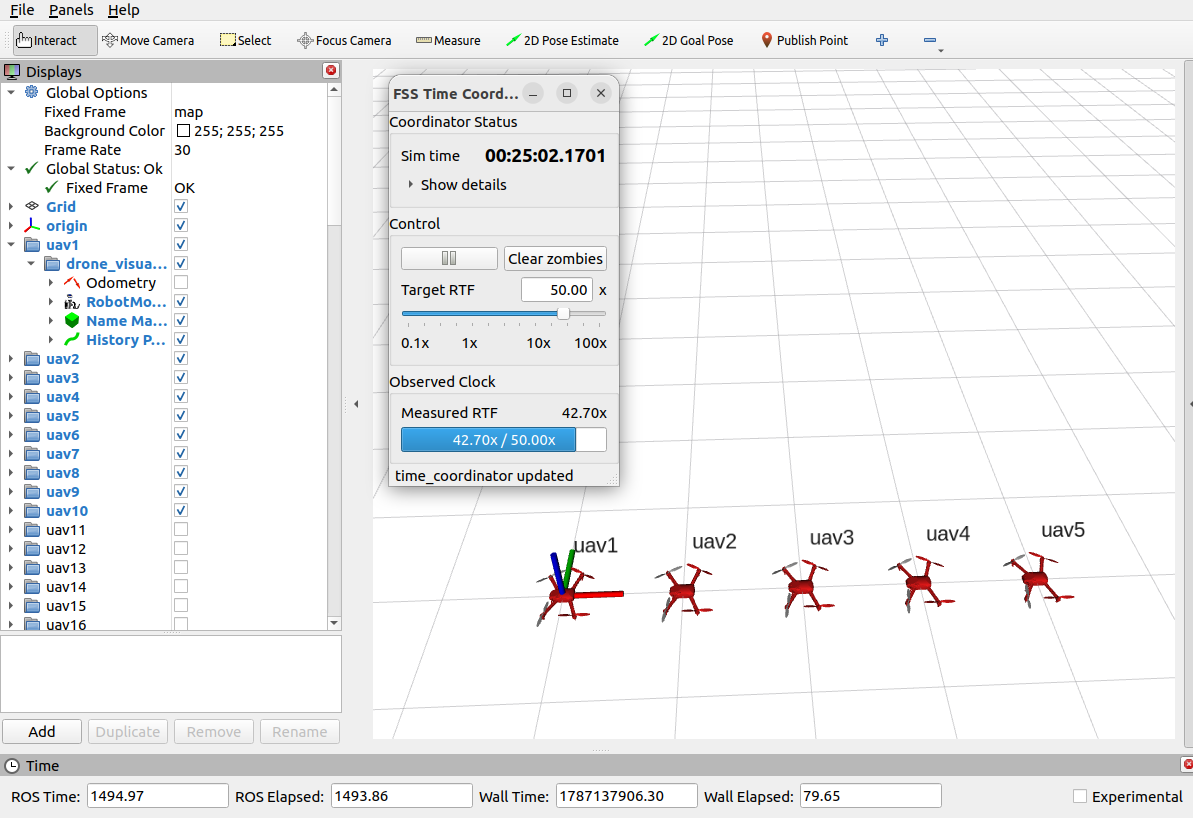
Performance: On a desktop-class computer with LiDAR simulation disabled, FastSwarmSim can run a single vehicle at up to 100x real time, five vehicles at 50x, ten vehicles at 30x, and one hundred vehicles at 4x. This performance comes from the trimmed PX4 core, lightweight MAVROS modules, and efficient lock-step simulation-time system.
Packages
| Package | Purpose |
|---|---|
fss_bringup |
Integrated launch files for complete single- and multi-drone PX4/LiDAR/RViz simulations. |
fss_px4_sim |
Trimmed PX4 1.13.3-based quadrotor simulation runtime, MAVROS Lite bridge, ideal quadrotor dynamics, MAVROS-compatible perfect-drone baseline, and RViz vehicle visualization. |
fss_sensing |
Local LiDAR point-cloud simulator. It renders the visible cloud from a vehicle pose against a static PCD map through the bundled marsim_render library. |
fss_time |
ZeroMQ-based conservative lock-step time coordinator, /clock publisher, simulation-speed controls, and C++ helpers/executors for time-synchronized ROS 2 nodes. NOT only for FastSwarmSim, but for all types of ROS nodes
|
fss_time_interfaces |
ROS 2 message and service definitions used by fss_time, including simulation clock control interfaces. |
Installation
Binary from ROS apt source
To install FastSwarmSim from the ROS apt source, follow these steps:
sudo apt update
# fss-bringup is the main package that includes all other packages as dependencies
sudo apt install ros-$ROS_DISTRO-fss-bringup

# ros-$ROS_DISTRO-fss-px4-sim ros-$ROS_DISTRO-fss-sensing ros-$ROS_DISTRO-fss-time ros-$ROS_DISTRO-fss-time-interfaces
Status of fastswarmsim in the ROS2 build farm:
| Operating system | ROS 2 distribution | ROS2 build farm status |
|---|---|---|
| Ubuntu 22.04 | ROS 2 Humble | |
| Ubuntu 24.04 | ROS 2 Jazzy | TODO |
| Ubuntu 26.04 | ROS 2 Lyrical | TODO |
| Ubuntu | ROS 2 Rolling | TODO |
Build from source
Install ROS 2, colcon, and rosdep by following the ROS 2 installation guide. The guide also includes solutions for common network issues.
Initialize rosdep once on a new machine, then clone and build the workspace. rosdep install resolves the required system and ROS dependencies:
sudo rosdep init
rosdep update

git clone https://github.com/shupx/FastSwarmSim.git

# for chinese users
git clone https://gitee.com/shu-peixuan/FastSwarmSim.git

cd FastSwarmSim

source /opt/ros/$ROS_DISTRO/setup.bash
rosdep install --from-paths src --ignore-src -r -y
colcon build --symlink-install
source install/setup.bash
Source install/setup.bash in every new terminal before running the commands below.
Common Launch Commands
Time coordinator
ros2 launch fss_time time_coordinator.launch.py
Set a maximum simulation speed when needed:
ros2 launch fss_time time_coordinator.launch.py max_real_time_factor:=2.0
PX4 and perfect-drone simulation
ros2 launch fss_px4_sim px4_rotor_sim_single.launch.py
ros2 launch fss_px4_sim px4_rotor_sim_multi.launch.py num_drones:=5
ros2 launch fss_px4_sim perfect_mavros_drone_swarm.launch.py num_drones:=5
File truncated at 100 lines see the full file
CONTRIBUTING
|
|
fastswarmsim repositoryfss_bringup fss_px4_sim fss_sensing fss_time fss_time_interfaces |
ROS Distro
|
Repository Summary
| Checkout URI | https://github.com/shupx/FastSwarmSim.git |
| VCS Type | git |
| VCS Version | main |
| Last Updated | 2026-10-10 |
| Dev Status | MAINTAINED |
| Released | RELEASED |
| Contributing |
Help Wanted (-)
Good First Issues (-) Pull Requests to Review (-) |
Packages
| Name | Version |
|---|---|
| fss_bringup | 0.1.4 |
| fss_px4_sim | 0.1.4 |
| fss_sensing | 0.1.4 |
| fss_time | 0.1.4 |
| fss_time_interfaces | 0.1.4 |
README
FastSwarmSim
FastSwarmSim (fss) is a lightweight ROS 2 simulator for PX4-compatible multi-rotor vehicles. It combines a streamlined PX4 runtime, MAVROS-compatible ROS interfaces, local LiDAR point-cloud rendering, RViz visualization, and a conservative lock-step simulation clock. The simulator is intended for multi-UAV algorithm development, repeatable simulation-time experiments, and large-scale swarm prototyping.
Documentation: https://shupx.github.io/FastSwarmSim
Source code: https://github.com/shupx/FastSwarmSim.git
Performance: On a desktop-class computer with LiDAR simulation disabled, FastSwarmSim can run a single vehicle at up to 100x real time, five vehicles at 50x, ten vehicles at 30x, and one hundred vehicles at 4x. This performance comes from the trimmed PX4 core, lightweight MAVROS modules, and efficient lock-step simulation-time system.
Packages
| Package | Purpose |
|---|---|
fss_bringup |
Integrated launch files for complete single- and multi-drone PX4/LiDAR/RViz simulations. |
fss_px4_sim |
Trimmed PX4 1.13.3-based quadrotor simulation runtime, MAVROS Lite bridge, ideal quadrotor dynamics, MAVROS-compatible perfect-drone baseline, and RViz vehicle visualization. |
fss_sensing |
Local LiDAR point-cloud simulator. It renders the visible cloud from a vehicle pose against a static PCD map through the bundled marsim_render library. |
fss_time |
ZeroMQ-based conservative lock-step time coordinator, /clock publisher, simulation-speed controls, and C++ helpers/executors for time-synchronized ROS 2 nodes. NOT only for FastSwarmSim, but for all types of ROS nodes
|
fss_time_interfaces |
ROS 2 message and service definitions used by fss_time, including simulation clock control interfaces. |
Installation
Binary from ROS apt source
To install FastSwarmSim from the ROS apt source, follow these steps:
sudo apt update
# fss-bringup is the main package that includes all other packages as dependencies
sudo apt install ros-$ROS_DISTRO-fss-bringup

# ros-$ROS_DISTRO-fss-px4-sim ros-$ROS_DISTRO-fss-sensing ros-$ROS_DISTRO-fss-time ros-$ROS_DISTRO-fss-time-interfaces
Status of fastswarmsim in the ROS2 build farm:
| Operating system | ROS 2 distribution | ROS2 build farm status |
|---|---|---|
| Ubuntu 22.04 | ROS 2 Humble | |
| Ubuntu 24.04 | ROS 2 Jazzy | TODO |
| Ubuntu 26.04 | ROS 2 Lyrical | TODO |
| Ubuntu | ROS 2 Rolling | TODO |
Build from source
Install ROS 2, colcon, and rosdep by following the ROS 2 installation guide. The guide also includes solutions for common network issues.
Initialize rosdep once on a new machine, then clone and build the workspace. rosdep install resolves the required system and ROS dependencies:
sudo rosdep init
rosdep update

git clone https://github.com/shupx/FastSwarmSim.git

# for chinese users
git clone https://gitee.com/shu-peixuan/FastSwarmSim.git

cd FastSwarmSim

source /opt/ros/$ROS_DISTRO/setup.bash
rosdep install --from-paths src --ignore-src -r -y
colcon build --symlink-install
source install/setup.bash
Source install/setup.bash in every new terminal before running the commands below.
Common Launch Commands
Time coordinator
ros2 launch fss_time time_coordinator.launch.py
Set a maximum simulation speed when needed:
ros2 launch fss_time time_coordinator.launch.py max_real_time_factor:=2.0
PX4 and perfect-drone simulation
ros2 launch fss_px4_sim px4_rotor_sim_single.launch.py
ros2 launch fss_px4_sim px4_rotor_sim_multi.launch.py num_drones:=5
ros2 launch fss_px4_sim perfect_mavros_drone_swarm.launch.py num_drones:=5
File truncated at 100 lines see the full file
CONTRIBUTING
|
|
fastswarmsim repositoryfss_bringup fss_px4_sim fss_sensing fss_time fss_time_interfaces |
ROS Distro
|
Repository Summary
| Checkout URI | https://github.com/shupx/FastSwarmSim.git |
| VCS Type | git |
| VCS Version | main |
| Last Updated | 2026-10-10 |
| Dev Status | MAINTAINED |
| Released | RELEASED |
| Contributing |
Help Wanted (-)
Good First Issues (-) Pull Requests to Review (-) |
Packages
| Name | Version |
|---|---|
| fss_bringup | 0.1.4 |
| fss_px4_sim | 0.1.4 |
| fss_sensing | 0.1.4 |
| fss_time | 0.1.4 |
| fss_time_interfaces | 0.1.4 |
README
FastSwarmSim
FastSwarmSim (fss) is a lightweight ROS 2 simulator for PX4-compatible multi-rotor vehicles. It combines a streamlined PX4 runtime, MAVROS-compatible ROS interfaces, local LiDAR point-cloud rendering, RViz visualization, and a conservative lock-step simulation clock. The simulator is intended for multi-UAV algorithm development, repeatable simulation-time experiments, and large-scale swarm prototyping.
Documentation: https://shupx.github.io/FastSwarmSim
Source code: https://github.com/shupx/FastSwarmSim.git
Performance: On a desktop-class computer with LiDAR simulation disabled, FastSwarmSim can run a single vehicle at up to 100x real time, five vehicles at 50x, ten vehicles at 30x, and one hundred vehicles at 4x. This performance comes from the trimmed PX4 core, lightweight MAVROS modules, and efficient lock-step simulation-time system.
Packages
| Package | Purpose |
|---|---|
fss_bringup |
Integrated launch files for complete single- and multi-drone PX4/LiDAR/RViz simulations. |
fss_px4_sim |
Trimmed PX4 1.13.3-based quadrotor simulation runtime, MAVROS Lite bridge, ideal quadrotor dynamics, MAVROS-compatible perfect-drone baseline, and RViz vehicle visualization. |
fss_sensing |
Local LiDAR point-cloud simulator. It renders the visible cloud from a vehicle pose against a static PCD map through the bundled marsim_render library. |
fss_time |
ZeroMQ-based conservative lock-step time coordinator, /clock publisher, simulation-speed controls, and C++ helpers/executors for time-synchronized ROS 2 nodes. NOT only for FastSwarmSim, but for all types of ROS nodes
|
fss_time_interfaces |
ROS 2 message and service definitions used by fss_time, including simulation clock control interfaces. |
Installation
Binary from ROS apt source
To install FastSwarmSim from the ROS apt source, follow these steps:
sudo apt update
# fss-bringup is the main package that includes all other packages as dependencies
sudo apt install ros-$ROS_DISTRO-fss-bringup

# ros-$ROS_DISTRO-fss-px4-sim ros-$ROS_DISTRO-fss-sensing ros-$ROS_DISTRO-fss-time ros-$ROS_DISTRO-fss-time-interfaces
Status of fastswarmsim in the ROS2 build farm:
| Operating system | ROS 2 distribution | ROS2 build farm status |
|---|---|---|
| Ubuntu 22.04 | ROS 2 Humble | |
| Ubuntu 24.04 | ROS 2 Jazzy | TODO |
| Ubuntu 26.04 | ROS 2 Lyrical | TODO |
| Ubuntu | ROS 2 Rolling | TODO |
Build from source
Install ROS 2, colcon, and rosdep by following the ROS 2 installation guide. The guide also includes solutions for common network issues.
Initialize rosdep once on a new machine, then clone and build the workspace. rosdep install resolves the required system and ROS dependencies:
sudo rosdep init
rosdep update

git clone https://github.com/shupx/FastSwarmSim.git

# for chinese users
git clone https://gitee.com/shu-peixuan/FastSwarmSim.git

cd FastSwarmSim

source /opt/ros/$ROS_DISTRO/setup.bash
rosdep install --from-paths src --ignore-src -r -y
colcon build --symlink-install
source install/setup.bash
Source install/setup.bash in every new terminal before running the commands below.
Common Launch Commands
Time coordinator
ros2 launch fss_time time_coordinator.launch.py
Set a maximum simulation speed when needed:
ros2 launch fss_time time_coordinator.launch.py max_real_time_factor:=2.0
PX4 and perfect-drone simulation
ros2 launch fss_px4_sim px4_rotor_sim_single.launch.py
ros2 launch fss_px4_sim px4_rotor_sim_multi.launch.py num_drones:=5
ros2 launch fss_px4_sim perfect_mavros_drone_swarm.launch.py num_drones:=5
File truncated at 100 lines see the full file
CONTRIBUTING
|
|
fastswarmsim repositoryfss_bringup fss_px4_sim fss_sensing fss_time fss_time_interfaces |
ROS Distro
|
Repository Summary
| Checkout URI | https://github.com/shupx/FastSwarmSim.git |
| VCS Type | git |
| VCS Version | main |
| Last Updated | 2026-10-10 |
| Dev Status | MAINTAINED |
| Released | RELEASED |
| Contributing |
Help Wanted (-)
Good First Issues (-) Pull Requests to Review (-) |
Packages
| Name | Version |
|---|---|
| fss_bringup | 0.1.4 |
| fss_px4_sim | 0.1.4 |
| fss_sensing | 0.1.4 |
| fss_time | 0.1.4 |
| fss_time_interfaces | 0.1.4 |
README
FastSwarmSim
FastSwarmSim (fss) is a lightweight ROS 2 simulator for PX4-compatible multi-rotor vehicles. It combines a streamlined PX4 runtime, MAVROS-compatible ROS interfaces, local LiDAR point-cloud rendering, RViz visualization, and a conservative lock-step simulation clock. The simulator is intended for multi-UAV algorithm development, repeatable simulation-time experiments, and large-scale swarm prototyping.
Documentation: https://shupx.github.io/FastSwarmSim
Source code: https://github.com/shupx/FastSwarmSim.git
Performance: On a desktop-class computer with LiDAR simulation disabled, FastSwarmSim can run a single vehicle at up to 100x real time, five vehicles at 50x, ten vehicles at 30x, and one hundred vehicles at 4x. This performance comes from the trimmed PX4 core, lightweight MAVROS modules, and efficient lock-step simulation-time system.
Packages
| Package | Purpose |
|---|---|
fss_bringup |
Integrated launch files for complete single- and multi-drone PX4/LiDAR/RViz simulations. |
fss_px4_sim |
Trimmed PX4 1.13.3-based quadrotor simulation runtime, MAVROS Lite bridge, ideal quadrotor dynamics, MAVROS-compatible perfect-drone baseline, and RViz vehicle visualization. |
fss_sensing |
Local LiDAR point-cloud simulator. It renders the visible cloud from a vehicle pose against a static PCD map through the bundled marsim_render library. |
fss_time |
ZeroMQ-based conservative lock-step time coordinator, /clock publisher, simulation-speed controls, and C++ helpers/executors for time-synchronized ROS 2 nodes. NOT only for FastSwarmSim, but for all types of ROS nodes
|
fss_time_interfaces |
ROS 2 message and service definitions used by fss_time, including simulation clock control interfaces. |
Installation
Binary from ROS apt source
To install FastSwarmSim from the ROS apt source, follow these steps:
sudo apt update
# fss-bringup is the main package that includes all other packages as dependencies
sudo apt install ros-$ROS_DISTRO-fss-bringup

# ros-$ROS_DISTRO-fss-px4-sim ros-$ROS_DISTRO-fss-sensing ros-$ROS_DISTRO-fss-time ros-$ROS_DISTRO-fss-time-interfaces
Status of fastswarmsim in the ROS2 build farm:
| Operating system | ROS 2 distribution | ROS2 build farm status |
|---|---|---|
| Ubuntu 22.04 | ROS 2 Humble | |
| Ubuntu 24.04 | ROS 2 Jazzy | TODO |
| Ubuntu 26.04 | ROS 2 Lyrical | TODO |
| Ubuntu | ROS 2 Rolling | TODO |
Build from source
Install ROS 2, colcon, and rosdep by following the ROS 2 installation guide. The guide also includes solutions for common network issues.
Initialize rosdep once on a new machine, then clone and build the workspace. rosdep install resolves the required system and ROS dependencies:
sudo rosdep init
rosdep update

git clone https://github.com/shupx/FastSwarmSim.git

# for chinese users
git clone https://gitee.com/shu-peixuan/FastSwarmSim.git

cd FastSwarmSim

source /opt/ros/$ROS_DISTRO/setup.bash
rosdep install --from-paths src --ignore-src -r -y
colcon build --symlink-install
source install/setup.bash
Source install/setup.bash in every new terminal before running the commands below.
Common Launch Commands
Time coordinator
ros2 launch fss_time time_coordinator.launch.py
Set a maximum simulation speed when needed:
ros2 launch fss_time time_coordinator.launch.py max_real_time_factor:=2.0
PX4 and perfect-drone simulation
ros2 launch fss_px4_sim px4_rotor_sim_single.launch.py
ros2 launch fss_px4_sim px4_rotor_sim_multi.launch.py num_drones:=5
ros2 launch fss_px4_sim perfect_mavros_drone_swarm.launch.py num_drones:=5
File truncated at 100 lines see the full file
CONTRIBUTING
|
|
fastswarmsim repositoryfss_bringup fss_px4_sim fss_sensing fss_time fss_time_interfaces |
ROS Distro
|
Repository Summary
| Checkout URI | https://github.com/shupx/FastSwarmSim.git |
| VCS Type | git |
| VCS Version | main |
| Last Updated | 2026-10-10 |
| Dev Status | MAINTAINED |
| Released | RELEASED |
| Contributing |
Help Wanted (-)
Good First Issues (-) Pull Requests to Review (-) |
Packages
| Name | Version |
|---|---|
| fss_bringup | 0.1.4 |
| fss_px4_sim | 0.1.4 |
| fss_sensing | 0.1.4 |
| fss_time | 0.1.4 |
| fss_time_interfaces | 0.1.4 |
README
FastSwarmSim
FastSwarmSim (fss) is a lightweight ROS 2 simulator for PX4-compatible multi-rotor vehicles. It combines a streamlined PX4 runtime, MAVROS-compatible ROS interfaces, local LiDAR point-cloud rendering, RViz visualization, and a conservative lock-step simulation clock. The simulator is intended for multi-UAV algorithm development, repeatable simulation-time experiments, and large-scale swarm prototyping.
Documentation: https://shupx.github.io/FastSwarmSim
Source code: https://github.com/shupx/FastSwarmSim.git
Performance: On a desktop-class computer with LiDAR simulation disabled, FastSwarmSim can run a single vehicle at up to 100x real time, five vehicles at 50x, ten vehicles at 30x, and one hundred vehicles at 4x. This performance comes from the trimmed PX4 core, lightweight MAVROS modules, and efficient lock-step simulation-time system.
Packages
| Package | Purpose |
|---|---|
fss_bringup |
Integrated launch files for complete single- and multi-drone PX4/LiDAR/RViz simulations. |
fss_px4_sim |
Trimmed PX4 1.13.3-based quadrotor simulation runtime, MAVROS Lite bridge, ideal quadrotor dynamics, MAVROS-compatible perfect-drone baseline, and RViz vehicle visualization. |
fss_sensing |
Local LiDAR point-cloud simulator. It renders the visible cloud from a vehicle pose against a static PCD map through the bundled marsim_render library. |
fss_time |
ZeroMQ-based conservative lock-step time coordinator, /clock publisher, simulation-speed controls, and C++ helpers/executors for time-synchronized ROS 2 nodes. NOT only for FastSwarmSim, but for all types of ROS nodes
|
fss_time_interfaces |
ROS 2 message and service definitions used by fss_time, including simulation clock control interfaces. |
Installation
Binary from ROS apt source
To install FastSwarmSim from the ROS apt source, follow these steps:
sudo apt update
# fss-bringup is the main package that includes all other packages as dependencies
sudo apt install ros-$ROS_DISTRO-fss-bringup

# ros-$ROS_DISTRO-fss-px4-sim ros-$ROS_DISTRO-fss-sensing ros-$ROS_DISTRO-fss-time ros-$ROS_DISTRO-fss-time-interfaces
Status of fastswarmsim in the ROS2 build farm:
| Operating system | ROS 2 distribution | ROS2 build farm status |
|---|---|---|
| Ubuntu 22.04 | ROS 2 Humble | |
| Ubuntu 24.04 | ROS 2 Jazzy | TODO |
| Ubuntu 26.04 | ROS 2 Lyrical | TODO |
| Ubuntu | ROS 2 Rolling | TODO |
Build from source
Install ROS 2, colcon, and rosdep by following the ROS 2 installation guide. The guide also includes solutions for common network issues.
Initialize rosdep once on a new machine, then clone and build the workspace. rosdep install resolves the required system and ROS dependencies:
sudo rosdep init
rosdep update

git clone https://github.com/shupx/FastSwarmSim.git

# for chinese users
git clone https://gitee.com/shu-peixuan/FastSwarmSim.git

cd FastSwarmSim

source /opt/ros/$ROS_DISTRO/setup.bash
rosdep install --from-paths src --ignore-src -r -y
colcon build --symlink-install
source install/setup.bash
Source install/setup.bash in every new terminal before running the commands below.
Common Launch Commands
Time coordinator
ros2 launch fss_time time_coordinator.launch.py
Set a maximum simulation speed when needed:
ros2 launch fss_time time_coordinator.launch.py max_real_time_factor:=2.0
PX4 and perfect-drone simulation
ros2 launch fss_px4_sim px4_rotor_sim_single.launch.py
ros2 launch fss_px4_sim px4_rotor_sim_multi.launch.py num_drones:=5
ros2 launch fss_px4_sim perfect_mavros_drone_swarm.launch.py num_drones:=5
File truncated at 100 lines see the full file
CONTRIBUTING
|
|
fastswarmsim repositoryfss_bringup fss_px4_sim fss_sensing fss_time fss_time_interfaces |
ROS Distro
|
Repository Summary
| Checkout URI | https://github.com/shupx/FastSwarmSim.git |
| VCS Type | git |
| VCS Version | main |
| Last Updated | 2026-10-10 |
| Dev Status | MAINTAINED |
| Released | RELEASED |
| Contributing |
Help Wanted (-)
Good First Issues (-) Pull Requests to Review (-) |
Packages
| Name | Version |
|---|---|
| fss_bringup | 0.1.4 |
| fss_px4_sim | 0.1.4 |
| fss_sensing | 0.1.4 |
| fss_time | 0.1.4 |
| fss_time_interfaces | 0.1.4 |
README
FastSwarmSim
FastSwarmSim (fss) is a lightweight ROS 2 simulator for PX4-compatible multi-rotor vehicles. It combines a streamlined PX4 runtime, MAVROS-compatible ROS interfaces, local LiDAR point-cloud rendering, RViz visualization, and a conservative lock-step simulation clock. The simulator is intended for multi-UAV algorithm development, repeatable simulation-time experiments, and large-scale swarm prototyping.
Documentation: https://shupx.github.io/FastSwarmSim
Source code: https://github.com/shupx/FastSwarmSim.git
Performance: On a desktop-class computer with LiDAR simulation disabled, FastSwarmSim can run a single vehicle at up to 100x real time, five vehicles at 50x, ten vehicles at 30x, and one hundred vehicles at 4x. This performance comes from the trimmed PX4 core, lightweight MAVROS modules, and efficient lock-step simulation-time system.
Packages
| Package | Purpose |
|---|---|
fss_bringup |
Integrated launch files for complete single- and multi-drone PX4/LiDAR/RViz simulations. |
fss_px4_sim |
Trimmed PX4 1.13.3-based quadrotor simulation runtime, MAVROS Lite bridge, ideal quadrotor dynamics, MAVROS-compatible perfect-drone baseline, and RViz vehicle visualization. |
fss_sensing |
Local LiDAR point-cloud simulator. It renders the visible cloud from a vehicle pose against a static PCD map through the bundled marsim_render library. |
fss_time |
ZeroMQ-based conservative lock-step time coordinator, /clock publisher, simulation-speed controls, and C++ helpers/executors for time-synchronized ROS 2 nodes. NOT only for FastSwarmSim, but for all types of ROS nodes
|
fss_time_interfaces |
ROS 2 message and service definitions used by fss_time, including simulation clock control interfaces. |
Installation
Binary from ROS apt source
To install FastSwarmSim from the ROS apt source, follow these steps:
sudo apt update
# fss-bringup is the main package that includes all other packages as dependencies
sudo apt install ros-$ROS_DISTRO-fss-bringup

# ros-$ROS_DISTRO-fss-px4-sim ros-$ROS_DISTRO-fss-sensing ros-$ROS_DISTRO-fss-time ros-$ROS_DISTRO-fss-time-interfaces
Status of fastswarmsim in the ROS2 build farm:
| Operating system | ROS 2 distribution | ROS2 build farm status |
|---|---|---|
| Ubuntu 22.04 | ROS 2 Humble | |
| Ubuntu 24.04 | ROS 2 Jazzy | TODO |
| Ubuntu 26.04 | ROS 2 Lyrical | TODO |
| Ubuntu | ROS 2 Rolling | TODO |
Build from source
Install ROS 2, colcon, and rosdep by following the ROS 2 installation guide. The guide also includes solutions for common network issues.
Initialize rosdep once on a new machine, then clone and build the workspace. rosdep install resolves the required system and ROS dependencies:
sudo rosdep init
rosdep update

git clone https://github.com/shupx/FastSwarmSim.git

# for chinese users
git clone https://gitee.com/shu-peixuan/FastSwarmSim.git

cd FastSwarmSim

source /opt/ros/$ROS_DISTRO/setup.bash
rosdep install --from-paths src --ignore-src -r -y
colcon build --symlink-install
source install/setup.bash
Source install/setup.bash in every new terminal before running the commands below.
Common Launch Commands
Time coordinator
ros2 launch fss_time time_coordinator.launch.py
Set a maximum simulation speed when needed:
ros2 launch fss_time time_coordinator.launch.py max_real_time_factor:=2.0
PX4 and perfect-drone simulation
ros2 launch fss_px4_sim px4_rotor_sim_single.launch.py
ros2 launch fss_px4_sim px4_rotor_sim_multi.launch.py num_drones:=5
ros2 launch fss_px4_sim perfect_mavros_drone_swarm.launch.py num_drones:=5
File truncated at 100 lines see the full file
CONTRIBUTING
|
|
fastswarmsim repositoryfss_bringup fss_px4_sim fss_sensing fss_time fss_time_interfaces |
ROS Distro
|
Repository Summary
| Checkout URI | https://github.com/shupx/FastSwarmSim.git |
| VCS Type | git |
| VCS Version | main |
| Last Updated | 2026-10-10 |
| Dev Status | MAINTAINED |
| Released | RELEASED |
| Contributing |
Help Wanted (-)
Good First Issues (-) Pull Requests to Review (-) |
Packages
| Name | Version |
|---|---|
| fss_bringup | 0.1.4 |
| fss_px4_sim | 0.1.4 |
| fss_sensing | 0.1.4 |
| fss_time | 0.1.4 |
| fss_time_interfaces | 0.1.4 |
README
FastSwarmSim
FastSwarmSim (fss) is a lightweight ROS 2 simulator for PX4-compatible multi-rotor vehicles. It combines a streamlined PX4 runtime, MAVROS-compatible ROS interfaces, local LiDAR point-cloud rendering, RViz visualization, and a conservative lock-step simulation clock. The simulator is intended for multi-UAV algorithm development, repeatable simulation-time experiments, and large-scale swarm prototyping.
Documentation: https://shupx.github.io/FastSwarmSim
Source code: https://github.com/shupx/FastSwarmSim.git
Performance: On a desktop-class computer with LiDAR simulation disabled, FastSwarmSim can run a single vehicle at up to 100x real time, five vehicles at 50x, ten vehicles at 30x, and one hundred vehicles at 4x. This performance comes from the trimmed PX4 core, lightweight MAVROS modules, and efficient lock-step simulation-time system.
Packages
| Package | Purpose |
|---|---|
fss_bringup |
Integrated launch files for complete single- and multi-drone PX4/LiDAR/RViz simulations. |
fss_px4_sim |
Trimmed PX4 1.13.3-based quadrotor simulation runtime, MAVROS Lite bridge, ideal quadrotor dynamics, MAVROS-compatible perfect-drone baseline, and RViz vehicle visualization. |
fss_sensing |
Local LiDAR point-cloud simulator. It renders the visible cloud from a vehicle pose against a static PCD map through the bundled marsim_render library. |
fss_time |
ZeroMQ-based conservative lock-step time coordinator, /clock publisher, simulation-speed controls, and C++ helpers/executors for time-synchronized ROS 2 nodes. NOT only for FastSwarmSim, but for all types of ROS nodes
|
fss_time_interfaces |
ROS 2 message and service definitions used by fss_time, including simulation clock control interfaces. |
Installation
Binary from ROS apt source
To install FastSwarmSim from the ROS apt source, follow these steps:
sudo apt update
# fss-bringup is the main package that includes all other packages as dependencies
sudo apt install ros-$ROS_DISTRO-fss-bringup

# ros-$ROS_DISTRO-fss-px4-sim ros-$ROS_DISTRO-fss-sensing ros-$ROS_DISTRO-fss-time ros-$ROS_DISTRO-fss-time-interfaces
Status of fastswarmsim in the ROS2 build farm:
| Operating system | ROS 2 distribution | ROS2 build farm status |
|---|---|---|
| Ubuntu 22.04 | ROS 2 Humble | |
| Ubuntu 24.04 | ROS 2 Jazzy | TODO |
| Ubuntu 26.04 | ROS 2 Lyrical | TODO |
| Ubuntu | ROS 2 Rolling | TODO |
Build from source
Install ROS 2, colcon, and rosdep by following the ROS 2 installation guide. The guide also includes solutions for common network issues.
Initialize rosdep once on a new machine, then clone and build the workspace. rosdep install resolves the required system and ROS dependencies:
sudo rosdep init
rosdep update

git clone https://github.com/shupx/FastSwarmSim.git

# for chinese users
git clone https://gitee.com/shu-peixuan/FastSwarmSim.git

cd FastSwarmSim

source /opt/ros/$ROS_DISTRO/setup.bash
rosdep install --from-paths src --ignore-src -r -y
colcon build --symlink-install
source install/setup.bash
Source install/setup.bash in every new terminal before running the commands below.
Common Launch Commands
Time coordinator
ros2 launch fss_time time_coordinator.launch.py
Set a maximum simulation speed when needed:
ros2 launch fss_time time_coordinator.launch.py max_real_time_factor:=2.0
PX4 and perfect-drone simulation
ros2 launch fss_px4_sim px4_rotor_sim_single.launch.py
ros2 launch fss_px4_sim px4_rotor_sim_multi.launch.py num_drones:=5
ros2 launch fss_px4_sim perfect_mavros_drone_swarm.launch.py num_drones:=5
File truncated at 100 lines see the full file
CONTRIBUTING
|
|
fastswarmsim repositoryfss_bringup fss_px4_sim fss_sensing fss_time fss_time_interfaces |
ROS Distro
|
Repository Summary
| Checkout URI | https://github.com/shupx/FastSwarmSim.git |
| VCS Type | git |
| VCS Version | main |
| Last Updated | 2026-10-10 |
| Dev Status | MAINTAINED |
| Released | RELEASED |
| Contributing |
Help Wanted (-)
Good First Issues (-) Pull Requests to Review (-) |
Packages
| Name | Version |
|---|---|
| fss_bringup | 0.1.4 |
| fss_px4_sim | 0.1.4 |
| fss_sensing | 0.1.4 |
| fss_time | 0.1.4 |
| fss_time_interfaces | 0.1.4 |
README
FastSwarmSim
FastSwarmSim (fss) is a lightweight ROS 2 simulator for PX4-compatible multi-rotor vehicles. It combines a streamlined PX4 runtime, MAVROS-compatible ROS interfaces, local LiDAR point-cloud rendering, RViz visualization, and a conservative lock-step simulation clock. The simulator is intended for multi-UAV algorithm development, repeatable simulation-time experiments, and large-scale swarm prototyping.
Documentation: https://shupx.github.io/FastSwarmSim
Source code: https://github.com/shupx/FastSwarmSim.git
Performance: On a desktop-class computer with LiDAR simulation disabled, FastSwarmSim can run a single vehicle at up to 100x real time, five vehicles at 50x, ten vehicles at 30x, and one hundred vehicles at 4x. This performance comes from the trimmed PX4 core, lightweight MAVROS modules, and efficient lock-step simulation-time system.
Packages
| Package | Purpose |
|---|---|
fss_bringup |
Integrated launch files for complete single- and multi-drone PX4/LiDAR/RViz simulations. |
fss_px4_sim |
Trimmed PX4 1.13.3-based quadrotor simulation runtime, MAVROS Lite bridge, ideal quadrotor dynamics, MAVROS-compatible perfect-drone baseline, and RViz vehicle visualization. |
fss_sensing |
Local LiDAR point-cloud simulator. It renders the visible cloud from a vehicle pose against a static PCD map through the bundled marsim_render library. |
fss_time |
ZeroMQ-based conservative lock-step time coordinator, /clock publisher, simulation-speed controls, and C++ helpers/executors for time-synchronized ROS 2 nodes. NOT only for FastSwarmSim, but for all types of ROS nodes
|
fss_time_interfaces |
ROS 2 message and service definitions used by fss_time, including simulation clock control interfaces. |
Installation
Binary from ROS apt source
To install FastSwarmSim from the ROS apt source, follow these steps:
sudo apt update
# fss-bringup is the main package that includes all other packages as dependencies
sudo apt install ros-$ROS_DISTRO-fss-bringup

# ros-$ROS_DISTRO-fss-px4-sim ros-$ROS_DISTRO-fss-sensing ros-$ROS_DISTRO-fss-time ros-$ROS_DISTRO-fss-time-interfaces
Status of fastswarmsim in the ROS2 build farm:
| Operating system | ROS 2 distribution | ROS2 build farm status |
|---|---|---|
| Ubuntu 22.04 | ROS 2 Humble | |
| Ubuntu 24.04 | ROS 2 Jazzy | TODO |
| Ubuntu 26.04 | ROS 2 Lyrical | TODO |
| Ubuntu | ROS 2 Rolling | TODO |
Build from source
Install ROS 2, colcon, and rosdep by following the ROS 2 installation guide. The guide also includes solutions for common network issues.
Initialize rosdep once on a new machine, then clone and build the workspace. rosdep install resolves the required system and ROS dependencies:
sudo rosdep init
rosdep update

git clone https://github.com/shupx/FastSwarmSim.git

# for chinese users
git clone https://gitee.com/shu-peixuan/FastSwarmSim.git

cd FastSwarmSim

source /opt/ros/$ROS_DISTRO/setup.bash
rosdep install --from-paths src --ignore-src -r -y
colcon build --symlink-install
source install/setup.bash
Source install/setup.bash in every new terminal before running the commands below.
Common Launch Commands
Time coordinator
ros2 launch fss_time time_coordinator.launch.py
Set a maximum simulation speed when needed:
ros2 launch fss_time time_coordinator.launch.py max_real_time_factor:=2.0
PX4 and perfect-drone simulation
ros2 launch fss_px4_sim px4_rotor_sim_single.launch.py
ros2 launch fss_px4_sim px4_rotor_sim_multi.launch.py num_drones:=5
ros2 launch fss_px4_sim perfect_mavros_drone_swarm.launch.py num_drones:=5
File truncated at 100 lines see the full file
CONTRIBUTING
|
|
fastswarmsim repositoryfss_bringup fss_px4_sim fss_sensing fss_time fss_time_interfaces |
ROS Distro
|
Repository Summary
| Checkout URI | https://github.com/shupx/FastSwarmSim.git |
| VCS Type | git |
| VCS Version | main |
| Last Updated | 2026-10-10 |
| Dev Status | MAINTAINED |
| Released | RELEASED |
| Contributing |
Help Wanted (-)
Good First Issues (-) Pull Requests to Review (-) |
Packages
| Name | Version |
|---|---|
| fss_bringup | 0.1.4 |
| fss_px4_sim | 0.1.4 |
| fss_sensing | 0.1.4 |
| fss_time | 0.1.4 |
| fss_time_interfaces | 0.1.4 |
README
FastSwarmSim
FastSwarmSim (fss) is a lightweight ROS 2 simulator for PX4-compatible multi-rotor vehicles. It combines a streamlined PX4 runtime, MAVROS-compatible ROS interfaces, local LiDAR point-cloud rendering, RViz visualization, and a conservative lock-step simulation clock. The simulator is intended for multi-UAV algorithm development, repeatable simulation-time experiments, and large-scale swarm prototyping.
Documentation: https://shupx.github.io/FastSwarmSim
Source code: https://github.com/shupx/FastSwarmSim.git
Performance: On a desktop-class computer with LiDAR simulation disabled, FastSwarmSim can run a single vehicle at up to 100x real time, five vehicles at 50x, ten vehicles at 30x, and one hundred vehicles at 4x. This performance comes from the trimmed PX4 core, lightweight MAVROS modules, and efficient lock-step simulation-time system.
Packages
| Package | Purpose |
|---|---|
fss_bringup |
Integrated launch files for complete single- and multi-drone PX4/LiDAR/RViz simulations. |
fss_px4_sim |
Trimmed PX4 1.13.3-based quadrotor simulation runtime, MAVROS Lite bridge, ideal quadrotor dynamics, MAVROS-compatible perfect-drone baseline, and RViz vehicle visualization. |
fss_sensing |
Local LiDAR point-cloud simulator. It renders the visible cloud from a vehicle pose against a static PCD map through the bundled marsim_render library. |
fss_time |
ZeroMQ-based conservative lock-step time coordinator, /clock publisher, simulation-speed controls, and C++ helpers/executors for time-synchronized ROS 2 nodes. NOT only for FastSwarmSim, but for all types of ROS nodes
|
fss_time_interfaces |
ROS 2 message and service definitions used by fss_time, including simulation clock control interfaces. |
Installation
Binary from ROS apt source
To install FastSwarmSim from the ROS apt source, follow these steps:
sudo apt update
# fss-bringup is the main package that includes all other packages as dependencies
sudo apt install ros-$ROS_DISTRO-fss-bringup

# ros-$ROS_DISTRO-fss-px4-sim ros-$ROS_DISTRO-fss-sensing ros-$ROS_DISTRO-fss-time ros-$ROS_DISTRO-fss-time-interfaces
Status of fastswarmsim in the ROS2 build farm:
| Operating system | ROS 2 distribution | ROS2 build farm status |
|---|---|---|
| Ubuntu 22.04 | ROS 2 Humble | |
| Ubuntu 24.04 | ROS 2 Jazzy | TODO |
| Ubuntu 26.04 | ROS 2 Lyrical | TODO |
| Ubuntu | ROS 2 Rolling | TODO |
Build from source
Install ROS 2, colcon, and rosdep by following the ROS 2 installation guide. The guide also includes solutions for common network issues.
Initialize rosdep once on a new machine, then clone and build the workspace. rosdep install resolves the required system and ROS dependencies:
sudo rosdep init
rosdep update

git clone https://github.com/shupx/FastSwarmSim.git

# for chinese users
git clone https://gitee.com/shu-peixuan/FastSwarmSim.git

cd FastSwarmSim

source /opt/ros/$ROS_DISTRO/setup.bash
rosdep install --from-paths src --ignore-src -r -y
colcon build --symlink-install
source install/setup.bash
Source install/setup.bash in every new terminal before running the commands below.
Common Launch Commands
Time coordinator
ros2 launch fss_time time_coordinator.launch.py
Set a maximum simulation speed when needed:
ros2 launch fss_time time_coordinator.launch.py max_real_time_factor:=2.0
PX4 and perfect-drone simulation
ros2 launch fss_px4_sim px4_rotor_sim_single.launch.py
ros2 launch fss_px4_sim px4_rotor_sim_multi.launch.py num_drones:=5
ros2 launch fss_px4_sim perfect_mavros_drone_swarm.launch.py num_drones:=5
File truncated at 100 lines see the full file
CONTRIBUTING
|
|
fastswarmsim repositoryfss_bringup fss_px4_sim fss_sensing fss_time fss_time_interfaces |
ROS Distro
|
Repository Summary
| Checkout URI | https://github.com/shupx/FastSwarmSim.git |
| VCS Type | git |
| VCS Version | main |
| Last Updated | 2026-10-10 |
| Dev Status | MAINTAINED |
| Released | RELEASED |
| Contributing |
Help Wanted (-)
Good First Issues (-) Pull Requests to Review (-) |
Packages
| Name | Version |
|---|---|
| fss_bringup | 0.1.4 |
| fss_px4_sim | 0.1.4 |
| fss_sensing | 0.1.4 |
| fss_time | 0.1.4 |
| fss_time_interfaces | 0.1.4 |
README
FastSwarmSim
FastSwarmSim (fss) is a lightweight ROS 2 simulator for PX4-compatible multi-rotor vehicles. It combines a streamlined PX4 runtime, MAVROS-compatible ROS interfaces, local LiDAR point-cloud rendering, RViz visualization, and a conservative lock-step simulation clock. The simulator is intended for multi-UAV algorithm development, repeatable simulation-time experiments, and large-scale swarm prototyping.
Documentation: https://shupx.github.io/FastSwarmSim
Source code: https://github.com/shupx/FastSwarmSim.git
Performance: On a desktop-class computer with LiDAR simulation disabled, FastSwarmSim can run a single vehicle at up to 100x real time, five vehicles at 50x, ten vehicles at 30x, and one hundred vehicles at 4x. This performance comes from the trimmed PX4 core, lightweight MAVROS modules, and efficient lock-step simulation-time system.
Packages
| Package | Purpose |
|---|---|
fss_bringup |
Integrated launch files for complete single- and multi-drone PX4/LiDAR/RViz simulations. |
fss_px4_sim |
Trimmed PX4 1.13.3-based quadrotor simulation runtime, MAVROS Lite bridge, ideal quadrotor dynamics, MAVROS-compatible perfect-drone baseline, and RViz vehicle visualization. |
fss_sensing |
Local LiDAR point-cloud simulator. It renders the visible cloud from a vehicle pose against a static PCD map through the bundled marsim_render library. |
fss_time |
ZeroMQ-based conservative lock-step time coordinator, /clock publisher, simulation-speed controls, and C++ helpers/executors for time-synchronized ROS 2 nodes. NOT only for FastSwarmSim, but for all types of ROS nodes
|
fss_time_interfaces |
ROS 2 message and service definitions used by fss_time, including simulation clock control interfaces. |
Installation
Binary from ROS apt source
To install FastSwarmSim from the ROS apt source, follow these steps:
sudo apt update
# fss-bringup is the main package that includes all other packages as dependencies
sudo apt install ros-$ROS_DISTRO-fss-bringup

# ros-$ROS_DISTRO-fss-px4-sim ros-$ROS_DISTRO-fss-sensing ros-$ROS_DISTRO-fss-time ros-$ROS_DISTRO-fss-time-interfaces
Status of fastswarmsim in the ROS2 build farm:
| Operating system | ROS 2 distribution | ROS2 build farm status |
|---|---|---|
| Ubuntu 22.04 | ROS 2 Humble | |
| Ubuntu 24.04 | ROS 2 Jazzy | TODO |
| Ubuntu 26.04 | ROS 2 Lyrical | TODO |
| Ubuntu | ROS 2 Rolling | TODO |
Build from source
Install ROS 2, colcon, and rosdep by following the ROS 2 installation guide. The guide also includes solutions for common network issues.
Initialize rosdep once on a new machine, then clone and build the workspace. rosdep install resolves the required system and ROS dependencies:
sudo rosdep init
rosdep update

git clone https://github.com/shupx/FastSwarmSim.git

# for chinese users
git clone https://gitee.com/shu-peixuan/FastSwarmSim.git

cd FastSwarmSim

source /opt/ros/$ROS_DISTRO/setup.bash
rosdep install --from-paths src --ignore-src -r -y
colcon build --symlink-install
source install/setup.bash
Source install/setup.bash in every new terminal before running the commands below.
Common Launch Commands
Time coordinator
ros2 launch fss_time time_coordinator.launch.py
Set a maximum simulation speed when needed:
ros2 launch fss_time time_coordinator.launch.py max_real_time_factor:=2.0
PX4 and perfect-drone simulation
ros2 launch fss_px4_sim px4_rotor_sim_single.launch.py
ros2 launch fss_px4_sim px4_rotor_sim_multi.launch.py num_drones:=5
ros2 launch fss_px4_sim perfect_mavros_drone_swarm.launch.py num_drones:=5
File truncated at 100 lines see the full file
CONTRIBUTING
|
|
fastswarmsim repositoryfss_bringup fss_px4_sim fss_sensing fss_time fss_time_interfaces |
ROS Distro
|
Repository Summary
| Checkout URI | https://github.com/shupx/FastSwarmSim.git |
| VCS Type | git |
| VCS Version | main |
| Last Updated | 2026-10-10 |
| Dev Status | MAINTAINED |
| Released | RELEASED |
| Contributing |
Help Wanted (-)
Good First Issues (-) Pull Requests to Review (-) |
Packages
| Name | Version |
|---|---|
| fss_bringup | 0.1.4 |
| fss_px4_sim | 0.1.4 |
| fss_sensing | 0.1.4 |
| fss_time | 0.1.4 |
| fss_time_interfaces | 0.1.4 |
README
FastSwarmSim
FastSwarmSim (fss) is a lightweight ROS 2 simulator for PX4-compatible multi-rotor vehicles. It combines a streamlined PX4 runtime, MAVROS-compatible ROS interfaces, local LiDAR point-cloud rendering, RViz visualization, and a conservative lock-step simulation clock. The simulator is intended for multi-UAV algorithm development, repeatable simulation-time experiments, and large-scale swarm prototyping.
Documentation: https://shupx.github.io/FastSwarmSim
Source code: https://github.com/shupx/FastSwarmSim.git
Performance: On a desktop-class computer with LiDAR simulation disabled, FastSwarmSim can run a single vehicle at up to 100x real time, five vehicles at 50x, ten vehicles at 30x, and one hundred vehicles at 4x. This performance comes from the trimmed PX4 core, lightweight MAVROS modules, and efficient lock-step simulation-time system.
Packages
| Package | Purpose |
|---|---|
fss_bringup |
Integrated launch files for complete single- and multi-drone PX4/LiDAR/RViz simulations. |
fss_px4_sim |
Trimmed PX4 1.13.3-based quadrotor simulation runtime, MAVROS Lite bridge, ideal quadrotor dynamics, MAVROS-compatible perfect-drone baseline, and RViz vehicle visualization. |
fss_sensing |
Local LiDAR point-cloud simulator. It renders the visible cloud from a vehicle pose against a static PCD map through the bundled marsim_render library. |
fss_time |
ZeroMQ-based conservative lock-step time coordinator, /clock publisher, simulation-speed controls, and C++ helpers/executors for time-synchronized ROS 2 nodes. NOT only for FastSwarmSim, but for all types of ROS nodes
|
fss_time_interfaces |
ROS 2 message and service definitions used by fss_time, including simulation clock control interfaces. |
Installation
Binary from ROS apt source
To install FastSwarmSim from the ROS apt source, follow these steps:
sudo apt update
# fss-bringup is the main package that includes all other packages as dependencies
sudo apt install ros-$ROS_DISTRO-fss-bringup

# ros-$ROS_DISTRO-fss-px4-sim ros-$ROS_DISTRO-fss-sensing ros-$ROS_DISTRO-fss-time ros-$ROS_DISTRO-fss-time-interfaces
Status of fastswarmsim in the ROS2 build farm:
| Operating system | ROS 2 distribution | ROS2 build farm status |
|---|---|---|
| Ubuntu 22.04 | ROS 2 Humble | |
| Ubuntu 24.04 | ROS 2 Jazzy | TODO |
| Ubuntu 26.04 | ROS 2 Lyrical | TODO |
| Ubuntu | ROS 2 Rolling | TODO |
Build from source
Install ROS 2, colcon, and rosdep by following the ROS 2 installation guide. The guide also includes solutions for common network issues.
Initialize rosdep once on a new machine, then clone and build the workspace. rosdep install resolves the required system and ROS dependencies:
sudo rosdep init
rosdep update

git clone https://github.com/shupx/FastSwarmSim.git

# for chinese users
git clone https://gitee.com/shu-peixuan/FastSwarmSim.git

cd FastSwarmSim

source /opt/ros/$ROS_DISTRO/setup.bash
rosdep install --from-paths src --ignore-src -r -y
colcon build --symlink-install
source install/setup.bash
Source install/setup.bash in every new terminal before running the commands below.
Common Launch Commands
Time coordinator
ros2 launch fss_time time_coordinator.launch.py
Set a maximum simulation speed when needed:
ros2 launch fss_time time_coordinator.launch.py max_real_time_factor:=2.0
PX4 and perfect-drone simulation
ros2 launch fss_px4_sim px4_rotor_sim_single.launch.py
ros2 launch fss_px4_sim px4_rotor_sim_multi.launch.py num_drones:=5
ros2 launch fss_px4_sim perfect_mavros_drone_swarm.launch.py num_drones:=5
File truncated at 100 lines see the full file
CONTRIBUTING
|
|
fastswarmsim repositoryfss_bringup fss_px4_sim fss_sensing fss_time fss_time_interfaces |
ROS Distro
|
Repository Summary
| Checkout URI | https://github.com/shupx/FastSwarmSim.git |
| VCS Type | git |
| VCS Version | main |
| Last Updated | 2026-10-10 |
| Dev Status | MAINTAINED |
| Released | RELEASED |
| Contributing |
Help Wanted (-)
Good First Issues (-) Pull Requests to Review (-) |
Packages
| Name | Version |
|---|---|
| fss_bringup | 0.1.4 |
| fss_px4_sim | 0.1.4 |
| fss_sensing | 0.1.4 |
| fss_time | 0.1.4 |
| fss_time_interfaces | 0.1.4 |
README
FastSwarmSim
FastSwarmSim (fss) is a lightweight ROS 2 simulator for PX4-compatible multi-rotor vehicles. It combines a streamlined PX4 runtime, MAVROS-compatible ROS interfaces, local LiDAR point-cloud rendering, RViz visualization, and a conservative lock-step simulation clock. The simulator is intended for multi-UAV algorithm development, repeatable simulation-time experiments, and large-scale swarm prototyping.
Documentation: https://shupx.github.io/FastSwarmSim
Source code: https://github.com/shupx/FastSwarmSim.git
Performance: On a desktop-class computer with LiDAR simulation disabled, FastSwarmSim can run a single vehicle at up to 100x real time, five vehicles at 50x, ten vehicles at 30x, and one hundred vehicles at 4x. This performance comes from the trimmed PX4 core, lightweight MAVROS modules, and efficient lock-step simulation-time system.
Packages
| Package | Purpose |
|---|---|
fss_bringup |
Integrated launch files for complete single- and multi-drone PX4/LiDAR/RViz simulations. |
fss_px4_sim |
Trimmed PX4 1.13.3-based quadrotor simulation runtime, MAVROS Lite bridge, ideal quadrotor dynamics, MAVROS-compatible perfect-drone baseline, and RViz vehicle visualization. |
fss_sensing |
Local LiDAR point-cloud simulator. It renders the visible cloud from a vehicle pose against a static PCD map through the bundled marsim_render library. |
fss_time |
ZeroMQ-based conservative lock-step time coordinator, /clock publisher, simulation-speed controls, and C++ helpers/executors for time-synchronized ROS 2 nodes. NOT only for FastSwarmSim, but for all types of ROS nodes
|
fss_time_interfaces |
ROS 2 message and service definitions used by fss_time, including simulation clock control interfaces. |
Installation
Binary from ROS apt source
To install FastSwarmSim from the ROS apt source, follow these steps:
sudo apt update
# fss-bringup is the main package that includes all other packages as dependencies
sudo apt install ros-$ROS_DISTRO-fss-bringup

# ros-$ROS_DISTRO-fss-px4-sim ros-$ROS_DISTRO-fss-sensing ros-$ROS_DISTRO-fss-time ros-$ROS_DISTRO-fss-time-interfaces
Status of fastswarmsim in the ROS2 build farm:
| Operating system | ROS 2 distribution | ROS2 build farm status |
|---|---|---|
| Ubuntu 22.04 | ROS 2 Humble | |
| Ubuntu 24.04 | ROS 2 Jazzy | TODO |
| Ubuntu 26.04 | ROS 2 Lyrical | TODO |
| Ubuntu | ROS 2 Rolling | TODO |
Build from source
Install ROS 2, colcon, and rosdep by following the ROS 2 installation guide. The guide also includes solutions for common network issues.
Initialize rosdep once on a new machine, then clone and build the workspace. rosdep install resolves the required system and ROS dependencies:
sudo rosdep init
rosdep update

git clone https://github.com/shupx/FastSwarmSim.git

# for chinese users
git clone https://gitee.com/shu-peixuan/FastSwarmSim.git

cd FastSwarmSim

source /opt/ros/$ROS_DISTRO/setup.bash
rosdep install --from-paths src --ignore-src -r -y
colcon build --symlink-install
source install/setup.bash
Source install/setup.bash in every new terminal before running the commands below.
Common Launch Commands
Time coordinator
ros2 launch fss_time time_coordinator.launch.py
Set a maximum simulation speed when needed:
ros2 launch fss_time time_coordinator.launch.py max_real_time_factor:=2.0
PX4 and perfect-drone simulation
ros2 launch fss_px4_sim px4_rotor_sim_single.launch.py
ros2 launch fss_px4_sim px4_rotor_sim_multi.launch.py num_drones:=5
ros2 launch fss_px4_sim perfect_mavros_drone_swarm.launch.py num_drones:=5
File truncated at 100 lines see the full file
CONTRIBUTING
|
|
fastswarmsim repositoryfss_bringup fss_px4_sim fss_sensing fss_time fss_time_interfaces |
ROS Distro
|
Repository Summary
| Checkout URI | https://github.com/shupx/FastSwarmSim.git |
| VCS Type | git |
| VCS Version | main |
| Last Updated | 2026-10-10 |
| Dev Status | MAINTAINED |
| Released | RELEASED |
| Contributing |
Help Wanted (-)
Good First Issues (-) Pull Requests to Review (-) |
Packages
| Name | Version |
|---|---|
| fss_bringup | 0.1.4 |
| fss_px4_sim | 0.1.4 |
| fss_sensing | 0.1.4 |
| fss_time | 0.1.4 |
| fss_time_interfaces | 0.1.4 |
README
FastSwarmSim
FastSwarmSim (fss) is a lightweight ROS 2 simulator for PX4-compatible multi-rotor vehicles. It combines a streamlined PX4 runtime, MAVROS-compatible ROS interfaces, local LiDAR point-cloud rendering, RViz visualization, and a conservative lock-step simulation clock. The simulator is intended for multi-UAV algorithm development, repeatable simulation-time experiments, and large-scale swarm prototyping.
Documentation: https://shupx.github.io/FastSwarmSim
Source code: https://github.com/shupx/FastSwarmSim.git
Performance: On a desktop-class computer with LiDAR simulation disabled, FastSwarmSim can run a single vehicle at up to 100x real time, five vehicles at 50x, ten vehicles at 30x, and one hundred vehicles at 4x. This performance comes from the trimmed PX4 core, lightweight MAVROS modules, and efficient lock-step simulation-time system.
Packages
| Package | Purpose |
|---|---|
fss_bringup |
Integrated launch files for complete single- and multi-drone PX4/LiDAR/RViz simulations. |
fss_px4_sim |
Trimmed PX4 1.13.3-based quadrotor simulation runtime, MAVROS Lite bridge, ideal quadrotor dynamics, MAVROS-compatible perfect-drone baseline, and RViz vehicle visualization. |
fss_sensing |
Local LiDAR point-cloud simulator. It renders the visible cloud from a vehicle pose against a static PCD map through the bundled marsim_render library. |
fss_time |
ZeroMQ-based conservative lock-step time coordinator, /clock publisher, simulation-speed controls, and C++ helpers/executors for time-synchronized ROS 2 nodes. NOT only for FastSwarmSim, but for all types of ROS nodes
|
fss_time_interfaces |
ROS 2 message and service definitions used by fss_time, including simulation clock control interfaces. |
Installation
Binary from ROS apt source
To install FastSwarmSim from the ROS apt source, follow these steps:
sudo apt update
# fss-bringup is the main package that includes all other packages as dependencies
sudo apt install ros-$ROS_DISTRO-fss-bringup

# ros-$ROS_DISTRO-fss-px4-sim ros-$ROS_DISTRO-fss-sensing ros-$ROS_DISTRO-fss-time ros-$ROS_DISTRO-fss-time-interfaces
Status of fastswarmsim in the ROS2 build farm:
| Operating system | ROS 2 distribution | ROS2 build farm status |
|---|---|---|
| Ubuntu 22.04 | ROS 2 Humble | |
| Ubuntu 24.04 | ROS 2 Jazzy | TODO |
| Ubuntu 26.04 | ROS 2 Lyrical | TODO |
| Ubuntu | ROS 2 Rolling | TODO |
Build from source
Install ROS 2, colcon, and rosdep by following the ROS 2 installation guide. The guide also includes solutions for common network issues.
Initialize rosdep once on a new machine, then clone and build the workspace. rosdep install resolves the required system and ROS dependencies:
sudo rosdep init
rosdep update

git clone https://github.com/shupx/FastSwarmSim.git

# for chinese users
git clone https://gitee.com/shu-peixuan/FastSwarmSim.git

cd FastSwarmSim

source /opt/ros/$ROS_DISTRO/setup.bash
rosdep install --from-paths src --ignore-src -r -y
colcon build --symlink-install
source install/setup.bash
Source install/setup.bash in every new terminal before running the commands below.
Common Launch Commands
Time coordinator
ros2 launch fss_time time_coordinator.launch.py
Set a maximum simulation speed when needed:
ros2 launch fss_time time_coordinator.launch.py max_real_time_factor:=2.0
PX4 and perfect-drone simulation
ros2 launch fss_px4_sim px4_rotor_sim_single.launch.py
ros2 launch fss_px4_sim px4_rotor_sim_multi.launch.py num_drones:=5
ros2 launch fss_px4_sim perfect_mavros_drone_swarm.launch.py num_drones:=5
File truncated at 100 lines see the full file
CONTRIBUTING
|
|
fastswarmsim repositoryfss_bringup fss_px4_sim fss_sensing fss_time fss_time_interfaces |
ROS Distro
|
Repository Summary
| Checkout URI | https://github.com/shupx/FastSwarmSim.git |
| VCS Type | git |
| VCS Version | main |
| Last Updated | 2026-10-10 |
| Dev Status | MAINTAINED |
| Released | RELEASED |
| Contributing |
Help Wanted (-)
Good First Issues (-) Pull Requests to Review (-) |
Packages
| Name | Version |
|---|---|
| fss_bringup | 0.1.4 |
| fss_px4_sim | 0.1.4 |
| fss_sensing | 0.1.4 |
| fss_time | 0.1.4 |
| fss_time_interfaces | 0.1.4 |
README
FastSwarmSim
FastSwarmSim (fss) is a lightweight ROS 2 simulator for PX4-compatible multi-rotor vehicles. It combines a streamlined PX4 runtime, MAVROS-compatible ROS interfaces, local LiDAR point-cloud rendering, RViz visualization, and a conservative lock-step simulation clock. The simulator is intended for multi-UAV algorithm development, repeatable simulation-time experiments, and large-scale swarm prototyping.
Documentation: https://shupx.github.io/FastSwarmSim
Source code: https://github.com/shupx/FastSwarmSim.git
Performance: On a desktop-class computer with LiDAR simulation disabled, FastSwarmSim can run a single vehicle at up to 100x real time, five vehicles at 50x, ten vehicles at 30x, and one hundred vehicles at 4x. This performance comes from the trimmed PX4 core, lightweight MAVROS modules, and efficient lock-step simulation-time system.
Packages
| Package | Purpose |
|---|---|
fss_bringup |
Integrated launch files for complete single- and multi-drone PX4/LiDAR/RViz simulations. |
fss_px4_sim |
Trimmed PX4 1.13.3-based quadrotor simulation runtime, MAVROS Lite bridge, ideal quadrotor dynamics, MAVROS-compatible perfect-drone baseline, and RViz vehicle visualization. |
fss_sensing |
Local LiDAR point-cloud simulator. It renders the visible cloud from a vehicle pose against a static PCD map through the bundled marsim_render library. |
fss_time |
ZeroMQ-based conservative lock-step time coordinator, /clock publisher, simulation-speed controls, and C++ helpers/executors for time-synchronized ROS 2 nodes. NOT only for FastSwarmSim, but for all types of ROS nodes
|
fss_time_interfaces |
ROS 2 message and service definitions used by fss_time, including simulation clock control interfaces. |
Installation
Binary from ROS apt source
To install FastSwarmSim from the ROS apt source, follow these steps:
sudo apt update
# fss-bringup is the main package that includes all other packages as dependencies
sudo apt install ros-$ROS_DISTRO-fss-bringup

# ros-$ROS_DISTRO-fss-px4-sim ros-$ROS_DISTRO-fss-sensing ros-$ROS_DISTRO-fss-time ros-$ROS_DISTRO-fss-time-interfaces
Status of fastswarmsim in the ROS2 build farm:
| Operating system | ROS 2 distribution | ROS2 build farm status |
|---|---|---|
| Ubuntu 22.04 | ROS 2 Humble | |
| Ubuntu 24.04 | ROS 2 Jazzy | TODO |
| Ubuntu 26.04 | ROS 2 Lyrical | TODO |
| Ubuntu | ROS 2 Rolling | TODO |
Build from source
Install ROS 2, colcon, and rosdep by following the ROS 2 installation guide. The guide also includes solutions for common network issues.
Initialize rosdep once on a new machine, then clone and build the workspace. rosdep install resolves the required system and ROS dependencies:
sudo rosdep init
rosdep update

git clone https://github.com/shupx/FastSwarmSim.git

# for chinese users
git clone https://gitee.com/shu-peixuan/FastSwarmSim.git

cd FastSwarmSim

source /opt/ros/$ROS_DISTRO/setup.bash
rosdep install --from-paths src --ignore-src -r -y
colcon build --symlink-install
source install/setup.bash
Source install/setup.bash in every new terminal before running the commands below.
Common Launch Commands
Time coordinator
ros2 launch fss_time time_coordinator.launch.py
Set a maximum simulation speed when needed:
ros2 launch fss_time time_coordinator.launch.py max_real_time_factor:=2.0
PX4 and perfect-drone simulation
ros2 launch fss_px4_sim px4_rotor_sim_single.launch.py
ros2 launch fss_px4_sim px4_rotor_sim_multi.launch.py num_drones:=5
ros2 launch fss_px4_sim perfect_mavros_drone_swarm.launch.py num_drones:=5
File truncated at 100 lines see the full file
CONTRIBUTING
|
|
fastswarmsim repositoryfss_bringup fss_px4_sim fss_sensing fss_time fss_time_interfaces |
ROS Distro
|
Repository Summary
| Checkout URI | https://github.com/shupx/FastSwarmSim.git |
| VCS Type | git |
| VCS Version | main |
| Last Updated | 2026-10-10 |
| Dev Status | MAINTAINED |
| Released | RELEASED |
| Contributing |
Help Wanted (-)
Good First Issues (-) Pull Requests to Review (-) |
Packages
| Name | Version |
|---|---|
| fss_bringup | 0.1.4 |
| fss_px4_sim | 0.1.4 |
| fss_sensing | 0.1.4 |
| fss_time | 0.1.4 |
| fss_time_interfaces | 0.1.4 |
README
FastSwarmSim
FastSwarmSim (fss) is a lightweight ROS 2 simulator for PX4-compatible multi-rotor vehicles. It combines a streamlined PX4 runtime, MAVROS-compatible ROS interfaces, local LiDAR point-cloud rendering, RViz visualization, and a conservative lock-step simulation clock. The simulator is intended for multi-UAV algorithm development, repeatable simulation-time experiments, and large-scale swarm prototyping.
Documentation: https://shupx.github.io/FastSwarmSim
Source code: https://github.com/shupx/FastSwarmSim.git
Performance: On a desktop-class computer with LiDAR simulation disabled, FastSwarmSim can run a single vehicle at up to 100x real time, five vehicles at 50x, ten vehicles at 30x, and one hundred vehicles at 4x. This performance comes from the trimmed PX4 core, lightweight MAVROS modules, and efficient lock-step simulation-time system.
Packages
| Package | Purpose |
|---|---|
fss_bringup |
Integrated launch files for complete single- and multi-drone PX4/LiDAR/RViz simulations. |
fss_px4_sim |
Trimmed PX4 1.13.3-based quadrotor simulation runtime, MAVROS Lite bridge, ideal quadrotor dynamics, MAVROS-compatible perfect-drone baseline, and RViz vehicle visualization. |
fss_sensing |
Local LiDAR point-cloud simulator. It renders the visible cloud from a vehicle pose against a static PCD map through the bundled marsim_render library. |
fss_time |
ZeroMQ-based conservative lock-step time coordinator, /clock publisher, simulation-speed controls, and C++ helpers/executors for time-synchronized ROS 2 nodes. NOT only for FastSwarmSim, but for all types of ROS nodes
|
fss_time_interfaces |
ROS 2 message and service definitions used by fss_time, including simulation clock control interfaces. |
Installation
Binary from ROS apt source
To install FastSwarmSim from the ROS apt source, follow these steps:
sudo apt update
# fss-bringup is the main package that includes all other packages as dependencies
sudo apt install ros-$ROS_DISTRO-fss-bringup

# ros-$ROS_DISTRO-fss-px4-sim ros-$ROS_DISTRO-fss-sensing ros-$ROS_DISTRO-fss-time ros-$ROS_DISTRO-fss-time-interfaces
Status of fastswarmsim in the ROS2 build farm:
| Operating system | ROS 2 distribution | ROS2 build farm status |
|---|---|---|
| Ubuntu 22.04 | ROS 2 Humble | |
| Ubuntu 24.04 | ROS 2 Jazzy | TODO |
| Ubuntu 26.04 | ROS 2 Lyrical | TODO |
| Ubuntu | ROS 2 Rolling | TODO |
Build from source
Install ROS 2, colcon, and rosdep by following the ROS 2 installation guide. The guide also includes solutions for common network issues.
Initialize rosdep once on a new machine, then clone and build the workspace. rosdep install resolves the required system and ROS dependencies:
sudo rosdep init
rosdep update

git clone https://github.com/shupx/FastSwarmSim.git

# for chinese users
git clone https://gitee.com/shu-peixuan/FastSwarmSim.git

cd FastSwarmSim

source /opt/ros/$ROS_DISTRO/setup.bash
rosdep install --from-paths src --ignore-src -r -y
colcon build --symlink-install
source install/setup.bash
Source install/setup.bash in every new terminal before running the commands below.
Common Launch Commands
Time coordinator
ros2 launch fss_time time_coordinator.launch.py
Set a maximum simulation speed when needed:
ros2 launch fss_time time_coordinator.launch.py max_real_time_factor:=2.0
PX4 and perfect-drone simulation
ros2 launch fss_px4_sim px4_rotor_sim_single.launch.py
ros2 launch fss_px4_sim px4_rotor_sim_multi.launch.py num_drones:=5
ros2 launch fss_px4_sim perfect_mavros_drone_swarm.launch.py num_drones:=5
File truncated at 100 lines see the full file
CONTRIBUTING
|
|
fastswarmsim repositoryfss_bringup fss_px4_sim fss_sensing fss_time fss_time_interfaces |
ROS Distro
|
Repository Summary
| Checkout URI | https://github.com/shupx/FastSwarmSim.git |
| VCS Type | git |
| VCS Version | main |
| Last Updated | 2026-10-10 |
| Dev Status | MAINTAINED |
| Released | RELEASED |
| Contributing |
Help Wanted (-)
Good First Issues (-) Pull Requests to Review (-) |
Packages
| Name | Version |
|---|---|
| fss_bringup | 0.1.4 |
| fss_px4_sim | 0.1.4 |
| fss_sensing | 0.1.4 |
| fss_time | 0.1.4 |
| fss_time_interfaces | 0.1.4 |
README
FastSwarmSim
FastSwarmSim (fss) is a lightweight ROS 2 simulator for PX4-compatible multi-rotor vehicles. It combines a streamlined PX4 runtime, MAVROS-compatible ROS interfaces, local LiDAR point-cloud rendering, RViz visualization, and a conservative lock-step simulation clock. The simulator is intended for multi-UAV algorithm development, repeatable simulation-time experiments, and large-scale swarm prototyping.
Documentation: https://shupx.github.io/FastSwarmSim
Source code: https://github.com/shupx/FastSwarmSim.git
Performance: On a desktop-class computer with LiDAR simulation disabled, FastSwarmSim can run a single vehicle at up to 100x real time, five vehicles at 50x, ten vehicles at 30x, and one hundred vehicles at 4x. This performance comes from the trimmed PX4 core, lightweight MAVROS modules, and efficient lock-step simulation-time system.
Packages
| Package | Purpose |
|---|---|
fss_bringup |
Integrated launch files for complete single- and multi-drone PX4/LiDAR/RViz simulations. |
fss_px4_sim |
Trimmed PX4 1.13.3-based quadrotor simulation runtime, MAVROS Lite bridge, ideal quadrotor dynamics, MAVROS-compatible perfect-drone baseline, and RViz vehicle visualization. |
fss_sensing |
Local LiDAR point-cloud simulator. It renders the visible cloud from a vehicle pose against a static PCD map through the bundled marsim_render library. |
fss_time |
ZeroMQ-based conservative lock-step time coordinator, /clock publisher, simulation-speed controls, and C++ helpers/executors for time-synchronized ROS 2 nodes. NOT only for FastSwarmSim, but for all types of ROS nodes
|
fss_time_interfaces |
ROS 2 message and service definitions used by fss_time, including simulation clock control interfaces. |
Installation
Binary from ROS apt source
To install FastSwarmSim from the ROS apt source, follow these steps:
sudo apt update
# fss-bringup is the main package that includes all other packages as dependencies
sudo apt install ros-$ROS_DISTRO-fss-bringup

# ros-$ROS_DISTRO-fss-px4-sim ros-$ROS_DISTRO-fss-sensing ros-$ROS_DISTRO-fss-time ros-$ROS_DISTRO-fss-time-interfaces
Status of fastswarmsim in the ROS2 build farm:
| Operating system | ROS 2 distribution | ROS2 build farm status |
|---|---|---|
| Ubuntu 22.04 | ROS 2 Humble | |
| Ubuntu 24.04 | ROS 2 Jazzy | TODO |
| Ubuntu 26.04 | ROS 2 Lyrical | TODO |
| Ubuntu | ROS 2 Rolling | TODO |
Build from source
Install ROS 2, colcon, and rosdep by following the ROS 2 installation guide. The guide also includes solutions for common network issues.
Initialize rosdep once on a new machine, then clone and build the workspace. rosdep install resolves the required system and ROS dependencies:
sudo rosdep init
rosdep update

git clone https://github.com/shupx/FastSwarmSim.git

# for chinese users
git clone https://gitee.com/shu-peixuan/FastSwarmSim.git

cd FastSwarmSim

source /opt/ros/$ROS_DISTRO/setup.bash
rosdep install --from-paths src --ignore-src -r -y
colcon build --symlink-install
source install/setup.bash
Source install/setup.bash in every new terminal before running the commands below.
Common Launch Commands
Time coordinator
ros2 launch fss_time time_coordinator.launch.py
Set a maximum simulation speed when needed:
ros2 launch fss_time time_coordinator.launch.py max_real_time_factor:=2.0
PX4 and perfect-drone simulation
ros2 launch fss_px4_sim px4_rotor_sim_single.launch.py
ros2 launch fss_px4_sim px4_rotor_sim_multi.launch.py num_drones:=5
ros2 launch fss_px4_sim perfect_mavros_drone_swarm.launch.py num_drones:=5
File truncated at 100 lines see the full file
CONTRIBUTING
|
|
fastswarmsim repositoryfss_bringup fss_px4_sim fss_sensing fss_time fss_time_interfaces |
ROS Distro
|
Repository Summary
| Checkout URI | https://github.com/shupx/FastSwarmSim.git |
| VCS Type | git |
| VCS Version | main |
| Last Updated | 2026-10-10 |
| Dev Status | MAINTAINED |
| Released | RELEASED |
| Contributing |
Help Wanted (-)
Good First Issues (-) Pull Requests to Review (-) |
Packages
| Name | Version |
|---|---|
| fss_bringup | 0.1.4 |
| fss_px4_sim | 0.1.4 |
| fss_sensing | 0.1.4 |
| fss_time | 0.1.4 |
| fss_time_interfaces | 0.1.4 |
README
FastSwarmSim
FastSwarmSim (fss) is a lightweight ROS 2 simulator for PX4-compatible multi-rotor vehicles. It combines a streamlined PX4 runtime, MAVROS-compatible ROS interfaces, local LiDAR point-cloud rendering, RViz visualization, and a conservative lock-step simulation clock. The simulator is intended for multi-UAV algorithm development, repeatable simulation-time experiments, and large-scale swarm prototyping.
Documentation: https://shupx.github.io/FastSwarmSim
Source code: https://github.com/shupx/FastSwarmSim.git
Performance: On a desktop-class computer with LiDAR simulation disabled, FastSwarmSim can run a single vehicle at up to 100x real time, five vehicles at 50x, ten vehicles at 30x, and one hundred vehicles at 4x. This performance comes from the trimmed PX4 core, lightweight MAVROS modules, and efficient lock-step simulation-time system.
Packages
| Package | Purpose |
|---|---|
fss_bringup |
Integrated launch files for complete single- and multi-drone PX4/LiDAR/RViz simulations. |
fss_px4_sim |
Trimmed PX4 1.13.3-based quadrotor simulation runtime, MAVROS Lite bridge, ideal quadrotor dynamics, MAVROS-compatible perfect-drone baseline, and RViz vehicle visualization. |
fss_sensing |
Local LiDAR point-cloud simulator. It renders the visible cloud from a vehicle pose against a static PCD map through the bundled marsim_render library. |
fss_time |
ZeroMQ-based conservative lock-step time coordinator, /clock publisher, simulation-speed controls, and C++ helpers/executors for time-synchronized ROS 2 nodes. NOT only for FastSwarmSim, but for all types of ROS nodes
|
fss_time_interfaces |
ROS 2 message and service definitions used by fss_time, including simulation clock control interfaces. |
Installation
Binary from ROS apt source
To install FastSwarmSim from the ROS apt source, follow these steps:
sudo apt update
# fss-bringup is the main package that includes all other packages as dependencies
sudo apt install ros-$ROS_DISTRO-fss-bringup

# ros-$ROS_DISTRO-fss-px4-sim ros-$ROS_DISTRO-fss-sensing ros-$ROS_DISTRO-fss-time ros-$ROS_DISTRO-fss-time-interfaces
Status of fastswarmsim in the ROS2 build farm:
| Operating system | ROS 2 distribution | ROS2 build farm status |
|---|---|---|
| Ubuntu 22.04 | ROS 2 Humble | |
| Ubuntu 24.04 | ROS 2 Jazzy | TODO |
| Ubuntu 26.04 | ROS 2 Lyrical | TODO |
| Ubuntu | ROS 2 Rolling | TODO |
Build from source
Install ROS 2, colcon, and rosdep by following the ROS 2 installation guide. The guide also includes solutions for common network issues.
Initialize rosdep once on a new machine, then clone and build the workspace. rosdep install resolves the required system and ROS dependencies:
sudo rosdep init
rosdep update

git clone https://github.com/shupx/FastSwarmSim.git

# for chinese users
git clone https://gitee.com/shu-peixuan/FastSwarmSim.git

cd FastSwarmSim

source /opt/ros/$ROS_DISTRO/setup.bash
rosdep install --from-paths src --ignore-src -r -y
colcon build --symlink-install
source install/setup.bash
Source install/setup.bash in every new terminal before running the commands below.
Common Launch Commands
Time coordinator
ros2 launch fss_time time_coordinator.launch.py
Set a maximum simulation speed when needed:
ros2 launch fss_time time_coordinator.launch.py max_real_time_factor:=2.0
PX4 and perfect-drone simulation
ros2 launch fss_px4_sim px4_rotor_sim_single.launch.py
ros2 launch fss_px4_sim px4_rotor_sim_multi.launch.py num_drones:=5
ros2 launch fss_px4_sim perfect_mavros_drone_swarm.launch.py num_drones:=5
File truncated at 100 lines see the full file
CONTRIBUTING
|
|
fastswarmsim repositoryfss_bringup fss_px4_sim fss_sensing fss_time fss_time_interfaces |
ROS Distro
|
Repository Summary
| Checkout URI | https://github.com/shupx/FastSwarmSim.git |
| VCS Type | git |
| VCS Version | main |
| Last Updated | 2026-10-10 |
| Dev Status | MAINTAINED |
| Released | RELEASED |
| Contributing |
Help Wanted (-)
Good First Issues (-) Pull Requests to Review (-) |
Packages
| Name | Version |
|---|---|
| fss_bringup | 0.1.4 |
| fss_px4_sim | 0.1.4 |
| fss_sensing | 0.1.4 |
| fss_time | 0.1.4 |
| fss_time_interfaces | 0.1.4 |
README
FastSwarmSim
FastSwarmSim (fss) is a lightweight ROS 2 simulator for PX4-compatible multi-rotor vehicles. It combines a streamlined PX4 runtime, MAVROS-compatible ROS interfaces, local LiDAR point-cloud rendering, RViz visualization, and a conservative lock-step simulation clock. The simulator is intended for multi-UAV algorithm development, repeatable simulation-time experiments, and large-scale swarm prototyping.
Documentation: https://shupx.github.io/FastSwarmSim
Source code: https://github.com/shupx/FastSwarmSim.git
Performance: On a desktop-class computer with LiDAR simulation disabled, FastSwarmSim can run a single vehicle at up to 100x real time, five vehicles at 50x, ten vehicles at 30x, and one hundred vehicles at 4x. This performance comes from the trimmed PX4 core, lightweight MAVROS modules, and efficient lock-step simulation-time system.
Packages
| Package | Purpose |
|---|---|
fss_bringup |
Integrated launch files for complete single- and multi-drone PX4/LiDAR/RViz simulations. |
fss_px4_sim |
Trimmed PX4 1.13.3-based quadrotor simulation runtime, MAVROS Lite bridge, ideal quadrotor dynamics, MAVROS-compatible perfect-drone baseline, and RViz vehicle visualization. |
fss_sensing |
Local LiDAR point-cloud simulator. It renders the visible cloud from a vehicle pose against a static PCD map through the bundled marsim_render library. |
fss_time |
ZeroMQ-based conservative lock-step time coordinator, /clock publisher, simulation-speed controls, and C++ helpers/executors for time-synchronized ROS 2 nodes. NOT only for FastSwarmSim, but for all types of ROS nodes
|
fss_time_interfaces |
ROS 2 message and service definitions used by fss_time, including simulation clock control interfaces. |
Installation
Binary from ROS apt source
To install FastSwarmSim from the ROS apt source, follow these steps:
sudo apt update
# fss-bringup is the main package that includes all other packages as dependencies
sudo apt install ros-$ROS_DISTRO-fss-bringup

# ros-$ROS_DISTRO-fss-px4-sim ros-$ROS_DISTRO-fss-sensing ros-$ROS_DISTRO-fss-time ros-$ROS_DISTRO-fss-time-interfaces
Status of fastswarmsim in the ROS2 build farm:
| Operating system | ROS 2 distribution | ROS2 build farm status |
|---|---|---|
| Ubuntu 22.04 | ROS 2 Humble | |
| Ubuntu 24.04 | ROS 2 Jazzy | TODO |
| Ubuntu 26.04 | ROS 2 Lyrical | TODO |
| Ubuntu | ROS 2 Rolling | TODO |
Build from source
Install ROS 2, colcon, and rosdep by following the ROS 2 installation guide. The guide also includes solutions for common network issues.
Initialize rosdep once on a new machine, then clone and build the workspace. rosdep install resolves the required system and ROS dependencies:
sudo rosdep init
rosdep update

git clone https://github.com/shupx/FastSwarmSim.git

# for chinese users
git clone https://gitee.com/shu-peixuan/FastSwarmSim.git

cd FastSwarmSim

source /opt/ros/$ROS_DISTRO/setup.bash
rosdep install --from-paths src --ignore-src -r -y
colcon build --symlink-install
source install/setup.bash
Source install/setup.bash in every new terminal before running the commands below.
Common Launch Commands
Time coordinator
ros2 launch fss_time time_coordinator.launch.py
Set a maximum simulation speed when needed:
ros2 launch fss_time time_coordinator.launch.py max_real_time_factor:=2.0
PX4 and perfect-drone simulation
ros2 launch fss_px4_sim px4_rotor_sim_single.launch.py
ros2 launch fss_px4_sim px4_rotor_sim_multi.launch.py num_drones:=5
ros2 launch fss_px4_sim perfect_mavros_drone_swarm.launch.py num_drones:=5
File truncated at 100 lines see the full file
CONTRIBUTING
|
|
fastswarmsim repositoryfss_bringup fss_px4_sim fss_sensing fss_time fss_time_interfaces |
ROS Distro
|
Repository Summary
| Checkout URI | https://github.com/shupx/FastSwarmSim.git |
| VCS Type | git |
| VCS Version | main |
| Last Updated | 2026-10-10 |
| Dev Status | MAINTAINED |
| Released | RELEASED |
| Contributing |
Help Wanted (-)
Good First Issues (-) Pull Requests to Review (-) |
Packages
| Name | Version |
|---|---|
| fss_bringup | 0.1.4 |
| fss_px4_sim | 0.1.4 |
| fss_sensing | 0.1.4 |
| fss_time | 0.1.4 |
| fss_time_interfaces | 0.1.4 |
README
FastSwarmSim
FastSwarmSim (fss) is a lightweight ROS 2 simulator for PX4-compatible multi-rotor vehicles. It combines a streamlined PX4 runtime, MAVROS-compatible ROS interfaces, local LiDAR point-cloud rendering, RViz visualization, and a conservative lock-step simulation clock. The simulator is intended for multi-UAV algorithm development, repeatable simulation-time experiments, and large-scale swarm prototyping.
Documentation: https://shupx.github.io/FastSwarmSim
Source code: https://github.com/shupx/FastSwarmSim.git
Performance: On a desktop-class computer with LiDAR simulation disabled, FastSwarmSim can run a single vehicle at up to 100x real time, five vehicles at 50x, ten vehicles at 30x, and one hundred vehicles at 4x. This performance comes from the trimmed PX4 core, lightweight MAVROS modules, and efficient lock-step simulation-time system.
Packages
| Package | Purpose |
|---|---|
fss_bringup |
Integrated launch files for complete single- and multi-drone PX4/LiDAR/RViz simulations. |
fss_px4_sim |
Trimmed PX4 1.13.3-based quadrotor simulation runtime, MAVROS Lite bridge, ideal quadrotor dynamics, MAVROS-compatible perfect-drone baseline, and RViz vehicle visualization. |
fss_sensing |
Local LiDAR point-cloud simulator. It renders the visible cloud from a vehicle pose against a static PCD map through the bundled marsim_render library. |
fss_time |
ZeroMQ-based conservative lock-step time coordinator, /clock publisher, simulation-speed controls, and C++ helpers/executors for time-synchronized ROS 2 nodes. NOT only for FastSwarmSim, but for all types of ROS nodes
|
fss_time_interfaces |
ROS 2 message and service definitions used by fss_time, including simulation clock control interfaces. |
Installation
Binary from ROS apt source
To install FastSwarmSim from the ROS apt source, follow these steps:
sudo apt update
# fss-bringup is the main package that includes all other packages as dependencies
sudo apt install ros-$ROS_DISTRO-fss-bringup

# ros-$ROS_DISTRO-fss-px4-sim ros-$ROS_DISTRO-fss-sensing ros-$ROS_DISTRO-fss-time ros-$ROS_DISTRO-fss-time-interfaces
Status of fastswarmsim in the ROS2 build farm:
| Operating system | ROS 2 distribution | ROS2 build farm status |
|---|---|---|
| Ubuntu 22.04 | ROS 2 Humble | |
| Ubuntu 24.04 | ROS 2 Jazzy | TODO |
| Ubuntu 26.04 | ROS 2 Lyrical | TODO |
| Ubuntu | ROS 2 Rolling | TODO |
Build from source
Install ROS 2, colcon, and rosdep by following the ROS 2 installation guide. The guide also includes solutions for common network issues.
Initialize rosdep once on a new machine, then clone and build the workspace. rosdep install resolves the required system and ROS dependencies:
sudo rosdep init
rosdep update

git clone https://github.com/shupx/FastSwarmSim.git

# for chinese users
git clone https://gitee.com/shu-peixuan/FastSwarmSim.git

cd FastSwarmSim

source /opt/ros/$ROS_DISTRO/setup.bash
rosdep install --from-paths src --ignore-src -r -y
colcon build --symlink-install
source install/setup.bash
Source install/setup.bash in every new terminal before running the commands below.
Common Launch Commands
Time coordinator
ros2 launch fss_time time_coordinator.launch.py
Set a maximum simulation speed when needed:
ros2 launch fss_time time_coordinator.launch.py max_real_time_factor:=2.0
PX4 and perfect-drone simulation
ros2 launch fss_px4_sim px4_rotor_sim_single.launch.py
ros2 launch fss_px4_sim px4_rotor_sim_multi.launch.py num_drones:=5
ros2 launch fss_px4_sim perfect_mavros_drone_swarm.launch.py num_drones:=5
File truncated at 100 lines see the full file
CONTRIBUTING
|
|
fastswarmsim repositoryfss_bringup fss_px4_sim fss_sensing fss_time fss_time_interfaces |
ROS Distro
|
Repository Summary
| Checkout URI | https://github.com/shupx/FastSwarmSim.git |
| VCS Type | git |
| VCS Version | main |
| Last Updated | 2026-10-10 |
| Dev Status | MAINTAINED |
| Released | RELEASED |
| Contributing |
Help Wanted (-)
Good First Issues (-) Pull Requests to Review (-) |
Packages
| Name | Version |
|---|---|
| fss_bringup | 0.1.4 |
| fss_px4_sim | 0.1.4 |
| fss_sensing | 0.1.4 |
| fss_time | 0.1.4 |
| fss_time_interfaces | 0.1.4 |
README
FastSwarmSim
FastSwarmSim (fss) is a lightweight ROS 2 simulator for PX4-compatible multi-rotor vehicles. It combines a streamlined PX4 runtime, MAVROS-compatible ROS interfaces, local LiDAR point-cloud rendering, RViz visualization, and a conservative lock-step simulation clock. The simulator is intended for multi-UAV algorithm development, repeatable simulation-time experiments, and large-scale swarm prototyping.
Documentation: https://shupx.github.io/FastSwarmSim
Source code: https://github.com/shupx/FastSwarmSim.git
Performance: On a desktop-class computer with LiDAR simulation disabled, FastSwarmSim can run a single vehicle at up to 100x real time, five vehicles at 50x, ten vehicles at 30x, and one hundred vehicles at 4x. This performance comes from the trimmed PX4 core, lightweight MAVROS modules, and efficient lock-step simulation-time system.
Packages
| Package | Purpose |
|---|---|
fss_bringup |
Integrated launch files for complete single- and multi-drone PX4/LiDAR/RViz simulations. |
fss_px4_sim |
Trimmed PX4 1.13.3-based quadrotor simulation runtime, MAVROS Lite bridge, ideal quadrotor dynamics, MAVROS-compatible perfect-drone baseline, and RViz vehicle visualization. |
fss_sensing |
Local LiDAR point-cloud simulator. It renders the visible cloud from a vehicle pose against a static PCD map through the bundled marsim_render library. |
fss_time |
ZeroMQ-based conservative lock-step time coordinator, /clock publisher, simulation-speed controls, and C++ helpers/executors for time-synchronized ROS 2 nodes. NOT only for FastSwarmSim, but for all types of ROS nodes
|
fss_time_interfaces |
ROS 2 message and service definitions used by fss_time, including simulation clock control interfaces. |
Installation
Binary from ROS apt source
To install FastSwarmSim from the ROS apt source, follow these steps:
sudo apt update
# fss-bringup is the main package that includes all other packages as dependencies
sudo apt install ros-$ROS_DISTRO-fss-bringup

# ros-$ROS_DISTRO-fss-px4-sim ros-$ROS_DISTRO-fss-sensing ros-$ROS_DISTRO-fss-time ros-$ROS_DISTRO-fss-time-interfaces
Status of fastswarmsim in the ROS2 build farm:
| Operating system | ROS 2 distribution | ROS2 build farm status |
|---|---|---|
| Ubuntu 22.04 | ROS 2 Humble | |
| Ubuntu 24.04 | ROS 2 Jazzy | TODO |
| Ubuntu 26.04 | ROS 2 Lyrical | TODO |
| Ubuntu | ROS 2 Rolling | TODO |
Build from source
Install ROS 2, colcon, and rosdep by following the ROS 2 installation guide. The guide also includes solutions for common network issues.
Initialize rosdep once on a new machine, then clone and build the workspace. rosdep install resolves the required system and ROS dependencies:
sudo rosdep init
rosdep update

git clone https://github.com/shupx/FastSwarmSim.git

# for chinese users
git clone https://gitee.com/shu-peixuan/FastSwarmSim.git

cd FastSwarmSim

source /opt/ros/$ROS_DISTRO/setup.bash
rosdep install --from-paths src --ignore-src -r -y
colcon build --symlink-install
source install/setup.bash
Source install/setup.bash in every new terminal before running the commands below.
Common Launch Commands
Time coordinator
ros2 launch fss_time time_coordinator.launch.py
Set a maximum simulation speed when needed:
ros2 launch fss_time time_coordinator.launch.py max_real_time_factor:=2.0
PX4 and perfect-drone simulation
ros2 launch fss_px4_sim px4_rotor_sim_single.launch.py
ros2 launch fss_px4_sim px4_rotor_sim_multi.launch.py num_drones:=5
ros2 launch fss_px4_sim perfect_mavros_drone_swarm.launch.py num_drones:=5
File truncated at 100 lines see the full file