 ROS Index
Repository Summary
| Checkout URI | https://github.com/splat-ros/RVizSplat.git |
| VCS Type | git |
| VCS Version | main |
| Last Updated | 2026-08-17 |
| Dev Status | DEVELOPED |
| Released | UNRELEASED |
| Contributing |
Help Wanted (-)
Good First Issues (-) Pull Requests to Review (-) |
Packages
| Name | Version |
|---|---|
| gsplat_publisher | 1.0.0 |
| gsplat_rviz_plugin | 1.0.0 |
README
RVizSplat
RVizSplat is an RViz2 display plugin that provides end-to-end visualization of 3D Gaussian Splats in RViz.
Build status


How to build and run from source
mkdir -p ~/ros_ws/src
cd ~/ros_ws/src
git clone https://github.com/RVizSplat/RVizSplat.git
cd ~/ros_ws
rosdep update
rosdep install --from-paths src --ignore-src -r -y
colcon build --symlink-install --cmake-args -DCMAKE_BUILD_TYPE=Release
source install/setup.bash
Installation via apt
This feature is currently under development (See https://github.com/ros/rosdistro/pull/50909 for details)
After sourcing your ROS 2 environment:
sudo apt-get install ros-$ROS_DISTRO-gsplat-rviz-plugin ros-$ROS_DISTRO-gsplat-publisher ros-$ROS_DISTRO-gsplat-msgs
Examples
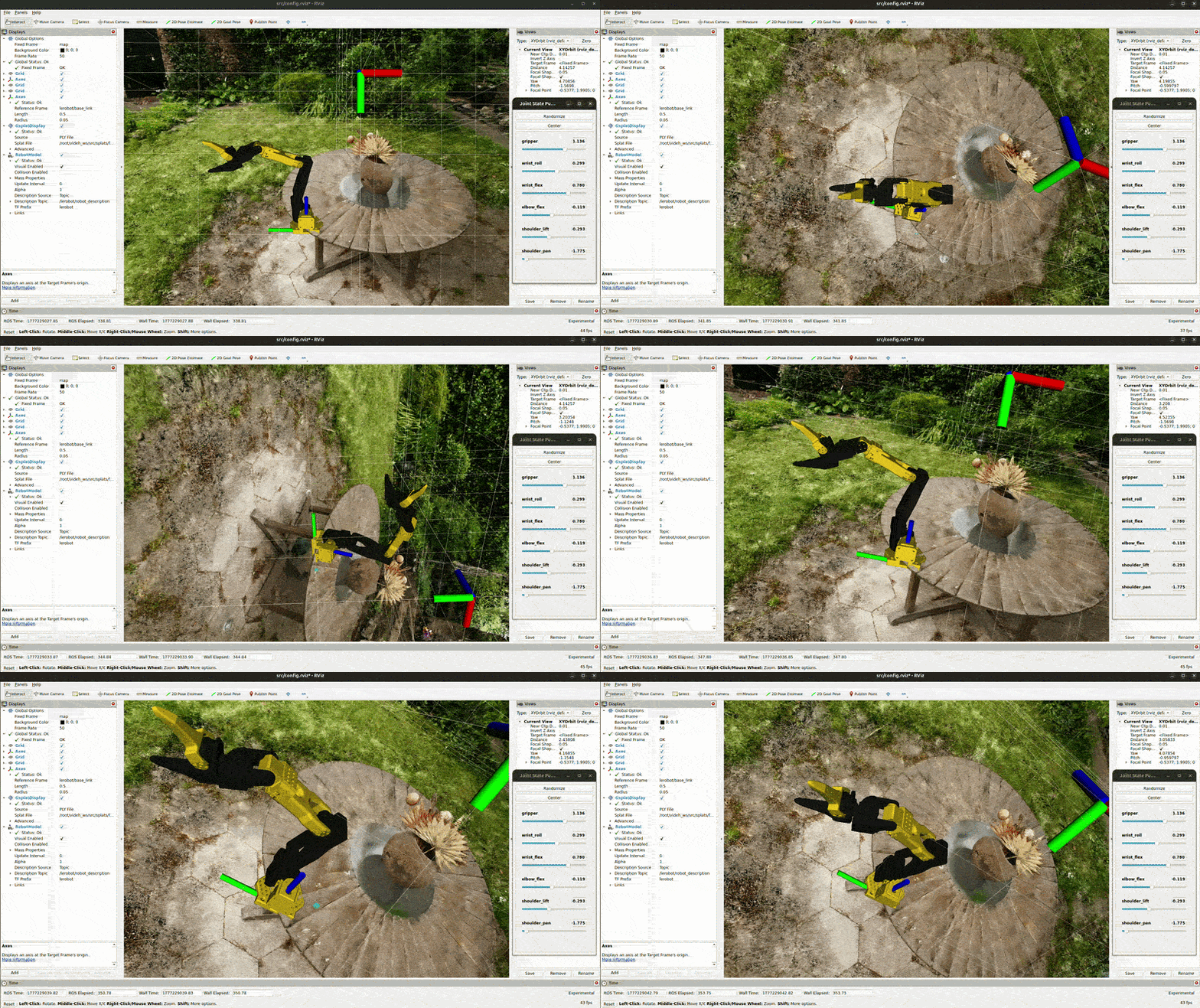
Rendering of a LeRobot SO-100 arm with a scene containing 6 million splats
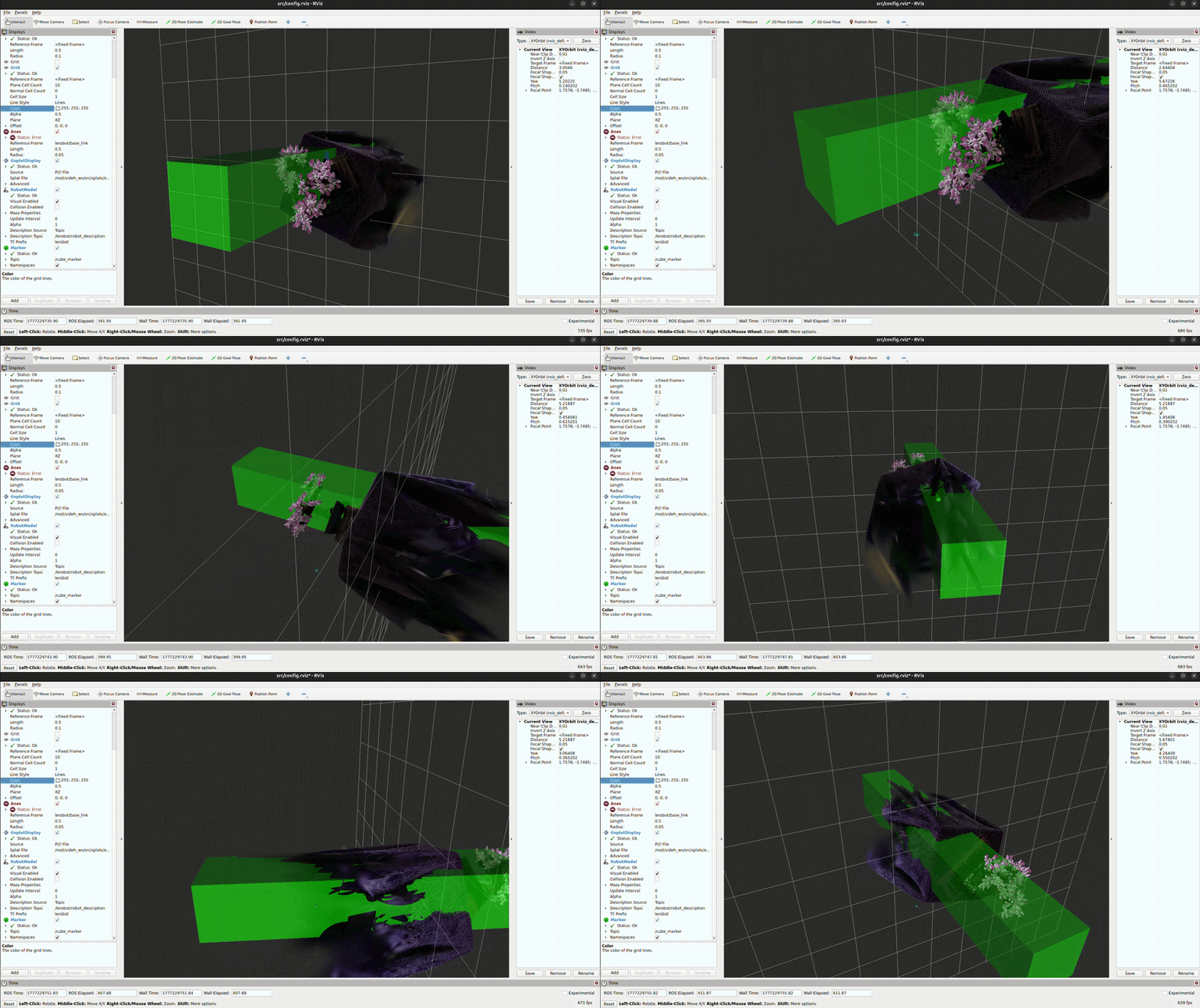
Rendering of transparent markers along with other gaussians
Using OIT for performance optimization
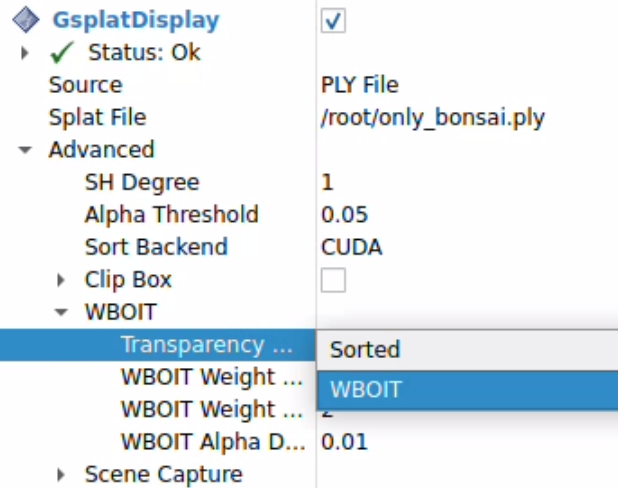
If you have a resource constrained CPU and a weaker GPU (just integrated graphics), you might want to consider bypassing sorting entirely. For this use case, we provide OIT based implementations.
To activate this, follow the “Advanced” options in the RViz plugin and select WBOIT.
Architecture
Coming soon!
Evaluation
The gsplat_plugin_evaluation/eval.py script computes image quality metrics (PSNR, SSIM, LPIPS) between a ref_folder and an eval_folder.
Images are matched by the trailing 3-digit number in the filename (e.g. img_001.png in the ref_folder is paired with *_001.png in the eval_folder).
Usage
cd gsplat_plugin_evaluation
python eval.py <ref_folder> <eval_folder> [--metrics psnr ssim lpips] [--lpips-net alex|vgg]
| Argument | Description |
|---|---|
ref_folder |
Folder containing reference (ground-truth) images |
eval_folder |
Folder containing images to evaluate |
--metrics |
Space-separated list of metrics to compute (default: all three) |
--lpips-net |
Backbone network for LPIPS — alex (default) or vgg
|
Examples
Compute all metrics using the default AlexNet backbone:
python eval.py data/ref data/eval
Compute PSNR and LPIPS with VGG backbone:
python eval.py data/ref data/eval --metrics psnr lpips --lpips-net vgg
Output
The script prints a per-image table and a mean row at the bottom:
File truncated at 100 lines see the full file
CONTRIBUTING
Repository Summary
| Checkout URI | https://github.com/splat-ros/RVizSplat.git |
| VCS Type | git |
| VCS Version | main |
| Last Updated | 2026-08-17 |
| Dev Status | DEVELOPED |
| Released | UNRELEASED |
| Contributing |
Help Wanted (-)
Good First Issues (-) Pull Requests to Review (-) |
Packages
| Name | Version |
|---|---|
| gsplat_publisher | 1.0.0 |
| gsplat_rviz_plugin | 1.0.0 |
README
RVizSplat
RVizSplat is an RViz2 display plugin that provides end-to-end visualization of 3D Gaussian Splats in RViz.
Build status
How to build and run from source
mkdir -p ~/ros_ws/src
cd ~/ros_ws/src
git clone https://github.com/RVizSplat/RVizSplat.git
cd ~/ros_ws
rosdep update
rosdep install --from-paths src --ignore-src -r -y
colcon build --symlink-install --cmake-args -DCMAKE_BUILD_TYPE=Release
source install/setup.bash
Installation via apt
This feature is currently under development (See https://github.com/ros/rosdistro/pull/50909 for details)
After sourcing your ROS 2 environment:
sudo apt-get install ros-$ROS_DISTRO-gsplat-rviz-plugin ros-$ROS_DISTRO-gsplat-publisher ros-$ROS_DISTRO-gsplat-msgs
Examples
Rendering of a LeRobot SO-100 arm with a scene containing 6 million splats
Rendering of transparent markers along with other gaussians
Using OIT for performance optimization
If you have a resource constrained CPU and a weaker GPU (just integrated graphics), you might want to consider bypassing sorting entirely. For this use case, we provide OIT based implementations.
To activate this, follow the “Advanced” options in the RViz plugin and select WBOIT.
Architecture
Coming soon!
Evaluation
The gsplat_plugin_evaluation/eval.py script computes image quality metrics (PSNR, SSIM, LPIPS) between a ref_folder and an eval_folder.
Images are matched by the trailing 3-digit number in the filename (e.g. img_001.png in the ref_folder is paired with *_001.png in the eval_folder).
Usage
cd gsplat_plugin_evaluation
python eval.py <ref_folder> <eval_folder> [--metrics psnr ssim lpips] [--lpips-net alex|vgg]
| Argument | Description |
|---|---|
ref_folder |
Folder containing reference (ground-truth) images |
eval_folder |
Folder containing images to evaluate |
--metrics |
Space-separated list of metrics to compute (default: all three) |
--lpips-net |
Backbone network for LPIPS — alex (default) or vgg
|
Examples
Compute all metrics using the default AlexNet backbone:
python eval.py data/ref data/eval
Compute PSNR and LPIPS with VGG backbone:
python eval.py data/ref data/eval --metrics psnr lpips --lpips-net vgg
Output
The script prints a per-image table and a mean row at the bottom:
File truncated at 100 lines see the full file
CONTRIBUTING
Repository Summary
| Checkout URI | https://github.com/splat-ros/RVizSplat.git |
| VCS Type | git |
| VCS Version | main |
| Last Updated | 2026-08-17 |
| Dev Status | DEVELOPED |
| Released | UNRELEASED |
| Contributing |
Help Wanted (-)
Good First Issues (-) Pull Requests to Review (-) |
Packages
| Name | Version |
|---|---|
| gsplat_publisher | 1.0.0 |
| gsplat_rviz_plugin | 1.0.0 |
README
RVizSplat
RVizSplat is an RViz2 display plugin that provides end-to-end visualization of 3D Gaussian Splats in RViz.
Build status
How to build and run from source
mkdir -p ~/ros_ws/src
cd ~/ros_ws/src
git clone https://github.com/RVizSplat/RVizSplat.git
cd ~/ros_ws
rosdep update
rosdep install --from-paths src --ignore-src -r -y
colcon build --symlink-install --cmake-args -DCMAKE_BUILD_TYPE=Release
source install/setup.bash
Installation via apt
This feature is currently under development (See https://github.com/ros/rosdistro/pull/50909 for details)
After sourcing your ROS 2 environment:
sudo apt-get install ros-$ROS_DISTRO-gsplat-rviz-plugin ros-$ROS_DISTRO-gsplat-publisher ros-$ROS_DISTRO-gsplat-msgs
Examples
Rendering of a LeRobot SO-100 arm with a scene containing 6 million splats
Rendering of transparent markers along with other gaussians
Using OIT for performance optimization
If you have a resource constrained CPU and a weaker GPU (just integrated graphics), you might want to consider bypassing sorting entirely. For this use case, we provide OIT based implementations.
To activate this, follow the “Advanced” options in the RViz plugin and select WBOIT.
Architecture
Coming soon!
Evaluation
The gsplat_plugin_evaluation/eval.py script computes image quality metrics (PSNR, SSIM, LPIPS) between a ref_folder and an eval_folder.
Images are matched by the trailing 3-digit number in the filename (e.g. img_001.png in the ref_folder is paired with *_001.png in the eval_folder).
Usage
cd gsplat_plugin_evaluation
python eval.py <ref_folder> <eval_folder> [--metrics psnr ssim lpips] [--lpips-net alex|vgg]
| Argument | Description |
|---|---|
ref_folder |
Folder containing reference (ground-truth) images |
eval_folder |
Folder containing images to evaluate |
--metrics |
Space-separated list of metrics to compute (default: all three) |
--lpips-net |
Backbone network for LPIPS — alex (default) or vgg
|
Examples
Compute all metrics using the default AlexNet backbone:
python eval.py data/ref data/eval
Compute PSNR and LPIPS with VGG backbone:
python eval.py data/ref data/eval --metrics psnr lpips --lpips-net vgg
Output
The script prints a per-image table and a mean row at the bottom:
File truncated at 100 lines see the full file
CONTRIBUTING
Repository Summary
| Checkout URI | https://github.com/splat-ros/RVizSplat.git |
| VCS Type | git |
| VCS Version | main |
| Last Updated | 2026-08-17 |
| Dev Status | DEVELOPED |
| Released | UNRELEASED |
| Contributing |
Help Wanted (-)
Good First Issues (-) Pull Requests to Review (-) |
Packages
| Name | Version |
|---|---|
| gsplat_publisher | 1.0.0 |
| gsplat_rviz_plugin | 1.0.0 |
README
RVizSplat
RVizSplat is an RViz2 display plugin that provides end-to-end visualization of 3D Gaussian Splats in RViz.
Build status
How to build and run from source
mkdir -p ~/ros_ws/src
cd ~/ros_ws/src
git clone https://github.com/RVizSplat/RVizSplat.git
cd ~/ros_ws
rosdep update
rosdep install --from-paths src --ignore-src -r -y
colcon build --symlink-install --cmake-args -DCMAKE_BUILD_TYPE=Release
source install/setup.bash
Installation via apt
This feature is currently under development (See https://github.com/ros/rosdistro/pull/50909 for details)
After sourcing your ROS 2 environment:
sudo apt-get install ros-$ROS_DISTRO-gsplat-rviz-plugin ros-$ROS_DISTRO-gsplat-publisher ros-$ROS_DISTRO-gsplat-msgs
Examples
Rendering of a LeRobot SO-100 arm with a scene containing 6 million splats
Rendering of transparent markers along with other gaussians
Using OIT for performance optimization
If you have a resource constrained CPU and a weaker GPU (just integrated graphics), you might want to consider bypassing sorting entirely. For this use case, we provide OIT based implementations.
To activate this, follow the “Advanced” options in the RViz plugin and select WBOIT.
Architecture
Coming soon!
Evaluation
The gsplat_plugin_evaluation/eval.py script computes image quality metrics (PSNR, SSIM, LPIPS) between a ref_folder and an eval_folder.
Images are matched by the trailing 3-digit number in the filename (e.g. img_001.png in the ref_folder is paired with *_001.png in the eval_folder).
Usage
cd gsplat_plugin_evaluation
python eval.py <ref_folder> <eval_folder> [--metrics psnr ssim lpips] [--lpips-net alex|vgg]
| Argument | Description |
|---|---|
ref_folder |
Folder containing reference (ground-truth) images |
eval_folder |
Folder containing images to evaluate |
--metrics |
Space-separated list of metrics to compute (default: all three) |
--lpips-net |
Backbone network for LPIPS — alex (default) or vgg
|
Examples
Compute all metrics using the default AlexNet backbone:
python eval.py data/ref data/eval
Compute PSNR and LPIPS with VGG backbone:
python eval.py data/ref data/eval --metrics psnr lpips --lpips-net vgg
Output
The script prints a per-image table and a mean row at the bottom:
File truncated at 100 lines see the full file
CONTRIBUTING
Repository Summary
| Checkout URI | https://github.com/splat-ros/RVizSplat.git |
| VCS Type | git |
| VCS Version | main |
| Last Updated | 2026-08-17 |
| Dev Status | DEVELOPED |
| Released | UNRELEASED |
| Contributing |
Help Wanted (-)
Good First Issues (-) Pull Requests to Review (-) |
Packages
| Name | Version |
|---|---|
| gsplat_publisher | 1.0.0 |
| gsplat_rviz_plugin | 1.0.0 |
README
RVizSplat
RVizSplat is an RViz2 display plugin that provides end-to-end visualization of 3D Gaussian Splats in RViz.
Build status
How to build and run from source
mkdir -p ~/ros_ws/src
cd ~/ros_ws/src
git clone https://github.com/RVizSplat/RVizSplat.git
cd ~/ros_ws
rosdep update
rosdep install --from-paths src --ignore-src -r -y
colcon build --symlink-install --cmake-args -DCMAKE_BUILD_TYPE=Release
source install/setup.bash
Installation via apt
This feature is currently under development (See https://github.com/ros/rosdistro/pull/50909 for details)
After sourcing your ROS 2 environment:
sudo apt-get install ros-$ROS_DISTRO-gsplat-rviz-plugin ros-$ROS_DISTRO-gsplat-publisher ros-$ROS_DISTRO-gsplat-msgs
Examples
Rendering of a LeRobot SO-100 arm with a scene containing 6 million splats
Rendering of transparent markers along with other gaussians
Using OIT for performance optimization
If you have a resource constrained CPU and a weaker GPU (just integrated graphics), you might want to consider bypassing sorting entirely. For this use case, we provide OIT based implementations.
To activate this, follow the “Advanced” options in the RViz plugin and select WBOIT.
Architecture
Coming soon!
Evaluation
The gsplat_plugin_evaluation/eval.py script computes image quality metrics (PSNR, SSIM, LPIPS) between a ref_folder and an eval_folder.
Images are matched by the trailing 3-digit number in the filename (e.g. img_001.png in the ref_folder is paired with *_001.png in the eval_folder).
Usage
cd gsplat_plugin_evaluation
python eval.py <ref_folder> <eval_folder> [--metrics psnr ssim lpips] [--lpips-net alex|vgg]
| Argument | Description |
|---|---|
ref_folder |
Folder containing reference (ground-truth) images |
eval_folder |
Folder containing images to evaluate |
--metrics |
Space-separated list of metrics to compute (default: all three) |
--lpips-net |
Backbone network for LPIPS — alex (default) or vgg
|
Examples
Compute all metrics using the default AlexNet backbone:
python eval.py data/ref data/eval
Compute PSNR and LPIPS with VGG backbone:
python eval.py data/ref data/eval --metrics psnr lpips --lpips-net vgg
Output
The script prints a per-image table and a mean row at the bottom:
File truncated at 100 lines see the full file
CONTRIBUTING
Repository Summary
| Checkout URI | https://github.com/splat-ros/RVizSplat.git |
| VCS Type | git |
| VCS Version | main |
| Last Updated | 2026-08-17 |
| Dev Status | DEVELOPED |
| Released | UNRELEASED |
| Contributing |
Help Wanted (-)
Good First Issues (-) Pull Requests to Review (-) |
Packages
| Name | Version |
|---|---|
| gsplat_publisher | 1.0.0 |
| gsplat_rviz_plugin | 1.0.0 |
README
RVizSplat
RVizSplat is an RViz2 display plugin that provides end-to-end visualization of 3D Gaussian Splats in RViz.
Build status
How to build and run from source
mkdir -p ~/ros_ws/src
cd ~/ros_ws/src
git clone https://github.com/RVizSplat/RVizSplat.git
cd ~/ros_ws
rosdep update
rosdep install --from-paths src --ignore-src -r -y
colcon build --symlink-install --cmake-args -DCMAKE_BUILD_TYPE=Release
source install/setup.bash
Installation via apt
This feature is currently under development (See https://github.com/ros/rosdistro/pull/50909 for details)
After sourcing your ROS 2 environment:
sudo apt-get install ros-$ROS_DISTRO-gsplat-rviz-plugin ros-$ROS_DISTRO-gsplat-publisher ros-$ROS_DISTRO-gsplat-msgs
Examples
Rendering of a LeRobot SO-100 arm with a scene containing 6 million splats
Rendering of transparent markers along with other gaussians
Using OIT for performance optimization
If you have a resource constrained CPU and a weaker GPU (just integrated graphics), you might want to consider bypassing sorting entirely. For this use case, we provide OIT based implementations.
To activate this, follow the “Advanced” options in the RViz plugin and select WBOIT.
Architecture
Coming soon!
Evaluation
The gsplat_plugin_evaluation/eval.py script computes image quality metrics (PSNR, SSIM, LPIPS) between a ref_folder and an eval_folder.
Images are matched by the trailing 3-digit number in the filename (e.g. img_001.png in the ref_folder is paired with *_001.png in the eval_folder).
Usage
cd gsplat_plugin_evaluation
python eval.py <ref_folder> <eval_folder> [--metrics psnr ssim lpips] [--lpips-net alex|vgg]
| Argument | Description |
|---|---|
ref_folder |
Folder containing reference (ground-truth) images |
eval_folder |
Folder containing images to evaluate |
--metrics |
Space-separated list of metrics to compute (default: all three) |
--lpips-net |
Backbone network for LPIPS — alex (default) or vgg
|
Examples
Compute all metrics using the default AlexNet backbone:
python eval.py data/ref data/eval
Compute PSNR and LPIPS with VGG backbone:
python eval.py data/ref data/eval --metrics psnr lpips --lpips-net vgg
Output
The script prints a per-image table and a mean row at the bottom:
File truncated at 100 lines see the full file
CONTRIBUTING
Repository Summary
| Checkout URI | https://github.com/splat-ros/RVizSplat.git |
| VCS Type | git |
| VCS Version | main |
| Last Updated | 2026-08-17 |
| Dev Status | DEVELOPED |
| Released | UNRELEASED |
| Contributing |
Help Wanted (-)
Good First Issues (-) Pull Requests to Review (-) |
Packages
| Name | Version |
|---|---|
| gsplat_publisher | 1.0.0 |
| gsplat_rviz_plugin | 1.0.0 |
README
RVizSplat
RVizSplat is an RViz2 display plugin that provides end-to-end visualization of 3D Gaussian Splats in RViz.
Build status
How to build and run from source
mkdir -p ~/ros_ws/src
cd ~/ros_ws/src
git clone https://github.com/RVizSplat/RVizSplat.git
cd ~/ros_ws
rosdep update
rosdep install --from-paths src --ignore-src -r -y
colcon build --symlink-install --cmake-args -DCMAKE_BUILD_TYPE=Release
source install/setup.bash
Installation via apt
This feature is currently under development (See https://github.com/ros/rosdistro/pull/50909 for details)
After sourcing your ROS 2 environment:
sudo apt-get install ros-$ROS_DISTRO-gsplat-rviz-plugin ros-$ROS_DISTRO-gsplat-publisher ros-$ROS_DISTRO-gsplat-msgs
Examples
Rendering of a LeRobot SO-100 arm with a scene containing 6 million splats
Rendering of transparent markers along with other gaussians
Using OIT for performance optimization
If you have a resource constrained CPU and a weaker GPU (just integrated graphics), you might want to consider bypassing sorting entirely. For this use case, we provide OIT based implementations.
To activate this, follow the “Advanced” options in the RViz plugin and select WBOIT.
Architecture
Coming soon!
Evaluation
The gsplat_plugin_evaluation/eval.py script computes image quality metrics (PSNR, SSIM, LPIPS) between a ref_folder and an eval_folder.
Images are matched by the trailing 3-digit number in the filename (e.g. img_001.png in the ref_folder is paired with *_001.png in the eval_folder).
Usage
cd gsplat_plugin_evaluation
python eval.py <ref_folder> <eval_folder> [--metrics psnr ssim lpips] [--lpips-net alex|vgg]
| Argument | Description |
|---|---|
ref_folder |
Folder containing reference (ground-truth) images |
eval_folder |
Folder containing images to evaluate |
--metrics |
Space-separated list of metrics to compute (default: all three) |
--lpips-net |
Backbone network for LPIPS — alex (default) or vgg
|
Examples
Compute all metrics using the default AlexNet backbone:
python eval.py data/ref data/eval
Compute PSNR and LPIPS with VGG backbone:
python eval.py data/ref data/eval --metrics psnr lpips --lpips-net vgg
Output
The script prints a per-image table and a mean row at the bottom:
File truncated at 100 lines see the full file
CONTRIBUTING
Repository Summary
| Checkout URI | https://github.com/splat-ros/RVizSplat.git |
| VCS Type | git |
| VCS Version | main |
| Last Updated | 2026-08-17 |
| Dev Status | DEVELOPED |
| Released | UNRELEASED |
| Contributing |
Help Wanted (-)
Good First Issues (-) Pull Requests to Review (-) |
Packages
| Name | Version |
|---|---|
| gsplat_publisher | 1.0.0 |
| gsplat_rviz_plugin | 1.0.0 |
README
RVizSplat
RVizSplat is an RViz2 display plugin that provides end-to-end visualization of 3D Gaussian Splats in RViz.
Build status
How to build and run from source
mkdir -p ~/ros_ws/src
cd ~/ros_ws/src
git clone https://github.com/RVizSplat/RVizSplat.git
cd ~/ros_ws
rosdep update
rosdep install --from-paths src --ignore-src -r -y
colcon build --symlink-install --cmake-args -DCMAKE_BUILD_TYPE=Release
source install/setup.bash
Installation via apt
This feature is currently under development (See https://github.com/ros/rosdistro/pull/50909 for details)
After sourcing your ROS 2 environment:
sudo apt-get install ros-$ROS_DISTRO-gsplat-rviz-plugin ros-$ROS_DISTRO-gsplat-publisher ros-$ROS_DISTRO-gsplat-msgs
Examples
Rendering of a LeRobot SO-100 arm with a scene containing 6 million splats
Rendering of transparent markers along with other gaussians
Using OIT for performance optimization
If you have a resource constrained CPU and a weaker GPU (just integrated graphics), you might want to consider bypassing sorting entirely. For this use case, we provide OIT based implementations.
To activate this, follow the “Advanced” options in the RViz plugin and select WBOIT.
Architecture
Coming soon!
Evaluation
The gsplat_plugin_evaluation/eval.py script computes image quality metrics (PSNR, SSIM, LPIPS) between a ref_folder and an eval_folder.
Images are matched by the trailing 3-digit number in the filename (e.g. img_001.png in the ref_folder is paired with *_001.png in the eval_folder).
Usage
cd gsplat_plugin_evaluation
python eval.py <ref_folder> <eval_folder> [--metrics psnr ssim lpips] [--lpips-net alex|vgg]
| Argument | Description |
|---|---|
ref_folder |
Folder containing reference (ground-truth) images |
eval_folder |
Folder containing images to evaluate |
--metrics |
Space-separated list of metrics to compute (default: all three) |
--lpips-net |
Backbone network for LPIPS — alex (default) or vgg
|
Examples
Compute all metrics using the default AlexNet backbone:
python eval.py data/ref data/eval
Compute PSNR and LPIPS with VGG backbone:
python eval.py data/ref data/eval --metrics psnr lpips --lpips-net vgg
Output
The script prints a per-image table and a mean row at the bottom:
File truncated at 100 lines see the full file
CONTRIBUTING
Repository Summary
| Checkout URI | https://github.com/splat-ros/RVizSplat.git |
| VCS Type | git |
| VCS Version | main |
| Last Updated | 2026-08-17 |
| Dev Status | DEVELOPED |
| Released | UNRELEASED |
| Contributing |
Help Wanted (-)
Good First Issues (-) Pull Requests to Review (-) |
Packages
| Name | Version |
|---|---|
| gsplat_publisher | 1.0.0 |
| gsplat_rviz_plugin | 1.0.0 |
README
RVizSplat
RVizSplat is an RViz2 display plugin that provides end-to-end visualization of 3D Gaussian Splats in RViz.
Build status
How to build and run from source
mkdir -p ~/ros_ws/src
cd ~/ros_ws/src
git clone https://github.com/RVizSplat/RVizSplat.git
cd ~/ros_ws
rosdep update
rosdep install --from-paths src --ignore-src -r -y
colcon build --symlink-install --cmake-args -DCMAKE_BUILD_TYPE=Release
source install/setup.bash
Installation via apt
This feature is currently under development (See https://github.com/ros/rosdistro/pull/50909 for details)
After sourcing your ROS 2 environment:
sudo apt-get install ros-$ROS_DISTRO-gsplat-rviz-plugin ros-$ROS_DISTRO-gsplat-publisher ros-$ROS_DISTRO-gsplat-msgs
Examples
Rendering of a LeRobot SO-100 arm with a scene containing 6 million splats
Rendering of transparent markers along with other gaussians
Using OIT for performance optimization
If you have a resource constrained CPU and a weaker GPU (just integrated graphics), you might want to consider bypassing sorting entirely. For this use case, we provide OIT based implementations.
To activate this, follow the “Advanced” options in the RViz plugin and select WBOIT.
Architecture
Coming soon!
Evaluation
The gsplat_plugin_evaluation/eval.py script computes image quality metrics (PSNR, SSIM, LPIPS) between a ref_folder and an eval_folder.
Images are matched by the trailing 3-digit number in the filename (e.g. img_001.png in the ref_folder is paired with *_001.png in the eval_folder).
Usage
cd gsplat_plugin_evaluation
python eval.py <ref_folder> <eval_folder> [--metrics psnr ssim lpips] [--lpips-net alex|vgg]
| Argument | Description |
|---|---|
ref_folder |
Folder containing reference (ground-truth) images |
eval_folder |
Folder containing images to evaluate |
--metrics |
Space-separated list of metrics to compute (default: all three) |
--lpips-net |
Backbone network for LPIPS — alex (default) or vgg
|
Examples
Compute all metrics using the default AlexNet backbone:
python eval.py data/ref data/eval
Compute PSNR and LPIPS with VGG backbone:
python eval.py data/ref data/eval --metrics psnr lpips --lpips-net vgg
Output
The script prints a per-image table and a mean row at the bottom:
File truncated at 100 lines see the full file
CONTRIBUTING
Repository Summary
| Checkout URI | https://github.com/splat-ros/RVizSplat.git |
| VCS Type | git |
| VCS Version | main |
| Last Updated | 2026-08-17 |
| Dev Status | DEVELOPED |
| Released | UNRELEASED |
| Contributing |
Help Wanted (-)
Good First Issues (-) Pull Requests to Review (-) |
Packages
| Name | Version |
|---|---|
| gsplat_publisher | 1.0.0 |
| gsplat_rviz_plugin | 1.0.0 |
README
RVizSplat
RVizSplat is an RViz2 display plugin that provides end-to-end visualization of 3D Gaussian Splats in RViz.
Build status
How to build and run from source
mkdir -p ~/ros_ws/src
cd ~/ros_ws/src
git clone https://github.com/RVizSplat/RVizSplat.git
cd ~/ros_ws
rosdep update
rosdep install --from-paths src --ignore-src -r -y
colcon build --symlink-install --cmake-args -DCMAKE_BUILD_TYPE=Release
source install/setup.bash
Installation via apt
This feature is currently under development (See https://github.com/ros/rosdistro/pull/50909 for details)
After sourcing your ROS 2 environment:
sudo apt-get install ros-$ROS_DISTRO-gsplat-rviz-plugin ros-$ROS_DISTRO-gsplat-publisher ros-$ROS_DISTRO-gsplat-msgs
Examples
Rendering of a LeRobot SO-100 arm with a scene containing 6 million splats
Rendering of transparent markers along with other gaussians
Using OIT for performance optimization
If you have a resource constrained CPU and a weaker GPU (just integrated graphics), you might want to consider bypassing sorting entirely. For this use case, we provide OIT based implementations.
To activate this, follow the “Advanced” options in the RViz plugin and select WBOIT.
Architecture
Coming soon!
Evaluation
The gsplat_plugin_evaluation/eval.py script computes image quality metrics (PSNR, SSIM, LPIPS) between a ref_folder and an eval_folder.
Images are matched by the trailing 3-digit number in the filename (e.g. img_001.png in the ref_folder is paired with *_001.png in the eval_folder).
Usage
cd gsplat_plugin_evaluation
python eval.py <ref_folder> <eval_folder> [--metrics psnr ssim lpips] [--lpips-net alex|vgg]
| Argument | Description |
|---|---|
ref_folder |
Folder containing reference (ground-truth) images |
eval_folder |
Folder containing images to evaluate |
--metrics |
Space-separated list of metrics to compute (default: all three) |
--lpips-net |
Backbone network for LPIPS — alex (default) or vgg
|
Examples
Compute all metrics using the default AlexNet backbone:
python eval.py data/ref data/eval
Compute PSNR and LPIPS with VGG backbone:
python eval.py data/ref data/eval --metrics psnr lpips --lpips-net vgg
Output
The script prints a per-image table and a mean row at the bottom:
File truncated at 100 lines see the full file
CONTRIBUTING
Repository Summary
| Checkout URI | https://github.com/splat-ros/RVizSplat.git |
| VCS Type | git |
| VCS Version | main |
| Last Updated | 2026-08-17 |
| Dev Status | DEVELOPED |
| Released | UNRELEASED |
| Contributing |
Help Wanted (-)
Good First Issues (-) Pull Requests to Review (-) |
Packages
| Name | Version |
|---|---|
| gsplat_publisher | 1.0.0 |
| gsplat_rviz_plugin | 1.0.0 |
README
RVizSplat
RVizSplat is an RViz2 display plugin that provides end-to-end visualization of 3D Gaussian Splats in RViz.
Build status
How to build and run from source
mkdir -p ~/ros_ws/src
cd ~/ros_ws/src
git clone https://github.com/RVizSplat/RVizSplat.git
cd ~/ros_ws
rosdep update
rosdep install --from-paths src --ignore-src -r -y
colcon build --symlink-install --cmake-args -DCMAKE_BUILD_TYPE=Release
source install/setup.bash
Installation via apt
This feature is currently under development (See https://github.com/ros/rosdistro/pull/50909 for details)
After sourcing your ROS 2 environment:
sudo apt-get install ros-$ROS_DISTRO-gsplat-rviz-plugin ros-$ROS_DISTRO-gsplat-publisher ros-$ROS_DISTRO-gsplat-msgs
Examples
Rendering of a LeRobot SO-100 arm with a scene containing 6 million splats
Rendering of transparent markers along with other gaussians
Using OIT for performance optimization
If you have a resource constrained CPU and a weaker GPU (just integrated graphics), you might want to consider bypassing sorting entirely. For this use case, we provide OIT based implementations.
To activate this, follow the “Advanced” options in the RViz plugin and select WBOIT.
Architecture
Coming soon!
Evaluation
The gsplat_plugin_evaluation/eval.py script computes image quality metrics (PSNR, SSIM, LPIPS) between a ref_folder and an eval_folder.
Images are matched by the trailing 3-digit number in the filename (e.g. img_001.png in the ref_folder is paired with *_001.png in the eval_folder).
Usage
cd gsplat_plugin_evaluation
python eval.py <ref_folder> <eval_folder> [--metrics psnr ssim lpips] [--lpips-net alex|vgg]
| Argument | Description |
|---|---|
ref_folder |
Folder containing reference (ground-truth) images |
eval_folder |
Folder containing images to evaluate |
--metrics |
Space-separated list of metrics to compute (default: all three) |
--lpips-net |
Backbone network for LPIPS — alex (default) or vgg
|
Examples
Compute all metrics using the default AlexNet backbone:
python eval.py data/ref data/eval
Compute PSNR and LPIPS with VGG backbone:
python eval.py data/ref data/eval --metrics psnr lpips --lpips-net vgg
Output
The script prints a per-image table and a mean row at the bottom:
File truncated at 100 lines see the full file
CONTRIBUTING
Repository Summary
| Checkout URI | https://github.com/splat-ros/RVizSplat.git |
| VCS Type | git |
| VCS Version | main |
| Last Updated | 2026-08-17 |
| Dev Status | DEVELOPED |
| Released | UNRELEASED |
| Contributing |
Help Wanted (-)
Good First Issues (-) Pull Requests to Review (-) |
Packages
| Name | Version |
|---|---|
| gsplat_publisher | 1.0.0 |
| gsplat_rviz_plugin | 1.0.0 |
README
RVizSplat
RVizSplat is an RViz2 display plugin that provides end-to-end visualization of 3D Gaussian Splats in RViz.
Build status
How to build and run from source
mkdir -p ~/ros_ws/src
cd ~/ros_ws/src
git clone https://github.com/RVizSplat/RVizSplat.git
cd ~/ros_ws
rosdep update
rosdep install --from-paths src --ignore-src -r -y
colcon build --symlink-install --cmake-args -DCMAKE_BUILD_TYPE=Release
source install/setup.bash
Installation via apt
This feature is currently under development (See https://github.com/ros/rosdistro/pull/50909 for details)
After sourcing your ROS 2 environment:
sudo apt-get install ros-$ROS_DISTRO-gsplat-rviz-plugin ros-$ROS_DISTRO-gsplat-publisher ros-$ROS_DISTRO-gsplat-msgs
Examples
Rendering of a LeRobot SO-100 arm with a scene containing 6 million splats
Rendering of transparent markers along with other gaussians
Using OIT for performance optimization
If you have a resource constrained CPU and a weaker GPU (just integrated graphics), you might want to consider bypassing sorting entirely. For this use case, we provide OIT based implementations.
To activate this, follow the “Advanced” options in the RViz plugin and select WBOIT.
Architecture
Coming soon!
Evaluation
The gsplat_plugin_evaluation/eval.py script computes image quality metrics (PSNR, SSIM, LPIPS) between a ref_folder and an eval_folder.
Images are matched by the trailing 3-digit number in the filename (e.g. img_001.png in the ref_folder is paired with *_001.png in the eval_folder).
Usage
cd gsplat_plugin_evaluation
python eval.py <ref_folder> <eval_folder> [--metrics psnr ssim lpips] [--lpips-net alex|vgg]
| Argument | Description |
|---|---|
ref_folder |
Folder containing reference (ground-truth) images |
eval_folder |
Folder containing images to evaluate |
--metrics |
Space-separated list of metrics to compute (default: all three) |
--lpips-net |
Backbone network for LPIPS — alex (default) or vgg
|
Examples
Compute all metrics using the default AlexNet backbone:
python eval.py data/ref data/eval
Compute PSNR and LPIPS with VGG backbone:
python eval.py data/ref data/eval --metrics psnr lpips --lpips-net vgg
Output
The script prints a per-image table and a mean row at the bottom:
File truncated at 100 lines see the full file
CONTRIBUTING
Repository Summary
| Checkout URI | https://github.com/splat-ros/RVizSplat.git |
| VCS Type | git |
| VCS Version | main |
| Last Updated | 2026-08-17 |
| Dev Status | DEVELOPED |
| Released | UNRELEASED |
| Contributing |
Help Wanted (-)
Good First Issues (-) Pull Requests to Review (-) |
Packages
| Name | Version |
|---|---|
| gsplat_publisher | 1.0.0 |
| gsplat_rviz_plugin | 1.0.0 |
README
RVizSplat
RVizSplat is an RViz2 display plugin that provides end-to-end visualization of 3D Gaussian Splats in RViz.
Build status
How to build and run from source
mkdir -p ~/ros_ws/src
cd ~/ros_ws/src
git clone https://github.com/RVizSplat/RVizSplat.git
cd ~/ros_ws
rosdep update
rosdep install --from-paths src --ignore-src -r -y
colcon build --symlink-install --cmake-args -DCMAKE_BUILD_TYPE=Release
source install/setup.bash
Installation via apt
This feature is currently under development (See https://github.com/ros/rosdistro/pull/50909 for details)
After sourcing your ROS 2 environment:
sudo apt-get install ros-$ROS_DISTRO-gsplat-rviz-plugin ros-$ROS_DISTRO-gsplat-publisher ros-$ROS_DISTRO-gsplat-msgs
Examples
Rendering of a LeRobot SO-100 arm with a scene containing 6 million splats
Rendering of transparent markers along with other gaussians
Using OIT for performance optimization
If you have a resource constrained CPU and a weaker GPU (just integrated graphics), you might want to consider bypassing sorting entirely. For this use case, we provide OIT based implementations.
To activate this, follow the “Advanced” options in the RViz plugin and select WBOIT.
Architecture
Coming soon!
Evaluation
The gsplat_plugin_evaluation/eval.py script computes image quality metrics (PSNR, SSIM, LPIPS) between a ref_folder and an eval_folder.
Images are matched by the trailing 3-digit number in the filename (e.g. img_001.png in the ref_folder is paired with *_001.png in the eval_folder).
Usage
cd gsplat_plugin_evaluation
python eval.py <ref_folder> <eval_folder> [--metrics psnr ssim lpips] [--lpips-net alex|vgg]
| Argument | Description |
|---|---|
ref_folder |
Folder containing reference (ground-truth) images |
eval_folder |
Folder containing images to evaluate |
--metrics |
Space-separated list of metrics to compute (default: all three) |
--lpips-net |
Backbone network for LPIPS — alex (default) or vgg
|
Examples
Compute all metrics using the default AlexNet backbone:
python eval.py data/ref data/eval
Compute PSNR and LPIPS with VGG backbone:
python eval.py data/ref data/eval --metrics psnr lpips --lpips-net vgg
Output
The script prints a per-image table and a mean row at the bottom:
File truncated at 100 lines see the full file
CONTRIBUTING
Repository Summary
| Checkout URI | https://github.com/splat-ros/RVizSplat.git |
| VCS Type | git |
| VCS Version | main |
| Last Updated | 2026-08-17 |
| Dev Status | DEVELOPED |
| Released | UNRELEASED |
| Contributing |
Help Wanted (-)
Good First Issues (-) Pull Requests to Review (-) |
Packages
| Name | Version |
|---|---|
| gsplat_publisher | 1.0.0 |
| gsplat_rviz_plugin | 1.0.0 |
README
RVizSplat
RVizSplat is an RViz2 display plugin that provides end-to-end visualization of 3D Gaussian Splats in RViz.
Build status
How to build and run from source
mkdir -p ~/ros_ws/src
cd ~/ros_ws/src
git clone https://github.com/RVizSplat/RVizSplat.git
cd ~/ros_ws
rosdep update
rosdep install --from-paths src --ignore-src -r -y
colcon build --symlink-install --cmake-args -DCMAKE_BUILD_TYPE=Release
source install/setup.bash
Installation via apt
This feature is currently under development (See https://github.com/ros/rosdistro/pull/50909 for details)
After sourcing your ROS 2 environment:
sudo apt-get install ros-$ROS_DISTRO-gsplat-rviz-plugin ros-$ROS_DISTRO-gsplat-publisher ros-$ROS_DISTRO-gsplat-msgs
Examples
Rendering of a LeRobot SO-100 arm with a scene containing 6 million splats
Rendering of transparent markers along with other gaussians
Using OIT for performance optimization
If you have a resource constrained CPU and a weaker GPU (just integrated graphics), you might want to consider bypassing sorting entirely. For this use case, we provide OIT based implementations.
To activate this, follow the “Advanced” options in the RViz plugin and select WBOIT.
Architecture
Coming soon!
Evaluation
The gsplat_plugin_evaluation/eval.py script computes image quality metrics (PSNR, SSIM, LPIPS) between a ref_folder and an eval_folder.
Images are matched by the trailing 3-digit number in the filename (e.g. img_001.png in the ref_folder is paired with *_001.png in the eval_folder).
Usage
cd gsplat_plugin_evaluation
python eval.py <ref_folder> <eval_folder> [--metrics psnr ssim lpips] [--lpips-net alex|vgg]
| Argument | Description |
|---|---|
ref_folder |
Folder containing reference (ground-truth) images |
eval_folder |
Folder containing images to evaluate |
--metrics |
Space-separated list of metrics to compute (default: all three) |
--lpips-net |
Backbone network for LPIPS — alex (default) or vgg
|
Examples
Compute all metrics using the default AlexNet backbone:
python eval.py data/ref data/eval
Compute PSNR and LPIPS with VGG backbone:
python eval.py data/ref data/eval --metrics psnr lpips --lpips-net vgg
Output
The script prints a per-image table and a mean row at the bottom:
File truncated at 100 lines see the full file
CONTRIBUTING
Repository Summary
| Checkout URI | https://github.com/splat-ros/RVizSplat.git |
| VCS Type | git |
| VCS Version | main |
| Last Updated | 2026-08-17 |
| Dev Status | DEVELOPED |
| Released | UNRELEASED |
| Contributing |
Help Wanted (-)
Good First Issues (-) Pull Requests to Review (-) |
Packages
| Name | Version |
|---|---|
| gsplat_publisher | 1.0.0 |
| gsplat_rviz_plugin | 1.0.0 |
README
RVizSplat
RVizSplat is an RViz2 display plugin that provides end-to-end visualization of 3D Gaussian Splats in RViz.
Build status
How to build and run from source
mkdir -p ~/ros_ws/src
cd ~/ros_ws/src
git clone https://github.com/RVizSplat/RVizSplat.git
cd ~/ros_ws
rosdep update
rosdep install --from-paths src --ignore-src -r -y
colcon build --symlink-install --cmake-args -DCMAKE_BUILD_TYPE=Release
source install/setup.bash
Installation via apt
This feature is currently under development (See https://github.com/ros/rosdistro/pull/50909 for details)
After sourcing your ROS 2 environment:
sudo apt-get install ros-$ROS_DISTRO-gsplat-rviz-plugin ros-$ROS_DISTRO-gsplat-publisher ros-$ROS_DISTRO-gsplat-msgs
Examples
Rendering of a LeRobot SO-100 arm with a scene containing 6 million splats
Rendering of transparent markers along with other gaussians
Using OIT for performance optimization
If you have a resource constrained CPU and a weaker GPU (just integrated graphics), you might want to consider bypassing sorting entirely. For this use case, we provide OIT based implementations.
To activate this, follow the “Advanced” options in the RViz plugin and select WBOIT.
Architecture
Coming soon!
Evaluation
The gsplat_plugin_evaluation/eval.py script computes image quality metrics (PSNR, SSIM, LPIPS) between a ref_folder and an eval_folder.
Images are matched by the trailing 3-digit number in the filename (e.g. img_001.png in the ref_folder is paired with *_001.png in the eval_folder).
Usage
cd gsplat_plugin_evaluation
python eval.py <ref_folder> <eval_folder> [--metrics psnr ssim lpips] [--lpips-net alex|vgg]
| Argument | Description |
|---|---|
ref_folder |
Folder containing reference (ground-truth) images |
eval_folder |
Folder containing images to evaluate |
--metrics |
Space-separated list of metrics to compute (default: all three) |
--lpips-net |
Backbone network for LPIPS — alex (default) or vgg
|
Examples
Compute all metrics using the default AlexNet backbone:
python eval.py data/ref data/eval
Compute PSNR and LPIPS with VGG backbone:
python eval.py data/ref data/eval --metrics psnr lpips --lpips-net vgg
Output
The script prints a per-image table and a mean row at the bottom:
File truncated at 100 lines see the full file
CONTRIBUTING
Repository Summary
| Checkout URI | https://github.com/splat-ros/RVizSplat.git |
| VCS Type | git |
| VCS Version | main |
| Last Updated | 2026-08-17 |
| Dev Status | DEVELOPED |
| Released | UNRELEASED |
| Contributing |
Help Wanted (-)
Good First Issues (-) Pull Requests to Review (-) |
Packages
| Name | Version |
|---|---|
| gsplat_publisher | 1.0.0 |
| gsplat_rviz_plugin | 1.0.0 |
README
RVizSplat
RVizSplat is an RViz2 display plugin that provides end-to-end visualization of 3D Gaussian Splats in RViz.
Build status
How to build and run from source
mkdir -p ~/ros_ws/src
cd ~/ros_ws/src
git clone https://github.com/RVizSplat/RVizSplat.git
cd ~/ros_ws
rosdep update
rosdep install --from-paths src --ignore-src -r -y
colcon build --symlink-install --cmake-args -DCMAKE_BUILD_TYPE=Release
source install/setup.bash
Installation via apt
This feature is currently under development (See https://github.com/ros/rosdistro/pull/50909 for details)
After sourcing your ROS 2 environment:
sudo apt-get install ros-$ROS_DISTRO-gsplat-rviz-plugin ros-$ROS_DISTRO-gsplat-publisher ros-$ROS_DISTRO-gsplat-msgs
Examples
Rendering of a LeRobot SO-100 arm with a scene containing 6 million splats
Rendering of transparent markers along with other gaussians
Using OIT for performance optimization
If you have a resource constrained CPU and a weaker GPU (just integrated graphics), you might want to consider bypassing sorting entirely. For this use case, we provide OIT based implementations.
To activate this, follow the “Advanced” options in the RViz plugin and select WBOIT.
Architecture
Coming soon!
Evaluation
The gsplat_plugin_evaluation/eval.py script computes image quality metrics (PSNR, SSIM, LPIPS) between a ref_folder and an eval_folder.
Images are matched by the trailing 3-digit number in the filename (e.g. img_001.png in the ref_folder is paired with *_001.png in the eval_folder).
Usage
cd gsplat_plugin_evaluation
python eval.py <ref_folder> <eval_folder> [--metrics psnr ssim lpips] [--lpips-net alex|vgg]
| Argument | Description |
|---|---|
ref_folder |
Folder containing reference (ground-truth) images |
eval_folder |
Folder containing images to evaluate |
--metrics |
Space-separated list of metrics to compute (default: all three) |
--lpips-net |
Backbone network for LPIPS — alex (default) or vgg
|
Examples
Compute all metrics using the default AlexNet backbone:
python eval.py data/ref data/eval
Compute PSNR and LPIPS with VGG backbone:
python eval.py data/ref data/eval --metrics psnr lpips --lpips-net vgg
Output
The script prints a per-image table and a mean row at the bottom:
File truncated at 100 lines see the full file
CONTRIBUTING
Repository Summary
| Checkout URI | https://github.com/splat-ros/RVizSplat.git |
| VCS Type | git |
| VCS Version | main |
| Last Updated | 2026-08-17 |
| Dev Status | DEVELOPED |
| Released | UNRELEASED |
| Contributing |
Help Wanted (-)
Good First Issues (-) Pull Requests to Review (-) |
Packages
| Name | Version |
|---|---|
| gsplat_publisher | 1.0.0 |
| gsplat_rviz_plugin | 1.0.0 |
README
RVizSplat
RVizSplat is an RViz2 display plugin that provides end-to-end visualization of 3D Gaussian Splats in RViz.
Build status
How to build and run from source
mkdir -p ~/ros_ws/src
cd ~/ros_ws/src
git clone https://github.com/RVizSplat/RVizSplat.git
cd ~/ros_ws
rosdep update
rosdep install --from-paths src --ignore-src -r -y
colcon build --symlink-install --cmake-args -DCMAKE_BUILD_TYPE=Release
source install/setup.bash
Installation via apt
This feature is currently under development (See https://github.com/ros/rosdistro/pull/50909 for details)
After sourcing your ROS 2 environment:
sudo apt-get install ros-$ROS_DISTRO-gsplat-rviz-plugin ros-$ROS_DISTRO-gsplat-publisher ros-$ROS_DISTRO-gsplat-msgs
Examples
Rendering of a LeRobot SO-100 arm with a scene containing 6 million splats
Rendering of transparent markers along with other gaussians
Using OIT for performance optimization
If you have a resource constrained CPU and a weaker GPU (just integrated graphics), you might want to consider bypassing sorting entirely. For this use case, we provide OIT based implementations.
To activate this, follow the “Advanced” options in the RViz plugin and select WBOIT.
Architecture
Coming soon!
Evaluation
The gsplat_plugin_evaluation/eval.py script computes image quality metrics (PSNR, SSIM, LPIPS) between a ref_folder and an eval_folder.
Images are matched by the trailing 3-digit number in the filename (e.g. img_001.png in the ref_folder is paired with *_001.png in the eval_folder).
Usage
cd gsplat_plugin_evaluation
python eval.py <ref_folder> <eval_folder> [--metrics psnr ssim lpips] [--lpips-net alex|vgg]
| Argument | Description |
|---|---|
ref_folder |
Folder containing reference (ground-truth) images |
eval_folder |
Folder containing images to evaluate |
--metrics |
Space-separated list of metrics to compute (default: all three) |
--lpips-net |
Backbone network for LPIPS — alex (default) or vgg
|
Examples
Compute all metrics using the default AlexNet backbone:
python eval.py data/ref data/eval
Compute PSNR and LPIPS with VGG backbone:
python eval.py data/ref data/eval --metrics psnr lpips --lpips-net vgg
Output
The script prints a per-image table and a mean row at the bottom:
File truncated at 100 lines see the full file
CONTRIBUTING
Repository Summary
| Checkout URI | https://github.com/splat-ros/RVizSplat.git |
| VCS Type | git |
| VCS Version | main |
| Last Updated | 2026-08-17 |
| Dev Status | DEVELOPED |
| Released | UNRELEASED |
| Contributing |
Help Wanted (-)
Good First Issues (-) Pull Requests to Review (-) |
Packages
| Name | Version |
|---|---|
| gsplat_publisher | 1.0.0 |
| gsplat_rviz_plugin | 1.0.0 |
README
RVizSplat
RVizSplat is an RViz2 display plugin that provides end-to-end visualization of 3D Gaussian Splats in RViz.
Build status
How to build and run from source
mkdir -p ~/ros_ws/src
cd ~/ros_ws/src
git clone https://github.com/RVizSplat/RVizSplat.git
cd ~/ros_ws
rosdep update
rosdep install --from-paths src --ignore-src -r -y
colcon build --symlink-install --cmake-args -DCMAKE_BUILD_TYPE=Release
source install/setup.bash
Installation via apt
This feature is currently under development (See https://github.com/ros/rosdistro/pull/50909 for details)
After sourcing your ROS 2 environment:
sudo apt-get install ros-$ROS_DISTRO-gsplat-rviz-plugin ros-$ROS_DISTRO-gsplat-publisher ros-$ROS_DISTRO-gsplat-msgs
Examples
Rendering of a LeRobot SO-100 arm with a scene containing 6 million splats
Rendering of transparent markers along with other gaussians
Using OIT for performance optimization
If you have a resource constrained CPU and a weaker GPU (just integrated graphics), you might want to consider bypassing sorting entirely. For this use case, we provide OIT based implementations.
To activate this, follow the “Advanced” options in the RViz plugin and select WBOIT.
Architecture
Coming soon!
Evaluation
The gsplat_plugin_evaluation/eval.py script computes image quality metrics (PSNR, SSIM, LPIPS) between a ref_folder and an eval_folder.
Images are matched by the trailing 3-digit number in the filename (e.g. img_001.png in the ref_folder is paired with *_001.png in the eval_folder).
Usage
cd gsplat_plugin_evaluation
python eval.py <ref_folder> <eval_folder> [--metrics psnr ssim lpips] [--lpips-net alex|vgg]
| Argument | Description |
|---|---|
ref_folder |
Folder containing reference (ground-truth) images |
eval_folder |
Folder containing images to evaluate |
--metrics |
Space-separated list of metrics to compute (default: all three) |
--lpips-net |
Backbone network for LPIPS — alex (default) or vgg
|
Examples
Compute all metrics using the default AlexNet backbone:
python eval.py data/ref data/eval
Compute PSNR and LPIPS with VGG backbone:
python eval.py data/ref data/eval --metrics psnr lpips --lpips-net vgg
Output
The script prints a per-image table and a mean row at the bottom:
File truncated at 100 lines see the full file
CONTRIBUTING
Repository Summary
| Checkout URI | https://github.com/splat-ros/RVizSplat.git |
| VCS Type | git |
| VCS Version | main |
| Last Updated | 2026-08-17 |
| Dev Status | DEVELOPED |
| Released | UNRELEASED |
| Contributing |
Help Wanted (-)
Good First Issues (-) Pull Requests to Review (-) |
Packages
| Name | Version |
|---|---|
| gsplat_publisher | 1.0.0 |
| gsplat_rviz_plugin | 1.0.0 |
README
RVizSplat
RVizSplat is an RViz2 display plugin that provides end-to-end visualization of 3D Gaussian Splats in RViz.
Build status
How to build and run from source
mkdir -p ~/ros_ws/src
cd ~/ros_ws/src
git clone https://github.com/RVizSplat/RVizSplat.git
cd ~/ros_ws
rosdep update
rosdep install --from-paths src --ignore-src -r -y
colcon build --symlink-install --cmake-args -DCMAKE_BUILD_TYPE=Release
source install/setup.bash
Installation via apt
This feature is currently under development (See https://github.com/ros/rosdistro/pull/50909 for details)
After sourcing your ROS 2 environment:
sudo apt-get install ros-$ROS_DISTRO-gsplat-rviz-plugin ros-$ROS_DISTRO-gsplat-publisher ros-$ROS_DISTRO-gsplat-msgs
Examples
Rendering of a LeRobot SO-100 arm with a scene containing 6 million splats
Rendering of transparent markers along with other gaussians
Using OIT for performance optimization
If you have a resource constrained CPU and a weaker GPU (just integrated graphics), you might want to consider bypassing sorting entirely. For this use case, we provide OIT based implementations.
To activate this, follow the “Advanced” options in the RViz plugin and select WBOIT.
Architecture
Coming soon!
Evaluation
The gsplat_plugin_evaluation/eval.py script computes image quality metrics (PSNR, SSIM, LPIPS) between a ref_folder and an eval_folder.
Images are matched by the trailing 3-digit number in the filename (e.g. img_001.png in the ref_folder is paired with *_001.png in the eval_folder).
Usage
cd gsplat_plugin_evaluation
python eval.py <ref_folder> <eval_folder> [--metrics psnr ssim lpips] [--lpips-net alex|vgg]
| Argument | Description |
|---|---|
ref_folder |
Folder containing reference (ground-truth) images |
eval_folder |
Folder containing images to evaluate |
--metrics |
Space-separated list of metrics to compute (default: all three) |
--lpips-net |
Backbone network for LPIPS — alex (default) or vgg
|
Examples
Compute all metrics using the default AlexNet backbone:
python eval.py data/ref data/eval
Compute PSNR and LPIPS with VGG backbone:
python eval.py data/ref data/eval --metrics psnr lpips --lpips-net vgg
Output
The script prints a per-image table and a mean row at the bottom:
File truncated at 100 lines see the full file
CONTRIBUTING
Repository Summary
| Checkout URI | https://github.com/splat-ros/RVizSplat.git |
| VCS Type | git |
| VCS Version | main |
| Last Updated | 2026-08-17 |
| Dev Status | DEVELOPED |
| Released | UNRELEASED |
| Contributing |
Help Wanted (-)
Good First Issues (-) Pull Requests to Review (-) |
Packages
| Name | Version |
|---|---|
| gsplat_publisher | 1.0.0 |
| gsplat_rviz_plugin | 1.0.0 |
README
RVizSplat
RVizSplat is an RViz2 display plugin that provides end-to-end visualization of 3D Gaussian Splats in RViz.
Build status
How to build and run from source
mkdir -p ~/ros_ws/src
cd ~/ros_ws/src
git clone https://github.com/RVizSplat/RVizSplat.git
cd ~/ros_ws
rosdep update
rosdep install --from-paths src --ignore-src -r -y
colcon build --symlink-install --cmake-args -DCMAKE_BUILD_TYPE=Release
source install/setup.bash
Installation via apt
This feature is currently under development (See https://github.com/ros/rosdistro/pull/50909 for details)
After sourcing your ROS 2 environment:
sudo apt-get install ros-$ROS_DISTRO-gsplat-rviz-plugin ros-$ROS_DISTRO-gsplat-publisher ros-$ROS_DISTRO-gsplat-msgs
Examples
Rendering of a LeRobot SO-100 arm with a scene containing 6 million splats
Rendering of transparent markers along with other gaussians
Using OIT for performance optimization
If you have a resource constrained CPU and a weaker GPU (just integrated graphics), you might want to consider bypassing sorting entirely. For this use case, we provide OIT based implementations.
To activate this, follow the “Advanced” options in the RViz plugin and select WBOIT.
Architecture
Coming soon!
Evaluation
The gsplat_plugin_evaluation/eval.py script computes image quality metrics (PSNR, SSIM, LPIPS) between a ref_folder and an eval_folder.
Images are matched by the trailing 3-digit number in the filename (e.g. img_001.png in the ref_folder is paired with *_001.png in the eval_folder).
Usage
cd gsplat_plugin_evaluation
python eval.py <ref_folder> <eval_folder> [--metrics psnr ssim lpips] [--lpips-net alex|vgg]
| Argument | Description |
|---|---|
ref_folder |
Folder containing reference (ground-truth) images |
eval_folder |
Folder containing images to evaluate |
--metrics |
Space-separated list of metrics to compute (default: all three) |
--lpips-net |
Backbone network for LPIPS — alex (default) or vgg
|
Examples
Compute all metrics using the default AlexNet backbone:
python eval.py data/ref data/eval
Compute PSNR and LPIPS with VGG backbone:
python eval.py data/ref data/eval --metrics psnr lpips --lpips-net vgg
Output
The script prints a per-image table and a mean row at the bottom:
File truncated at 100 lines see the full file