 ROS Index

|
mapoi repositorymapoi mapoi_interfaces mapoi_rviz_plugins mapoi_server mapoi_turtlebot3_example mapoi_webui |
ROS Distro
|
Repository Summary
| Checkout URI | https://github.com/shimz-robotics/mapoi.git |
| VCS Type | git |
| VCS Version | main |
| Last Updated | 2026-09-26 |
| Dev Status | DEVELOPED |
| Released | RELEASED |
| Contributing |
Help Wanted (-)
Good First Issues (-) Pull Requests to Review (-) |
Packages
| Name | Version |
|---|---|
| mapoi | 0.6.0 |
| mapoi_interfaces | 0.6.0 |
| mapoi_rviz_plugins | 0.6.0 |
| mapoi_server | 0.6.0 |
| mapoi_turtlebot3_example | 0.6.0 |
| mapoi_webui | 0.6.0 |
README
mapoi
English version (primary): README.md 本ファイルは日本語スナップショットです。最新の内容は英語版を参照してください。



Navigation2 向けの地図(Map)と関心地点(POI: Point of Interest)を管理するメタパッケージです。 地図の切り替え、POI の管理、RViz2 GUI からの自律走行操作、POI 半径イベントの検知を提供します。
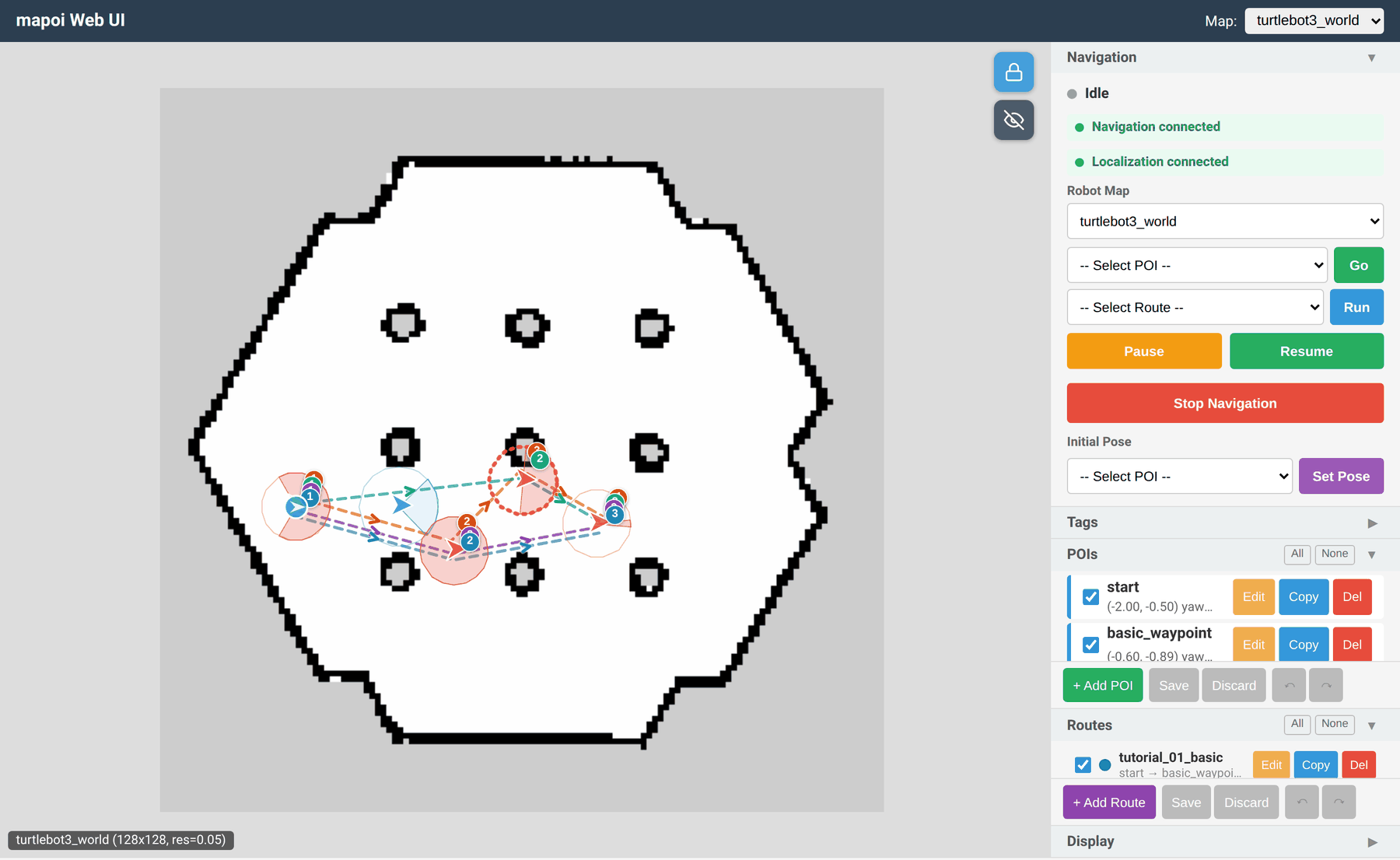
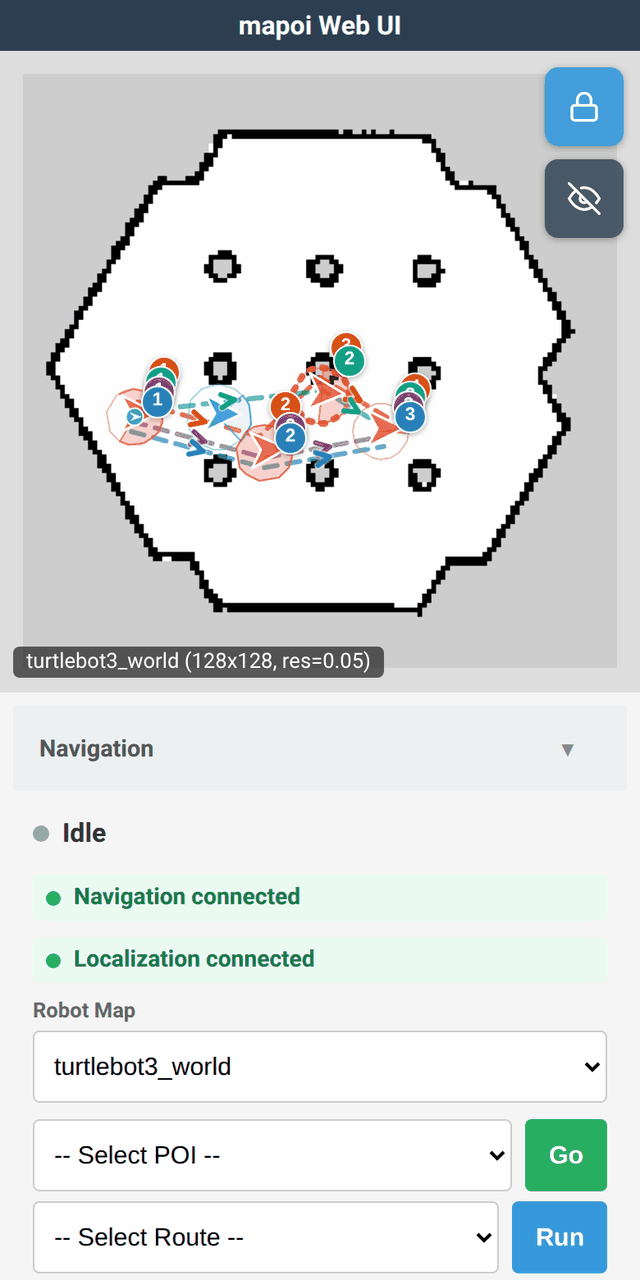
turtlebot3_world デモ実行中の Web UI(デスクトップ表示とスマートフォン表示)。
主な機能
- 地図管理: 複数地図の切り替え、Nav2 との連携
- POI 管理: YAML ベースの POI 定義、サービス経由での取得
- 自律走行: POI 名指定でのゴール走行、ルート走行、一時停止・再開
- POI 半径イベント: POI の半径にロボットが侵入/退出した際のイベント発行
-
タグシステム: システムタグ(
waypoint,landmark,pause)とユーザー定義タグによる POI 分類 - RViz2 GUI: 地図切替・ゴール指定・ルート走行の操作パネル、POI エディタ、ポーズ指定ツール
- Web UI: ブラウザからの地図表示・POI 編集・ナビゲーション操作・ロボット位置表示(スマートフォン対応)
- マーカー表示: RViz2 上での POI 可視化、ハイライト表示、半径表示
アーキテクチャ
flowchart LR
    UI["Web UI / RViz2 panels"]
    BRIDGE["mapoi_nav2_bridge"]
    SERVER["mapoi_server"]
    NAV2["Nav2"]
    CFG["mapoi_config.yaml (per map)"]
    UI -- "mapoi/nav/* command topics (goal_pose_poi, route, pause, resume, cancel, switch_map)" --> BRIDGE
    BRIDGE -- "navigate_to_pose / follow_waypoints actions" --> NAV2
    BRIDGE -- "mapoi/nav/status, mapoi/events" --> UI
    UI -- "mapoi/get_pois_info etc. (services)" --> SERVER
    BRIDGE -- "mapoi/select_map, mapoi/get_route_pois (services)" --> SERVER
    SERVER <--> CFG
上図は簡略版です (localization・RViz マーカー・status/event の詳細は省略)。ノード・topic・service の全体像は docs/architecture.ja.md を参照してください。
動作要件
- ROS 2 Humble (Ubuntu 22.04) または Jazzy (Ubuntu 24.04) または Docker
- Nav2 ほか依存パッケージは、apt でインストールする場合も
rosdepでソースビルドする場合も自動解決されます
インストール
ROS 2 (Humble / Jazzy) を apt で導入済みの環境なら、以下でインストールできます。
# source /opt/ros/<distro>/setup.bash   # humble または jazzy。既に source 済みならスキップ可 (確認: echo $ROS_DISTRO)
sudo apt install ros-$ROS_DISTRO-mapoi-turtlebot3-example
# サンプル不要ならコアのみ:
# sudo apt install ros-$ROS_DISTRO-mapoi
サンプル (
mapoi-turtlebot3-example) は Humble の arm64 では apt にまだ無い (upstream のturtlebot3バイナリが未収録) — その場合はソースビルドするか、代わりに Docker で試す を利用してください。自分でソースビルドする場合は CONTRIBUTING.md を参照してください。
サンプルを試す
export TURTLEBOT3_MODEL=burger
ros2 launch mapoi_turtlebot3_example turtlebot3_navigation.launch.yaml
ブラウザから Web UI にアクセス:
http://localhost:8765
スマートフォンからも同一ネットワーク内であればアクセスできます。その場合、localhost の部分を実行している PC の IP アドレスに変更してください。 地図表示・POI 編集・ナビゲーション操作・ロボット位置表示が可能です。
コマンドで目的地を指定したい場合には、別ターミナルから自律走行をテストできます。
ros2 topic pub -1 /mapoi/nav/goal_pose_poi std_msgs/msg/String "{data: goal}"
Docker で試す
ROS 2 環境が無くても、ghcr.io 配布 image を docker run すれば同じサンプルを試せます。
```sh
xhost +local:docker
docker pull ghcr.io/shimz-robotics/mapoi:jazzy # jazzy/latest は main 追従のローリングタグ。再訪時も pull で最新化
docker run –rm -it –network host –ipc host
-e DISPLAY=$DISPLAY
-e QT_X11_NO_MITSHM=1
-v /tmp/.X11-unix:/tmp/.X11-unix
ghcr.io/shimz-robotics/mapoi:jazzy
File truncated at 100 lines see the full file
CONTRIBUTING
Contributing to mapoi
Development setup
Clone into a colcon workspace and build (CI uses the same src/mapoi layout):
# cd path/to/your_ws
git clone https://github.com/shimz-robotics/mapoi.git src/mapoi
rosdep install --from-paths src --ignore-src -r -y
colcon build --symlink-install --cmake-args -DBUILD_TESTING=ON
source install/setup.bash
CI (.github/workflows/ros-test.yml) builds and tests on both Humble and Jazzy, so changes must work on both distros. If you develop on a single distro, the Docker dev environment can verify the other one (e.g. ROS_DISTRO=humble docker compose run --rm dev; see docs/docker.md).
Workflow
- Open an Issue first (see the issue templates) and describe the bug or proposal
- Create a branch and open a PR that references the Issue — no direct pushes to
main - All CI checks must pass before merge
Tests
| PR gate | Workflow |
|---|---|
C++ gtest + pytest (colcon test, launch_test excluded) |
ros-test.yml (humble / jazzy matrix) |
| WebUI vitest + Playwright e2e, Python consistency scripts | consistency-check.yml |
The slow launch_test integration tests are excluded from the PR gate; they run on main push, the weekly schedule, and manual dispatch.
Whether a change needs a new test at all is a deliberate decision — see docs/testing-policy.md (Japanese) for the criteria (criticality × execution cost × maintenance load) and the extra bar for new launch_test / e2e files.
Docs assets
The screenshots in docs/images/ are captured from the Web UI running the turtlebot3_world demo (the ROS-independent e2e mock server under mapoi_webui/tests/web/e2e/ can serve the same UI for capturing). Keep images small — optimized PNG, roughly under 100 KB each.
Before opening a PR
-
colcon test --ctest-args -LE launch_testpasses locally (this matches the PR gate), then check withcolcon test-result --verbose - The README of every package whose behavior or interface you changed is updated (each package ships its own README)
|
|
mapoi repositorymapoi mapoi_interfaces mapoi_rviz_plugins mapoi_server mapoi_turtlebot3_example mapoi_webui |
ROS Distro
|
Repository Summary
| Checkout URI | https://github.com/shimz-robotics/mapoi.git |
| VCS Type | git |
| VCS Version | main |
| Last Updated | 2026-09-26 |
| Dev Status | DEVELOPED |
| Released | RELEASED |
| Contributing |
Help Wanted (-)
Good First Issues (-) Pull Requests to Review (-) |
Packages
| Name | Version |
|---|---|
| mapoi | 0.6.0 |
| mapoi_interfaces | 0.6.0 |
| mapoi_rviz_plugins | 0.6.0 |
| mapoi_server | 0.6.0 |
| mapoi_turtlebot3_example | 0.6.0 |
| mapoi_webui | 0.6.0 |
README
mapoi
English version (primary): README.md 本ファイルは日本語スナップショットです。最新の内容は英語版を参照してください。
Navigation2 向けの地図(Map)と関心地点(POI: Point of Interest)を管理するメタパッケージです。 地図の切り替え、POI の管理、RViz2 GUI からの自律走行操作、POI 半径イベントの検知を提供します。
turtlebot3_world デモ実行中の Web UI(デスクトップ表示とスマートフォン表示)。
主な機能
- 地図管理: 複数地図の切り替え、Nav2 との連携
- POI 管理: YAML ベースの POI 定義、サービス経由での取得
- 自律走行: POI 名指定でのゴール走行、ルート走行、一時停止・再開
- POI 半径イベント: POI の半径にロボットが侵入/退出した際のイベント発行
-
タグシステム: システムタグ(
waypoint,landmark,pause)とユーザー定義タグによる POI 分類 - RViz2 GUI: 地図切替・ゴール指定・ルート走行の操作パネル、POI エディタ、ポーズ指定ツール
- Web UI: ブラウザからの地図表示・POI 編集・ナビゲーション操作・ロボット位置表示(スマートフォン対応)
- マーカー表示: RViz2 上での POI 可視化、ハイライト表示、半径表示
アーキテクチャ
flowchart LR
    UI["Web UI / RViz2 panels"]
    BRIDGE["mapoi_nav2_bridge"]
    SERVER["mapoi_server"]
    NAV2["Nav2"]
    CFG["mapoi_config.yaml (per map)"]
    UI -- "mapoi/nav/* command topics (goal_pose_poi, route, pause, resume, cancel, switch_map)" --> BRIDGE
    BRIDGE -- "navigate_to_pose / follow_waypoints actions" --> NAV2
    BRIDGE -- "mapoi/nav/status, mapoi/events" --> UI
    UI -- "mapoi/get_pois_info etc. (services)" --> SERVER
    BRIDGE -- "mapoi/select_map, mapoi/get_route_pois (services)" --> SERVER
    SERVER <--> CFG
上図は簡略版です (localization・RViz マーカー・status/event の詳細は省略)。ノード・topic・service の全体像は docs/architecture.ja.md を参照してください。
動作要件
- ROS 2 Humble (Ubuntu 22.04) または Jazzy (Ubuntu 24.04) または Docker
- Nav2 ほか依存パッケージは、apt でインストールする場合も
rosdepでソースビルドする場合も自動解決されます
インストール
ROS 2 (Humble / Jazzy) を apt で導入済みの環境なら、以下でインストールできます。
# source /opt/ros/<distro>/setup.bash   # humble または jazzy。既に source 済みならスキップ可 (確認: echo $ROS_DISTRO)
sudo apt install ros-$ROS_DISTRO-mapoi-turtlebot3-example
# サンプル不要ならコアのみ:
# sudo apt install ros-$ROS_DISTRO-mapoi
サンプル (
mapoi-turtlebot3-example) は Humble の arm64 では apt にまだ無い (upstream のturtlebot3バイナリが未収録) — その場合はソースビルドするか、代わりに Docker で試す を利用してください。自分でソースビルドする場合は CONTRIBUTING.md を参照してください。
サンプルを試す
export TURTLEBOT3_MODEL=burger
ros2 launch mapoi_turtlebot3_example turtlebot3_navigation.launch.yaml
ブラウザから Web UI にアクセス:
http://localhost:8765
スマートフォンからも同一ネットワーク内であればアクセスできます。その場合、localhost の部分を実行している PC の IP アドレスに変更してください。 地図表示・POI 編集・ナビゲーション操作・ロボット位置表示が可能です。
コマンドで目的地を指定したい場合には、別ターミナルから自律走行をテストできます。
ros2 topic pub -1 /mapoi/nav/goal_pose_poi std_msgs/msg/String "{data: goal}"
Docker で試す
ROS 2 環境が無くても、ghcr.io 配布 image を docker run すれば同じサンプルを試せます。
```sh
xhost +local:docker
docker pull ghcr.io/shimz-robotics/mapoi:jazzy # jazzy/latest は main 追従のローリングタグ。再訪時も pull で最新化
docker run –rm -it –network host –ipc host
-e DISPLAY=$DISPLAY
-e QT_X11_NO_MITSHM=1
-v /tmp/.X11-unix:/tmp/.X11-unix
ghcr.io/shimz-robotics/mapoi:jazzy
File truncated at 100 lines see the full file
CONTRIBUTING
Contributing to mapoi
Development setup
Clone into a colcon workspace and build (CI uses the same src/mapoi layout):
# cd path/to/your_ws
git clone https://github.com/shimz-robotics/mapoi.git src/mapoi
rosdep install --from-paths src --ignore-src -r -y
colcon build --symlink-install --cmake-args -DBUILD_TESTING=ON
source install/setup.bash
CI (.github/workflows/ros-test.yml) builds and tests on both Humble and Jazzy, so changes must work on both distros. If you develop on a single distro, the Docker dev environment can verify the other one (e.g. ROS_DISTRO=humble docker compose run --rm dev; see docs/docker.md).
Workflow
- Open an Issue first (see the issue templates) and describe the bug or proposal
- Create a branch and open a PR that references the Issue — no direct pushes to
main - All CI checks must pass before merge
Tests
| PR gate | Workflow |
|---|---|
C++ gtest + pytest (colcon test, launch_test excluded) |
ros-test.yml (humble / jazzy matrix) |
| WebUI vitest + Playwright e2e, Python consistency scripts | consistency-check.yml |
The slow launch_test integration tests are excluded from the PR gate; they run on main push, the weekly schedule, and manual dispatch.
Whether a change needs a new test at all is a deliberate decision — see docs/testing-policy.md (Japanese) for the criteria (criticality × execution cost × maintenance load) and the extra bar for new launch_test / e2e files.
Docs assets
The screenshots in docs/images/ are captured from the Web UI running the turtlebot3_world demo (the ROS-independent e2e mock server under mapoi_webui/tests/web/e2e/ can serve the same UI for capturing). Keep images small — optimized PNG, roughly under 100 KB each.
Before opening a PR
-
colcon test --ctest-args -LE launch_testpasses locally (this matches the PR gate), then check withcolcon test-result --verbose - The README of every package whose behavior or interface you changed is updated (each package ships its own README)
|
|
mapoi repositorymapoi mapoi_interfaces mapoi_rviz_plugins mapoi_server mapoi_turtlebot3_example mapoi_webui |
ROS Distro
|
Repository Summary
| Checkout URI | https://github.com/shimz-robotics/mapoi.git |
| VCS Type | git |
| VCS Version | main |
| Last Updated | 2026-09-26 |
| Dev Status | DEVELOPED |
| Released | RELEASED |
| Contributing |
Help Wanted (-)
Good First Issues (-) Pull Requests to Review (-) |
Packages
| Name | Version |
|---|---|
| mapoi | 0.6.0 |
| mapoi_interfaces | 0.6.0 |
| mapoi_rviz_plugins | 0.6.0 |
| mapoi_server | 0.6.0 |
| mapoi_turtlebot3_example | 0.6.0 |
| mapoi_webui | 0.6.0 |
README
mapoi
English version (primary): README.md 本ファイルは日本語スナップショットです。最新の内容は英語版を参照してください。
Navigation2 向けの地図(Map)と関心地点(POI: Point of Interest)を管理するメタパッケージです。 地図の切り替え、POI の管理、RViz2 GUI からの自律走行操作、POI 半径イベントの検知を提供します。
turtlebot3_world デモ実行中の Web UI(デスクトップ表示とスマートフォン表示)。
主な機能
- 地図管理: 複数地図の切り替え、Nav2 との連携
- POI 管理: YAML ベースの POI 定義、サービス経由での取得
- 自律走行: POI 名指定でのゴール走行、ルート走行、一時停止・再開
- POI 半径イベント: POI の半径にロボットが侵入/退出した際のイベント発行
-
タグシステム: システムタグ(
waypoint,landmark,pause)とユーザー定義タグによる POI 分類 - RViz2 GUI: 地図切替・ゴール指定・ルート走行の操作パネル、POI エディタ、ポーズ指定ツール
- Web UI: ブラウザからの地図表示・POI 編集・ナビゲーション操作・ロボット位置表示(スマートフォン対応)
- マーカー表示: RViz2 上での POI 可視化、ハイライト表示、半径表示
アーキテクチャ
flowchart LR
    UI["Web UI / RViz2 panels"]
    BRIDGE["mapoi_nav2_bridge"]
    SERVER["mapoi_server"]
    NAV2["Nav2"]
    CFG["mapoi_config.yaml (per map)"]
    UI -- "mapoi/nav/* command topics (goal_pose_poi, route, pause, resume, cancel, switch_map)" --> BRIDGE
    BRIDGE -- "navigate_to_pose / follow_waypoints actions" --> NAV2
    BRIDGE -- "mapoi/nav/status, mapoi/events" --> UI
    UI -- "mapoi/get_pois_info etc. (services)" --> SERVER
    BRIDGE -- "mapoi/select_map, mapoi/get_route_pois (services)" --> SERVER
    SERVER <--> CFG
上図は簡略版です (localization・RViz マーカー・status/event の詳細は省略)。ノード・topic・service の全体像は docs/architecture.ja.md を参照してください。
動作要件
- ROS 2 Humble (Ubuntu 22.04) または Jazzy (Ubuntu 24.04) または Docker
- Nav2 ほか依存パッケージは、apt でインストールする場合も
rosdepでソースビルドする場合も自動解決されます
インストール
ROS 2 (Humble / Jazzy) を apt で導入済みの環境なら、以下でインストールできます。
# source /opt/ros/<distro>/setup.bash   # humble または jazzy。既に source 済みならスキップ可 (確認: echo $ROS_DISTRO)
sudo apt install ros-$ROS_DISTRO-mapoi-turtlebot3-example
# サンプル不要ならコアのみ:
# sudo apt install ros-$ROS_DISTRO-mapoi
サンプル (
mapoi-turtlebot3-example) は Humble の arm64 では apt にまだ無い (upstream のturtlebot3バイナリが未収録) — その場合はソースビルドするか、代わりに Docker で試す を利用してください。自分でソースビルドする場合は CONTRIBUTING.md を参照してください。
サンプルを試す
export TURTLEBOT3_MODEL=burger
ros2 launch mapoi_turtlebot3_example turtlebot3_navigation.launch.yaml
ブラウザから Web UI にアクセス:
http://localhost:8765
スマートフォンからも同一ネットワーク内であればアクセスできます。その場合、localhost の部分を実行している PC の IP アドレスに変更してください。 地図表示・POI 編集・ナビゲーション操作・ロボット位置表示が可能です。
コマンドで目的地を指定したい場合には、別ターミナルから自律走行をテストできます。
ros2 topic pub -1 /mapoi/nav/goal_pose_poi std_msgs/msg/String "{data: goal}"
Docker で試す
ROS 2 環境が無くても、ghcr.io 配布 image を docker run すれば同じサンプルを試せます。
```sh
xhost +local:docker
docker pull ghcr.io/shimz-robotics/mapoi:jazzy # jazzy/latest は main 追従のローリングタグ。再訪時も pull で最新化
docker run –rm -it –network host –ipc host
-e DISPLAY=$DISPLAY
-e QT_X11_NO_MITSHM=1
-v /tmp/.X11-unix:/tmp/.X11-unix
ghcr.io/shimz-robotics/mapoi:jazzy
File truncated at 100 lines see the full file
CONTRIBUTING
Contributing to mapoi
Development setup
Clone into a colcon workspace and build (CI uses the same src/mapoi layout):
# cd path/to/your_ws
git clone https://github.com/shimz-robotics/mapoi.git src/mapoi
rosdep install --from-paths src --ignore-src -r -y
colcon build --symlink-install --cmake-args -DBUILD_TESTING=ON
source install/setup.bash
CI (.github/workflows/ros-test.yml) builds and tests on both Humble and Jazzy, so changes must work on both distros. If you develop on a single distro, the Docker dev environment can verify the other one (e.g. ROS_DISTRO=humble docker compose run --rm dev; see docs/docker.md).
Workflow
- Open an Issue first (see the issue templates) and describe the bug or proposal
- Create a branch and open a PR that references the Issue — no direct pushes to
main - All CI checks must pass before merge
Tests
| PR gate | Workflow |
|---|---|
C++ gtest + pytest (colcon test, launch_test excluded) |
ros-test.yml (humble / jazzy matrix) |
| WebUI vitest + Playwright e2e, Python consistency scripts | consistency-check.yml |
The slow launch_test integration tests are excluded from the PR gate; they run on main push, the weekly schedule, and manual dispatch.
Whether a change needs a new test at all is a deliberate decision — see docs/testing-policy.md (Japanese) for the criteria (criticality × execution cost × maintenance load) and the extra bar for new launch_test / e2e files.
Docs assets
The screenshots in docs/images/ are captured from the Web UI running the turtlebot3_world demo (the ROS-independent e2e mock server under mapoi_webui/tests/web/e2e/ can serve the same UI for capturing). Keep images small — optimized PNG, roughly under 100 KB each.
Before opening a PR
-
colcon test --ctest-args -LE launch_testpasses locally (this matches the PR gate), then check withcolcon test-result --verbose - The README of every package whose behavior or interface you changed is updated (each package ships its own README)
|
|
mapoi repositorymapoi mapoi_interfaces mapoi_rviz_plugins mapoi_server mapoi_turtlebot3_example mapoi_webui |
ROS Distro
|
Repository Summary
| Checkout URI | https://github.com/shimz-robotics/mapoi.git |
| VCS Type | git |
| VCS Version | main |
| Last Updated | 2026-09-26 |
| Dev Status | DEVELOPED |
| Released | RELEASED |
| Contributing |
Help Wanted (-)
Good First Issues (-) Pull Requests to Review (-) |
Packages
| Name | Version |
|---|---|
| mapoi | 0.6.0 |
| mapoi_interfaces | 0.6.0 |
| mapoi_rviz_plugins | 0.6.0 |
| mapoi_server | 0.6.0 |
| mapoi_turtlebot3_example | 0.6.0 |
| mapoi_webui | 0.6.0 |
README
mapoi
English version (primary): README.md 本ファイルは日本語スナップショットです。最新の内容は英語版を参照してください。
Navigation2 向けの地図(Map)と関心地点(POI: Point of Interest)を管理するメタパッケージです。 地図の切り替え、POI の管理、RViz2 GUI からの自律走行操作、POI 半径イベントの検知を提供します。
turtlebot3_world デモ実行中の Web UI(デスクトップ表示とスマートフォン表示)。
主な機能
- 地図管理: 複数地図の切り替え、Nav2 との連携
- POI 管理: YAML ベースの POI 定義、サービス経由での取得
- 自律走行: POI 名指定でのゴール走行、ルート走行、一時停止・再開
- POI 半径イベント: POI の半径にロボットが侵入/退出した際のイベント発行
-
タグシステム: システムタグ(
waypoint,landmark,pause)とユーザー定義タグによる POI 分類 - RViz2 GUI: 地図切替・ゴール指定・ルート走行の操作パネル、POI エディタ、ポーズ指定ツール
- Web UI: ブラウザからの地図表示・POI 編集・ナビゲーション操作・ロボット位置表示(スマートフォン対応)
- マーカー表示: RViz2 上での POI 可視化、ハイライト表示、半径表示
アーキテクチャ
flowchart LR
    UI["Web UI / RViz2 panels"]
    BRIDGE["mapoi_nav2_bridge"]
    SERVER["mapoi_server"]
    NAV2["Nav2"]
    CFG["mapoi_config.yaml (per map)"]
    UI -- "mapoi/nav/* command topics (goal_pose_poi, route, pause, resume, cancel, switch_map)" --> BRIDGE
    BRIDGE -- "navigate_to_pose / follow_waypoints actions" --> NAV2
    BRIDGE -- "mapoi/nav/status, mapoi/events" --> UI
    UI -- "mapoi/get_pois_info etc. (services)" --> SERVER
    BRIDGE -- "mapoi/select_map, mapoi/get_route_pois (services)" --> SERVER
    SERVER <--> CFG
上図は簡略版です (localization・RViz マーカー・status/event の詳細は省略)。ノード・topic・service の全体像は docs/architecture.ja.md を参照してください。
動作要件
- ROS 2 Humble (Ubuntu 22.04) または Jazzy (Ubuntu 24.04) または Docker
- Nav2 ほか依存パッケージは、apt でインストールする場合も
rosdepでソースビルドする場合も自動解決されます
インストール
ROS 2 (Humble / Jazzy) を apt で導入済みの環境なら、以下でインストールできます。
# source /opt/ros/<distro>/setup.bash   # humble または jazzy。既に source 済みならスキップ可 (確認: echo $ROS_DISTRO)
sudo apt install ros-$ROS_DISTRO-mapoi-turtlebot3-example
# サンプル不要ならコアのみ:
# sudo apt install ros-$ROS_DISTRO-mapoi
サンプル (
mapoi-turtlebot3-example) は Humble の arm64 では apt にまだ無い (upstream のturtlebot3バイナリが未収録) — その場合はソースビルドするか、代わりに Docker で試す を利用してください。自分でソースビルドする場合は CONTRIBUTING.md を参照してください。
サンプルを試す
export TURTLEBOT3_MODEL=burger
ros2 launch mapoi_turtlebot3_example turtlebot3_navigation.launch.yaml
ブラウザから Web UI にアクセス:
http://localhost:8765
スマートフォンからも同一ネットワーク内であればアクセスできます。その場合、localhost の部分を実行している PC の IP アドレスに変更してください。 地図表示・POI 編集・ナビゲーション操作・ロボット位置表示が可能です。
コマンドで目的地を指定したい場合には、別ターミナルから自律走行をテストできます。
ros2 topic pub -1 /mapoi/nav/goal_pose_poi std_msgs/msg/String "{data: goal}"
Docker で試す
ROS 2 環境が無くても、ghcr.io 配布 image を docker run すれば同じサンプルを試せます。
```sh
xhost +local:docker
docker pull ghcr.io/shimz-robotics/mapoi:jazzy # jazzy/latest は main 追従のローリングタグ。再訪時も pull で最新化
docker run –rm -it –network host –ipc host
-e DISPLAY=$DISPLAY
-e QT_X11_NO_MITSHM=1
-v /tmp/.X11-unix:/tmp/.X11-unix
ghcr.io/shimz-robotics/mapoi:jazzy
File truncated at 100 lines see the full file
CONTRIBUTING
Contributing to mapoi
Development setup
Clone into a colcon workspace and build (CI uses the same src/mapoi layout):
# cd path/to/your_ws
git clone https://github.com/shimz-robotics/mapoi.git src/mapoi
rosdep install --from-paths src --ignore-src -r -y
colcon build --symlink-install --cmake-args -DBUILD_TESTING=ON
source install/setup.bash
CI (.github/workflows/ros-test.yml) builds and tests on both Humble and Jazzy, so changes must work on both distros. If you develop on a single distro, the Docker dev environment can verify the other one (e.g. ROS_DISTRO=humble docker compose run --rm dev; see docs/docker.md).
Workflow
- Open an Issue first (see the issue templates) and describe the bug or proposal
- Create a branch and open a PR that references the Issue — no direct pushes to
main - All CI checks must pass before merge
Tests
| PR gate | Workflow |
|---|---|
C++ gtest + pytest (colcon test, launch_test excluded) |
ros-test.yml (humble / jazzy matrix) |
| WebUI vitest + Playwright e2e, Python consistency scripts | consistency-check.yml |
The slow launch_test integration tests are excluded from the PR gate; they run on main push, the weekly schedule, and manual dispatch.
Whether a change needs a new test at all is a deliberate decision — see docs/testing-policy.md (Japanese) for the criteria (criticality × execution cost × maintenance load) and the extra bar for new launch_test / e2e files.
Docs assets
The screenshots in docs/images/ are captured from the Web UI running the turtlebot3_world demo (the ROS-independent e2e mock server under mapoi_webui/tests/web/e2e/ can serve the same UI for capturing). Keep images small — optimized PNG, roughly under 100 KB each.
Before opening a PR
-
colcon test --ctest-args -LE launch_testpasses locally (this matches the PR gate), then check withcolcon test-result --verbose - The README of every package whose behavior or interface you changed is updated (each package ships its own README)
|
|
mapoi repositorymapoi mapoi_interfaces mapoi_rviz_plugins mapoi_server mapoi_turtlebot3_example mapoi_webui |
ROS Distro
|
Repository Summary
| Checkout URI | https://github.com/shimz-robotics/mapoi.git |
| VCS Type | git |
| VCS Version | main |
| Last Updated | 2026-09-26 |
| Dev Status | DEVELOPED |
| Released | RELEASED |
| Contributing |
Help Wanted (-)
Good First Issues (-) Pull Requests to Review (-) |
Packages
| Name | Version |
|---|---|
| mapoi | 0.6.0 |
| mapoi_interfaces | 0.6.0 |
| mapoi_rviz_plugins | 0.6.0 |
| mapoi_server | 0.6.0 |
| mapoi_turtlebot3_example | 0.6.0 |
| mapoi_webui | 0.6.0 |
README
mapoi
English version (primary): README.md 本ファイルは日本語スナップショットです。最新の内容は英語版を参照してください。
Navigation2 向けの地図(Map)と関心地点(POI: Point of Interest)を管理するメタパッケージです。 地図の切り替え、POI の管理、RViz2 GUI からの自律走行操作、POI 半径イベントの検知を提供します。
turtlebot3_world デモ実行中の Web UI(デスクトップ表示とスマートフォン表示)。
主な機能
- 地図管理: 複数地図の切り替え、Nav2 との連携
- POI 管理: YAML ベースの POI 定義、サービス経由での取得
- 自律走行: POI 名指定でのゴール走行、ルート走行、一時停止・再開
- POI 半径イベント: POI の半径にロボットが侵入/退出した際のイベント発行
-
タグシステム: システムタグ(
waypoint,landmark,pause)とユーザー定義タグによる POI 分類 - RViz2 GUI: 地図切替・ゴール指定・ルート走行の操作パネル、POI エディタ、ポーズ指定ツール
- Web UI: ブラウザからの地図表示・POI 編集・ナビゲーション操作・ロボット位置表示(スマートフォン対応)
- マーカー表示: RViz2 上での POI 可視化、ハイライト表示、半径表示
アーキテクチャ
flowchart LR
    UI["Web UI / RViz2 panels"]
    BRIDGE["mapoi_nav2_bridge"]
    SERVER["mapoi_server"]
    NAV2["Nav2"]
    CFG["mapoi_config.yaml (per map)"]
    UI -- "mapoi/nav/* command topics (goal_pose_poi, route, pause, resume, cancel, switch_map)" --> BRIDGE
    BRIDGE -- "navigate_to_pose / follow_waypoints actions" --> NAV2
    BRIDGE -- "mapoi/nav/status, mapoi/events" --> UI
    UI -- "mapoi/get_pois_info etc. (services)" --> SERVER
    BRIDGE -- "mapoi/select_map, mapoi/get_route_pois (services)" --> SERVER
    SERVER <--> CFG
上図は簡略版です (localization・RViz マーカー・status/event の詳細は省略)。ノード・topic・service の全体像は docs/architecture.ja.md を参照してください。
動作要件
- ROS 2 Humble (Ubuntu 22.04) または Jazzy (Ubuntu 24.04) または Docker
- Nav2 ほか依存パッケージは、apt でインストールする場合も
rosdepでソースビルドする場合も自動解決されます
インストール
ROS 2 (Humble / Jazzy) を apt で導入済みの環境なら、以下でインストールできます。
# source /opt/ros/<distro>/setup.bash   # humble または jazzy。既に source 済みならスキップ可 (確認: echo $ROS_DISTRO)
sudo apt install ros-$ROS_DISTRO-mapoi-turtlebot3-example
# サンプル不要ならコアのみ:
# sudo apt install ros-$ROS_DISTRO-mapoi
サンプル (
mapoi-turtlebot3-example) は Humble の arm64 では apt にまだ無い (upstream のturtlebot3バイナリが未収録) — その場合はソースビルドするか、代わりに Docker で試す を利用してください。自分でソースビルドする場合は CONTRIBUTING.md を参照してください。
サンプルを試す
export TURTLEBOT3_MODEL=burger
ros2 launch mapoi_turtlebot3_example turtlebot3_navigation.launch.yaml
ブラウザから Web UI にアクセス:
http://localhost:8765
スマートフォンからも同一ネットワーク内であればアクセスできます。その場合、localhost の部分を実行している PC の IP アドレスに変更してください。 地図表示・POI 編集・ナビゲーション操作・ロボット位置表示が可能です。
コマンドで目的地を指定したい場合には、別ターミナルから自律走行をテストできます。
ros2 topic pub -1 /mapoi/nav/goal_pose_poi std_msgs/msg/String "{data: goal}"
Docker で試す
ROS 2 環境が無くても、ghcr.io 配布 image を docker run すれば同じサンプルを試せます。
```sh
xhost +local:docker
docker pull ghcr.io/shimz-robotics/mapoi:jazzy # jazzy/latest は main 追従のローリングタグ。再訪時も pull で最新化
docker run –rm -it –network host –ipc host
-e DISPLAY=$DISPLAY
-e QT_X11_NO_MITSHM=1
-v /tmp/.X11-unix:/tmp/.X11-unix
ghcr.io/shimz-robotics/mapoi:jazzy
File truncated at 100 lines see the full file
CONTRIBUTING
Contributing to mapoi
Development setup
Clone into a colcon workspace and build (CI uses the same src/mapoi layout):
# cd path/to/your_ws
git clone https://github.com/shimz-robotics/mapoi.git src/mapoi
rosdep install --from-paths src --ignore-src -r -y
colcon build --symlink-install --cmake-args -DBUILD_TESTING=ON
source install/setup.bash
CI (.github/workflows/ros-test.yml) builds and tests on both Humble and Jazzy, so changes must work on both distros. If you develop on a single distro, the Docker dev environment can verify the other one (e.g. ROS_DISTRO=humble docker compose run --rm dev; see docs/docker.md).
Workflow
- Open an Issue first (see the issue templates) and describe the bug or proposal
- Create a branch and open a PR that references the Issue — no direct pushes to
main - All CI checks must pass before merge
Tests
| PR gate | Workflow |
|---|---|
C++ gtest + pytest (colcon test, launch_test excluded) |
ros-test.yml (humble / jazzy matrix) |
| WebUI vitest + Playwright e2e, Python consistency scripts | consistency-check.yml |
The slow launch_test integration tests are excluded from the PR gate; they run on main push, the weekly schedule, and manual dispatch.
Whether a change needs a new test at all is a deliberate decision — see docs/testing-policy.md (Japanese) for the criteria (criticality × execution cost × maintenance load) and the extra bar for new launch_test / e2e files.
Docs assets
The screenshots in docs/images/ are captured from the Web UI running the turtlebot3_world demo (the ROS-independent e2e mock server under mapoi_webui/tests/web/e2e/ can serve the same UI for capturing). Keep images small — optimized PNG, roughly under 100 KB each.
Before opening a PR
-
colcon test --ctest-args -LE launch_testpasses locally (this matches the PR gate), then check withcolcon test-result --verbose - The README of every package whose behavior or interface you changed is updated (each package ships its own README)
|
|
mapoi repositorymapoi mapoi_interfaces mapoi_rviz_plugins mapoi_server mapoi_turtlebot3_example mapoi_webui |
ROS Distro
|
Repository Summary
| Checkout URI | https://github.com/shimz-robotics/mapoi.git |
| VCS Type | git |
| VCS Version | main |
| Last Updated | 2026-09-26 |
| Dev Status | DEVELOPED |
| Released | RELEASED |
| Contributing |
Help Wanted (-)
Good First Issues (-) Pull Requests to Review (-) |
Packages
| Name | Version |
|---|---|
| mapoi | 0.6.0 |
| mapoi_interfaces | 0.6.0 |
| mapoi_rviz_plugins | 0.6.0 |
| mapoi_server | 0.6.0 |
| mapoi_turtlebot3_example | 0.6.0 |
| mapoi_webui | 0.6.0 |
README
mapoi
English version (primary): README.md 本ファイルは日本語スナップショットです。最新の内容は英語版を参照してください。
Navigation2 向けの地図(Map)と関心地点(POI: Point of Interest)を管理するメタパッケージです。 地図の切り替え、POI の管理、RViz2 GUI からの自律走行操作、POI 半径イベントの検知を提供します。
turtlebot3_world デモ実行中の Web UI(デスクトップ表示とスマートフォン表示)。
主な機能
- 地図管理: 複数地図の切り替え、Nav2 との連携
- POI 管理: YAML ベースの POI 定義、サービス経由での取得
- 自律走行: POI 名指定でのゴール走行、ルート走行、一時停止・再開
- POI 半径イベント: POI の半径にロボットが侵入/退出した際のイベント発行
-
タグシステム: システムタグ(
waypoint,landmark,pause)とユーザー定義タグによる POI 分類 - RViz2 GUI: 地図切替・ゴール指定・ルート走行の操作パネル、POI エディタ、ポーズ指定ツール
- Web UI: ブラウザからの地図表示・POI 編集・ナビゲーション操作・ロボット位置表示(スマートフォン対応)
- マーカー表示: RViz2 上での POI 可視化、ハイライト表示、半径表示
アーキテクチャ
flowchart LR
    UI["Web UI / RViz2 panels"]
    BRIDGE["mapoi_nav2_bridge"]
    SERVER["mapoi_server"]
    NAV2["Nav2"]
    CFG["mapoi_config.yaml (per map)"]
    UI -- "mapoi/nav/* command topics (goal_pose_poi, route, pause, resume, cancel, switch_map)" --> BRIDGE
    BRIDGE -- "navigate_to_pose / follow_waypoints actions" --> NAV2
    BRIDGE -- "mapoi/nav/status, mapoi/events" --> UI
    UI -- "mapoi/get_pois_info etc. (services)" --> SERVER
    BRIDGE -- "mapoi/select_map, mapoi/get_route_pois (services)" --> SERVER
    SERVER <--> CFG
上図は簡略版です (localization・RViz マーカー・status/event の詳細は省略)。ノード・topic・service の全体像は docs/architecture.ja.md を参照してください。
動作要件
- ROS 2 Humble (Ubuntu 22.04) または Jazzy (Ubuntu 24.04) または Docker
- Nav2 ほか依存パッケージは、apt でインストールする場合も
rosdepでソースビルドする場合も自動解決されます
インストール
ROS 2 (Humble / Jazzy) を apt で導入済みの環境なら、以下でインストールできます。
# source /opt/ros/<distro>/setup.bash   # humble または jazzy。既に source 済みならスキップ可 (確認: echo $ROS_DISTRO)
sudo apt install ros-$ROS_DISTRO-mapoi-turtlebot3-example
# サンプル不要ならコアのみ:
# sudo apt install ros-$ROS_DISTRO-mapoi
サンプル (
mapoi-turtlebot3-example) は Humble の arm64 では apt にまだ無い (upstream のturtlebot3バイナリが未収録) — その場合はソースビルドするか、代わりに Docker で試す を利用してください。自分でソースビルドする場合は CONTRIBUTING.md を参照してください。
サンプルを試す
export TURTLEBOT3_MODEL=burger
ros2 launch mapoi_turtlebot3_example turtlebot3_navigation.launch.yaml
ブラウザから Web UI にアクセス:
http://localhost:8765
スマートフォンからも同一ネットワーク内であればアクセスできます。その場合、localhost の部分を実行している PC の IP アドレスに変更してください。 地図表示・POI 編集・ナビゲーション操作・ロボット位置表示が可能です。
コマンドで目的地を指定したい場合には、別ターミナルから自律走行をテストできます。
ros2 topic pub -1 /mapoi/nav/goal_pose_poi std_msgs/msg/String "{data: goal}"
Docker で試す
ROS 2 環境が無くても、ghcr.io 配布 image を docker run すれば同じサンプルを試せます。
```sh
xhost +local:docker
docker pull ghcr.io/shimz-robotics/mapoi:jazzy # jazzy/latest は main 追従のローリングタグ。再訪時も pull で最新化
docker run –rm -it –network host –ipc host
-e DISPLAY=$DISPLAY
-e QT_X11_NO_MITSHM=1
-v /tmp/.X11-unix:/tmp/.X11-unix
ghcr.io/shimz-robotics/mapoi:jazzy
File truncated at 100 lines see the full file
CONTRIBUTING
Contributing to mapoi
Development setup
Clone into a colcon workspace and build (CI uses the same src/mapoi layout):
# cd path/to/your_ws
git clone https://github.com/shimz-robotics/mapoi.git src/mapoi
rosdep install --from-paths src --ignore-src -r -y
colcon build --symlink-install --cmake-args -DBUILD_TESTING=ON
source install/setup.bash
CI (.github/workflows/ros-test.yml) builds and tests on both Humble and Jazzy, so changes must work on both distros. If you develop on a single distro, the Docker dev environment can verify the other one (e.g. ROS_DISTRO=humble docker compose run --rm dev; see docs/docker.md).
Workflow
- Open an Issue first (see the issue templates) and describe the bug or proposal
- Create a branch and open a PR that references the Issue — no direct pushes to
main - All CI checks must pass before merge
Tests
| PR gate | Workflow |
|---|---|
C++ gtest + pytest (colcon test, launch_test excluded) |
ros-test.yml (humble / jazzy matrix) |
| WebUI vitest + Playwright e2e, Python consistency scripts | consistency-check.yml |
The slow launch_test integration tests are excluded from the PR gate; they run on main push, the weekly schedule, and manual dispatch.
Whether a change needs a new test at all is a deliberate decision — see docs/testing-policy.md (Japanese) for the criteria (criticality × execution cost × maintenance load) and the extra bar for new launch_test / e2e files.
Docs assets
The screenshots in docs/images/ are captured from the Web UI running the turtlebot3_world demo (the ROS-independent e2e mock server under mapoi_webui/tests/web/e2e/ can serve the same UI for capturing). Keep images small — optimized PNG, roughly under 100 KB each.
Before opening a PR
-
colcon test --ctest-args -LE launch_testpasses locally (this matches the PR gate), then check withcolcon test-result --verbose - The README of every package whose behavior or interface you changed is updated (each package ships its own README)
|
|
mapoi repositorymapoi mapoi_interfaces mapoi_rviz_plugins mapoi_server mapoi_turtlebot3_example mapoi_webui |
ROS Distro
|
Repository Summary
| Checkout URI | https://github.com/shimz-robotics/mapoi.git |
| VCS Type | git |
| VCS Version | main |
| Last Updated | 2026-09-26 |
| Dev Status | DEVELOPED |
| Released | RELEASED |
| Contributing |
Help Wanted (-)
Good First Issues (-) Pull Requests to Review (-) |
Packages
| Name | Version |
|---|---|
| mapoi | 0.6.0 |
| mapoi_interfaces | 0.6.0 |
| mapoi_rviz_plugins | 0.6.0 |
| mapoi_server | 0.6.0 |
| mapoi_turtlebot3_example | 0.6.0 |
| mapoi_webui | 0.6.0 |
README
mapoi
English version (primary): README.md 本ファイルは日本語スナップショットです。最新の内容は英語版を参照してください。
Navigation2 向けの地図(Map)と関心地点(POI: Point of Interest)を管理するメタパッケージです。 地図の切り替え、POI の管理、RViz2 GUI からの自律走行操作、POI 半径イベントの検知を提供します。
turtlebot3_world デモ実行中の Web UI(デスクトップ表示とスマートフォン表示)。
主な機能
- 地図管理: 複数地図の切り替え、Nav2 との連携
- POI 管理: YAML ベースの POI 定義、サービス経由での取得
- 自律走行: POI 名指定でのゴール走行、ルート走行、一時停止・再開
- POI 半径イベント: POI の半径にロボットが侵入/退出した際のイベント発行
-
タグシステム: システムタグ(
waypoint,landmark,pause)とユーザー定義タグによる POI 分類 - RViz2 GUI: 地図切替・ゴール指定・ルート走行の操作パネル、POI エディタ、ポーズ指定ツール
- Web UI: ブラウザからの地図表示・POI 編集・ナビゲーション操作・ロボット位置表示(スマートフォン対応)
- マーカー表示: RViz2 上での POI 可視化、ハイライト表示、半径表示
アーキテクチャ
flowchart LR
    UI["Web UI / RViz2 panels"]
    BRIDGE["mapoi_nav2_bridge"]
    SERVER["mapoi_server"]
    NAV2["Nav2"]
    CFG["mapoi_config.yaml (per map)"]
    UI -- "mapoi/nav/* command topics (goal_pose_poi, route, pause, resume, cancel, switch_map)" --> BRIDGE
    BRIDGE -- "navigate_to_pose / follow_waypoints actions" --> NAV2
    BRIDGE -- "mapoi/nav/status, mapoi/events" --> UI
    UI -- "mapoi/get_pois_info etc. (services)" --> SERVER
    BRIDGE -- "mapoi/select_map, mapoi/get_route_pois (services)" --> SERVER
    SERVER <--> CFG
上図は簡略版です (localization・RViz マーカー・status/event の詳細は省略)。ノード・topic・service の全体像は docs/architecture.ja.md を参照してください。
動作要件
- ROS 2 Humble (Ubuntu 22.04) または Jazzy (Ubuntu 24.04) または Docker
- Nav2 ほか依存パッケージは、apt でインストールする場合も
rosdepでソースビルドする場合も自動解決されます
インストール
ROS 2 (Humble / Jazzy) を apt で導入済みの環境なら、以下でインストールできます。
# source /opt/ros/<distro>/setup.bash   # humble または jazzy。既に source 済みならスキップ可 (確認: echo $ROS_DISTRO)
sudo apt install ros-$ROS_DISTRO-mapoi-turtlebot3-example
# サンプル不要ならコアのみ:
# sudo apt install ros-$ROS_DISTRO-mapoi
サンプル (
mapoi-turtlebot3-example) は Humble の arm64 では apt にまだ無い (upstream のturtlebot3バイナリが未収録) — その場合はソースビルドするか、代わりに Docker で試す を利用してください。自分でソースビルドする場合は CONTRIBUTING.md を参照してください。
サンプルを試す
export TURTLEBOT3_MODEL=burger
ros2 launch mapoi_turtlebot3_example turtlebot3_navigation.launch.yaml
ブラウザから Web UI にアクセス:
http://localhost:8765
スマートフォンからも同一ネットワーク内であればアクセスできます。その場合、localhost の部分を実行している PC の IP アドレスに変更してください。 地図表示・POI 編集・ナビゲーション操作・ロボット位置表示が可能です。
コマンドで目的地を指定したい場合には、別ターミナルから自律走行をテストできます。
ros2 topic pub -1 /mapoi/nav/goal_pose_poi std_msgs/msg/String "{data: goal}"
Docker で試す
ROS 2 環境が無くても、ghcr.io 配布 image を docker run すれば同じサンプルを試せます。
```sh
xhost +local:docker
docker pull ghcr.io/shimz-robotics/mapoi:jazzy # jazzy/latest は main 追従のローリングタグ。再訪時も pull で最新化
docker run –rm -it –network host –ipc host
-e DISPLAY=$DISPLAY
-e QT_X11_NO_MITSHM=1
-v /tmp/.X11-unix:/tmp/.X11-unix
ghcr.io/shimz-robotics/mapoi:jazzy
File truncated at 100 lines see the full file
CONTRIBUTING
Contributing to mapoi
Development setup
Clone into a colcon workspace and build (CI uses the same src/mapoi layout):
# cd path/to/your_ws
git clone https://github.com/shimz-robotics/mapoi.git src/mapoi
rosdep install --from-paths src --ignore-src -r -y
colcon build --symlink-install --cmake-args -DBUILD_TESTING=ON
source install/setup.bash
CI (.github/workflows/ros-test.yml) builds and tests on both Humble and Jazzy, so changes must work on both distros. If you develop on a single distro, the Docker dev environment can verify the other one (e.g. ROS_DISTRO=humble docker compose run --rm dev; see docs/docker.md).
Workflow
- Open an Issue first (see the issue templates) and describe the bug or proposal
- Create a branch and open a PR that references the Issue — no direct pushes to
main - All CI checks must pass before merge
Tests
| PR gate | Workflow |
|---|---|
C++ gtest + pytest (colcon test, launch_test excluded) |
ros-test.yml (humble / jazzy matrix) |
| WebUI vitest + Playwright e2e, Python consistency scripts | consistency-check.yml |
The slow launch_test integration tests are excluded from the PR gate; they run on main push, the weekly schedule, and manual dispatch.
Whether a change needs a new test at all is a deliberate decision — see docs/testing-policy.md (Japanese) for the criteria (criticality × execution cost × maintenance load) and the extra bar for new launch_test / e2e files.
Docs assets
The screenshots in docs/images/ are captured from the Web UI running the turtlebot3_world demo (the ROS-independent e2e mock server under mapoi_webui/tests/web/e2e/ can serve the same UI for capturing). Keep images small — optimized PNG, roughly under 100 KB each.
Before opening a PR
-
colcon test --ctest-args -LE launch_testpasses locally (this matches the PR gate), then check withcolcon test-result --verbose - The README of every package whose behavior or interface you changed is updated (each package ships its own README)
|
|
mapoi repositorymapoi mapoi_interfaces mapoi_rviz_plugins mapoi_server mapoi_turtlebot3_example mapoi_webui |
ROS Distro
|
Repository Summary
| Checkout URI | https://github.com/shimz-robotics/mapoi.git |
| VCS Type | git |
| VCS Version | main |
| Last Updated | 2026-09-26 |
| Dev Status | DEVELOPED |
| Released | RELEASED |
| Contributing |
Help Wanted (-)
Good First Issues (-) Pull Requests to Review (-) |
Packages
| Name | Version |
|---|---|
| mapoi | 0.6.0 |
| mapoi_interfaces | 0.6.0 |
| mapoi_rviz_plugins | 0.6.0 |
| mapoi_server | 0.6.0 |
| mapoi_turtlebot3_example | 0.6.0 |
| mapoi_webui | 0.6.0 |
README
mapoi
English version (primary): README.md 本ファイルは日本語スナップショットです。最新の内容は英語版を参照してください。
Navigation2 向けの地図(Map)と関心地点(POI: Point of Interest)を管理するメタパッケージです。 地図の切り替え、POI の管理、RViz2 GUI からの自律走行操作、POI 半径イベントの検知を提供します。
turtlebot3_world デモ実行中の Web UI(デスクトップ表示とスマートフォン表示)。
主な機能
- 地図管理: 複数地図の切り替え、Nav2 との連携
- POI 管理: YAML ベースの POI 定義、サービス経由での取得
- 自律走行: POI 名指定でのゴール走行、ルート走行、一時停止・再開
- POI 半径イベント: POI の半径にロボットが侵入/退出した際のイベント発行
-
タグシステム: システムタグ(
waypoint,landmark,pause)とユーザー定義タグによる POI 分類 - RViz2 GUI: 地図切替・ゴール指定・ルート走行の操作パネル、POI エディタ、ポーズ指定ツール
- Web UI: ブラウザからの地図表示・POI 編集・ナビゲーション操作・ロボット位置表示(スマートフォン対応)
- マーカー表示: RViz2 上での POI 可視化、ハイライト表示、半径表示
アーキテクチャ
flowchart LR
    UI["Web UI / RViz2 panels"]
    BRIDGE["mapoi_nav2_bridge"]
    SERVER["mapoi_server"]
    NAV2["Nav2"]
    CFG["mapoi_config.yaml (per map)"]
    UI -- "mapoi/nav/* command topics (goal_pose_poi, route, pause, resume, cancel, switch_map)" --> BRIDGE
    BRIDGE -- "navigate_to_pose / follow_waypoints actions" --> NAV2
    BRIDGE -- "mapoi/nav/status, mapoi/events" --> UI
    UI -- "mapoi/get_pois_info etc. (services)" --> SERVER
    BRIDGE -- "mapoi/select_map, mapoi/get_route_pois (services)" --> SERVER
    SERVER <--> CFG
上図は簡略版です (localization・RViz マーカー・status/event の詳細は省略)。ノード・topic・service の全体像は docs/architecture.ja.md を参照してください。
動作要件
- ROS 2 Humble (Ubuntu 22.04) または Jazzy (Ubuntu 24.04) または Docker
- Nav2 ほか依存パッケージは、apt でインストールする場合も
rosdepでソースビルドする場合も自動解決されます
インストール
ROS 2 (Humble / Jazzy) を apt で導入済みの環境なら、以下でインストールできます。
# source /opt/ros/<distro>/setup.bash   # humble または jazzy。既に source 済みならスキップ可 (確認: echo $ROS_DISTRO)
sudo apt install ros-$ROS_DISTRO-mapoi-turtlebot3-example
# サンプル不要ならコアのみ:
# sudo apt install ros-$ROS_DISTRO-mapoi
サンプル (
mapoi-turtlebot3-example) は Humble の arm64 では apt にまだ無い (upstream のturtlebot3バイナリが未収録) — その場合はソースビルドするか、代わりに Docker で試す を利用してください。自分でソースビルドする場合は CONTRIBUTING.md を参照してください。
サンプルを試す
export TURTLEBOT3_MODEL=burger
ros2 launch mapoi_turtlebot3_example turtlebot3_navigation.launch.yaml
ブラウザから Web UI にアクセス:
http://localhost:8765
スマートフォンからも同一ネットワーク内であればアクセスできます。その場合、localhost の部分を実行している PC の IP アドレスに変更してください。 地図表示・POI 編集・ナビゲーション操作・ロボット位置表示が可能です。
コマンドで目的地を指定したい場合には、別ターミナルから自律走行をテストできます。
ros2 topic pub -1 /mapoi/nav/goal_pose_poi std_msgs/msg/String "{data: goal}"
Docker で試す
ROS 2 環境が無くても、ghcr.io 配布 image を docker run すれば同じサンプルを試せます。
```sh
xhost +local:docker
docker pull ghcr.io/shimz-robotics/mapoi:jazzy # jazzy/latest は main 追従のローリングタグ。再訪時も pull で最新化
docker run –rm -it –network host –ipc host
-e DISPLAY=$DISPLAY
-e QT_X11_NO_MITSHM=1
-v /tmp/.X11-unix:/tmp/.X11-unix
ghcr.io/shimz-robotics/mapoi:jazzy
File truncated at 100 lines see the full file
CONTRIBUTING
Contributing to mapoi
Development setup
Clone into a colcon workspace and build (CI uses the same src/mapoi layout):
# cd path/to/your_ws
git clone https://github.com/shimz-robotics/mapoi.git src/mapoi
rosdep install --from-paths src --ignore-src -r -y
colcon build --symlink-install --cmake-args -DBUILD_TESTING=ON
source install/setup.bash
CI (.github/workflows/ros-test.yml) builds and tests on both Humble and Jazzy, so changes must work on both distros. If you develop on a single distro, the Docker dev environment can verify the other one (e.g. ROS_DISTRO=humble docker compose run --rm dev; see docs/docker.md).
Workflow
- Open an Issue first (see the issue templates) and describe the bug or proposal
- Create a branch and open a PR that references the Issue — no direct pushes to
main - All CI checks must pass before merge
Tests
| PR gate | Workflow |
|---|---|
C++ gtest + pytest (colcon test, launch_test excluded) |
ros-test.yml (humble / jazzy matrix) |
| WebUI vitest + Playwright e2e, Python consistency scripts | consistency-check.yml |
The slow launch_test integration tests are excluded from the PR gate; they run on main push, the weekly schedule, and manual dispatch.
Whether a change needs a new test at all is a deliberate decision — see docs/testing-policy.md (Japanese) for the criteria (criticality × execution cost × maintenance load) and the extra bar for new launch_test / e2e files.
Docs assets
The screenshots in docs/images/ are captured from the Web UI running the turtlebot3_world demo (the ROS-independent e2e mock server under mapoi_webui/tests/web/e2e/ can serve the same UI for capturing). Keep images small — optimized PNG, roughly under 100 KB each.
Before opening a PR
-
colcon test --ctest-args -LE launch_testpasses locally (this matches the PR gate), then check withcolcon test-result --verbose - The README of every package whose behavior or interface you changed is updated (each package ships its own README)
|
|
mapoi repositorymapoi mapoi_interfaces mapoi_rviz_plugins mapoi_server mapoi_turtlebot3_example mapoi_webui |
ROS Distro
|
Repository Summary
| Checkout URI | https://github.com/shimz-robotics/mapoi.git |
| VCS Type | git |
| VCS Version | main |
| Last Updated | 2026-09-26 |
| Dev Status | DEVELOPED |
| Released | RELEASED |
| Contributing |
Help Wanted (-)
Good First Issues (-) Pull Requests to Review (-) |
Packages
| Name | Version |
|---|---|
| mapoi | 0.6.0 |
| mapoi_interfaces | 0.6.0 |
| mapoi_rviz_plugins | 0.6.0 |
| mapoi_server | 0.6.0 |
| mapoi_turtlebot3_example | 0.6.0 |
| mapoi_webui | 0.6.0 |
README
mapoi
English version (primary): README.md 本ファイルは日本語スナップショットです。最新の内容は英語版を参照してください。
Navigation2 向けの地図(Map)と関心地点(POI: Point of Interest)を管理するメタパッケージです。 地図の切り替え、POI の管理、RViz2 GUI からの自律走行操作、POI 半径イベントの検知を提供します。
turtlebot3_world デモ実行中の Web UI(デスクトップ表示とスマートフォン表示)。
主な機能
- 地図管理: 複数地図の切り替え、Nav2 との連携
- POI 管理: YAML ベースの POI 定義、サービス経由での取得
- 自律走行: POI 名指定でのゴール走行、ルート走行、一時停止・再開
- POI 半径イベント: POI の半径にロボットが侵入/退出した際のイベント発行
-
タグシステム: システムタグ(
waypoint,landmark,pause)とユーザー定義タグによる POI 分類 - RViz2 GUI: 地図切替・ゴール指定・ルート走行の操作パネル、POI エディタ、ポーズ指定ツール
- Web UI: ブラウザからの地図表示・POI 編集・ナビゲーション操作・ロボット位置表示(スマートフォン対応)
- マーカー表示: RViz2 上での POI 可視化、ハイライト表示、半径表示
アーキテクチャ
flowchart LR
    UI["Web UI / RViz2 panels"]
    BRIDGE["mapoi_nav2_bridge"]
    SERVER["mapoi_server"]
    NAV2["Nav2"]
    CFG["mapoi_config.yaml (per map)"]
    UI -- "mapoi/nav/* command topics (goal_pose_poi, route, pause, resume, cancel, switch_map)" --> BRIDGE
    BRIDGE -- "navigate_to_pose / follow_waypoints actions" --> NAV2
    BRIDGE -- "mapoi/nav/status, mapoi/events" --> UI
    UI -- "mapoi/get_pois_info etc. (services)" --> SERVER
    BRIDGE -- "mapoi/select_map, mapoi/get_route_pois (services)" --> SERVER
    SERVER <--> CFG
上図は簡略版です (localization・RViz マーカー・status/event の詳細は省略)。ノード・topic・service の全体像は docs/architecture.ja.md を参照してください。
動作要件
- ROS 2 Humble (Ubuntu 22.04) または Jazzy (Ubuntu 24.04) または Docker
- Nav2 ほか依存パッケージは、apt でインストールする場合も
rosdepでソースビルドする場合も自動解決されます
インストール
ROS 2 (Humble / Jazzy) を apt で導入済みの環境なら、以下でインストールできます。
# source /opt/ros/<distro>/setup.bash   # humble または jazzy。既に source 済みならスキップ可 (確認: echo $ROS_DISTRO)
sudo apt install ros-$ROS_DISTRO-mapoi-turtlebot3-example
# サンプル不要ならコアのみ:
# sudo apt install ros-$ROS_DISTRO-mapoi
サンプル (
mapoi-turtlebot3-example) は Humble の arm64 では apt にまだ無い (upstream のturtlebot3バイナリが未収録) — その場合はソースビルドするか、代わりに Docker で試す を利用してください。自分でソースビルドする場合は CONTRIBUTING.md を参照してください。
サンプルを試す
export TURTLEBOT3_MODEL=burger
ros2 launch mapoi_turtlebot3_example turtlebot3_navigation.launch.yaml
ブラウザから Web UI にアクセス:
http://localhost:8765
スマートフォンからも同一ネットワーク内であればアクセスできます。その場合、localhost の部分を実行している PC の IP アドレスに変更してください。 地図表示・POI 編集・ナビゲーション操作・ロボット位置表示が可能です。
コマンドで目的地を指定したい場合には、別ターミナルから自律走行をテストできます。
ros2 topic pub -1 /mapoi/nav/goal_pose_poi std_msgs/msg/String "{data: goal}"
Docker で試す
ROS 2 環境が無くても、ghcr.io 配布 image を docker run すれば同じサンプルを試せます。
```sh
xhost +local:docker
docker pull ghcr.io/shimz-robotics/mapoi:jazzy # jazzy/latest は main 追従のローリングタグ。再訪時も pull で最新化
docker run –rm -it –network host –ipc host
-e DISPLAY=$DISPLAY
-e QT_X11_NO_MITSHM=1
-v /tmp/.X11-unix:/tmp/.X11-unix
ghcr.io/shimz-robotics/mapoi:jazzy
File truncated at 100 lines see the full file
CONTRIBUTING
Contributing to mapoi
Development setup
Clone into a colcon workspace and build (CI uses the same src/mapoi layout):
# cd path/to/your_ws
git clone https://github.com/shimz-robotics/mapoi.git src/mapoi
rosdep install --from-paths src --ignore-src -r -y
colcon build --symlink-install --cmake-args -DBUILD_TESTING=ON
source install/setup.bash
CI (.github/workflows/ros-test.yml) builds and tests on both Humble and Jazzy, so changes must work on both distros. If you develop on a single distro, the Docker dev environment can verify the other one (e.g. ROS_DISTRO=humble docker compose run --rm dev; see docs/docker.md).
Workflow
- Open an Issue first (see the issue templates) and describe the bug or proposal
- Create a branch and open a PR that references the Issue — no direct pushes to
main - All CI checks must pass before merge
Tests
| PR gate | Workflow |
|---|---|
C++ gtest + pytest (colcon test, launch_test excluded) |
ros-test.yml (humble / jazzy matrix) |
| WebUI vitest + Playwright e2e, Python consistency scripts | consistency-check.yml |
The slow launch_test integration tests are excluded from the PR gate; they run on main push, the weekly schedule, and manual dispatch.
Whether a change needs a new test at all is a deliberate decision — see docs/testing-policy.md (Japanese) for the criteria (criticality × execution cost × maintenance load) and the extra bar for new launch_test / e2e files.
Docs assets
The screenshots in docs/images/ are captured from the Web UI running the turtlebot3_world demo (the ROS-independent e2e mock server under mapoi_webui/tests/web/e2e/ can serve the same UI for capturing). Keep images small — optimized PNG, roughly under 100 KB each.
Before opening a PR
-
colcon test --ctest-args -LE launch_testpasses locally (this matches the PR gate), then check withcolcon test-result --verbose - The README of every package whose behavior or interface you changed is updated (each package ships its own README)
|
|
mapoi repositorymapoi mapoi_interfaces mapoi_rviz_plugins mapoi_server mapoi_turtlebot3_example mapoi_webui |
ROS Distro
|
Repository Summary
| Checkout URI | https://github.com/shimz-robotics/mapoi.git |
| VCS Type | git |
| VCS Version | main |
| Last Updated | 2026-09-26 |
| Dev Status | DEVELOPED |
| Released | RELEASED |
| Contributing |
Help Wanted (-)
Good First Issues (-) Pull Requests to Review (-) |
Packages
| Name | Version |
|---|---|
| mapoi | 0.6.0 |
| mapoi_interfaces | 0.6.0 |
| mapoi_rviz_plugins | 0.6.0 |
| mapoi_server | 0.6.0 |
| mapoi_turtlebot3_example | 0.6.0 |
| mapoi_webui | 0.6.0 |
README
mapoi
English version (primary): README.md 本ファイルは日本語スナップショットです。最新の内容は英語版を参照してください。
Navigation2 向けの地図(Map)と関心地点(POI: Point of Interest)を管理するメタパッケージです。 地図の切り替え、POI の管理、RViz2 GUI からの自律走行操作、POI 半径イベントの検知を提供します。
turtlebot3_world デモ実行中の Web UI(デスクトップ表示とスマートフォン表示)。
主な機能
- 地図管理: 複数地図の切り替え、Nav2 との連携
- POI 管理: YAML ベースの POI 定義、サービス経由での取得
- 自律走行: POI 名指定でのゴール走行、ルート走行、一時停止・再開
- POI 半径イベント: POI の半径にロボットが侵入/退出した際のイベント発行
-
タグシステム: システムタグ(
waypoint,landmark,pause)とユーザー定義タグによる POI 分類 - RViz2 GUI: 地図切替・ゴール指定・ルート走行の操作パネル、POI エディタ、ポーズ指定ツール
- Web UI: ブラウザからの地図表示・POI 編集・ナビゲーション操作・ロボット位置表示(スマートフォン対応)
- マーカー表示: RViz2 上での POI 可視化、ハイライト表示、半径表示
アーキテクチャ
flowchart LR
    UI["Web UI / RViz2 panels"]
    BRIDGE["mapoi_nav2_bridge"]
    SERVER["mapoi_server"]
    NAV2["Nav2"]
    CFG["mapoi_config.yaml (per map)"]
    UI -- "mapoi/nav/* command topics (goal_pose_poi, route, pause, resume, cancel, switch_map)" --> BRIDGE
    BRIDGE -- "navigate_to_pose / follow_waypoints actions" --> NAV2
    BRIDGE -- "mapoi/nav/status, mapoi/events" --> UI
    UI -- "mapoi/get_pois_info etc. (services)" --> SERVER
    BRIDGE -- "mapoi/select_map, mapoi/get_route_pois (services)" --> SERVER
    SERVER <--> CFG
上図は簡略版です (localization・RViz マーカー・status/event の詳細は省略)。ノード・topic・service の全体像は docs/architecture.ja.md を参照してください。
動作要件
- ROS 2 Humble (Ubuntu 22.04) または Jazzy (Ubuntu 24.04) または Docker
- Nav2 ほか依存パッケージは、apt でインストールする場合も
rosdepでソースビルドする場合も自動解決されます
インストール
ROS 2 (Humble / Jazzy) を apt で導入済みの環境なら、以下でインストールできます。
# source /opt/ros/<distro>/setup.bash   # humble または jazzy。既に source 済みならスキップ可 (確認: echo $ROS_DISTRO)
sudo apt install ros-$ROS_DISTRO-mapoi-turtlebot3-example
# サンプル不要ならコアのみ:
# sudo apt install ros-$ROS_DISTRO-mapoi
サンプル (
mapoi-turtlebot3-example) は Humble の arm64 では apt にまだ無い (upstream のturtlebot3バイナリが未収録) — その場合はソースビルドするか、代わりに Docker で試す を利用してください。自分でソースビルドする場合は CONTRIBUTING.md を参照してください。
サンプルを試す
export TURTLEBOT3_MODEL=burger
ros2 launch mapoi_turtlebot3_example turtlebot3_navigation.launch.yaml
ブラウザから Web UI にアクセス:
http://localhost:8765
スマートフォンからも同一ネットワーク内であればアクセスできます。その場合、localhost の部分を実行している PC の IP アドレスに変更してください。 地図表示・POI 編集・ナビゲーション操作・ロボット位置表示が可能です。
コマンドで目的地を指定したい場合には、別ターミナルから自律走行をテストできます。
ros2 topic pub -1 /mapoi/nav/goal_pose_poi std_msgs/msg/String "{data: goal}"
Docker で試す
ROS 2 環境が無くても、ghcr.io 配布 image を docker run すれば同じサンプルを試せます。
```sh
xhost +local:docker
docker pull ghcr.io/shimz-robotics/mapoi:jazzy # jazzy/latest は main 追従のローリングタグ。再訪時も pull で最新化
docker run –rm -it –network host –ipc host
-e DISPLAY=$DISPLAY
-e QT_X11_NO_MITSHM=1
-v /tmp/.X11-unix:/tmp/.X11-unix
ghcr.io/shimz-robotics/mapoi:jazzy
File truncated at 100 lines see the full file
CONTRIBUTING
Contributing to mapoi
Development setup
Clone into a colcon workspace and build (CI uses the same src/mapoi layout):
# cd path/to/your_ws
git clone https://github.com/shimz-robotics/mapoi.git src/mapoi
rosdep install --from-paths src --ignore-src -r -y
colcon build --symlink-install --cmake-args -DBUILD_TESTING=ON
source install/setup.bash
CI (.github/workflows/ros-test.yml) builds and tests on both Humble and Jazzy, so changes must work on both distros. If you develop on a single distro, the Docker dev environment can verify the other one (e.g. ROS_DISTRO=humble docker compose run --rm dev; see docs/docker.md).
Workflow
- Open an Issue first (see the issue templates) and describe the bug or proposal
- Create a branch and open a PR that references the Issue — no direct pushes to
main - All CI checks must pass before merge
Tests
| PR gate | Workflow |
|---|---|
C++ gtest + pytest (colcon test, launch_test excluded) |
ros-test.yml (humble / jazzy matrix) |
| WebUI vitest + Playwright e2e, Python consistency scripts | consistency-check.yml |
The slow launch_test integration tests are excluded from the PR gate; they run on main push, the weekly schedule, and manual dispatch.
Whether a change needs a new test at all is a deliberate decision — see docs/testing-policy.md (Japanese) for the criteria (criticality × execution cost × maintenance load) and the extra bar for new launch_test / e2e files.
Docs assets
The screenshots in docs/images/ are captured from the Web UI running the turtlebot3_world demo (the ROS-independent e2e mock server under mapoi_webui/tests/web/e2e/ can serve the same UI for capturing). Keep images small — optimized PNG, roughly under 100 KB each.
Before opening a PR
-
colcon test --ctest-args -LE launch_testpasses locally (this matches the PR gate), then check withcolcon test-result --verbose - The README of every package whose behavior or interface you changed is updated (each package ships its own README)
|
|
mapoi repositorymapoi mapoi_interfaces mapoi_rviz_plugins mapoi_server mapoi_turtlebot3_example mapoi_webui |
ROS Distro
|
Repository Summary
| Checkout URI | https://github.com/shimz-robotics/mapoi.git |
| VCS Type | git |
| VCS Version | main |
| Last Updated | 2026-09-26 |
| Dev Status | DEVELOPED |
| Released | RELEASED |
| Contributing |
Help Wanted (-)
Good First Issues (-) Pull Requests to Review (-) |
Packages
| Name | Version |
|---|---|
| mapoi | 0.6.0 |
| mapoi_interfaces | 0.6.0 |
| mapoi_rviz_plugins | 0.6.0 |
| mapoi_server | 0.6.0 |
| mapoi_turtlebot3_example | 0.6.0 |
| mapoi_webui | 0.6.0 |
README
mapoi
English version (primary): README.md 本ファイルは日本語スナップショットです。最新の内容は英語版を参照してください。
Navigation2 向けの地図(Map)と関心地点(POI: Point of Interest)を管理するメタパッケージです。 地図の切り替え、POI の管理、RViz2 GUI からの自律走行操作、POI 半径イベントの検知を提供します。
turtlebot3_world デモ実行中の Web UI(デスクトップ表示とスマートフォン表示)。
主な機能
- 地図管理: 複数地図の切り替え、Nav2 との連携
- POI 管理: YAML ベースの POI 定義、サービス経由での取得
- 自律走行: POI 名指定でのゴール走行、ルート走行、一時停止・再開
- POI 半径イベント: POI の半径にロボットが侵入/退出した際のイベント発行
-
タグシステム: システムタグ(
waypoint,landmark,pause)とユーザー定義タグによる POI 分類 - RViz2 GUI: 地図切替・ゴール指定・ルート走行の操作パネル、POI エディタ、ポーズ指定ツール
- Web UI: ブラウザからの地図表示・POI 編集・ナビゲーション操作・ロボット位置表示(スマートフォン対応)
- マーカー表示: RViz2 上での POI 可視化、ハイライト表示、半径表示
アーキテクチャ
flowchart LR
    UI["Web UI / RViz2 panels"]
    BRIDGE["mapoi_nav2_bridge"]
    SERVER["mapoi_server"]
    NAV2["Nav2"]
    CFG["mapoi_config.yaml (per map)"]
    UI -- "mapoi/nav/* command topics (goal_pose_poi, route, pause, resume, cancel, switch_map)" --> BRIDGE
    BRIDGE -- "navigate_to_pose / follow_waypoints actions" --> NAV2
    BRIDGE -- "mapoi/nav/status, mapoi/events" --> UI
    UI -- "mapoi/get_pois_info etc. (services)" --> SERVER
    BRIDGE -- "mapoi/select_map, mapoi/get_route_pois (services)" --> SERVER
    SERVER <--> CFG
上図は簡略版です (localization・RViz マーカー・status/event の詳細は省略)。ノード・topic・service の全体像は docs/architecture.ja.md を参照してください。
動作要件
- ROS 2 Humble (Ubuntu 22.04) または Jazzy (Ubuntu 24.04) または Docker
- Nav2 ほか依存パッケージは、apt でインストールする場合も
rosdepでソースビルドする場合も自動解決されます
インストール
ROS 2 (Humble / Jazzy) を apt で導入済みの環境なら、以下でインストールできます。
# source /opt/ros/<distro>/setup.bash   # humble または jazzy。既に source 済みならスキップ可 (確認: echo $ROS_DISTRO)
sudo apt install ros-$ROS_DISTRO-mapoi-turtlebot3-example
# サンプル不要ならコアのみ:
# sudo apt install ros-$ROS_DISTRO-mapoi
サンプル (
mapoi-turtlebot3-example) は Humble の arm64 では apt にまだ無い (upstream のturtlebot3バイナリが未収録) — その場合はソースビルドするか、代わりに Docker で試す を利用してください。自分でソースビルドする場合は CONTRIBUTING.md を参照してください。
サンプルを試す
export TURTLEBOT3_MODEL=burger
ros2 launch mapoi_turtlebot3_example turtlebot3_navigation.launch.yaml
ブラウザから Web UI にアクセス:
http://localhost:8765
スマートフォンからも同一ネットワーク内であればアクセスできます。その場合、localhost の部分を実行している PC の IP アドレスに変更してください。 地図表示・POI 編集・ナビゲーション操作・ロボット位置表示が可能です。
コマンドで目的地を指定したい場合には、別ターミナルから自律走行をテストできます。
ros2 topic pub -1 /mapoi/nav/goal_pose_poi std_msgs/msg/String "{data: goal}"
Docker で試す
ROS 2 環境が無くても、ghcr.io 配布 image を docker run すれば同じサンプルを試せます。
```sh
xhost +local:docker
docker pull ghcr.io/shimz-robotics/mapoi:jazzy # jazzy/latest は main 追従のローリングタグ。再訪時も pull で最新化
docker run –rm -it –network host –ipc host
-e DISPLAY=$DISPLAY
-e QT_X11_NO_MITSHM=1
-v /tmp/.X11-unix:/tmp/.X11-unix
ghcr.io/shimz-robotics/mapoi:jazzy
File truncated at 100 lines see the full file
CONTRIBUTING
Contributing to mapoi
Development setup
Clone into a colcon workspace and build (CI uses the same src/mapoi layout):
# cd path/to/your_ws
git clone https://github.com/shimz-robotics/mapoi.git src/mapoi
rosdep install --from-paths src --ignore-src -r -y
colcon build --symlink-install --cmake-args -DBUILD_TESTING=ON
source install/setup.bash
CI (.github/workflows/ros-test.yml) builds and tests on both Humble and Jazzy, so changes must work on both distros. If you develop on a single distro, the Docker dev environment can verify the other one (e.g. ROS_DISTRO=humble docker compose run --rm dev; see docs/docker.md).
Workflow
- Open an Issue first (see the issue templates) and describe the bug or proposal
- Create a branch and open a PR that references the Issue — no direct pushes to
main - All CI checks must pass before merge
Tests
| PR gate | Workflow |
|---|---|
C++ gtest + pytest (colcon test, launch_test excluded) |
ros-test.yml (humble / jazzy matrix) |
| WebUI vitest + Playwright e2e, Python consistency scripts | consistency-check.yml |
The slow launch_test integration tests are excluded from the PR gate; they run on main push, the weekly schedule, and manual dispatch.
Whether a change needs a new test at all is a deliberate decision — see docs/testing-policy.md (Japanese) for the criteria (criticality × execution cost × maintenance load) and the extra bar for new launch_test / e2e files.
Docs assets
The screenshots in docs/images/ are captured from the Web UI running the turtlebot3_world demo (the ROS-independent e2e mock server under mapoi_webui/tests/web/e2e/ can serve the same UI for capturing). Keep images small — optimized PNG, roughly under 100 KB each.
Before opening a PR
-
colcon test --ctest-args -LE launch_testpasses locally (this matches the PR gate), then check withcolcon test-result --verbose - The README of every package whose behavior or interface you changed is updated (each package ships its own README)
|
|
mapoi repositorymapoi mapoi_interfaces mapoi_rviz_plugins mapoi_server mapoi_turtlebot3_example mapoi_webui |
ROS Distro
|
Repository Summary
| Checkout URI | https://github.com/shimz-robotics/mapoi.git |
| VCS Type | git |
| VCS Version | main |
| Last Updated | 2026-09-26 |
| Dev Status | DEVELOPED |
| Released | RELEASED |
| Contributing |
Help Wanted (-)
Good First Issues (-) Pull Requests to Review (-) |
Packages
| Name | Version |
|---|---|
| mapoi | 0.6.0 |
| mapoi_interfaces | 0.6.0 |
| mapoi_rviz_plugins | 0.6.0 |
| mapoi_server | 0.6.0 |
| mapoi_turtlebot3_example | 0.6.0 |
| mapoi_webui | 0.6.0 |
README
mapoi
English version (primary): README.md 本ファイルは日本語スナップショットです。最新の内容は英語版を参照してください。
Navigation2 向けの地図(Map)と関心地点(POI: Point of Interest)を管理するメタパッケージです。 地図の切り替え、POI の管理、RViz2 GUI からの自律走行操作、POI 半径イベントの検知を提供します。
turtlebot3_world デモ実行中の Web UI(デスクトップ表示とスマートフォン表示)。
主な機能
- 地図管理: 複数地図の切り替え、Nav2 との連携
- POI 管理: YAML ベースの POI 定義、サービス経由での取得
- 自律走行: POI 名指定でのゴール走行、ルート走行、一時停止・再開
- POI 半径イベント: POI の半径にロボットが侵入/退出した際のイベント発行
-
タグシステム: システムタグ(
waypoint,landmark,pause)とユーザー定義タグによる POI 分類 - RViz2 GUI: 地図切替・ゴール指定・ルート走行の操作パネル、POI エディタ、ポーズ指定ツール
- Web UI: ブラウザからの地図表示・POI 編集・ナビゲーション操作・ロボット位置表示(スマートフォン対応)
- マーカー表示: RViz2 上での POI 可視化、ハイライト表示、半径表示
アーキテクチャ
flowchart LR
    UI["Web UI / RViz2 panels"]
    BRIDGE["mapoi_nav2_bridge"]
    SERVER["mapoi_server"]
    NAV2["Nav2"]
    CFG["mapoi_config.yaml (per map)"]
    UI -- "mapoi/nav/* command topics (goal_pose_poi, route, pause, resume, cancel, switch_map)" --> BRIDGE
    BRIDGE -- "navigate_to_pose / follow_waypoints actions" --> NAV2
    BRIDGE -- "mapoi/nav/status, mapoi/events" --> UI
    UI -- "mapoi/get_pois_info etc. (services)" --> SERVER
    BRIDGE -- "mapoi/select_map, mapoi/get_route_pois (services)" --> SERVER
    SERVER <--> CFG
上図は簡略版です (localization・RViz マーカー・status/event の詳細は省略)。ノード・topic・service の全体像は docs/architecture.ja.md を参照してください。
動作要件
- ROS 2 Humble (Ubuntu 22.04) または Jazzy (Ubuntu 24.04) または Docker
- Nav2 ほか依存パッケージは、apt でインストールする場合も
rosdepでソースビルドする場合も自動解決されます
インストール
ROS 2 (Humble / Jazzy) を apt で導入済みの環境なら、以下でインストールできます。
# source /opt/ros/<distro>/setup.bash   # humble または jazzy。既に source 済みならスキップ可 (確認: echo $ROS_DISTRO)
sudo apt install ros-$ROS_DISTRO-mapoi-turtlebot3-example
# サンプル不要ならコアのみ:
# sudo apt install ros-$ROS_DISTRO-mapoi
サンプル (
mapoi-turtlebot3-example) は Humble の arm64 では apt にまだ無い (upstream のturtlebot3バイナリが未収録) — その場合はソースビルドするか、代わりに Docker で試す を利用してください。自分でソースビルドする場合は CONTRIBUTING.md を参照してください。
サンプルを試す
export TURTLEBOT3_MODEL=burger
ros2 launch mapoi_turtlebot3_example turtlebot3_navigation.launch.yaml
ブラウザから Web UI にアクセス:
http://localhost:8765
スマートフォンからも同一ネットワーク内であればアクセスできます。その場合、localhost の部分を実行している PC の IP アドレスに変更してください。 地図表示・POI 編集・ナビゲーション操作・ロボット位置表示が可能です。
コマンドで目的地を指定したい場合には、別ターミナルから自律走行をテストできます。
ros2 topic pub -1 /mapoi/nav/goal_pose_poi std_msgs/msg/String "{data: goal}"
Docker で試す
ROS 2 環境が無くても、ghcr.io 配布 image を docker run すれば同じサンプルを試せます。
```sh
xhost +local:docker
docker pull ghcr.io/shimz-robotics/mapoi:jazzy # jazzy/latest は main 追従のローリングタグ。再訪時も pull で最新化
docker run –rm -it –network host –ipc host
-e DISPLAY=$DISPLAY
-e QT_X11_NO_MITSHM=1
-v /tmp/.X11-unix:/tmp/.X11-unix
ghcr.io/shimz-robotics/mapoi:jazzy
File truncated at 100 lines see the full file
CONTRIBUTING
Contributing to mapoi
Development setup
Clone into a colcon workspace and build (CI uses the same src/mapoi layout):
# cd path/to/your_ws
git clone https://github.com/shimz-robotics/mapoi.git src/mapoi
rosdep install --from-paths src --ignore-src -r -y
colcon build --symlink-install --cmake-args -DBUILD_TESTING=ON
source install/setup.bash
CI (.github/workflows/ros-test.yml) builds and tests on both Humble and Jazzy, so changes must work on both distros. If you develop on a single distro, the Docker dev environment can verify the other one (e.g. ROS_DISTRO=humble docker compose run --rm dev; see docs/docker.md).
Workflow
- Open an Issue first (see the issue templates) and describe the bug or proposal
- Create a branch and open a PR that references the Issue — no direct pushes to
main - All CI checks must pass before merge
Tests
| PR gate | Workflow |
|---|---|
C++ gtest + pytest (colcon test, launch_test excluded) |
ros-test.yml (humble / jazzy matrix) |
| WebUI vitest + Playwright e2e, Python consistency scripts | consistency-check.yml |
The slow launch_test integration tests are excluded from the PR gate; they run on main push, the weekly schedule, and manual dispatch.
Whether a change needs a new test at all is a deliberate decision — see docs/testing-policy.md (Japanese) for the criteria (criticality × execution cost × maintenance load) and the extra bar for new launch_test / e2e files.
Docs assets
The screenshots in docs/images/ are captured from the Web UI running the turtlebot3_world demo (the ROS-independent e2e mock server under mapoi_webui/tests/web/e2e/ can serve the same UI for capturing). Keep images small — optimized PNG, roughly under 100 KB each.
Before opening a PR
-
colcon test --ctest-args -LE launch_testpasses locally (this matches the PR gate), then check withcolcon test-result --verbose - The README of every package whose behavior or interface you changed is updated (each package ships its own README)
|
|
mapoi repositorymapoi mapoi_interfaces mapoi_rviz_plugins mapoi_server mapoi_turtlebot3_example mapoi_webui |
ROS Distro
|
Repository Summary
| Checkout URI | https://github.com/shimz-robotics/mapoi.git |
| VCS Type | git |
| VCS Version | main |
| Last Updated | 2026-09-26 |
| Dev Status | DEVELOPED |
| Released | RELEASED |
| Contributing |
Help Wanted (-)
Good First Issues (-) Pull Requests to Review (-) |
Packages
| Name | Version |
|---|---|
| mapoi | 0.6.0 |
| mapoi_interfaces | 0.6.0 |
| mapoi_rviz_plugins | 0.6.0 |
| mapoi_server | 0.6.0 |
| mapoi_turtlebot3_example | 0.6.0 |
| mapoi_webui | 0.6.0 |
README
mapoi
English version (primary): README.md 本ファイルは日本語スナップショットです。最新の内容は英語版を参照してください。
Navigation2 向けの地図(Map)と関心地点(POI: Point of Interest)を管理するメタパッケージです。 地図の切り替え、POI の管理、RViz2 GUI からの自律走行操作、POI 半径イベントの検知を提供します。
turtlebot3_world デモ実行中の Web UI(デスクトップ表示とスマートフォン表示)。
主な機能
- 地図管理: 複数地図の切り替え、Nav2 との連携
- POI 管理: YAML ベースの POI 定義、サービス経由での取得
- 自律走行: POI 名指定でのゴール走行、ルート走行、一時停止・再開
- POI 半径イベント: POI の半径にロボットが侵入/退出した際のイベント発行
-
タグシステム: システムタグ(
waypoint,landmark,pause)とユーザー定義タグによる POI 分類 - RViz2 GUI: 地図切替・ゴール指定・ルート走行の操作パネル、POI エディタ、ポーズ指定ツール
- Web UI: ブラウザからの地図表示・POI 編集・ナビゲーション操作・ロボット位置表示(スマートフォン対応)
- マーカー表示: RViz2 上での POI 可視化、ハイライト表示、半径表示
アーキテクチャ
flowchart LR
    UI["Web UI / RViz2 panels"]
    BRIDGE["mapoi_nav2_bridge"]
    SERVER["mapoi_server"]
    NAV2["Nav2"]
    CFG["mapoi_config.yaml (per map)"]
    UI -- "mapoi/nav/* command topics (goal_pose_poi, route, pause, resume, cancel, switch_map)" --> BRIDGE
    BRIDGE -- "navigate_to_pose / follow_waypoints actions" --> NAV2
    BRIDGE -- "mapoi/nav/status, mapoi/events" --> UI
    UI -- "mapoi/get_pois_info etc. (services)" --> SERVER
    BRIDGE -- "mapoi/select_map, mapoi/get_route_pois (services)" --> SERVER
    SERVER <--> CFG
上図は簡略版です (localization・RViz マーカー・status/event の詳細は省略)。ノード・topic・service の全体像は docs/architecture.ja.md を参照してください。
動作要件
- ROS 2 Humble (Ubuntu 22.04) または Jazzy (Ubuntu 24.04) または Docker
- Nav2 ほか依存パッケージは、apt でインストールする場合も
rosdepでソースビルドする場合も自動解決されます
インストール
ROS 2 (Humble / Jazzy) を apt で導入済みの環境なら、以下でインストールできます。
# source /opt/ros/<distro>/setup.bash   # humble または jazzy。既に source 済みならスキップ可 (確認: echo $ROS_DISTRO)
sudo apt install ros-$ROS_DISTRO-mapoi-turtlebot3-example
# サンプル不要ならコアのみ:
# sudo apt install ros-$ROS_DISTRO-mapoi
サンプル (
mapoi-turtlebot3-example) は Humble の arm64 では apt にまだ無い (upstream のturtlebot3バイナリが未収録) — その場合はソースビルドするか、代わりに Docker で試す を利用してください。自分でソースビルドする場合は CONTRIBUTING.md を参照してください。
サンプルを試す
export TURTLEBOT3_MODEL=burger
ros2 launch mapoi_turtlebot3_example turtlebot3_navigation.launch.yaml
ブラウザから Web UI にアクセス:
http://localhost:8765
スマートフォンからも同一ネットワーク内であればアクセスできます。その場合、localhost の部分を実行している PC の IP アドレスに変更してください。 地図表示・POI 編集・ナビゲーション操作・ロボット位置表示が可能です。
コマンドで目的地を指定したい場合には、別ターミナルから自律走行をテストできます。
ros2 topic pub -1 /mapoi/nav/goal_pose_poi std_msgs/msg/String "{data: goal}"
Docker で試す
ROS 2 環境が無くても、ghcr.io 配布 image を docker run すれば同じサンプルを試せます。
```sh
xhost +local:docker
docker pull ghcr.io/shimz-robotics/mapoi:jazzy # jazzy/latest は main 追従のローリングタグ。再訪時も pull で最新化
docker run –rm -it –network host –ipc host
-e DISPLAY=$DISPLAY
-e QT_X11_NO_MITSHM=1
-v /tmp/.X11-unix:/tmp/.X11-unix
ghcr.io/shimz-robotics/mapoi:jazzy
File truncated at 100 lines see the full file
CONTRIBUTING
Contributing to mapoi
Development setup
Clone into a colcon workspace and build (CI uses the same src/mapoi layout):
# cd path/to/your_ws
git clone https://github.com/shimz-robotics/mapoi.git src/mapoi
rosdep install --from-paths src --ignore-src -r -y
colcon build --symlink-install --cmake-args -DBUILD_TESTING=ON
source install/setup.bash
CI (.github/workflows/ros-test.yml) builds and tests on both Humble and Jazzy, so changes must work on both distros. If you develop on a single distro, the Docker dev environment can verify the other one (e.g. ROS_DISTRO=humble docker compose run --rm dev; see docs/docker.md).
Workflow
- Open an Issue first (see the issue templates) and describe the bug or proposal
- Create a branch and open a PR that references the Issue — no direct pushes to
main - All CI checks must pass before merge
Tests
| PR gate | Workflow |
|---|---|
C++ gtest + pytest (colcon test, launch_test excluded) |
ros-test.yml (humble / jazzy matrix) |
| WebUI vitest + Playwright e2e, Python consistency scripts | consistency-check.yml |
The slow launch_test integration tests are excluded from the PR gate; they run on main push, the weekly schedule, and manual dispatch.
Whether a change needs a new test at all is a deliberate decision — see docs/testing-policy.md (Japanese) for the criteria (criticality × execution cost × maintenance load) and the extra bar for new launch_test / e2e files.
Docs assets
The screenshots in docs/images/ are captured from the Web UI running the turtlebot3_world demo (the ROS-independent e2e mock server under mapoi_webui/tests/web/e2e/ can serve the same UI for capturing). Keep images small — optimized PNG, roughly under 100 KB each.
Before opening a PR
-
colcon test --ctest-args -LE launch_testpasses locally (this matches the PR gate), then check withcolcon test-result --verbose - The README of every package whose behavior or interface you changed is updated (each package ships its own README)
|
|
mapoi repositorymapoi mapoi_interfaces mapoi_rviz_plugins mapoi_server mapoi_turtlebot3_example mapoi_webui |
ROS Distro
|
Repository Summary
| Checkout URI | https://github.com/shimz-robotics/mapoi.git |
| VCS Type | git |
| VCS Version | main |
| Last Updated | 2026-09-26 |
| Dev Status | DEVELOPED |
| Released | RELEASED |
| Contributing |
Help Wanted (-)
Good First Issues (-) Pull Requests to Review (-) |
Packages
| Name | Version |
|---|---|
| mapoi | 0.6.0 |
| mapoi_interfaces | 0.6.0 |
| mapoi_rviz_plugins | 0.6.0 |
| mapoi_server | 0.6.0 |
| mapoi_turtlebot3_example | 0.6.0 |
| mapoi_webui | 0.6.0 |
README
mapoi
English version (primary): README.md 本ファイルは日本語スナップショットです。最新の内容は英語版を参照してください。
Navigation2 向けの地図(Map)と関心地点(POI: Point of Interest)を管理するメタパッケージです。 地図の切り替え、POI の管理、RViz2 GUI からの自律走行操作、POI 半径イベントの検知を提供します。
turtlebot3_world デモ実行中の Web UI(デスクトップ表示とスマートフォン表示)。
主な機能
- 地図管理: 複数地図の切り替え、Nav2 との連携
- POI 管理: YAML ベースの POI 定義、サービス経由での取得
- 自律走行: POI 名指定でのゴール走行、ルート走行、一時停止・再開
- POI 半径イベント: POI の半径にロボットが侵入/退出した際のイベント発行
-
タグシステム: システムタグ(
waypoint,landmark,pause)とユーザー定義タグによる POI 分類 - RViz2 GUI: 地図切替・ゴール指定・ルート走行の操作パネル、POI エディタ、ポーズ指定ツール
- Web UI: ブラウザからの地図表示・POI 編集・ナビゲーション操作・ロボット位置表示(スマートフォン対応)
- マーカー表示: RViz2 上での POI 可視化、ハイライト表示、半径表示
アーキテクチャ
flowchart LR
    UI["Web UI / RViz2 panels"]
    BRIDGE["mapoi_nav2_bridge"]
    SERVER["mapoi_server"]
    NAV2["Nav2"]
    CFG["mapoi_config.yaml (per map)"]
    UI -- "mapoi/nav/* command topics (goal_pose_poi, route, pause, resume, cancel, switch_map)" --> BRIDGE
    BRIDGE -- "navigate_to_pose / follow_waypoints actions" --> NAV2
    BRIDGE -- "mapoi/nav/status, mapoi/events" --> UI
    UI -- "mapoi/get_pois_info etc. (services)" --> SERVER
    BRIDGE -- "mapoi/select_map, mapoi/get_route_pois (services)" --> SERVER
    SERVER <--> CFG
上図は簡略版です (localization・RViz マーカー・status/event の詳細は省略)。ノード・topic・service の全体像は docs/architecture.ja.md を参照してください。
動作要件
- ROS 2 Humble (Ubuntu 22.04) または Jazzy (Ubuntu 24.04) または Docker
- Nav2 ほか依存パッケージは、apt でインストールする場合も
rosdepでソースビルドする場合も自動解決されます
インストール
ROS 2 (Humble / Jazzy) を apt で導入済みの環境なら、以下でインストールできます。
# source /opt/ros/<distro>/setup.bash   # humble または jazzy。既に source 済みならスキップ可 (確認: echo $ROS_DISTRO)
sudo apt install ros-$ROS_DISTRO-mapoi-turtlebot3-example
# サンプル不要ならコアのみ:
# sudo apt install ros-$ROS_DISTRO-mapoi
サンプル (
mapoi-turtlebot3-example) は Humble の arm64 では apt にまだ無い (upstream のturtlebot3バイナリが未収録) — その場合はソースビルドするか、代わりに Docker で試す を利用してください。自分でソースビルドする場合は CONTRIBUTING.md を参照してください。
サンプルを試す
export TURTLEBOT3_MODEL=burger
ros2 launch mapoi_turtlebot3_example turtlebot3_navigation.launch.yaml
ブラウザから Web UI にアクセス:
http://localhost:8765
スマートフォンからも同一ネットワーク内であればアクセスできます。その場合、localhost の部分を実行している PC の IP アドレスに変更してください。 地図表示・POI 編集・ナビゲーション操作・ロボット位置表示が可能です。
コマンドで目的地を指定したい場合には、別ターミナルから自律走行をテストできます。
ros2 topic pub -1 /mapoi/nav/goal_pose_poi std_msgs/msg/String "{data: goal}"
Docker で試す
ROS 2 環境が無くても、ghcr.io 配布 image を docker run すれば同じサンプルを試せます。
```sh
xhost +local:docker
docker pull ghcr.io/shimz-robotics/mapoi:jazzy # jazzy/latest は main 追従のローリングタグ。再訪時も pull で最新化
docker run –rm -it –network host –ipc host
-e DISPLAY=$DISPLAY
-e QT_X11_NO_MITSHM=1
-v /tmp/.X11-unix:/tmp/.X11-unix
ghcr.io/shimz-robotics/mapoi:jazzy
File truncated at 100 lines see the full file
CONTRIBUTING
Contributing to mapoi
Development setup
Clone into a colcon workspace and build (CI uses the same src/mapoi layout):
# cd path/to/your_ws
git clone https://github.com/shimz-robotics/mapoi.git src/mapoi
rosdep install --from-paths src --ignore-src -r -y
colcon build --symlink-install --cmake-args -DBUILD_TESTING=ON
source install/setup.bash
CI (.github/workflows/ros-test.yml) builds and tests on both Humble and Jazzy, so changes must work on both distros. If you develop on a single distro, the Docker dev environment can verify the other one (e.g. ROS_DISTRO=humble docker compose run --rm dev; see docs/docker.md).
Workflow
- Open an Issue first (see the issue templates) and describe the bug or proposal
- Create a branch and open a PR that references the Issue — no direct pushes to
main - All CI checks must pass before merge
Tests
| PR gate | Workflow |
|---|---|
C++ gtest + pytest (colcon test, launch_test excluded) |
ros-test.yml (humble / jazzy matrix) |
| WebUI vitest + Playwright e2e, Python consistency scripts | consistency-check.yml |
The slow launch_test integration tests are excluded from the PR gate; they run on main push, the weekly schedule, and manual dispatch.
Whether a change needs a new test at all is a deliberate decision — see docs/testing-policy.md (Japanese) for the criteria (criticality × execution cost × maintenance load) and the extra bar for new launch_test / e2e files.
Docs assets
The screenshots in docs/images/ are captured from the Web UI running the turtlebot3_world demo (the ROS-independent e2e mock server under mapoi_webui/tests/web/e2e/ can serve the same UI for capturing). Keep images small — optimized PNG, roughly under 100 KB each.
Before opening a PR
-
colcon test --ctest-args -LE launch_testpasses locally (this matches the PR gate), then check withcolcon test-result --verbose - The README of every package whose behavior or interface you changed is updated (each package ships its own README)
|
|
mapoi repositorymapoi mapoi_interfaces mapoi_rviz_plugins mapoi_server mapoi_turtlebot3_example mapoi_webui |
ROS Distro
|
Repository Summary
| Checkout URI | https://github.com/shimz-robotics/mapoi.git |
| VCS Type | git |
| VCS Version | main |
| Last Updated | 2026-09-26 |
| Dev Status | DEVELOPED |
| Released | RELEASED |
| Contributing |
Help Wanted (-)
Good First Issues (-) Pull Requests to Review (-) |
Packages
| Name | Version |
|---|---|
| mapoi | 0.6.0 |
| mapoi_interfaces | 0.6.0 |
| mapoi_rviz_plugins | 0.6.0 |
| mapoi_server | 0.6.0 |
| mapoi_turtlebot3_example | 0.6.0 |
| mapoi_webui | 0.6.0 |
README
mapoi
English version (primary): README.md 本ファイルは日本語スナップショットです。最新の内容は英語版を参照してください。
Navigation2 向けの地図(Map)と関心地点(POI: Point of Interest)を管理するメタパッケージです。 地図の切り替え、POI の管理、RViz2 GUI からの自律走行操作、POI 半径イベントの検知を提供します。
turtlebot3_world デモ実行中の Web UI(デスクトップ表示とスマートフォン表示)。
主な機能
- 地図管理: 複数地図の切り替え、Nav2 との連携
- POI 管理: YAML ベースの POI 定義、サービス経由での取得
- 自律走行: POI 名指定でのゴール走行、ルート走行、一時停止・再開
- POI 半径イベント: POI の半径にロボットが侵入/退出した際のイベント発行
-
タグシステム: システムタグ(
waypoint,landmark,pause)とユーザー定義タグによる POI 分類 - RViz2 GUI: 地図切替・ゴール指定・ルート走行の操作パネル、POI エディタ、ポーズ指定ツール
- Web UI: ブラウザからの地図表示・POI 編集・ナビゲーション操作・ロボット位置表示(スマートフォン対応)
- マーカー表示: RViz2 上での POI 可視化、ハイライト表示、半径表示
アーキテクチャ
flowchart LR
    UI["Web UI / RViz2 panels"]
    BRIDGE["mapoi_nav2_bridge"]
    SERVER["mapoi_server"]
    NAV2["Nav2"]
    CFG["mapoi_config.yaml (per map)"]
    UI -- "mapoi/nav/* command topics (goal_pose_poi, route, pause, resume, cancel, switch_map)" --> BRIDGE
    BRIDGE -- "navigate_to_pose / follow_waypoints actions" --> NAV2
    BRIDGE -- "mapoi/nav/status, mapoi/events" --> UI
    UI -- "mapoi/get_pois_info etc. (services)" --> SERVER
    BRIDGE -- "mapoi/select_map, mapoi/get_route_pois (services)" --> SERVER
    SERVER <--> CFG
上図は簡略版です (localization・RViz マーカー・status/event の詳細は省略)。ノード・topic・service の全体像は docs/architecture.ja.md を参照してください。
動作要件
- ROS 2 Humble (Ubuntu 22.04) または Jazzy (Ubuntu 24.04) または Docker
- Nav2 ほか依存パッケージは、apt でインストールする場合も
rosdepでソースビルドする場合も自動解決されます
インストール
ROS 2 (Humble / Jazzy) を apt で導入済みの環境なら、以下でインストールできます。
# source /opt/ros/<distro>/setup.bash   # humble または jazzy。既に source 済みならスキップ可 (確認: echo $ROS_DISTRO)
sudo apt install ros-$ROS_DISTRO-mapoi-turtlebot3-example
# サンプル不要ならコアのみ:
# sudo apt install ros-$ROS_DISTRO-mapoi
サンプル (
mapoi-turtlebot3-example) は Humble の arm64 では apt にまだ無い (upstream のturtlebot3バイナリが未収録) — その場合はソースビルドするか、代わりに Docker で試す を利用してください。自分でソースビルドする場合は CONTRIBUTING.md を参照してください。
サンプルを試す
export TURTLEBOT3_MODEL=burger
ros2 launch mapoi_turtlebot3_example turtlebot3_navigation.launch.yaml
ブラウザから Web UI にアクセス:
http://localhost:8765
スマートフォンからも同一ネットワーク内であればアクセスできます。その場合、localhost の部分を実行している PC の IP アドレスに変更してください。 地図表示・POI 編集・ナビゲーション操作・ロボット位置表示が可能です。
コマンドで目的地を指定したい場合には、別ターミナルから自律走行をテストできます。
ros2 topic pub -1 /mapoi/nav/goal_pose_poi std_msgs/msg/String "{data: goal}"
Docker で試す
ROS 2 環境が無くても、ghcr.io 配布 image を docker run すれば同じサンプルを試せます。
```sh
xhost +local:docker
docker pull ghcr.io/shimz-robotics/mapoi:jazzy # jazzy/latest は main 追従のローリングタグ。再訪時も pull で最新化
docker run –rm -it –network host –ipc host
-e DISPLAY=$DISPLAY
-e QT_X11_NO_MITSHM=1
-v /tmp/.X11-unix:/tmp/.X11-unix
ghcr.io/shimz-robotics/mapoi:jazzy
File truncated at 100 lines see the full file
CONTRIBUTING
Contributing to mapoi
Development setup
Clone into a colcon workspace and build (CI uses the same src/mapoi layout):
# cd path/to/your_ws
git clone https://github.com/shimz-robotics/mapoi.git src/mapoi
rosdep install --from-paths src --ignore-src -r -y
colcon build --symlink-install --cmake-args -DBUILD_TESTING=ON
source install/setup.bash
CI (.github/workflows/ros-test.yml) builds and tests on both Humble and Jazzy, so changes must work on both distros. If you develop on a single distro, the Docker dev environment can verify the other one (e.g. ROS_DISTRO=humble docker compose run --rm dev; see docs/docker.md).
Workflow
- Open an Issue first (see the issue templates) and describe the bug or proposal
- Create a branch and open a PR that references the Issue — no direct pushes to
main - All CI checks must pass before merge
Tests
| PR gate | Workflow |
|---|---|
C++ gtest + pytest (colcon test, launch_test excluded) |
ros-test.yml (humble / jazzy matrix) |
| WebUI vitest + Playwright e2e, Python consistency scripts | consistency-check.yml |
The slow launch_test integration tests are excluded from the PR gate; they run on main push, the weekly schedule, and manual dispatch.
Whether a change needs a new test at all is a deliberate decision — see docs/testing-policy.md (Japanese) for the criteria (criticality × execution cost × maintenance load) and the extra bar for new launch_test / e2e files.
Docs assets
The screenshots in docs/images/ are captured from the Web UI running the turtlebot3_world demo (the ROS-independent e2e mock server under mapoi_webui/tests/web/e2e/ can serve the same UI for capturing). Keep images small — optimized PNG, roughly under 100 KB each.
Before opening a PR
-
colcon test --ctest-args -LE launch_testpasses locally (this matches the PR gate), then check withcolcon test-result --verbose - The README of every package whose behavior or interface you changed is updated (each package ships its own README)
|
|
mapoi repositorymapoi mapoi_interfaces mapoi_rviz_plugins mapoi_server mapoi_turtlebot3_example mapoi_webui |
ROS Distro
|
Repository Summary
| Checkout URI | https://github.com/shimz-robotics/mapoi.git |
| VCS Type | git |
| VCS Version | main |
| Last Updated | 2026-09-26 |
| Dev Status | DEVELOPED |
| Released | RELEASED |
| Contributing |
Help Wanted (-)
Good First Issues (-) Pull Requests to Review (-) |
Packages
| Name | Version |
|---|---|
| mapoi | 0.6.0 |
| mapoi_interfaces | 0.6.0 |
| mapoi_rviz_plugins | 0.6.0 |
| mapoi_server | 0.6.0 |
| mapoi_turtlebot3_example | 0.6.0 |
| mapoi_webui | 0.6.0 |
README
mapoi
English version (primary): README.md 本ファイルは日本語スナップショットです。最新の内容は英語版を参照してください。
Navigation2 向けの地図(Map)と関心地点(POI: Point of Interest)を管理するメタパッケージです。 地図の切り替え、POI の管理、RViz2 GUI からの自律走行操作、POI 半径イベントの検知を提供します。
turtlebot3_world デモ実行中の Web UI(デスクトップ表示とスマートフォン表示)。
主な機能
- 地図管理: 複数地図の切り替え、Nav2 との連携
- POI 管理: YAML ベースの POI 定義、サービス経由での取得
- 自律走行: POI 名指定でのゴール走行、ルート走行、一時停止・再開
- POI 半径イベント: POI の半径にロボットが侵入/退出した際のイベント発行
-
タグシステム: システムタグ(
waypoint,landmark,pause)とユーザー定義タグによる POI 分類 - RViz2 GUI: 地図切替・ゴール指定・ルート走行の操作パネル、POI エディタ、ポーズ指定ツール
- Web UI: ブラウザからの地図表示・POI 編集・ナビゲーション操作・ロボット位置表示(スマートフォン対応)
- マーカー表示: RViz2 上での POI 可視化、ハイライト表示、半径表示
アーキテクチャ
flowchart LR
    UI["Web UI / RViz2 panels"]
    BRIDGE["mapoi_nav2_bridge"]
    SERVER["mapoi_server"]
    NAV2["Nav2"]
    CFG["mapoi_config.yaml (per map)"]
    UI -- "mapoi/nav/* command topics (goal_pose_poi, route, pause, resume, cancel, switch_map)" --> BRIDGE
    BRIDGE -- "navigate_to_pose / follow_waypoints actions" --> NAV2
    BRIDGE -- "mapoi/nav/status, mapoi/events" --> UI
    UI -- "mapoi/get_pois_info etc. (services)" --> SERVER
    BRIDGE -- "mapoi/select_map, mapoi/get_route_pois (services)" --> SERVER
    SERVER <--> CFG
上図は簡略版です (localization・RViz マーカー・status/event の詳細は省略)。ノード・topic・service の全体像は docs/architecture.ja.md を参照してください。
動作要件
- ROS 2 Humble (Ubuntu 22.04) または Jazzy (Ubuntu 24.04) または Docker
- Nav2 ほか依存パッケージは、apt でインストールする場合も
rosdepでソースビルドする場合も自動解決されます
インストール
ROS 2 (Humble / Jazzy) を apt で導入済みの環境なら、以下でインストールできます。
# source /opt/ros/<distro>/setup.bash   # humble または jazzy。既に source 済みならスキップ可 (確認: echo $ROS_DISTRO)
sudo apt install ros-$ROS_DISTRO-mapoi-turtlebot3-example
# サンプル不要ならコアのみ:
# sudo apt install ros-$ROS_DISTRO-mapoi
サンプル (
mapoi-turtlebot3-example) は Humble の arm64 では apt にまだ無い (upstream のturtlebot3バイナリが未収録) — その場合はソースビルドするか、代わりに Docker で試す を利用してください。自分でソースビルドする場合は CONTRIBUTING.md を参照してください。
サンプルを試す
export TURTLEBOT3_MODEL=burger
ros2 launch mapoi_turtlebot3_example turtlebot3_navigation.launch.yaml
ブラウザから Web UI にアクセス:
http://localhost:8765
スマートフォンからも同一ネットワーク内であればアクセスできます。その場合、localhost の部分を実行している PC の IP アドレスに変更してください。 地図表示・POI 編集・ナビゲーション操作・ロボット位置表示が可能です。
コマンドで目的地を指定したい場合には、別ターミナルから自律走行をテストできます。
ros2 topic pub -1 /mapoi/nav/goal_pose_poi std_msgs/msg/String "{data: goal}"
Docker で試す
ROS 2 環境が無くても、ghcr.io 配布 image を docker run すれば同じサンプルを試せます。
```sh
xhost +local:docker
docker pull ghcr.io/shimz-robotics/mapoi:jazzy # jazzy/latest は main 追従のローリングタグ。再訪時も pull で最新化
docker run –rm -it –network host –ipc host
-e DISPLAY=$DISPLAY
-e QT_X11_NO_MITSHM=1
-v /tmp/.X11-unix:/tmp/.X11-unix
ghcr.io/shimz-robotics/mapoi:jazzy
File truncated at 100 lines see the full file
CONTRIBUTING
Contributing to mapoi
Development setup
Clone into a colcon workspace and build (CI uses the same src/mapoi layout):
# cd path/to/your_ws
git clone https://github.com/shimz-robotics/mapoi.git src/mapoi
rosdep install --from-paths src --ignore-src -r -y
colcon build --symlink-install --cmake-args -DBUILD_TESTING=ON
source install/setup.bash
CI (.github/workflows/ros-test.yml) builds and tests on both Humble and Jazzy, so changes must work on both distros. If you develop on a single distro, the Docker dev environment can verify the other one (e.g. ROS_DISTRO=humble docker compose run --rm dev; see docs/docker.md).
Workflow
- Open an Issue first (see the issue templates) and describe the bug or proposal
- Create a branch and open a PR that references the Issue — no direct pushes to
main - All CI checks must pass before merge
Tests
| PR gate | Workflow |
|---|---|
C++ gtest + pytest (colcon test, launch_test excluded) |
ros-test.yml (humble / jazzy matrix) |
| WebUI vitest + Playwright e2e, Python consistency scripts | consistency-check.yml |
The slow launch_test integration tests are excluded from the PR gate; they run on main push, the weekly schedule, and manual dispatch.
Whether a change needs a new test at all is a deliberate decision — see docs/testing-policy.md (Japanese) for the criteria (criticality × execution cost × maintenance load) and the extra bar for new launch_test / e2e files.
Docs assets
The screenshots in docs/images/ are captured from the Web UI running the turtlebot3_world demo (the ROS-independent e2e mock server under mapoi_webui/tests/web/e2e/ can serve the same UI for capturing). Keep images small — optimized PNG, roughly under 100 KB each.
Before opening a PR
-
colcon test --ctest-args -LE launch_testpasses locally (this matches the PR gate), then check withcolcon test-result --verbose - The README of every package whose behavior or interface you changed is updated (each package ships its own README)
|
|
mapoi repositorymapoi mapoi_interfaces mapoi_rviz_plugins mapoi_server mapoi_turtlebot3_example mapoi_webui |
ROS Distro
|
Repository Summary
| Checkout URI | https://github.com/shimz-robotics/mapoi.git |
| VCS Type | git |
| VCS Version | main |
| Last Updated | 2026-09-26 |
| Dev Status | DEVELOPED |
| Released | RELEASED |
| Contributing |
Help Wanted (-)
Good First Issues (-) Pull Requests to Review (-) |
Packages
| Name | Version |
|---|---|
| mapoi | 0.6.0 |
| mapoi_interfaces | 0.6.0 |
| mapoi_rviz_plugins | 0.6.0 |
| mapoi_server | 0.6.0 |
| mapoi_turtlebot3_example | 0.6.0 |
| mapoi_webui | 0.6.0 |
README
mapoi
English version (primary): README.md 本ファイルは日本語スナップショットです。最新の内容は英語版を参照してください。
Navigation2 向けの地図(Map)と関心地点(POI: Point of Interest)を管理するメタパッケージです。 地図の切り替え、POI の管理、RViz2 GUI からの自律走行操作、POI 半径イベントの検知を提供します。
turtlebot3_world デモ実行中の Web UI(デスクトップ表示とスマートフォン表示)。
主な機能
- 地図管理: 複数地図の切り替え、Nav2 との連携
- POI 管理: YAML ベースの POI 定義、サービス経由での取得
- 自律走行: POI 名指定でのゴール走行、ルート走行、一時停止・再開
- POI 半径イベント: POI の半径にロボットが侵入/退出した際のイベント発行
-
タグシステム: システムタグ(
waypoint,landmark,pause)とユーザー定義タグによる POI 分類 - RViz2 GUI: 地図切替・ゴール指定・ルート走行の操作パネル、POI エディタ、ポーズ指定ツール
- Web UI: ブラウザからの地図表示・POI 編集・ナビゲーション操作・ロボット位置表示(スマートフォン対応)
- マーカー表示: RViz2 上での POI 可視化、ハイライト表示、半径表示
アーキテクチャ
flowchart LR
    UI["Web UI / RViz2 panels"]
    BRIDGE["mapoi_nav2_bridge"]
    SERVER["mapoi_server"]
    NAV2["Nav2"]
    CFG["mapoi_config.yaml (per map)"]
    UI -- "mapoi/nav/* command topics (goal_pose_poi, route, pause, resume, cancel, switch_map)" --> BRIDGE
    BRIDGE -- "navigate_to_pose / follow_waypoints actions" --> NAV2
    BRIDGE -- "mapoi/nav/status, mapoi/events" --> UI
    UI -- "mapoi/get_pois_info etc. (services)" --> SERVER
    BRIDGE -- "mapoi/select_map, mapoi/get_route_pois (services)" --> SERVER
    SERVER <--> CFG
上図は簡略版です (localization・RViz マーカー・status/event の詳細は省略)。ノード・topic・service の全体像は docs/architecture.ja.md を参照してください。
動作要件
- ROS 2 Humble (Ubuntu 22.04) または Jazzy (Ubuntu 24.04) または Docker
- Nav2 ほか依存パッケージは、apt でインストールする場合も
rosdepでソースビルドする場合も自動解決されます
インストール
ROS 2 (Humble / Jazzy) を apt で導入済みの環境なら、以下でインストールできます。
# source /opt/ros/<distro>/setup.bash   # humble または jazzy。既に source 済みならスキップ可 (確認: echo $ROS_DISTRO)
sudo apt install ros-$ROS_DISTRO-mapoi-turtlebot3-example
# サンプル不要ならコアのみ:
# sudo apt install ros-$ROS_DISTRO-mapoi
サンプル (
mapoi-turtlebot3-example) は Humble の arm64 では apt にまだ無い (upstream のturtlebot3バイナリが未収録) — その場合はソースビルドするか、代わりに Docker で試す を利用してください。自分でソースビルドする場合は CONTRIBUTING.md を参照してください。
サンプルを試す
export TURTLEBOT3_MODEL=burger
ros2 launch mapoi_turtlebot3_example turtlebot3_navigation.launch.yaml
ブラウザから Web UI にアクセス:
http://localhost:8765
スマートフォンからも同一ネットワーク内であればアクセスできます。その場合、localhost の部分を実行している PC の IP アドレスに変更してください。 地図表示・POI 編集・ナビゲーション操作・ロボット位置表示が可能です。
コマンドで目的地を指定したい場合には、別ターミナルから自律走行をテストできます。
ros2 topic pub -1 /mapoi/nav/goal_pose_poi std_msgs/msg/String "{data: goal}"
Docker で試す
ROS 2 環境が無くても、ghcr.io 配布 image を docker run すれば同じサンプルを試せます。
```sh
xhost +local:docker
docker pull ghcr.io/shimz-robotics/mapoi:jazzy # jazzy/latest は main 追従のローリングタグ。再訪時も pull で最新化
docker run –rm -it –network host –ipc host
-e DISPLAY=$DISPLAY
-e QT_X11_NO_MITSHM=1
-v /tmp/.X11-unix:/tmp/.X11-unix
ghcr.io/shimz-robotics/mapoi:jazzy
File truncated at 100 lines see the full file
CONTRIBUTING
Contributing to mapoi
Development setup
Clone into a colcon workspace and build (CI uses the same src/mapoi layout):
# cd path/to/your_ws
git clone https://github.com/shimz-robotics/mapoi.git src/mapoi
rosdep install --from-paths src --ignore-src -r -y
colcon build --symlink-install --cmake-args -DBUILD_TESTING=ON
source install/setup.bash
CI (.github/workflows/ros-test.yml) builds and tests on both Humble and Jazzy, so changes must work on both distros. If you develop on a single distro, the Docker dev environment can verify the other one (e.g. ROS_DISTRO=humble docker compose run --rm dev; see docs/docker.md).
Workflow
- Open an Issue first (see the issue templates) and describe the bug or proposal
- Create a branch and open a PR that references the Issue — no direct pushes to
main - All CI checks must pass before merge
Tests
| PR gate | Workflow |
|---|---|
C++ gtest + pytest (colcon test, launch_test excluded) |
ros-test.yml (humble / jazzy matrix) |
| WebUI vitest + Playwright e2e, Python consistency scripts | consistency-check.yml |
The slow launch_test integration tests are excluded from the PR gate; they run on main push, the weekly schedule, and manual dispatch.
Whether a change needs a new test at all is a deliberate decision — see docs/testing-policy.md (Japanese) for the criteria (criticality × execution cost × maintenance load) and the extra bar for new launch_test / e2e files.
Docs assets
The screenshots in docs/images/ are captured from the Web UI running the turtlebot3_world demo (the ROS-independent e2e mock server under mapoi_webui/tests/web/e2e/ can serve the same UI for capturing). Keep images small — optimized PNG, roughly under 100 KB each.
Before opening a PR
-
colcon test --ctest-args -LE launch_testpasses locally (this matches the PR gate), then check withcolcon test-result --verbose - The README of every package whose behavior or interface you changed is updated (each package ships its own README)
|
|
mapoi repositorymapoi mapoi_interfaces mapoi_rviz_plugins mapoi_server mapoi_turtlebot3_example mapoi_webui |
ROS Distro
|
Repository Summary
| Checkout URI | https://github.com/shimz-robotics/mapoi.git |
| VCS Type | git |
| VCS Version | main |
| Last Updated | 2026-09-26 |
| Dev Status | DEVELOPED |
| Released | RELEASED |
| Contributing |
Help Wanted (-)
Good First Issues (-) Pull Requests to Review (-) |
Packages
| Name | Version |
|---|---|
| mapoi | 0.6.0 |
| mapoi_interfaces | 0.6.0 |
| mapoi_rviz_plugins | 0.6.0 |
| mapoi_server | 0.6.0 |
| mapoi_turtlebot3_example | 0.6.0 |
| mapoi_webui | 0.6.0 |
README
mapoi
English version (primary): README.md 本ファイルは日本語スナップショットです。最新の内容は英語版を参照してください。
Navigation2 向けの地図(Map)と関心地点(POI: Point of Interest)を管理するメタパッケージです。 地図の切り替え、POI の管理、RViz2 GUI からの自律走行操作、POI 半径イベントの検知を提供します。
turtlebot3_world デモ実行中の Web UI(デスクトップ表示とスマートフォン表示)。
主な機能
- 地図管理: 複数地図の切り替え、Nav2 との連携
- POI 管理: YAML ベースの POI 定義、サービス経由での取得
- 自律走行: POI 名指定でのゴール走行、ルート走行、一時停止・再開
- POI 半径イベント: POI の半径にロボットが侵入/退出した際のイベント発行
-
タグシステム: システムタグ(
waypoint,landmark,pause)とユーザー定義タグによる POI 分類 - RViz2 GUI: 地図切替・ゴール指定・ルート走行の操作パネル、POI エディタ、ポーズ指定ツール
- Web UI: ブラウザからの地図表示・POI 編集・ナビゲーション操作・ロボット位置表示(スマートフォン対応)
- マーカー表示: RViz2 上での POI 可視化、ハイライト表示、半径表示
アーキテクチャ
flowchart LR
    UI["Web UI / RViz2 panels"]
    BRIDGE["mapoi_nav2_bridge"]
    SERVER["mapoi_server"]
    NAV2["Nav2"]
    CFG["mapoi_config.yaml (per map)"]
    UI -- "mapoi/nav/* command topics (goal_pose_poi, route, pause, resume, cancel, switch_map)" --> BRIDGE
    BRIDGE -- "navigate_to_pose / follow_waypoints actions" --> NAV2
    BRIDGE -- "mapoi/nav/status, mapoi/events" --> UI
    UI -- "mapoi/get_pois_info etc. (services)" --> SERVER
    BRIDGE -- "mapoi/select_map, mapoi/get_route_pois (services)" --> SERVER
    SERVER <--> CFG
上図は簡略版です (localization・RViz マーカー・status/event の詳細は省略)。ノード・topic・service の全体像は docs/architecture.ja.md を参照してください。
動作要件
- ROS 2 Humble (Ubuntu 22.04) または Jazzy (Ubuntu 24.04) または Docker
- Nav2 ほか依存パッケージは、apt でインストールする場合も
rosdepでソースビルドする場合も自動解決されます
インストール
ROS 2 (Humble / Jazzy) を apt で導入済みの環境なら、以下でインストールできます。
# source /opt/ros/<distro>/setup.bash   # humble または jazzy。既に source 済みならスキップ可 (確認: echo $ROS_DISTRO)
sudo apt install ros-$ROS_DISTRO-mapoi-turtlebot3-example
# サンプル不要ならコアのみ:
# sudo apt install ros-$ROS_DISTRO-mapoi
サンプル (
mapoi-turtlebot3-example) は Humble の arm64 では apt にまだ無い (upstream のturtlebot3バイナリが未収録) — その場合はソースビルドするか、代わりに Docker で試す を利用してください。自分でソースビルドする場合は CONTRIBUTING.md を参照してください。
サンプルを試す
export TURTLEBOT3_MODEL=burger
ros2 launch mapoi_turtlebot3_example turtlebot3_navigation.launch.yaml
ブラウザから Web UI にアクセス:
http://localhost:8765
スマートフォンからも同一ネットワーク内であればアクセスできます。その場合、localhost の部分を実行している PC の IP アドレスに変更してください。 地図表示・POI 編集・ナビゲーション操作・ロボット位置表示が可能です。
コマンドで目的地を指定したい場合には、別ターミナルから自律走行をテストできます。
ros2 topic pub -1 /mapoi/nav/goal_pose_poi std_msgs/msg/String "{data: goal}"
Docker で試す
ROS 2 環境が無くても、ghcr.io 配布 image を docker run すれば同じサンプルを試せます。
```sh
xhost +local:docker
docker pull ghcr.io/shimz-robotics/mapoi:jazzy # jazzy/latest は main 追従のローリングタグ。再訪時も pull で最新化
docker run –rm -it –network host –ipc host
-e DISPLAY=$DISPLAY
-e QT_X11_NO_MITSHM=1
-v /tmp/.X11-unix:/tmp/.X11-unix
ghcr.io/shimz-robotics/mapoi:jazzy
File truncated at 100 lines see the full file
CONTRIBUTING
Contributing to mapoi
Development setup
Clone into a colcon workspace and build (CI uses the same src/mapoi layout):
# cd path/to/your_ws
git clone https://github.com/shimz-robotics/mapoi.git src/mapoi
rosdep install --from-paths src --ignore-src -r -y
colcon build --symlink-install --cmake-args -DBUILD_TESTING=ON
source install/setup.bash
CI (.github/workflows/ros-test.yml) builds and tests on both Humble and Jazzy, so changes must work on both distros. If you develop on a single distro, the Docker dev environment can verify the other one (e.g. ROS_DISTRO=humble docker compose run --rm dev; see docs/docker.md).
Workflow
- Open an Issue first (see the issue templates) and describe the bug or proposal
- Create a branch and open a PR that references the Issue — no direct pushes to
main - All CI checks must pass before merge
Tests
| PR gate | Workflow |
|---|---|
C++ gtest + pytest (colcon test, launch_test excluded) |
ros-test.yml (humble / jazzy matrix) |
| WebUI vitest + Playwright e2e, Python consistency scripts | consistency-check.yml |
The slow launch_test integration tests are excluded from the PR gate; they run on main push, the weekly schedule, and manual dispatch.
Whether a change needs a new test at all is a deliberate decision — see docs/testing-policy.md (Japanese) for the criteria (criticality × execution cost × maintenance load) and the extra bar for new launch_test / e2e files.
Docs assets
The screenshots in docs/images/ are captured from the Web UI running the turtlebot3_world demo (the ROS-independent e2e mock server under mapoi_webui/tests/web/e2e/ can serve the same UI for capturing). Keep images small — optimized PNG, roughly under 100 KB each.
Before opening a PR
-
colcon test --ctest-args -LE launch_testpasses locally (this matches the PR gate), then check withcolcon test-result --verbose - The README of every package whose behavior or interface you changed is updated (each package ships its own README)
|
|
mapoi repositorymapoi mapoi_interfaces mapoi_rviz_plugins mapoi_server mapoi_turtlebot3_example mapoi_webui |
ROS Distro
|
Repository Summary
| Checkout URI | https://github.com/shimz-robotics/mapoi.git |
| VCS Type | git |
| VCS Version | main |
| Last Updated | 2026-09-26 |
| Dev Status | DEVELOPED |
| Released | RELEASED |
| Contributing |
Help Wanted (-)
Good First Issues (-) Pull Requests to Review (-) |
Packages
| Name | Version |
|---|---|
| mapoi | 0.6.0 |
| mapoi_interfaces | 0.6.0 |
| mapoi_rviz_plugins | 0.6.0 |
| mapoi_server | 0.6.0 |
| mapoi_turtlebot3_example | 0.6.0 |
| mapoi_webui | 0.6.0 |
README
mapoi
English version (primary): README.md 本ファイルは日本語スナップショットです。最新の内容は英語版を参照してください。
Navigation2 向けの地図(Map)と関心地点(POI: Point of Interest)を管理するメタパッケージです。 地図の切り替え、POI の管理、RViz2 GUI からの自律走行操作、POI 半径イベントの検知を提供します。
turtlebot3_world デモ実行中の Web UI(デスクトップ表示とスマートフォン表示)。
主な機能
- 地図管理: 複数地図の切り替え、Nav2 との連携
- POI 管理: YAML ベースの POI 定義、サービス経由での取得
- 自律走行: POI 名指定でのゴール走行、ルート走行、一時停止・再開
- POI 半径イベント: POI の半径にロボットが侵入/退出した際のイベント発行
-
タグシステム: システムタグ(
waypoint,landmark,pause)とユーザー定義タグによる POI 分類 - RViz2 GUI: 地図切替・ゴール指定・ルート走行の操作パネル、POI エディタ、ポーズ指定ツール
- Web UI: ブラウザからの地図表示・POI 編集・ナビゲーション操作・ロボット位置表示(スマートフォン対応)
- マーカー表示: RViz2 上での POI 可視化、ハイライト表示、半径表示
アーキテクチャ
flowchart LR
    UI["Web UI / RViz2 panels"]
    BRIDGE["mapoi_nav2_bridge"]
    SERVER["mapoi_server"]
    NAV2["Nav2"]
    CFG["mapoi_config.yaml (per map)"]
    UI -- "mapoi/nav/* command topics (goal_pose_poi, route, pause, resume, cancel, switch_map)" --> BRIDGE
    BRIDGE -- "navigate_to_pose / follow_waypoints actions" --> NAV2
    BRIDGE -- "mapoi/nav/status, mapoi/events" --> UI
    UI -- "mapoi/get_pois_info etc. (services)" --> SERVER
    BRIDGE -- "mapoi/select_map, mapoi/get_route_pois (services)" --> SERVER
    SERVER <--> CFG
上図は簡略版です (localization・RViz マーカー・status/event の詳細は省略)。ノード・topic・service の全体像は docs/architecture.ja.md を参照してください。
動作要件
- ROS 2 Humble (Ubuntu 22.04) または Jazzy (Ubuntu 24.04) または Docker
- Nav2 ほか依存パッケージは、apt でインストールする場合も
rosdepでソースビルドする場合も自動解決されます
インストール
ROS 2 (Humble / Jazzy) を apt で導入済みの環境なら、以下でインストールできます。
# source /opt/ros/<distro>/setup.bash   # humble または jazzy。既に source 済みならスキップ可 (確認: echo $ROS_DISTRO)
sudo apt install ros-$ROS_DISTRO-mapoi-turtlebot3-example
# サンプル不要ならコアのみ:
# sudo apt install ros-$ROS_DISTRO-mapoi
サンプル (
mapoi-turtlebot3-example) は Humble の arm64 では apt にまだ無い (upstream のturtlebot3バイナリが未収録) — その場合はソースビルドするか、代わりに Docker で試す を利用してください。自分でソースビルドする場合は CONTRIBUTING.md を参照してください。
サンプルを試す
export TURTLEBOT3_MODEL=burger
ros2 launch mapoi_turtlebot3_example turtlebot3_navigation.launch.yaml
ブラウザから Web UI にアクセス:
http://localhost:8765
スマートフォンからも同一ネットワーク内であればアクセスできます。その場合、localhost の部分を実行している PC の IP アドレスに変更してください。 地図表示・POI 編集・ナビゲーション操作・ロボット位置表示が可能です。
コマンドで目的地を指定したい場合には、別ターミナルから自律走行をテストできます。
ros2 topic pub -1 /mapoi/nav/goal_pose_poi std_msgs/msg/String "{data: goal}"
Docker で試す
ROS 2 環境が無くても、ghcr.io 配布 image を docker run すれば同じサンプルを試せます。
```sh
xhost +local:docker
docker pull ghcr.io/shimz-robotics/mapoi:jazzy # jazzy/latest は main 追従のローリングタグ。再訪時も pull で最新化
docker run –rm -it –network host –ipc host
-e DISPLAY=$DISPLAY
-e QT_X11_NO_MITSHM=1
-v /tmp/.X11-unix:/tmp/.X11-unix
ghcr.io/shimz-robotics/mapoi:jazzy
File truncated at 100 lines see the full file
CONTRIBUTING
Contributing to mapoi
Development setup
Clone into a colcon workspace and build (CI uses the same src/mapoi layout):
# cd path/to/your_ws
git clone https://github.com/shimz-robotics/mapoi.git src/mapoi
rosdep install --from-paths src --ignore-src -r -y
colcon build --symlink-install --cmake-args -DBUILD_TESTING=ON
source install/setup.bash
CI (.github/workflows/ros-test.yml) builds and tests on both Humble and Jazzy, so changes must work on both distros. If you develop on a single distro, the Docker dev environment can verify the other one (e.g. ROS_DISTRO=humble docker compose run --rm dev; see docs/docker.md).
Workflow
- Open an Issue first (see the issue templates) and describe the bug or proposal
- Create a branch and open a PR that references the Issue — no direct pushes to
main - All CI checks must pass before merge
Tests
| PR gate | Workflow |
|---|---|
C++ gtest + pytest (colcon test, launch_test excluded) |
ros-test.yml (humble / jazzy matrix) |
| WebUI vitest + Playwright e2e, Python consistency scripts | consistency-check.yml |
The slow launch_test integration tests are excluded from the PR gate; they run on main push, the weekly schedule, and manual dispatch.
Whether a change needs a new test at all is a deliberate decision — see docs/testing-policy.md (Japanese) for the criteria (criticality × execution cost × maintenance load) and the extra bar for new launch_test / e2e files.
Docs assets
The screenshots in docs/images/ are captured from the Web UI running the turtlebot3_world demo (the ROS-independent e2e mock server under mapoi_webui/tests/web/e2e/ can serve the same UI for capturing). Keep images small — optimized PNG, roughly under 100 KB each.
Before opening a PR
-
colcon test --ctest-args -LE launch_testpasses locally (this matches the PR gate), then check withcolcon test-result --verbose - The README of every package whose behavior or interface you changed is updated (each package ships its own README)
|
|
mapoi repositorymapoi mapoi_interfaces mapoi_rviz_plugins mapoi_server mapoi_turtlebot3_example mapoi_webui |
ROS Distro
|
Repository Summary
| Checkout URI | https://github.com/shimz-robotics/mapoi.git |
| VCS Type | git |
| VCS Version | main |
| Last Updated | 2026-09-26 |
| Dev Status | DEVELOPED |
| Released | RELEASED |
| Contributing |
Help Wanted (-)
Good First Issues (-) Pull Requests to Review (-) |
Packages
| Name | Version |
|---|---|
| mapoi | 0.6.0 |
| mapoi_interfaces | 0.6.0 |
| mapoi_rviz_plugins | 0.6.0 |
| mapoi_server | 0.6.0 |
| mapoi_turtlebot3_example | 0.6.0 |
| mapoi_webui | 0.6.0 |
README
mapoi
English version (primary): README.md 本ファイルは日本語スナップショットです。最新の内容は英語版を参照してください。
Navigation2 向けの地図(Map)と関心地点(POI: Point of Interest)を管理するメタパッケージです。 地図の切り替え、POI の管理、RViz2 GUI からの自律走行操作、POI 半径イベントの検知を提供します。
turtlebot3_world デモ実行中の Web UI(デスクトップ表示とスマートフォン表示)。
主な機能
- 地図管理: 複数地図の切り替え、Nav2 との連携
- POI 管理: YAML ベースの POI 定義、サービス経由での取得
- 自律走行: POI 名指定でのゴール走行、ルート走行、一時停止・再開
- POI 半径イベント: POI の半径にロボットが侵入/退出した際のイベント発行
-
タグシステム: システムタグ(
waypoint,landmark,pause)とユーザー定義タグによる POI 分類 - RViz2 GUI: 地図切替・ゴール指定・ルート走行の操作パネル、POI エディタ、ポーズ指定ツール
- Web UI: ブラウザからの地図表示・POI 編集・ナビゲーション操作・ロボット位置表示(スマートフォン対応)
- マーカー表示: RViz2 上での POI 可視化、ハイライト表示、半径表示
アーキテクチャ
flowchart LR
    UI["Web UI / RViz2 panels"]
    BRIDGE["mapoi_nav2_bridge"]
    SERVER["mapoi_server"]
    NAV2["Nav2"]
    CFG["mapoi_config.yaml (per map)"]
    UI -- "mapoi/nav/* command topics (goal_pose_poi, route, pause, resume, cancel, switch_map)" --> BRIDGE
    BRIDGE -- "navigate_to_pose / follow_waypoints actions" --> NAV2
    BRIDGE -- "mapoi/nav/status, mapoi/events" --> UI
    UI -- "mapoi/get_pois_info etc. (services)" --> SERVER
    BRIDGE -- "mapoi/select_map, mapoi/get_route_pois (services)" --> SERVER
    SERVER <--> CFG
上図は簡略版です (localization・RViz マーカー・status/event の詳細は省略)。ノード・topic・service の全体像は docs/architecture.ja.md を参照してください。
動作要件
- ROS 2 Humble (Ubuntu 22.04) または Jazzy (Ubuntu 24.04) または Docker
- Nav2 ほか依存パッケージは、apt でインストールする場合も
rosdepでソースビルドする場合も自動解決されます
インストール
ROS 2 (Humble / Jazzy) を apt で導入済みの環境なら、以下でインストールできます。
# source /opt/ros/<distro>/setup.bash   # humble または jazzy。既に source 済みならスキップ可 (確認: echo $ROS_DISTRO)
sudo apt install ros-$ROS_DISTRO-mapoi-turtlebot3-example
# サンプル不要ならコアのみ:
# sudo apt install ros-$ROS_DISTRO-mapoi
サンプル (
mapoi-turtlebot3-example) は Humble の arm64 では apt にまだ無い (upstream のturtlebot3バイナリが未収録) — その場合はソースビルドするか、代わりに Docker で試す を利用してください。自分でソースビルドする場合は CONTRIBUTING.md を参照してください。
サンプルを試す
export TURTLEBOT3_MODEL=burger
ros2 launch mapoi_turtlebot3_example turtlebot3_navigation.launch.yaml
ブラウザから Web UI にアクセス:
http://localhost:8765
スマートフォンからも同一ネットワーク内であればアクセスできます。その場合、localhost の部分を実行している PC の IP アドレスに変更してください。 地図表示・POI 編集・ナビゲーション操作・ロボット位置表示が可能です。
コマンドで目的地を指定したい場合には、別ターミナルから自律走行をテストできます。
ros2 topic pub -1 /mapoi/nav/goal_pose_poi std_msgs/msg/String "{data: goal}"
Docker で試す
ROS 2 環境が無くても、ghcr.io 配布 image を docker run すれば同じサンプルを試せます。
```sh
xhost +local:docker
docker pull ghcr.io/shimz-robotics/mapoi:jazzy # jazzy/latest は main 追従のローリングタグ。再訪時も pull で最新化
docker run –rm -it –network host –ipc host
-e DISPLAY=$DISPLAY
-e QT_X11_NO_MITSHM=1
-v /tmp/.X11-unix:/tmp/.X11-unix
ghcr.io/shimz-robotics/mapoi:jazzy
File truncated at 100 lines see the full file
CONTRIBUTING
Contributing to mapoi
Development setup
Clone into a colcon workspace and build (CI uses the same src/mapoi layout):
# cd path/to/your_ws
git clone https://github.com/shimz-robotics/mapoi.git src/mapoi
rosdep install --from-paths src --ignore-src -r -y
colcon build --symlink-install --cmake-args -DBUILD_TESTING=ON
source install/setup.bash
CI (.github/workflows/ros-test.yml) builds and tests on both Humble and Jazzy, so changes must work on both distros. If you develop on a single distro, the Docker dev environment can verify the other one (e.g. ROS_DISTRO=humble docker compose run --rm dev; see docs/docker.md).
Workflow
- Open an Issue first (see the issue templates) and describe the bug or proposal
- Create a branch and open a PR that references the Issue — no direct pushes to
main - All CI checks must pass before merge
Tests
| PR gate | Workflow |
|---|---|
C++ gtest + pytest (colcon test, launch_test excluded) |
ros-test.yml (humble / jazzy matrix) |
| WebUI vitest + Playwright e2e, Python consistency scripts | consistency-check.yml |
The slow launch_test integration tests are excluded from the PR gate; they run on main push, the weekly schedule, and manual dispatch.
Whether a change needs a new test at all is a deliberate decision — see docs/testing-policy.md (Japanese) for the criteria (criticality × execution cost × maintenance load) and the extra bar for new launch_test / e2e files.
Docs assets
The screenshots in docs/images/ are captured from the Web UI running the turtlebot3_world demo (the ROS-independent e2e mock server under mapoi_webui/tests/web/e2e/ can serve the same UI for capturing). Keep images small — optimized PNG, roughly under 100 KB each.
Before opening a PR
-
colcon test --ctest-args -LE launch_testpasses locally (this matches the PR gate), then check withcolcon test-result --verbose - The README of every package whose behavior or interface you changed is updated (each package ships its own README)