 ROS Index
Repository Summary
| Checkout URI | https://github.com/catplotlib/ros2_shadow.git |
| VCS Type | git |
| VCS Version | main |
| Last Updated | 2026-09-16 |
| Dev Status | UNMAINTAINED |
| Released | RELEASED |
| Contributing |
Help Wanted (-)
Good First Issues (-) Pull Requests to Review (-) |
Packages
| Name | Version |
|---|---|
| ros2_shadow | 0.1.0 |
| ros2_shadow_demos | 0.1.0 |
README
ros2_shadow
Runs a candidate node beside a production node on the same live inputs, compares their outputs, and reports where they disagree. Only production drives the robot.
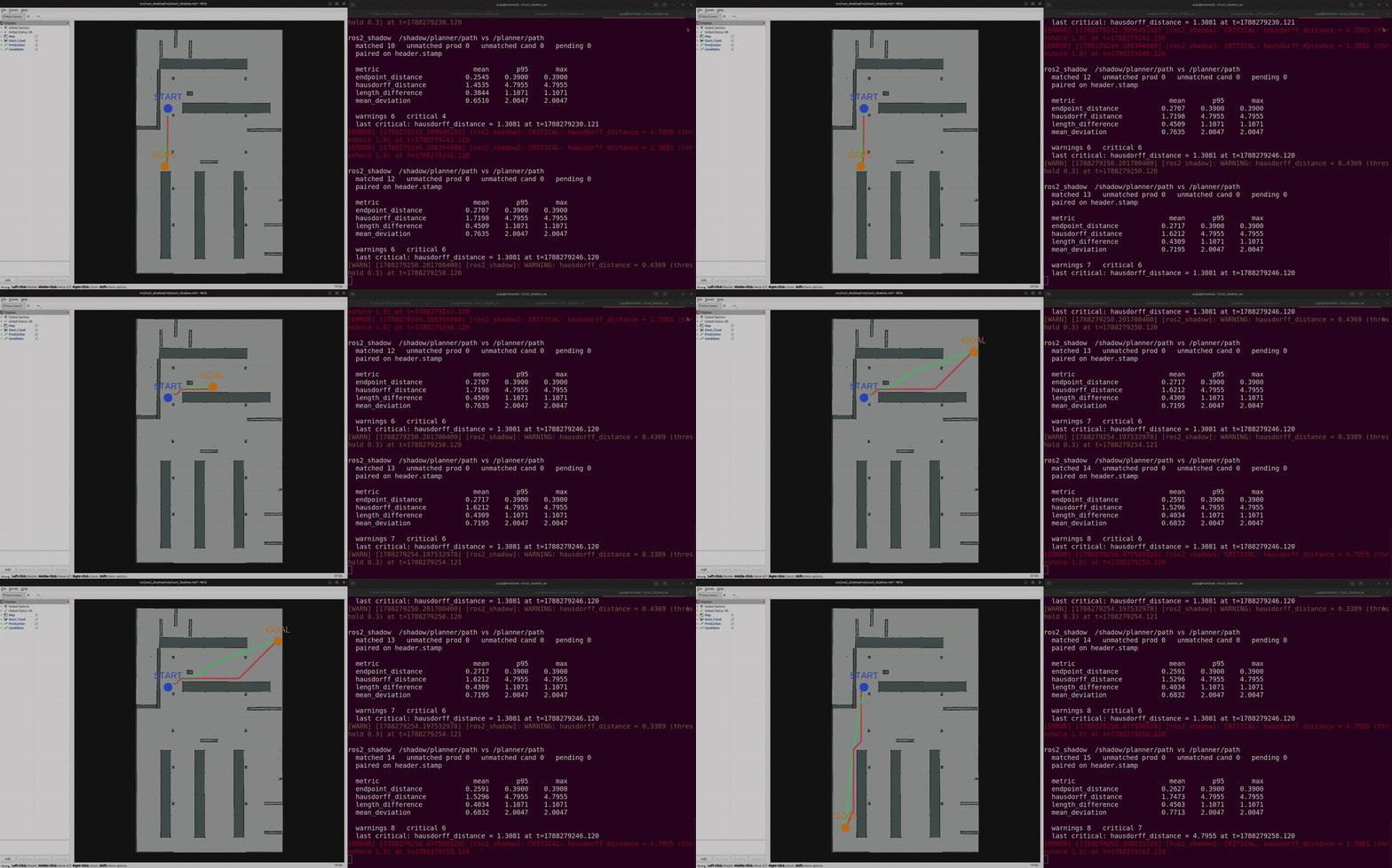
Two real Nav2 planners on one map, given identical goals: NavFn in green as production, Smac 2D in red as the candidate. The right pane is ros2_shadow pairing their outputs and measuring the divergence as it happens. Full clip at docs/demo.mp4.
Requirements
- ROS 2 Jazzy
- Python 3.10 or later
Build
$ colcon build --packages-select ros2_shadow
$ source install/setup.bash
The demos live in a second package so that installing the tool does not pull in Nav2. To run them:
$ colcon build --packages-select ros2_shadow_demos
Usage
$ ros2 run ros2_shadow shadow config.yaml
Unrecognised arguments are passed to rclpy, so the node namespaces and remaps like any other. Several can run side by side:
$ ros2 run ros2_shadow shadow config.yaml --ros-args -r __ns:=/robot1
Launch the candidate however you normally would, with its output remapped somewhere production does not subscribe:
$ ros2 run my_package my_candidate_node --ros-args -r /planner/path:=/shadow/planner/path
Keeping the candidate away from hardware
Running the candidate in its own namespace is usually enough. Topic names are
resolved relative to it, so a node that publishes cmd_vel ends up on
/shadow/cmd_vel without knowing anything has changed. Nav2 relies on this for
its multi-robot configurations.
It does not cover a node that hardcodes a leading slash, or builds a topic name
at runtime. For those, the tool warns if a node under the shadow namespace
publishes on a topic listed in safety.forbidden_topics and suspends the
comparison, though only once the publisher appears in the graph.
If you want a guarantee rather than a warning, run the candidate in its own
ROS_DOMAIN_ID, where the hardware topics do not exist at all, and bridge the
inputs it needs with
domain_bridge. Nothing the candidate
publishes can reach production unless the bridge is configured to carry it.
Either way this covers ROS-level access only. A candidate that opens a serial port is a container or permissions problem.
Configuration
production:
  topic: /planner/cmd_vel

shadow:
  topic: /shadow/planner/cmd_vel
  namespace: /shadow

comparison:
  type: geometry_msgs/msg/Twist
  synchronization:
    tolerance_ms: 20
  metrics:
    - name: linear_error
      warning: 0.05
      critical: 0.20
    - name: direction_reversal
      critical: 1.0

safety:
  forbidden_topics:
    - /cmd_vel
    - /joint_commands
    - /hardware/*
File truncated at 100 lines see the full file
CONTRIBUTING
Repository Summary
| Checkout URI | https://github.com/catplotlib/ros2_shadow.git |
| VCS Type | git |
| VCS Version | main |
| Last Updated | 2026-09-16 |
| Dev Status | UNMAINTAINED |
| Released | RELEASED |
| Contributing |
Help Wanted (-)
Good First Issues (-) Pull Requests to Review (-) |
Packages
| Name | Version |
|---|---|
| ros2_shadow | 0.1.0 |
| ros2_shadow_demos | 0.1.0 |
README
ros2_shadow
Runs a candidate node beside a production node on the same live inputs, compares their outputs, and reports where they disagree. Only production drives the robot.
Two real Nav2 planners on one map, given identical goals: NavFn in green as production, Smac 2D in red as the candidate. The right pane is ros2_shadow pairing their outputs and measuring the divergence as it happens. Full clip at docs/demo.mp4.
Requirements
- ROS 2 Jazzy
- Python 3.10 or later
Build
$ colcon build --packages-select ros2_shadow
$ source install/setup.bash
The demos live in a second package so that installing the tool does not pull in Nav2. To run them:
$ colcon build --packages-select ros2_shadow_demos
Usage
$ ros2 run ros2_shadow shadow config.yaml
Unrecognised arguments are passed to rclpy, so the node namespaces and remaps like any other. Several can run side by side:
$ ros2 run ros2_shadow shadow config.yaml --ros-args -r __ns:=/robot1
Launch the candidate however you normally would, with its output remapped somewhere production does not subscribe:
$ ros2 run my_package my_candidate_node --ros-args -r /planner/path:=/shadow/planner/path
Keeping the candidate away from hardware
Running the candidate in its own namespace is usually enough. Topic names are
resolved relative to it, so a node that publishes cmd_vel ends up on
/shadow/cmd_vel without knowing anything has changed. Nav2 relies on this for
its multi-robot configurations.
It does not cover a node that hardcodes a leading slash, or builds a topic name
at runtime. For those, the tool warns if a node under the shadow namespace
publishes on a topic listed in safety.forbidden_topics and suspends the
comparison, though only once the publisher appears in the graph.
If you want a guarantee rather than a warning, run the candidate in its own
ROS_DOMAIN_ID, where the hardware topics do not exist at all, and bridge the
inputs it needs with
domain_bridge. Nothing the candidate
publishes can reach production unless the bridge is configured to carry it.
Either way this covers ROS-level access only. A candidate that opens a serial port is a container or permissions problem.
Configuration
production:
  topic: /planner/cmd_vel

shadow:
  topic: /shadow/planner/cmd_vel
  namespace: /shadow

comparison:
  type: geometry_msgs/msg/Twist
  synchronization:
    tolerance_ms: 20
  metrics:
    - name: linear_error
      warning: 0.05
      critical: 0.20
    - name: direction_reversal
      critical: 1.0

safety:
  forbidden_topics:
    - /cmd_vel
    - /joint_commands
    - /hardware/*
File truncated at 100 lines see the full file
CONTRIBUTING
Repository Summary
| Checkout URI | https://github.com/catplotlib/ros2_shadow.git |
| VCS Type | git |
| VCS Version | main |
| Last Updated | 2026-09-16 |
| Dev Status | UNMAINTAINED |
| Released | RELEASED |
| Contributing |
Help Wanted (-)
Good First Issues (-) Pull Requests to Review (-) |
Packages
| Name | Version |
|---|---|
| ros2_shadow | 0.1.0 |
| ros2_shadow_demos | 0.1.0 |
README
ros2_shadow
Runs a candidate node beside a production node on the same live inputs, compares their outputs, and reports where they disagree. Only production drives the robot.
Two real Nav2 planners on one map, given identical goals: NavFn in green as production, Smac 2D in red as the candidate. The right pane is ros2_shadow pairing their outputs and measuring the divergence as it happens. Full clip at docs/demo.mp4.
Requirements
- ROS 2 Jazzy
- Python 3.10 or later
Build
$ colcon build --packages-select ros2_shadow
$ source install/setup.bash
The demos live in a second package so that installing the tool does not pull in Nav2. To run them:
$ colcon build --packages-select ros2_shadow_demos
Usage
$ ros2 run ros2_shadow shadow config.yaml
Unrecognised arguments are passed to rclpy, so the node namespaces and remaps like any other. Several can run side by side:
$ ros2 run ros2_shadow shadow config.yaml --ros-args -r __ns:=/robot1
Launch the candidate however you normally would, with its output remapped somewhere production does not subscribe:
$ ros2 run my_package my_candidate_node --ros-args -r /planner/path:=/shadow/planner/path
Keeping the candidate away from hardware
Running the candidate in its own namespace is usually enough. Topic names are
resolved relative to it, so a node that publishes cmd_vel ends up on
/shadow/cmd_vel without knowing anything has changed. Nav2 relies on this for
its multi-robot configurations.
It does not cover a node that hardcodes a leading slash, or builds a topic name
at runtime. For those, the tool warns if a node under the shadow namespace
publishes on a topic listed in safety.forbidden_topics and suspends the
comparison, though only once the publisher appears in the graph.
If you want a guarantee rather than a warning, run the candidate in its own
ROS_DOMAIN_ID, where the hardware topics do not exist at all, and bridge the
inputs it needs with
domain_bridge. Nothing the candidate
publishes can reach production unless the bridge is configured to carry it.
Either way this covers ROS-level access only. A candidate that opens a serial port is a container or permissions problem.
Configuration
production:
  topic: /planner/cmd_vel

shadow:
  topic: /shadow/planner/cmd_vel
  namespace: /shadow

comparison:
  type: geometry_msgs/msg/Twist
  synchronization:
    tolerance_ms: 20
  metrics:
    - name: linear_error
      warning: 0.05
      critical: 0.20
    - name: direction_reversal
      critical: 1.0

safety:
  forbidden_topics:
    - /cmd_vel
    - /joint_commands
    - /hardware/*
File truncated at 100 lines see the full file
CONTRIBUTING
Repository Summary
| Checkout URI | https://github.com/catplotlib/ros2_shadow.git |
| VCS Type | git |
| VCS Version | main |
| Last Updated | 2026-09-16 |
| Dev Status | UNMAINTAINED |
| Released | RELEASED |
| Contributing |
Help Wanted (-)
Good First Issues (-) Pull Requests to Review (-) |
Packages
| Name | Version |
|---|---|
| ros2_shadow | 0.1.0 |
| ros2_shadow_demos | 0.1.0 |
README
ros2_shadow
Runs a candidate node beside a production node on the same live inputs, compares their outputs, and reports where they disagree. Only production drives the robot.
Two real Nav2 planners on one map, given identical goals: NavFn in green as production, Smac 2D in red as the candidate. The right pane is ros2_shadow pairing their outputs and measuring the divergence as it happens. Full clip at docs/demo.mp4.
Requirements
- ROS 2 Jazzy
- Python 3.10 or later
Build
$ colcon build --packages-select ros2_shadow
$ source install/setup.bash
The demos live in a second package so that installing the tool does not pull in Nav2. To run them:
$ colcon build --packages-select ros2_shadow_demos
Usage
$ ros2 run ros2_shadow shadow config.yaml
Unrecognised arguments are passed to rclpy, so the node namespaces and remaps like any other. Several can run side by side:
$ ros2 run ros2_shadow shadow config.yaml --ros-args -r __ns:=/robot1
Launch the candidate however you normally would, with its output remapped somewhere production does not subscribe:
$ ros2 run my_package my_candidate_node --ros-args -r /planner/path:=/shadow/planner/path
Keeping the candidate away from hardware
Running the candidate in its own namespace is usually enough. Topic names are
resolved relative to it, so a node that publishes cmd_vel ends up on
/shadow/cmd_vel without knowing anything has changed. Nav2 relies on this for
its multi-robot configurations.
It does not cover a node that hardcodes a leading slash, or builds a topic name
at runtime. For those, the tool warns if a node under the shadow namespace
publishes on a topic listed in safety.forbidden_topics and suspends the
comparison, though only once the publisher appears in the graph.
If you want a guarantee rather than a warning, run the candidate in its own
ROS_DOMAIN_ID, where the hardware topics do not exist at all, and bridge the
inputs it needs with
domain_bridge. Nothing the candidate
publishes can reach production unless the bridge is configured to carry it.
Either way this covers ROS-level access only. A candidate that opens a serial port is a container or permissions problem.
Configuration
production:
  topic: /planner/cmd_vel

shadow:
  topic: /shadow/planner/cmd_vel
  namespace: /shadow

comparison:
  type: geometry_msgs/msg/Twist
  synchronization:
    tolerance_ms: 20
  metrics:
    - name: linear_error
      warning: 0.05
      critical: 0.20
    - name: direction_reversal
      critical: 1.0

safety:
  forbidden_topics:
    - /cmd_vel
    - /joint_commands
    - /hardware/*
File truncated at 100 lines see the full file
CONTRIBUTING
Repository Summary
| Checkout URI | https://github.com/catplotlib/ros2_shadow.git |
| VCS Type | git |
| VCS Version | main |
| Last Updated | 2026-09-16 |
| Dev Status | UNMAINTAINED |
| Released | RELEASED |
| Contributing |
Help Wanted (-)
Good First Issues (-) Pull Requests to Review (-) |
Packages
| Name | Version |
|---|---|
| ros2_shadow | 0.1.0 |
| ros2_shadow_demos | 0.1.0 |
README
ros2_shadow
Runs a candidate node beside a production node on the same live inputs, compares their outputs, and reports where they disagree. Only production drives the robot.
Two real Nav2 planners on one map, given identical goals: NavFn in green as production, Smac 2D in red as the candidate. The right pane is ros2_shadow pairing their outputs and measuring the divergence as it happens. Full clip at docs/demo.mp4.
Requirements
- ROS 2 Jazzy
- Python 3.10 or later
Build
$ colcon build --packages-select ros2_shadow
$ source install/setup.bash
The demos live in a second package so that installing the tool does not pull in Nav2. To run them:
$ colcon build --packages-select ros2_shadow_demos
Usage
$ ros2 run ros2_shadow shadow config.yaml
Unrecognised arguments are passed to rclpy, so the node namespaces and remaps like any other. Several can run side by side:
$ ros2 run ros2_shadow shadow config.yaml --ros-args -r __ns:=/robot1
Launch the candidate however you normally would, with its output remapped somewhere production does not subscribe:
$ ros2 run my_package my_candidate_node --ros-args -r /planner/path:=/shadow/planner/path
Keeping the candidate away from hardware
Running the candidate in its own namespace is usually enough. Topic names are
resolved relative to it, so a node that publishes cmd_vel ends up on
/shadow/cmd_vel without knowing anything has changed. Nav2 relies on this for
its multi-robot configurations.
It does not cover a node that hardcodes a leading slash, or builds a topic name
at runtime. For those, the tool warns if a node under the shadow namespace
publishes on a topic listed in safety.forbidden_topics and suspends the
comparison, though only once the publisher appears in the graph.
If you want a guarantee rather than a warning, run the candidate in its own
ROS_DOMAIN_ID, where the hardware topics do not exist at all, and bridge the
inputs it needs with
domain_bridge. Nothing the candidate
publishes can reach production unless the bridge is configured to carry it.
Either way this covers ROS-level access only. A candidate that opens a serial port is a container or permissions problem.
Configuration
production:
  topic: /planner/cmd_vel

shadow:
  topic: /shadow/planner/cmd_vel
  namespace: /shadow

comparison:
  type: geometry_msgs/msg/Twist
  synchronization:
    tolerance_ms: 20
  metrics:
    - name: linear_error
      warning: 0.05
      critical: 0.20
    - name: direction_reversal
      critical: 1.0

safety:
  forbidden_topics:
    - /cmd_vel
    - /joint_commands
    - /hardware/*
File truncated at 100 lines see the full file
CONTRIBUTING
Repository Summary
| Checkout URI | https://github.com/catplotlib/ros2_shadow.git |
| VCS Type | git |
| VCS Version | main |
| Last Updated | 2026-09-16 |
| Dev Status | UNMAINTAINED |
| Released | RELEASED |
| Contributing |
Help Wanted (-)
Good First Issues (-) Pull Requests to Review (-) |
Packages
| Name | Version |
|---|---|
| ros2_shadow | 0.1.0 |
| ros2_shadow_demos | 0.1.0 |
README
ros2_shadow
Runs a candidate node beside a production node on the same live inputs, compares their outputs, and reports where they disagree. Only production drives the robot.
Two real Nav2 planners on one map, given identical goals: NavFn in green as production, Smac 2D in red as the candidate. The right pane is ros2_shadow pairing their outputs and measuring the divergence as it happens. Full clip at docs/demo.mp4.
Requirements
- ROS 2 Jazzy
- Python 3.10 or later
Build
$ colcon build --packages-select ros2_shadow
$ source install/setup.bash
The demos live in a second package so that installing the tool does not pull in Nav2. To run them:
$ colcon build --packages-select ros2_shadow_demos
Usage
$ ros2 run ros2_shadow shadow config.yaml
Unrecognised arguments are passed to rclpy, so the node namespaces and remaps like any other. Several can run side by side:
$ ros2 run ros2_shadow shadow config.yaml --ros-args -r __ns:=/robot1
Launch the candidate however you normally would, with its output remapped somewhere production does not subscribe:
$ ros2 run my_package my_candidate_node --ros-args -r /planner/path:=/shadow/planner/path
Keeping the candidate away from hardware
Running the candidate in its own namespace is usually enough. Topic names are
resolved relative to it, so a node that publishes cmd_vel ends up on
/shadow/cmd_vel without knowing anything has changed. Nav2 relies on this for
its multi-robot configurations.
It does not cover a node that hardcodes a leading slash, or builds a topic name
at runtime. For those, the tool warns if a node under the shadow namespace
publishes on a topic listed in safety.forbidden_topics and suspends the
comparison, though only once the publisher appears in the graph.
If you want a guarantee rather than a warning, run the candidate in its own
ROS_DOMAIN_ID, where the hardware topics do not exist at all, and bridge the
inputs it needs with
domain_bridge. Nothing the candidate
publishes can reach production unless the bridge is configured to carry it.
Either way this covers ROS-level access only. A candidate that opens a serial port is a container or permissions problem.
Configuration
production:
  topic: /planner/cmd_vel

shadow:
  topic: /shadow/planner/cmd_vel
  namespace: /shadow

comparison:
  type: geometry_msgs/msg/Twist
  synchronization:
    tolerance_ms: 20
  metrics:
    - name: linear_error
      warning: 0.05
      critical: 0.20
    - name: direction_reversal
      critical: 1.0

safety:
  forbidden_topics:
    - /cmd_vel
    - /joint_commands
    - /hardware/*
File truncated at 100 lines see the full file
CONTRIBUTING
Repository Summary
| Checkout URI | https://github.com/catplotlib/ros2_shadow.git |
| VCS Type | git |
| VCS Version | main |
| Last Updated | 2026-09-16 |
| Dev Status | UNMAINTAINED |
| Released | RELEASED |
| Contributing |
Help Wanted (-)
Good First Issues (-) Pull Requests to Review (-) |
Packages
| Name | Version |
|---|---|
| ros2_shadow | 0.1.0 |
| ros2_shadow_demos | 0.1.0 |
README
ros2_shadow
Runs a candidate node beside a production node on the same live inputs, compares their outputs, and reports where they disagree. Only production drives the robot.
Two real Nav2 planners on one map, given identical goals: NavFn in green as production, Smac 2D in red as the candidate. The right pane is ros2_shadow pairing their outputs and measuring the divergence as it happens. Full clip at docs/demo.mp4.
Requirements
- ROS 2 Jazzy
- Python 3.10 or later
Build
$ colcon build --packages-select ros2_shadow
$ source install/setup.bash
The demos live in a second package so that installing the tool does not pull in Nav2. To run them:
$ colcon build --packages-select ros2_shadow_demos
Usage
$ ros2 run ros2_shadow shadow config.yaml
Unrecognised arguments are passed to rclpy, so the node namespaces and remaps like any other. Several can run side by side:
$ ros2 run ros2_shadow shadow config.yaml --ros-args -r __ns:=/robot1
Launch the candidate however you normally would, with its output remapped somewhere production does not subscribe:
$ ros2 run my_package my_candidate_node --ros-args -r /planner/path:=/shadow/planner/path
Keeping the candidate away from hardware
Running the candidate in its own namespace is usually enough. Topic names are
resolved relative to it, so a node that publishes cmd_vel ends up on
/shadow/cmd_vel without knowing anything has changed. Nav2 relies on this for
its multi-robot configurations.
It does not cover a node that hardcodes a leading slash, or builds a topic name
at runtime. For those, the tool warns if a node under the shadow namespace
publishes on a topic listed in safety.forbidden_topics and suspends the
comparison, though only once the publisher appears in the graph.
If you want a guarantee rather than a warning, run the candidate in its own
ROS_DOMAIN_ID, where the hardware topics do not exist at all, and bridge the
inputs it needs with
domain_bridge. Nothing the candidate
publishes can reach production unless the bridge is configured to carry it.
Either way this covers ROS-level access only. A candidate that opens a serial port is a container or permissions problem.
Configuration
production:
  topic: /planner/cmd_vel

shadow:
  topic: /shadow/planner/cmd_vel
  namespace: /shadow

comparison:
  type: geometry_msgs/msg/Twist
  synchronization:
    tolerance_ms: 20
  metrics:
    - name: linear_error
      warning: 0.05
      critical: 0.20
    - name: direction_reversal
      critical: 1.0

safety:
  forbidden_topics:
    - /cmd_vel
    - /joint_commands
    - /hardware/*
File truncated at 100 lines see the full file
CONTRIBUTING
Repository Summary
| Checkout URI | https://github.com/catplotlib/ros2_shadow.git |
| VCS Type | git |
| VCS Version | main |
| Last Updated | 2026-09-16 |
| Dev Status | UNMAINTAINED |
| Released | RELEASED |
| Contributing |
Help Wanted (-)
Good First Issues (-) Pull Requests to Review (-) |
Packages
| Name | Version |
|---|---|
| ros2_shadow | 0.1.0 |
| ros2_shadow_demos | 0.1.0 |
README
ros2_shadow
Runs a candidate node beside a production node on the same live inputs, compares their outputs, and reports where they disagree. Only production drives the robot.
Two real Nav2 planners on one map, given identical goals: NavFn in green as production, Smac 2D in red as the candidate. The right pane is ros2_shadow pairing their outputs and measuring the divergence as it happens. Full clip at docs/demo.mp4.
Requirements
- ROS 2 Jazzy
- Python 3.10 or later
Build
$ colcon build --packages-select ros2_shadow
$ source install/setup.bash
The demos live in a second package so that installing the tool does not pull in Nav2. To run them:
$ colcon build --packages-select ros2_shadow_demos
Usage
$ ros2 run ros2_shadow shadow config.yaml
Unrecognised arguments are passed to rclpy, so the node namespaces and remaps like any other. Several can run side by side:
$ ros2 run ros2_shadow shadow config.yaml --ros-args -r __ns:=/robot1
Launch the candidate however you normally would, with its output remapped somewhere production does not subscribe:
$ ros2 run my_package my_candidate_node --ros-args -r /planner/path:=/shadow/planner/path
Keeping the candidate away from hardware
Running the candidate in its own namespace is usually enough. Topic names are
resolved relative to it, so a node that publishes cmd_vel ends up on
/shadow/cmd_vel without knowing anything has changed. Nav2 relies on this for
its multi-robot configurations.
It does not cover a node that hardcodes a leading slash, or builds a topic name
at runtime. For those, the tool warns if a node under the shadow namespace
publishes on a topic listed in safety.forbidden_topics and suspends the
comparison, though only once the publisher appears in the graph.
If you want a guarantee rather than a warning, run the candidate in its own
ROS_DOMAIN_ID, where the hardware topics do not exist at all, and bridge the
inputs it needs with
domain_bridge. Nothing the candidate
publishes can reach production unless the bridge is configured to carry it.
Either way this covers ROS-level access only. A candidate that opens a serial port is a container or permissions problem.
Configuration
production:
  topic: /planner/cmd_vel

shadow:
  topic: /shadow/planner/cmd_vel
  namespace: /shadow

comparison:
  type: geometry_msgs/msg/Twist
  synchronization:
    tolerance_ms: 20
  metrics:
    - name: linear_error
      warning: 0.05
      critical: 0.20
    - name: direction_reversal
      critical: 1.0

safety:
  forbidden_topics:
    - /cmd_vel
    - /joint_commands
    - /hardware/*
File truncated at 100 lines see the full file
CONTRIBUTING
Repository Summary
| Checkout URI | https://github.com/catplotlib/ros2_shadow.git |
| VCS Type | git |
| VCS Version | main |
| Last Updated | 2026-09-16 |
| Dev Status | UNMAINTAINED |
| Released | RELEASED |
| Contributing |
Help Wanted (-)
Good First Issues (-) Pull Requests to Review (-) |
Packages
| Name | Version |
|---|---|
| ros2_shadow | 0.1.0 |
| ros2_shadow_demos | 0.1.0 |
README
ros2_shadow
Runs a candidate node beside a production node on the same live inputs, compares their outputs, and reports where they disagree. Only production drives the robot.
Two real Nav2 planners on one map, given identical goals: NavFn in green as production, Smac 2D in red as the candidate. The right pane is ros2_shadow pairing their outputs and measuring the divergence as it happens. Full clip at docs/demo.mp4.
Requirements
- ROS 2 Jazzy
- Python 3.10 or later
Build
$ colcon build --packages-select ros2_shadow
$ source install/setup.bash
The demos live in a second package so that installing the tool does not pull in Nav2. To run them:
$ colcon build --packages-select ros2_shadow_demos
Usage
$ ros2 run ros2_shadow shadow config.yaml
Unrecognised arguments are passed to rclpy, so the node namespaces and remaps like any other. Several can run side by side:
$ ros2 run ros2_shadow shadow config.yaml --ros-args -r __ns:=/robot1
Launch the candidate however you normally would, with its output remapped somewhere production does not subscribe:
$ ros2 run my_package my_candidate_node --ros-args -r /planner/path:=/shadow/planner/path
Keeping the candidate away from hardware
Running the candidate in its own namespace is usually enough. Topic names are
resolved relative to it, so a node that publishes cmd_vel ends up on
/shadow/cmd_vel without knowing anything has changed. Nav2 relies on this for
its multi-robot configurations.
It does not cover a node that hardcodes a leading slash, or builds a topic name
at runtime. For those, the tool warns if a node under the shadow namespace
publishes on a topic listed in safety.forbidden_topics and suspends the
comparison, though only once the publisher appears in the graph.
If you want a guarantee rather than a warning, run the candidate in its own
ROS_DOMAIN_ID, where the hardware topics do not exist at all, and bridge the
inputs it needs with
domain_bridge. Nothing the candidate
publishes can reach production unless the bridge is configured to carry it.
Either way this covers ROS-level access only. A candidate that opens a serial port is a container or permissions problem.
Configuration
production:
  topic: /planner/cmd_vel

shadow:
  topic: /shadow/planner/cmd_vel
  namespace: /shadow

comparison:
  type: geometry_msgs/msg/Twist
  synchronization:
    tolerance_ms: 20
  metrics:
    - name: linear_error
      warning: 0.05
      critical: 0.20
    - name: direction_reversal
      critical: 1.0

safety:
  forbidden_topics:
    - /cmd_vel
    - /joint_commands
    - /hardware/*
File truncated at 100 lines see the full file
CONTRIBUTING
Repository Summary
| Checkout URI | https://github.com/catplotlib/ros2_shadow.git |
| VCS Type | git |
| VCS Version | main |
| Last Updated | 2026-09-16 |
| Dev Status | UNMAINTAINED |
| Released | RELEASED |
| Contributing |
Help Wanted (-)
Good First Issues (-) Pull Requests to Review (-) |
Packages
| Name | Version |
|---|---|
| ros2_shadow | 0.1.0 |
| ros2_shadow_demos | 0.1.0 |
README
ros2_shadow
Runs a candidate node beside a production node on the same live inputs, compares their outputs, and reports where they disagree. Only production drives the robot.
Two real Nav2 planners on one map, given identical goals: NavFn in green as production, Smac 2D in red as the candidate. The right pane is ros2_shadow pairing their outputs and measuring the divergence as it happens. Full clip at docs/demo.mp4.
Requirements
- ROS 2 Jazzy
- Python 3.10 or later
Build
$ colcon build --packages-select ros2_shadow
$ source install/setup.bash
The demos live in a second package so that installing the tool does not pull in Nav2. To run them:
$ colcon build --packages-select ros2_shadow_demos
Usage
$ ros2 run ros2_shadow shadow config.yaml
Unrecognised arguments are passed to rclpy, so the node namespaces and remaps like any other. Several can run side by side:
$ ros2 run ros2_shadow shadow config.yaml --ros-args -r __ns:=/robot1
Launch the candidate however you normally would, with its output remapped somewhere production does not subscribe:
$ ros2 run my_package my_candidate_node --ros-args -r /planner/path:=/shadow/planner/path
Keeping the candidate away from hardware
Running the candidate in its own namespace is usually enough. Topic names are
resolved relative to it, so a node that publishes cmd_vel ends up on
/shadow/cmd_vel without knowing anything has changed. Nav2 relies on this for
its multi-robot configurations.
It does not cover a node that hardcodes a leading slash, or builds a topic name
at runtime. For those, the tool warns if a node under the shadow namespace
publishes on a topic listed in safety.forbidden_topics and suspends the
comparison, though only once the publisher appears in the graph.
If you want a guarantee rather than a warning, run the candidate in its own
ROS_DOMAIN_ID, where the hardware topics do not exist at all, and bridge the
inputs it needs with
domain_bridge. Nothing the candidate
publishes can reach production unless the bridge is configured to carry it.
Either way this covers ROS-level access only. A candidate that opens a serial port is a container or permissions problem.
Configuration
production:
  topic: /planner/cmd_vel

shadow:
  topic: /shadow/planner/cmd_vel
  namespace: /shadow

comparison:
  type: geometry_msgs/msg/Twist
  synchronization:
    tolerance_ms: 20
  metrics:
    - name: linear_error
      warning: 0.05
      critical: 0.20
    - name: direction_reversal
      critical: 1.0

safety:
  forbidden_topics:
    - /cmd_vel
    - /joint_commands
    - /hardware/*
File truncated at 100 lines see the full file
CONTRIBUTING
Repository Summary
| Checkout URI | https://github.com/catplotlib/ros2_shadow.git |
| VCS Type | git |
| VCS Version | main |
| Last Updated | 2026-09-16 |
| Dev Status | UNMAINTAINED |
| Released | RELEASED |
| Contributing |
Help Wanted (-)
Good First Issues (-) Pull Requests to Review (-) |
Packages
| Name | Version |
|---|---|
| ros2_shadow | 0.1.0 |
| ros2_shadow_demos | 0.1.0 |
README
ros2_shadow
Runs a candidate node beside a production node on the same live inputs, compares their outputs, and reports where they disagree. Only production drives the robot.
Two real Nav2 planners on one map, given identical goals: NavFn in green as production, Smac 2D in red as the candidate. The right pane is ros2_shadow pairing their outputs and measuring the divergence as it happens. Full clip at docs/demo.mp4.
Requirements
- ROS 2 Jazzy
- Python 3.10 or later
Build
$ colcon build --packages-select ros2_shadow
$ source install/setup.bash
The demos live in a second package so that installing the tool does not pull in Nav2. To run them:
$ colcon build --packages-select ros2_shadow_demos
Usage
$ ros2 run ros2_shadow shadow config.yaml
Unrecognised arguments are passed to rclpy, so the node namespaces and remaps like any other. Several can run side by side:
$ ros2 run ros2_shadow shadow config.yaml --ros-args -r __ns:=/robot1
Launch the candidate however you normally would, with its output remapped somewhere production does not subscribe:
$ ros2 run my_package my_candidate_node --ros-args -r /planner/path:=/shadow/planner/path
Keeping the candidate away from hardware
Running the candidate in its own namespace is usually enough. Topic names are
resolved relative to it, so a node that publishes cmd_vel ends up on
/shadow/cmd_vel without knowing anything has changed. Nav2 relies on this for
its multi-robot configurations.
It does not cover a node that hardcodes a leading slash, or builds a topic name
at runtime. For those, the tool warns if a node under the shadow namespace
publishes on a topic listed in safety.forbidden_topics and suspends the
comparison, though only once the publisher appears in the graph.
If you want a guarantee rather than a warning, run the candidate in its own
ROS_DOMAIN_ID, where the hardware topics do not exist at all, and bridge the
inputs it needs with
domain_bridge. Nothing the candidate
publishes can reach production unless the bridge is configured to carry it.
Either way this covers ROS-level access only. A candidate that opens a serial port is a container or permissions problem.
Configuration
production:
  topic: /planner/cmd_vel

shadow:
  topic: /shadow/planner/cmd_vel
  namespace: /shadow

comparison:
  type: geometry_msgs/msg/Twist
  synchronization:
    tolerance_ms: 20
  metrics:
    - name: linear_error
      warning: 0.05
      critical: 0.20
    - name: direction_reversal
      critical: 1.0

safety:
  forbidden_topics:
    - /cmd_vel
    - /joint_commands
    - /hardware/*
File truncated at 100 lines see the full file
CONTRIBUTING
Repository Summary
| Checkout URI | https://github.com/catplotlib/ros2_shadow.git |
| VCS Type | git |
| VCS Version | main |
| Last Updated | 2026-09-16 |
| Dev Status | UNMAINTAINED |
| Released | RELEASED |
| Contributing |
Help Wanted (-)
Good First Issues (-) Pull Requests to Review (-) |
Packages
| Name | Version |
|---|---|
| ros2_shadow | 0.1.0 |
| ros2_shadow_demos | 0.1.0 |
README
ros2_shadow
Runs a candidate node beside a production node on the same live inputs, compares their outputs, and reports where they disagree. Only production drives the robot.
Two real Nav2 planners on one map, given identical goals: NavFn in green as production, Smac 2D in red as the candidate. The right pane is ros2_shadow pairing their outputs and measuring the divergence as it happens. Full clip at docs/demo.mp4.
Requirements
- ROS 2 Jazzy
- Python 3.10 or later
Build
$ colcon build --packages-select ros2_shadow
$ source install/setup.bash
The demos live in a second package so that installing the tool does not pull in Nav2. To run them:
$ colcon build --packages-select ros2_shadow_demos
Usage
$ ros2 run ros2_shadow shadow config.yaml
Unrecognised arguments are passed to rclpy, so the node namespaces and remaps like any other. Several can run side by side:
$ ros2 run ros2_shadow shadow config.yaml --ros-args -r __ns:=/robot1
Launch the candidate however you normally would, with its output remapped somewhere production does not subscribe:
$ ros2 run my_package my_candidate_node --ros-args -r /planner/path:=/shadow/planner/path
Keeping the candidate away from hardware
Running the candidate in its own namespace is usually enough. Topic names are
resolved relative to it, so a node that publishes cmd_vel ends up on
/shadow/cmd_vel without knowing anything has changed. Nav2 relies on this for
its multi-robot configurations.
It does not cover a node that hardcodes a leading slash, or builds a topic name
at runtime. For those, the tool warns if a node under the shadow namespace
publishes on a topic listed in safety.forbidden_topics and suspends the
comparison, though only once the publisher appears in the graph.
If you want a guarantee rather than a warning, run the candidate in its own
ROS_DOMAIN_ID, where the hardware topics do not exist at all, and bridge the
inputs it needs with
domain_bridge. Nothing the candidate
publishes can reach production unless the bridge is configured to carry it.
Either way this covers ROS-level access only. A candidate that opens a serial port is a container or permissions problem.
Configuration
production:
  topic: /planner/cmd_vel

shadow:
  topic: /shadow/planner/cmd_vel
  namespace: /shadow

comparison:
  type: geometry_msgs/msg/Twist
  synchronization:
    tolerance_ms: 20
  metrics:
    - name: linear_error
      warning: 0.05
      critical: 0.20
    - name: direction_reversal
      critical: 1.0

safety:
  forbidden_topics:
    - /cmd_vel
    - /joint_commands
    - /hardware/*
File truncated at 100 lines see the full file
CONTRIBUTING
Repository Summary
| Checkout URI | https://github.com/catplotlib/ros2_shadow.git |
| VCS Type | git |
| VCS Version | main |
| Last Updated | 2026-09-16 |
| Dev Status | UNMAINTAINED |
| Released | RELEASED |
| Contributing |
Help Wanted (-)
Good First Issues (-) Pull Requests to Review (-) |
Packages
| Name | Version |
|---|---|
| ros2_shadow | 0.1.0 |
| ros2_shadow_demos | 0.1.0 |
README
ros2_shadow
Runs a candidate node beside a production node on the same live inputs, compares their outputs, and reports where they disagree. Only production drives the robot.
Two real Nav2 planners on one map, given identical goals: NavFn in green as production, Smac 2D in red as the candidate. The right pane is ros2_shadow pairing their outputs and measuring the divergence as it happens. Full clip at docs/demo.mp4.
Requirements
- ROS 2 Jazzy
- Python 3.10 or later
Build
$ colcon build --packages-select ros2_shadow
$ source install/setup.bash
The demos live in a second package so that installing the tool does not pull in Nav2. To run them:
$ colcon build --packages-select ros2_shadow_demos
Usage
$ ros2 run ros2_shadow shadow config.yaml
Unrecognised arguments are passed to rclpy, so the node namespaces and remaps like any other. Several can run side by side:
$ ros2 run ros2_shadow shadow config.yaml --ros-args -r __ns:=/robot1
Launch the candidate however you normally would, with its output remapped somewhere production does not subscribe:
$ ros2 run my_package my_candidate_node --ros-args -r /planner/path:=/shadow/planner/path
Keeping the candidate away from hardware
Running the candidate in its own namespace is usually enough. Topic names are
resolved relative to it, so a node that publishes cmd_vel ends up on
/shadow/cmd_vel without knowing anything has changed. Nav2 relies on this for
its multi-robot configurations.
It does not cover a node that hardcodes a leading slash, or builds a topic name
at runtime. For those, the tool warns if a node under the shadow namespace
publishes on a topic listed in safety.forbidden_topics and suspends the
comparison, though only once the publisher appears in the graph.
If you want a guarantee rather than a warning, run the candidate in its own
ROS_DOMAIN_ID, where the hardware topics do not exist at all, and bridge the
inputs it needs with
domain_bridge. Nothing the candidate
publishes can reach production unless the bridge is configured to carry it.
Either way this covers ROS-level access only. A candidate that opens a serial port is a container or permissions problem.
Configuration
production:
  topic: /planner/cmd_vel

shadow:
  topic: /shadow/planner/cmd_vel
  namespace: /shadow

comparison:
  type: geometry_msgs/msg/Twist
  synchronization:
    tolerance_ms: 20
  metrics:
    - name: linear_error
      warning: 0.05
      critical: 0.20
    - name: direction_reversal
      critical: 1.0

safety:
  forbidden_topics:
    - /cmd_vel
    - /joint_commands
    - /hardware/*
File truncated at 100 lines see the full file
CONTRIBUTING
Repository Summary
| Checkout URI | https://github.com/catplotlib/ros2_shadow.git |
| VCS Type | git |
| VCS Version | main |
| Last Updated | 2026-09-16 |
| Dev Status | UNMAINTAINED |
| Released | RELEASED |
| Contributing |
Help Wanted (-)
Good First Issues (-) Pull Requests to Review (-) |
Packages
| Name | Version |
|---|---|
| ros2_shadow | 0.1.0 |
| ros2_shadow_demos | 0.1.0 |
README
ros2_shadow
Runs a candidate node beside a production node on the same live inputs, compares their outputs, and reports where they disagree. Only production drives the robot.
Two real Nav2 planners on one map, given identical goals: NavFn in green as production, Smac 2D in red as the candidate. The right pane is ros2_shadow pairing their outputs and measuring the divergence as it happens. Full clip at docs/demo.mp4.
Requirements
- ROS 2 Jazzy
- Python 3.10 or later
Build
$ colcon build --packages-select ros2_shadow
$ source install/setup.bash
The demos live in a second package so that installing the tool does not pull in Nav2. To run them:
$ colcon build --packages-select ros2_shadow_demos
Usage
$ ros2 run ros2_shadow shadow config.yaml
Unrecognised arguments are passed to rclpy, so the node namespaces and remaps like any other. Several can run side by side:
$ ros2 run ros2_shadow shadow config.yaml --ros-args -r __ns:=/robot1
Launch the candidate however you normally would, with its output remapped somewhere production does not subscribe:
$ ros2 run my_package my_candidate_node --ros-args -r /planner/path:=/shadow/planner/path
Keeping the candidate away from hardware
Running the candidate in its own namespace is usually enough. Topic names are
resolved relative to it, so a node that publishes cmd_vel ends up on
/shadow/cmd_vel without knowing anything has changed. Nav2 relies on this for
its multi-robot configurations.
It does not cover a node that hardcodes a leading slash, or builds a topic name
at runtime. For those, the tool warns if a node under the shadow namespace
publishes on a topic listed in safety.forbidden_topics and suspends the
comparison, though only once the publisher appears in the graph.
If you want a guarantee rather than a warning, run the candidate in its own
ROS_DOMAIN_ID, where the hardware topics do not exist at all, and bridge the
inputs it needs with
domain_bridge. Nothing the candidate
publishes can reach production unless the bridge is configured to carry it.
Either way this covers ROS-level access only. A candidate that opens a serial port is a container or permissions problem.
Configuration
production:
  topic: /planner/cmd_vel

shadow:
  topic: /shadow/planner/cmd_vel
  namespace: /shadow

comparison:
  type: geometry_msgs/msg/Twist
  synchronization:
    tolerance_ms: 20
  metrics:
    - name: linear_error
      warning: 0.05
      critical: 0.20
    - name: direction_reversal
      critical: 1.0

safety:
  forbidden_topics:
    - /cmd_vel
    - /joint_commands
    - /hardware/*
File truncated at 100 lines see the full file
CONTRIBUTING
Repository Summary
| Checkout URI | https://github.com/catplotlib/ros2_shadow.git |
| VCS Type | git |
| VCS Version | main |
| Last Updated | 2026-09-16 |
| Dev Status | UNMAINTAINED |
| Released | RELEASED |
| Contributing |
Help Wanted (-)
Good First Issues (-) Pull Requests to Review (-) |
Packages
| Name | Version |
|---|---|
| ros2_shadow | 0.1.0 |
| ros2_shadow_demos | 0.1.0 |
README
ros2_shadow
Runs a candidate node beside a production node on the same live inputs, compares their outputs, and reports where they disagree. Only production drives the robot.
Two real Nav2 planners on one map, given identical goals: NavFn in green as production, Smac 2D in red as the candidate. The right pane is ros2_shadow pairing their outputs and measuring the divergence as it happens. Full clip at docs/demo.mp4.
Requirements
- ROS 2 Jazzy
- Python 3.10 or later
Build
$ colcon build --packages-select ros2_shadow
$ source install/setup.bash
The demos live in a second package so that installing the tool does not pull in Nav2. To run them:
$ colcon build --packages-select ros2_shadow_demos
Usage
$ ros2 run ros2_shadow shadow config.yaml
Unrecognised arguments are passed to rclpy, so the node namespaces and remaps like any other. Several can run side by side:
$ ros2 run ros2_shadow shadow config.yaml --ros-args -r __ns:=/robot1
Launch the candidate however you normally would, with its output remapped somewhere production does not subscribe:
$ ros2 run my_package my_candidate_node --ros-args -r /planner/path:=/shadow/planner/path
Keeping the candidate away from hardware
Running the candidate in its own namespace is usually enough. Topic names are
resolved relative to it, so a node that publishes cmd_vel ends up on
/shadow/cmd_vel without knowing anything has changed. Nav2 relies on this for
its multi-robot configurations.
It does not cover a node that hardcodes a leading slash, or builds a topic name
at runtime. For those, the tool warns if a node under the shadow namespace
publishes on a topic listed in safety.forbidden_topics and suspends the
comparison, though only once the publisher appears in the graph.
If you want a guarantee rather than a warning, run the candidate in its own
ROS_DOMAIN_ID, where the hardware topics do not exist at all, and bridge the
inputs it needs with
domain_bridge. Nothing the candidate
publishes can reach production unless the bridge is configured to carry it.
Either way this covers ROS-level access only. A candidate that opens a serial port is a container or permissions problem.
Configuration
production:
  topic: /planner/cmd_vel

shadow:
  topic: /shadow/planner/cmd_vel
  namespace: /shadow

comparison:
  type: geometry_msgs/msg/Twist
  synchronization:
    tolerance_ms: 20
  metrics:
    - name: linear_error
      warning: 0.05
      critical: 0.20
    - name: direction_reversal
      critical: 1.0

safety:
  forbidden_topics:
    - /cmd_vel
    - /joint_commands
    - /hardware/*
File truncated at 100 lines see the full file
CONTRIBUTING
Repository Summary
| Checkout URI | https://github.com/catplotlib/ros2_shadow.git |
| VCS Type | git |
| VCS Version | main |
| Last Updated | 2026-09-16 |
| Dev Status | UNMAINTAINED |
| Released | RELEASED |
| Contributing |
Help Wanted (-)
Good First Issues (-) Pull Requests to Review (-) |
Packages
| Name | Version |
|---|---|
| ros2_shadow | 0.1.0 |
| ros2_shadow_demos | 0.1.0 |
README
ros2_shadow
Runs a candidate node beside a production node on the same live inputs, compares their outputs, and reports where they disagree. Only production drives the robot.
Two real Nav2 planners on one map, given identical goals: NavFn in green as production, Smac 2D in red as the candidate. The right pane is ros2_shadow pairing their outputs and measuring the divergence as it happens. Full clip at docs/demo.mp4.
Requirements
- ROS 2 Jazzy
- Python 3.10 or later
Build
$ colcon build --packages-select ros2_shadow
$ source install/setup.bash
The demos live in a second package so that installing the tool does not pull in Nav2. To run them:
$ colcon build --packages-select ros2_shadow_demos
Usage
$ ros2 run ros2_shadow shadow config.yaml
Unrecognised arguments are passed to rclpy, so the node namespaces and remaps like any other. Several can run side by side:
$ ros2 run ros2_shadow shadow config.yaml --ros-args -r __ns:=/robot1
Launch the candidate however you normally would, with its output remapped somewhere production does not subscribe:
$ ros2 run my_package my_candidate_node --ros-args -r /planner/path:=/shadow/planner/path
Keeping the candidate away from hardware
Running the candidate in its own namespace is usually enough. Topic names are
resolved relative to it, so a node that publishes cmd_vel ends up on
/shadow/cmd_vel without knowing anything has changed. Nav2 relies on this for
its multi-robot configurations.
It does not cover a node that hardcodes a leading slash, or builds a topic name
at runtime. For those, the tool warns if a node under the shadow namespace
publishes on a topic listed in safety.forbidden_topics and suspends the
comparison, though only once the publisher appears in the graph.
If you want a guarantee rather than a warning, run the candidate in its own
ROS_DOMAIN_ID, where the hardware topics do not exist at all, and bridge the
inputs it needs with
domain_bridge. Nothing the candidate
publishes can reach production unless the bridge is configured to carry it.
Either way this covers ROS-level access only. A candidate that opens a serial port is a container or permissions problem.
Configuration
production:
  topic: /planner/cmd_vel

shadow:
  topic: /shadow/planner/cmd_vel
  namespace: /shadow

comparison:
  type: geometry_msgs/msg/Twist
  synchronization:
    tolerance_ms: 20
  metrics:
    - name: linear_error
      warning: 0.05
      critical: 0.20
    - name: direction_reversal
      critical: 1.0

safety:
  forbidden_topics:
    - /cmd_vel
    - /joint_commands
    - /hardware/*
File truncated at 100 lines see the full file
CONTRIBUTING
Repository Summary
| Checkout URI | https://github.com/catplotlib/ros2_shadow.git |
| VCS Type | git |
| VCS Version | main |
| Last Updated | 2026-09-16 |
| Dev Status | UNMAINTAINED |
| Released | RELEASED |
| Contributing |
Help Wanted (-)
Good First Issues (-) Pull Requests to Review (-) |
Packages
| Name | Version |
|---|---|
| ros2_shadow | 0.1.0 |
| ros2_shadow_demos | 0.1.0 |
README
ros2_shadow
Runs a candidate node beside a production node on the same live inputs, compares their outputs, and reports where they disagree. Only production drives the robot.
Two real Nav2 planners on one map, given identical goals: NavFn in green as production, Smac 2D in red as the candidate. The right pane is ros2_shadow pairing their outputs and measuring the divergence as it happens. Full clip at docs/demo.mp4.
Requirements
- ROS 2 Jazzy
- Python 3.10 or later
Build
$ colcon build --packages-select ros2_shadow
$ source install/setup.bash
The demos live in a second package so that installing the tool does not pull in Nav2. To run them:
$ colcon build --packages-select ros2_shadow_demos
Usage
$ ros2 run ros2_shadow shadow config.yaml
Unrecognised arguments are passed to rclpy, so the node namespaces and remaps like any other. Several can run side by side:
$ ros2 run ros2_shadow shadow config.yaml --ros-args -r __ns:=/robot1
Launch the candidate however you normally would, with its output remapped somewhere production does not subscribe:
$ ros2 run my_package my_candidate_node --ros-args -r /planner/path:=/shadow/planner/path
Keeping the candidate away from hardware
Running the candidate in its own namespace is usually enough. Topic names are
resolved relative to it, so a node that publishes cmd_vel ends up on
/shadow/cmd_vel without knowing anything has changed. Nav2 relies on this for
its multi-robot configurations.
It does not cover a node that hardcodes a leading slash, or builds a topic name
at runtime. For those, the tool warns if a node under the shadow namespace
publishes on a topic listed in safety.forbidden_topics and suspends the
comparison, though only once the publisher appears in the graph.
If you want a guarantee rather than a warning, run the candidate in its own
ROS_DOMAIN_ID, where the hardware topics do not exist at all, and bridge the
inputs it needs with
domain_bridge. Nothing the candidate
publishes can reach production unless the bridge is configured to carry it.
Either way this covers ROS-level access only. A candidate that opens a serial port is a container or permissions problem.
Configuration
production:
  topic: /planner/cmd_vel

shadow:
  topic: /shadow/planner/cmd_vel
  namespace: /shadow

comparison:
  type: geometry_msgs/msg/Twist
  synchronization:
    tolerance_ms: 20
  metrics:
    - name: linear_error
      warning: 0.05
      critical: 0.20
    - name: direction_reversal
      critical: 1.0

safety:
  forbidden_topics:
    - /cmd_vel
    - /joint_commands
    - /hardware/*
File truncated at 100 lines see the full file
CONTRIBUTING
Repository Summary
| Checkout URI | https://github.com/catplotlib/ros2_shadow.git |
| VCS Type | git |
| VCS Version | main |
| Last Updated | 2026-09-16 |
| Dev Status | UNMAINTAINED |
| Released | RELEASED |
| Contributing |
Help Wanted (-)
Good First Issues (-) Pull Requests to Review (-) |
Packages
| Name | Version |
|---|---|
| ros2_shadow | 0.1.0 |
| ros2_shadow_demos | 0.1.0 |
README
ros2_shadow
Runs a candidate node beside a production node on the same live inputs, compares their outputs, and reports where they disagree. Only production drives the robot.
Two real Nav2 planners on one map, given identical goals: NavFn in green as production, Smac 2D in red as the candidate. The right pane is ros2_shadow pairing their outputs and measuring the divergence as it happens. Full clip at docs/demo.mp4.
Requirements
- ROS 2 Jazzy
- Python 3.10 or later
Build
$ colcon build --packages-select ros2_shadow
$ source install/setup.bash
The demos live in a second package so that installing the tool does not pull in Nav2. To run them:
$ colcon build --packages-select ros2_shadow_demos
Usage
$ ros2 run ros2_shadow shadow config.yaml
Unrecognised arguments are passed to rclpy, so the node namespaces and remaps like any other. Several can run side by side:
$ ros2 run ros2_shadow shadow config.yaml --ros-args -r __ns:=/robot1
Launch the candidate however you normally would, with its output remapped somewhere production does not subscribe:
$ ros2 run my_package my_candidate_node --ros-args -r /planner/path:=/shadow/planner/path
Keeping the candidate away from hardware
Running the candidate in its own namespace is usually enough. Topic names are
resolved relative to it, so a node that publishes cmd_vel ends up on
/shadow/cmd_vel without knowing anything has changed. Nav2 relies on this for
its multi-robot configurations.
It does not cover a node that hardcodes a leading slash, or builds a topic name
at runtime. For those, the tool warns if a node under the shadow namespace
publishes on a topic listed in safety.forbidden_topics and suspends the
comparison, though only once the publisher appears in the graph.
If you want a guarantee rather than a warning, run the candidate in its own
ROS_DOMAIN_ID, where the hardware topics do not exist at all, and bridge the
inputs it needs with
domain_bridge. Nothing the candidate
publishes can reach production unless the bridge is configured to carry it.
Either way this covers ROS-level access only. A candidate that opens a serial port is a container or permissions problem.
Configuration
production:
  topic: /planner/cmd_vel

shadow:
  topic: /shadow/planner/cmd_vel
  namespace: /shadow

comparison:
  type: geometry_msgs/msg/Twist
  synchronization:
    tolerance_ms: 20
  metrics:
    - name: linear_error
      warning: 0.05
      critical: 0.20
    - name: direction_reversal
      critical: 1.0

safety:
  forbidden_topics:
    - /cmd_vel
    - /joint_commands
    - /hardware/*
File truncated at 100 lines see the full file
CONTRIBUTING
Repository Summary
| Checkout URI | https://github.com/catplotlib/ros2_shadow.git |
| VCS Type | git |
| VCS Version | main |
| Last Updated | 2026-09-16 |
| Dev Status | UNMAINTAINED |
| Released | RELEASED |
| Contributing |
Help Wanted (-)
Good First Issues (-) Pull Requests to Review (-) |
Packages
| Name | Version |
|---|---|
| ros2_shadow | 0.1.0 |
| ros2_shadow_demos | 0.1.0 |
README
ros2_shadow
Runs a candidate node beside a production node on the same live inputs, compares their outputs, and reports where they disagree. Only production drives the robot.
Two real Nav2 planners on one map, given identical goals: NavFn in green as production, Smac 2D in red as the candidate. The right pane is ros2_shadow pairing their outputs and measuring the divergence as it happens. Full clip at docs/demo.mp4.
Requirements
- ROS 2 Jazzy
- Python 3.10 or later
Build
$ colcon build --packages-select ros2_shadow
$ source install/setup.bash
The demos live in a second package so that installing the tool does not pull in Nav2. To run them:
$ colcon build --packages-select ros2_shadow_demos
Usage
$ ros2 run ros2_shadow shadow config.yaml
Unrecognised arguments are passed to rclpy, so the node namespaces and remaps like any other. Several can run side by side:
$ ros2 run ros2_shadow shadow config.yaml --ros-args -r __ns:=/robot1
Launch the candidate however you normally would, with its output remapped somewhere production does not subscribe:
$ ros2 run my_package my_candidate_node --ros-args -r /planner/path:=/shadow/planner/path
Keeping the candidate away from hardware
Running the candidate in its own namespace is usually enough. Topic names are
resolved relative to it, so a node that publishes cmd_vel ends up on
/shadow/cmd_vel without knowing anything has changed. Nav2 relies on this for
its multi-robot configurations.
It does not cover a node that hardcodes a leading slash, or builds a topic name
at runtime. For those, the tool warns if a node under the shadow namespace
publishes on a topic listed in safety.forbidden_topics and suspends the
comparison, though only once the publisher appears in the graph.
If you want a guarantee rather than a warning, run the candidate in its own
ROS_DOMAIN_ID, where the hardware topics do not exist at all, and bridge the
inputs it needs with
domain_bridge. Nothing the candidate
publishes can reach production unless the bridge is configured to carry it.
Either way this covers ROS-level access only. A candidate that opens a serial port is a container or permissions problem.
Configuration
production:
  topic: /planner/cmd_vel

shadow:
  topic: /shadow/planner/cmd_vel
  namespace: /shadow

comparison:
  type: geometry_msgs/msg/Twist
  synchronization:
    tolerance_ms: 20
  metrics:
    - name: linear_error
      warning: 0.05
      critical: 0.20
    - name: direction_reversal
      critical: 1.0

safety:
  forbidden_topics:
    - /cmd_vel
    - /joint_commands
    - /hardware/*
File truncated at 100 lines see the full file
CONTRIBUTING
Repository Summary
| Checkout URI | https://github.com/catplotlib/ros2_shadow.git |
| VCS Type | git |
| VCS Version | main |
| Last Updated | 2026-09-16 |
| Dev Status | UNMAINTAINED |
| Released | RELEASED |
| Contributing |
Help Wanted (-)
Good First Issues (-) Pull Requests to Review (-) |
Packages
| Name | Version |
|---|---|
| ros2_shadow | 0.1.0 |
| ros2_shadow_demos | 0.1.0 |
README
ros2_shadow
Runs a candidate node beside a production node on the same live inputs, compares their outputs, and reports where they disagree. Only production drives the robot.
Two real Nav2 planners on one map, given identical goals: NavFn in green as production, Smac 2D in red as the candidate. The right pane is ros2_shadow pairing their outputs and measuring the divergence as it happens. Full clip at docs/demo.mp4.
Requirements
- ROS 2 Jazzy
- Python 3.10 or later
Build
$ colcon build --packages-select ros2_shadow
$ source install/setup.bash
The demos live in a second package so that installing the tool does not pull in Nav2. To run them:
$ colcon build --packages-select ros2_shadow_demos
Usage
$ ros2 run ros2_shadow shadow config.yaml
Unrecognised arguments are passed to rclpy, so the node namespaces and remaps like any other. Several can run side by side:
$ ros2 run ros2_shadow shadow config.yaml --ros-args -r __ns:=/robot1
Launch the candidate however you normally would, with its output remapped somewhere production does not subscribe:
$ ros2 run my_package my_candidate_node --ros-args -r /planner/path:=/shadow/planner/path
Keeping the candidate away from hardware
Running the candidate in its own namespace is usually enough. Topic names are
resolved relative to it, so a node that publishes cmd_vel ends up on
/shadow/cmd_vel without knowing anything has changed. Nav2 relies on this for
its multi-robot configurations.
It does not cover a node that hardcodes a leading slash, or builds a topic name
at runtime. For those, the tool warns if a node under the shadow namespace
publishes on a topic listed in safety.forbidden_topics and suspends the
comparison, though only once the publisher appears in the graph.
If you want a guarantee rather than a warning, run the candidate in its own
ROS_DOMAIN_ID, where the hardware topics do not exist at all, and bridge the
inputs it needs with
domain_bridge. Nothing the candidate
publishes can reach production unless the bridge is configured to carry it.
Either way this covers ROS-level access only. A candidate that opens a serial port is a container or permissions problem.
Configuration
production:
  topic: /planner/cmd_vel

shadow:
  topic: /shadow/planner/cmd_vel
  namespace: /shadow

comparison:
  type: geometry_msgs/msg/Twist
  synchronization:
    tolerance_ms: 20
  metrics:
    - name: linear_error
      warning: 0.05
      critical: 0.20
    - name: direction_reversal
      critical: 1.0

safety:
  forbidden_topics:
    - /cmd_vel
    - /joint_commands
    - /hardware/*
File truncated at 100 lines see the full file