 ROS Index
Repository Summary
| Checkout URI | https://github.com/nasa-jpl/dispatcher.git |
| VCS Type | git |
| VCS Version | master |
| Last Updated | 2026-09-23 |
| Dev Status | MAINTAINED |
| Released | RELEASED |
| Contributing |
Help Wanted (-)
Good First Issues (-) Pull Requests to Review (-) |
Packages
| Name | Version |
|---|---|
| dispatcher | 0.4.5 |
README
Dispatcher
A Qt-based ROS 2 widget for starting, stopping, and monitoring both ROS nodes and arbitrary shell processes.
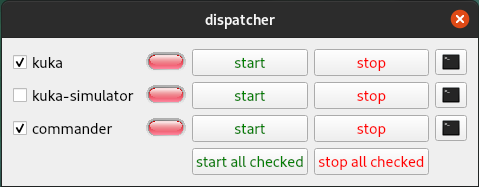
dispatcher builds its UI from a YAML file. Each configured item is launched in its own detached tmux session, and the terminal button can attach a gnome-terminal window to that session when available.
Runtime Parameters
The dispatcher executable uses the following ROS parameters:
| Name | Type | Default | Description |
|---|---|---|---|
dispatcher_config_path |
string |
"" |
Path to the dispatcher YAML file. |
initial_configuration |
string |
"" |
Configuration name to select on startup. |
start_checked_on_startup |
bool |
false |
Start all checked process items after loading the initial configuration. |
ssh_timeout_sec |
int |
10 |
Timeout used when building remote SSH commands. |
target_loop_rate_hz |
double |
100.0 |
Main process/status polling rate. |
YAML Configuration
The top-level dispatcher YAML supports:
| Key | Required | Description |
|---|---|---|
workspace |
Yes | Workspace path used by ROS process items before sourcing install/setup.bash. |
nodes |
Yes | Process and category definitions rendered in the main panel. |
configurations |
No | Named runtime configurations. Each entry may be a simple name or a map with name, cmd_prefix, environment_variables, and icon. |
cmd_prefix |
No | Default command prefix for the implicit all configuration. |
environment_variables |
No | Default environment variables for the implicit all configuration. |
hide_unconfigured_processes |
No | If true, items missing in the active configuration are hidden instead of disabled. |
scripts |
No | Script button definitions shown in the scripts panel. |
variables |
No | Variable selectors used for $VARIABLE command substitution. |
Node Types
Each entry in nodes can be:
- A ROS process item. If
typeis omitted, the item is treated as ROS by default. - A shell process item with
type: shell. - A collapsible category with
type: categoryand anitemsarray. Entries initemsfollow the same rules, including the default to ROS whentypeis omitted.
Common item fields include:
| Key | Description |
|---|---|
name |
UI label and tmux-session base name. |
cmd |
Command used for the implicit all configuration. |
configurations |
Per-configuration command definitions. |
start_checked |
Whether the item starts checked in the UI. Optional, defaults to false. |
stop_tmux_cmd |
Stop sequence sent to tmux. Optional, defaults to C-C. |
hostname / user
|
Optional remote execution target for local commands or configuration entries. |
use_cmd_prefix |
Enables or disables command-prefix injection. |
use_environment_variables |
Enables or disables environment-variable injection. |
attach_on_start |
Opens a terminal automatically after launch. |
ROS process items can additionally define node_name plus an optional
namespace, or a ros_nodes array with the same monitoring fields for
online-state monitoring. An omitted namespace resolves to the root namespace,
so name: talker matches the graph’s /talker; a name that is already
absolute, such as /fcat/fcat, carries its own namespace.
Shell process items use pgrep on the item name to infer online state.
Scripts and Variables
Script entries support:
| Key | Description |
|---|---|
name |
Button label. |
cmd or configurations
|
Script command definition. |
row, column
|
Grid placement in the scripts panel. |
icon |
Optional Qt resource path for the button icon. |
use_terminal |
Whether to wrap execution in gnome-terminal --. |
Variable entries support:
| Key | Description |
|---|---|
name |
Variable name used in commands, for example $FCAT_LOOP_RATE_HZ. |
choices |
Selectable values exposed in the UI. |
Examples
The following examples build incrementally from a minimal configuration to a
full-featured setup. Each one corresponds to a YAML file in config/
and a screenshot in doc/.
ROS 2 Demos (runnable out of the box)
Four examples run without any custom packages, using only the demos that ship
with ROS 2. Each is self-contained and includes an rqt_graph button. Install
the demo packages if needed:
```bash sudo apt install ros-$ROS_DISTRO-demo-nodes-cpp \
File truncated at 100 lines see the full file
CONTRIBUTING
Repository Summary
| Checkout URI | https://github.com/nasa-jpl/dispatcher.git |
| VCS Type | git |
| VCS Version | master |
| Last Updated | 2026-09-23 |
| Dev Status | MAINTAINED |
| Released | RELEASED |
| Contributing |
Help Wanted (-)
Good First Issues (-) Pull Requests to Review (-) |
Packages
| Name | Version |
|---|---|
| dispatcher | 0.4.5 |
README
Dispatcher
A Qt-based ROS 2 widget for starting, stopping, and monitoring both ROS nodes and arbitrary shell processes.
dispatcher builds its UI from a YAML file. Each configured item is launched in its own detached tmux session, and the terminal button can attach a gnome-terminal window to that session when available.
Runtime Parameters
The dispatcher executable uses the following ROS parameters:
| Name | Type | Default | Description |
|---|---|---|---|
dispatcher_config_path |
string |
"" |
Path to the dispatcher YAML file. |
initial_configuration |
string |
"" |
Configuration name to select on startup. |
start_checked_on_startup |
bool |
false |
Start all checked process items after loading the initial configuration. |
ssh_timeout_sec |
int |
10 |
Timeout used when building remote SSH commands. |
target_loop_rate_hz |
double |
100.0 |
Main process/status polling rate. |
YAML Configuration
The top-level dispatcher YAML supports:
| Key | Required | Description |
|---|---|---|
workspace |
Yes | Workspace path used by ROS process items before sourcing install/setup.bash. |
nodes |
Yes | Process and category definitions rendered in the main panel. |
configurations |
No | Named runtime configurations. Each entry may be a simple name or a map with name, cmd_prefix, environment_variables, and icon. |
cmd_prefix |
No | Default command prefix for the implicit all configuration. |
environment_variables |
No | Default environment variables for the implicit all configuration. |
hide_unconfigured_processes |
No | If true, items missing in the active configuration are hidden instead of disabled. |
scripts |
No | Script button definitions shown in the scripts panel. |
variables |
No | Variable selectors used for $VARIABLE command substitution. |
Node Types
Each entry in nodes can be:
- A ROS process item. If
typeis omitted, the item is treated as ROS by default. - A shell process item with
type: shell. - A collapsible category with
type: categoryand anitemsarray. Entries initemsfollow the same rules, including the default to ROS whentypeis omitted.
Common item fields include:
| Key | Description |
|---|---|
name |
UI label and tmux-session base name. |
cmd |
Command used for the implicit all configuration. |
configurations |
Per-configuration command definitions. |
start_checked |
Whether the item starts checked in the UI. Optional, defaults to false. |
stop_tmux_cmd |
Stop sequence sent to tmux. Optional, defaults to C-C. |
hostname / user
|
Optional remote execution target for local commands or configuration entries. |
use_cmd_prefix |
Enables or disables command-prefix injection. |
use_environment_variables |
Enables or disables environment-variable injection. |
attach_on_start |
Opens a terminal automatically after launch. |
ROS process items can additionally define node_name plus an optional
namespace, or a ros_nodes array with the same monitoring fields for
online-state monitoring. An omitted namespace resolves to the root namespace,
so name: talker matches the graph’s /talker; a name that is already
absolute, such as /fcat/fcat, carries its own namespace.
Shell process items use pgrep on the item name to infer online state.
Scripts and Variables
Script entries support:
| Key | Description |
|---|---|
name |
Button label. |
cmd or configurations
|
Script command definition. |
row, column
|
Grid placement in the scripts panel. |
icon |
Optional Qt resource path for the button icon. |
use_terminal |
Whether to wrap execution in gnome-terminal --. |
Variable entries support:
| Key | Description |
|---|---|
name |
Variable name used in commands, for example $FCAT_LOOP_RATE_HZ. |
choices |
Selectable values exposed in the UI. |
Examples
The following examples build incrementally from a minimal configuration to a
full-featured setup. Each one corresponds to a YAML file in config/
and a screenshot in doc/.
ROS 2 Demos (runnable out of the box)
Four examples run without any custom packages, using only the demos that ship
with ROS 2. Each is self-contained and includes an rqt_graph button. Install
the demo packages if needed:
```bash sudo apt install ros-$ROS_DISTRO-demo-nodes-cpp \
File truncated at 100 lines see the full file
CONTRIBUTING
Repository Summary
| Checkout URI | https://github.com/nasa-jpl/dispatcher.git |
| VCS Type | git |
| VCS Version | master |
| Last Updated | 2026-09-23 |
| Dev Status | MAINTAINED |
| Released | RELEASED |
| Contributing |
Help Wanted (-)
Good First Issues (-) Pull Requests to Review (-) |
Packages
| Name | Version |
|---|---|
| dispatcher | 0.4.5 |
README
Dispatcher
A Qt-based ROS 2 widget for starting, stopping, and monitoring both ROS nodes and arbitrary shell processes.
dispatcher builds its UI from a YAML file. Each configured item is launched in its own detached tmux session, and the terminal button can attach a gnome-terminal window to that session when available.
Runtime Parameters
The dispatcher executable uses the following ROS parameters:
| Name | Type | Default | Description |
|---|---|---|---|
dispatcher_config_path |
string |
"" |
Path to the dispatcher YAML file. |
initial_configuration |
string |
"" |
Configuration name to select on startup. |
start_checked_on_startup |
bool |
false |
Start all checked process items after loading the initial configuration. |
ssh_timeout_sec |
int |
10 |
Timeout used when building remote SSH commands. |
target_loop_rate_hz |
double |
100.0 |
Main process/status polling rate. |
YAML Configuration
The top-level dispatcher YAML supports:
| Key | Required | Description |
|---|---|---|
workspace |
Yes | Workspace path used by ROS process items before sourcing install/setup.bash. |
nodes |
Yes | Process and category definitions rendered in the main panel. |
configurations |
No | Named runtime configurations. Each entry may be a simple name or a map with name, cmd_prefix, environment_variables, and icon. |
cmd_prefix |
No | Default command prefix for the implicit all configuration. |
environment_variables |
No | Default environment variables for the implicit all configuration. |
hide_unconfigured_processes |
No | If true, items missing in the active configuration are hidden instead of disabled. |
scripts |
No | Script button definitions shown in the scripts panel. |
variables |
No | Variable selectors used for $VARIABLE command substitution. |
Node Types
Each entry in nodes can be:
- A ROS process item. If
typeis omitted, the item is treated as ROS by default. - A shell process item with
type: shell. - A collapsible category with
type: categoryand anitemsarray. Entries initemsfollow the same rules, including the default to ROS whentypeis omitted.
Common item fields include:
| Key | Description |
|---|---|
name |
UI label and tmux-session base name. |
cmd |
Command used for the implicit all configuration. |
configurations |
Per-configuration command definitions. |
start_checked |
Whether the item starts checked in the UI. Optional, defaults to false. |
stop_tmux_cmd |
Stop sequence sent to tmux. Optional, defaults to C-C. |
hostname / user
|
Optional remote execution target for local commands or configuration entries. |
use_cmd_prefix |
Enables or disables command-prefix injection. |
use_environment_variables |
Enables or disables environment-variable injection. |
attach_on_start |
Opens a terminal automatically after launch. |
ROS process items can additionally define node_name plus an optional
namespace, or a ros_nodes array with the same monitoring fields for
online-state monitoring. An omitted namespace resolves to the root namespace,
so name: talker matches the graph’s /talker; a name that is already
absolute, such as /fcat/fcat, carries its own namespace.
Shell process items use pgrep on the item name to infer online state.
Scripts and Variables
Script entries support:
| Key | Description |
|---|---|
name |
Button label. |
cmd or configurations
|
Script command definition. |
row, column
|
Grid placement in the scripts panel. |
icon |
Optional Qt resource path for the button icon. |
use_terminal |
Whether to wrap execution in gnome-terminal --. |
Variable entries support:
| Key | Description |
|---|---|
name |
Variable name used in commands, for example $FCAT_LOOP_RATE_HZ. |
choices |
Selectable values exposed in the UI. |
Examples
The following examples build incrementally from a minimal configuration to a
full-featured setup. Each one corresponds to a YAML file in config/
and a screenshot in doc/.
ROS 2 Demos (runnable out of the box)
Four examples run without any custom packages, using only the demos that ship
with ROS 2. Each is self-contained and includes an rqt_graph button. Install
the demo packages if needed:
```bash sudo apt install ros-$ROS_DISTRO-demo-nodes-cpp \
File truncated at 100 lines see the full file
CONTRIBUTING
Repository Summary
| Checkout URI | https://github.com/nasa-jpl/dispatcher.git |
| VCS Type | git |
| VCS Version | master |
| Last Updated | 2026-09-23 |
| Dev Status | MAINTAINED |
| Released | RELEASED |
| Contributing |
Help Wanted (-)
Good First Issues (-) Pull Requests to Review (-) |
Packages
| Name | Version |
|---|---|
| dispatcher | 0.4.5 |
README
Dispatcher
A Qt-based ROS 2 widget for starting, stopping, and monitoring both ROS nodes and arbitrary shell processes.
dispatcher builds its UI from a YAML file. Each configured item is launched in its own detached tmux session, and the terminal button can attach a gnome-terminal window to that session when available.
Runtime Parameters
The dispatcher executable uses the following ROS parameters:
| Name | Type | Default | Description |
|---|---|---|---|
dispatcher_config_path |
string |
"" |
Path to the dispatcher YAML file. |
initial_configuration |
string |
"" |
Configuration name to select on startup. |
start_checked_on_startup |
bool |
false |
Start all checked process items after loading the initial configuration. |
ssh_timeout_sec |
int |
10 |
Timeout used when building remote SSH commands. |
target_loop_rate_hz |
double |
100.0 |
Main process/status polling rate. |
YAML Configuration
The top-level dispatcher YAML supports:
| Key | Required | Description |
|---|---|---|
workspace |
Yes | Workspace path used by ROS process items before sourcing install/setup.bash. |
nodes |
Yes | Process and category definitions rendered in the main panel. |
configurations |
No | Named runtime configurations. Each entry may be a simple name or a map with name, cmd_prefix, environment_variables, and icon. |
cmd_prefix |
No | Default command prefix for the implicit all configuration. |
environment_variables |
No | Default environment variables for the implicit all configuration. |
hide_unconfigured_processes |
No | If true, items missing in the active configuration are hidden instead of disabled. |
scripts |
No | Script button definitions shown in the scripts panel. |
variables |
No | Variable selectors used for $VARIABLE command substitution. |
Node Types
Each entry in nodes can be:
- A ROS process item. If
typeis omitted, the item is treated as ROS by default. - A shell process item with
type: shell. - A collapsible category with
type: categoryand anitemsarray. Entries initemsfollow the same rules, including the default to ROS whentypeis omitted.
Common item fields include:
| Key | Description |
|---|---|
name |
UI label and tmux-session base name. |
cmd |
Command used for the implicit all configuration. |
configurations |
Per-configuration command definitions. |
start_checked |
Whether the item starts checked in the UI. Optional, defaults to false. |
stop_tmux_cmd |
Stop sequence sent to tmux. Optional, defaults to C-C. |
hostname / user
|
Optional remote execution target for local commands or configuration entries. |
use_cmd_prefix |
Enables or disables command-prefix injection. |
use_environment_variables |
Enables or disables environment-variable injection. |
attach_on_start |
Opens a terminal automatically after launch. |
ROS process items can additionally define node_name plus an optional
namespace, or a ros_nodes array with the same monitoring fields for
online-state monitoring. An omitted namespace resolves to the root namespace,
so name: talker matches the graph’s /talker; a name that is already
absolute, such as /fcat/fcat, carries its own namespace.
Shell process items use pgrep on the item name to infer online state.
Scripts and Variables
Script entries support:
| Key | Description |
|---|---|
name |
Button label. |
cmd or configurations
|
Script command definition. |
row, column
|
Grid placement in the scripts panel. |
icon |
Optional Qt resource path for the button icon. |
use_terminal |
Whether to wrap execution in gnome-terminal --. |
Variable entries support:
| Key | Description |
|---|---|
name |
Variable name used in commands, for example $FCAT_LOOP_RATE_HZ. |
choices |
Selectable values exposed in the UI. |
Examples
The following examples build incrementally from a minimal configuration to a
full-featured setup. Each one corresponds to a YAML file in config/
and a screenshot in doc/.
ROS 2 Demos (runnable out of the box)
Four examples run without any custom packages, using only the demos that ship
with ROS 2. Each is self-contained and includes an rqt_graph button. Install
the demo packages if needed:
```bash sudo apt install ros-$ROS_DISTRO-demo-nodes-cpp \
File truncated at 100 lines see the full file
CONTRIBUTING
Repository Summary
| Checkout URI | https://github.com/nasa-jpl/dispatcher.git |
| VCS Type | git |
| VCS Version | master |
| Last Updated | 2026-09-23 |
| Dev Status | MAINTAINED |
| Released | RELEASED |
| Contributing |
Help Wanted (-)
Good First Issues (-) Pull Requests to Review (-) |
Packages
| Name | Version |
|---|---|
| dispatcher | 0.4.5 |
README
Dispatcher
A Qt-based ROS 2 widget for starting, stopping, and monitoring both ROS nodes and arbitrary shell processes.
dispatcher builds its UI from a YAML file. Each configured item is launched in its own detached tmux session, and the terminal button can attach a gnome-terminal window to that session when available.
Runtime Parameters
The dispatcher executable uses the following ROS parameters:
| Name | Type | Default | Description |
|---|---|---|---|
dispatcher_config_path |
string |
"" |
Path to the dispatcher YAML file. |
initial_configuration |
string |
"" |
Configuration name to select on startup. |
start_checked_on_startup |
bool |
false |
Start all checked process items after loading the initial configuration. |
ssh_timeout_sec |
int |
10 |
Timeout used when building remote SSH commands. |
target_loop_rate_hz |
double |
100.0 |
Main process/status polling rate. |
YAML Configuration
The top-level dispatcher YAML supports:
| Key | Required | Description |
|---|---|---|
workspace |
Yes | Workspace path used by ROS process items before sourcing install/setup.bash. |
nodes |
Yes | Process and category definitions rendered in the main panel. |
configurations |
No | Named runtime configurations. Each entry may be a simple name or a map with name, cmd_prefix, environment_variables, and icon. |
cmd_prefix |
No | Default command prefix for the implicit all configuration. |
environment_variables |
No | Default environment variables for the implicit all configuration. |
hide_unconfigured_processes |
No | If true, items missing in the active configuration are hidden instead of disabled. |
scripts |
No | Script button definitions shown in the scripts panel. |
variables |
No | Variable selectors used for $VARIABLE command substitution. |
Node Types
Each entry in nodes can be:
- A ROS process item. If
typeis omitted, the item is treated as ROS by default. - A shell process item with
type: shell. - A collapsible category with
type: categoryand anitemsarray. Entries initemsfollow the same rules, including the default to ROS whentypeis omitted.
Common item fields include:
| Key | Description |
|---|---|
name |
UI label and tmux-session base name. |
cmd |
Command used for the implicit all configuration. |
configurations |
Per-configuration command definitions. |
start_checked |
Whether the item starts checked in the UI. Optional, defaults to false. |
stop_tmux_cmd |
Stop sequence sent to tmux. Optional, defaults to C-C. |
hostname / user
|
Optional remote execution target for local commands or configuration entries. |
use_cmd_prefix |
Enables or disables command-prefix injection. |
use_environment_variables |
Enables or disables environment-variable injection. |
attach_on_start |
Opens a terminal automatically after launch. |
ROS process items can additionally define node_name plus an optional
namespace, or a ros_nodes array with the same monitoring fields for
online-state monitoring. An omitted namespace resolves to the root namespace,
so name: talker matches the graph’s /talker; a name that is already
absolute, such as /fcat/fcat, carries its own namespace.
Shell process items use pgrep on the item name to infer online state.
Scripts and Variables
Script entries support:
| Key | Description |
|---|---|
name |
Button label. |
cmd or configurations
|
Script command definition. |
row, column
|
Grid placement in the scripts panel. |
icon |
Optional Qt resource path for the button icon. |
use_terminal |
Whether to wrap execution in gnome-terminal --. |
Variable entries support:
| Key | Description |
|---|---|
name |
Variable name used in commands, for example $FCAT_LOOP_RATE_HZ. |
choices |
Selectable values exposed in the UI. |
Examples
The following examples build incrementally from a minimal configuration to a
full-featured setup. Each one corresponds to a YAML file in config/
and a screenshot in doc/.
ROS 2 Demos (runnable out of the box)
Four examples run without any custom packages, using only the demos that ship
with ROS 2. Each is self-contained and includes an rqt_graph button. Install
the demo packages if needed:
```bash sudo apt install ros-$ROS_DISTRO-demo-nodes-cpp \
File truncated at 100 lines see the full file
CONTRIBUTING
Repository Summary
| Checkout URI | https://github.com/nasa-jpl/dispatcher.git |
| VCS Type | git |
| VCS Version | master |
| Last Updated | 2026-09-23 |
| Dev Status | MAINTAINED |
| Released | RELEASED |
| Contributing |
Help Wanted (-)
Good First Issues (-) Pull Requests to Review (-) |
Packages
| Name | Version |
|---|---|
| dispatcher | 0.4.5 |
README
Dispatcher
A Qt-based ROS 2 widget for starting, stopping, and monitoring both ROS nodes and arbitrary shell processes.
dispatcher builds its UI from a YAML file. Each configured item is launched in its own detached tmux session, and the terminal button can attach a gnome-terminal window to that session when available.
Runtime Parameters
The dispatcher executable uses the following ROS parameters:
| Name | Type | Default | Description |
|---|---|---|---|
dispatcher_config_path |
string |
"" |
Path to the dispatcher YAML file. |
initial_configuration |
string |
"" |
Configuration name to select on startup. |
start_checked_on_startup |
bool |
false |
Start all checked process items after loading the initial configuration. |
ssh_timeout_sec |
int |
10 |
Timeout used when building remote SSH commands. |
target_loop_rate_hz |
double |
100.0 |
Main process/status polling rate. |
YAML Configuration
The top-level dispatcher YAML supports:
| Key | Required | Description |
|---|---|---|
workspace |
Yes | Workspace path used by ROS process items before sourcing install/setup.bash. |
nodes |
Yes | Process and category definitions rendered in the main panel. |
configurations |
No | Named runtime configurations. Each entry may be a simple name or a map with name, cmd_prefix, environment_variables, and icon. |
cmd_prefix |
No | Default command prefix for the implicit all configuration. |
environment_variables |
No | Default environment variables for the implicit all configuration. |
hide_unconfigured_processes |
No | If true, items missing in the active configuration are hidden instead of disabled. |
scripts |
No | Script button definitions shown in the scripts panel. |
variables |
No | Variable selectors used for $VARIABLE command substitution. |
Node Types
Each entry in nodes can be:
- A ROS process item. If
typeis omitted, the item is treated as ROS by default. - A shell process item with
type: shell. - A collapsible category with
type: categoryand anitemsarray. Entries initemsfollow the same rules, including the default to ROS whentypeis omitted.
Common item fields include:
| Key | Description |
|---|---|
name |
UI label and tmux-session base name. |
cmd |
Command used for the implicit all configuration. |
configurations |
Per-configuration command definitions. |
start_checked |
Whether the item starts checked in the UI. Optional, defaults to false. |
stop_tmux_cmd |
Stop sequence sent to tmux. Optional, defaults to C-C. |
hostname / user
|
Optional remote execution target for local commands or configuration entries. |
use_cmd_prefix |
Enables or disables command-prefix injection. |
use_environment_variables |
Enables or disables environment-variable injection. |
attach_on_start |
Opens a terminal automatically after launch. |
ROS process items can additionally define node_name plus an optional
namespace, or a ros_nodes array with the same monitoring fields for
online-state monitoring. An omitted namespace resolves to the root namespace,
so name: talker matches the graph’s /talker; a name that is already
absolute, such as /fcat/fcat, carries its own namespace.
Shell process items use pgrep on the item name to infer online state.
Scripts and Variables
Script entries support:
| Key | Description |
|---|---|
name |
Button label. |
cmd or configurations
|
Script command definition. |
row, column
|
Grid placement in the scripts panel. |
icon |
Optional Qt resource path for the button icon. |
use_terminal |
Whether to wrap execution in gnome-terminal --. |
Variable entries support:
| Key | Description |
|---|---|
name |
Variable name used in commands, for example $FCAT_LOOP_RATE_HZ. |
choices |
Selectable values exposed in the UI. |
Examples
The following examples build incrementally from a minimal configuration to a
full-featured setup. Each one corresponds to a YAML file in config/
and a screenshot in doc/.
ROS 2 Demos (runnable out of the box)
Four examples run without any custom packages, using only the demos that ship
with ROS 2. Each is self-contained and includes an rqt_graph button. Install
the demo packages if needed:
```bash sudo apt install ros-$ROS_DISTRO-demo-nodes-cpp \
File truncated at 100 lines see the full file
CONTRIBUTING
Repository Summary
| Checkout URI | https://github.com/nasa-jpl/dispatcher.git |
| VCS Type | git |
| VCS Version | master |
| Last Updated | 2026-09-23 |
| Dev Status | MAINTAINED |
| Released | RELEASED |
| Contributing |
Help Wanted (-)
Good First Issues (-) Pull Requests to Review (-) |
Packages
| Name | Version |
|---|---|
| dispatcher | 0.4.5 |
README
Dispatcher
A Qt-based ROS 2 widget for starting, stopping, and monitoring both ROS nodes and arbitrary shell processes.
dispatcher builds its UI from a YAML file. Each configured item is launched in its own detached tmux session, and the terminal button can attach a gnome-terminal window to that session when available.
Runtime Parameters
The dispatcher executable uses the following ROS parameters:
| Name | Type | Default | Description |
|---|---|---|---|
dispatcher_config_path |
string |
"" |
Path to the dispatcher YAML file. |
initial_configuration |
string |
"" |
Configuration name to select on startup. |
start_checked_on_startup |
bool |
false |
Start all checked process items after loading the initial configuration. |
ssh_timeout_sec |
int |
10 |
Timeout used when building remote SSH commands. |
target_loop_rate_hz |
double |
100.0 |
Main process/status polling rate. |
YAML Configuration
The top-level dispatcher YAML supports:
| Key | Required | Description |
|---|---|---|
workspace |
Yes | Workspace path used by ROS process items before sourcing install/setup.bash. |
nodes |
Yes | Process and category definitions rendered in the main panel. |
configurations |
No | Named runtime configurations. Each entry may be a simple name or a map with name, cmd_prefix, environment_variables, and icon. |
cmd_prefix |
No | Default command prefix for the implicit all configuration. |
environment_variables |
No | Default environment variables for the implicit all configuration. |
hide_unconfigured_processes |
No | If true, items missing in the active configuration are hidden instead of disabled. |
scripts |
No | Script button definitions shown in the scripts panel. |
variables |
No | Variable selectors used for $VARIABLE command substitution. |
Node Types
Each entry in nodes can be:
- A ROS process item. If
typeis omitted, the item is treated as ROS by default. - A shell process item with
type: shell. - A collapsible category with
type: categoryand anitemsarray. Entries initemsfollow the same rules, including the default to ROS whentypeis omitted.
Common item fields include:
| Key | Description |
|---|---|
name |
UI label and tmux-session base name. |
cmd |
Command used for the implicit all configuration. |
configurations |
Per-configuration command definitions. |
start_checked |
Whether the item starts checked in the UI. Optional, defaults to false. |
stop_tmux_cmd |
Stop sequence sent to tmux. Optional, defaults to C-C. |
hostname / user
|
Optional remote execution target for local commands or configuration entries. |
use_cmd_prefix |
Enables or disables command-prefix injection. |
use_environment_variables |
Enables or disables environment-variable injection. |
attach_on_start |
Opens a terminal automatically after launch. |
ROS process items can additionally define node_name plus an optional
namespace, or a ros_nodes array with the same monitoring fields for
online-state monitoring. An omitted namespace resolves to the root namespace,
so name: talker matches the graph’s /talker; a name that is already
absolute, such as /fcat/fcat, carries its own namespace.
Shell process items use pgrep on the item name to infer online state.
Scripts and Variables
Script entries support:
| Key | Description |
|---|---|
name |
Button label. |
cmd or configurations
|
Script command definition. |
row, column
|
Grid placement in the scripts panel. |
icon |
Optional Qt resource path for the button icon. |
use_terminal |
Whether to wrap execution in gnome-terminal --. |
Variable entries support:
| Key | Description |
|---|---|
name |
Variable name used in commands, for example $FCAT_LOOP_RATE_HZ. |
choices |
Selectable values exposed in the UI. |
Examples
The following examples build incrementally from a minimal configuration to a
full-featured setup. Each one corresponds to a YAML file in config/
and a screenshot in doc/.
ROS 2 Demos (runnable out of the box)
Four examples run without any custom packages, using only the demos that ship
with ROS 2. Each is self-contained and includes an rqt_graph button. Install
the demo packages if needed:
```bash sudo apt install ros-$ROS_DISTRO-demo-nodes-cpp \
File truncated at 100 lines see the full file
CONTRIBUTING
Repository Summary
| Checkout URI | https://github.com/nasa-jpl/dispatcher.git |
| VCS Type | git |
| VCS Version | master |
| Last Updated | 2026-09-23 |
| Dev Status | MAINTAINED |
| Released | RELEASED |
| Contributing |
Help Wanted (-)
Good First Issues (-) Pull Requests to Review (-) |
Packages
| Name | Version |
|---|---|
| dispatcher | 0.4.5 |
README
Dispatcher
A Qt-based ROS 2 widget for starting, stopping, and monitoring both ROS nodes and arbitrary shell processes.
dispatcher builds its UI from a YAML file. Each configured item is launched in its own detached tmux session, and the terminal button can attach a gnome-terminal window to that session when available.
Runtime Parameters
The dispatcher executable uses the following ROS parameters:
| Name | Type | Default | Description |
|---|---|---|---|
dispatcher_config_path |
string |
"" |
Path to the dispatcher YAML file. |
initial_configuration |
string |
"" |
Configuration name to select on startup. |
start_checked_on_startup |
bool |
false |
Start all checked process items after loading the initial configuration. |
ssh_timeout_sec |
int |
10 |
Timeout used when building remote SSH commands. |
target_loop_rate_hz |
double |
100.0 |
Main process/status polling rate. |
YAML Configuration
The top-level dispatcher YAML supports:
| Key | Required | Description |
|---|---|---|
workspace |
Yes | Workspace path used by ROS process items before sourcing install/setup.bash. |
nodes |
Yes | Process and category definitions rendered in the main panel. |
configurations |
No | Named runtime configurations. Each entry may be a simple name or a map with name, cmd_prefix, environment_variables, and icon. |
cmd_prefix |
No | Default command prefix for the implicit all configuration. |
environment_variables |
No | Default environment variables for the implicit all configuration. |
hide_unconfigured_processes |
No | If true, items missing in the active configuration are hidden instead of disabled. |
scripts |
No | Script button definitions shown in the scripts panel. |
variables |
No | Variable selectors used for $VARIABLE command substitution. |
Node Types
Each entry in nodes can be:
- A ROS process item. If
typeis omitted, the item is treated as ROS by default. - A shell process item with
type: shell. - A collapsible category with
type: categoryand anitemsarray. Entries initemsfollow the same rules, including the default to ROS whentypeis omitted.
Common item fields include:
| Key | Description |
|---|---|
name |
UI label and tmux-session base name. |
cmd |
Command used for the implicit all configuration. |
configurations |
Per-configuration command definitions. |
start_checked |
Whether the item starts checked in the UI. Optional, defaults to false. |
stop_tmux_cmd |
Stop sequence sent to tmux. Optional, defaults to C-C. |
hostname / user
|
Optional remote execution target for local commands or configuration entries. |
use_cmd_prefix |
Enables or disables command-prefix injection. |
use_environment_variables |
Enables or disables environment-variable injection. |
attach_on_start |
Opens a terminal automatically after launch. |
ROS process items can additionally define node_name plus an optional
namespace, or a ros_nodes array with the same monitoring fields for
online-state monitoring. An omitted namespace resolves to the root namespace,
so name: talker matches the graph’s /talker; a name that is already
absolute, such as /fcat/fcat, carries its own namespace.
Shell process items use pgrep on the item name to infer online state.
Scripts and Variables
Script entries support:
| Key | Description |
|---|---|
name |
Button label. |
cmd or configurations
|
Script command definition. |
row, column
|
Grid placement in the scripts panel. |
icon |
Optional Qt resource path for the button icon. |
use_terminal |
Whether to wrap execution in gnome-terminal --. |
Variable entries support:
| Key | Description |
|---|---|
name |
Variable name used in commands, for example $FCAT_LOOP_RATE_HZ. |
choices |
Selectable values exposed in the UI. |
Examples
The following examples build incrementally from a minimal configuration to a
full-featured setup. Each one corresponds to a YAML file in config/
and a screenshot in doc/.
ROS 2 Demos (runnable out of the box)
Four examples run without any custom packages, using only the demos that ship
with ROS 2. Each is self-contained and includes an rqt_graph button. Install
the demo packages if needed:
```bash sudo apt install ros-$ROS_DISTRO-demo-nodes-cpp \
File truncated at 100 lines see the full file
CONTRIBUTING
Repository Summary
| Checkout URI | https://github.com/nasa-jpl/dispatcher.git |
| VCS Type | git |
| VCS Version | master |
| Last Updated | 2026-09-23 |
| Dev Status | MAINTAINED |
| Released | RELEASED |
| Contributing |
Help Wanted (-)
Good First Issues (-) Pull Requests to Review (-) |
Packages
| Name | Version |
|---|---|
| dispatcher | 0.4.5 |
README
Dispatcher
A Qt-based ROS 2 widget for starting, stopping, and monitoring both ROS nodes and arbitrary shell processes.
dispatcher builds its UI from a YAML file. Each configured item is launched in its own detached tmux session, and the terminal button can attach a gnome-terminal window to that session when available.
Runtime Parameters
The dispatcher executable uses the following ROS parameters:
| Name | Type | Default | Description |
|---|---|---|---|
dispatcher_config_path |
string |
"" |
Path to the dispatcher YAML file. |
initial_configuration |
string |
"" |
Configuration name to select on startup. |
start_checked_on_startup |
bool |
false |
Start all checked process items after loading the initial configuration. |
ssh_timeout_sec |
int |
10 |
Timeout used when building remote SSH commands. |
target_loop_rate_hz |
double |
100.0 |
Main process/status polling rate. |
YAML Configuration
The top-level dispatcher YAML supports:
| Key | Required | Description |
|---|---|---|
workspace |
Yes | Workspace path used by ROS process items before sourcing install/setup.bash. |
nodes |
Yes | Process and category definitions rendered in the main panel. |
configurations |
No | Named runtime configurations. Each entry may be a simple name or a map with name, cmd_prefix, environment_variables, and icon. |
cmd_prefix |
No | Default command prefix for the implicit all configuration. |
environment_variables |
No | Default environment variables for the implicit all configuration. |
hide_unconfigured_processes |
No | If true, items missing in the active configuration are hidden instead of disabled. |
scripts |
No | Script button definitions shown in the scripts panel. |
variables |
No | Variable selectors used for $VARIABLE command substitution. |
Node Types
Each entry in nodes can be:
- A ROS process item. If
typeis omitted, the item is treated as ROS by default. - A shell process item with
type: shell. - A collapsible category with
type: categoryand anitemsarray. Entries initemsfollow the same rules, including the default to ROS whentypeis omitted.
Common item fields include:
| Key | Description |
|---|---|
name |
UI label and tmux-session base name. |
cmd |
Command used for the implicit all configuration. |
configurations |
Per-configuration command definitions. |
start_checked |
Whether the item starts checked in the UI. Optional, defaults to false. |
stop_tmux_cmd |
Stop sequence sent to tmux. Optional, defaults to C-C. |
hostname / user
|
Optional remote execution target for local commands or configuration entries. |
use_cmd_prefix |
Enables or disables command-prefix injection. |
use_environment_variables |
Enables or disables environment-variable injection. |
attach_on_start |
Opens a terminal automatically after launch. |
ROS process items can additionally define node_name plus an optional
namespace, or a ros_nodes array with the same monitoring fields for
online-state monitoring. An omitted namespace resolves to the root namespace,
so name: talker matches the graph’s /talker; a name that is already
absolute, such as /fcat/fcat, carries its own namespace.
Shell process items use pgrep on the item name to infer online state.
Scripts and Variables
Script entries support:
| Key | Description |
|---|---|
name |
Button label. |
cmd or configurations
|
Script command definition. |
row, column
|
Grid placement in the scripts panel. |
icon |
Optional Qt resource path for the button icon. |
use_terminal |
Whether to wrap execution in gnome-terminal --. |
Variable entries support:
| Key | Description |
|---|---|
name |
Variable name used in commands, for example $FCAT_LOOP_RATE_HZ. |
choices |
Selectable values exposed in the UI. |
Examples
The following examples build incrementally from a minimal configuration to a
full-featured setup. Each one corresponds to a YAML file in config/
and a screenshot in doc/.
ROS 2 Demos (runnable out of the box)
Four examples run without any custom packages, using only the demos that ship
with ROS 2. Each is self-contained and includes an rqt_graph button. Install
the demo packages if needed:
```bash sudo apt install ros-$ROS_DISTRO-demo-nodes-cpp \
File truncated at 100 lines see the full file
CONTRIBUTING
Repository Summary
| Checkout URI | https://github.com/nasa-jpl/dispatcher.git |
| VCS Type | git |
| VCS Version | master |
| Last Updated | 2026-09-23 |
| Dev Status | MAINTAINED |
| Released | RELEASED |
| Contributing |
Help Wanted (-)
Good First Issues (-) Pull Requests to Review (-) |
Packages
| Name | Version |
|---|---|
| dispatcher | 0.4.5 |
README
Dispatcher
A Qt-based ROS 2 widget for starting, stopping, and monitoring both ROS nodes and arbitrary shell processes.
dispatcher builds its UI from a YAML file. Each configured item is launched in its own detached tmux session, and the terminal button can attach a gnome-terminal window to that session when available.
Runtime Parameters
The dispatcher executable uses the following ROS parameters:
| Name | Type | Default | Description |
|---|---|---|---|
dispatcher_config_path |
string |
"" |
Path to the dispatcher YAML file. |
initial_configuration |
string |
"" |
Configuration name to select on startup. |
start_checked_on_startup |
bool |
false |
Start all checked process items after loading the initial configuration. |
ssh_timeout_sec |
int |
10 |
Timeout used when building remote SSH commands. |
target_loop_rate_hz |
double |
100.0 |
Main process/status polling rate. |
YAML Configuration
The top-level dispatcher YAML supports:
| Key | Required | Description |
|---|---|---|
workspace |
Yes | Workspace path used by ROS process items before sourcing install/setup.bash. |
nodes |
Yes | Process and category definitions rendered in the main panel. |
configurations |
No | Named runtime configurations. Each entry may be a simple name or a map with name, cmd_prefix, environment_variables, and icon. |
cmd_prefix |
No | Default command prefix for the implicit all configuration. |
environment_variables |
No | Default environment variables for the implicit all configuration. |
hide_unconfigured_processes |
No | If true, items missing in the active configuration are hidden instead of disabled. |
scripts |
No | Script button definitions shown in the scripts panel. |
variables |
No | Variable selectors used for $VARIABLE command substitution. |
Node Types
Each entry in nodes can be:
- A ROS process item. If
typeis omitted, the item is treated as ROS by default. - A shell process item with
type: shell. - A collapsible category with
type: categoryand anitemsarray. Entries initemsfollow the same rules, including the default to ROS whentypeis omitted.
Common item fields include:
| Key | Description |
|---|---|
name |
UI label and tmux-session base name. |
cmd |
Command used for the implicit all configuration. |
configurations |
Per-configuration command definitions. |
start_checked |
Whether the item starts checked in the UI. Optional, defaults to false. |
stop_tmux_cmd |
Stop sequence sent to tmux. Optional, defaults to C-C. |
hostname / user
|
Optional remote execution target for local commands or configuration entries. |
use_cmd_prefix |
Enables or disables command-prefix injection. |
use_environment_variables |
Enables or disables environment-variable injection. |
attach_on_start |
Opens a terminal automatically after launch. |
ROS process items can additionally define node_name plus an optional
namespace, or a ros_nodes array with the same monitoring fields for
online-state monitoring. An omitted namespace resolves to the root namespace,
so name: talker matches the graph’s /talker; a name that is already
absolute, such as /fcat/fcat, carries its own namespace.
Shell process items use pgrep on the item name to infer online state.
Scripts and Variables
Script entries support:
| Key | Description |
|---|---|
name |
Button label. |
cmd or configurations
|
Script command definition. |
row, column
|
Grid placement in the scripts panel. |
icon |
Optional Qt resource path for the button icon. |
use_terminal |
Whether to wrap execution in gnome-terminal --. |
Variable entries support:
| Key | Description |
|---|---|
name |
Variable name used in commands, for example $FCAT_LOOP_RATE_HZ. |
choices |
Selectable values exposed in the UI. |
Examples
The following examples build incrementally from a minimal configuration to a
full-featured setup. Each one corresponds to a YAML file in config/
and a screenshot in doc/.
ROS 2 Demos (runnable out of the box)
Four examples run without any custom packages, using only the demos that ship
with ROS 2. Each is self-contained and includes an rqt_graph button. Install
the demo packages if needed:
```bash sudo apt install ros-$ROS_DISTRO-demo-nodes-cpp \
File truncated at 100 lines see the full file
CONTRIBUTING
Repository Summary
| Checkout URI | https://github.com/nasa-jpl/dispatcher.git |
| VCS Type | git |
| VCS Version | master |
| Last Updated | 2026-09-23 |
| Dev Status | MAINTAINED |
| Released | RELEASED |
| Contributing |
Help Wanted (-)
Good First Issues (-) Pull Requests to Review (-) |
Packages
| Name | Version |
|---|---|
| dispatcher | 0.4.5 |
README
Dispatcher
A Qt-based ROS 2 widget for starting, stopping, and monitoring both ROS nodes and arbitrary shell processes.
dispatcher builds its UI from a YAML file. Each configured item is launched in its own detached tmux session, and the terminal button can attach a gnome-terminal window to that session when available.
Runtime Parameters
The dispatcher executable uses the following ROS parameters:
| Name | Type | Default | Description |
|---|---|---|---|
dispatcher_config_path |
string |
"" |
Path to the dispatcher YAML file. |
initial_configuration |
string |
"" |
Configuration name to select on startup. |
start_checked_on_startup |
bool |
false |
Start all checked process items after loading the initial configuration. |
ssh_timeout_sec |
int |
10 |
Timeout used when building remote SSH commands. |
target_loop_rate_hz |
double |
100.0 |
Main process/status polling rate. |
YAML Configuration
The top-level dispatcher YAML supports:
| Key | Required | Description |
|---|---|---|
workspace |
Yes | Workspace path used by ROS process items before sourcing install/setup.bash. |
nodes |
Yes | Process and category definitions rendered in the main panel. |
configurations |
No | Named runtime configurations. Each entry may be a simple name or a map with name, cmd_prefix, environment_variables, and icon. |
cmd_prefix |
No | Default command prefix for the implicit all configuration. |
environment_variables |
No | Default environment variables for the implicit all configuration. |
hide_unconfigured_processes |
No | If true, items missing in the active configuration are hidden instead of disabled. |
scripts |
No | Script button definitions shown in the scripts panel. |
variables |
No | Variable selectors used for $VARIABLE command substitution. |
Node Types
Each entry in nodes can be:
- A ROS process item. If
typeis omitted, the item is treated as ROS by default. - A shell process item with
type: shell. - A collapsible category with
type: categoryand anitemsarray. Entries initemsfollow the same rules, including the default to ROS whentypeis omitted.
Common item fields include:
| Key | Description |
|---|---|
name |
UI label and tmux-session base name. |
cmd |
Command used for the implicit all configuration. |
configurations |
Per-configuration command definitions. |
start_checked |
Whether the item starts checked in the UI. Optional, defaults to false. |
stop_tmux_cmd |
Stop sequence sent to tmux. Optional, defaults to C-C. |
hostname / user
|
Optional remote execution target for local commands or configuration entries. |
use_cmd_prefix |
Enables or disables command-prefix injection. |
use_environment_variables |
Enables or disables environment-variable injection. |
attach_on_start |
Opens a terminal automatically after launch. |
ROS process items can additionally define node_name plus an optional
namespace, or a ros_nodes array with the same monitoring fields for
online-state monitoring. An omitted namespace resolves to the root namespace,
so name: talker matches the graph’s /talker; a name that is already
absolute, such as /fcat/fcat, carries its own namespace.
Shell process items use pgrep on the item name to infer online state.
Scripts and Variables
Script entries support:
| Key | Description |
|---|---|
name |
Button label. |
cmd or configurations
|
Script command definition. |
row, column
|
Grid placement in the scripts panel. |
icon |
Optional Qt resource path for the button icon. |
use_terminal |
Whether to wrap execution in gnome-terminal --. |
Variable entries support:
| Key | Description |
|---|---|
name |
Variable name used in commands, for example $FCAT_LOOP_RATE_HZ. |
choices |
Selectable values exposed in the UI. |
Examples
The following examples build incrementally from a minimal configuration to a
full-featured setup. Each one corresponds to a YAML file in config/
and a screenshot in doc/.
ROS 2 Demos (runnable out of the box)
Four examples run without any custom packages, using only the demos that ship
with ROS 2. Each is self-contained and includes an rqt_graph button. Install
the demo packages if needed:
```bash sudo apt install ros-$ROS_DISTRO-demo-nodes-cpp \
File truncated at 100 lines see the full file
CONTRIBUTING
Repository Summary
| Checkout URI | https://github.com/nasa-jpl/dispatcher.git |
| VCS Type | git |
| VCS Version | master |
| Last Updated | 2026-09-23 |
| Dev Status | MAINTAINED |
| Released | RELEASED |
| Contributing |
Help Wanted (-)
Good First Issues (-) Pull Requests to Review (-) |
Packages
| Name | Version |
|---|---|
| dispatcher | 0.4.5 |
README
Dispatcher
A Qt-based ROS 2 widget for starting, stopping, and monitoring both ROS nodes and arbitrary shell processes.
dispatcher builds its UI from a YAML file. Each configured item is launched in its own detached tmux session, and the terminal button can attach a gnome-terminal window to that session when available.
Runtime Parameters
The dispatcher executable uses the following ROS parameters:
| Name | Type | Default | Description |
|---|---|---|---|
dispatcher_config_path |
string |
"" |
Path to the dispatcher YAML file. |
initial_configuration |
string |
"" |
Configuration name to select on startup. |
start_checked_on_startup |
bool |
false |
Start all checked process items after loading the initial configuration. |
ssh_timeout_sec |
int |
10 |
Timeout used when building remote SSH commands. |
target_loop_rate_hz |
double |
100.0 |
Main process/status polling rate. |
YAML Configuration
The top-level dispatcher YAML supports:
| Key | Required | Description |
|---|---|---|
workspace |
Yes | Workspace path used by ROS process items before sourcing install/setup.bash. |
nodes |
Yes | Process and category definitions rendered in the main panel. |
configurations |
No | Named runtime configurations. Each entry may be a simple name or a map with name, cmd_prefix, environment_variables, and icon. |
cmd_prefix |
No | Default command prefix for the implicit all configuration. |
environment_variables |
No | Default environment variables for the implicit all configuration. |
hide_unconfigured_processes |
No | If true, items missing in the active configuration are hidden instead of disabled. |
scripts |
No | Script button definitions shown in the scripts panel. |
variables |
No | Variable selectors used for $VARIABLE command substitution. |
Node Types
Each entry in nodes can be:
- A ROS process item. If
typeis omitted, the item is treated as ROS by default. - A shell process item with
type: shell. - A collapsible category with
type: categoryand anitemsarray. Entries initemsfollow the same rules, including the default to ROS whentypeis omitted.
Common item fields include:
| Key | Description |
|---|---|
name |
UI label and tmux-session base name. |
cmd |
Command used for the implicit all configuration. |
configurations |
Per-configuration command definitions. |
start_checked |
Whether the item starts checked in the UI. Optional, defaults to false. |
stop_tmux_cmd |
Stop sequence sent to tmux. Optional, defaults to C-C. |
hostname / user
|
Optional remote execution target for local commands or configuration entries. |
use_cmd_prefix |
Enables or disables command-prefix injection. |
use_environment_variables |
Enables or disables environment-variable injection. |
attach_on_start |
Opens a terminal automatically after launch. |
ROS process items can additionally define node_name plus an optional
namespace, or a ros_nodes array with the same monitoring fields for
online-state monitoring. An omitted namespace resolves to the root namespace,
so name: talker matches the graph’s /talker; a name that is already
absolute, such as /fcat/fcat, carries its own namespace.
Shell process items use pgrep on the item name to infer online state.
Scripts and Variables
Script entries support:
| Key | Description |
|---|---|
name |
Button label. |
cmd or configurations
|
Script command definition. |
row, column
|
Grid placement in the scripts panel. |
icon |
Optional Qt resource path for the button icon. |
use_terminal |
Whether to wrap execution in gnome-terminal --. |
Variable entries support:
| Key | Description |
|---|---|
name |
Variable name used in commands, for example $FCAT_LOOP_RATE_HZ. |
choices |
Selectable values exposed in the UI. |
Examples
The following examples build incrementally from a minimal configuration to a
full-featured setup. Each one corresponds to a YAML file in config/
and a screenshot in doc/.
ROS 2 Demos (runnable out of the box)
Four examples run without any custom packages, using only the demos that ship
with ROS 2. Each is self-contained and includes an rqt_graph button. Install
the demo packages if needed:
```bash sudo apt install ros-$ROS_DISTRO-demo-nodes-cpp \
File truncated at 100 lines see the full file
CONTRIBUTING
Repository Summary
| Checkout URI | https://github.com/nasa-jpl/dispatcher.git |
| VCS Type | git |
| VCS Version | master |
| Last Updated | 2026-09-23 |
| Dev Status | MAINTAINED |
| Released | RELEASED |
| Contributing |
Help Wanted (-)
Good First Issues (-) Pull Requests to Review (-) |
Packages
| Name | Version |
|---|---|
| dispatcher | 0.4.5 |
README
Dispatcher
A Qt-based ROS 2 widget for starting, stopping, and monitoring both ROS nodes and arbitrary shell processes.
dispatcher builds its UI from a YAML file. Each configured item is launched in its own detached tmux session, and the terminal button can attach a gnome-terminal window to that session when available.
Runtime Parameters
The dispatcher executable uses the following ROS parameters:
| Name | Type | Default | Description |
|---|---|---|---|
dispatcher_config_path |
string |
"" |
Path to the dispatcher YAML file. |
initial_configuration |
string |
"" |
Configuration name to select on startup. |
start_checked_on_startup |
bool |
false |
Start all checked process items after loading the initial configuration. |
ssh_timeout_sec |
int |
10 |
Timeout used when building remote SSH commands. |
target_loop_rate_hz |
double |
100.0 |
Main process/status polling rate. |
YAML Configuration
The top-level dispatcher YAML supports:
| Key | Required | Description |
|---|---|---|
workspace |
Yes | Workspace path used by ROS process items before sourcing install/setup.bash. |
nodes |
Yes | Process and category definitions rendered in the main panel. |
configurations |
No | Named runtime configurations. Each entry may be a simple name or a map with name, cmd_prefix, environment_variables, and icon. |
cmd_prefix |
No | Default command prefix for the implicit all configuration. |
environment_variables |
No | Default environment variables for the implicit all configuration. |
hide_unconfigured_processes |
No | If true, items missing in the active configuration are hidden instead of disabled. |
scripts |
No | Script button definitions shown in the scripts panel. |
variables |
No | Variable selectors used for $VARIABLE command substitution. |
Node Types
Each entry in nodes can be:
- A ROS process item. If
typeis omitted, the item is treated as ROS by default. - A shell process item with
type: shell. - A collapsible category with
type: categoryand anitemsarray. Entries initemsfollow the same rules, including the default to ROS whentypeis omitted.
Common item fields include:
| Key | Description |
|---|---|
name |
UI label and tmux-session base name. |
cmd |
Command used for the implicit all configuration. |
configurations |
Per-configuration command definitions. |
start_checked |
Whether the item starts checked in the UI. Optional, defaults to false. |
stop_tmux_cmd |
Stop sequence sent to tmux. Optional, defaults to C-C. |
hostname / user
|
Optional remote execution target for local commands or configuration entries. |
use_cmd_prefix |
Enables or disables command-prefix injection. |
use_environment_variables |
Enables or disables environment-variable injection. |
attach_on_start |
Opens a terminal automatically after launch. |
ROS process items can additionally define node_name plus an optional
namespace, or a ros_nodes array with the same monitoring fields for
online-state monitoring. An omitted namespace resolves to the root namespace,
so name: talker matches the graph’s /talker; a name that is already
absolute, such as /fcat/fcat, carries its own namespace.
Shell process items use pgrep on the item name to infer online state.
Scripts and Variables
Script entries support:
| Key | Description |
|---|---|
name |
Button label. |
cmd or configurations
|
Script command definition. |
row, column
|
Grid placement in the scripts panel. |
icon |
Optional Qt resource path for the button icon. |
use_terminal |
Whether to wrap execution in gnome-terminal --. |
Variable entries support:
| Key | Description |
|---|---|
name |
Variable name used in commands, for example $FCAT_LOOP_RATE_HZ. |
choices |
Selectable values exposed in the UI. |
Examples
The following examples build incrementally from a minimal configuration to a
full-featured setup. Each one corresponds to a YAML file in config/
and a screenshot in doc/.
ROS 2 Demos (runnable out of the box)
Four examples run without any custom packages, using only the demos that ship
with ROS 2. Each is self-contained and includes an rqt_graph button. Install
the demo packages if needed:
```bash sudo apt install ros-$ROS_DISTRO-demo-nodes-cpp \
File truncated at 100 lines see the full file
CONTRIBUTING
Repository Summary
| Checkout URI | https://github.com/nasa-jpl/dispatcher.git |
| VCS Type | git |
| VCS Version | master |
| Last Updated | 2026-09-23 |
| Dev Status | MAINTAINED |
| Released | RELEASED |
| Contributing |
Help Wanted (-)
Good First Issues (-) Pull Requests to Review (-) |
Packages
| Name | Version |
|---|---|
| dispatcher | 0.4.5 |
README
Dispatcher
A Qt-based ROS 2 widget for starting, stopping, and monitoring both ROS nodes and arbitrary shell processes.
dispatcher builds its UI from a YAML file. Each configured item is launched in its own detached tmux session, and the terminal button can attach a gnome-terminal window to that session when available.
Runtime Parameters
The dispatcher executable uses the following ROS parameters:
| Name | Type | Default | Description |
|---|---|---|---|
dispatcher_config_path |
string |
"" |
Path to the dispatcher YAML file. |
initial_configuration |
string |
"" |
Configuration name to select on startup. |
start_checked_on_startup |
bool |
false |
Start all checked process items after loading the initial configuration. |
ssh_timeout_sec |
int |
10 |
Timeout used when building remote SSH commands. |
target_loop_rate_hz |
double |
100.0 |
Main process/status polling rate. |
YAML Configuration
The top-level dispatcher YAML supports:
| Key | Required | Description |
|---|---|---|
workspace |
Yes | Workspace path used by ROS process items before sourcing install/setup.bash. |
nodes |
Yes | Process and category definitions rendered in the main panel. |
configurations |
No | Named runtime configurations. Each entry may be a simple name or a map with name, cmd_prefix, environment_variables, and icon. |
cmd_prefix |
No | Default command prefix for the implicit all configuration. |
environment_variables |
No | Default environment variables for the implicit all configuration. |
hide_unconfigured_processes |
No | If true, items missing in the active configuration are hidden instead of disabled. |
scripts |
No | Script button definitions shown in the scripts panel. |
variables |
No | Variable selectors used for $VARIABLE command substitution. |
Node Types
Each entry in nodes can be:
- A ROS process item. If
typeis omitted, the item is treated as ROS by default. - A shell process item with
type: shell. - A collapsible category with
type: categoryand anitemsarray. Entries initemsfollow the same rules, including the default to ROS whentypeis omitted.
Common item fields include:
| Key | Description |
|---|---|
name |
UI label and tmux-session base name. |
cmd |
Command used for the implicit all configuration. |
configurations |
Per-configuration command definitions. |
start_checked |
Whether the item starts checked in the UI. Optional, defaults to false. |
stop_tmux_cmd |
Stop sequence sent to tmux. Optional, defaults to C-C. |
hostname / user
|
Optional remote execution target for local commands or configuration entries. |
use_cmd_prefix |
Enables or disables command-prefix injection. |
use_environment_variables |
Enables or disables environment-variable injection. |
attach_on_start |
Opens a terminal automatically after launch. |
ROS process items can additionally define node_name plus an optional
namespace, or a ros_nodes array with the same monitoring fields for
online-state monitoring. An omitted namespace resolves to the root namespace,
so name: talker matches the graph’s /talker; a name that is already
absolute, such as /fcat/fcat, carries its own namespace.
Shell process items use pgrep on the item name to infer online state.
Scripts and Variables
Script entries support:
| Key | Description |
|---|---|
name |
Button label. |
cmd or configurations
|
Script command definition. |
row, column
|
Grid placement in the scripts panel. |
icon |
Optional Qt resource path for the button icon. |
use_terminal |
Whether to wrap execution in gnome-terminal --. |
Variable entries support:
| Key | Description |
|---|---|
name |
Variable name used in commands, for example $FCAT_LOOP_RATE_HZ. |
choices |
Selectable values exposed in the UI. |
Examples
The following examples build incrementally from a minimal configuration to a
full-featured setup. Each one corresponds to a YAML file in config/
and a screenshot in doc/.
ROS 2 Demos (runnable out of the box)
Four examples run without any custom packages, using only the demos that ship
with ROS 2. Each is self-contained and includes an rqt_graph button. Install
the demo packages if needed:
```bash sudo apt install ros-$ROS_DISTRO-demo-nodes-cpp \
File truncated at 100 lines see the full file
CONTRIBUTING
Repository Summary
| Checkout URI | https://github.com/nasa-jpl/dispatcher.git |
| VCS Type | git |
| VCS Version | master |
| Last Updated | 2026-09-23 |
| Dev Status | MAINTAINED |
| Released | RELEASED |
| Contributing |
Help Wanted (-)
Good First Issues (-) Pull Requests to Review (-) |
Packages
| Name | Version |
|---|---|
| dispatcher | 0.4.5 |
README
Dispatcher
A Qt-based ROS 2 widget for starting, stopping, and monitoring both ROS nodes and arbitrary shell processes.
dispatcher builds its UI from a YAML file. Each configured item is launched in its own detached tmux session, and the terminal button can attach a gnome-terminal window to that session when available.
Runtime Parameters
The dispatcher executable uses the following ROS parameters:
| Name | Type | Default | Description |
|---|---|---|---|
dispatcher_config_path |
string |
"" |
Path to the dispatcher YAML file. |
initial_configuration |
string |
"" |
Configuration name to select on startup. |
start_checked_on_startup |
bool |
false |
Start all checked process items after loading the initial configuration. |
ssh_timeout_sec |
int |
10 |
Timeout used when building remote SSH commands. |
target_loop_rate_hz |
double |
100.0 |
Main process/status polling rate. |
YAML Configuration
The top-level dispatcher YAML supports:
| Key | Required | Description |
|---|---|---|
workspace |
Yes | Workspace path used by ROS process items before sourcing install/setup.bash. |
nodes |
Yes | Process and category definitions rendered in the main panel. |
configurations |
No | Named runtime configurations. Each entry may be a simple name or a map with name, cmd_prefix, environment_variables, and icon. |
cmd_prefix |
No | Default command prefix for the implicit all configuration. |
environment_variables |
No | Default environment variables for the implicit all configuration. |
hide_unconfigured_processes |
No | If true, items missing in the active configuration are hidden instead of disabled. |
scripts |
No | Script button definitions shown in the scripts panel. |
variables |
No | Variable selectors used for $VARIABLE command substitution. |
Node Types
Each entry in nodes can be:
- A ROS process item. If
typeis omitted, the item is treated as ROS by default. - A shell process item with
type: shell. - A collapsible category with
type: categoryand anitemsarray. Entries initemsfollow the same rules, including the default to ROS whentypeis omitted.
Common item fields include:
| Key | Description |
|---|---|
name |
UI label and tmux-session base name. |
cmd |
Command used for the implicit all configuration. |
configurations |
Per-configuration command definitions. |
start_checked |
Whether the item starts checked in the UI. Optional, defaults to false. |
stop_tmux_cmd |
Stop sequence sent to tmux. Optional, defaults to C-C. |
hostname / user
|
Optional remote execution target for local commands or configuration entries. |
use_cmd_prefix |
Enables or disables command-prefix injection. |
use_environment_variables |
Enables or disables environment-variable injection. |
attach_on_start |
Opens a terminal automatically after launch. |
ROS process items can additionally define node_name plus an optional
namespace, or a ros_nodes array with the same monitoring fields for
online-state monitoring. An omitted namespace resolves to the root namespace,
so name: talker matches the graph’s /talker; a name that is already
absolute, such as /fcat/fcat, carries its own namespace.
Shell process items use pgrep on the item name to infer online state.
Scripts and Variables
Script entries support:
| Key | Description |
|---|---|
name |
Button label. |
cmd or configurations
|
Script command definition. |
row, column
|
Grid placement in the scripts panel. |
icon |
Optional Qt resource path for the button icon. |
use_terminal |
Whether to wrap execution in gnome-terminal --. |
Variable entries support:
| Key | Description |
|---|---|
name |
Variable name used in commands, for example $FCAT_LOOP_RATE_HZ. |
choices |
Selectable values exposed in the UI. |
Examples
The following examples build incrementally from a minimal configuration to a
full-featured setup. Each one corresponds to a YAML file in config/
and a screenshot in doc/.
ROS 2 Demos (runnable out of the box)
Four examples run without any custom packages, using only the demos that ship
with ROS 2. Each is self-contained and includes an rqt_graph button. Install
the demo packages if needed:
```bash sudo apt install ros-$ROS_DISTRO-demo-nodes-cpp \
File truncated at 100 lines see the full file
CONTRIBUTING
Repository Summary
| Checkout URI | https://github.com/nasa-jpl/dispatcher.git |
| VCS Type | git |
| VCS Version | master |
| Last Updated | 2026-09-23 |
| Dev Status | MAINTAINED |
| Released | RELEASED |
| Contributing |
Help Wanted (-)
Good First Issues (-) Pull Requests to Review (-) |
Packages
| Name | Version |
|---|---|
| dispatcher | 0.4.5 |
README
Dispatcher
A Qt-based ROS 2 widget for starting, stopping, and monitoring both ROS nodes and arbitrary shell processes.
dispatcher builds its UI from a YAML file. Each configured item is launched in its own detached tmux session, and the terminal button can attach a gnome-terminal window to that session when available.
Runtime Parameters
The dispatcher executable uses the following ROS parameters:
| Name | Type | Default | Description |
|---|---|---|---|
dispatcher_config_path |
string |
"" |
Path to the dispatcher YAML file. |
initial_configuration |
string |
"" |
Configuration name to select on startup. |
start_checked_on_startup |
bool |
false |
Start all checked process items after loading the initial configuration. |
ssh_timeout_sec |
int |
10 |
Timeout used when building remote SSH commands. |
target_loop_rate_hz |
double |
100.0 |
Main process/status polling rate. |
YAML Configuration
The top-level dispatcher YAML supports:
| Key | Required | Description |
|---|---|---|
workspace |
Yes | Workspace path used by ROS process items before sourcing install/setup.bash. |
nodes |
Yes | Process and category definitions rendered in the main panel. |
configurations |
No | Named runtime configurations. Each entry may be a simple name or a map with name, cmd_prefix, environment_variables, and icon. |
cmd_prefix |
No | Default command prefix for the implicit all configuration. |
environment_variables |
No | Default environment variables for the implicit all configuration. |
hide_unconfigured_processes |
No | If true, items missing in the active configuration are hidden instead of disabled. |
scripts |
No | Script button definitions shown in the scripts panel. |
variables |
No | Variable selectors used for $VARIABLE command substitution. |
Node Types
Each entry in nodes can be:
- A ROS process item. If
typeis omitted, the item is treated as ROS by default. - A shell process item with
type: shell. - A collapsible category with
type: categoryand anitemsarray. Entries initemsfollow the same rules, including the default to ROS whentypeis omitted.
Common item fields include:
| Key | Description |
|---|---|
name |
UI label and tmux-session base name. |
cmd |
Command used for the implicit all configuration. |
configurations |
Per-configuration command definitions. |
start_checked |
Whether the item starts checked in the UI. Optional, defaults to false. |
stop_tmux_cmd |
Stop sequence sent to tmux. Optional, defaults to C-C. |
hostname / user
|
Optional remote execution target for local commands or configuration entries. |
use_cmd_prefix |
Enables or disables command-prefix injection. |
use_environment_variables |
Enables or disables environment-variable injection. |
attach_on_start |
Opens a terminal automatically after launch. |
ROS process items can additionally define node_name plus an optional
namespace, or a ros_nodes array with the same monitoring fields for
online-state monitoring. An omitted namespace resolves to the root namespace,
so name: talker matches the graph’s /talker; a name that is already
absolute, such as /fcat/fcat, carries its own namespace.
Shell process items use pgrep on the item name to infer online state.
Scripts and Variables
Script entries support:
| Key | Description |
|---|---|
name |
Button label. |
cmd or configurations
|
Script command definition. |
row, column
|
Grid placement in the scripts panel. |
icon |
Optional Qt resource path for the button icon. |
use_terminal |
Whether to wrap execution in gnome-terminal --. |
Variable entries support:
| Key | Description |
|---|---|
name |
Variable name used in commands, for example $FCAT_LOOP_RATE_HZ. |
choices |
Selectable values exposed in the UI. |
Examples
The following examples build incrementally from a minimal configuration to a
full-featured setup. Each one corresponds to a YAML file in config/
and a screenshot in doc/.
ROS 2 Demos (runnable out of the box)
Four examples run without any custom packages, using only the demos that ship
with ROS 2. Each is self-contained and includes an rqt_graph button. Install
the demo packages if needed:
```bash sudo apt install ros-$ROS_DISTRO-demo-nodes-cpp \
File truncated at 100 lines see the full file
CONTRIBUTING
Repository Summary
| Checkout URI | https://github.com/nasa-jpl/dispatcher.git |
| VCS Type | git |
| VCS Version | master |
| Last Updated | 2026-09-23 |
| Dev Status | MAINTAINED |
| Released | RELEASED |
| Contributing |
Help Wanted (-)
Good First Issues (-) Pull Requests to Review (-) |
Packages
| Name | Version |
|---|---|
| dispatcher | 0.4.5 |
README
Dispatcher
A Qt-based ROS 2 widget for starting, stopping, and monitoring both ROS nodes and arbitrary shell processes.
dispatcher builds its UI from a YAML file. Each configured item is launched in its own detached tmux session, and the terminal button can attach a gnome-terminal window to that session when available.
Runtime Parameters
The dispatcher executable uses the following ROS parameters:
| Name | Type | Default | Description |
|---|---|---|---|
dispatcher_config_path |
string |
"" |
Path to the dispatcher YAML file. |
initial_configuration |
string |
"" |
Configuration name to select on startup. |
start_checked_on_startup |
bool |
false |
Start all checked process items after loading the initial configuration. |
ssh_timeout_sec |
int |
10 |
Timeout used when building remote SSH commands. |
target_loop_rate_hz |
double |
100.0 |
Main process/status polling rate. |
YAML Configuration
The top-level dispatcher YAML supports:
| Key | Required | Description |
|---|---|---|
workspace |
Yes | Workspace path used by ROS process items before sourcing install/setup.bash. |
nodes |
Yes | Process and category definitions rendered in the main panel. |
configurations |
No | Named runtime configurations. Each entry may be a simple name or a map with name, cmd_prefix, environment_variables, and icon. |
cmd_prefix |
No | Default command prefix for the implicit all configuration. |
environment_variables |
No | Default environment variables for the implicit all configuration. |
hide_unconfigured_processes |
No | If true, items missing in the active configuration are hidden instead of disabled. |
scripts |
No | Script button definitions shown in the scripts panel. |
variables |
No | Variable selectors used for $VARIABLE command substitution. |
Node Types
Each entry in nodes can be:
- A ROS process item. If
typeis omitted, the item is treated as ROS by default. - A shell process item with
type: shell. - A collapsible category with
type: categoryand anitemsarray. Entries initemsfollow the same rules, including the default to ROS whentypeis omitted.
Common item fields include:
| Key | Description |
|---|---|
name |
UI label and tmux-session base name. |
cmd |
Command used for the implicit all configuration. |
configurations |
Per-configuration command definitions. |
start_checked |
Whether the item starts checked in the UI. Optional, defaults to false. |
stop_tmux_cmd |
Stop sequence sent to tmux. Optional, defaults to C-C. |
hostname / user
|
Optional remote execution target for local commands or configuration entries. |
use_cmd_prefix |
Enables or disables command-prefix injection. |
use_environment_variables |
Enables or disables environment-variable injection. |
attach_on_start |
Opens a terminal automatically after launch. |
ROS process items can additionally define node_name plus an optional
namespace, or a ros_nodes array with the same monitoring fields for
online-state monitoring. An omitted namespace resolves to the root namespace,
so name: talker matches the graph’s /talker; a name that is already
absolute, such as /fcat/fcat, carries its own namespace.
Shell process items use pgrep on the item name to infer online state.
Scripts and Variables
Script entries support:
| Key | Description |
|---|---|
name |
Button label. |
cmd or configurations
|
Script command definition. |
row, column
|
Grid placement in the scripts panel. |
icon |
Optional Qt resource path for the button icon. |
use_terminal |
Whether to wrap execution in gnome-terminal --. |
Variable entries support:
| Key | Description |
|---|---|
name |
Variable name used in commands, for example $FCAT_LOOP_RATE_HZ. |
choices |
Selectable values exposed in the UI. |
Examples
The following examples build incrementally from a minimal configuration to a
full-featured setup. Each one corresponds to a YAML file in config/
and a screenshot in doc/.
ROS 2 Demos (runnable out of the box)
Four examples run without any custom packages, using only the demos that ship
with ROS 2. Each is self-contained and includes an rqt_graph button. Install
the demo packages if needed:
```bash sudo apt install ros-$ROS_DISTRO-demo-nodes-cpp \
File truncated at 100 lines see the full file
CONTRIBUTING
Repository Summary
| Checkout URI | https://github.com/nasa-jpl/dispatcher.git |
| VCS Type | git |
| VCS Version | master |
| Last Updated | 2026-09-23 |
| Dev Status | MAINTAINED |
| Released | RELEASED |
| Contributing |
Help Wanted (-)
Good First Issues (-) Pull Requests to Review (-) |
Packages
| Name | Version |
|---|---|
| dispatcher | 0.4.5 |
README
Dispatcher
A Qt-based ROS 2 widget for starting, stopping, and monitoring both ROS nodes and arbitrary shell processes.
dispatcher builds its UI from a YAML file. Each configured item is launched in its own detached tmux session, and the terminal button can attach a gnome-terminal window to that session when available.
Runtime Parameters
The dispatcher executable uses the following ROS parameters:
| Name | Type | Default | Description |
|---|---|---|---|
dispatcher_config_path |
string |
"" |
Path to the dispatcher YAML file. |
initial_configuration |
string |
"" |
Configuration name to select on startup. |
start_checked_on_startup |
bool |
false |
Start all checked process items after loading the initial configuration. |
ssh_timeout_sec |
int |
10 |
Timeout used when building remote SSH commands. |
target_loop_rate_hz |
double |
100.0 |
Main process/status polling rate. |
YAML Configuration
The top-level dispatcher YAML supports:
| Key | Required | Description |
|---|---|---|
workspace |
Yes | Workspace path used by ROS process items before sourcing install/setup.bash. |
nodes |
Yes | Process and category definitions rendered in the main panel. |
configurations |
No | Named runtime configurations. Each entry may be a simple name or a map with name, cmd_prefix, environment_variables, and icon. |
cmd_prefix |
No | Default command prefix for the implicit all configuration. |
environment_variables |
No | Default environment variables for the implicit all configuration. |
hide_unconfigured_processes |
No | If true, items missing in the active configuration are hidden instead of disabled. |
scripts |
No | Script button definitions shown in the scripts panel. |
variables |
No | Variable selectors used for $VARIABLE command substitution. |
Node Types
Each entry in nodes can be:
- A ROS process item. If
typeis omitted, the item is treated as ROS by default. - A shell process item with
type: shell. - A collapsible category with
type: categoryand anitemsarray. Entries initemsfollow the same rules, including the default to ROS whentypeis omitted.
Common item fields include:
| Key | Description |
|---|---|
name |
UI label and tmux-session base name. |
cmd |
Command used for the implicit all configuration. |
configurations |
Per-configuration command definitions. |
start_checked |
Whether the item starts checked in the UI. Optional, defaults to false. |
stop_tmux_cmd |
Stop sequence sent to tmux. Optional, defaults to C-C. |
hostname / user
|
Optional remote execution target for local commands or configuration entries. |
use_cmd_prefix |
Enables or disables command-prefix injection. |
use_environment_variables |
Enables or disables environment-variable injection. |
attach_on_start |
Opens a terminal automatically after launch. |
ROS process items can additionally define node_name plus an optional
namespace, or a ros_nodes array with the same monitoring fields for
online-state monitoring. An omitted namespace resolves to the root namespace,
so name: talker matches the graph’s /talker; a name that is already
absolute, such as /fcat/fcat, carries its own namespace.
Shell process items use pgrep on the item name to infer online state.
Scripts and Variables
Script entries support:
| Key | Description |
|---|---|
name |
Button label. |
cmd or configurations
|
Script command definition. |
row, column
|
Grid placement in the scripts panel. |
icon |
Optional Qt resource path for the button icon. |
use_terminal |
Whether to wrap execution in gnome-terminal --. |
Variable entries support:
| Key | Description |
|---|---|
name |
Variable name used in commands, for example $FCAT_LOOP_RATE_HZ. |
choices |
Selectable values exposed in the UI. |
Examples
The following examples build incrementally from a minimal configuration to a
full-featured setup. Each one corresponds to a YAML file in config/
and a screenshot in doc/.
ROS 2 Demos (runnable out of the box)
Four examples run without any custom packages, using only the demos that ship
with ROS 2. Each is self-contained and includes an rqt_graph button. Install
the demo packages if needed:
```bash sudo apt install ros-$ROS_DISTRO-demo-nodes-cpp \
File truncated at 100 lines see the full file
CONTRIBUTING
Repository Summary
| Checkout URI | https://github.com/nasa-jpl/dispatcher.git |
| VCS Type | git |
| VCS Version | master |
| Last Updated | 2026-09-23 |
| Dev Status | MAINTAINED |
| Released | RELEASED |
| Contributing |
Help Wanted (-)
Good First Issues (-) Pull Requests to Review (-) |
Packages
| Name | Version |
|---|---|
| dispatcher | 0.4.5 |
README
Dispatcher
A Qt-based ROS 2 widget for starting, stopping, and monitoring both ROS nodes and arbitrary shell processes.
dispatcher builds its UI from a YAML file. Each configured item is launched in its own detached tmux session, and the terminal button can attach a gnome-terminal window to that session when available.
Runtime Parameters
The dispatcher executable uses the following ROS parameters:
| Name | Type | Default | Description |
|---|---|---|---|
dispatcher_config_path |
string |
"" |
Path to the dispatcher YAML file. |
initial_configuration |
string |
"" |
Configuration name to select on startup. |
start_checked_on_startup |
bool |
false |
Start all checked process items after loading the initial configuration. |
ssh_timeout_sec |
int |
10 |
Timeout used when building remote SSH commands. |
target_loop_rate_hz |
double |
100.0 |
Main process/status polling rate. |
YAML Configuration
The top-level dispatcher YAML supports:
| Key | Required | Description |
|---|---|---|
workspace |
Yes | Workspace path used by ROS process items before sourcing install/setup.bash. |
nodes |
Yes | Process and category definitions rendered in the main panel. |
configurations |
No | Named runtime configurations. Each entry may be a simple name or a map with name, cmd_prefix, environment_variables, and icon. |
cmd_prefix |
No | Default command prefix for the implicit all configuration. |
environment_variables |
No | Default environment variables for the implicit all configuration. |
hide_unconfigured_processes |
No | If true, items missing in the active configuration are hidden instead of disabled. |
scripts |
No | Script button definitions shown in the scripts panel. |
variables |
No | Variable selectors used for $VARIABLE command substitution. |
Node Types
Each entry in nodes can be:
- A ROS process item. If
typeis omitted, the item is treated as ROS by default. - A shell process item with
type: shell. - A collapsible category with
type: categoryand anitemsarray. Entries initemsfollow the same rules, including the default to ROS whentypeis omitted.
Common item fields include:
| Key | Description |
|---|---|
name |
UI label and tmux-session base name. |
cmd |
Command used for the implicit all configuration. |
configurations |
Per-configuration command definitions. |
start_checked |
Whether the item starts checked in the UI. Optional, defaults to false. |
stop_tmux_cmd |
Stop sequence sent to tmux. Optional, defaults to C-C. |
hostname / user
|
Optional remote execution target for local commands or configuration entries. |
use_cmd_prefix |
Enables or disables command-prefix injection. |
use_environment_variables |
Enables or disables environment-variable injection. |
attach_on_start |
Opens a terminal automatically after launch. |
ROS process items can additionally define node_name plus an optional
namespace, or a ros_nodes array with the same monitoring fields for
online-state monitoring. An omitted namespace resolves to the root namespace,
so name: talker matches the graph’s /talker; a name that is already
absolute, such as /fcat/fcat, carries its own namespace.
Shell process items use pgrep on the item name to infer online state.
Scripts and Variables
Script entries support:
| Key | Description |
|---|---|
name |
Button label. |
cmd or configurations
|
Script command definition. |
row, column
|
Grid placement in the scripts panel. |
icon |
Optional Qt resource path for the button icon. |
use_terminal |
Whether to wrap execution in gnome-terminal --. |
Variable entries support:
| Key | Description |
|---|---|
name |
Variable name used in commands, for example $FCAT_LOOP_RATE_HZ. |
choices |
Selectable values exposed in the UI. |
Examples
The following examples build incrementally from a minimal configuration to a
full-featured setup. Each one corresponds to a YAML file in config/
and a screenshot in doc/.
ROS 2 Demos (runnable out of the box)
Four examples run without any custom packages, using only the demos that ship
with ROS 2. Each is self-contained and includes an rqt_graph button. Install
the demo packages if needed:
```bash sudo apt install ros-$ROS_DISTRO-demo-nodes-cpp \
File truncated at 100 lines see the full file
CONTRIBUTING
Repository Summary
| Checkout URI | https://github.com/nasa-jpl/dispatcher.git |
| VCS Type | git |
| VCS Version | master |
| Last Updated | 2026-09-23 |
| Dev Status | MAINTAINED |
| Released | RELEASED |
| Contributing |
Help Wanted (-)
Good First Issues (-) Pull Requests to Review (-) |
Packages
| Name | Version |
|---|---|
| dispatcher | 0.4.5 |
README
Dispatcher
A Qt-based ROS 2 widget for starting, stopping, and monitoring both ROS nodes and arbitrary shell processes.
dispatcher builds its UI from a YAML file. Each configured item is launched in its own detached tmux session, and the terminal button can attach a gnome-terminal window to that session when available.
Runtime Parameters
The dispatcher executable uses the following ROS parameters:
| Name | Type | Default | Description |
|---|---|---|---|
dispatcher_config_path |
string |
"" |
Path to the dispatcher YAML file. |
initial_configuration |
string |
"" |
Configuration name to select on startup. |
start_checked_on_startup |
bool |
false |
Start all checked process items after loading the initial configuration. |
ssh_timeout_sec |
int |
10 |
Timeout used when building remote SSH commands. |
target_loop_rate_hz |
double |
100.0 |
Main process/status polling rate. |
YAML Configuration
The top-level dispatcher YAML supports:
| Key | Required | Description |
|---|---|---|
workspace |
Yes | Workspace path used by ROS process items before sourcing install/setup.bash. |
nodes |
Yes | Process and category definitions rendered in the main panel. |
configurations |
No | Named runtime configurations. Each entry may be a simple name or a map with name, cmd_prefix, environment_variables, and icon. |
cmd_prefix |
No | Default command prefix for the implicit all configuration. |
environment_variables |
No | Default environment variables for the implicit all configuration. |
hide_unconfigured_processes |
No | If true, items missing in the active configuration are hidden instead of disabled. |
scripts |
No | Script button definitions shown in the scripts panel. |
variables |
No | Variable selectors used for $VARIABLE command substitution. |
Node Types
Each entry in nodes can be:
- A ROS process item. If
typeis omitted, the item is treated as ROS by default. - A shell process item with
type: shell. - A collapsible category with
type: categoryand anitemsarray. Entries initemsfollow the same rules, including the default to ROS whentypeis omitted.
Common item fields include:
| Key | Description |
|---|---|
name |
UI label and tmux-session base name. |
cmd |
Command used for the implicit all configuration. |
configurations |
Per-configuration command definitions. |
start_checked |
Whether the item starts checked in the UI. Optional, defaults to false. |
stop_tmux_cmd |
Stop sequence sent to tmux. Optional, defaults to C-C. |
hostname / user
|
Optional remote execution target for local commands or configuration entries. |
use_cmd_prefix |
Enables or disables command-prefix injection. |
use_environment_variables |
Enables or disables environment-variable injection. |
attach_on_start |
Opens a terminal automatically after launch. |
ROS process items can additionally define node_name plus an optional
namespace, or a ros_nodes array with the same monitoring fields for
online-state monitoring. An omitted namespace resolves to the root namespace,
so name: talker matches the graph’s /talker; a name that is already
absolute, such as /fcat/fcat, carries its own namespace.
Shell process items use pgrep on the item name to infer online state.
Scripts and Variables
Script entries support:
| Key | Description |
|---|---|
name |
Button label. |
cmd or configurations
|
Script command definition. |
row, column
|
Grid placement in the scripts panel. |
icon |
Optional Qt resource path for the button icon. |
use_terminal |
Whether to wrap execution in gnome-terminal --. |
Variable entries support:
| Key | Description |
|---|---|
name |
Variable name used in commands, for example $FCAT_LOOP_RATE_HZ. |
choices |
Selectable values exposed in the UI. |
Examples
The following examples build incrementally from a minimal configuration to a
full-featured setup. Each one corresponds to a YAML file in config/
and a screenshot in doc/.
ROS 2 Demos (runnable out of the box)
Four examples run without any custom packages, using only the demos that ship
with ROS 2. Each is self-contained and includes an rqt_graph button. Install
the demo packages if needed:
```bash sudo apt install ros-$ROS_DISTRO-demo-nodes-cpp \
File truncated at 100 lines see the full file