 ROS Index
Repository Summary
| Checkout URI | https://github.com/PickNikRobotics/data_tamer.git |
| VCS Type | git |
| VCS Version | main |
| Last Updated | 2026-10-19 |
| Dev Status | MAINTAINED |
| Released | RELEASED |
| Contributing |
Help Wanted (-)
Good First Issues (-) Pull Requests to Review (-) |
Packages
| Name | Version |
|---|---|
| data_tamer_v2 | 2.0.0 |
| data_tamer_msgs | 2.0.0 |
README





DataTamer is a library to log/trace numerical variables over time and takes periodic “snapshots” of their values, to later visualize them as timeseries.
It works great with PlotJuggler, the timeseries visualization tool (note: you will need PlotJuggler 4 or later). For ROS 2 topics and rosbag2 recordings, use Foxglove with the data_tamer extension (desktop or web).
DataTamer is “fearless data logger” because you can record hundreds or thousands of variables: even 1 million points per second should have a fairly small CPU overhead.
Since all the values are aggregated in a single “snapshot”, it is usually meant to record data in a periodic loop (a very frequent use case, in robotics applications).
Kudos to pal_statistics, for inspiring this project.
How it works
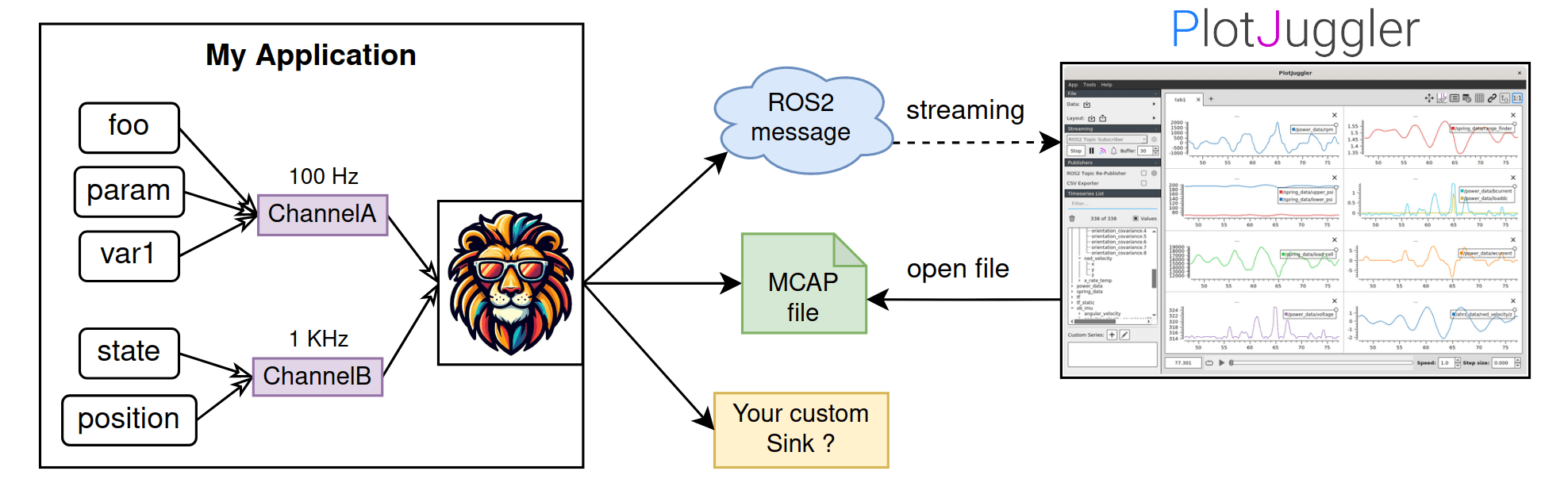
DataTamer can be used to monitor multiple variables in your applications.
Channels are used to take “snapshots” of a subset of variables at a given time. If you want to record at different frequencies, you can use different channels.
DataTamer will forward the collected data to 1 or multiple sinks; a sink may save the information immediately in a file (currently, we support MCAP) or publish it using an inter-process communication, for instance, a ROS2 publisher.
You can easily create your own, specialized sinks.
Use PlotJuggler to visualize your logs offline or in real-time.
Features
- Serialization schema is created at run-time: no need to do code generation.
-
Suitable for real-time applications: very low latency (on the side of the callee);
once logging started (
startLogging()before the loop),tryTakeSnapshot()neither blocks nor allocates. With Clang 20 or later, the real-time API is[[clang::nonblocking]], so-Wfunction-effectsand RealtimeSanitizer check your control loop. - Multi-sink architecture: recorded data can be forwarded to multiple “backends”.
- Very low serialization overhead, in the order of 1 bit per traced value.
- The user can enable/disable traced variables at run-time.
-
Flight recorder:
MCAPRingSinkkeeps the last seconds in RAM and writes an MCAP file only when you ask, for instance after a fault.
Examples
Basic example
```cpp #include “data_tamer_v2/channel.hpp” #include “data_tamer_v2/sinks/mcap_sink.hpp”
#include
int main() { // The channel borrows these variables: declare them first so they outlive it. double shoulder_position = 0, shoulder_velocity = 0, shoulder_effort = 0; double elbow_position = 0, elbow_velocity = 0, elbow_effort = 0;
// A worker that owns the sink writing the file (mcap->sink() is the MCAPSink). The // channel takes snapshots and hands them to its sinks. auto mcap = DataTamer2::MCAPSink::create(“T01_joint_states.mcap”); auto channel = DataTamer2::LogChannel::create(“controller”); channel->addDataSink(mcap);
channel->registerValue(“shoulder/position”, &shoulder_position); channel->registerValue(“shoulder/velocity”, &shoulder_velocity); channel->registerValue(“shoulder/effort”, &shoulder_effort); channel->registerValue(“elbow/position”, &elbow_position); channel->registerValue(“elbow/velocity”, &elbow_velocity); channel->registerValue(“elbow/effort”, &elbow_effort);
for(int cycle = 0; cycle < 1500; ++cycle) { const double t = cycle * 0.001; shoulder_position = std::sin(4 * t); shoulder_velocity = 4 * std::cos(4 * t); shoulder_effort = 0.2 * std::sin(4 * t); elbow_position = std::sin(4 * t + 0.5); elbow_velocity = 4 * std::cos(4 * t + 0.5); elbow_effort = 0.2 * std::sin(4 * t + 0.5); channel->takeSnapshot(); // One sample of every registered value. std::this_thread::sleep_for(std::chrono::milliseconds(1)); }
File truncated at 100 lines see the full file
CONTRIBUTING
Repository Summary
| Checkout URI | https://github.com/PickNikRobotics/data_tamer.git |
| VCS Type | git |
| VCS Version | main |
| Last Updated | 2026-10-19 |
| Dev Status | MAINTAINED |
| Released | RELEASED |
| Contributing |
Help Wanted (-)
Good First Issues (-) Pull Requests to Review (-) |
Packages
| Name | Version |
|---|---|
| data_tamer_v2 | 2.0.0 |
| data_tamer_msgs | 2.0.0 |
README
DataTamer is a library to log/trace numerical variables over time and takes periodic “snapshots” of their values, to later visualize them as timeseries.
It works great with PlotJuggler, the timeseries visualization tool (note: you will need PlotJuggler 4 or later). For ROS 2 topics and rosbag2 recordings, use Foxglove with the data_tamer extension (desktop or web).
DataTamer is “fearless data logger” because you can record hundreds or thousands of variables: even 1 million points per second should have a fairly small CPU overhead.
Since all the values are aggregated in a single “snapshot”, it is usually meant to record data in a periodic loop (a very frequent use case, in robotics applications).
Kudos to pal_statistics, for inspiring this project.
How it works
DataTamer can be used to monitor multiple variables in your applications.
Channels are used to take “snapshots” of a subset of variables at a given time. If you want to record at different frequencies, you can use different channels.
DataTamer will forward the collected data to 1 or multiple sinks; a sink may save the information immediately in a file (currently, we support MCAP) or publish it using an inter-process communication, for instance, a ROS2 publisher.
You can easily create your own, specialized sinks.
Use PlotJuggler to visualize your logs offline or in real-time.
Features
- Serialization schema is created at run-time: no need to do code generation.
-
Suitable for real-time applications: very low latency (on the side of the callee);
once logging started (
startLogging()before the loop),tryTakeSnapshot()neither blocks nor allocates. With Clang 20 or later, the real-time API is[[clang::nonblocking]], so-Wfunction-effectsand RealtimeSanitizer check your control loop. - Multi-sink architecture: recorded data can be forwarded to multiple “backends”.
- Very low serialization overhead, in the order of 1 bit per traced value.
- The user can enable/disable traced variables at run-time.
-
Flight recorder:
MCAPRingSinkkeeps the last seconds in RAM and writes an MCAP file only when you ask, for instance after a fault.
Examples
Basic example
```cpp #include “data_tamer_v2/channel.hpp” #include “data_tamer_v2/sinks/mcap_sink.hpp”
#include
int main() { // The channel borrows these variables: declare them first so they outlive it. double shoulder_position = 0, shoulder_velocity = 0, shoulder_effort = 0; double elbow_position = 0, elbow_velocity = 0, elbow_effort = 0;
// A worker that owns the sink writing the file (mcap->sink() is the MCAPSink). The // channel takes snapshots and hands them to its sinks. auto mcap = DataTamer2::MCAPSink::create(“T01_joint_states.mcap”); auto channel = DataTamer2::LogChannel::create(“controller”); channel->addDataSink(mcap);
channel->registerValue(“shoulder/position”, &shoulder_position); channel->registerValue(“shoulder/velocity”, &shoulder_velocity); channel->registerValue(“shoulder/effort”, &shoulder_effort); channel->registerValue(“elbow/position”, &elbow_position); channel->registerValue(“elbow/velocity”, &elbow_velocity); channel->registerValue(“elbow/effort”, &elbow_effort);
for(int cycle = 0; cycle < 1500; ++cycle) { const double t = cycle * 0.001; shoulder_position = std::sin(4 * t); shoulder_velocity = 4 * std::cos(4 * t); shoulder_effort = 0.2 * std::sin(4 * t); elbow_position = std::sin(4 * t + 0.5); elbow_velocity = 4 * std::cos(4 * t + 0.5); elbow_effort = 0.2 * std::sin(4 * t + 0.5); channel->takeSnapshot(); // One sample of every registered value. std::this_thread::sleep_for(std::chrono::milliseconds(1)); }
File truncated at 100 lines see the full file
CONTRIBUTING
Repository Summary
| Checkout URI | https://github.com/PickNikRobotics/data_tamer.git |
| VCS Type | git |
| VCS Version | main |
| Last Updated | 2026-10-19 |
| Dev Status | MAINTAINED |
| Released | RELEASED |
| Contributing |
Help Wanted (-)
Good First Issues (-) Pull Requests to Review (-) |
Packages
| Name | Version |
|---|---|
| data_tamer_v2 | 2.0.0 |
| data_tamer_msgs | 2.0.0 |
README
DataTamer is a library to log/trace numerical variables over time and takes periodic “snapshots” of their values, to later visualize them as timeseries.
It works great with PlotJuggler, the timeseries visualization tool (note: you will need PlotJuggler 4 or later). For ROS 2 topics and rosbag2 recordings, use Foxglove with the data_tamer extension (desktop or web).
DataTamer is “fearless data logger” because you can record hundreds or thousands of variables: even 1 million points per second should have a fairly small CPU overhead.
Since all the values are aggregated in a single “snapshot”, it is usually meant to record data in a periodic loop (a very frequent use case, in robotics applications).
Kudos to pal_statistics, for inspiring this project.
How it works
DataTamer can be used to monitor multiple variables in your applications.
Channels are used to take “snapshots” of a subset of variables at a given time. If you want to record at different frequencies, you can use different channels.
DataTamer will forward the collected data to 1 or multiple sinks; a sink may save the information immediately in a file (currently, we support MCAP) or publish it using an inter-process communication, for instance, a ROS2 publisher.
You can easily create your own, specialized sinks.
Use PlotJuggler to visualize your logs offline or in real-time.
Features
- Serialization schema is created at run-time: no need to do code generation.
-
Suitable for real-time applications: very low latency (on the side of the callee);
once logging started (
startLogging()before the loop),tryTakeSnapshot()neither blocks nor allocates. With Clang 20 or later, the real-time API is[[clang::nonblocking]], so-Wfunction-effectsand RealtimeSanitizer check your control loop. - Multi-sink architecture: recorded data can be forwarded to multiple “backends”.
- Very low serialization overhead, in the order of 1 bit per traced value.
- The user can enable/disable traced variables at run-time.
-
Flight recorder:
MCAPRingSinkkeeps the last seconds in RAM and writes an MCAP file only when you ask, for instance after a fault.
Examples
Basic example
```cpp #include “data_tamer_v2/channel.hpp” #include “data_tamer_v2/sinks/mcap_sink.hpp”
#include
int main() { // The channel borrows these variables: declare them first so they outlive it. double shoulder_position = 0, shoulder_velocity = 0, shoulder_effort = 0; double elbow_position = 0, elbow_velocity = 0, elbow_effort = 0;
// A worker that owns the sink writing the file (mcap->sink() is the MCAPSink). The // channel takes snapshots and hands them to its sinks. auto mcap = DataTamer2::MCAPSink::create(“T01_joint_states.mcap”); auto channel = DataTamer2::LogChannel::create(“controller”); channel->addDataSink(mcap);
channel->registerValue(“shoulder/position”, &shoulder_position); channel->registerValue(“shoulder/velocity”, &shoulder_velocity); channel->registerValue(“shoulder/effort”, &shoulder_effort); channel->registerValue(“elbow/position”, &elbow_position); channel->registerValue(“elbow/velocity”, &elbow_velocity); channel->registerValue(“elbow/effort”, &elbow_effort);
for(int cycle = 0; cycle < 1500; ++cycle) { const double t = cycle * 0.001; shoulder_position = std::sin(4 * t); shoulder_velocity = 4 * std::cos(4 * t); shoulder_effort = 0.2 * std::sin(4 * t); elbow_position = std::sin(4 * t + 0.5); elbow_velocity = 4 * std::cos(4 * t + 0.5); elbow_effort = 0.2 * std::sin(4 * t + 0.5); channel->takeSnapshot(); // One sample of every registered value. std::this_thread::sleep_for(std::chrono::milliseconds(1)); }
File truncated at 100 lines see the full file
CONTRIBUTING
Repository Summary
| Checkout URI | https://github.com/PickNikRobotics/data_tamer.git |
| VCS Type | git |
| VCS Version | main |
| Last Updated | 2026-10-19 |
| Dev Status | MAINTAINED |
| Released | RELEASED |
| Contributing |
Help Wanted (-)
Good First Issues (-) Pull Requests to Review (-) |
Packages
| Name | Version |
|---|---|
| data_tamer_v2 | 2.0.0 |
| data_tamer_msgs | 2.0.0 |
README
DataTamer is a library to log/trace numerical variables over time and takes periodic “snapshots” of their values, to later visualize them as timeseries.
It works great with PlotJuggler, the timeseries visualization tool (note: you will need PlotJuggler 4 or later). For ROS 2 topics and rosbag2 recordings, use Foxglove with the data_tamer extension (desktop or web).
DataTamer is “fearless data logger” because you can record hundreds or thousands of variables: even 1 million points per second should have a fairly small CPU overhead.
Since all the values are aggregated in a single “snapshot”, it is usually meant to record data in a periodic loop (a very frequent use case, in robotics applications).
Kudos to pal_statistics, for inspiring this project.
How it works
DataTamer can be used to monitor multiple variables in your applications.
Channels are used to take “snapshots” of a subset of variables at a given time. If you want to record at different frequencies, you can use different channels.
DataTamer will forward the collected data to 1 or multiple sinks; a sink may save the information immediately in a file (currently, we support MCAP) or publish it using an inter-process communication, for instance, a ROS2 publisher.
You can easily create your own, specialized sinks.
Use PlotJuggler to visualize your logs offline or in real-time.
Features
- Serialization schema is created at run-time: no need to do code generation.
-
Suitable for real-time applications: very low latency (on the side of the callee);
once logging started (
startLogging()before the loop),tryTakeSnapshot()neither blocks nor allocates. With Clang 20 or later, the real-time API is[[clang::nonblocking]], so-Wfunction-effectsand RealtimeSanitizer check your control loop. - Multi-sink architecture: recorded data can be forwarded to multiple “backends”.
- Very low serialization overhead, in the order of 1 bit per traced value.
- The user can enable/disable traced variables at run-time.
-
Flight recorder:
MCAPRingSinkkeeps the last seconds in RAM and writes an MCAP file only when you ask, for instance after a fault.
Examples
Basic example
```cpp #include “data_tamer_v2/channel.hpp” #include “data_tamer_v2/sinks/mcap_sink.hpp”
#include
int main() { // The channel borrows these variables: declare them first so they outlive it. double shoulder_position = 0, shoulder_velocity = 0, shoulder_effort = 0; double elbow_position = 0, elbow_velocity = 0, elbow_effort = 0;
// A worker that owns the sink writing the file (mcap->sink() is the MCAPSink). The // channel takes snapshots and hands them to its sinks. auto mcap = DataTamer2::MCAPSink::create(“T01_joint_states.mcap”); auto channel = DataTamer2::LogChannel::create(“controller”); channel->addDataSink(mcap);
channel->registerValue(“shoulder/position”, &shoulder_position); channel->registerValue(“shoulder/velocity”, &shoulder_velocity); channel->registerValue(“shoulder/effort”, &shoulder_effort); channel->registerValue(“elbow/position”, &elbow_position); channel->registerValue(“elbow/velocity”, &elbow_velocity); channel->registerValue(“elbow/effort”, &elbow_effort);
for(int cycle = 0; cycle < 1500; ++cycle) { const double t = cycle * 0.001; shoulder_position = std::sin(4 * t); shoulder_velocity = 4 * std::cos(4 * t); shoulder_effort = 0.2 * std::sin(4 * t); elbow_position = std::sin(4 * t + 0.5); elbow_velocity = 4 * std::cos(4 * t + 0.5); elbow_effort = 0.2 * std::sin(4 * t + 0.5); channel->takeSnapshot(); // One sample of every registered value. std::this_thread::sleep_for(std::chrono::milliseconds(1)); }
File truncated at 100 lines see the full file
CONTRIBUTING
Repository Summary
| Checkout URI | https://github.com/PickNikRobotics/data_tamer.git |
| VCS Type | git |
| VCS Version | main |
| Last Updated | 2026-10-19 |
| Dev Status | MAINTAINED |
| Released | RELEASED |
| Contributing |
Help Wanted (-)
Good First Issues (-) Pull Requests to Review (-) |
Packages
| Name | Version |
|---|---|
| data_tamer_v2 | 2.0.0 |
| data_tamer_msgs | 2.0.0 |
README
DataTamer is a library to log/trace numerical variables over time and takes periodic “snapshots” of their values, to later visualize them as timeseries.
It works great with PlotJuggler, the timeseries visualization tool (note: you will need PlotJuggler 4 or later). For ROS 2 topics and rosbag2 recordings, use Foxglove with the data_tamer extension (desktop or web).
DataTamer is “fearless data logger” because you can record hundreds or thousands of variables: even 1 million points per second should have a fairly small CPU overhead.
Since all the values are aggregated in a single “snapshot”, it is usually meant to record data in a periodic loop (a very frequent use case, in robotics applications).
Kudos to pal_statistics, for inspiring this project.
How it works
DataTamer can be used to monitor multiple variables in your applications.
Channels are used to take “snapshots” of a subset of variables at a given time. If you want to record at different frequencies, you can use different channels.
DataTamer will forward the collected data to 1 or multiple sinks; a sink may save the information immediately in a file (currently, we support MCAP) or publish it using an inter-process communication, for instance, a ROS2 publisher.
You can easily create your own, specialized sinks.
Use PlotJuggler to visualize your logs offline or in real-time.
Features
- Serialization schema is created at run-time: no need to do code generation.
-
Suitable for real-time applications: very low latency (on the side of the callee);
once logging started (
startLogging()before the loop),tryTakeSnapshot()neither blocks nor allocates. With Clang 20 or later, the real-time API is[[clang::nonblocking]], so-Wfunction-effectsand RealtimeSanitizer check your control loop. - Multi-sink architecture: recorded data can be forwarded to multiple “backends”.
- Very low serialization overhead, in the order of 1 bit per traced value.
- The user can enable/disable traced variables at run-time.
-
Flight recorder:
MCAPRingSinkkeeps the last seconds in RAM and writes an MCAP file only when you ask, for instance after a fault.
Examples
Basic example
```cpp #include “data_tamer_v2/channel.hpp” #include “data_tamer_v2/sinks/mcap_sink.hpp”
#include
int main() { // The channel borrows these variables: declare them first so they outlive it. double shoulder_position = 0, shoulder_velocity = 0, shoulder_effort = 0; double elbow_position = 0, elbow_velocity = 0, elbow_effort = 0;
// A worker that owns the sink writing the file (mcap->sink() is the MCAPSink). The // channel takes snapshots and hands them to its sinks. auto mcap = DataTamer2::MCAPSink::create(“T01_joint_states.mcap”); auto channel = DataTamer2::LogChannel::create(“controller”); channel->addDataSink(mcap);
channel->registerValue(“shoulder/position”, &shoulder_position); channel->registerValue(“shoulder/velocity”, &shoulder_velocity); channel->registerValue(“shoulder/effort”, &shoulder_effort); channel->registerValue(“elbow/position”, &elbow_position); channel->registerValue(“elbow/velocity”, &elbow_velocity); channel->registerValue(“elbow/effort”, &elbow_effort);
for(int cycle = 0; cycle < 1500; ++cycle) { const double t = cycle * 0.001; shoulder_position = std::sin(4 * t); shoulder_velocity = 4 * std::cos(4 * t); shoulder_effort = 0.2 * std::sin(4 * t); elbow_position = std::sin(4 * t + 0.5); elbow_velocity = 4 * std::cos(4 * t + 0.5); elbow_effort = 0.2 * std::sin(4 * t + 0.5); channel->takeSnapshot(); // One sample of every registered value. std::this_thread::sleep_for(std::chrono::milliseconds(1)); }
File truncated at 100 lines see the full file
CONTRIBUTING
Repository Summary
| Checkout URI | https://github.com/PickNikRobotics/data_tamer.git |
| VCS Type | git |
| VCS Version | main |
| Last Updated | 2026-10-19 |
| Dev Status | MAINTAINED |
| Released | RELEASED |
| Contributing |
Help Wanted (-)
Good First Issues (-) Pull Requests to Review (-) |
Packages
| Name | Version |
|---|---|
| data_tamer_v2 | 2.0.0 |
| data_tamer_msgs | 2.0.0 |
README
DataTamer is a library to log/trace numerical variables over time and takes periodic “snapshots” of their values, to later visualize them as timeseries.
It works great with PlotJuggler, the timeseries visualization tool (note: you will need PlotJuggler 4 or later). For ROS 2 topics and rosbag2 recordings, use Foxglove with the data_tamer extension (desktop or web).
DataTamer is “fearless data logger” because you can record hundreds or thousands of variables: even 1 million points per second should have a fairly small CPU overhead.
Since all the values are aggregated in a single “snapshot”, it is usually meant to record data in a periodic loop (a very frequent use case, in robotics applications).
Kudos to pal_statistics, for inspiring this project.
How it works
DataTamer can be used to monitor multiple variables in your applications.
Channels are used to take “snapshots” of a subset of variables at a given time. If you want to record at different frequencies, you can use different channels.
DataTamer will forward the collected data to 1 or multiple sinks; a sink may save the information immediately in a file (currently, we support MCAP) or publish it using an inter-process communication, for instance, a ROS2 publisher.
You can easily create your own, specialized sinks.
Use PlotJuggler to visualize your logs offline or in real-time.
Features
- Serialization schema is created at run-time: no need to do code generation.
-
Suitable for real-time applications: very low latency (on the side of the callee);
once logging started (
startLogging()before the loop),tryTakeSnapshot()neither blocks nor allocates. With Clang 20 or later, the real-time API is[[clang::nonblocking]], so-Wfunction-effectsand RealtimeSanitizer check your control loop. - Multi-sink architecture: recorded data can be forwarded to multiple “backends”.
- Very low serialization overhead, in the order of 1 bit per traced value.
- The user can enable/disable traced variables at run-time.
-
Flight recorder:
MCAPRingSinkkeeps the last seconds in RAM and writes an MCAP file only when you ask, for instance after a fault.
Examples
Basic example
```cpp #include “data_tamer_v2/channel.hpp” #include “data_tamer_v2/sinks/mcap_sink.hpp”
#include
int main() { // The channel borrows these variables: declare them first so they outlive it. double shoulder_position = 0, shoulder_velocity = 0, shoulder_effort = 0; double elbow_position = 0, elbow_velocity = 0, elbow_effort = 0;
// A worker that owns the sink writing the file (mcap->sink() is the MCAPSink). The // channel takes snapshots and hands them to its sinks. auto mcap = DataTamer2::MCAPSink::create(“T01_joint_states.mcap”); auto channel = DataTamer2::LogChannel::create(“controller”); channel->addDataSink(mcap);
channel->registerValue(“shoulder/position”, &shoulder_position); channel->registerValue(“shoulder/velocity”, &shoulder_velocity); channel->registerValue(“shoulder/effort”, &shoulder_effort); channel->registerValue(“elbow/position”, &elbow_position); channel->registerValue(“elbow/velocity”, &elbow_velocity); channel->registerValue(“elbow/effort”, &elbow_effort);
for(int cycle = 0; cycle < 1500; ++cycle) { const double t = cycle * 0.001; shoulder_position = std::sin(4 * t); shoulder_velocity = 4 * std::cos(4 * t); shoulder_effort = 0.2 * std::sin(4 * t); elbow_position = std::sin(4 * t + 0.5); elbow_velocity = 4 * std::cos(4 * t + 0.5); elbow_effort = 0.2 * std::sin(4 * t + 0.5); channel->takeSnapshot(); // One sample of every registered value. std::this_thread::sleep_for(std::chrono::milliseconds(1)); }
File truncated at 100 lines see the full file
CONTRIBUTING
Repository Summary
| Checkout URI | https://github.com/PickNikRobotics/data_tamer.git |
| VCS Type | git |
| VCS Version | main |
| Last Updated | 2026-10-19 |
| Dev Status | MAINTAINED |
| Released | RELEASED |
| Contributing |
Help Wanted (-)
Good First Issues (-) Pull Requests to Review (-) |
Packages
| Name | Version |
|---|---|
| data_tamer_v2 | 2.0.0 |
| data_tamer_msgs | 2.0.0 |
README
DataTamer is a library to log/trace numerical variables over time and takes periodic “snapshots” of their values, to later visualize them as timeseries.
It works great with PlotJuggler, the timeseries visualization tool (note: you will need PlotJuggler 4 or later). For ROS 2 topics and rosbag2 recordings, use Foxglove with the data_tamer extension (desktop or web).
DataTamer is “fearless data logger” because you can record hundreds or thousands of variables: even 1 million points per second should have a fairly small CPU overhead.
Since all the values are aggregated in a single “snapshot”, it is usually meant to record data in a periodic loop (a very frequent use case, in robotics applications).
Kudos to pal_statistics, for inspiring this project.
How it works
DataTamer can be used to monitor multiple variables in your applications.
Channels are used to take “snapshots” of a subset of variables at a given time. If you want to record at different frequencies, you can use different channels.
DataTamer will forward the collected data to 1 or multiple sinks; a sink may save the information immediately in a file (currently, we support MCAP) or publish it using an inter-process communication, for instance, a ROS2 publisher.
You can easily create your own, specialized sinks.
Use PlotJuggler to visualize your logs offline or in real-time.
Features
- Serialization schema is created at run-time: no need to do code generation.
-
Suitable for real-time applications: very low latency (on the side of the callee);
once logging started (
startLogging()before the loop),tryTakeSnapshot()neither blocks nor allocates. With Clang 20 or later, the real-time API is[[clang::nonblocking]], so-Wfunction-effectsand RealtimeSanitizer check your control loop. - Multi-sink architecture: recorded data can be forwarded to multiple “backends”.
- Very low serialization overhead, in the order of 1 bit per traced value.
- The user can enable/disable traced variables at run-time.
-
Flight recorder:
MCAPRingSinkkeeps the last seconds in RAM and writes an MCAP file only when you ask, for instance after a fault.
Examples
Basic example
```cpp #include “data_tamer_v2/channel.hpp” #include “data_tamer_v2/sinks/mcap_sink.hpp”
#include
int main() { // The channel borrows these variables: declare them first so they outlive it. double shoulder_position = 0, shoulder_velocity = 0, shoulder_effort = 0; double elbow_position = 0, elbow_velocity = 0, elbow_effort = 0;
// A worker that owns the sink writing the file (mcap->sink() is the MCAPSink). The // channel takes snapshots and hands them to its sinks. auto mcap = DataTamer2::MCAPSink::create(“T01_joint_states.mcap”); auto channel = DataTamer2::LogChannel::create(“controller”); channel->addDataSink(mcap);
channel->registerValue(“shoulder/position”, &shoulder_position); channel->registerValue(“shoulder/velocity”, &shoulder_velocity); channel->registerValue(“shoulder/effort”, &shoulder_effort); channel->registerValue(“elbow/position”, &elbow_position); channel->registerValue(“elbow/velocity”, &elbow_velocity); channel->registerValue(“elbow/effort”, &elbow_effort);
for(int cycle = 0; cycle < 1500; ++cycle) { const double t = cycle * 0.001; shoulder_position = std::sin(4 * t); shoulder_velocity = 4 * std::cos(4 * t); shoulder_effort = 0.2 * std::sin(4 * t); elbow_position = std::sin(4 * t + 0.5); elbow_velocity = 4 * std::cos(4 * t + 0.5); elbow_effort = 0.2 * std::sin(4 * t + 0.5); channel->takeSnapshot(); // One sample of every registered value. std::this_thread::sleep_for(std::chrono::milliseconds(1)); }
File truncated at 100 lines see the full file
CONTRIBUTING
Repository Summary
| Checkout URI | https://github.com/PickNikRobotics/data_tamer.git |
| VCS Type | git |
| VCS Version | main |
| Last Updated | 2026-10-19 |
| Dev Status | MAINTAINED |
| Released | RELEASED |
| Contributing |
Help Wanted (-)
Good First Issues (-) Pull Requests to Review (-) |
Packages
| Name | Version |
|---|---|
| data_tamer_v2 | 2.0.0 |
| data_tamer_msgs | 2.0.0 |
README
DataTamer is a library to log/trace numerical variables over time and takes periodic “snapshots” of their values, to later visualize them as timeseries.
It works great with PlotJuggler, the timeseries visualization tool (note: you will need PlotJuggler 4 or later). For ROS 2 topics and rosbag2 recordings, use Foxglove with the data_tamer extension (desktop or web).
DataTamer is “fearless data logger” because you can record hundreds or thousands of variables: even 1 million points per second should have a fairly small CPU overhead.
Since all the values are aggregated in a single “snapshot”, it is usually meant to record data in a periodic loop (a very frequent use case, in robotics applications).
Kudos to pal_statistics, for inspiring this project.
How it works
DataTamer can be used to monitor multiple variables in your applications.
Channels are used to take “snapshots” of a subset of variables at a given time. If you want to record at different frequencies, you can use different channels.
DataTamer will forward the collected data to 1 or multiple sinks; a sink may save the information immediately in a file (currently, we support MCAP) or publish it using an inter-process communication, for instance, a ROS2 publisher.
You can easily create your own, specialized sinks.
Use PlotJuggler to visualize your logs offline or in real-time.
Features
- Serialization schema is created at run-time: no need to do code generation.
-
Suitable for real-time applications: very low latency (on the side of the callee);
once logging started (
startLogging()before the loop),tryTakeSnapshot()neither blocks nor allocates. With Clang 20 or later, the real-time API is[[clang::nonblocking]], so-Wfunction-effectsand RealtimeSanitizer check your control loop. - Multi-sink architecture: recorded data can be forwarded to multiple “backends”.
- Very low serialization overhead, in the order of 1 bit per traced value.
- The user can enable/disable traced variables at run-time.
-
Flight recorder:
MCAPRingSinkkeeps the last seconds in RAM and writes an MCAP file only when you ask, for instance after a fault.
Examples
Basic example
```cpp #include “data_tamer_v2/channel.hpp” #include “data_tamer_v2/sinks/mcap_sink.hpp”
#include
int main() { // The channel borrows these variables: declare them first so they outlive it. double shoulder_position = 0, shoulder_velocity = 0, shoulder_effort = 0; double elbow_position = 0, elbow_velocity = 0, elbow_effort = 0;
// A worker that owns the sink writing the file (mcap->sink() is the MCAPSink). The // channel takes snapshots and hands them to its sinks. auto mcap = DataTamer2::MCAPSink::create(“T01_joint_states.mcap”); auto channel = DataTamer2::LogChannel::create(“controller”); channel->addDataSink(mcap);
channel->registerValue(“shoulder/position”, &shoulder_position); channel->registerValue(“shoulder/velocity”, &shoulder_velocity); channel->registerValue(“shoulder/effort”, &shoulder_effort); channel->registerValue(“elbow/position”, &elbow_position); channel->registerValue(“elbow/velocity”, &elbow_velocity); channel->registerValue(“elbow/effort”, &elbow_effort);
for(int cycle = 0; cycle < 1500; ++cycle) { const double t = cycle * 0.001; shoulder_position = std::sin(4 * t); shoulder_velocity = 4 * std::cos(4 * t); shoulder_effort = 0.2 * std::sin(4 * t); elbow_position = std::sin(4 * t + 0.5); elbow_velocity = 4 * std::cos(4 * t + 0.5); elbow_effort = 0.2 * std::sin(4 * t + 0.5); channel->takeSnapshot(); // One sample of every registered value. std::this_thread::sleep_for(std::chrono::milliseconds(1)); }
File truncated at 100 lines see the full file
CONTRIBUTING
Repository Summary
| Checkout URI | https://github.com/PickNikRobotics/data_tamer.git |
| VCS Type | git |
| VCS Version | main |
| Last Updated | 2026-10-19 |
| Dev Status | MAINTAINED |
| Released | RELEASED |
| Contributing |
Help Wanted (-)
Good First Issues (-) Pull Requests to Review (-) |
Packages
| Name | Version |
|---|---|
| data_tamer_v2 | 2.0.0 |
| data_tamer_msgs | 2.0.0 |
README
DataTamer is a library to log/trace numerical variables over time and takes periodic “snapshots” of their values, to later visualize them as timeseries.
It works great with PlotJuggler, the timeseries visualization tool (note: you will need PlotJuggler 4 or later). For ROS 2 topics and rosbag2 recordings, use Foxglove with the data_tamer extension (desktop or web).
DataTamer is “fearless data logger” because you can record hundreds or thousands of variables: even 1 million points per second should have a fairly small CPU overhead.
Since all the values are aggregated in a single “snapshot”, it is usually meant to record data in a periodic loop (a very frequent use case, in robotics applications).
Kudos to pal_statistics, for inspiring this project.
How it works
DataTamer can be used to monitor multiple variables in your applications.
Channels are used to take “snapshots” of a subset of variables at a given time. If you want to record at different frequencies, you can use different channels.
DataTamer will forward the collected data to 1 or multiple sinks; a sink may save the information immediately in a file (currently, we support MCAP) or publish it using an inter-process communication, for instance, a ROS2 publisher.
You can easily create your own, specialized sinks.
Use PlotJuggler to visualize your logs offline or in real-time.
Features
- Serialization schema is created at run-time: no need to do code generation.
-
Suitable for real-time applications: very low latency (on the side of the callee);
once logging started (
startLogging()before the loop),tryTakeSnapshot()neither blocks nor allocates. With Clang 20 or later, the real-time API is[[clang::nonblocking]], so-Wfunction-effectsand RealtimeSanitizer check your control loop. - Multi-sink architecture: recorded data can be forwarded to multiple “backends”.
- Very low serialization overhead, in the order of 1 bit per traced value.
- The user can enable/disable traced variables at run-time.
-
Flight recorder:
MCAPRingSinkkeeps the last seconds in RAM and writes an MCAP file only when you ask, for instance after a fault.
Examples
Basic example
```cpp #include “data_tamer_v2/channel.hpp” #include “data_tamer_v2/sinks/mcap_sink.hpp”
#include
int main() { // The channel borrows these variables: declare them first so they outlive it. double shoulder_position = 0, shoulder_velocity = 0, shoulder_effort = 0; double elbow_position = 0, elbow_velocity = 0, elbow_effort = 0;
// A worker that owns the sink writing the file (mcap->sink() is the MCAPSink). The // channel takes snapshots and hands them to its sinks. auto mcap = DataTamer2::MCAPSink::create(“T01_joint_states.mcap”); auto channel = DataTamer2::LogChannel::create(“controller”); channel->addDataSink(mcap);
channel->registerValue(“shoulder/position”, &shoulder_position); channel->registerValue(“shoulder/velocity”, &shoulder_velocity); channel->registerValue(“shoulder/effort”, &shoulder_effort); channel->registerValue(“elbow/position”, &elbow_position); channel->registerValue(“elbow/velocity”, &elbow_velocity); channel->registerValue(“elbow/effort”, &elbow_effort);
for(int cycle = 0; cycle < 1500; ++cycle) { const double t = cycle * 0.001; shoulder_position = std::sin(4 * t); shoulder_velocity = 4 * std::cos(4 * t); shoulder_effort = 0.2 * std::sin(4 * t); elbow_position = std::sin(4 * t + 0.5); elbow_velocity = 4 * std::cos(4 * t + 0.5); elbow_effort = 0.2 * std::sin(4 * t + 0.5); channel->takeSnapshot(); // One sample of every registered value. std::this_thread::sleep_for(std::chrono::milliseconds(1)); }
File truncated at 100 lines see the full file
CONTRIBUTING
Repository Summary
| Checkout URI | https://github.com/PickNikRobotics/data_tamer.git |
| VCS Type | git |
| VCS Version | main |
| Last Updated | 2026-10-19 |
| Dev Status | MAINTAINED |
| Released | RELEASED |
| Contributing |
Help Wanted (-)
Good First Issues (-) Pull Requests to Review (-) |
Packages
| Name | Version |
|---|---|
| data_tamer_v2 | 2.0.0 |
| data_tamer_msgs | 2.0.0 |
README
DataTamer is a library to log/trace numerical variables over time and takes periodic “snapshots” of their values, to later visualize them as timeseries.
It works great with PlotJuggler, the timeseries visualization tool (note: you will need PlotJuggler 4 or later). For ROS 2 topics and rosbag2 recordings, use Foxglove with the data_tamer extension (desktop or web).
DataTamer is “fearless data logger” because you can record hundreds or thousands of variables: even 1 million points per second should have a fairly small CPU overhead.
Since all the values are aggregated in a single “snapshot”, it is usually meant to record data in a periodic loop (a very frequent use case, in robotics applications).
Kudos to pal_statistics, for inspiring this project.
How it works
DataTamer can be used to monitor multiple variables in your applications.
Channels are used to take “snapshots” of a subset of variables at a given time. If you want to record at different frequencies, you can use different channels.
DataTamer will forward the collected data to 1 or multiple sinks; a sink may save the information immediately in a file (currently, we support MCAP) or publish it using an inter-process communication, for instance, a ROS2 publisher.
You can easily create your own, specialized sinks.
Use PlotJuggler to visualize your logs offline or in real-time.
Features
- Serialization schema is created at run-time: no need to do code generation.
-
Suitable for real-time applications: very low latency (on the side of the callee);
once logging started (
startLogging()before the loop),tryTakeSnapshot()neither blocks nor allocates. With Clang 20 or later, the real-time API is[[clang::nonblocking]], so-Wfunction-effectsand RealtimeSanitizer check your control loop. - Multi-sink architecture: recorded data can be forwarded to multiple “backends”.
- Very low serialization overhead, in the order of 1 bit per traced value.
- The user can enable/disable traced variables at run-time.
-
Flight recorder:
MCAPRingSinkkeeps the last seconds in RAM and writes an MCAP file only when you ask, for instance after a fault.
Examples
Basic example
```cpp #include “data_tamer_v2/channel.hpp” #include “data_tamer_v2/sinks/mcap_sink.hpp”
#include
int main() { // The channel borrows these variables: declare them first so they outlive it. double shoulder_position = 0, shoulder_velocity = 0, shoulder_effort = 0; double elbow_position = 0, elbow_velocity = 0, elbow_effort = 0;
// A worker that owns the sink writing the file (mcap->sink() is the MCAPSink). The // channel takes snapshots and hands them to its sinks. auto mcap = DataTamer2::MCAPSink::create(“T01_joint_states.mcap”); auto channel = DataTamer2::LogChannel::create(“controller”); channel->addDataSink(mcap);
channel->registerValue(“shoulder/position”, &shoulder_position); channel->registerValue(“shoulder/velocity”, &shoulder_velocity); channel->registerValue(“shoulder/effort”, &shoulder_effort); channel->registerValue(“elbow/position”, &elbow_position); channel->registerValue(“elbow/velocity”, &elbow_velocity); channel->registerValue(“elbow/effort”, &elbow_effort);
for(int cycle = 0; cycle < 1500; ++cycle) { const double t = cycle * 0.001; shoulder_position = std::sin(4 * t); shoulder_velocity = 4 * std::cos(4 * t); shoulder_effort = 0.2 * std::sin(4 * t); elbow_position = std::sin(4 * t + 0.5); elbow_velocity = 4 * std::cos(4 * t + 0.5); elbow_effort = 0.2 * std::sin(4 * t + 0.5); channel->takeSnapshot(); // One sample of every registered value. std::this_thread::sleep_for(std::chrono::milliseconds(1)); }
File truncated at 100 lines see the full file
CONTRIBUTING
Repository Summary
| Checkout URI | https://github.com/PickNikRobotics/data_tamer.git |
| VCS Type | git |
| VCS Version | main |
| Last Updated | 2026-10-19 |
| Dev Status | MAINTAINED |
| Released | RELEASED |
| Contributing |
Help Wanted (-)
Good First Issues (-) Pull Requests to Review (-) |
Packages
| Name | Version |
|---|---|
| data_tamer_v2 | 2.0.0 |
| data_tamer_msgs | 2.0.0 |
README
DataTamer is a library to log/trace numerical variables over time and takes periodic “snapshots” of their values, to later visualize them as timeseries.
It works great with PlotJuggler, the timeseries visualization tool (note: you will need PlotJuggler 4 or later). For ROS 2 topics and rosbag2 recordings, use Foxglove with the data_tamer extension (desktop or web).
DataTamer is “fearless data logger” because you can record hundreds or thousands of variables: even 1 million points per second should have a fairly small CPU overhead.
Since all the values are aggregated in a single “snapshot”, it is usually meant to record data in a periodic loop (a very frequent use case, in robotics applications).
Kudos to pal_statistics, for inspiring this project.
How it works
DataTamer can be used to monitor multiple variables in your applications.
Channels are used to take “snapshots” of a subset of variables at a given time. If you want to record at different frequencies, you can use different channels.
DataTamer will forward the collected data to 1 or multiple sinks; a sink may save the information immediately in a file (currently, we support MCAP) or publish it using an inter-process communication, for instance, a ROS2 publisher.
You can easily create your own, specialized sinks.
Use PlotJuggler to visualize your logs offline or in real-time.
Features
- Serialization schema is created at run-time: no need to do code generation.
-
Suitable for real-time applications: very low latency (on the side of the callee);
once logging started (
startLogging()before the loop),tryTakeSnapshot()neither blocks nor allocates. With Clang 20 or later, the real-time API is[[clang::nonblocking]], so-Wfunction-effectsand RealtimeSanitizer check your control loop. - Multi-sink architecture: recorded data can be forwarded to multiple “backends”.
- Very low serialization overhead, in the order of 1 bit per traced value.
- The user can enable/disable traced variables at run-time.
-
Flight recorder:
MCAPRingSinkkeeps the last seconds in RAM and writes an MCAP file only when you ask, for instance after a fault.
Examples
Basic example
```cpp #include “data_tamer_v2/channel.hpp” #include “data_tamer_v2/sinks/mcap_sink.hpp”
#include
int main() { // The channel borrows these variables: declare them first so they outlive it. double shoulder_position = 0, shoulder_velocity = 0, shoulder_effort = 0; double elbow_position = 0, elbow_velocity = 0, elbow_effort = 0;
// A worker that owns the sink writing the file (mcap->sink() is the MCAPSink). The // channel takes snapshots and hands them to its sinks. auto mcap = DataTamer2::MCAPSink::create(“T01_joint_states.mcap”); auto channel = DataTamer2::LogChannel::create(“controller”); channel->addDataSink(mcap);
channel->registerValue(“shoulder/position”, &shoulder_position); channel->registerValue(“shoulder/velocity”, &shoulder_velocity); channel->registerValue(“shoulder/effort”, &shoulder_effort); channel->registerValue(“elbow/position”, &elbow_position); channel->registerValue(“elbow/velocity”, &elbow_velocity); channel->registerValue(“elbow/effort”, &elbow_effort);
for(int cycle = 0; cycle < 1500; ++cycle) { const double t = cycle * 0.001; shoulder_position = std::sin(4 * t); shoulder_velocity = 4 * std::cos(4 * t); shoulder_effort = 0.2 * std::sin(4 * t); elbow_position = std::sin(4 * t + 0.5); elbow_velocity = 4 * std::cos(4 * t + 0.5); elbow_effort = 0.2 * std::sin(4 * t + 0.5); channel->takeSnapshot(); // One sample of every registered value. std::this_thread::sleep_for(std::chrono::milliseconds(1)); }
File truncated at 100 lines see the full file
CONTRIBUTING
Repository Summary
| Checkout URI | https://github.com/PickNikRobotics/data_tamer.git |
| VCS Type | git |
| VCS Version | main |
| Last Updated | 2026-10-19 |
| Dev Status | MAINTAINED |
| Released | RELEASED |
| Contributing |
Help Wanted (-)
Good First Issues (-) Pull Requests to Review (-) |
Packages
| Name | Version |
|---|---|
| data_tamer_v2 | 2.0.0 |
| data_tamer_msgs | 2.0.0 |
README
DataTamer is a library to log/trace numerical variables over time and takes periodic “snapshots” of their values, to later visualize them as timeseries.
It works great with PlotJuggler, the timeseries visualization tool (note: you will need PlotJuggler 4 or later). For ROS 2 topics and rosbag2 recordings, use Foxglove with the data_tamer extension (desktop or web).
DataTamer is “fearless data logger” because you can record hundreds or thousands of variables: even 1 million points per second should have a fairly small CPU overhead.
Since all the values are aggregated in a single “snapshot”, it is usually meant to record data in a periodic loop (a very frequent use case, in robotics applications).
Kudos to pal_statistics, for inspiring this project.
How it works
DataTamer can be used to monitor multiple variables in your applications.
Channels are used to take “snapshots” of a subset of variables at a given time. If you want to record at different frequencies, you can use different channels.
DataTamer will forward the collected data to 1 or multiple sinks; a sink may save the information immediately in a file (currently, we support MCAP) or publish it using an inter-process communication, for instance, a ROS2 publisher.
You can easily create your own, specialized sinks.
Use PlotJuggler to visualize your logs offline or in real-time.
Features
- Serialization schema is created at run-time: no need to do code generation.
-
Suitable for real-time applications: very low latency (on the side of the callee);
once logging started (
startLogging()before the loop),tryTakeSnapshot()neither blocks nor allocates. With Clang 20 or later, the real-time API is[[clang::nonblocking]], so-Wfunction-effectsand RealtimeSanitizer check your control loop. - Multi-sink architecture: recorded data can be forwarded to multiple “backends”.
- Very low serialization overhead, in the order of 1 bit per traced value.
- The user can enable/disable traced variables at run-time.
-
Flight recorder:
MCAPRingSinkkeeps the last seconds in RAM and writes an MCAP file only when you ask, for instance after a fault.
Examples
Basic example
```cpp #include “data_tamer_v2/channel.hpp” #include “data_tamer_v2/sinks/mcap_sink.hpp”
#include
int main() { // The channel borrows these variables: declare them first so they outlive it. double shoulder_position = 0, shoulder_velocity = 0, shoulder_effort = 0; double elbow_position = 0, elbow_velocity = 0, elbow_effort = 0;
// A worker that owns the sink writing the file (mcap->sink() is the MCAPSink). The // channel takes snapshots and hands them to its sinks. auto mcap = DataTamer2::MCAPSink::create(“T01_joint_states.mcap”); auto channel = DataTamer2::LogChannel::create(“controller”); channel->addDataSink(mcap);
channel->registerValue(“shoulder/position”, &shoulder_position); channel->registerValue(“shoulder/velocity”, &shoulder_velocity); channel->registerValue(“shoulder/effort”, &shoulder_effort); channel->registerValue(“elbow/position”, &elbow_position); channel->registerValue(“elbow/velocity”, &elbow_velocity); channel->registerValue(“elbow/effort”, &elbow_effort);
for(int cycle = 0; cycle < 1500; ++cycle) { const double t = cycle * 0.001; shoulder_position = std::sin(4 * t); shoulder_velocity = 4 * std::cos(4 * t); shoulder_effort = 0.2 * std::sin(4 * t); elbow_position = std::sin(4 * t + 0.5); elbow_velocity = 4 * std::cos(4 * t + 0.5); elbow_effort = 0.2 * std::sin(4 * t + 0.5); channel->takeSnapshot(); // One sample of every registered value. std::this_thread::sleep_for(std::chrono::milliseconds(1)); }
File truncated at 100 lines see the full file
CONTRIBUTING
Repository Summary
| Checkout URI | https://github.com/PickNikRobotics/data_tamer.git |
| VCS Type | git |
| VCS Version | main |
| Last Updated | 2026-10-19 |
| Dev Status | MAINTAINED |
| Released | RELEASED |
| Contributing |
Help Wanted (-)
Good First Issues (-) Pull Requests to Review (-) |
Packages
| Name | Version |
|---|---|
| data_tamer_v2 | 2.0.0 |
| data_tamer_msgs | 2.0.0 |
README
DataTamer is a library to log/trace numerical variables over time and takes periodic “snapshots” of their values, to later visualize them as timeseries.
It works great with PlotJuggler, the timeseries visualization tool (note: you will need PlotJuggler 4 or later). For ROS 2 topics and rosbag2 recordings, use Foxglove with the data_tamer extension (desktop or web).
DataTamer is “fearless data logger” because you can record hundreds or thousands of variables: even 1 million points per second should have a fairly small CPU overhead.
Since all the values are aggregated in a single “snapshot”, it is usually meant to record data in a periodic loop (a very frequent use case, in robotics applications).
Kudos to pal_statistics, for inspiring this project.
How it works
DataTamer can be used to monitor multiple variables in your applications.
Channels are used to take “snapshots” of a subset of variables at a given time. If you want to record at different frequencies, you can use different channels.
DataTamer will forward the collected data to 1 or multiple sinks; a sink may save the information immediately in a file (currently, we support MCAP) or publish it using an inter-process communication, for instance, a ROS2 publisher.
You can easily create your own, specialized sinks.
Use PlotJuggler to visualize your logs offline or in real-time.
Features
- Serialization schema is created at run-time: no need to do code generation.
-
Suitable for real-time applications: very low latency (on the side of the callee);
once logging started (
startLogging()before the loop),tryTakeSnapshot()neither blocks nor allocates. With Clang 20 or later, the real-time API is[[clang::nonblocking]], so-Wfunction-effectsand RealtimeSanitizer check your control loop. - Multi-sink architecture: recorded data can be forwarded to multiple “backends”.
- Very low serialization overhead, in the order of 1 bit per traced value.
- The user can enable/disable traced variables at run-time.
-
Flight recorder:
MCAPRingSinkkeeps the last seconds in RAM and writes an MCAP file only when you ask, for instance after a fault.
Examples
Basic example
```cpp #include “data_tamer_v2/channel.hpp” #include “data_tamer_v2/sinks/mcap_sink.hpp”
#include
int main() { // The channel borrows these variables: declare them first so they outlive it. double shoulder_position = 0, shoulder_velocity = 0, shoulder_effort = 0; double elbow_position = 0, elbow_velocity = 0, elbow_effort = 0;
// A worker that owns the sink writing the file (mcap->sink() is the MCAPSink). The // channel takes snapshots and hands them to its sinks. auto mcap = DataTamer2::MCAPSink::create(“T01_joint_states.mcap”); auto channel = DataTamer2::LogChannel::create(“controller”); channel->addDataSink(mcap);
channel->registerValue(“shoulder/position”, &shoulder_position); channel->registerValue(“shoulder/velocity”, &shoulder_velocity); channel->registerValue(“shoulder/effort”, &shoulder_effort); channel->registerValue(“elbow/position”, &elbow_position); channel->registerValue(“elbow/velocity”, &elbow_velocity); channel->registerValue(“elbow/effort”, &elbow_effort);
for(int cycle = 0; cycle < 1500; ++cycle) { const double t = cycle * 0.001; shoulder_position = std::sin(4 * t); shoulder_velocity = 4 * std::cos(4 * t); shoulder_effort = 0.2 * std::sin(4 * t); elbow_position = std::sin(4 * t + 0.5); elbow_velocity = 4 * std::cos(4 * t + 0.5); elbow_effort = 0.2 * std::sin(4 * t + 0.5); channel->takeSnapshot(); // One sample of every registered value. std::this_thread::sleep_for(std::chrono::milliseconds(1)); }
File truncated at 100 lines see the full file
CONTRIBUTING
Repository Summary
| Checkout URI | https://github.com/PickNikRobotics/data_tamer.git |
| VCS Type | git |
| VCS Version | main |
| Last Updated | 2026-10-19 |
| Dev Status | MAINTAINED |
| Released | RELEASED |
| Contributing |
Help Wanted (-)
Good First Issues (-) Pull Requests to Review (-) |
Packages
| Name | Version |
|---|---|
| data_tamer_v2 | 2.0.0 |
| data_tamer_msgs | 2.0.0 |
README
DataTamer is a library to log/trace numerical variables over time and takes periodic “snapshots” of their values, to later visualize them as timeseries.
It works great with PlotJuggler, the timeseries visualization tool (note: you will need PlotJuggler 4 or later). For ROS 2 topics and rosbag2 recordings, use Foxglove with the data_tamer extension (desktop or web).
DataTamer is “fearless data logger” because you can record hundreds or thousands of variables: even 1 million points per second should have a fairly small CPU overhead.
Since all the values are aggregated in a single “snapshot”, it is usually meant to record data in a periodic loop (a very frequent use case, in robotics applications).
Kudos to pal_statistics, for inspiring this project.
How it works
DataTamer can be used to monitor multiple variables in your applications.
Channels are used to take “snapshots” of a subset of variables at a given time. If you want to record at different frequencies, you can use different channels.
DataTamer will forward the collected data to 1 or multiple sinks; a sink may save the information immediately in a file (currently, we support MCAP) or publish it using an inter-process communication, for instance, a ROS2 publisher.
You can easily create your own, specialized sinks.
Use PlotJuggler to visualize your logs offline or in real-time.
Features
- Serialization schema is created at run-time: no need to do code generation.
-
Suitable for real-time applications: very low latency (on the side of the callee);
once logging started (
startLogging()before the loop),tryTakeSnapshot()neither blocks nor allocates. With Clang 20 or later, the real-time API is[[clang::nonblocking]], so-Wfunction-effectsand RealtimeSanitizer check your control loop. - Multi-sink architecture: recorded data can be forwarded to multiple “backends”.
- Very low serialization overhead, in the order of 1 bit per traced value.
- The user can enable/disable traced variables at run-time.
-
Flight recorder:
MCAPRingSinkkeeps the last seconds in RAM and writes an MCAP file only when you ask, for instance after a fault.
Examples
Basic example
```cpp #include “data_tamer_v2/channel.hpp” #include “data_tamer_v2/sinks/mcap_sink.hpp”
#include
int main() { // The channel borrows these variables: declare them first so they outlive it. double shoulder_position = 0, shoulder_velocity = 0, shoulder_effort = 0; double elbow_position = 0, elbow_velocity = 0, elbow_effort = 0;
// A worker that owns the sink writing the file (mcap->sink() is the MCAPSink). The // channel takes snapshots and hands them to its sinks. auto mcap = DataTamer2::MCAPSink::create(“T01_joint_states.mcap”); auto channel = DataTamer2::LogChannel::create(“controller”); channel->addDataSink(mcap);
channel->registerValue(“shoulder/position”, &shoulder_position); channel->registerValue(“shoulder/velocity”, &shoulder_velocity); channel->registerValue(“shoulder/effort”, &shoulder_effort); channel->registerValue(“elbow/position”, &elbow_position); channel->registerValue(“elbow/velocity”, &elbow_velocity); channel->registerValue(“elbow/effort”, &elbow_effort);
for(int cycle = 0; cycle < 1500; ++cycle) { const double t = cycle * 0.001; shoulder_position = std::sin(4 * t); shoulder_velocity = 4 * std::cos(4 * t); shoulder_effort = 0.2 * std::sin(4 * t); elbow_position = std::sin(4 * t + 0.5); elbow_velocity = 4 * std::cos(4 * t + 0.5); elbow_effort = 0.2 * std::sin(4 * t + 0.5); channel->takeSnapshot(); // One sample of every registered value. std::this_thread::sleep_for(std::chrono::milliseconds(1)); }
File truncated at 100 lines see the full file
CONTRIBUTING
Repository Summary
| Checkout URI | https://github.com/PickNikRobotics/data_tamer.git |
| VCS Type | git |
| VCS Version | main |
| Last Updated | 2026-10-19 |
| Dev Status | MAINTAINED |
| Released | RELEASED |
| Contributing |
Help Wanted (-)
Good First Issues (-) Pull Requests to Review (-) |
Packages
| Name | Version |
|---|---|
| data_tamer_v2 | 2.0.0 |
| data_tamer_msgs | 2.0.0 |
README
DataTamer is a library to log/trace numerical variables over time and takes periodic “snapshots” of their values, to later visualize them as timeseries.
It works great with PlotJuggler, the timeseries visualization tool (note: you will need PlotJuggler 4 or later). For ROS 2 topics and rosbag2 recordings, use Foxglove with the data_tamer extension (desktop or web).
DataTamer is “fearless data logger” because you can record hundreds or thousands of variables: even 1 million points per second should have a fairly small CPU overhead.
Since all the values are aggregated in a single “snapshot”, it is usually meant to record data in a periodic loop (a very frequent use case, in robotics applications).
Kudos to pal_statistics, for inspiring this project.
How it works
DataTamer can be used to monitor multiple variables in your applications.
Channels are used to take “snapshots” of a subset of variables at a given time. If you want to record at different frequencies, you can use different channels.
DataTamer will forward the collected data to 1 or multiple sinks; a sink may save the information immediately in a file (currently, we support MCAP) or publish it using an inter-process communication, for instance, a ROS2 publisher.
You can easily create your own, specialized sinks.
Use PlotJuggler to visualize your logs offline or in real-time.
Features
- Serialization schema is created at run-time: no need to do code generation.
-
Suitable for real-time applications: very low latency (on the side of the callee);
once logging started (
startLogging()before the loop),tryTakeSnapshot()neither blocks nor allocates. With Clang 20 or later, the real-time API is[[clang::nonblocking]], so-Wfunction-effectsand RealtimeSanitizer check your control loop. - Multi-sink architecture: recorded data can be forwarded to multiple “backends”.
- Very low serialization overhead, in the order of 1 bit per traced value.
- The user can enable/disable traced variables at run-time.
-
Flight recorder:
MCAPRingSinkkeeps the last seconds in RAM and writes an MCAP file only when you ask, for instance after a fault.
Examples
Basic example
```cpp #include “data_tamer_v2/channel.hpp” #include “data_tamer_v2/sinks/mcap_sink.hpp”
#include
int main() { // The channel borrows these variables: declare them first so they outlive it. double shoulder_position = 0, shoulder_velocity = 0, shoulder_effort = 0; double elbow_position = 0, elbow_velocity = 0, elbow_effort = 0;
// A worker that owns the sink writing the file (mcap->sink() is the MCAPSink). The // channel takes snapshots and hands them to its sinks. auto mcap = DataTamer2::MCAPSink::create(“T01_joint_states.mcap”); auto channel = DataTamer2::LogChannel::create(“controller”); channel->addDataSink(mcap);
channel->registerValue(“shoulder/position”, &shoulder_position); channel->registerValue(“shoulder/velocity”, &shoulder_velocity); channel->registerValue(“shoulder/effort”, &shoulder_effort); channel->registerValue(“elbow/position”, &elbow_position); channel->registerValue(“elbow/velocity”, &elbow_velocity); channel->registerValue(“elbow/effort”, &elbow_effort);
for(int cycle = 0; cycle < 1500; ++cycle) { const double t = cycle * 0.001; shoulder_position = std::sin(4 * t); shoulder_velocity = 4 * std::cos(4 * t); shoulder_effort = 0.2 * std::sin(4 * t); elbow_position = std::sin(4 * t + 0.5); elbow_velocity = 4 * std::cos(4 * t + 0.5); elbow_effort = 0.2 * std::sin(4 * t + 0.5); channel->takeSnapshot(); // One sample of every registered value. std::this_thread::sleep_for(std::chrono::milliseconds(1)); }
File truncated at 100 lines see the full file
CONTRIBUTING
Repository Summary
| Checkout URI | https://github.com/PickNikRobotics/data_tamer.git |
| VCS Type | git |
| VCS Version | main |
| Last Updated | 2026-10-19 |
| Dev Status | MAINTAINED |
| Released | RELEASED |
| Contributing |
Help Wanted (-)
Good First Issues (-) Pull Requests to Review (-) |
Packages
| Name | Version |
|---|---|
| data_tamer_v2 | 2.0.0 |
| data_tamer_msgs | 2.0.0 |
README
DataTamer is a library to log/trace numerical variables over time and takes periodic “snapshots” of their values, to later visualize them as timeseries.
It works great with PlotJuggler, the timeseries visualization tool (note: you will need PlotJuggler 4 or later). For ROS 2 topics and rosbag2 recordings, use Foxglove with the data_tamer extension (desktop or web).
DataTamer is “fearless data logger” because you can record hundreds or thousands of variables: even 1 million points per second should have a fairly small CPU overhead.
Since all the values are aggregated in a single “snapshot”, it is usually meant to record data in a periodic loop (a very frequent use case, in robotics applications).
Kudos to pal_statistics, for inspiring this project.
How it works
DataTamer can be used to monitor multiple variables in your applications.
Channels are used to take “snapshots” of a subset of variables at a given time. If you want to record at different frequencies, you can use different channels.
DataTamer will forward the collected data to 1 or multiple sinks; a sink may save the information immediately in a file (currently, we support MCAP) or publish it using an inter-process communication, for instance, a ROS2 publisher.
You can easily create your own, specialized sinks.
Use PlotJuggler to visualize your logs offline or in real-time.
Features
- Serialization schema is created at run-time: no need to do code generation.
-
Suitable for real-time applications: very low latency (on the side of the callee);
once logging started (
startLogging()before the loop),tryTakeSnapshot()neither blocks nor allocates. With Clang 20 or later, the real-time API is[[clang::nonblocking]], so-Wfunction-effectsand RealtimeSanitizer check your control loop. - Multi-sink architecture: recorded data can be forwarded to multiple “backends”.
- Very low serialization overhead, in the order of 1 bit per traced value.
- The user can enable/disable traced variables at run-time.
-
Flight recorder:
MCAPRingSinkkeeps the last seconds in RAM and writes an MCAP file only when you ask, for instance after a fault.
Examples
Basic example
```cpp #include “data_tamer_v2/channel.hpp” #include “data_tamer_v2/sinks/mcap_sink.hpp”
#include
int main() { // The channel borrows these variables: declare them first so they outlive it. double shoulder_position = 0, shoulder_velocity = 0, shoulder_effort = 0; double elbow_position = 0, elbow_velocity = 0, elbow_effort = 0;
// A worker that owns the sink writing the file (mcap->sink() is the MCAPSink). The // channel takes snapshots and hands them to its sinks. auto mcap = DataTamer2::MCAPSink::create(“T01_joint_states.mcap”); auto channel = DataTamer2::LogChannel::create(“controller”); channel->addDataSink(mcap);
channel->registerValue(“shoulder/position”, &shoulder_position); channel->registerValue(“shoulder/velocity”, &shoulder_velocity); channel->registerValue(“shoulder/effort”, &shoulder_effort); channel->registerValue(“elbow/position”, &elbow_position); channel->registerValue(“elbow/velocity”, &elbow_velocity); channel->registerValue(“elbow/effort”, &elbow_effort);
for(int cycle = 0; cycle < 1500; ++cycle) { const double t = cycle * 0.001; shoulder_position = std::sin(4 * t); shoulder_velocity = 4 * std::cos(4 * t); shoulder_effort = 0.2 * std::sin(4 * t); elbow_position = std::sin(4 * t + 0.5); elbow_velocity = 4 * std::cos(4 * t + 0.5); elbow_effort = 0.2 * std::sin(4 * t + 0.5); channel->takeSnapshot(); // One sample of every registered value. std::this_thread::sleep_for(std::chrono::milliseconds(1)); }
File truncated at 100 lines see the full file
CONTRIBUTING
Repository Summary
| Checkout URI | https://github.com/PickNikRobotics/data_tamer.git |
| VCS Type | git |
| VCS Version | main |
| Last Updated | 2026-10-19 |
| Dev Status | MAINTAINED |
| Released | RELEASED |
| Contributing |
Help Wanted (-)
Good First Issues (-) Pull Requests to Review (-) |
Packages
| Name | Version |
|---|---|
| data_tamer_v2 | 2.0.0 |
| data_tamer_msgs | 2.0.0 |
README
DataTamer is a library to log/trace numerical variables over time and takes periodic “snapshots” of their values, to later visualize them as timeseries.
It works great with PlotJuggler, the timeseries visualization tool (note: you will need PlotJuggler 4 or later). For ROS 2 topics and rosbag2 recordings, use Foxglove with the data_tamer extension (desktop or web).
DataTamer is “fearless data logger” because you can record hundreds or thousands of variables: even 1 million points per second should have a fairly small CPU overhead.
Since all the values are aggregated in a single “snapshot”, it is usually meant to record data in a periodic loop (a very frequent use case, in robotics applications).
Kudos to pal_statistics, for inspiring this project.
How it works
DataTamer can be used to monitor multiple variables in your applications.
Channels are used to take “snapshots” of a subset of variables at a given time. If you want to record at different frequencies, you can use different channels.
DataTamer will forward the collected data to 1 or multiple sinks; a sink may save the information immediately in a file (currently, we support MCAP) or publish it using an inter-process communication, for instance, a ROS2 publisher.
You can easily create your own, specialized sinks.
Use PlotJuggler to visualize your logs offline or in real-time.
Features
- Serialization schema is created at run-time: no need to do code generation.
-
Suitable for real-time applications: very low latency (on the side of the callee);
once logging started (
startLogging()before the loop),tryTakeSnapshot()neither blocks nor allocates. With Clang 20 or later, the real-time API is[[clang::nonblocking]], so-Wfunction-effectsand RealtimeSanitizer check your control loop. - Multi-sink architecture: recorded data can be forwarded to multiple “backends”.
- Very low serialization overhead, in the order of 1 bit per traced value.
- The user can enable/disable traced variables at run-time.
-
Flight recorder:
MCAPRingSinkkeeps the last seconds in RAM and writes an MCAP file only when you ask, for instance after a fault.
Examples
Basic example
```cpp #include “data_tamer_v2/channel.hpp” #include “data_tamer_v2/sinks/mcap_sink.hpp”
#include
int main() { // The channel borrows these variables: declare them first so they outlive it. double shoulder_position = 0, shoulder_velocity = 0, shoulder_effort = 0; double elbow_position = 0, elbow_velocity = 0, elbow_effort = 0;
// A worker that owns the sink writing the file (mcap->sink() is the MCAPSink). The // channel takes snapshots and hands them to its sinks. auto mcap = DataTamer2::MCAPSink::create(“T01_joint_states.mcap”); auto channel = DataTamer2::LogChannel::create(“controller”); channel->addDataSink(mcap);
channel->registerValue(“shoulder/position”, &shoulder_position); channel->registerValue(“shoulder/velocity”, &shoulder_velocity); channel->registerValue(“shoulder/effort”, &shoulder_effort); channel->registerValue(“elbow/position”, &elbow_position); channel->registerValue(“elbow/velocity”, &elbow_velocity); channel->registerValue(“elbow/effort”, &elbow_effort);
for(int cycle = 0; cycle < 1500; ++cycle) { const double t = cycle * 0.001; shoulder_position = std::sin(4 * t); shoulder_velocity = 4 * std::cos(4 * t); shoulder_effort = 0.2 * std::sin(4 * t); elbow_position = std::sin(4 * t + 0.5); elbow_velocity = 4 * std::cos(4 * t + 0.5); elbow_effort = 0.2 * std::sin(4 * t + 0.5); channel->takeSnapshot(); // One sample of every registered value. std::this_thread::sleep_for(std::chrono::milliseconds(1)); }
File truncated at 100 lines see the full file
CONTRIBUTING
Repository Summary
| Checkout URI | https://github.com/PickNikRobotics/data_tamer.git |
| VCS Type | git |
| VCS Version | main |
| Last Updated | 2026-10-19 |
| Dev Status | MAINTAINED |
| Released | RELEASED |
| Contributing |
Help Wanted (-)
Good First Issues (-) Pull Requests to Review (-) |
Packages
| Name | Version |
|---|---|
| data_tamer_v2 | 2.0.0 |
| data_tamer_msgs | 2.0.0 |
README
DataTamer is a library to log/trace numerical variables over time and takes periodic “snapshots” of their values, to later visualize them as timeseries.
It works great with PlotJuggler, the timeseries visualization tool (note: you will need PlotJuggler 4 or later). For ROS 2 topics and rosbag2 recordings, use Foxglove with the data_tamer extension (desktop or web).
DataTamer is “fearless data logger” because you can record hundreds or thousands of variables: even 1 million points per second should have a fairly small CPU overhead.
Since all the values are aggregated in a single “snapshot”, it is usually meant to record data in a periodic loop (a very frequent use case, in robotics applications).
Kudos to pal_statistics, for inspiring this project.
How it works
DataTamer can be used to monitor multiple variables in your applications.
Channels are used to take “snapshots” of a subset of variables at a given time. If you want to record at different frequencies, you can use different channels.
DataTamer will forward the collected data to 1 or multiple sinks; a sink may save the information immediately in a file (currently, we support MCAP) or publish it using an inter-process communication, for instance, a ROS2 publisher.
You can easily create your own, specialized sinks.
Use PlotJuggler to visualize your logs offline or in real-time.
Features
- Serialization schema is created at run-time: no need to do code generation.
-
Suitable for real-time applications: very low latency (on the side of the callee);
once logging started (
startLogging()before the loop),tryTakeSnapshot()neither blocks nor allocates. With Clang 20 or later, the real-time API is[[clang::nonblocking]], so-Wfunction-effectsand RealtimeSanitizer check your control loop. - Multi-sink architecture: recorded data can be forwarded to multiple “backends”.
- Very low serialization overhead, in the order of 1 bit per traced value.
- The user can enable/disable traced variables at run-time.
-
Flight recorder:
MCAPRingSinkkeeps the last seconds in RAM and writes an MCAP file only when you ask, for instance after a fault.
Examples
Basic example
```cpp #include “data_tamer_v2/channel.hpp” #include “data_tamer_v2/sinks/mcap_sink.hpp”
#include
int main() { // The channel borrows these variables: declare them first so they outlive it. double shoulder_position = 0, shoulder_velocity = 0, shoulder_effort = 0; double elbow_position = 0, elbow_velocity = 0, elbow_effort = 0;
// A worker that owns the sink writing the file (mcap->sink() is the MCAPSink). The // channel takes snapshots and hands them to its sinks. auto mcap = DataTamer2::MCAPSink::create(“T01_joint_states.mcap”); auto channel = DataTamer2::LogChannel::create(“controller”); channel->addDataSink(mcap);
channel->registerValue(“shoulder/position”, &shoulder_position); channel->registerValue(“shoulder/velocity”, &shoulder_velocity); channel->registerValue(“shoulder/effort”, &shoulder_effort); channel->registerValue(“elbow/position”, &elbow_position); channel->registerValue(“elbow/velocity”, &elbow_velocity); channel->registerValue(“elbow/effort”, &elbow_effort);
for(int cycle = 0; cycle < 1500; ++cycle) { const double t = cycle * 0.001; shoulder_position = std::sin(4 * t); shoulder_velocity = 4 * std::cos(4 * t); shoulder_effort = 0.2 * std::sin(4 * t); elbow_position = std::sin(4 * t + 0.5); elbow_velocity = 4 * std::cos(4 * t + 0.5); elbow_effort = 0.2 * std::sin(4 * t + 0.5); channel->takeSnapshot(); // One sample of every registered value. std::this_thread::sleep_for(std::chrono::milliseconds(1)); }
File truncated at 100 lines see the full file
CONTRIBUTING
Repository Summary
| Checkout URI | https://github.com/PickNikRobotics/data_tamer.git |
| VCS Type | git |
| VCS Version | main |
| Last Updated | 2026-10-19 |
| Dev Status | MAINTAINED |
| Released | RELEASED |
| Contributing |
Help Wanted (-)
Good First Issues (-) Pull Requests to Review (-) |
Packages
| Name | Version |
|---|---|
| data_tamer_v2 | 2.0.0 |
| data_tamer_msgs | 2.0.0 |
README
DataTamer is a library to log/trace numerical variables over time and takes periodic “snapshots” of their values, to later visualize them as timeseries.
It works great with PlotJuggler, the timeseries visualization tool (note: you will need PlotJuggler 4 or later). For ROS 2 topics and rosbag2 recordings, use Foxglove with the data_tamer extension (desktop or web).
DataTamer is “fearless data logger” because you can record hundreds or thousands of variables: even 1 million points per second should have a fairly small CPU overhead.
Since all the values are aggregated in a single “snapshot”, it is usually meant to record data in a periodic loop (a very frequent use case, in robotics applications).
Kudos to pal_statistics, for inspiring this project.
How it works
DataTamer can be used to monitor multiple variables in your applications.
Channels are used to take “snapshots” of a subset of variables at a given time. If you want to record at different frequencies, you can use different channels.
DataTamer will forward the collected data to 1 or multiple sinks; a sink may save the information immediately in a file (currently, we support MCAP) or publish it using an inter-process communication, for instance, a ROS2 publisher.
You can easily create your own, specialized sinks.
Use PlotJuggler to visualize your logs offline or in real-time.
Features
- Serialization schema is created at run-time: no need to do code generation.
-
Suitable for real-time applications: very low latency (on the side of the callee);
once logging started (
startLogging()before the loop),tryTakeSnapshot()neither blocks nor allocates. With Clang 20 or later, the real-time API is[[clang::nonblocking]], so-Wfunction-effectsand RealtimeSanitizer check your control loop. - Multi-sink architecture: recorded data can be forwarded to multiple “backends”.
- Very low serialization overhead, in the order of 1 bit per traced value.
- The user can enable/disable traced variables at run-time.
-
Flight recorder:
MCAPRingSinkkeeps the last seconds in RAM and writes an MCAP file only when you ask, for instance after a fault.
Examples
Basic example
```cpp #include “data_tamer_v2/channel.hpp” #include “data_tamer_v2/sinks/mcap_sink.hpp”
#include
int main() { // The channel borrows these variables: declare them first so they outlive it. double shoulder_position = 0, shoulder_velocity = 0, shoulder_effort = 0; double elbow_position = 0, elbow_velocity = 0, elbow_effort = 0;
// A worker that owns the sink writing the file (mcap->sink() is the MCAPSink). The // channel takes snapshots and hands them to its sinks. auto mcap = DataTamer2::MCAPSink::create(“T01_joint_states.mcap”); auto channel = DataTamer2::LogChannel::create(“controller”); channel->addDataSink(mcap);
channel->registerValue(“shoulder/position”, &shoulder_position); channel->registerValue(“shoulder/velocity”, &shoulder_velocity); channel->registerValue(“shoulder/effort”, &shoulder_effort); channel->registerValue(“elbow/position”, &elbow_position); channel->registerValue(“elbow/velocity”, &elbow_velocity); channel->registerValue(“elbow/effort”, &elbow_effort);
for(int cycle = 0; cycle < 1500; ++cycle) { const double t = cycle * 0.001; shoulder_position = std::sin(4 * t); shoulder_velocity = 4 * std::cos(4 * t); shoulder_effort = 0.2 * std::sin(4 * t); elbow_position = std::sin(4 * t + 0.5); elbow_velocity = 4 * std::cos(4 * t + 0.5); elbow_effort = 0.2 * std::sin(4 * t + 0.5); channel->takeSnapshot(); // One sample of every registered value. std::this_thread::sleep_for(std::chrono::milliseconds(1)); }
File truncated at 100 lines see the full file
CONTRIBUTING
Repository Summary
| Checkout URI | https://github.com/PickNikRobotics/data_tamer.git |
| VCS Type | git |
| VCS Version | main |
| Last Updated | 2026-10-19 |
| Dev Status | MAINTAINED |
| Released | RELEASED |
| Contributing |
Help Wanted (-)
Good First Issues (-) Pull Requests to Review (-) |
Packages
| Name | Version |
|---|---|
| data_tamer_v2 | 2.0.0 |
| data_tamer_msgs | 2.0.0 |
README
DataTamer is a library to log/trace numerical variables over time and takes periodic “snapshots” of their values, to later visualize them as timeseries.
It works great with PlotJuggler, the timeseries visualization tool (note: you will need PlotJuggler 4 or later). For ROS 2 topics and rosbag2 recordings, use Foxglove with the data_tamer extension (desktop or web).
DataTamer is “fearless data logger” because you can record hundreds or thousands of variables: even 1 million points per second should have a fairly small CPU overhead.
Since all the values are aggregated in a single “snapshot”, it is usually meant to record data in a periodic loop (a very frequent use case, in robotics applications).
Kudos to pal_statistics, for inspiring this project.
How it works
DataTamer can be used to monitor multiple variables in your applications.
Channels are used to take “snapshots” of a subset of variables at a given time. If you want to record at different frequencies, you can use different channels.
DataTamer will forward the collected data to 1 or multiple sinks; a sink may save the information immediately in a file (currently, we support MCAP) or publish it using an inter-process communication, for instance, a ROS2 publisher.
You can easily create your own, specialized sinks.
Use PlotJuggler to visualize your logs offline or in real-time.
Features
- Serialization schema is created at run-time: no need to do code generation.
-
Suitable for real-time applications: very low latency (on the side of the callee);
once logging started (
startLogging()before the loop),tryTakeSnapshot()neither blocks nor allocates. With Clang 20 or later, the real-time API is[[clang::nonblocking]], so-Wfunction-effectsand RealtimeSanitizer check your control loop. - Multi-sink architecture: recorded data can be forwarded to multiple “backends”.
- Very low serialization overhead, in the order of 1 bit per traced value.
- The user can enable/disable traced variables at run-time.
-
Flight recorder:
MCAPRingSinkkeeps the last seconds in RAM and writes an MCAP file only when you ask, for instance after a fault.
Examples
Basic example
```cpp #include “data_tamer_v2/channel.hpp” #include “data_tamer_v2/sinks/mcap_sink.hpp”
#include
int main() { // The channel borrows these variables: declare them first so they outlive it. double shoulder_position = 0, shoulder_velocity = 0, shoulder_effort = 0; double elbow_position = 0, elbow_velocity = 0, elbow_effort = 0;
// A worker that owns the sink writing the file (mcap->sink() is the MCAPSink). The // channel takes snapshots and hands them to its sinks. auto mcap = DataTamer2::MCAPSink::create(“T01_joint_states.mcap”); auto channel = DataTamer2::LogChannel::create(“controller”); channel->addDataSink(mcap);
channel->registerValue(“shoulder/position”, &shoulder_position); channel->registerValue(“shoulder/velocity”, &shoulder_velocity); channel->registerValue(“shoulder/effort”, &shoulder_effort); channel->registerValue(“elbow/position”, &elbow_position); channel->registerValue(“elbow/velocity”, &elbow_velocity); channel->registerValue(“elbow/effort”, &elbow_effort);
for(int cycle = 0; cycle < 1500; ++cycle) { const double t = cycle * 0.001; shoulder_position = std::sin(4 * t); shoulder_velocity = 4 * std::cos(4 * t); shoulder_effort = 0.2 * std::sin(4 * t); elbow_position = std::sin(4 * t + 0.5); elbow_velocity = 4 * std::cos(4 * t + 0.5); elbow_effort = 0.2 * std::sin(4 * t + 0.5); channel->takeSnapshot(); // One sample of every registered value. std::this_thread::sleep_for(std::chrono::milliseconds(1)); }
File truncated at 100 lines see the full file