 ROS Index

|
autoware_overlay_rviz_plugin package from autoware_rviz_plugins repoautoware_localization_rviz_plugin autoware_mission_details_overlay_rviz_plugin autoware_overlay_rviz_plugin autoware_string_stamped_rviz_plugin autoware_perception_rviz_plugin autoware_planning_rviz_plugin |
ROS Distro
|
Package Summary
| Version | 0.4.0 |
| License | Apache License 2.0 |
| Build type | AMENT_CMAKE |
| Use | RECOMMENDED |
Repository Summary
| Checkout URI | https://github.com/autowarefoundation/autoware_rviz_plugins.git |
| VCS Type | git |
| VCS Version | main |
| Last Updated | 2026-02-14 |
| Dev Status | DEVELOPED |
| Released | RELEASED |
| Contributing |
Help Wanted (-)
Good First Issues (-) Pull Requests to Review (-) |
Package Description
Maintainers
- Khalil Selyan
Authors
autoware_overlay_rviz_plugin
Plugin for displaying 2D overlays over the RViz2 3D scene.
Purpose
This plugin provides a visual and easy-to-understand display of vehicle speed, turn signal, steering status and gears.
Inputs / Outputs
Input
| Name | Type | Description |
|---|---|---|
/vehicle/status/velocity_status |
autoware_vehicle_msgs::msg::VelocityReport |
The topic is vehicle velocity |
/vehicle/status/turn_indicators_status |
autoware_vehicle_msgs::msg::TurnIndicatorsReport |
The topic is status of turn signal |
/vehicle/status/hazard_status |
autoware_vehicle_msgs::msg::HazardReport |
The topic is status of hazard |
/vehicle/status/steering_status |
autoware_vehicle_msgs::msg::SteeringReport |
The topic is status of steering |
/vehicle/status/gear_status |
autoware_vehicle_msgs::msg::GearReport |
The topic is status of gear |
/planning/scenario_planning/current_max_velocity |
autoware_internal_planning_msgs::msg::VelocityLimit |
The topic is velocity limit |
/perception/traffic_light_recognition/traffic_signals |
autoware_perception_msgs::msg::TrafficLightGroupArray |
The topic is status of traffic light |
Parameter
Core Parameters
SignalDisplay
| Name | Type | Default Value | Description |
|---|---|---|---|
property_width_ |
int | 128 | Width of the plotter window [px] |
property_height_ |
int | 128 | Height of the plotter window [px] |
property_left_ |
int | 128 | Left of the plotter window [px] |
property_top_ |
int | 128 | Top of the plotter window [px] |
property_signal_color_ |
QColor | QColor(25, 255, 240) | Turn Signal color |
Assumptions / Known limits
TBD.
Usage
-
Start
rviz2and clickAddbutton under theDisplayspanel.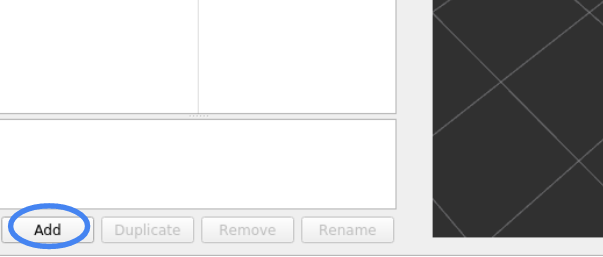
-
Under
By display typetab, selectautoware_overlay_rviz_plugin/SignalDisplayand press OK. -
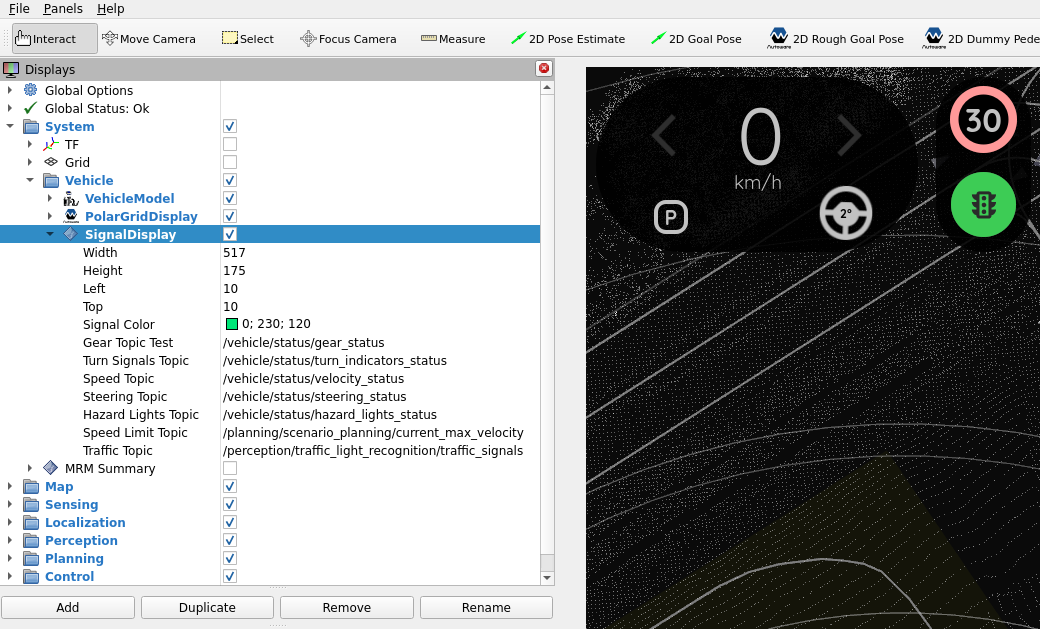
Enter the names of the topics if necessary.
Changelog for package autoware_overlay_rviz_plugin
0.4.0 (2026-02-14)
-
feat: use rviz_2d_overlay_plugins package for OverlayObject class (#29)
- feat: use rviz_2d_overlay_plugins package for OverlayObject class
* style(pre-commit): autofix ---------Co-authored-by: pre-commit-ci[bot] <66853113+pre-commit-ci[bot]@users.noreply.github.com>
-
Contributors: Ryohsuke Mitsudome
0.3.0 (2025-11-16)
0.2.0 (2025-08-14)
0.1.0 (2025-06-28)
- feat: port autoware_overlay_rviz_plugin from Autoware Universe (#7) Co-authored-by: pre-commit-ci[bot] <66853113+pre-commit-ci[bot]@users.noreply.github.com>
- Contributors: Ryohsuke Mitsudome
Package Dependencies
System Dependencies
| Name |
|---|
| boost |
Dependant Packages
Launch files
Messages
Services
Plugins
Recent questions tagged autoware_overlay_rviz_plugin at Robotics Stack Exchange
|
|
autoware_overlay_rviz_plugin package from autoware_rviz_plugins repoautoware_localization_rviz_plugin autoware_mission_details_overlay_rviz_plugin autoware_overlay_rviz_plugin autoware_string_stamped_rviz_plugin autoware_perception_rviz_plugin autoware_planning_rviz_plugin |
ROS Distro
|
Package Summary
| Version | 0.4.0 |
| License | Apache License 2.0 |
| Build type | AMENT_CMAKE |
| Use | RECOMMENDED |
Repository Summary
| Checkout URI | https://github.com/autowarefoundation/autoware_rviz_plugins.git |
| VCS Type | git |
| VCS Version | main |
| Last Updated | 2026-02-14 |
| Dev Status | DEVELOPED |
| Released | RELEASED |
| Contributing |
Help Wanted (-)
Good First Issues (-) Pull Requests to Review (-) |
Package Description
Maintainers
- Khalil Selyan
Authors
autoware_overlay_rviz_plugin
Plugin for displaying 2D overlays over the RViz2 3D scene.
Purpose
This plugin provides a visual and easy-to-understand display of vehicle speed, turn signal, steering status and gears.
Inputs / Outputs
Input
| Name | Type | Description |
|---|---|---|
/vehicle/status/velocity_status |
autoware_vehicle_msgs::msg::VelocityReport |
The topic is vehicle velocity |
/vehicle/status/turn_indicators_status |
autoware_vehicle_msgs::msg::TurnIndicatorsReport |
The topic is status of turn signal |
/vehicle/status/hazard_status |
autoware_vehicle_msgs::msg::HazardReport |
The topic is status of hazard |
/vehicle/status/steering_status |
autoware_vehicle_msgs::msg::SteeringReport |
The topic is status of steering |
/vehicle/status/gear_status |
autoware_vehicle_msgs::msg::GearReport |
The topic is status of gear |
/planning/scenario_planning/current_max_velocity |
autoware_internal_planning_msgs::msg::VelocityLimit |
The topic is velocity limit |
/perception/traffic_light_recognition/traffic_signals |
autoware_perception_msgs::msg::TrafficLightGroupArray |
The topic is status of traffic light |
Parameter
Core Parameters
SignalDisplay
| Name | Type | Default Value | Description |
|---|---|---|---|
property_width_ |
int | 128 | Width of the plotter window [px] |
property_height_ |
int | 128 | Height of the plotter window [px] |
property_left_ |
int | 128 | Left of the plotter window [px] |
property_top_ |
int | 128 | Top of the plotter window [px] |
property_signal_color_ |
QColor | QColor(25, 255, 240) | Turn Signal color |
Assumptions / Known limits
TBD.
Usage
-
Start
rviz2and clickAddbutton under theDisplayspanel. -
Under
By display typetab, selectautoware_overlay_rviz_plugin/SignalDisplayand press OK. -
Enter the names of the topics if necessary.
Changelog for package autoware_overlay_rviz_plugin
0.4.0 (2026-02-14)
-
feat: use rviz_2d_overlay_plugins package for OverlayObject class (#29)
- feat: use rviz_2d_overlay_plugins package for OverlayObject class
* style(pre-commit): autofix ---------Co-authored-by: pre-commit-ci[bot] <66853113+pre-commit-ci[bot]@users.noreply.github.com>
-
Contributors: Ryohsuke Mitsudome
0.3.0 (2025-11-16)
0.2.0 (2025-08-14)
0.1.0 (2025-06-28)
- feat: port autoware_overlay_rviz_plugin from Autoware Universe (#7) Co-authored-by: pre-commit-ci[bot] <66853113+pre-commit-ci[bot]@users.noreply.github.com>
- Contributors: Ryohsuke Mitsudome
Package Dependencies
System Dependencies
| Name |
|---|
| boost |
Dependant Packages
Launch files
Messages
Services
Plugins
Recent questions tagged autoware_overlay_rviz_plugin at Robotics Stack Exchange
|
|
autoware_overlay_rviz_plugin package from autoware_rviz_plugins repoautoware_localization_rviz_plugin autoware_mission_details_overlay_rviz_plugin autoware_overlay_rviz_plugin autoware_string_stamped_rviz_plugin autoware_perception_rviz_plugin autoware_planning_rviz_plugin |
ROS Distro
|
Package Summary
| Version | 0.4.0 |
| License | Apache License 2.0 |
| Build type | AMENT_CMAKE |
| Use | RECOMMENDED |
Repository Summary
| Checkout URI | https://github.com/autowarefoundation/autoware_rviz_plugins.git |
| VCS Type | git |
| VCS Version | main |
| Last Updated | 2026-02-14 |
| Dev Status | DEVELOPED |
| Released | RELEASED |
| Contributing |
Help Wanted (-)
Good First Issues (-) Pull Requests to Review (-) |
Package Description
Maintainers
- Khalil Selyan
Authors
autoware_overlay_rviz_plugin
Plugin for displaying 2D overlays over the RViz2 3D scene.
Purpose
This plugin provides a visual and easy-to-understand display of vehicle speed, turn signal, steering status and gears.
Inputs / Outputs
Input
| Name | Type | Description |
|---|---|---|
/vehicle/status/velocity_status |
autoware_vehicle_msgs::msg::VelocityReport |
The topic is vehicle velocity |
/vehicle/status/turn_indicators_status |
autoware_vehicle_msgs::msg::TurnIndicatorsReport |
The topic is status of turn signal |
/vehicle/status/hazard_status |
autoware_vehicle_msgs::msg::HazardReport |
The topic is status of hazard |
/vehicle/status/steering_status |
autoware_vehicle_msgs::msg::SteeringReport |
The topic is status of steering |
/vehicle/status/gear_status |
autoware_vehicle_msgs::msg::GearReport |
The topic is status of gear |
/planning/scenario_planning/current_max_velocity |
autoware_internal_planning_msgs::msg::VelocityLimit |
The topic is velocity limit |
/perception/traffic_light_recognition/traffic_signals |
autoware_perception_msgs::msg::TrafficLightGroupArray |
The topic is status of traffic light |
Parameter
Core Parameters
SignalDisplay
| Name | Type | Default Value | Description |
|---|---|---|---|
property_width_ |
int | 128 | Width of the plotter window [px] |
property_height_ |
int | 128 | Height of the plotter window [px] |
property_left_ |
int | 128 | Left of the plotter window [px] |
property_top_ |
int | 128 | Top of the plotter window [px] |
property_signal_color_ |
QColor | QColor(25, 255, 240) | Turn Signal color |
Assumptions / Known limits
TBD.
Usage
-
Start
rviz2and clickAddbutton under theDisplayspanel. -
Under
By display typetab, selectautoware_overlay_rviz_plugin/SignalDisplayand press OK. -
Enter the names of the topics if necessary.
Changelog for package autoware_overlay_rviz_plugin
0.4.0 (2026-02-14)
-
feat: use rviz_2d_overlay_plugins package for OverlayObject class (#29)
- feat: use rviz_2d_overlay_plugins package for OverlayObject class
* style(pre-commit): autofix ---------Co-authored-by: pre-commit-ci[bot] <66853113+pre-commit-ci[bot]@users.noreply.github.com>
-
Contributors: Ryohsuke Mitsudome
0.3.0 (2025-11-16)
0.2.0 (2025-08-14)
0.1.0 (2025-06-28)
- feat: port autoware_overlay_rviz_plugin from Autoware Universe (#7) Co-authored-by: pre-commit-ci[bot] <66853113+pre-commit-ci[bot]@users.noreply.github.com>
- Contributors: Ryohsuke Mitsudome
Package Dependencies
System Dependencies
| Name |
|---|
| boost |
Dependant Packages
Launch files
Messages
Services
Plugins
Recent questions tagged autoware_overlay_rviz_plugin at Robotics Stack Exchange
|
|
autoware_overlay_rviz_plugin package from autoware_rviz_plugins repoautoware_localization_rviz_plugin autoware_mission_details_overlay_rviz_plugin autoware_overlay_rviz_plugin autoware_string_stamped_rviz_plugin autoware_perception_rviz_plugin autoware_planning_rviz_plugin |
ROS Distro
|
Package Summary
| Version | 0.4.0 |
| License | Apache License 2.0 |
| Build type | AMENT_CMAKE |
| Use | RECOMMENDED |
Repository Summary
| Checkout URI | https://github.com/autowarefoundation/autoware_rviz_plugins.git |
| VCS Type | git |
| VCS Version | main |
| Last Updated | 2026-02-14 |
| Dev Status | DEVELOPED |
| Released | RELEASED |
| Contributing |
Help Wanted (-)
Good First Issues (-) Pull Requests to Review (-) |
Package Description
Maintainers
- Khalil Selyan
Authors
autoware_overlay_rviz_plugin
Plugin for displaying 2D overlays over the RViz2 3D scene.
Purpose
This plugin provides a visual and easy-to-understand display of vehicle speed, turn signal, steering status and gears.
Inputs / Outputs
Input
| Name | Type | Description |
|---|---|---|
/vehicle/status/velocity_status |
autoware_vehicle_msgs::msg::VelocityReport |
The topic is vehicle velocity |
/vehicle/status/turn_indicators_status |
autoware_vehicle_msgs::msg::TurnIndicatorsReport |
The topic is status of turn signal |
/vehicle/status/hazard_status |
autoware_vehicle_msgs::msg::HazardReport |
The topic is status of hazard |
/vehicle/status/steering_status |
autoware_vehicle_msgs::msg::SteeringReport |
The topic is status of steering |
/vehicle/status/gear_status |
autoware_vehicle_msgs::msg::GearReport |
The topic is status of gear |
/planning/scenario_planning/current_max_velocity |
autoware_internal_planning_msgs::msg::VelocityLimit |
The topic is velocity limit |
/perception/traffic_light_recognition/traffic_signals |
autoware_perception_msgs::msg::TrafficLightGroupArray |
The topic is status of traffic light |
Parameter
Core Parameters
SignalDisplay
| Name | Type | Default Value | Description |
|---|---|---|---|
property_width_ |
int | 128 | Width of the plotter window [px] |
property_height_ |
int | 128 | Height of the plotter window [px] |
property_left_ |
int | 128 | Left of the plotter window [px] |
property_top_ |
int | 128 | Top of the plotter window [px] |
property_signal_color_ |
QColor | QColor(25, 255, 240) | Turn Signal color |
Assumptions / Known limits
TBD.
Usage
-
Start
rviz2and clickAddbutton under theDisplayspanel. -
Under
By display typetab, selectautoware_overlay_rviz_plugin/SignalDisplayand press OK. -
Enter the names of the topics if necessary.
Changelog for package autoware_overlay_rviz_plugin
0.4.0 (2026-02-14)
-
feat: use rviz_2d_overlay_plugins package for OverlayObject class (#29)
- feat: use rviz_2d_overlay_plugins package for OverlayObject class
* style(pre-commit): autofix ---------Co-authored-by: pre-commit-ci[bot] <66853113+pre-commit-ci[bot]@users.noreply.github.com>
-
Contributors: Ryohsuke Mitsudome
0.3.0 (2025-11-16)
0.2.0 (2025-08-14)
0.1.0 (2025-06-28)
- feat: port autoware_overlay_rviz_plugin from Autoware Universe (#7) Co-authored-by: pre-commit-ci[bot] <66853113+pre-commit-ci[bot]@users.noreply.github.com>
- Contributors: Ryohsuke Mitsudome
Package Dependencies
System Dependencies
| Name |
|---|
| boost |
Dependant Packages
Launch files
Messages
Services
Plugins
Recent questions tagged autoware_overlay_rviz_plugin at Robotics Stack Exchange
|
|
autoware_overlay_rviz_plugin package from autoware_rviz_plugins repoautoware_localization_rviz_plugin autoware_mission_details_overlay_rviz_plugin autoware_overlay_rviz_plugin autoware_string_stamped_rviz_plugin autoware_perception_rviz_plugin autoware_planning_rviz_plugin |
ROS Distro
|
Package Summary
| Version | 0.4.0 |
| License | Apache License 2.0 |
| Build type | AMENT_CMAKE |
| Use | RECOMMENDED |
Repository Summary
| Checkout URI | https://github.com/autowarefoundation/autoware_rviz_plugins.git |
| VCS Type | git |
| VCS Version | main |
| Last Updated | 2026-02-14 |
| Dev Status | DEVELOPED |
| Released | RELEASED |
| Contributing |
Help Wanted (-)
Good First Issues (-) Pull Requests to Review (-) |
Package Description
Maintainers
- Khalil Selyan
Authors
autoware_overlay_rviz_plugin
Plugin for displaying 2D overlays over the RViz2 3D scene.
Purpose
This plugin provides a visual and easy-to-understand display of vehicle speed, turn signal, steering status and gears.
Inputs / Outputs
Input
| Name | Type | Description |
|---|---|---|
/vehicle/status/velocity_status |
autoware_vehicle_msgs::msg::VelocityReport |
The topic is vehicle velocity |
/vehicle/status/turn_indicators_status |
autoware_vehicle_msgs::msg::TurnIndicatorsReport |
The topic is status of turn signal |
/vehicle/status/hazard_status |
autoware_vehicle_msgs::msg::HazardReport |
The topic is status of hazard |
/vehicle/status/steering_status |
autoware_vehicle_msgs::msg::SteeringReport |
The topic is status of steering |
/vehicle/status/gear_status |
autoware_vehicle_msgs::msg::GearReport |
The topic is status of gear |
/planning/scenario_planning/current_max_velocity |
autoware_internal_planning_msgs::msg::VelocityLimit |
The topic is velocity limit |
/perception/traffic_light_recognition/traffic_signals |
autoware_perception_msgs::msg::TrafficLightGroupArray |
The topic is status of traffic light |
Parameter
Core Parameters
SignalDisplay
| Name | Type | Default Value | Description |
|---|---|---|---|
property_width_ |
int | 128 | Width of the plotter window [px] |
property_height_ |
int | 128 | Height of the plotter window [px] |
property_left_ |
int | 128 | Left of the plotter window [px] |
property_top_ |
int | 128 | Top of the plotter window [px] |
property_signal_color_ |
QColor | QColor(25, 255, 240) | Turn Signal color |
Assumptions / Known limits
TBD.
Usage
-
Start
rviz2and clickAddbutton under theDisplayspanel. -
Under
By display typetab, selectautoware_overlay_rviz_plugin/SignalDisplayand press OK. -
Enter the names of the topics if necessary.
Changelog for package autoware_overlay_rviz_plugin
0.4.0 (2026-02-14)
-
feat: use rviz_2d_overlay_plugins package for OverlayObject class (#29)
- feat: use rviz_2d_overlay_plugins package for OverlayObject class
* style(pre-commit): autofix ---------Co-authored-by: pre-commit-ci[bot] <66853113+pre-commit-ci[bot]@users.noreply.github.com>
-
Contributors: Ryohsuke Mitsudome
0.3.0 (2025-11-16)
0.2.0 (2025-08-14)
0.1.0 (2025-06-28)
- feat: port autoware_overlay_rviz_plugin from Autoware Universe (#7) Co-authored-by: pre-commit-ci[bot] <66853113+pre-commit-ci[bot]@users.noreply.github.com>
- Contributors: Ryohsuke Mitsudome
Package Dependencies
System Dependencies
| Name |
|---|
| boost |
Dependant Packages
Launch files
Messages
Services
Plugins
Recent questions tagged autoware_overlay_rviz_plugin at Robotics Stack Exchange
|
|
autoware_overlay_rviz_plugin package from autoware_rviz_plugins repoautoware_localization_rviz_plugin autoware_mission_details_overlay_rviz_plugin autoware_overlay_rviz_plugin autoware_string_stamped_rviz_plugin autoware_perception_rviz_plugin autoware_planning_rviz_plugin |
ROS Distro
|
Package Summary
| Version | 0.4.0 |
| License | Apache License 2.0 |
| Build type | AMENT_CMAKE |
| Use | RECOMMENDED |
Repository Summary
| Checkout URI | https://github.com/autowarefoundation/autoware_rviz_plugins.git |
| VCS Type | git |
| VCS Version | main |
| Last Updated | 2026-02-14 |
| Dev Status | DEVELOPED |
| Released | RELEASED |
| Contributing |
Help Wanted (-)
Good First Issues (-) Pull Requests to Review (-) |
Package Description
Maintainers
- Khalil Selyan
Authors
autoware_overlay_rviz_plugin
Plugin for displaying 2D overlays over the RViz2 3D scene.
Purpose
This plugin provides a visual and easy-to-understand display of vehicle speed, turn signal, steering status and gears.
Inputs / Outputs
Input
| Name | Type | Description |
|---|---|---|
/vehicle/status/velocity_status |
autoware_vehicle_msgs::msg::VelocityReport |
The topic is vehicle velocity |
/vehicle/status/turn_indicators_status |
autoware_vehicle_msgs::msg::TurnIndicatorsReport |
The topic is status of turn signal |
/vehicle/status/hazard_status |
autoware_vehicle_msgs::msg::HazardReport |
The topic is status of hazard |
/vehicle/status/steering_status |
autoware_vehicle_msgs::msg::SteeringReport |
The topic is status of steering |
/vehicle/status/gear_status |
autoware_vehicle_msgs::msg::GearReport |
The topic is status of gear |
/planning/scenario_planning/current_max_velocity |
autoware_internal_planning_msgs::msg::VelocityLimit |
The topic is velocity limit |
/perception/traffic_light_recognition/traffic_signals |
autoware_perception_msgs::msg::TrafficLightGroupArray |
The topic is status of traffic light |
Parameter
Core Parameters
SignalDisplay
| Name | Type | Default Value | Description |
|---|---|---|---|
property_width_ |
int | 128 | Width of the plotter window [px] |
property_height_ |
int | 128 | Height of the plotter window [px] |
property_left_ |
int | 128 | Left of the plotter window [px] |
property_top_ |
int | 128 | Top of the plotter window [px] |
property_signal_color_ |
QColor | QColor(25, 255, 240) | Turn Signal color |
Assumptions / Known limits
TBD.
Usage
-
Start
rviz2and clickAddbutton under theDisplayspanel. -
Under
By display typetab, selectautoware_overlay_rviz_plugin/SignalDisplayand press OK. -
Enter the names of the topics if necessary.
Changelog for package autoware_overlay_rviz_plugin
0.4.0 (2026-02-14)
-
feat: use rviz_2d_overlay_plugins package for OverlayObject class (#29)
- feat: use rviz_2d_overlay_plugins package for OverlayObject class
* style(pre-commit): autofix ---------Co-authored-by: pre-commit-ci[bot] <66853113+pre-commit-ci[bot]@users.noreply.github.com>
-
Contributors: Ryohsuke Mitsudome
0.3.0 (2025-11-16)
0.2.0 (2025-08-14)
0.1.0 (2025-06-28)
- feat: port autoware_overlay_rviz_plugin from Autoware Universe (#7) Co-authored-by: pre-commit-ci[bot] <66853113+pre-commit-ci[bot]@users.noreply.github.com>
- Contributors: Ryohsuke Mitsudome
Package Dependencies
System Dependencies
| Name |
|---|
| boost |
Dependant Packages
Launch files
Messages
Services
Plugins
Recent questions tagged autoware_overlay_rviz_plugin at Robotics Stack Exchange
|
|
autoware_overlay_rviz_plugin package from autoware_rviz_plugins repoautoware_localization_rviz_plugin autoware_mission_details_overlay_rviz_plugin autoware_overlay_rviz_plugin autoware_string_stamped_rviz_plugin autoware_perception_rviz_plugin autoware_planning_rviz_plugin |
ROS Distro
|
Package Summary
| Version | 0.4.0 |
| License | Apache License 2.0 |
| Build type | AMENT_CMAKE |
| Use | RECOMMENDED |
Repository Summary
| Checkout URI | https://github.com/autowarefoundation/autoware_rviz_plugins.git |
| VCS Type | git |
| VCS Version | main |
| Last Updated | 2026-02-14 |
| Dev Status | DEVELOPED |
| Released | RELEASED |
| Contributing |
Help Wanted (-)
Good First Issues (-) Pull Requests to Review (-) |
Package Description
Maintainers
- Khalil Selyan
Authors
autoware_overlay_rviz_plugin
Plugin for displaying 2D overlays over the RViz2 3D scene.
Purpose
This plugin provides a visual and easy-to-understand display of vehicle speed, turn signal, steering status and gears.
Inputs / Outputs
Input
| Name | Type | Description |
|---|---|---|
/vehicle/status/velocity_status |
autoware_vehicle_msgs::msg::VelocityReport |
The topic is vehicle velocity |
/vehicle/status/turn_indicators_status |
autoware_vehicle_msgs::msg::TurnIndicatorsReport |
The topic is status of turn signal |
/vehicle/status/hazard_status |
autoware_vehicle_msgs::msg::HazardReport |
The topic is status of hazard |
/vehicle/status/steering_status |
autoware_vehicle_msgs::msg::SteeringReport |
The topic is status of steering |
/vehicle/status/gear_status |
autoware_vehicle_msgs::msg::GearReport |
The topic is status of gear |
/planning/scenario_planning/current_max_velocity |
autoware_internal_planning_msgs::msg::VelocityLimit |
The topic is velocity limit |
/perception/traffic_light_recognition/traffic_signals |
autoware_perception_msgs::msg::TrafficLightGroupArray |
The topic is status of traffic light |
Parameter
Core Parameters
SignalDisplay
| Name | Type | Default Value | Description |
|---|---|---|---|
property_width_ |
int | 128 | Width of the plotter window [px] |
property_height_ |
int | 128 | Height of the plotter window [px] |
property_left_ |
int | 128 | Left of the plotter window [px] |
property_top_ |
int | 128 | Top of the plotter window [px] |
property_signal_color_ |
QColor | QColor(25, 255, 240) | Turn Signal color |
Assumptions / Known limits
TBD.
Usage
-
Start
rviz2and clickAddbutton under theDisplayspanel. -
Under
By display typetab, selectautoware_overlay_rviz_plugin/SignalDisplayand press OK. -
Enter the names of the topics if necessary.
Changelog for package autoware_overlay_rviz_plugin
0.4.0 (2026-02-14)
-
feat: use rviz_2d_overlay_plugins package for OverlayObject class (#29)
- feat: use rviz_2d_overlay_plugins package for OverlayObject class
* style(pre-commit): autofix ---------Co-authored-by: pre-commit-ci[bot] <66853113+pre-commit-ci[bot]@users.noreply.github.com>
-
Contributors: Ryohsuke Mitsudome
0.3.0 (2025-11-16)
0.2.0 (2025-08-14)
0.1.0 (2025-06-28)
- feat: port autoware_overlay_rviz_plugin from Autoware Universe (#7) Co-authored-by: pre-commit-ci[bot] <66853113+pre-commit-ci[bot]@users.noreply.github.com>
- Contributors: Ryohsuke Mitsudome
Package Dependencies
System Dependencies
| Name |
|---|
| boost |
Dependant Packages
Launch files
Messages
Services
Plugins
Recent questions tagged autoware_overlay_rviz_plugin at Robotics Stack Exchange
|
|
autoware_overlay_rviz_plugin package from autoware_rviz_plugins repoautoware_localization_rviz_plugin autoware_mission_details_overlay_rviz_plugin autoware_overlay_rviz_plugin autoware_string_stamped_rviz_plugin autoware_perception_rviz_plugin autoware_planning_rviz_plugin |
ROS Distro
|
Package Summary
| Version | 0.4.0 |
| License | Apache License 2.0 |
| Build type | AMENT_CMAKE |
| Use | RECOMMENDED |
Repository Summary
| Checkout URI | https://github.com/autowarefoundation/autoware_rviz_plugins.git |
| VCS Type | git |
| VCS Version | main |
| Last Updated | 2026-02-14 |
| Dev Status | DEVELOPED |
| Released | RELEASED |
| Contributing |
Help Wanted (-)
Good First Issues (-) Pull Requests to Review (-) |
Package Description
Maintainers
- Khalil Selyan
Authors
autoware_overlay_rviz_plugin
Plugin for displaying 2D overlays over the RViz2 3D scene.
Purpose
This plugin provides a visual and easy-to-understand display of vehicle speed, turn signal, steering status and gears.
Inputs / Outputs
Input
| Name | Type | Description |
|---|---|---|
/vehicle/status/velocity_status |
autoware_vehicle_msgs::msg::VelocityReport |
The topic is vehicle velocity |
/vehicle/status/turn_indicators_status |
autoware_vehicle_msgs::msg::TurnIndicatorsReport |
The topic is status of turn signal |
/vehicle/status/hazard_status |
autoware_vehicle_msgs::msg::HazardReport |
The topic is status of hazard |
/vehicle/status/steering_status |
autoware_vehicle_msgs::msg::SteeringReport |
The topic is status of steering |
/vehicle/status/gear_status |
autoware_vehicle_msgs::msg::GearReport |
The topic is status of gear |
/planning/scenario_planning/current_max_velocity |
autoware_internal_planning_msgs::msg::VelocityLimit |
The topic is velocity limit |
/perception/traffic_light_recognition/traffic_signals |
autoware_perception_msgs::msg::TrafficLightGroupArray |
The topic is status of traffic light |
Parameter
Core Parameters
SignalDisplay
| Name | Type | Default Value | Description |
|---|---|---|---|
property_width_ |
int | 128 | Width of the plotter window [px] |
property_height_ |
int | 128 | Height of the plotter window [px] |
property_left_ |
int | 128 | Left of the plotter window [px] |
property_top_ |
int | 128 | Top of the plotter window [px] |
property_signal_color_ |
QColor | QColor(25, 255, 240) | Turn Signal color |
Assumptions / Known limits
TBD.
Usage
-
Start
rviz2and clickAddbutton under theDisplayspanel. -
Under
By display typetab, selectautoware_overlay_rviz_plugin/SignalDisplayand press OK. -
Enter the names of the topics if necessary.
Changelog for package autoware_overlay_rviz_plugin
0.4.0 (2026-02-14)
-
feat: use rviz_2d_overlay_plugins package for OverlayObject class (#29)
- feat: use rviz_2d_overlay_plugins package for OverlayObject class
* style(pre-commit): autofix ---------Co-authored-by: pre-commit-ci[bot] <66853113+pre-commit-ci[bot]@users.noreply.github.com>
-
Contributors: Ryohsuke Mitsudome
0.3.0 (2025-11-16)
0.2.0 (2025-08-14)
0.1.0 (2025-06-28)
- feat: port autoware_overlay_rviz_plugin from Autoware Universe (#7) Co-authored-by: pre-commit-ci[bot] <66853113+pre-commit-ci[bot]@users.noreply.github.com>
- Contributors: Ryohsuke Mitsudome
Package Dependencies
System Dependencies
| Name |
|---|
| boost |
Dependant Packages
Launch files
Messages
Services
Plugins
Recent questions tagged autoware_overlay_rviz_plugin at Robotics Stack Exchange
|
|
autoware_overlay_rviz_plugin package from autoware_rviz_plugins repoautoware_localization_rviz_plugin autoware_mission_details_overlay_rviz_plugin autoware_overlay_rviz_plugin autoware_string_stamped_rviz_plugin autoware_perception_rviz_plugin autoware_planning_rviz_plugin |
ROS Distro
|
Package Summary
| Version | 0.4.0 |
| License | Apache License 2.0 |
| Build type | AMENT_CMAKE |
| Use | RECOMMENDED |
Repository Summary
| Checkout URI | https://github.com/autowarefoundation/autoware_rviz_plugins.git |
| VCS Type | git |
| VCS Version | main |
| Last Updated | 2026-02-14 |
| Dev Status | DEVELOPED |
| Released | RELEASED |
| Contributing |
Help Wanted (-)
Good First Issues (-) Pull Requests to Review (-) |
Package Description
Maintainers
- Khalil Selyan
Authors
autoware_overlay_rviz_plugin
Plugin for displaying 2D overlays over the RViz2 3D scene.
Purpose
This plugin provides a visual and easy-to-understand display of vehicle speed, turn signal, steering status and gears.
Inputs / Outputs
Input
| Name | Type | Description |
|---|---|---|
/vehicle/status/velocity_status |
autoware_vehicle_msgs::msg::VelocityReport |
The topic is vehicle velocity |
/vehicle/status/turn_indicators_status |
autoware_vehicle_msgs::msg::TurnIndicatorsReport |
The topic is status of turn signal |
/vehicle/status/hazard_status |
autoware_vehicle_msgs::msg::HazardReport |
The topic is status of hazard |
/vehicle/status/steering_status |
autoware_vehicle_msgs::msg::SteeringReport |
The topic is status of steering |
/vehicle/status/gear_status |
autoware_vehicle_msgs::msg::GearReport |
The topic is status of gear |
/planning/scenario_planning/current_max_velocity |
autoware_internal_planning_msgs::msg::VelocityLimit |
The topic is velocity limit |
/perception/traffic_light_recognition/traffic_signals |
autoware_perception_msgs::msg::TrafficLightGroupArray |
The topic is status of traffic light |
Parameter
Core Parameters
SignalDisplay
| Name | Type | Default Value | Description |
|---|---|---|---|
property_width_ |
int | 128 | Width of the plotter window [px] |
property_height_ |
int | 128 | Height of the plotter window [px] |
property_left_ |
int | 128 | Left of the plotter window [px] |
property_top_ |
int | 128 | Top of the plotter window [px] |
property_signal_color_ |
QColor | QColor(25, 255, 240) | Turn Signal color |
Assumptions / Known limits
TBD.
Usage
-
Start
rviz2and clickAddbutton under theDisplayspanel. -
Under
By display typetab, selectautoware_overlay_rviz_plugin/SignalDisplayand press OK. -
Enter the names of the topics if necessary.
Changelog for package autoware_overlay_rviz_plugin
0.4.0 (2026-02-14)
-
feat: use rviz_2d_overlay_plugins package for OverlayObject class (#29)
- feat: use rviz_2d_overlay_plugins package for OverlayObject class
* style(pre-commit): autofix ---------Co-authored-by: pre-commit-ci[bot] <66853113+pre-commit-ci[bot]@users.noreply.github.com>
-
Contributors: Ryohsuke Mitsudome
0.3.0 (2025-11-16)
0.2.0 (2025-08-14)
0.1.0 (2025-06-28)
- feat: port autoware_overlay_rviz_plugin from Autoware Universe (#7) Co-authored-by: pre-commit-ci[bot] <66853113+pre-commit-ci[bot]@users.noreply.github.com>
- Contributors: Ryohsuke Mitsudome
Package Dependencies
System Dependencies
| Name |
|---|
| boost |
Dependant Packages
Launch files
Messages
Services
Plugins
Recent questions tagged autoware_overlay_rviz_plugin at Robotics Stack Exchange
|
|
autoware_overlay_rviz_plugin package from autoware_rviz_plugins repoautoware_localization_rviz_plugin autoware_mission_details_overlay_rviz_plugin autoware_overlay_rviz_plugin autoware_string_stamped_rviz_plugin autoware_perception_rviz_plugin autoware_planning_rviz_plugin |
ROS Distro
|
Package Summary
| Version | 0.4.0 |
| License | Apache License 2.0 |
| Build type | AMENT_CMAKE |
| Use | RECOMMENDED |
Repository Summary
| Checkout URI | https://github.com/autowarefoundation/autoware_rviz_plugins.git |
| VCS Type | git |
| VCS Version | main |
| Last Updated | 2026-02-14 |
| Dev Status | DEVELOPED |
| Released | RELEASED |
| Contributing |
Help Wanted (-)
Good First Issues (-) Pull Requests to Review (-) |
Package Description
Maintainers
- Khalil Selyan
Authors
autoware_overlay_rviz_plugin
Plugin for displaying 2D overlays over the RViz2 3D scene.
Purpose
This plugin provides a visual and easy-to-understand display of vehicle speed, turn signal, steering status and gears.
Inputs / Outputs
Input
| Name | Type | Description |
|---|---|---|
/vehicle/status/velocity_status |
autoware_vehicle_msgs::msg::VelocityReport |
The topic is vehicle velocity |
/vehicle/status/turn_indicators_status |
autoware_vehicle_msgs::msg::TurnIndicatorsReport |
The topic is status of turn signal |
/vehicle/status/hazard_status |
autoware_vehicle_msgs::msg::HazardReport |
The topic is status of hazard |
/vehicle/status/steering_status |
autoware_vehicle_msgs::msg::SteeringReport |
The topic is status of steering |
/vehicle/status/gear_status |
autoware_vehicle_msgs::msg::GearReport |
The topic is status of gear |
/planning/scenario_planning/current_max_velocity |
autoware_internal_planning_msgs::msg::VelocityLimit |
The topic is velocity limit |
/perception/traffic_light_recognition/traffic_signals |
autoware_perception_msgs::msg::TrafficLightGroupArray |
The topic is status of traffic light |
Parameter
Core Parameters
SignalDisplay
| Name | Type | Default Value | Description |
|---|---|---|---|
property_width_ |
int | 128 | Width of the plotter window [px] |
property_height_ |
int | 128 | Height of the plotter window [px] |
property_left_ |
int | 128 | Left of the plotter window [px] |
property_top_ |
int | 128 | Top of the plotter window [px] |
property_signal_color_ |
QColor | QColor(25, 255, 240) | Turn Signal color |
Assumptions / Known limits
TBD.
Usage
-
Start
rviz2and clickAddbutton under theDisplayspanel. -
Under
By display typetab, selectautoware_overlay_rviz_plugin/SignalDisplayand press OK. -
Enter the names of the topics if necessary.
Changelog for package autoware_overlay_rviz_plugin
0.4.0 (2026-02-14)
-
feat: use rviz_2d_overlay_plugins package for OverlayObject class (#29)
- feat: use rviz_2d_overlay_plugins package for OverlayObject class
* style(pre-commit): autofix ---------Co-authored-by: pre-commit-ci[bot] <66853113+pre-commit-ci[bot]@users.noreply.github.com>
-
Contributors: Ryohsuke Mitsudome
0.3.0 (2025-11-16)
0.2.0 (2025-08-14)
0.1.0 (2025-06-28)
- feat: port autoware_overlay_rviz_plugin from Autoware Universe (#7) Co-authored-by: pre-commit-ci[bot] <66853113+pre-commit-ci[bot]@users.noreply.github.com>
- Contributors: Ryohsuke Mitsudome
Package Dependencies
System Dependencies
| Name |
|---|
| boost |
Dependant Packages
Launch files
Messages
Services
Plugins
Recent questions tagged autoware_overlay_rviz_plugin at Robotics Stack Exchange
|
|
autoware_overlay_rviz_plugin package from autoware_rviz_plugins repoautoware_localization_rviz_plugin autoware_mission_details_overlay_rviz_plugin autoware_overlay_rviz_plugin autoware_string_stamped_rviz_plugin autoware_perception_rviz_plugin autoware_planning_rviz_plugin |
ROS Distro
|
Package Summary
| Version | 0.4.0 |
| License | Apache License 2.0 |
| Build type | AMENT_CMAKE |
| Use | RECOMMENDED |
Repository Summary
| Checkout URI | https://github.com/autowarefoundation/autoware_rviz_plugins.git |
| VCS Type | git |
| VCS Version | main |
| Last Updated | 2026-02-14 |
| Dev Status | DEVELOPED |
| Released | RELEASED |
| Contributing |
Help Wanted (-)
Good First Issues (-) Pull Requests to Review (-) |
Package Description
Maintainers
- Khalil Selyan
Authors
autoware_overlay_rviz_plugin
Plugin for displaying 2D overlays over the RViz2 3D scene.
Purpose
This plugin provides a visual and easy-to-understand display of vehicle speed, turn signal, steering status and gears.
Inputs / Outputs
Input
| Name | Type | Description |
|---|---|---|
/vehicle/status/velocity_status |
autoware_vehicle_msgs::msg::VelocityReport |
The topic is vehicle velocity |
/vehicle/status/turn_indicators_status |
autoware_vehicle_msgs::msg::TurnIndicatorsReport |
The topic is status of turn signal |
/vehicle/status/hazard_status |
autoware_vehicle_msgs::msg::HazardReport |
The topic is status of hazard |
/vehicle/status/steering_status |
autoware_vehicle_msgs::msg::SteeringReport |
The topic is status of steering |
/vehicle/status/gear_status |
autoware_vehicle_msgs::msg::GearReport |
The topic is status of gear |
/planning/scenario_planning/current_max_velocity |
autoware_internal_planning_msgs::msg::VelocityLimit |
The topic is velocity limit |
/perception/traffic_light_recognition/traffic_signals |
autoware_perception_msgs::msg::TrafficLightGroupArray |
The topic is status of traffic light |
Parameter
Core Parameters
SignalDisplay
| Name | Type | Default Value | Description |
|---|---|---|---|
property_width_ |
int | 128 | Width of the plotter window [px] |
property_height_ |
int | 128 | Height of the plotter window [px] |
property_left_ |
int | 128 | Left of the plotter window [px] |
property_top_ |
int | 128 | Top of the plotter window [px] |
property_signal_color_ |
QColor | QColor(25, 255, 240) | Turn Signal color |
Assumptions / Known limits
TBD.
Usage
-
Start
rviz2and clickAddbutton under theDisplayspanel. -
Under
By display typetab, selectautoware_overlay_rviz_plugin/SignalDisplayand press OK. -
Enter the names of the topics if necessary.
Changelog for package autoware_overlay_rviz_plugin
0.4.0 (2026-02-14)
-
feat: use rviz_2d_overlay_plugins package for OverlayObject class (#29)
- feat: use rviz_2d_overlay_plugins package for OverlayObject class
* style(pre-commit): autofix ---------Co-authored-by: pre-commit-ci[bot] <66853113+pre-commit-ci[bot]@users.noreply.github.com>
-
Contributors: Ryohsuke Mitsudome
0.3.0 (2025-11-16)
0.2.0 (2025-08-14)
0.1.0 (2025-06-28)
- feat: port autoware_overlay_rviz_plugin from Autoware Universe (#7) Co-authored-by: pre-commit-ci[bot] <66853113+pre-commit-ci[bot]@users.noreply.github.com>
- Contributors: Ryohsuke Mitsudome
Package Dependencies
System Dependencies
| Name |
|---|
| boost |
Dependant Packages
Launch files
Messages
Services
Plugins
Recent questions tagged autoware_overlay_rviz_plugin at Robotics Stack Exchange
|
|
autoware_overlay_rviz_plugin package from autoware_rviz_plugins repoautoware_localization_rviz_plugin autoware_mission_details_overlay_rviz_plugin autoware_overlay_rviz_plugin autoware_string_stamped_rviz_plugin autoware_perception_rviz_plugin autoware_planning_rviz_plugin |
ROS Distro
|
Package Summary
| Version | 0.4.0 |
| License | Apache License 2.0 |
| Build type | AMENT_CMAKE |
| Use | RECOMMENDED |
Repository Summary
| Checkout URI | https://github.com/autowarefoundation/autoware_rviz_plugins.git |
| VCS Type | git |
| VCS Version | main |
| Last Updated | 2026-02-14 |
| Dev Status | DEVELOPED |
| Released | RELEASED |
| Contributing |
Help Wanted (-)
Good First Issues (-) Pull Requests to Review (-) |
Package Description
Maintainers
- Khalil Selyan
Authors
autoware_overlay_rviz_plugin
Plugin for displaying 2D overlays over the RViz2 3D scene.
Purpose
This plugin provides a visual and easy-to-understand display of vehicle speed, turn signal, steering status and gears.
Inputs / Outputs
Input
| Name | Type | Description |
|---|---|---|
/vehicle/status/velocity_status |
autoware_vehicle_msgs::msg::VelocityReport |
The topic is vehicle velocity |
/vehicle/status/turn_indicators_status |
autoware_vehicle_msgs::msg::TurnIndicatorsReport |
The topic is status of turn signal |
/vehicle/status/hazard_status |
autoware_vehicle_msgs::msg::HazardReport |
The topic is status of hazard |
/vehicle/status/steering_status |
autoware_vehicle_msgs::msg::SteeringReport |
The topic is status of steering |
/vehicle/status/gear_status |
autoware_vehicle_msgs::msg::GearReport |
The topic is status of gear |
/planning/scenario_planning/current_max_velocity |
autoware_internal_planning_msgs::msg::VelocityLimit |
The topic is velocity limit |
/perception/traffic_light_recognition/traffic_signals |
autoware_perception_msgs::msg::TrafficLightGroupArray |
The topic is status of traffic light |
Parameter
Core Parameters
SignalDisplay
| Name | Type | Default Value | Description |
|---|---|---|---|
property_width_ |
int | 128 | Width of the plotter window [px] |
property_height_ |
int | 128 | Height of the plotter window [px] |
property_left_ |
int | 128 | Left of the plotter window [px] |
property_top_ |
int | 128 | Top of the plotter window [px] |
property_signal_color_ |
QColor | QColor(25, 255, 240) | Turn Signal color |
Assumptions / Known limits
TBD.
Usage
-
Start
rviz2and clickAddbutton under theDisplayspanel. -
Under
By display typetab, selectautoware_overlay_rviz_plugin/SignalDisplayand press OK. -
Enter the names of the topics if necessary.
Changelog for package autoware_overlay_rviz_plugin
0.4.0 (2026-02-14)
-
feat: use rviz_2d_overlay_plugins package for OverlayObject class (#29)
- feat: use rviz_2d_overlay_plugins package for OverlayObject class
* style(pre-commit): autofix ---------Co-authored-by: pre-commit-ci[bot] <66853113+pre-commit-ci[bot]@users.noreply.github.com>
-
Contributors: Ryohsuke Mitsudome
0.3.0 (2025-11-16)
0.2.0 (2025-08-14)
0.1.0 (2025-06-28)
- feat: port autoware_overlay_rviz_plugin from Autoware Universe (#7) Co-authored-by: pre-commit-ci[bot] <66853113+pre-commit-ci[bot]@users.noreply.github.com>
- Contributors: Ryohsuke Mitsudome
Package Dependencies
System Dependencies
| Name |
|---|
| boost |
Dependant Packages
Launch files
Messages
Services
Plugins
Recent questions tagged autoware_overlay_rviz_plugin at Robotics Stack Exchange
|
|
autoware_overlay_rviz_plugin package from autoware_rviz_plugins repoautoware_localization_rviz_plugin autoware_mission_details_overlay_rviz_plugin autoware_overlay_rviz_plugin autoware_string_stamped_rviz_plugin autoware_perception_rviz_plugin autoware_planning_rviz_plugin |
ROS Distro
|
Package Summary
| Version | 0.4.0 |
| License | Apache License 2.0 |
| Build type | AMENT_CMAKE |
| Use | RECOMMENDED |
Repository Summary
| Checkout URI | https://github.com/autowarefoundation/autoware_rviz_plugins.git |
| VCS Type | git |
| VCS Version | main |
| Last Updated | 2026-02-14 |
| Dev Status | DEVELOPED |
| Released | RELEASED |
| Contributing |
Help Wanted (-)
Good First Issues (-) Pull Requests to Review (-) |
Package Description
Maintainers
- Khalil Selyan
Authors
autoware_overlay_rviz_plugin
Plugin for displaying 2D overlays over the RViz2 3D scene.
Purpose
This plugin provides a visual and easy-to-understand display of vehicle speed, turn signal, steering status and gears.
Inputs / Outputs
Input
| Name | Type | Description |
|---|---|---|
/vehicle/status/velocity_status |
autoware_vehicle_msgs::msg::VelocityReport |
The topic is vehicle velocity |
/vehicle/status/turn_indicators_status |
autoware_vehicle_msgs::msg::TurnIndicatorsReport |
The topic is status of turn signal |
/vehicle/status/hazard_status |
autoware_vehicle_msgs::msg::HazardReport |
The topic is status of hazard |
/vehicle/status/steering_status |
autoware_vehicle_msgs::msg::SteeringReport |
The topic is status of steering |
/vehicle/status/gear_status |
autoware_vehicle_msgs::msg::GearReport |
The topic is status of gear |
/planning/scenario_planning/current_max_velocity |
autoware_internal_planning_msgs::msg::VelocityLimit |
The topic is velocity limit |
/perception/traffic_light_recognition/traffic_signals |
autoware_perception_msgs::msg::TrafficLightGroupArray |
The topic is status of traffic light |
Parameter
Core Parameters
SignalDisplay
| Name | Type | Default Value | Description |
|---|---|---|---|
property_width_ |
int | 128 | Width of the plotter window [px] |
property_height_ |
int | 128 | Height of the plotter window [px] |
property_left_ |
int | 128 | Left of the plotter window [px] |
property_top_ |
int | 128 | Top of the plotter window [px] |
property_signal_color_ |
QColor | QColor(25, 255, 240) | Turn Signal color |
Assumptions / Known limits
TBD.
Usage
-
Start
rviz2and clickAddbutton under theDisplayspanel. -
Under
By display typetab, selectautoware_overlay_rviz_plugin/SignalDisplayand press OK. -
Enter the names of the topics if necessary.
Changelog for package autoware_overlay_rviz_plugin
0.4.0 (2026-02-14)
-
feat: use rviz_2d_overlay_plugins package for OverlayObject class (#29)
- feat: use rviz_2d_overlay_plugins package for OverlayObject class
* style(pre-commit): autofix ---------Co-authored-by: pre-commit-ci[bot] <66853113+pre-commit-ci[bot]@users.noreply.github.com>
-
Contributors: Ryohsuke Mitsudome
0.3.0 (2025-11-16)
0.2.0 (2025-08-14)
0.1.0 (2025-06-28)
- feat: port autoware_overlay_rviz_plugin from Autoware Universe (#7) Co-authored-by: pre-commit-ci[bot] <66853113+pre-commit-ci[bot]@users.noreply.github.com>
- Contributors: Ryohsuke Mitsudome
Package Dependencies
System Dependencies
| Name |
|---|
| boost |
Dependant Packages
Launch files
Messages
Services
Plugins
Recent questions tagged autoware_overlay_rviz_plugin at Robotics Stack Exchange
|
|
autoware_overlay_rviz_plugin package from autoware_rviz_plugins repoautoware_localization_rviz_plugin autoware_mission_details_overlay_rviz_plugin autoware_overlay_rviz_plugin autoware_string_stamped_rviz_plugin autoware_perception_rviz_plugin autoware_planning_rviz_plugin |
ROS Distro
|
Package Summary
| Version | 0.4.0 |
| License | Apache License 2.0 |
| Build type | AMENT_CMAKE |
| Use | RECOMMENDED |
Repository Summary
| Checkout URI | https://github.com/autowarefoundation/autoware_rviz_plugins.git |
| VCS Type | git |
| VCS Version | main |
| Last Updated | 2026-02-14 |
| Dev Status | DEVELOPED |
| Released | RELEASED |
| Contributing |
Help Wanted (-)
Good First Issues (-) Pull Requests to Review (-) |
Package Description
Maintainers
- Khalil Selyan
Authors
autoware_overlay_rviz_plugin
Plugin for displaying 2D overlays over the RViz2 3D scene.
Purpose
This plugin provides a visual and easy-to-understand display of vehicle speed, turn signal, steering status and gears.
Inputs / Outputs
Input
| Name | Type | Description |
|---|---|---|
/vehicle/status/velocity_status |
autoware_vehicle_msgs::msg::VelocityReport |
The topic is vehicle velocity |
/vehicle/status/turn_indicators_status |
autoware_vehicle_msgs::msg::TurnIndicatorsReport |
The topic is status of turn signal |
/vehicle/status/hazard_status |
autoware_vehicle_msgs::msg::HazardReport |
The topic is status of hazard |
/vehicle/status/steering_status |
autoware_vehicle_msgs::msg::SteeringReport |
The topic is status of steering |
/vehicle/status/gear_status |
autoware_vehicle_msgs::msg::GearReport |
The topic is status of gear |
/planning/scenario_planning/current_max_velocity |
autoware_internal_planning_msgs::msg::VelocityLimit |
The topic is velocity limit |
/perception/traffic_light_recognition/traffic_signals |
autoware_perception_msgs::msg::TrafficLightGroupArray |
The topic is status of traffic light |
Parameter
Core Parameters
SignalDisplay
| Name | Type | Default Value | Description |
|---|---|---|---|
property_width_ |
int | 128 | Width of the plotter window [px] |
property_height_ |
int | 128 | Height of the plotter window [px] |
property_left_ |
int | 128 | Left of the plotter window [px] |
property_top_ |
int | 128 | Top of the plotter window [px] |
property_signal_color_ |
QColor | QColor(25, 255, 240) | Turn Signal color |
Assumptions / Known limits
TBD.
Usage
-
Start
rviz2and clickAddbutton under theDisplayspanel. -
Under
By display typetab, selectautoware_overlay_rviz_plugin/SignalDisplayand press OK. -
Enter the names of the topics if necessary.
Changelog for package autoware_overlay_rviz_plugin
0.4.0 (2026-02-14)
-
feat: use rviz_2d_overlay_plugins package for OverlayObject class (#29)
- feat: use rviz_2d_overlay_plugins package for OverlayObject class
* style(pre-commit): autofix ---------Co-authored-by: pre-commit-ci[bot] <66853113+pre-commit-ci[bot]@users.noreply.github.com>
-
Contributors: Ryohsuke Mitsudome
0.3.0 (2025-11-16)
0.2.0 (2025-08-14)
0.1.0 (2025-06-28)
- feat: port autoware_overlay_rviz_plugin from Autoware Universe (#7) Co-authored-by: pre-commit-ci[bot] <66853113+pre-commit-ci[bot]@users.noreply.github.com>
- Contributors: Ryohsuke Mitsudome
Package Dependencies
System Dependencies
| Name |
|---|
| boost |
Dependant Packages
Launch files
Messages
Services
Plugins
Recent questions tagged autoware_overlay_rviz_plugin at Robotics Stack Exchange
|
|
autoware_overlay_rviz_plugin package from autoware_rviz_plugins repoautoware_localization_rviz_plugin autoware_mission_details_overlay_rviz_plugin autoware_overlay_rviz_plugin autoware_string_stamped_rviz_plugin autoware_perception_rviz_plugin autoware_planning_rviz_plugin |
ROS Distro
|
Package Summary
| Version | 0.4.0 |
| License | Apache License 2.0 |
| Build type | AMENT_CMAKE |
| Use | RECOMMENDED |
Repository Summary
| Checkout URI | https://github.com/autowarefoundation/autoware_rviz_plugins.git |
| VCS Type | git |
| VCS Version | main |
| Last Updated | 2026-02-14 |
| Dev Status | DEVELOPED |
| Released | RELEASED |
| Contributing |
Help Wanted (-)
Good First Issues (-) Pull Requests to Review (-) |
Package Description
Maintainers
- Khalil Selyan
Authors
autoware_overlay_rviz_plugin
Plugin for displaying 2D overlays over the RViz2 3D scene.
Purpose
This plugin provides a visual and easy-to-understand display of vehicle speed, turn signal, steering status and gears.
Inputs / Outputs
Input
| Name | Type | Description |
|---|---|---|
/vehicle/status/velocity_status |
autoware_vehicle_msgs::msg::VelocityReport |
The topic is vehicle velocity |
/vehicle/status/turn_indicators_status |
autoware_vehicle_msgs::msg::TurnIndicatorsReport |
The topic is status of turn signal |
/vehicle/status/hazard_status |
autoware_vehicle_msgs::msg::HazardReport |
The topic is status of hazard |
/vehicle/status/steering_status |
autoware_vehicle_msgs::msg::SteeringReport |
The topic is status of steering |
/vehicle/status/gear_status |
autoware_vehicle_msgs::msg::GearReport |
The topic is status of gear |
/planning/scenario_planning/current_max_velocity |
autoware_internal_planning_msgs::msg::VelocityLimit |
The topic is velocity limit |
/perception/traffic_light_recognition/traffic_signals |
autoware_perception_msgs::msg::TrafficLightGroupArray |
The topic is status of traffic light |
Parameter
Core Parameters
SignalDisplay
| Name | Type | Default Value | Description |
|---|---|---|---|
property_width_ |
int | 128 | Width of the plotter window [px] |
property_height_ |
int | 128 | Height of the plotter window [px] |
property_left_ |
int | 128 | Left of the plotter window [px] |
property_top_ |
int | 128 | Top of the plotter window [px] |
property_signal_color_ |
QColor | QColor(25, 255, 240) | Turn Signal color |
Assumptions / Known limits
TBD.
Usage
-
Start
rviz2and clickAddbutton under theDisplayspanel. -
Under
By display typetab, selectautoware_overlay_rviz_plugin/SignalDisplayand press OK. -
Enter the names of the topics if necessary.
Changelog for package autoware_overlay_rviz_plugin
0.4.0 (2026-02-14)
-
feat: use rviz_2d_overlay_plugins package for OverlayObject class (#29)
- feat: use rviz_2d_overlay_plugins package for OverlayObject class
* style(pre-commit): autofix ---------Co-authored-by: pre-commit-ci[bot] <66853113+pre-commit-ci[bot]@users.noreply.github.com>
-
Contributors: Ryohsuke Mitsudome
0.3.0 (2025-11-16)
0.2.0 (2025-08-14)
0.1.0 (2025-06-28)
- feat: port autoware_overlay_rviz_plugin from Autoware Universe (#7) Co-authored-by: pre-commit-ci[bot] <66853113+pre-commit-ci[bot]@users.noreply.github.com>
- Contributors: Ryohsuke Mitsudome
Package Dependencies
System Dependencies
| Name |
|---|
| boost |
Dependant Packages
Launch files
Messages
Services
Plugins
Recent questions tagged autoware_overlay_rviz_plugin at Robotics Stack Exchange
|
|
autoware_overlay_rviz_plugin package from autoware_rviz_plugins repoautoware_localization_rviz_plugin autoware_mission_details_overlay_rviz_plugin autoware_overlay_rviz_plugin autoware_string_stamped_rviz_plugin autoware_perception_rviz_plugin autoware_planning_rviz_plugin |
ROS Distro
|
Package Summary
| Version | 0.4.0 |
| License | Apache License 2.0 |
| Build type | AMENT_CMAKE |
| Use | RECOMMENDED |
Repository Summary
| Checkout URI | https://github.com/autowarefoundation/autoware_rviz_plugins.git |
| VCS Type | git |
| VCS Version | main |
| Last Updated | 2026-02-14 |
| Dev Status | DEVELOPED |
| Released | RELEASED |
| Contributing |
Help Wanted (-)
Good First Issues (-) Pull Requests to Review (-) |
Package Description
Maintainers
- Khalil Selyan
Authors
autoware_overlay_rviz_plugin
Plugin for displaying 2D overlays over the RViz2 3D scene.
Purpose
This plugin provides a visual and easy-to-understand display of vehicle speed, turn signal, steering status and gears.
Inputs / Outputs
Input
| Name | Type | Description |
|---|---|---|
/vehicle/status/velocity_status |
autoware_vehicle_msgs::msg::VelocityReport |
The topic is vehicle velocity |
/vehicle/status/turn_indicators_status |
autoware_vehicle_msgs::msg::TurnIndicatorsReport |
The topic is status of turn signal |
/vehicle/status/hazard_status |
autoware_vehicle_msgs::msg::HazardReport |
The topic is status of hazard |
/vehicle/status/steering_status |
autoware_vehicle_msgs::msg::SteeringReport |
The topic is status of steering |
/vehicle/status/gear_status |
autoware_vehicle_msgs::msg::GearReport |
The topic is status of gear |
/planning/scenario_planning/current_max_velocity |
autoware_internal_planning_msgs::msg::VelocityLimit |
The topic is velocity limit |
/perception/traffic_light_recognition/traffic_signals |
autoware_perception_msgs::msg::TrafficLightGroupArray |
The topic is status of traffic light |
Parameter
Core Parameters
SignalDisplay
| Name | Type | Default Value | Description |
|---|---|---|---|
property_width_ |
int | 128 | Width of the plotter window [px] |
property_height_ |
int | 128 | Height of the plotter window [px] |
property_left_ |
int | 128 | Left of the plotter window [px] |
property_top_ |
int | 128 | Top of the plotter window [px] |
property_signal_color_ |
QColor | QColor(25, 255, 240) | Turn Signal color |
Assumptions / Known limits
TBD.
Usage
-
Start
rviz2and clickAddbutton under theDisplayspanel. -
Under
By display typetab, selectautoware_overlay_rviz_plugin/SignalDisplayand press OK. -
Enter the names of the topics if necessary.
Changelog for package autoware_overlay_rviz_plugin
0.4.0 (2026-02-14)
-
feat: use rviz_2d_overlay_plugins package for OverlayObject class (#29)
- feat: use rviz_2d_overlay_plugins package for OverlayObject class
* style(pre-commit): autofix ---------Co-authored-by: pre-commit-ci[bot] <66853113+pre-commit-ci[bot]@users.noreply.github.com>
-
Contributors: Ryohsuke Mitsudome
0.3.0 (2025-11-16)
0.2.0 (2025-08-14)
0.1.0 (2025-06-28)
- feat: port autoware_overlay_rviz_plugin from Autoware Universe (#7) Co-authored-by: pre-commit-ci[bot] <66853113+pre-commit-ci[bot]@users.noreply.github.com>
- Contributors: Ryohsuke Mitsudome
Package Dependencies
System Dependencies
| Name |
|---|
| boost |
Dependant Packages
Launch files
Messages
Services
Plugins
Recent questions tagged autoware_overlay_rviz_plugin at Robotics Stack Exchange
|
|
autoware_overlay_rviz_plugin package from autoware_rviz_plugins repoautoware_localization_rviz_plugin autoware_mission_details_overlay_rviz_plugin autoware_overlay_rviz_plugin autoware_string_stamped_rviz_plugin autoware_perception_rviz_plugin autoware_planning_rviz_plugin |
ROS Distro
|
Package Summary
| Version | 0.4.0 |
| License | Apache License 2.0 |
| Build type | AMENT_CMAKE |
| Use | RECOMMENDED |
Repository Summary
| Checkout URI | https://github.com/autowarefoundation/autoware_rviz_plugins.git |
| VCS Type | git |
| VCS Version | main |
| Last Updated | 2026-02-14 |
| Dev Status | DEVELOPED |
| Released | RELEASED |
| Contributing |
Help Wanted (-)
Good First Issues (-) Pull Requests to Review (-) |
Package Description
Maintainers
- Khalil Selyan
Authors
autoware_overlay_rviz_plugin
Plugin for displaying 2D overlays over the RViz2 3D scene.
Purpose
This plugin provides a visual and easy-to-understand display of vehicle speed, turn signal, steering status and gears.
Inputs / Outputs
Input
| Name | Type | Description |
|---|---|---|
/vehicle/status/velocity_status |
autoware_vehicle_msgs::msg::VelocityReport |
The topic is vehicle velocity |
/vehicle/status/turn_indicators_status |
autoware_vehicle_msgs::msg::TurnIndicatorsReport |
The topic is status of turn signal |
/vehicle/status/hazard_status |
autoware_vehicle_msgs::msg::HazardReport |
The topic is status of hazard |
/vehicle/status/steering_status |
autoware_vehicle_msgs::msg::SteeringReport |
The topic is status of steering |
/vehicle/status/gear_status |
autoware_vehicle_msgs::msg::GearReport |
The topic is status of gear |
/planning/scenario_planning/current_max_velocity |
autoware_internal_planning_msgs::msg::VelocityLimit |
The topic is velocity limit |
/perception/traffic_light_recognition/traffic_signals |
autoware_perception_msgs::msg::TrafficLightGroupArray |
The topic is status of traffic light |
Parameter
Core Parameters
SignalDisplay
| Name | Type | Default Value | Description |
|---|---|---|---|
property_width_ |
int | 128 | Width of the plotter window [px] |
property_height_ |
int | 128 | Height of the plotter window [px] |
property_left_ |
int | 128 | Left of the plotter window [px] |
property_top_ |
int | 128 | Top of the plotter window [px] |
property_signal_color_ |
QColor | QColor(25, 255, 240) | Turn Signal color |
Assumptions / Known limits
TBD.
Usage
-
Start
rviz2and clickAddbutton under theDisplayspanel. -
Under
By display typetab, selectautoware_overlay_rviz_plugin/SignalDisplayand press OK. -
Enter the names of the topics if necessary.
Changelog for package autoware_overlay_rviz_plugin
0.4.0 (2026-02-14)
-
feat: use rviz_2d_overlay_plugins package for OverlayObject class (#29)
- feat: use rviz_2d_overlay_plugins package for OverlayObject class
* style(pre-commit): autofix ---------Co-authored-by: pre-commit-ci[bot] <66853113+pre-commit-ci[bot]@users.noreply.github.com>
-
Contributors: Ryohsuke Mitsudome
0.3.0 (2025-11-16)
0.2.0 (2025-08-14)
0.1.0 (2025-06-28)
- feat: port autoware_overlay_rviz_plugin from Autoware Universe (#7) Co-authored-by: pre-commit-ci[bot] <66853113+pre-commit-ci[bot]@users.noreply.github.com>
- Contributors: Ryohsuke Mitsudome
Package Dependencies
System Dependencies
| Name |
|---|
| boost |
Dependant Packages
Launch files
Messages
Services
Plugins
Recent questions tagged autoware_overlay_rviz_plugin at Robotics Stack Exchange
|
|
autoware_overlay_rviz_plugin package from autoware_rviz_plugins repoautoware_localization_rviz_plugin autoware_mission_details_overlay_rviz_plugin autoware_overlay_rviz_plugin autoware_string_stamped_rviz_plugin autoware_perception_rviz_plugin autoware_planning_rviz_plugin |
ROS Distro
|
Package Summary
| Version | 0.4.0 |
| License | Apache License 2.0 |
| Build type | AMENT_CMAKE |
| Use | RECOMMENDED |
Repository Summary
| Checkout URI | https://github.com/autowarefoundation/autoware_rviz_plugins.git |
| VCS Type | git |
| VCS Version | main |
| Last Updated | 2026-02-14 |
| Dev Status | DEVELOPED |
| Released | RELEASED |
| Contributing |
Help Wanted (-)
Good First Issues (-) Pull Requests to Review (-) |
Package Description
Maintainers
- Khalil Selyan
Authors
autoware_overlay_rviz_plugin
Plugin for displaying 2D overlays over the RViz2 3D scene.
Purpose
This plugin provides a visual and easy-to-understand display of vehicle speed, turn signal, steering status and gears.
Inputs / Outputs
Input
| Name | Type | Description |
|---|---|---|
/vehicle/status/velocity_status |
autoware_vehicle_msgs::msg::VelocityReport |
The topic is vehicle velocity |
/vehicle/status/turn_indicators_status |
autoware_vehicle_msgs::msg::TurnIndicatorsReport |
The topic is status of turn signal |
/vehicle/status/hazard_status |
autoware_vehicle_msgs::msg::HazardReport |
The topic is status of hazard |
/vehicle/status/steering_status |
autoware_vehicle_msgs::msg::SteeringReport |
The topic is status of steering |
/vehicle/status/gear_status |
autoware_vehicle_msgs::msg::GearReport |
The topic is status of gear |
/planning/scenario_planning/current_max_velocity |
autoware_internal_planning_msgs::msg::VelocityLimit |
The topic is velocity limit |
/perception/traffic_light_recognition/traffic_signals |
autoware_perception_msgs::msg::TrafficLightGroupArray |
The topic is status of traffic light |
Parameter
Core Parameters
SignalDisplay
| Name | Type | Default Value | Description |
|---|---|---|---|
property_width_ |
int | 128 | Width of the plotter window [px] |
property_height_ |
int | 128 | Height of the plotter window [px] |
property_left_ |
int | 128 | Left of the plotter window [px] |
property_top_ |
int | 128 | Top of the plotter window [px] |
property_signal_color_ |
QColor | QColor(25, 255, 240) | Turn Signal color |
Assumptions / Known limits
TBD.
Usage
-
Start
rviz2and clickAddbutton under theDisplayspanel. -
Under
By display typetab, selectautoware_overlay_rviz_plugin/SignalDisplayand press OK. -
Enter the names of the topics if necessary.
Changelog for package autoware_overlay_rviz_plugin
0.4.0 (2026-02-14)
-
feat: use rviz_2d_overlay_plugins package for OverlayObject class (#29)
- feat: use rviz_2d_overlay_plugins package for OverlayObject class
* style(pre-commit): autofix ---------Co-authored-by: pre-commit-ci[bot] <66853113+pre-commit-ci[bot]@users.noreply.github.com>
-
Contributors: Ryohsuke Mitsudome
0.3.0 (2025-11-16)
0.2.0 (2025-08-14)
0.1.0 (2025-06-28)
- feat: port autoware_overlay_rviz_plugin from Autoware Universe (#7) Co-authored-by: pre-commit-ci[bot] <66853113+pre-commit-ci[bot]@users.noreply.github.com>
- Contributors: Ryohsuke Mitsudome
Package Dependencies
System Dependencies
| Name |
|---|
| boost |
Dependant Packages
Launch files
Messages
Services
Plugins
Recent questions tagged autoware_overlay_rviz_plugin at Robotics Stack Exchange
|
|
autoware_overlay_rviz_plugin package from autoware_rviz_plugins repoautoware_localization_rviz_plugin autoware_mission_details_overlay_rviz_plugin autoware_overlay_rviz_plugin autoware_string_stamped_rviz_plugin autoware_perception_rviz_plugin autoware_planning_rviz_plugin |
ROS Distro
|
Package Summary
| Version | 0.4.0 |
| License | Apache License 2.0 |
| Build type | AMENT_CMAKE |
| Use | RECOMMENDED |
Repository Summary
| Checkout URI | https://github.com/autowarefoundation/autoware_rviz_plugins.git |
| VCS Type | git |
| VCS Version | main |
| Last Updated | 2026-02-14 |
| Dev Status | DEVELOPED |
| Released | RELEASED |
| Contributing |
Help Wanted (-)
Good First Issues (-) Pull Requests to Review (-) |
Package Description
Maintainers
- Khalil Selyan
Authors
autoware_overlay_rviz_plugin
Plugin for displaying 2D overlays over the RViz2 3D scene.
Purpose
This plugin provides a visual and easy-to-understand display of vehicle speed, turn signal, steering status and gears.
Inputs / Outputs
Input
| Name | Type | Description |
|---|---|---|
/vehicle/status/velocity_status |
autoware_vehicle_msgs::msg::VelocityReport |
The topic is vehicle velocity |
/vehicle/status/turn_indicators_status |
autoware_vehicle_msgs::msg::TurnIndicatorsReport |
The topic is status of turn signal |
/vehicle/status/hazard_status |
autoware_vehicle_msgs::msg::HazardReport |
The topic is status of hazard |
/vehicle/status/steering_status |
autoware_vehicle_msgs::msg::SteeringReport |
The topic is status of steering |
/vehicle/status/gear_status |
autoware_vehicle_msgs::msg::GearReport |
The topic is status of gear |
/planning/scenario_planning/current_max_velocity |
autoware_internal_planning_msgs::msg::VelocityLimit |
The topic is velocity limit |
/perception/traffic_light_recognition/traffic_signals |
autoware_perception_msgs::msg::TrafficLightGroupArray |
The topic is status of traffic light |
Parameter
Core Parameters
SignalDisplay
| Name | Type | Default Value | Description |
|---|---|---|---|
property_width_ |
int | 128 | Width of the plotter window [px] |
property_height_ |
int | 128 | Height of the plotter window [px] |
property_left_ |
int | 128 | Left of the plotter window [px] |
property_top_ |
int | 128 | Top of the plotter window [px] |
property_signal_color_ |
QColor | QColor(25, 255, 240) | Turn Signal color |
Assumptions / Known limits
TBD.
Usage
-
Start
rviz2and clickAddbutton under theDisplayspanel. -
Under
By display typetab, selectautoware_overlay_rviz_plugin/SignalDisplayand press OK. -
Enter the names of the topics if necessary.
Changelog for package autoware_overlay_rviz_plugin
0.4.0 (2026-02-14)
-
feat: use rviz_2d_overlay_plugins package for OverlayObject class (#29)
- feat: use rviz_2d_overlay_plugins package for OverlayObject class
* style(pre-commit): autofix ---------Co-authored-by: pre-commit-ci[bot] <66853113+pre-commit-ci[bot]@users.noreply.github.com>
-
Contributors: Ryohsuke Mitsudome
0.3.0 (2025-11-16)
0.2.0 (2025-08-14)
0.1.0 (2025-06-28)
- feat: port autoware_overlay_rviz_plugin from Autoware Universe (#7) Co-authored-by: pre-commit-ci[bot] <66853113+pre-commit-ci[bot]@users.noreply.github.com>
- Contributors: Ryohsuke Mitsudome
Package Dependencies
System Dependencies
| Name |
|---|
| boost |