 ROS Index
Repository Summary
| Checkout URI | https://github.com/GibsonHu/rosmon2.git |
| VCS Type | git |
| VCS Version | main |
| Last Updated | 2026-07-28 |
| Dev Status | DEVELOPED |
| Released | UNRELEASED |
| Contributing |
Help Wanted (-)
Good First Issues (-) Pull Requests to Review (-) |
Packages
| Name | Version |
|---|---|
| rosmon2 | 0.1.0 |
README
rosmon2
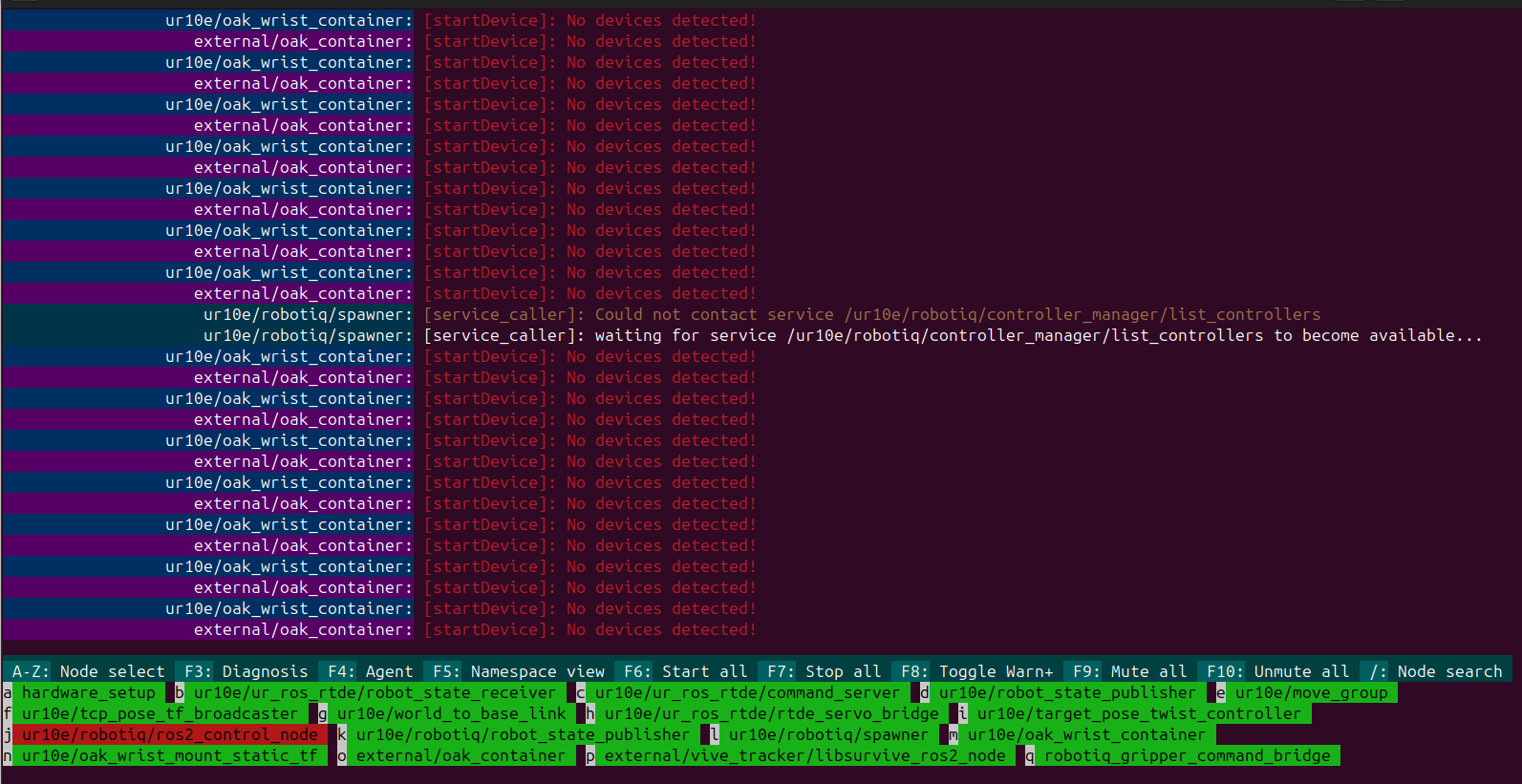
rosmon2 is a rosmon-style launcher and terminal process monitor for ROS 2.
It runs launch files through the native ROS 2 launch engine, so existing
Python, XML, and YAML launch files keep their normal arguments, substitutions,
and includes.
rosmon2 is inspired by xqms/rosmon, but is
an independent ROS 2 implementation and does not require ROS 1.
Screenshot
Installation and quick start
Install with pip
rosmon2 uses the ROS 2 Python launch APIs, so install ROS 2 first and source
the selected distribution before running it. A pip installation installs
rosmon2; it does not install ROS 2 itself.
Published releases can be installed from PyPI:
source /opt/ros/${ROS_DISTRO}/setup.bash
python3 -m pip install rosmon2
Until the first PyPI release is published, install the current main branch
directly from GitHub:
source /opt/ros/${ROS_DISTRO}/setup.bash
python3 -m pip install \
  'git+https://github.com/GibsonHu/rosmon2.git@main'
When using a virtual environment, expose both the system ROS packages and the virtual environment’s ament resource index:
python3 -m venv --system-site-packages ~/.venvs/rosmon2
source ~/.venvs/rosmon2/bin/activate
source /opt/ros/${ROS_DISTRO}/setup.bash
export AMENT_PREFIX_PATH="$VIRTUAL_ENV${AMENT_PREFIX_PATH:+:$AMENT_PREFIX_PATH}"
python -m pip install rosmon2
Then launch the included demo:
mon2 launch rosmon2 demo.launch.py
Install in a ROS workspace
Add this repository to a ROS 2 workspace, install its dependencies, and build
it with colcon:
mkdir -p ~/ros2_ws/src
cd ~/ros2_ws/src
git clone https://github.com/GibsonHu/rosmon2.git

cd ~/ros2_ws
source /opt/ros/${ROS_DISTRO}/setup.bash
rosdep install --from-paths src --ignore-src -r -y
colcon build --packages-select rosmon2
source install/setup.bash
Then launch the included talker/listener demo:
mon2 launch rosmon2 demo.launch.py
Launch arguments use the standard ROS 2 name:=value syntax:
mon2 launch rosmon2 demo.launch.py namespace:=demo
You can launch a file by package and filename, as above, or by path:
mon2 launch path/to/system.launch.py use_sim_time:=true
The rosmon2 executable is an alias for mon2, so this is equivalent:
rosmon2 launch rosmon2 demo.launch.py
Publishing a PyPI release
File truncated at 100 lines see the full file
CONTRIBUTING
Repository Summary
| Checkout URI | https://github.com/GibsonHu/rosmon2.git |
| VCS Type | git |
| VCS Version | main |
| Last Updated | 2026-07-28 |
| Dev Status | DEVELOPED |
| Released | UNRELEASED |
| Contributing |
Help Wanted (-)
Good First Issues (-) Pull Requests to Review (-) |
Packages
| Name | Version |
|---|---|
| rosmon2 | 0.1.0 |
README
rosmon2
rosmon2 is a rosmon-style launcher and terminal process monitor for ROS 2.
It runs launch files through the native ROS 2 launch engine, so existing
Python, XML, and YAML launch files keep their normal arguments, substitutions,
and includes.
rosmon2 is inspired by xqms/rosmon, but is
an independent ROS 2 implementation and does not require ROS 1.
Screenshot
Installation and quick start
Install with pip
rosmon2 uses the ROS 2 Python launch APIs, so install ROS 2 first and source
the selected distribution before running it. A pip installation installs
rosmon2; it does not install ROS 2 itself.
Published releases can be installed from PyPI:
source /opt/ros/${ROS_DISTRO}/setup.bash
python3 -m pip install rosmon2
Until the first PyPI release is published, install the current main branch
directly from GitHub:
source /opt/ros/${ROS_DISTRO}/setup.bash
python3 -m pip install \
  'git+https://github.com/GibsonHu/rosmon2.git@main'
When using a virtual environment, expose both the system ROS packages and the virtual environment’s ament resource index:
python3 -m venv --system-site-packages ~/.venvs/rosmon2
source ~/.venvs/rosmon2/bin/activate
source /opt/ros/${ROS_DISTRO}/setup.bash
export AMENT_PREFIX_PATH="$VIRTUAL_ENV${AMENT_PREFIX_PATH:+:$AMENT_PREFIX_PATH}"
python -m pip install rosmon2
Then launch the included demo:
mon2 launch rosmon2 demo.launch.py
Install in a ROS workspace
Add this repository to a ROS 2 workspace, install its dependencies, and build
it with colcon:
mkdir -p ~/ros2_ws/src
cd ~/ros2_ws/src
git clone https://github.com/GibsonHu/rosmon2.git

cd ~/ros2_ws
source /opt/ros/${ROS_DISTRO}/setup.bash
rosdep install --from-paths src --ignore-src -r -y
colcon build --packages-select rosmon2
source install/setup.bash
Then launch the included talker/listener demo:
mon2 launch rosmon2 demo.launch.py
Launch arguments use the standard ROS 2 name:=value syntax:
mon2 launch rosmon2 demo.launch.py namespace:=demo
You can launch a file by package and filename, as above, or by path:
mon2 launch path/to/system.launch.py use_sim_time:=true
The rosmon2 executable is an alias for mon2, so this is equivalent:
rosmon2 launch rosmon2 demo.launch.py
Publishing a PyPI release
File truncated at 100 lines see the full file
CONTRIBUTING
Repository Summary
| Checkout URI | https://github.com/GibsonHu/rosmon2.git |
| VCS Type | git |
| VCS Version | main |
| Last Updated | 2026-07-28 |
| Dev Status | DEVELOPED |
| Released | UNRELEASED |
| Contributing |
Help Wanted (-)
Good First Issues (-) Pull Requests to Review (-) |
Packages
| Name | Version |
|---|---|
| rosmon2 | 0.1.0 |
README
rosmon2
rosmon2 is a rosmon-style launcher and terminal process monitor for ROS 2.
It runs launch files through the native ROS 2 launch engine, so existing
Python, XML, and YAML launch files keep their normal arguments, substitutions,
and includes.
rosmon2 is inspired by xqms/rosmon, but is
an independent ROS 2 implementation and does not require ROS 1.
Screenshot
Installation and quick start
Install with pip
rosmon2 uses the ROS 2 Python launch APIs, so install ROS 2 first and source
the selected distribution before running it. A pip installation installs
rosmon2; it does not install ROS 2 itself.
Published releases can be installed from PyPI:
source /opt/ros/${ROS_DISTRO}/setup.bash
python3 -m pip install rosmon2
Until the first PyPI release is published, install the current main branch
directly from GitHub:
source /opt/ros/${ROS_DISTRO}/setup.bash
python3 -m pip install \
  'git+https://github.com/GibsonHu/rosmon2.git@main'
When using a virtual environment, expose both the system ROS packages and the virtual environment’s ament resource index:
python3 -m venv --system-site-packages ~/.venvs/rosmon2
source ~/.venvs/rosmon2/bin/activate
source /opt/ros/${ROS_DISTRO}/setup.bash
export AMENT_PREFIX_PATH="$VIRTUAL_ENV${AMENT_PREFIX_PATH:+:$AMENT_PREFIX_PATH}"
python -m pip install rosmon2
Then launch the included demo:
mon2 launch rosmon2 demo.launch.py
Install in a ROS workspace
Add this repository to a ROS 2 workspace, install its dependencies, and build
it with colcon:
mkdir -p ~/ros2_ws/src
cd ~/ros2_ws/src
git clone https://github.com/GibsonHu/rosmon2.git

cd ~/ros2_ws
source /opt/ros/${ROS_DISTRO}/setup.bash
rosdep install --from-paths src --ignore-src -r -y
colcon build --packages-select rosmon2
source install/setup.bash
Then launch the included talker/listener demo:
mon2 launch rosmon2 demo.launch.py
Launch arguments use the standard ROS 2 name:=value syntax:
mon2 launch rosmon2 demo.launch.py namespace:=demo
You can launch a file by package and filename, as above, or by path:
mon2 launch path/to/system.launch.py use_sim_time:=true
The rosmon2 executable is an alias for mon2, so this is equivalent:
rosmon2 launch rosmon2 demo.launch.py
Publishing a PyPI release
File truncated at 100 lines see the full file
CONTRIBUTING
Repository Summary
| Checkout URI | https://github.com/GibsonHu/rosmon2.git |
| VCS Type | git |
| VCS Version | main |
| Last Updated | 2026-07-28 |
| Dev Status | DEVELOPED |
| Released | UNRELEASED |
| Contributing |
Help Wanted (-)
Good First Issues (-) Pull Requests to Review (-) |
Packages
| Name | Version |
|---|---|
| rosmon2 | 0.1.0 |
README
rosmon2
rosmon2 is a rosmon-style launcher and terminal process monitor for ROS 2.
It runs launch files through the native ROS 2 launch engine, so existing
Python, XML, and YAML launch files keep their normal arguments, substitutions,
and includes.
rosmon2 is inspired by xqms/rosmon, but is
an independent ROS 2 implementation and does not require ROS 1.
Screenshot
Installation and quick start
Install with pip
rosmon2 uses the ROS 2 Python launch APIs, so install ROS 2 first and source
the selected distribution before running it. A pip installation installs
rosmon2; it does not install ROS 2 itself.
Published releases can be installed from PyPI:
source /opt/ros/${ROS_DISTRO}/setup.bash
python3 -m pip install rosmon2
Until the first PyPI release is published, install the current main branch
directly from GitHub:
source /opt/ros/${ROS_DISTRO}/setup.bash
python3 -m pip install \
  'git+https://github.com/GibsonHu/rosmon2.git@main'
When using a virtual environment, expose both the system ROS packages and the virtual environment’s ament resource index:
python3 -m venv --system-site-packages ~/.venvs/rosmon2
source ~/.venvs/rosmon2/bin/activate
source /opt/ros/${ROS_DISTRO}/setup.bash
export AMENT_PREFIX_PATH="$VIRTUAL_ENV${AMENT_PREFIX_PATH:+:$AMENT_PREFIX_PATH}"
python -m pip install rosmon2
Then launch the included demo:
mon2 launch rosmon2 demo.launch.py
Install in a ROS workspace
Add this repository to a ROS 2 workspace, install its dependencies, and build
it with colcon:
mkdir -p ~/ros2_ws/src
cd ~/ros2_ws/src
git clone https://github.com/GibsonHu/rosmon2.git

cd ~/ros2_ws
source /opt/ros/${ROS_DISTRO}/setup.bash
rosdep install --from-paths src --ignore-src -r -y
colcon build --packages-select rosmon2
source install/setup.bash
Then launch the included talker/listener demo:
mon2 launch rosmon2 demo.launch.py
Launch arguments use the standard ROS 2 name:=value syntax:
mon2 launch rosmon2 demo.launch.py namespace:=demo
You can launch a file by package and filename, as above, or by path:
mon2 launch path/to/system.launch.py use_sim_time:=true
The rosmon2 executable is an alias for mon2, so this is equivalent:
rosmon2 launch rosmon2 demo.launch.py
Publishing a PyPI release
File truncated at 100 lines see the full file
CONTRIBUTING
Repository Summary
| Checkout URI | https://github.com/GibsonHu/rosmon2.git |
| VCS Type | git |
| VCS Version | main |
| Last Updated | 2026-07-28 |
| Dev Status | DEVELOPED |
| Released | UNRELEASED |
| Contributing |
Help Wanted (-)
Good First Issues (-) Pull Requests to Review (-) |
Packages
| Name | Version |
|---|---|
| rosmon2 | 0.1.0 |
README
rosmon2
rosmon2 is a rosmon-style launcher and terminal process monitor for ROS 2.
It runs launch files through the native ROS 2 launch engine, so existing
Python, XML, and YAML launch files keep their normal arguments, substitutions,
and includes.
rosmon2 is inspired by xqms/rosmon, but is
an independent ROS 2 implementation and does not require ROS 1.
Screenshot
Installation and quick start
Install with pip
rosmon2 uses the ROS 2 Python launch APIs, so install ROS 2 first and source
the selected distribution before running it. A pip installation installs
rosmon2; it does not install ROS 2 itself.
Published releases can be installed from PyPI:
source /opt/ros/${ROS_DISTRO}/setup.bash
python3 -m pip install rosmon2
Until the first PyPI release is published, install the current main branch
directly from GitHub:
source /opt/ros/${ROS_DISTRO}/setup.bash
python3 -m pip install \
  'git+https://github.com/GibsonHu/rosmon2.git@main'
When using a virtual environment, expose both the system ROS packages and the virtual environment’s ament resource index:
python3 -m venv --system-site-packages ~/.venvs/rosmon2
source ~/.venvs/rosmon2/bin/activate
source /opt/ros/${ROS_DISTRO}/setup.bash
export AMENT_PREFIX_PATH="$VIRTUAL_ENV${AMENT_PREFIX_PATH:+:$AMENT_PREFIX_PATH}"
python -m pip install rosmon2
Then launch the included demo:
mon2 launch rosmon2 demo.launch.py
Install in a ROS workspace
Add this repository to a ROS 2 workspace, install its dependencies, and build
it with colcon:
mkdir -p ~/ros2_ws/src
cd ~/ros2_ws/src
git clone https://github.com/GibsonHu/rosmon2.git

cd ~/ros2_ws
source /opt/ros/${ROS_DISTRO}/setup.bash
rosdep install --from-paths src --ignore-src -r -y
colcon build --packages-select rosmon2
source install/setup.bash
Then launch the included talker/listener demo:
mon2 launch rosmon2 demo.launch.py
Launch arguments use the standard ROS 2 name:=value syntax:
mon2 launch rosmon2 demo.launch.py namespace:=demo
You can launch a file by package and filename, as above, or by path:
mon2 launch path/to/system.launch.py use_sim_time:=true
The rosmon2 executable is an alias for mon2, so this is equivalent:
rosmon2 launch rosmon2 demo.launch.py
Publishing a PyPI release
File truncated at 100 lines see the full file
CONTRIBUTING
Repository Summary
| Checkout URI | https://github.com/GibsonHu/rosmon2.git |
| VCS Type | git |
| VCS Version | main |
| Last Updated | 2026-07-28 |
| Dev Status | DEVELOPED |
| Released | UNRELEASED |
| Contributing |
Help Wanted (-)
Good First Issues (-) Pull Requests to Review (-) |
Packages
| Name | Version |
|---|---|
| rosmon2 | 0.1.0 |
README
rosmon2
rosmon2 is a rosmon-style launcher and terminal process monitor for ROS 2.
It runs launch files through the native ROS 2 launch engine, so existing
Python, XML, and YAML launch files keep their normal arguments, substitutions,
and includes.
rosmon2 is inspired by xqms/rosmon, but is
an independent ROS 2 implementation and does not require ROS 1.
Screenshot
Installation and quick start
Install with pip
rosmon2 uses the ROS 2 Python launch APIs, so install ROS 2 first and source
the selected distribution before running it. A pip installation installs
rosmon2; it does not install ROS 2 itself.
Published releases can be installed from PyPI:
source /opt/ros/${ROS_DISTRO}/setup.bash
python3 -m pip install rosmon2
Until the first PyPI release is published, install the current main branch
directly from GitHub:
source /opt/ros/${ROS_DISTRO}/setup.bash
python3 -m pip install \
  'git+https://github.com/GibsonHu/rosmon2.git@main'
When using a virtual environment, expose both the system ROS packages and the virtual environment’s ament resource index:
python3 -m venv --system-site-packages ~/.venvs/rosmon2
source ~/.venvs/rosmon2/bin/activate
source /opt/ros/${ROS_DISTRO}/setup.bash
export AMENT_PREFIX_PATH="$VIRTUAL_ENV${AMENT_PREFIX_PATH:+:$AMENT_PREFIX_PATH}"
python -m pip install rosmon2
Then launch the included demo:
mon2 launch rosmon2 demo.launch.py
Install in a ROS workspace
Add this repository to a ROS 2 workspace, install its dependencies, and build
it with colcon:
mkdir -p ~/ros2_ws/src
cd ~/ros2_ws/src
git clone https://github.com/GibsonHu/rosmon2.git

cd ~/ros2_ws
source /opt/ros/${ROS_DISTRO}/setup.bash
rosdep install --from-paths src --ignore-src -r -y
colcon build --packages-select rosmon2
source install/setup.bash
Then launch the included talker/listener demo:
mon2 launch rosmon2 demo.launch.py
Launch arguments use the standard ROS 2 name:=value syntax:
mon2 launch rosmon2 demo.launch.py namespace:=demo
You can launch a file by package and filename, as above, or by path:
mon2 launch path/to/system.launch.py use_sim_time:=true
The rosmon2 executable is an alias for mon2, so this is equivalent:
rosmon2 launch rosmon2 demo.launch.py
Publishing a PyPI release
File truncated at 100 lines see the full file
CONTRIBUTING
Repository Summary
| Checkout URI | https://github.com/GibsonHu/rosmon2.git |
| VCS Type | git |
| VCS Version | main |
| Last Updated | 2026-07-28 |
| Dev Status | DEVELOPED |
| Released | UNRELEASED |
| Contributing |
Help Wanted (-)
Good First Issues (-) Pull Requests to Review (-) |
Packages
| Name | Version |
|---|---|
| rosmon2 | 0.1.0 |
README
rosmon2
rosmon2 is a rosmon-style launcher and terminal process monitor for ROS 2.
It runs launch files through the native ROS 2 launch engine, so existing
Python, XML, and YAML launch files keep their normal arguments, substitutions,
and includes.
rosmon2 is inspired by xqms/rosmon, but is
an independent ROS 2 implementation and does not require ROS 1.
Screenshot
Installation and quick start
Install with pip
rosmon2 uses the ROS 2 Python launch APIs, so install ROS 2 first and source
the selected distribution before running it. A pip installation installs
rosmon2; it does not install ROS 2 itself.
Published releases can be installed from PyPI:
source /opt/ros/${ROS_DISTRO}/setup.bash
python3 -m pip install rosmon2
Until the first PyPI release is published, install the current main branch
directly from GitHub:
source /opt/ros/${ROS_DISTRO}/setup.bash
python3 -m pip install \
  'git+https://github.com/GibsonHu/rosmon2.git@main'
When using a virtual environment, expose both the system ROS packages and the virtual environment’s ament resource index:
python3 -m venv --system-site-packages ~/.venvs/rosmon2
source ~/.venvs/rosmon2/bin/activate
source /opt/ros/${ROS_DISTRO}/setup.bash
export AMENT_PREFIX_PATH="$VIRTUAL_ENV${AMENT_PREFIX_PATH:+:$AMENT_PREFIX_PATH}"
python -m pip install rosmon2
Then launch the included demo:
mon2 launch rosmon2 demo.launch.py
Install in a ROS workspace
Add this repository to a ROS 2 workspace, install its dependencies, and build
it with colcon:
mkdir -p ~/ros2_ws/src
cd ~/ros2_ws/src
git clone https://github.com/GibsonHu/rosmon2.git

cd ~/ros2_ws
source /opt/ros/${ROS_DISTRO}/setup.bash
rosdep install --from-paths src --ignore-src -r -y
colcon build --packages-select rosmon2
source install/setup.bash
Then launch the included talker/listener demo:
mon2 launch rosmon2 demo.launch.py
Launch arguments use the standard ROS 2 name:=value syntax:
mon2 launch rosmon2 demo.launch.py namespace:=demo
You can launch a file by package and filename, as above, or by path:
mon2 launch path/to/system.launch.py use_sim_time:=true
The rosmon2 executable is an alias for mon2, so this is equivalent:
rosmon2 launch rosmon2 demo.launch.py
Publishing a PyPI release
File truncated at 100 lines see the full file
CONTRIBUTING
Repository Summary
| Checkout URI | https://github.com/GibsonHu/rosmon2.git |
| VCS Type | git |
| VCS Version | main |
| Last Updated | 2026-07-28 |
| Dev Status | DEVELOPED |
| Released | UNRELEASED |
| Contributing |
Help Wanted (-)
Good First Issues (-) Pull Requests to Review (-) |
Packages
| Name | Version |
|---|---|
| rosmon2 | 0.1.0 |
README
rosmon2
rosmon2 is a rosmon-style launcher and terminal process monitor for ROS 2.
It runs launch files through the native ROS 2 launch engine, so existing
Python, XML, and YAML launch files keep their normal arguments, substitutions,
and includes.
rosmon2 is inspired by xqms/rosmon, but is
an independent ROS 2 implementation and does not require ROS 1.
Screenshot
Installation and quick start
Install with pip
rosmon2 uses the ROS 2 Python launch APIs, so install ROS 2 first and source
the selected distribution before running it. A pip installation installs
rosmon2; it does not install ROS 2 itself.
Published releases can be installed from PyPI:
source /opt/ros/${ROS_DISTRO}/setup.bash
python3 -m pip install rosmon2
Until the first PyPI release is published, install the current main branch
directly from GitHub:
source /opt/ros/${ROS_DISTRO}/setup.bash
python3 -m pip install \
  'git+https://github.com/GibsonHu/rosmon2.git@main'
When using a virtual environment, expose both the system ROS packages and the virtual environment’s ament resource index:
python3 -m venv --system-site-packages ~/.venvs/rosmon2
source ~/.venvs/rosmon2/bin/activate
source /opt/ros/${ROS_DISTRO}/setup.bash
export AMENT_PREFIX_PATH="$VIRTUAL_ENV${AMENT_PREFIX_PATH:+:$AMENT_PREFIX_PATH}"
python -m pip install rosmon2
Then launch the included demo:
mon2 launch rosmon2 demo.launch.py
Install in a ROS workspace
Add this repository to a ROS 2 workspace, install its dependencies, and build
it with colcon:
mkdir -p ~/ros2_ws/src
cd ~/ros2_ws/src
git clone https://github.com/GibsonHu/rosmon2.git

cd ~/ros2_ws
source /opt/ros/${ROS_DISTRO}/setup.bash
rosdep install --from-paths src --ignore-src -r -y
colcon build --packages-select rosmon2
source install/setup.bash
Then launch the included talker/listener demo:
mon2 launch rosmon2 demo.launch.py
Launch arguments use the standard ROS 2 name:=value syntax:
mon2 launch rosmon2 demo.launch.py namespace:=demo
You can launch a file by package and filename, as above, or by path:
mon2 launch path/to/system.launch.py use_sim_time:=true
The rosmon2 executable is an alias for mon2, so this is equivalent:
rosmon2 launch rosmon2 demo.launch.py
Publishing a PyPI release
File truncated at 100 lines see the full file
CONTRIBUTING
Repository Summary
| Checkout URI | https://github.com/GibsonHu/rosmon2.git |
| VCS Type | git |
| VCS Version | main |
| Last Updated | 2026-07-28 |
| Dev Status | DEVELOPED |
| Released | UNRELEASED |
| Contributing |
Help Wanted (-)
Good First Issues (-) Pull Requests to Review (-) |
Packages
| Name | Version |
|---|---|
| rosmon2 | 0.1.0 |
README
rosmon2
rosmon2 is a rosmon-style launcher and terminal process monitor for ROS 2.
It runs launch files through the native ROS 2 launch engine, so existing
Python, XML, and YAML launch files keep their normal arguments, substitutions,
and includes.
rosmon2 is inspired by xqms/rosmon, but is
an independent ROS 2 implementation and does not require ROS 1.
Screenshot
Installation and quick start
Install with pip
rosmon2 uses the ROS 2 Python launch APIs, so install ROS 2 first and source
the selected distribution before running it. A pip installation installs
rosmon2; it does not install ROS 2 itself.
Published releases can be installed from PyPI:
source /opt/ros/${ROS_DISTRO}/setup.bash
python3 -m pip install rosmon2
Until the first PyPI release is published, install the current main branch
directly from GitHub:
source /opt/ros/${ROS_DISTRO}/setup.bash
python3 -m pip install \
  'git+https://github.com/GibsonHu/rosmon2.git@main'
When using a virtual environment, expose both the system ROS packages and the virtual environment’s ament resource index:
python3 -m venv --system-site-packages ~/.venvs/rosmon2
source ~/.venvs/rosmon2/bin/activate
source /opt/ros/${ROS_DISTRO}/setup.bash
export AMENT_PREFIX_PATH="$VIRTUAL_ENV${AMENT_PREFIX_PATH:+:$AMENT_PREFIX_PATH}"
python -m pip install rosmon2
Then launch the included demo:
mon2 launch rosmon2 demo.launch.py
Install in a ROS workspace
Add this repository to a ROS 2 workspace, install its dependencies, and build
it with colcon:
mkdir -p ~/ros2_ws/src
cd ~/ros2_ws/src
git clone https://github.com/GibsonHu/rosmon2.git

cd ~/ros2_ws
source /opt/ros/${ROS_DISTRO}/setup.bash
rosdep install --from-paths src --ignore-src -r -y
colcon build --packages-select rosmon2
source install/setup.bash
Then launch the included talker/listener demo:
mon2 launch rosmon2 demo.launch.py
Launch arguments use the standard ROS 2 name:=value syntax:
mon2 launch rosmon2 demo.launch.py namespace:=demo
You can launch a file by package and filename, as above, or by path:
mon2 launch path/to/system.launch.py use_sim_time:=true
The rosmon2 executable is an alias for mon2, so this is equivalent:
rosmon2 launch rosmon2 demo.launch.py
Publishing a PyPI release
File truncated at 100 lines see the full file
CONTRIBUTING
Repository Summary
| Checkout URI | https://github.com/GibsonHu/rosmon2.git |
| VCS Type | git |
| VCS Version | main |
| Last Updated | 2026-07-28 |
| Dev Status | DEVELOPED |
| Released | UNRELEASED |
| Contributing |
Help Wanted (-)
Good First Issues (-) Pull Requests to Review (-) |
Packages
| Name | Version |
|---|---|
| rosmon2 | 0.1.0 |
README
rosmon2
rosmon2 is a rosmon-style launcher and terminal process monitor for ROS 2.
It runs launch files through the native ROS 2 launch engine, so existing
Python, XML, and YAML launch files keep their normal arguments, substitutions,
and includes.
rosmon2 is inspired by xqms/rosmon, but is
an independent ROS 2 implementation and does not require ROS 1.
Screenshot
Installation and quick start
Install with pip
rosmon2 uses the ROS 2 Python launch APIs, so install ROS 2 first and source
the selected distribution before running it. A pip installation installs
rosmon2; it does not install ROS 2 itself.
Published releases can be installed from PyPI:
source /opt/ros/${ROS_DISTRO}/setup.bash
python3 -m pip install rosmon2
Until the first PyPI release is published, install the current main branch
directly from GitHub:
source /opt/ros/${ROS_DISTRO}/setup.bash
python3 -m pip install \
  'git+https://github.com/GibsonHu/rosmon2.git@main'
When using a virtual environment, expose both the system ROS packages and the virtual environment’s ament resource index:
python3 -m venv --system-site-packages ~/.venvs/rosmon2
source ~/.venvs/rosmon2/bin/activate
source /opt/ros/${ROS_DISTRO}/setup.bash
export AMENT_PREFIX_PATH="$VIRTUAL_ENV${AMENT_PREFIX_PATH:+:$AMENT_PREFIX_PATH}"
python -m pip install rosmon2
Then launch the included demo:
mon2 launch rosmon2 demo.launch.py
Install in a ROS workspace
Add this repository to a ROS 2 workspace, install its dependencies, and build
it with colcon:
mkdir -p ~/ros2_ws/src
cd ~/ros2_ws/src
git clone https://github.com/GibsonHu/rosmon2.git

cd ~/ros2_ws
source /opt/ros/${ROS_DISTRO}/setup.bash
rosdep install --from-paths src --ignore-src -r -y
colcon build --packages-select rosmon2
source install/setup.bash
Then launch the included talker/listener demo:
mon2 launch rosmon2 demo.launch.py
Launch arguments use the standard ROS 2 name:=value syntax:
mon2 launch rosmon2 demo.launch.py namespace:=demo
You can launch a file by package and filename, as above, or by path:
mon2 launch path/to/system.launch.py use_sim_time:=true
The rosmon2 executable is an alias for mon2, so this is equivalent:
rosmon2 launch rosmon2 demo.launch.py
Publishing a PyPI release
File truncated at 100 lines see the full file
CONTRIBUTING
Repository Summary
| Checkout URI | https://github.com/GibsonHu/rosmon2.git |
| VCS Type | git |
| VCS Version | main |
| Last Updated | 2026-07-28 |
| Dev Status | DEVELOPED |
| Released | UNRELEASED |
| Contributing |
Help Wanted (-)
Good First Issues (-) Pull Requests to Review (-) |
Packages
| Name | Version |
|---|---|
| rosmon2 | 0.1.0 |
README
rosmon2
rosmon2 is a rosmon-style launcher and terminal process monitor for ROS 2.
It runs launch files through the native ROS 2 launch engine, so existing
Python, XML, and YAML launch files keep their normal arguments, substitutions,
and includes.
rosmon2 is inspired by xqms/rosmon, but is
an independent ROS 2 implementation and does not require ROS 1.
Screenshot
Installation and quick start
Install with pip
rosmon2 uses the ROS 2 Python launch APIs, so install ROS 2 first and source
the selected distribution before running it. A pip installation installs
rosmon2; it does not install ROS 2 itself.
Published releases can be installed from PyPI:
source /opt/ros/${ROS_DISTRO}/setup.bash
python3 -m pip install rosmon2
Until the first PyPI release is published, install the current main branch
directly from GitHub:
source /opt/ros/${ROS_DISTRO}/setup.bash
python3 -m pip install \
  'git+https://github.com/GibsonHu/rosmon2.git@main'
When using a virtual environment, expose both the system ROS packages and the virtual environment’s ament resource index:
python3 -m venv --system-site-packages ~/.venvs/rosmon2
source ~/.venvs/rosmon2/bin/activate
source /opt/ros/${ROS_DISTRO}/setup.bash
export AMENT_PREFIX_PATH="$VIRTUAL_ENV${AMENT_PREFIX_PATH:+:$AMENT_PREFIX_PATH}"
python -m pip install rosmon2
Then launch the included demo:
mon2 launch rosmon2 demo.launch.py
Install in a ROS workspace
Add this repository to a ROS 2 workspace, install its dependencies, and build
it with colcon:
mkdir -p ~/ros2_ws/src
cd ~/ros2_ws/src
git clone https://github.com/GibsonHu/rosmon2.git

cd ~/ros2_ws
source /opt/ros/${ROS_DISTRO}/setup.bash
rosdep install --from-paths src --ignore-src -r -y
colcon build --packages-select rosmon2
source install/setup.bash
Then launch the included talker/listener demo:
mon2 launch rosmon2 demo.launch.py
Launch arguments use the standard ROS 2 name:=value syntax:
mon2 launch rosmon2 demo.launch.py namespace:=demo
You can launch a file by package and filename, as above, or by path:
mon2 launch path/to/system.launch.py use_sim_time:=true
The rosmon2 executable is an alias for mon2, so this is equivalent:
rosmon2 launch rosmon2 demo.launch.py
Publishing a PyPI release
File truncated at 100 lines see the full file
CONTRIBUTING
Repository Summary
| Checkout URI | https://github.com/GibsonHu/rosmon2.git |
| VCS Type | git |
| VCS Version | main |
| Last Updated | 2026-07-28 |
| Dev Status | DEVELOPED |
| Released | UNRELEASED |
| Contributing |
Help Wanted (-)
Good First Issues (-) Pull Requests to Review (-) |
Packages
| Name | Version |
|---|---|
| rosmon2 | 0.1.0 |
README
rosmon2
rosmon2 is a rosmon-style launcher and terminal process monitor for ROS 2.
It runs launch files through the native ROS 2 launch engine, so existing
Python, XML, and YAML launch files keep their normal arguments, substitutions,
and includes.
rosmon2 is inspired by xqms/rosmon, but is
an independent ROS 2 implementation and does not require ROS 1.
Screenshot
Installation and quick start
Install with pip
rosmon2 uses the ROS 2 Python launch APIs, so install ROS 2 first and source
the selected distribution before running it. A pip installation installs
rosmon2; it does not install ROS 2 itself.
Published releases can be installed from PyPI:
source /opt/ros/${ROS_DISTRO}/setup.bash
python3 -m pip install rosmon2
Until the first PyPI release is published, install the current main branch
directly from GitHub:
source /opt/ros/${ROS_DISTRO}/setup.bash
python3 -m pip install \
  'git+https://github.com/GibsonHu/rosmon2.git@main'
When using a virtual environment, expose both the system ROS packages and the virtual environment’s ament resource index:
python3 -m venv --system-site-packages ~/.venvs/rosmon2
source ~/.venvs/rosmon2/bin/activate
source /opt/ros/${ROS_DISTRO}/setup.bash
export AMENT_PREFIX_PATH="$VIRTUAL_ENV${AMENT_PREFIX_PATH:+:$AMENT_PREFIX_PATH}"
python -m pip install rosmon2
Then launch the included demo:
mon2 launch rosmon2 demo.launch.py
Install in a ROS workspace
Add this repository to a ROS 2 workspace, install its dependencies, and build
it with colcon:
mkdir -p ~/ros2_ws/src
cd ~/ros2_ws/src
git clone https://github.com/GibsonHu/rosmon2.git

cd ~/ros2_ws
source /opt/ros/${ROS_DISTRO}/setup.bash
rosdep install --from-paths src --ignore-src -r -y
colcon build --packages-select rosmon2
source install/setup.bash
Then launch the included talker/listener demo:
mon2 launch rosmon2 demo.launch.py
Launch arguments use the standard ROS 2 name:=value syntax:
mon2 launch rosmon2 demo.launch.py namespace:=demo
You can launch a file by package and filename, as above, or by path:
mon2 launch path/to/system.launch.py use_sim_time:=true
The rosmon2 executable is an alias for mon2, so this is equivalent:
rosmon2 launch rosmon2 demo.launch.py
Publishing a PyPI release
File truncated at 100 lines see the full file
CONTRIBUTING
Repository Summary
| Checkout URI | https://github.com/GibsonHu/rosmon2.git |
| VCS Type | git |
| VCS Version | main |
| Last Updated | 2026-07-28 |
| Dev Status | DEVELOPED |
| Released | UNRELEASED |
| Contributing |
Help Wanted (-)
Good First Issues (-) Pull Requests to Review (-) |
Packages
| Name | Version |
|---|---|
| rosmon2 | 0.1.0 |
README
rosmon2
rosmon2 is a rosmon-style launcher and terminal process monitor for ROS 2.
It runs launch files through the native ROS 2 launch engine, so existing
Python, XML, and YAML launch files keep their normal arguments, substitutions,
and includes.
rosmon2 is inspired by xqms/rosmon, but is
an independent ROS 2 implementation and does not require ROS 1.
Screenshot
Installation and quick start
Install with pip
rosmon2 uses the ROS 2 Python launch APIs, so install ROS 2 first and source
the selected distribution before running it. A pip installation installs
rosmon2; it does not install ROS 2 itself.
Published releases can be installed from PyPI:
source /opt/ros/${ROS_DISTRO}/setup.bash
python3 -m pip install rosmon2
Until the first PyPI release is published, install the current main branch
directly from GitHub:
source /opt/ros/${ROS_DISTRO}/setup.bash
python3 -m pip install \
  'git+https://github.com/GibsonHu/rosmon2.git@main'
When using a virtual environment, expose both the system ROS packages and the virtual environment’s ament resource index:
python3 -m venv --system-site-packages ~/.venvs/rosmon2
source ~/.venvs/rosmon2/bin/activate
source /opt/ros/${ROS_DISTRO}/setup.bash
export AMENT_PREFIX_PATH="$VIRTUAL_ENV${AMENT_PREFIX_PATH:+:$AMENT_PREFIX_PATH}"
python -m pip install rosmon2
Then launch the included demo:
mon2 launch rosmon2 demo.launch.py
Install in a ROS workspace
Add this repository to a ROS 2 workspace, install its dependencies, and build
it with colcon:
mkdir -p ~/ros2_ws/src
cd ~/ros2_ws/src
git clone https://github.com/GibsonHu/rosmon2.git

cd ~/ros2_ws
source /opt/ros/${ROS_DISTRO}/setup.bash
rosdep install --from-paths src --ignore-src -r -y
colcon build --packages-select rosmon2
source install/setup.bash
Then launch the included talker/listener demo:
mon2 launch rosmon2 demo.launch.py
Launch arguments use the standard ROS 2 name:=value syntax:
mon2 launch rosmon2 demo.launch.py namespace:=demo
You can launch a file by package and filename, as above, or by path:
mon2 launch path/to/system.launch.py use_sim_time:=true
The rosmon2 executable is an alias for mon2, so this is equivalent:
rosmon2 launch rosmon2 demo.launch.py
Publishing a PyPI release
File truncated at 100 lines see the full file
CONTRIBUTING
Repository Summary
| Checkout URI | https://github.com/GibsonHu/rosmon2.git |
| VCS Type | git |
| VCS Version | main |
| Last Updated | 2026-07-28 |
| Dev Status | DEVELOPED |
| Released | UNRELEASED |
| Contributing |
Help Wanted (-)
Good First Issues (-) Pull Requests to Review (-) |
Packages
| Name | Version |
|---|---|
| rosmon2 | 0.1.0 |
README
rosmon2
rosmon2 is a rosmon-style launcher and terminal process monitor for ROS 2.
It runs launch files through the native ROS 2 launch engine, so existing
Python, XML, and YAML launch files keep their normal arguments, substitutions,
and includes.
rosmon2 is inspired by xqms/rosmon, but is
an independent ROS 2 implementation and does not require ROS 1.
Screenshot
Installation and quick start
Install with pip
rosmon2 uses the ROS 2 Python launch APIs, so install ROS 2 first and source
the selected distribution before running it. A pip installation installs
rosmon2; it does not install ROS 2 itself.
Published releases can be installed from PyPI:
source /opt/ros/${ROS_DISTRO}/setup.bash
python3 -m pip install rosmon2
Until the first PyPI release is published, install the current main branch
directly from GitHub:
source /opt/ros/${ROS_DISTRO}/setup.bash
python3 -m pip install \
  'git+https://github.com/GibsonHu/rosmon2.git@main'
When using a virtual environment, expose both the system ROS packages and the virtual environment’s ament resource index:
python3 -m venv --system-site-packages ~/.venvs/rosmon2
source ~/.venvs/rosmon2/bin/activate
source /opt/ros/${ROS_DISTRO}/setup.bash
export AMENT_PREFIX_PATH="$VIRTUAL_ENV${AMENT_PREFIX_PATH:+:$AMENT_PREFIX_PATH}"
python -m pip install rosmon2
Then launch the included demo:
mon2 launch rosmon2 demo.launch.py
Install in a ROS workspace
Add this repository to a ROS 2 workspace, install its dependencies, and build
it with colcon:
mkdir -p ~/ros2_ws/src
cd ~/ros2_ws/src
git clone https://github.com/GibsonHu/rosmon2.git

cd ~/ros2_ws
source /opt/ros/${ROS_DISTRO}/setup.bash
rosdep install --from-paths src --ignore-src -r -y
colcon build --packages-select rosmon2
source install/setup.bash
Then launch the included talker/listener demo:
mon2 launch rosmon2 demo.launch.py
Launch arguments use the standard ROS 2 name:=value syntax:
mon2 launch rosmon2 demo.launch.py namespace:=demo
You can launch a file by package and filename, as above, or by path:
mon2 launch path/to/system.launch.py use_sim_time:=true
The rosmon2 executable is an alias for mon2, so this is equivalent:
rosmon2 launch rosmon2 demo.launch.py
Publishing a PyPI release
File truncated at 100 lines see the full file
CONTRIBUTING
Repository Summary
| Checkout URI | https://github.com/GibsonHu/rosmon2.git |
| VCS Type | git |
| VCS Version | main |
| Last Updated | 2026-07-28 |
| Dev Status | DEVELOPED |
| Released | UNRELEASED |
| Contributing |
Help Wanted (-)
Good First Issues (-) Pull Requests to Review (-) |
Packages
| Name | Version |
|---|---|
| rosmon2 | 0.1.0 |
README
rosmon2
rosmon2 is a rosmon-style launcher and terminal process monitor for ROS 2.
It runs launch files through the native ROS 2 launch engine, so existing
Python, XML, and YAML launch files keep their normal arguments, substitutions,
and includes.
rosmon2 is inspired by xqms/rosmon, but is
an independent ROS 2 implementation and does not require ROS 1.
Screenshot
Installation and quick start
Install with pip
rosmon2 uses the ROS 2 Python launch APIs, so install ROS 2 first and source
the selected distribution before running it. A pip installation installs
rosmon2; it does not install ROS 2 itself.
Published releases can be installed from PyPI:
source /opt/ros/${ROS_DISTRO}/setup.bash
python3 -m pip install rosmon2
Until the first PyPI release is published, install the current main branch
directly from GitHub:
source /opt/ros/${ROS_DISTRO}/setup.bash
python3 -m pip install \
  'git+https://github.com/GibsonHu/rosmon2.git@main'
When using a virtual environment, expose both the system ROS packages and the virtual environment’s ament resource index:
python3 -m venv --system-site-packages ~/.venvs/rosmon2
source ~/.venvs/rosmon2/bin/activate
source /opt/ros/${ROS_DISTRO}/setup.bash
export AMENT_PREFIX_PATH="$VIRTUAL_ENV${AMENT_PREFIX_PATH:+:$AMENT_PREFIX_PATH}"
python -m pip install rosmon2
Then launch the included demo:
mon2 launch rosmon2 demo.launch.py
Install in a ROS workspace
Add this repository to a ROS 2 workspace, install its dependencies, and build
it with colcon:
mkdir -p ~/ros2_ws/src
cd ~/ros2_ws/src
git clone https://github.com/GibsonHu/rosmon2.git

cd ~/ros2_ws
source /opt/ros/${ROS_DISTRO}/setup.bash
rosdep install --from-paths src --ignore-src -r -y
colcon build --packages-select rosmon2
source install/setup.bash
Then launch the included talker/listener demo:
mon2 launch rosmon2 demo.launch.py
Launch arguments use the standard ROS 2 name:=value syntax:
mon2 launch rosmon2 demo.launch.py namespace:=demo
You can launch a file by package and filename, as above, or by path:
mon2 launch path/to/system.launch.py use_sim_time:=true
The rosmon2 executable is an alias for mon2, so this is equivalent:
rosmon2 launch rosmon2 demo.launch.py
Publishing a PyPI release
File truncated at 100 lines see the full file
CONTRIBUTING
Repository Summary
| Checkout URI | https://github.com/GibsonHu/rosmon2.git |
| VCS Type | git |
| VCS Version | main |
| Last Updated | 2026-07-28 |
| Dev Status | DEVELOPED |
| Released | UNRELEASED |
| Contributing |
Help Wanted (-)
Good First Issues (-) Pull Requests to Review (-) |
Packages
| Name | Version |
|---|---|
| rosmon2 | 0.1.0 |
README
rosmon2
rosmon2 is a rosmon-style launcher and terminal process monitor for ROS 2.
It runs launch files through the native ROS 2 launch engine, so existing
Python, XML, and YAML launch files keep their normal arguments, substitutions,
and includes.
rosmon2 is inspired by xqms/rosmon, but is
an independent ROS 2 implementation and does not require ROS 1.
Screenshot
Installation and quick start
Install with pip
rosmon2 uses the ROS 2 Python launch APIs, so install ROS 2 first and source
the selected distribution before running it. A pip installation installs
rosmon2; it does not install ROS 2 itself.
Published releases can be installed from PyPI:
source /opt/ros/${ROS_DISTRO}/setup.bash
python3 -m pip install rosmon2
Until the first PyPI release is published, install the current main branch
directly from GitHub:
source /opt/ros/${ROS_DISTRO}/setup.bash
python3 -m pip install \
  'git+https://github.com/GibsonHu/rosmon2.git@main'
When using a virtual environment, expose both the system ROS packages and the virtual environment’s ament resource index:
python3 -m venv --system-site-packages ~/.venvs/rosmon2
source ~/.venvs/rosmon2/bin/activate
source /opt/ros/${ROS_DISTRO}/setup.bash
export AMENT_PREFIX_PATH="$VIRTUAL_ENV${AMENT_PREFIX_PATH:+:$AMENT_PREFIX_PATH}"
python -m pip install rosmon2
Then launch the included demo:
mon2 launch rosmon2 demo.launch.py
Install in a ROS workspace
Add this repository to a ROS 2 workspace, install its dependencies, and build
it with colcon:
mkdir -p ~/ros2_ws/src
cd ~/ros2_ws/src
git clone https://github.com/GibsonHu/rosmon2.git

cd ~/ros2_ws
source /opt/ros/${ROS_DISTRO}/setup.bash
rosdep install --from-paths src --ignore-src -r -y
colcon build --packages-select rosmon2
source install/setup.bash
Then launch the included talker/listener demo:
mon2 launch rosmon2 demo.launch.py
Launch arguments use the standard ROS 2 name:=value syntax:
mon2 launch rosmon2 demo.launch.py namespace:=demo
You can launch a file by package and filename, as above, or by path:
mon2 launch path/to/system.launch.py use_sim_time:=true
The rosmon2 executable is an alias for mon2, so this is equivalent:
rosmon2 launch rosmon2 demo.launch.py
Publishing a PyPI release
File truncated at 100 lines see the full file
CONTRIBUTING
Repository Summary
| Checkout URI | https://github.com/GibsonHu/rosmon2.git |
| VCS Type | git |
| VCS Version | main |
| Last Updated | 2026-07-28 |
| Dev Status | DEVELOPED |
| Released | UNRELEASED |
| Contributing |
Help Wanted (-)
Good First Issues (-) Pull Requests to Review (-) |
Packages
| Name | Version |
|---|---|
| rosmon2 | 0.1.0 |
README
rosmon2
rosmon2 is a rosmon-style launcher and terminal process monitor for ROS 2.
It runs launch files through the native ROS 2 launch engine, so existing
Python, XML, and YAML launch files keep their normal arguments, substitutions,
and includes.
rosmon2 is inspired by xqms/rosmon, but is
an independent ROS 2 implementation and does not require ROS 1.
Screenshot
Installation and quick start
Install with pip
rosmon2 uses the ROS 2 Python launch APIs, so install ROS 2 first and source
the selected distribution before running it. A pip installation installs
rosmon2; it does not install ROS 2 itself.
Published releases can be installed from PyPI:
source /opt/ros/${ROS_DISTRO}/setup.bash
python3 -m pip install rosmon2
Until the first PyPI release is published, install the current main branch
directly from GitHub:
source /opt/ros/${ROS_DISTRO}/setup.bash
python3 -m pip install \
  'git+https://github.com/GibsonHu/rosmon2.git@main'
When using a virtual environment, expose both the system ROS packages and the virtual environment’s ament resource index:
python3 -m venv --system-site-packages ~/.venvs/rosmon2
source ~/.venvs/rosmon2/bin/activate
source /opt/ros/${ROS_DISTRO}/setup.bash
export AMENT_PREFIX_PATH="$VIRTUAL_ENV${AMENT_PREFIX_PATH:+:$AMENT_PREFIX_PATH}"
python -m pip install rosmon2
Then launch the included demo:
mon2 launch rosmon2 demo.launch.py
Install in a ROS workspace
Add this repository to a ROS 2 workspace, install its dependencies, and build
it with colcon:
mkdir -p ~/ros2_ws/src
cd ~/ros2_ws/src
git clone https://github.com/GibsonHu/rosmon2.git

cd ~/ros2_ws
source /opt/ros/${ROS_DISTRO}/setup.bash
rosdep install --from-paths src --ignore-src -r -y
colcon build --packages-select rosmon2
source install/setup.bash
Then launch the included talker/listener demo:
mon2 launch rosmon2 demo.launch.py
Launch arguments use the standard ROS 2 name:=value syntax:
mon2 launch rosmon2 demo.launch.py namespace:=demo
You can launch a file by package and filename, as above, or by path:
mon2 launch path/to/system.launch.py use_sim_time:=true
The rosmon2 executable is an alias for mon2, so this is equivalent:
rosmon2 launch rosmon2 demo.launch.py
Publishing a PyPI release
File truncated at 100 lines see the full file
CONTRIBUTING
Repository Summary
| Checkout URI | https://github.com/GibsonHu/rosmon2.git |
| VCS Type | git |
| VCS Version | main |
| Last Updated | 2026-07-28 |
| Dev Status | DEVELOPED |
| Released | UNRELEASED |
| Contributing |
Help Wanted (-)
Good First Issues (-) Pull Requests to Review (-) |
Packages
| Name | Version |
|---|---|
| rosmon2 | 0.1.0 |
README
rosmon2
rosmon2 is a rosmon-style launcher and terminal process monitor for ROS 2.
It runs launch files through the native ROS 2 launch engine, so existing
Python, XML, and YAML launch files keep their normal arguments, substitutions,
and includes.
rosmon2 is inspired by xqms/rosmon, but is
an independent ROS 2 implementation and does not require ROS 1.
Screenshot
Installation and quick start
Install with pip
rosmon2 uses the ROS 2 Python launch APIs, so install ROS 2 first and source
the selected distribution before running it. A pip installation installs
rosmon2; it does not install ROS 2 itself.
Published releases can be installed from PyPI:
source /opt/ros/${ROS_DISTRO}/setup.bash
python3 -m pip install rosmon2
Until the first PyPI release is published, install the current main branch
directly from GitHub:
source /opt/ros/${ROS_DISTRO}/setup.bash
python3 -m pip install \
  'git+https://github.com/GibsonHu/rosmon2.git@main'
When using a virtual environment, expose both the system ROS packages and the virtual environment’s ament resource index:
python3 -m venv --system-site-packages ~/.venvs/rosmon2
source ~/.venvs/rosmon2/bin/activate
source /opt/ros/${ROS_DISTRO}/setup.bash
export AMENT_PREFIX_PATH="$VIRTUAL_ENV${AMENT_PREFIX_PATH:+:$AMENT_PREFIX_PATH}"
python -m pip install rosmon2
Then launch the included demo:
mon2 launch rosmon2 demo.launch.py
Install in a ROS workspace
Add this repository to a ROS 2 workspace, install its dependencies, and build
it with colcon:
mkdir -p ~/ros2_ws/src
cd ~/ros2_ws/src
git clone https://github.com/GibsonHu/rosmon2.git

cd ~/ros2_ws
source /opt/ros/${ROS_DISTRO}/setup.bash
rosdep install --from-paths src --ignore-src -r -y
colcon build --packages-select rosmon2
source install/setup.bash
Then launch the included talker/listener demo:
mon2 launch rosmon2 demo.launch.py
Launch arguments use the standard ROS 2 name:=value syntax:
mon2 launch rosmon2 demo.launch.py namespace:=demo
You can launch a file by package and filename, as above, or by path:
mon2 launch path/to/system.launch.py use_sim_time:=true
The rosmon2 executable is an alias for mon2, so this is equivalent:
rosmon2 launch rosmon2 demo.launch.py
Publishing a PyPI release
File truncated at 100 lines see the full file
CONTRIBUTING
Repository Summary
| Checkout URI | https://github.com/GibsonHu/rosmon2.git |
| VCS Type | git |
| VCS Version | main |
| Last Updated | 2026-07-28 |
| Dev Status | DEVELOPED |
| Released | UNRELEASED |
| Contributing |
Help Wanted (-)
Good First Issues (-) Pull Requests to Review (-) |
Packages
| Name | Version |
|---|---|
| rosmon2 | 0.1.0 |
README
rosmon2
rosmon2 is a rosmon-style launcher and terminal process monitor for ROS 2.
It runs launch files through the native ROS 2 launch engine, so existing
Python, XML, and YAML launch files keep their normal arguments, substitutions,
and includes.
rosmon2 is inspired by xqms/rosmon, but is
an independent ROS 2 implementation and does not require ROS 1.
Screenshot
Installation and quick start
Install with pip
rosmon2 uses the ROS 2 Python launch APIs, so install ROS 2 first and source
the selected distribution before running it. A pip installation installs
rosmon2; it does not install ROS 2 itself.
Published releases can be installed from PyPI:
source /opt/ros/${ROS_DISTRO}/setup.bash
python3 -m pip install rosmon2
Until the first PyPI release is published, install the current main branch
directly from GitHub:
source /opt/ros/${ROS_DISTRO}/setup.bash
python3 -m pip install \
  'git+https://github.com/GibsonHu/rosmon2.git@main'
When using a virtual environment, expose both the system ROS packages and the virtual environment’s ament resource index:
python3 -m venv --system-site-packages ~/.venvs/rosmon2
source ~/.venvs/rosmon2/bin/activate
source /opt/ros/${ROS_DISTRO}/setup.bash
export AMENT_PREFIX_PATH="$VIRTUAL_ENV${AMENT_PREFIX_PATH:+:$AMENT_PREFIX_PATH}"
python -m pip install rosmon2
Then launch the included demo:
mon2 launch rosmon2 demo.launch.py
Install in a ROS workspace
Add this repository to a ROS 2 workspace, install its dependencies, and build
it with colcon:
mkdir -p ~/ros2_ws/src
cd ~/ros2_ws/src
git clone https://github.com/GibsonHu/rosmon2.git

cd ~/ros2_ws
source /opt/ros/${ROS_DISTRO}/setup.bash
rosdep install --from-paths src --ignore-src -r -y
colcon build --packages-select rosmon2
source install/setup.bash
Then launch the included talker/listener demo:
mon2 launch rosmon2 demo.launch.py
Launch arguments use the standard ROS 2 name:=value syntax:
mon2 launch rosmon2 demo.launch.py namespace:=demo
You can launch a file by package and filename, as above, or by path:
mon2 launch path/to/system.launch.py use_sim_time:=true
The rosmon2 executable is an alias for mon2, so this is equivalent:
rosmon2 launch rosmon2 demo.launch.py
Publishing a PyPI release
File truncated at 100 lines see the full file
CONTRIBUTING
Repository Summary
| Checkout URI | https://github.com/GibsonHu/rosmon2.git |
| VCS Type | git |
| VCS Version | main |
| Last Updated | 2026-07-28 |
| Dev Status | DEVELOPED |
| Released | UNRELEASED |
| Contributing |
Help Wanted (-)
Good First Issues (-) Pull Requests to Review (-) |
Packages
| Name | Version |
|---|---|
| rosmon2 | 0.1.0 |
README
rosmon2
rosmon2 is a rosmon-style launcher and terminal process monitor for ROS 2.
It runs launch files through the native ROS 2 launch engine, so existing
Python, XML, and YAML launch files keep their normal arguments, substitutions,
and includes.
rosmon2 is inspired by xqms/rosmon, but is
an independent ROS 2 implementation and does not require ROS 1.
Screenshot
Installation and quick start
Install with pip
rosmon2 uses the ROS 2 Python launch APIs, so install ROS 2 first and source
the selected distribution before running it. A pip installation installs
rosmon2; it does not install ROS 2 itself.
Published releases can be installed from PyPI:
source /opt/ros/${ROS_DISTRO}/setup.bash
python3 -m pip install rosmon2
Until the first PyPI release is published, install the current main branch
directly from GitHub:
source /opt/ros/${ROS_DISTRO}/setup.bash
python3 -m pip install \
  'git+https://github.com/GibsonHu/rosmon2.git@main'
When using a virtual environment, expose both the system ROS packages and the virtual environment’s ament resource index:
python3 -m venv --system-site-packages ~/.venvs/rosmon2
source ~/.venvs/rosmon2/bin/activate
source /opt/ros/${ROS_DISTRO}/setup.bash
export AMENT_PREFIX_PATH="$VIRTUAL_ENV${AMENT_PREFIX_PATH:+:$AMENT_PREFIX_PATH}"
python -m pip install rosmon2
Then launch the included demo:
mon2 launch rosmon2 demo.launch.py
Install in a ROS workspace
Add this repository to a ROS 2 workspace, install its dependencies, and build
it with colcon:
mkdir -p ~/ros2_ws/src
cd ~/ros2_ws/src
git clone https://github.com/GibsonHu/rosmon2.git

cd ~/ros2_ws
source /opt/ros/${ROS_DISTRO}/setup.bash
rosdep install --from-paths src --ignore-src -r -y
colcon build --packages-select rosmon2
source install/setup.bash
Then launch the included talker/listener demo:
mon2 launch rosmon2 demo.launch.py
Launch arguments use the standard ROS 2 name:=value syntax:
mon2 launch rosmon2 demo.launch.py namespace:=demo
You can launch a file by package and filename, as above, or by path:
mon2 launch path/to/system.launch.py use_sim_time:=true
The rosmon2 executable is an alias for mon2, so this is equivalent:
rosmon2 launch rosmon2 demo.launch.py
Publishing a PyPI release
File truncated at 100 lines see the full file