 ROS Index
Repository Summary
| Checkout URI | https://github.com/githubuser0xFFFF/Qt-Advanced-Docking-System.git |
| VCS Type | git |
| VCS Version | master |
| Last Updated | 2026-09-10 |
| Dev Status | DEVELOPED |
| Released | RELEASED |
| Contributing |
Help Wanted (-)
Good First Issues (-) Pull Requests to Review (-) |
Packages
README







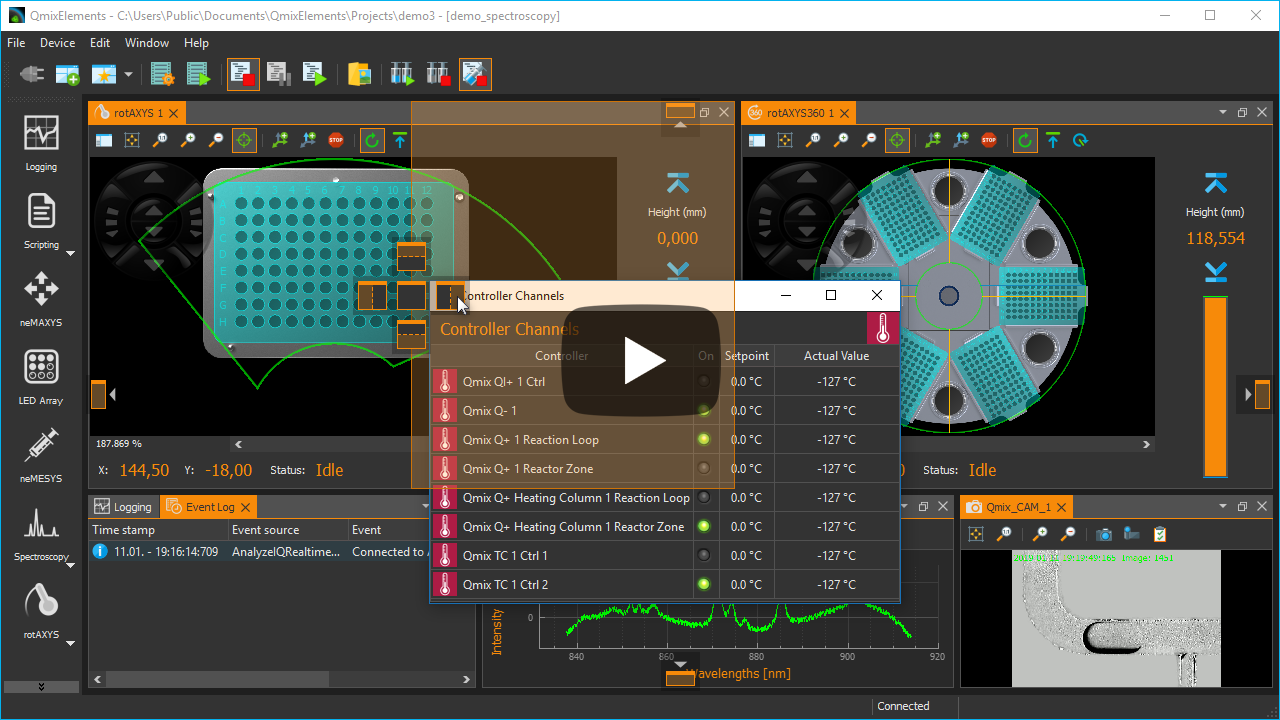
Qt Advanced Docking System lets you create customizable layouts using a full featured window docking system similar to what is found in many popular integrated development environments (IDEs) such as Visual Studio.
- What’s new…
- Documentation
- Original Repository: https://github.com/githubuser0xFFFF/Qt-Advanced-Docking-System
Overview
- New and Noteworthy
- Features
- Python Bindings
- Tested Compatible Environments
- Build
- Getting Started / Example
- License Information
- Donation
- Showcase
- Alternative Docking System Implementations
New and Noteworthy
Release 5.0
Full Dark Mode Support
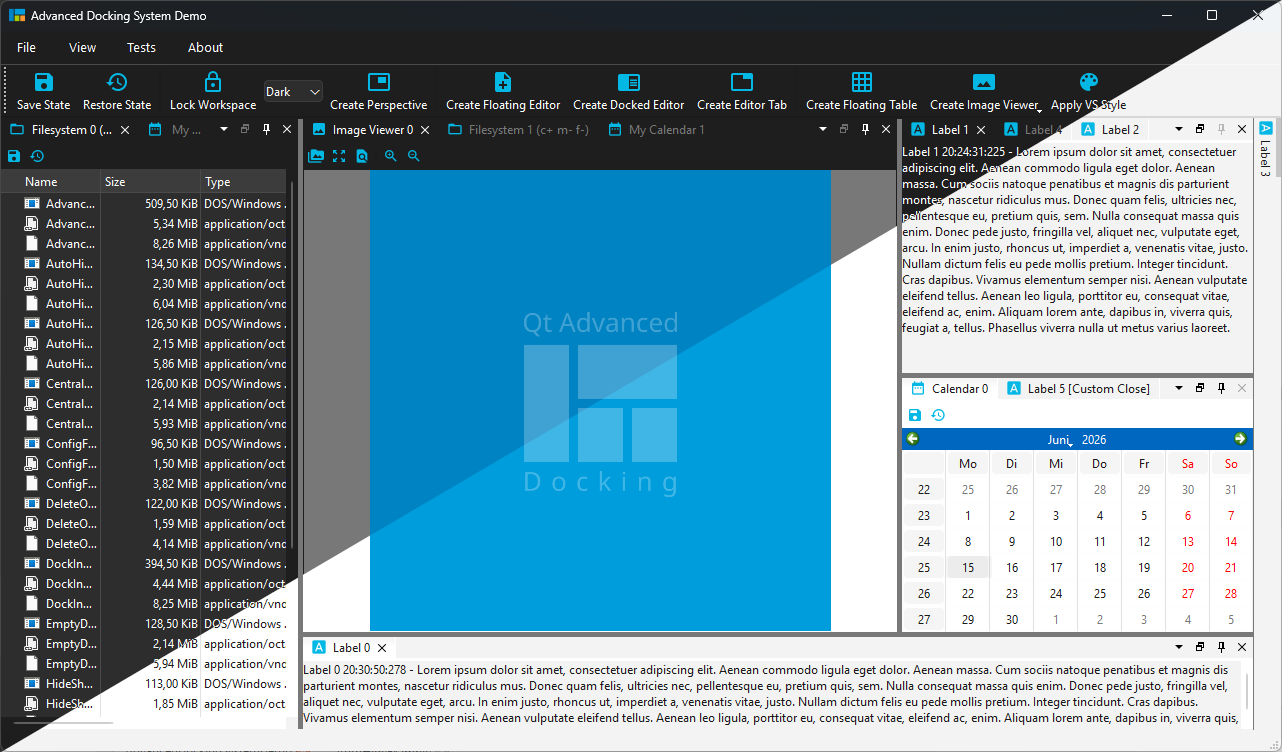
Thanks to the contribution from Vojtěch Miškovský, Qt ADS now provides full dark mode support with automatic theme switching. This includes:
- New stylesheets and icons
- Automatic detection of the current theme (light/dark)
- Automatic palette update propagation to user widgets
Native Wayland Support
Thanks to the outstanding contributions of Matt Liberty, the creator of Joulescope, and Davide Faconti, the creator of PlotJuggler, Qt ADS now provides native Wayland support, making Linux desktop environments such as GNOME and KDE first-class platforms for the Advanced Docking System.

Previous versions relied on mechanisms that are not supported by the Wayland protocol, resulting in incorrect drag previews and broken docking behavior. The new implementation adopts Wayland-native APIs while preserving the familiar Qt ADS user experience.
Highlights include:
- Full support for docking, undocking, and re-docking floating windows on Wayland
- Accurate drag previews and correctly positioned docking overlays
- Hybrid drag behavior: smooth in-window docking with seamless transition to native compositor-managed window dragging
- Platform-specific implementation that affects only Wayland—Windows, macOS, and X11 continue to use the existing, proven code path
- Improved compatibility with modern Linux desktop environments while maintaining the same intuitive docking workflow across all platforms
With these changes, Qt ADS now offers a reliable and polished docking experience on native Wayland without sacrificing compatibility or behavior on other operating systems.
Release 4.5
Tabs at Bottom
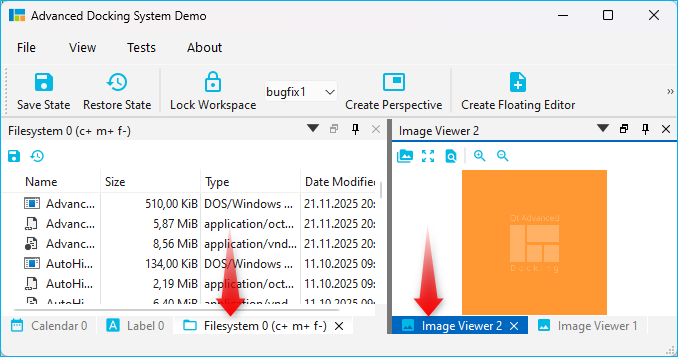
A new global dock manager flag TabsAtBottom has been added to configuration flags. This flag allows to configure if the tabs of dock areas are shown at the top (default) or at the bottom of the respective container.
If the flag is set, tabs will be shown at the bottom instead of in the title bar.
Release 4.1
Release 4.1 significantly improves the Auto-Hide functionality and also brings improvements for Drag and Drop of dock widgets into dock area tabs. These are the highlights of the new version:
Drag & Drop to Auto-Hide
Now you can easily drag any dock widget or any floating widget to the borders of a window to pin it as a auto-hide tab in one of the 4 sidebars. If you drag a dock widget close the one of the four window borders, special drop overlays will be shown to indicate the drop area for auto-hide widgets:
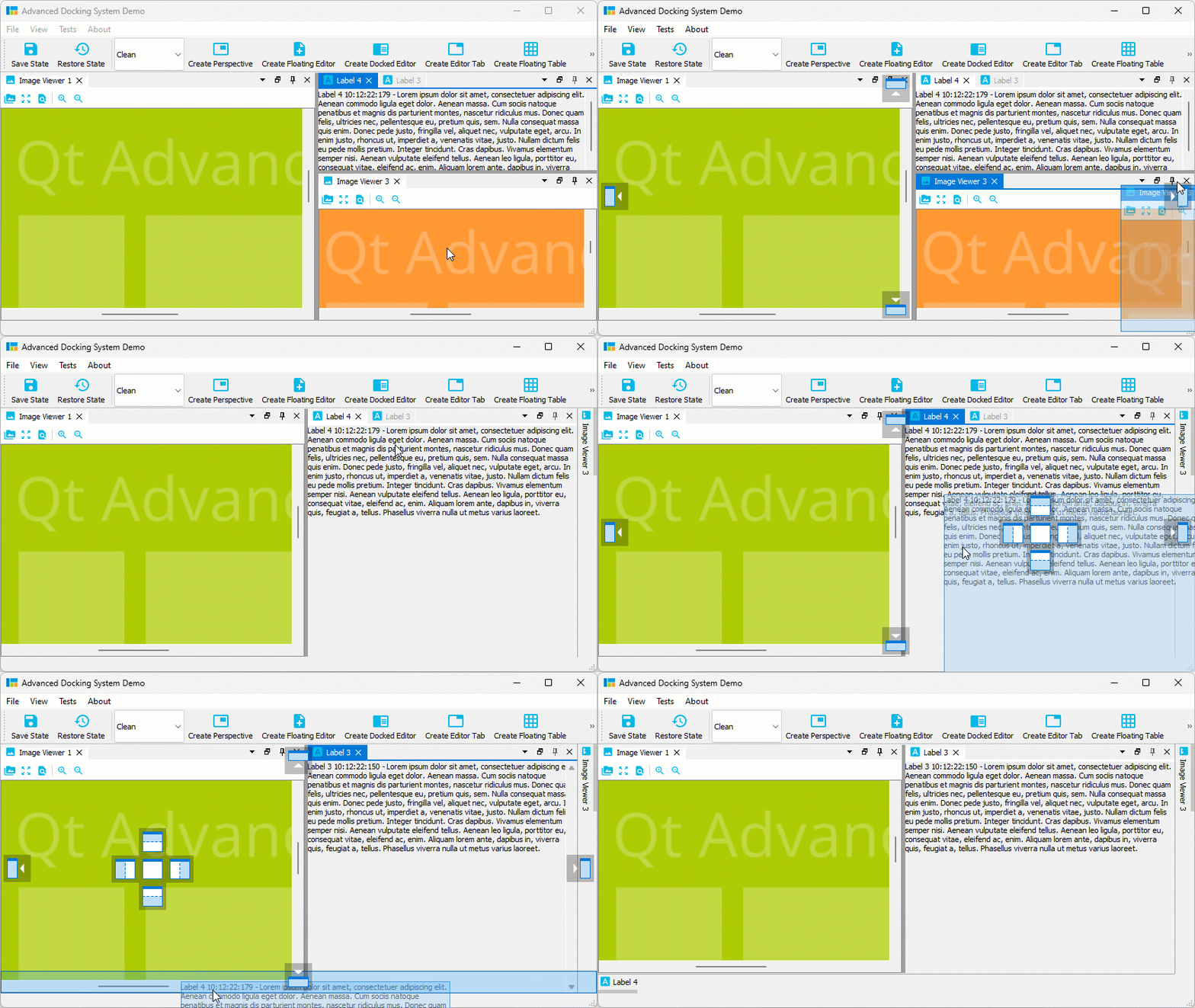
Of course, this also works with dock areas:
File truncated at 100 lines see the full file
CONTRIBUTING
Repository Summary
| Checkout URI | https://github.com/githubuser0xFFFF/Qt-Advanced-Docking-System.git |
| VCS Type | git |
| VCS Version | master |
| Last Updated | 2026-09-10 |
| Dev Status | DEVELOPED |
| Released | RELEASED |
| Contributing |
Help Wanted (-)
Good First Issues (-) Pull Requests to Review (-) |
Packages
README
Qt Advanced Docking System lets you create customizable layouts using a full featured window docking system similar to what is found in many popular integrated development environments (IDEs) such as Visual Studio.
- What’s new…
- Documentation
- Original Repository: https://github.com/githubuser0xFFFF/Qt-Advanced-Docking-System
Overview
- New and Noteworthy
- Features
- Python Bindings
- Tested Compatible Environments
- Build
- Getting Started / Example
- License Information
- Donation
- Showcase
- Alternative Docking System Implementations
New and Noteworthy
Release 5.0
Full Dark Mode Support
Thanks to the contribution from Vojtěch Miškovský, Qt ADS now provides full dark mode support with automatic theme switching. This includes:
- New stylesheets and icons
- Automatic detection of the current theme (light/dark)
- Automatic palette update propagation to user widgets
Native Wayland Support
Thanks to the outstanding contributions of Matt Liberty, the creator of Joulescope, and Davide Faconti, the creator of PlotJuggler, Qt ADS now provides native Wayland support, making Linux desktop environments such as GNOME and KDE first-class platforms for the Advanced Docking System.
Previous versions relied on mechanisms that are not supported by the Wayland protocol, resulting in incorrect drag previews and broken docking behavior. The new implementation adopts Wayland-native APIs while preserving the familiar Qt ADS user experience.
Highlights include:
- Full support for docking, undocking, and re-docking floating windows on Wayland
- Accurate drag previews and correctly positioned docking overlays
- Hybrid drag behavior: smooth in-window docking with seamless transition to native compositor-managed window dragging
- Platform-specific implementation that affects only Wayland—Windows, macOS, and X11 continue to use the existing, proven code path
- Improved compatibility with modern Linux desktop environments while maintaining the same intuitive docking workflow across all platforms
With these changes, Qt ADS now offers a reliable and polished docking experience on native Wayland without sacrificing compatibility or behavior on other operating systems.
Release 4.5
Tabs at Bottom
A new global dock manager flag TabsAtBottom has been added to configuration flags. This flag allows to configure if the tabs of dock areas are shown at the top (default) or at the bottom of the respective container.
If the flag is set, tabs will be shown at the bottom instead of in the title bar.
Release 4.1
Release 4.1 significantly improves the Auto-Hide functionality and also brings improvements for Drag and Drop of dock widgets into dock area tabs. These are the highlights of the new version:
Drag & Drop to Auto-Hide
Now you can easily drag any dock widget or any floating widget to the borders of a window to pin it as a auto-hide tab in one of the 4 sidebars. If you drag a dock widget close the one of the four window borders, special drop overlays will be shown to indicate the drop area for auto-hide widgets:
Of course, this also works with dock areas:
File truncated at 100 lines see the full file
CONTRIBUTING
Repository Summary
| Checkout URI | https://github.com/githubuser0xFFFF/Qt-Advanced-Docking-System.git |
| VCS Type | git |
| VCS Version | master |
| Last Updated | 2026-09-10 |
| Dev Status | DEVELOPED |
| Released | RELEASED |
| Contributing |
Help Wanted (-)
Good First Issues (-) Pull Requests to Review (-) |
Packages
README
Qt Advanced Docking System lets you create customizable layouts using a full featured window docking system similar to what is found in many popular integrated development environments (IDEs) such as Visual Studio.
- What’s new…
- Documentation
- Original Repository: https://github.com/githubuser0xFFFF/Qt-Advanced-Docking-System
Overview
- New and Noteworthy
- Features
- Python Bindings
- Tested Compatible Environments
- Build
- Getting Started / Example
- License Information
- Donation
- Showcase
- Alternative Docking System Implementations
New and Noteworthy
Release 5.0
Full Dark Mode Support
Thanks to the contribution from Vojtěch Miškovský, Qt ADS now provides full dark mode support with automatic theme switching. This includes:
- New stylesheets and icons
- Automatic detection of the current theme (light/dark)
- Automatic palette update propagation to user widgets
Native Wayland Support
Thanks to the outstanding contributions of Matt Liberty, the creator of Joulescope, and Davide Faconti, the creator of PlotJuggler, Qt ADS now provides native Wayland support, making Linux desktop environments such as GNOME and KDE first-class platforms for the Advanced Docking System.
Previous versions relied on mechanisms that are not supported by the Wayland protocol, resulting in incorrect drag previews and broken docking behavior. The new implementation adopts Wayland-native APIs while preserving the familiar Qt ADS user experience.
Highlights include:
- Full support for docking, undocking, and re-docking floating windows on Wayland
- Accurate drag previews and correctly positioned docking overlays
- Hybrid drag behavior: smooth in-window docking with seamless transition to native compositor-managed window dragging
- Platform-specific implementation that affects only Wayland—Windows, macOS, and X11 continue to use the existing, proven code path
- Improved compatibility with modern Linux desktop environments while maintaining the same intuitive docking workflow across all platforms
With these changes, Qt ADS now offers a reliable and polished docking experience on native Wayland without sacrificing compatibility or behavior on other operating systems.
Release 4.5
Tabs at Bottom
A new global dock manager flag TabsAtBottom has been added to configuration flags. This flag allows to configure if the tabs of dock areas are shown at the top (default) or at the bottom of the respective container.
If the flag is set, tabs will be shown at the bottom instead of in the title bar.
Release 4.1
Release 4.1 significantly improves the Auto-Hide functionality and also brings improvements for Drag and Drop of dock widgets into dock area tabs. These are the highlights of the new version:
Drag & Drop to Auto-Hide
Now you can easily drag any dock widget or any floating widget to the borders of a window to pin it as a auto-hide tab in one of the 4 sidebars. If you drag a dock widget close the one of the four window borders, special drop overlays will be shown to indicate the drop area for auto-hide widgets:
Of course, this also works with dock areas:
File truncated at 100 lines see the full file
CONTRIBUTING
Repository Summary
| Checkout URI | https://github.com/githubuser0xFFFF/Qt-Advanced-Docking-System.git |
| VCS Type | git |
| VCS Version | master |
| Last Updated | 2026-09-10 |
| Dev Status | DEVELOPED |
| Released | RELEASED |
| Contributing |
Help Wanted (-)
Good First Issues (-) Pull Requests to Review (-) |
Packages
README
Qt Advanced Docking System lets you create customizable layouts using a full featured window docking system similar to what is found in many popular integrated development environments (IDEs) such as Visual Studio.
- What’s new…
- Documentation
- Original Repository: https://github.com/githubuser0xFFFF/Qt-Advanced-Docking-System
Overview
- New and Noteworthy
- Features
- Python Bindings
- Tested Compatible Environments
- Build
- Getting Started / Example
- License Information
- Donation
- Showcase
- Alternative Docking System Implementations
New and Noteworthy
Release 5.0
Full Dark Mode Support
Thanks to the contribution from Vojtěch Miškovský, Qt ADS now provides full dark mode support with automatic theme switching. This includes:
- New stylesheets and icons
- Automatic detection of the current theme (light/dark)
- Automatic palette update propagation to user widgets
Native Wayland Support
Thanks to the outstanding contributions of Matt Liberty, the creator of Joulescope, and Davide Faconti, the creator of PlotJuggler, Qt ADS now provides native Wayland support, making Linux desktop environments such as GNOME and KDE first-class platforms for the Advanced Docking System.
Previous versions relied on mechanisms that are not supported by the Wayland protocol, resulting in incorrect drag previews and broken docking behavior. The new implementation adopts Wayland-native APIs while preserving the familiar Qt ADS user experience.
Highlights include:
- Full support for docking, undocking, and re-docking floating windows on Wayland
- Accurate drag previews and correctly positioned docking overlays
- Hybrid drag behavior: smooth in-window docking with seamless transition to native compositor-managed window dragging
- Platform-specific implementation that affects only Wayland—Windows, macOS, and X11 continue to use the existing, proven code path
- Improved compatibility with modern Linux desktop environments while maintaining the same intuitive docking workflow across all platforms
With these changes, Qt ADS now offers a reliable and polished docking experience on native Wayland without sacrificing compatibility or behavior on other operating systems.
Release 4.5
Tabs at Bottom
A new global dock manager flag TabsAtBottom has been added to configuration flags. This flag allows to configure if the tabs of dock areas are shown at the top (default) or at the bottom of the respective container.
If the flag is set, tabs will be shown at the bottom instead of in the title bar.
Release 4.1
Release 4.1 significantly improves the Auto-Hide functionality and also brings improvements for Drag and Drop of dock widgets into dock area tabs. These are the highlights of the new version:
Drag & Drop to Auto-Hide
Now you can easily drag any dock widget or any floating widget to the borders of a window to pin it as a auto-hide tab in one of the 4 sidebars. If you drag a dock widget close the one of the four window borders, special drop overlays will be shown to indicate the drop area for auto-hide widgets:
Of course, this also works with dock areas:
File truncated at 100 lines see the full file
CONTRIBUTING
Repository Summary
| Checkout URI | https://github.com/githubuser0xFFFF/Qt-Advanced-Docking-System.git |
| VCS Type | git |
| VCS Version | master |
| Last Updated | 2026-09-10 |
| Dev Status | DEVELOPED |
| Released | RELEASED |
| Contributing |
Help Wanted (-)
Good First Issues (-) Pull Requests to Review (-) |
Packages
README
Qt Advanced Docking System lets you create customizable layouts using a full featured window docking system similar to what is found in many popular integrated development environments (IDEs) such as Visual Studio.
- What’s new…
- Documentation
- Original Repository: https://github.com/githubuser0xFFFF/Qt-Advanced-Docking-System
Overview
- New and Noteworthy
- Features
- Python Bindings
- Tested Compatible Environments
- Build
- Getting Started / Example
- License Information
- Donation
- Showcase
- Alternative Docking System Implementations
New and Noteworthy
Release 5.0
Full Dark Mode Support
Thanks to the contribution from Vojtěch Miškovský, Qt ADS now provides full dark mode support with automatic theme switching. This includes:
- New stylesheets and icons
- Automatic detection of the current theme (light/dark)
- Automatic palette update propagation to user widgets
Native Wayland Support
Thanks to the outstanding contributions of Matt Liberty, the creator of Joulescope, and Davide Faconti, the creator of PlotJuggler, Qt ADS now provides native Wayland support, making Linux desktop environments such as GNOME and KDE first-class platforms for the Advanced Docking System.
Previous versions relied on mechanisms that are not supported by the Wayland protocol, resulting in incorrect drag previews and broken docking behavior. The new implementation adopts Wayland-native APIs while preserving the familiar Qt ADS user experience.
Highlights include:
- Full support for docking, undocking, and re-docking floating windows on Wayland
- Accurate drag previews and correctly positioned docking overlays
- Hybrid drag behavior: smooth in-window docking with seamless transition to native compositor-managed window dragging
- Platform-specific implementation that affects only Wayland—Windows, macOS, and X11 continue to use the existing, proven code path
- Improved compatibility with modern Linux desktop environments while maintaining the same intuitive docking workflow across all platforms
With these changes, Qt ADS now offers a reliable and polished docking experience on native Wayland without sacrificing compatibility or behavior on other operating systems.
Release 4.5
Tabs at Bottom
A new global dock manager flag TabsAtBottom has been added to configuration flags. This flag allows to configure if the tabs of dock areas are shown at the top (default) or at the bottom of the respective container.
If the flag is set, tabs will be shown at the bottom instead of in the title bar.
Release 4.1
Release 4.1 significantly improves the Auto-Hide functionality and also brings improvements for Drag and Drop of dock widgets into dock area tabs. These are the highlights of the new version:
Drag & Drop to Auto-Hide
Now you can easily drag any dock widget or any floating widget to the borders of a window to pin it as a auto-hide tab in one of the 4 sidebars. If you drag a dock widget close the one of the four window borders, special drop overlays will be shown to indicate the drop area for auto-hide widgets:
Of course, this also works with dock areas:
File truncated at 100 lines see the full file
CONTRIBUTING
Repository Summary
| Checkout URI | https://github.com/githubuser0xFFFF/Qt-Advanced-Docking-System.git |
| VCS Type | git |
| VCS Version | master |
| Last Updated | 2026-09-10 |
| Dev Status | DEVELOPED |
| Released | RELEASED |
| Contributing |
Help Wanted (-)
Good First Issues (-) Pull Requests to Review (-) |
Packages
README
Qt Advanced Docking System lets you create customizable layouts using a full featured window docking system similar to what is found in many popular integrated development environments (IDEs) such as Visual Studio.
- What’s new…
- Documentation
- Original Repository: https://github.com/githubuser0xFFFF/Qt-Advanced-Docking-System
Overview
- New and Noteworthy
- Features
- Python Bindings
- Tested Compatible Environments
- Build
- Getting Started / Example
- License Information
- Donation
- Showcase
- Alternative Docking System Implementations
New and Noteworthy
Release 5.0
Full Dark Mode Support
Thanks to the contribution from Vojtěch Miškovský, Qt ADS now provides full dark mode support with automatic theme switching. This includes:
- New stylesheets and icons
- Automatic detection of the current theme (light/dark)
- Automatic palette update propagation to user widgets
Native Wayland Support
Thanks to the outstanding contributions of Matt Liberty, the creator of Joulescope, and Davide Faconti, the creator of PlotJuggler, Qt ADS now provides native Wayland support, making Linux desktop environments such as GNOME and KDE first-class platforms for the Advanced Docking System.
Previous versions relied on mechanisms that are not supported by the Wayland protocol, resulting in incorrect drag previews and broken docking behavior. The new implementation adopts Wayland-native APIs while preserving the familiar Qt ADS user experience.
Highlights include:
- Full support for docking, undocking, and re-docking floating windows on Wayland
- Accurate drag previews and correctly positioned docking overlays
- Hybrid drag behavior: smooth in-window docking with seamless transition to native compositor-managed window dragging
- Platform-specific implementation that affects only Wayland—Windows, macOS, and X11 continue to use the existing, proven code path
- Improved compatibility with modern Linux desktop environments while maintaining the same intuitive docking workflow across all platforms
With these changes, Qt ADS now offers a reliable and polished docking experience on native Wayland without sacrificing compatibility or behavior on other operating systems.
Release 4.5
Tabs at Bottom
A new global dock manager flag TabsAtBottom has been added to configuration flags. This flag allows to configure if the tabs of dock areas are shown at the top (default) or at the bottom of the respective container.
If the flag is set, tabs will be shown at the bottom instead of in the title bar.
Release 4.1
Release 4.1 significantly improves the Auto-Hide functionality and also brings improvements for Drag and Drop of dock widgets into dock area tabs. These are the highlights of the new version:
Drag & Drop to Auto-Hide
Now you can easily drag any dock widget or any floating widget to the borders of a window to pin it as a auto-hide tab in one of the 4 sidebars. If you drag a dock widget close the one of the four window borders, special drop overlays will be shown to indicate the drop area for auto-hide widgets:
Of course, this also works with dock areas:
File truncated at 100 lines see the full file
CONTRIBUTING
Repository Summary
| Checkout URI | https://github.com/githubuser0xFFFF/Qt-Advanced-Docking-System.git |
| VCS Type | git |
| VCS Version | master |
| Last Updated | 2026-09-10 |
| Dev Status | DEVELOPED |
| Released | RELEASED |
| Contributing |
Help Wanted (-)
Good First Issues (-) Pull Requests to Review (-) |
Packages
README
Qt Advanced Docking System lets you create customizable layouts using a full featured window docking system similar to what is found in many popular integrated development environments (IDEs) such as Visual Studio.
- What’s new…
- Documentation
- Original Repository: https://github.com/githubuser0xFFFF/Qt-Advanced-Docking-System
Overview
- New and Noteworthy
- Features
- Python Bindings
- Tested Compatible Environments
- Build
- Getting Started / Example
- License Information
- Donation
- Showcase
- Alternative Docking System Implementations
New and Noteworthy
Release 5.0
Full Dark Mode Support
Thanks to the contribution from Vojtěch Miškovský, Qt ADS now provides full dark mode support with automatic theme switching. This includes:
- New stylesheets and icons
- Automatic detection of the current theme (light/dark)
- Automatic palette update propagation to user widgets
Native Wayland Support
Thanks to the outstanding contributions of Matt Liberty, the creator of Joulescope, and Davide Faconti, the creator of PlotJuggler, Qt ADS now provides native Wayland support, making Linux desktop environments such as GNOME and KDE first-class platforms for the Advanced Docking System.
Previous versions relied on mechanisms that are not supported by the Wayland protocol, resulting in incorrect drag previews and broken docking behavior. The new implementation adopts Wayland-native APIs while preserving the familiar Qt ADS user experience.
Highlights include:
- Full support for docking, undocking, and re-docking floating windows on Wayland
- Accurate drag previews and correctly positioned docking overlays
- Hybrid drag behavior: smooth in-window docking with seamless transition to native compositor-managed window dragging
- Platform-specific implementation that affects only Wayland—Windows, macOS, and X11 continue to use the existing, proven code path
- Improved compatibility with modern Linux desktop environments while maintaining the same intuitive docking workflow across all platforms
With these changes, Qt ADS now offers a reliable and polished docking experience on native Wayland without sacrificing compatibility or behavior on other operating systems.
Release 4.5
Tabs at Bottom
A new global dock manager flag TabsAtBottom has been added to configuration flags. This flag allows to configure if the tabs of dock areas are shown at the top (default) or at the bottom of the respective container.
If the flag is set, tabs will be shown at the bottom instead of in the title bar.
Release 4.1
Release 4.1 significantly improves the Auto-Hide functionality and also brings improvements for Drag and Drop of dock widgets into dock area tabs. These are the highlights of the new version:
Drag & Drop to Auto-Hide
Now you can easily drag any dock widget or any floating widget to the borders of a window to pin it as a auto-hide tab in one of the 4 sidebars. If you drag a dock widget close the one of the four window borders, special drop overlays will be shown to indicate the drop area for auto-hide widgets:
Of course, this also works with dock areas:
File truncated at 100 lines see the full file
CONTRIBUTING
Repository Summary
| Checkout URI | https://github.com/githubuser0xFFFF/Qt-Advanced-Docking-System.git |
| VCS Type | git |
| VCS Version | master |
| Last Updated | 2026-09-10 |
| Dev Status | DEVELOPED |
| Released | RELEASED |
| Contributing |
Help Wanted (-)
Good First Issues (-) Pull Requests to Review (-) |
Packages
README
Qt Advanced Docking System lets you create customizable layouts using a full featured window docking system similar to what is found in many popular integrated development environments (IDEs) such as Visual Studio.
- What’s new…
- Documentation
- Original Repository: https://github.com/githubuser0xFFFF/Qt-Advanced-Docking-System
Overview
- New and Noteworthy
- Features
- Python Bindings
- Tested Compatible Environments
- Build
- Getting Started / Example
- License Information
- Donation
- Showcase
- Alternative Docking System Implementations
New and Noteworthy
Release 5.0
Full Dark Mode Support
Thanks to the contribution from Vojtěch Miškovský, Qt ADS now provides full dark mode support with automatic theme switching. This includes:
- New stylesheets and icons
- Automatic detection of the current theme (light/dark)
- Automatic palette update propagation to user widgets
Native Wayland Support
Thanks to the outstanding contributions of Matt Liberty, the creator of Joulescope, and Davide Faconti, the creator of PlotJuggler, Qt ADS now provides native Wayland support, making Linux desktop environments such as GNOME and KDE first-class platforms for the Advanced Docking System.
Previous versions relied on mechanisms that are not supported by the Wayland protocol, resulting in incorrect drag previews and broken docking behavior. The new implementation adopts Wayland-native APIs while preserving the familiar Qt ADS user experience.
Highlights include:
- Full support for docking, undocking, and re-docking floating windows on Wayland
- Accurate drag previews and correctly positioned docking overlays
- Hybrid drag behavior: smooth in-window docking with seamless transition to native compositor-managed window dragging
- Platform-specific implementation that affects only Wayland—Windows, macOS, and X11 continue to use the existing, proven code path
- Improved compatibility with modern Linux desktop environments while maintaining the same intuitive docking workflow across all platforms
With these changes, Qt ADS now offers a reliable and polished docking experience on native Wayland without sacrificing compatibility or behavior on other operating systems.
Release 4.5
Tabs at Bottom
A new global dock manager flag TabsAtBottom has been added to configuration flags. This flag allows to configure if the tabs of dock areas are shown at the top (default) or at the bottom of the respective container.
If the flag is set, tabs will be shown at the bottom instead of in the title bar.
Release 4.1
Release 4.1 significantly improves the Auto-Hide functionality and also brings improvements for Drag and Drop of dock widgets into dock area tabs. These are the highlights of the new version:
Drag & Drop to Auto-Hide
Now you can easily drag any dock widget or any floating widget to the borders of a window to pin it as a auto-hide tab in one of the 4 sidebars. If you drag a dock widget close the one of the four window borders, special drop overlays will be shown to indicate the drop area for auto-hide widgets:
Of course, this also works with dock areas:
File truncated at 100 lines see the full file
CONTRIBUTING
Repository Summary
| Checkout URI | https://github.com/githubuser0xFFFF/Qt-Advanced-Docking-System.git |
| VCS Type | git |
| VCS Version | master |
| Last Updated | 2026-09-10 |
| Dev Status | DEVELOPED |
| Released | RELEASED |
| Contributing |
Help Wanted (-)
Good First Issues (-) Pull Requests to Review (-) |
Packages
README
Qt Advanced Docking System lets you create customizable layouts using a full featured window docking system similar to what is found in many popular integrated development environments (IDEs) such as Visual Studio.
- What’s new…
- Documentation
- Original Repository: https://github.com/githubuser0xFFFF/Qt-Advanced-Docking-System
Overview
- New and Noteworthy
- Features
- Python Bindings
- Tested Compatible Environments
- Build
- Getting Started / Example
- License Information
- Donation
- Showcase
- Alternative Docking System Implementations
New and Noteworthy
Release 5.0
Full Dark Mode Support
Thanks to the contribution from Vojtěch Miškovský, Qt ADS now provides full dark mode support with automatic theme switching. This includes:
- New stylesheets and icons
- Automatic detection of the current theme (light/dark)
- Automatic palette update propagation to user widgets
Native Wayland Support
Thanks to the outstanding contributions of Matt Liberty, the creator of Joulescope, and Davide Faconti, the creator of PlotJuggler, Qt ADS now provides native Wayland support, making Linux desktop environments such as GNOME and KDE first-class platforms for the Advanced Docking System.
Previous versions relied on mechanisms that are not supported by the Wayland protocol, resulting in incorrect drag previews and broken docking behavior. The new implementation adopts Wayland-native APIs while preserving the familiar Qt ADS user experience.
Highlights include:
- Full support for docking, undocking, and re-docking floating windows on Wayland
- Accurate drag previews and correctly positioned docking overlays
- Hybrid drag behavior: smooth in-window docking with seamless transition to native compositor-managed window dragging
- Platform-specific implementation that affects only Wayland—Windows, macOS, and X11 continue to use the existing, proven code path
- Improved compatibility with modern Linux desktop environments while maintaining the same intuitive docking workflow across all platforms
With these changes, Qt ADS now offers a reliable and polished docking experience on native Wayland without sacrificing compatibility or behavior on other operating systems.
Release 4.5
Tabs at Bottom
A new global dock manager flag TabsAtBottom has been added to configuration flags. This flag allows to configure if the tabs of dock areas are shown at the top (default) or at the bottom of the respective container.
If the flag is set, tabs will be shown at the bottom instead of in the title bar.
Release 4.1
Release 4.1 significantly improves the Auto-Hide functionality and also brings improvements for Drag and Drop of dock widgets into dock area tabs. These are the highlights of the new version:
Drag & Drop to Auto-Hide
Now you can easily drag any dock widget or any floating widget to the borders of a window to pin it as a auto-hide tab in one of the 4 sidebars. If you drag a dock widget close the one of the four window borders, special drop overlays will be shown to indicate the drop area for auto-hide widgets:
Of course, this also works with dock areas:
File truncated at 100 lines see the full file
CONTRIBUTING
Repository Summary
| Checkout URI | https://github.com/githubuser0xFFFF/Qt-Advanced-Docking-System.git |
| VCS Type | git |
| VCS Version | master |
| Last Updated | 2026-09-10 |
| Dev Status | DEVELOPED |
| Released | RELEASED |
| Contributing |
Help Wanted (-)
Good First Issues (-) Pull Requests to Review (-) |
Packages
README
Qt Advanced Docking System lets you create customizable layouts using a full featured window docking system similar to what is found in many popular integrated development environments (IDEs) such as Visual Studio.
- What’s new…
- Documentation
- Original Repository: https://github.com/githubuser0xFFFF/Qt-Advanced-Docking-System
Overview
- New and Noteworthy
- Features
- Python Bindings
- Tested Compatible Environments
- Build
- Getting Started / Example
- License Information
- Donation
- Showcase
- Alternative Docking System Implementations
New and Noteworthy
Release 5.0
Full Dark Mode Support
Thanks to the contribution from Vojtěch Miškovský, Qt ADS now provides full dark mode support with automatic theme switching. This includes:
- New stylesheets and icons
- Automatic detection of the current theme (light/dark)
- Automatic palette update propagation to user widgets
Native Wayland Support
Thanks to the outstanding contributions of Matt Liberty, the creator of Joulescope, and Davide Faconti, the creator of PlotJuggler, Qt ADS now provides native Wayland support, making Linux desktop environments such as GNOME and KDE first-class platforms for the Advanced Docking System.
Previous versions relied on mechanisms that are not supported by the Wayland protocol, resulting in incorrect drag previews and broken docking behavior. The new implementation adopts Wayland-native APIs while preserving the familiar Qt ADS user experience.
Highlights include:
- Full support for docking, undocking, and re-docking floating windows on Wayland
- Accurate drag previews and correctly positioned docking overlays
- Hybrid drag behavior: smooth in-window docking with seamless transition to native compositor-managed window dragging
- Platform-specific implementation that affects only Wayland—Windows, macOS, and X11 continue to use the existing, proven code path
- Improved compatibility with modern Linux desktop environments while maintaining the same intuitive docking workflow across all platforms
With these changes, Qt ADS now offers a reliable and polished docking experience on native Wayland without sacrificing compatibility or behavior on other operating systems.
Release 4.5
Tabs at Bottom
A new global dock manager flag TabsAtBottom has been added to configuration flags. This flag allows to configure if the tabs of dock areas are shown at the top (default) or at the bottom of the respective container.
If the flag is set, tabs will be shown at the bottom instead of in the title bar.
Release 4.1
Release 4.1 significantly improves the Auto-Hide functionality and also brings improvements for Drag and Drop of dock widgets into dock area tabs. These are the highlights of the new version:
Drag & Drop to Auto-Hide
Now you can easily drag any dock widget or any floating widget to the borders of a window to pin it as a auto-hide tab in one of the 4 sidebars. If you drag a dock widget close the one of the four window borders, special drop overlays will be shown to indicate the drop area for auto-hide widgets:
Of course, this also works with dock areas:
File truncated at 100 lines see the full file
CONTRIBUTING
Repository Summary
| Checkout URI | https://github.com/githubuser0xFFFF/Qt-Advanced-Docking-System.git |
| VCS Type | git |
| VCS Version | master |
| Last Updated | 2026-09-10 |
| Dev Status | DEVELOPED |
| Released | RELEASED |
| Contributing |
Help Wanted (-)
Good First Issues (-) Pull Requests to Review (-) |
Packages
README
Qt Advanced Docking System lets you create customizable layouts using a full featured window docking system similar to what is found in many popular integrated development environments (IDEs) such as Visual Studio.
- What’s new…
- Documentation
- Original Repository: https://github.com/githubuser0xFFFF/Qt-Advanced-Docking-System
Overview
- New and Noteworthy
- Features
- Python Bindings
- Tested Compatible Environments
- Build
- Getting Started / Example
- License Information
- Donation
- Showcase
- Alternative Docking System Implementations
New and Noteworthy
Release 5.0
Full Dark Mode Support
Thanks to the contribution from Vojtěch Miškovský, Qt ADS now provides full dark mode support with automatic theme switching. This includes:
- New stylesheets and icons
- Automatic detection of the current theme (light/dark)
- Automatic palette update propagation to user widgets
Native Wayland Support
Thanks to the outstanding contributions of Matt Liberty, the creator of Joulescope, and Davide Faconti, the creator of PlotJuggler, Qt ADS now provides native Wayland support, making Linux desktop environments such as GNOME and KDE first-class platforms for the Advanced Docking System.
Previous versions relied on mechanisms that are not supported by the Wayland protocol, resulting in incorrect drag previews and broken docking behavior. The new implementation adopts Wayland-native APIs while preserving the familiar Qt ADS user experience.
Highlights include:
- Full support for docking, undocking, and re-docking floating windows on Wayland
- Accurate drag previews and correctly positioned docking overlays
- Hybrid drag behavior: smooth in-window docking with seamless transition to native compositor-managed window dragging
- Platform-specific implementation that affects only Wayland—Windows, macOS, and X11 continue to use the existing, proven code path
- Improved compatibility with modern Linux desktop environments while maintaining the same intuitive docking workflow across all platforms
With these changes, Qt ADS now offers a reliable and polished docking experience on native Wayland without sacrificing compatibility or behavior on other operating systems.
Release 4.5
Tabs at Bottom
A new global dock manager flag TabsAtBottom has been added to configuration flags. This flag allows to configure if the tabs of dock areas are shown at the top (default) or at the bottom of the respective container.
If the flag is set, tabs will be shown at the bottom instead of in the title bar.
Release 4.1
Release 4.1 significantly improves the Auto-Hide functionality and also brings improvements for Drag and Drop of dock widgets into dock area tabs. These are the highlights of the new version:
Drag & Drop to Auto-Hide
Now you can easily drag any dock widget or any floating widget to the borders of a window to pin it as a auto-hide tab in one of the 4 sidebars. If you drag a dock widget close the one of the four window borders, special drop overlays will be shown to indicate the drop area for auto-hide widgets:
Of course, this also works with dock areas:
File truncated at 100 lines see the full file
CONTRIBUTING
Repository Summary
| Checkout URI | https://github.com/githubuser0xFFFF/Qt-Advanced-Docking-System.git |
| VCS Type | git |
| VCS Version | master |
| Last Updated | 2026-09-10 |
| Dev Status | DEVELOPED |
| Released | RELEASED |
| Contributing |
Help Wanted (-)
Good First Issues (-) Pull Requests to Review (-) |
Packages
README
Qt Advanced Docking System lets you create customizable layouts using a full featured window docking system similar to what is found in many popular integrated development environments (IDEs) such as Visual Studio.
- What’s new…
- Documentation
- Original Repository: https://github.com/githubuser0xFFFF/Qt-Advanced-Docking-System
Overview
- New and Noteworthy
- Features
- Python Bindings
- Tested Compatible Environments
- Build
- Getting Started / Example
- License Information
- Donation
- Showcase
- Alternative Docking System Implementations
New and Noteworthy
Release 5.0
Full Dark Mode Support
Thanks to the contribution from Vojtěch Miškovský, Qt ADS now provides full dark mode support with automatic theme switching. This includes:
- New stylesheets and icons
- Automatic detection of the current theme (light/dark)
- Automatic palette update propagation to user widgets
Native Wayland Support
Thanks to the outstanding contributions of Matt Liberty, the creator of Joulescope, and Davide Faconti, the creator of PlotJuggler, Qt ADS now provides native Wayland support, making Linux desktop environments such as GNOME and KDE first-class platforms for the Advanced Docking System.
Previous versions relied on mechanisms that are not supported by the Wayland protocol, resulting in incorrect drag previews and broken docking behavior. The new implementation adopts Wayland-native APIs while preserving the familiar Qt ADS user experience.
Highlights include:
- Full support for docking, undocking, and re-docking floating windows on Wayland
- Accurate drag previews and correctly positioned docking overlays
- Hybrid drag behavior: smooth in-window docking with seamless transition to native compositor-managed window dragging
- Platform-specific implementation that affects only Wayland—Windows, macOS, and X11 continue to use the existing, proven code path
- Improved compatibility with modern Linux desktop environments while maintaining the same intuitive docking workflow across all platforms
With these changes, Qt ADS now offers a reliable and polished docking experience on native Wayland without sacrificing compatibility or behavior on other operating systems.
Release 4.5
Tabs at Bottom
A new global dock manager flag TabsAtBottom has been added to configuration flags. This flag allows to configure if the tabs of dock areas are shown at the top (default) or at the bottom of the respective container.
If the flag is set, tabs will be shown at the bottom instead of in the title bar.
Release 4.1
Release 4.1 significantly improves the Auto-Hide functionality and also brings improvements for Drag and Drop of dock widgets into dock area tabs. These are the highlights of the new version:
Drag & Drop to Auto-Hide
Now you can easily drag any dock widget or any floating widget to the borders of a window to pin it as a auto-hide tab in one of the 4 sidebars. If you drag a dock widget close the one of the four window borders, special drop overlays will be shown to indicate the drop area for auto-hide widgets:
Of course, this also works with dock areas:
File truncated at 100 lines see the full file
CONTRIBUTING
Repository Summary
| Checkout URI | https://github.com/githubuser0xFFFF/Qt-Advanced-Docking-System.git |
| VCS Type | git |
| VCS Version | master |
| Last Updated | 2026-09-10 |
| Dev Status | DEVELOPED |
| Released | RELEASED |
| Contributing |
Help Wanted (-)
Good First Issues (-) Pull Requests to Review (-) |
Packages
README
Qt Advanced Docking System lets you create customizable layouts using a full featured window docking system similar to what is found in many popular integrated development environments (IDEs) such as Visual Studio.
- What’s new…
- Documentation
- Original Repository: https://github.com/githubuser0xFFFF/Qt-Advanced-Docking-System
Overview
- New and Noteworthy
- Features
- Python Bindings
- Tested Compatible Environments
- Build
- Getting Started / Example
- License Information
- Donation
- Showcase
- Alternative Docking System Implementations
New and Noteworthy
Release 5.0
Full Dark Mode Support
Thanks to the contribution from Vojtěch Miškovský, Qt ADS now provides full dark mode support with automatic theme switching. This includes:
- New stylesheets and icons
- Automatic detection of the current theme (light/dark)
- Automatic palette update propagation to user widgets
Native Wayland Support
Thanks to the outstanding contributions of Matt Liberty, the creator of Joulescope, and Davide Faconti, the creator of PlotJuggler, Qt ADS now provides native Wayland support, making Linux desktop environments such as GNOME and KDE first-class platforms for the Advanced Docking System.
Previous versions relied on mechanisms that are not supported by the Wayland protocol, resulting in incorrect drag previews and broken docking behavior. The new implementation adopts Wayland-native APIs while preserving the familiar Qt ADS user experience.
Highlights include:
- Full support for docking, undocking, and re-docking floating windows on Wayland
- Accurate drag previews and correctly positioned docking overlays
- Hybrid drag behavior: smooth in-window docking with seamless transition to native compositor-managed window dragging
- Platform-specific implementation that affects only Wayland—Windows, macOS, and X11 continue to use the existing, proven code path
- Improved compatibility with modern Linux desktop environments while maintaining the same intuitive docking workflow across all platforms
With these changes, Qt ADS now offers a reliable and polished docking experience on native Wayland without sacrificing compatibility or behavior on other operating systems.
Release 4.5
Tabs at Bottom
A new global dock manager flag TabsAtBottom has been added to configuration flags. This flag allows to configure if the tabs of dock areas are shown at the top (default) or at the bottom of the respective container.
If the flag is set, tabs will be shown at the bottom instead of in the title bar.
Release 4.1
Release 4.1 significantly improves the Auto-Hide functionality and also brings improvements for Drag and Drop of dock widgets into dock area tabs. These are the highlights of the new version:
Drag & Drop to Auto-Hide
Now you can easily drag any dock widget or any floating widget to the borders of a window to pin it as a auto-hide tab in one of the 4 sidebars. If you drag a dock widget close the one of the four window borders, special drop overlays will be shown to indicate the drop area for auto-hide widgets:
Of course, this also works with dock areas:
File truncated at 100 lines see the full file
CONTRIBUTING
Repository Summary
| Checkout URI | https://github.com/githubuser0xFFFF/Qt-Advanced-Docking-System.git |
| VCS Type | git |
| VCS Version | master |
| Last Updated | 2026-09-10 |
| Dev Status | DEVELOPED |
| Released | RELEASED |
| Contributing |
Help Wanted (-)
Good First Issues (-) Pull Requests to Review (-) |
Packages
README
Qt Advanced Docking System lets you create customizable layouts using a full featured window docking system similar to what is found in many popular integrated development environments (IDEs) such as Visual Studio.
- What’s new…
- Documentation
- Original Repository: https://github.com/githubuser0xFFFF/Qt-Advanced-Docking-System
Overview
- New and Noteworthy
- Features
- Python Bindings
- Tested Compatible Environments
- Build
- Getting Started / Example
- License Information
- Donation
- Showcase
- Alternative Docking System Implementations
New and Noteworthy
Release 5.0
Full Dark Mode Support
Thanks to the contribution from Vojtěch Miškovský, Qt ADS now provides full dark mode support with automatic theme switching. This includes:
- New stylesheets and icons
- Automatic detection of the current theme (light/dark)
- Automatic palette update propagation to user widgets
Native Wayland Support
Thanks to the outstanding contributions of Matt Liberty, the creator of Joulescope, and Davide Faconti, the creator of PlotJuggler, Qt ADS now provides native Wayland support, making Linux desktop environments such as GNOME and KDE first-class platforms for the Advanced Docking System.
Previous versions relied on mechanisms that are not supported by the Wayland protocol, resulting in incorrect drag previews and broken docking behavior. The new implementation adopts Wayland-native APIs while preserving the familiar Qt ADS user experience.
Highlights include:
- Full support for docking, undocking, and re-docking floating windows on Wayland
- Accurate drag previews and correctly positioned docking overlays
- Hybrid drag behavior: smooth in-window docking with seamless transition to native compositor-managed window dragging
- Platform-specific implementation that affects only Wayland—Windows, macOS, and X11 continue to use the existing, proven code path
- Improved compatibility with modern Linux desktop environments while maintaining the same intuitive docking workflow across all platforms
With these changes, Qt ADS now offers a reliable and polished docking experience on native Wayland without sacrificing compatibility or behavior on other operating systems.
Release 4.5
Tabs at Bottom
A new global dock manager flag TabsAtBottom has been added to configuration flags. This flag allows to configure if the tabs of dock areas are shown at the top (default) or at the bottom of the respective container.
If the flag is set, tabs will be shown at the bottom instead of in the title bar.
Release 4.1
Release 4.1 significantly improves the Auto-Hide functionality and also brings improvements for Drag and Drop of dock widgets into dock area tabs. These are the highlights of the new version:
Drag & Drop to Auto-Hide
Now you can easily drag any dock widget or any floating widget to the borders of a window to pin it as a auto-hide tab in one of the 4 sidebars. If you drag a dock widget close the one of the four window borders, special drop overlays will be shown to indicate the drop area for auto-hide widgets:
Of course, this also works with dock areas:
File truncated at 100 lines see the full file
CONTRIBUTING
Repository Summary
| Checkout URI | https://github.com/githubuser0xFFFF/Qt-Advanced-Docking-System.git |
| VCS Type | git |
| VCS Version | master |
| Last Updated | 2026-09-10 |
| Dev Status | DEVELOPED |
| Released | RELEASED |
| Contributing |
Help Wanted (-)
Good First Issues (-) Pull Requests to Review (-) |
Packages
README
Qt Advanced Docking System lets you create customizable layouts using a full featured window docking system similar to what is found in many popular integrated development environments (IDEs) such as Visual Studio.
- What’s new…
- Documentation
- Original Repository: https://github.com/githubuser0xFFFF/Qt-Advanced-Docking-System
Overview
- New and Noteworthy
- Features
- Python Bindings
- Tested Compatible Environments
- Build
- Getting Started / Example
- License Information
- Donation
- Showcase
- Alternative Docking System Implementations
New and Noteworthy
Release 5.0
Full Dark Mode Support
Thanks to the contribution from Vojtěch Miškovský, Qt ADS now provides full dark mode support with automatic theme switching. This includes:
- New stylesheets and icons
- Automatic detection of the current theme (light/dark)
- Automatic palette update propagation to user widgets
Native Wayland Support
Thanks to the outstanding contributions of Matt Liberty, the creator of Joulescope, and Davide Faconti, the creator of PlotJuggler, Qt ADS now provides native Wayland support, making Linux desktop environments such as GNOME and KDE first-class platforms for the Advanced Docking System.
Previous versions relied on mechanisms that are not supported by the Wayland protocol, resulting in incorrect drag previews and broken docking behavior. The new implementation adopts Wayland-native APIs while preserving the familiar Qt ADS user experience.
Highlights include:
- Full support for docking, undocking, and re-docking floating windows on Wayland
- Accurate drag previews and correctly positioned docking overlays
- Hybrid drag behavior: smooth in-window docking with seamless transition to native compositor-managed window dragging
- Platform-specific implementation that affects only Wayland—Windows, macOS, and X11 continue to use the existing, proven code path
- Improved compatibility with modern Linux desktop environments while maintaining the same intuitive docking workflow across all platforms
With these changes, Qt ADS now offers a reliable and polished docking experience on native Wayland without sacrificing compatibility or behavior on other operating systems.
Release 4.5
Tabs at Bottom
A new global dock manager flag TabsAtBottom has been added to configuration flags. This flag allows to configure if the tabs of dock areas are shown at the top (default) or at the bottom of the respective container.
If the flag is set, tabs will be shown at the bottom instead of in the title bar.
Release 4.1
Release 4.1 significantly improves the Auto-Hide functionality and also brings improvements for Drag and Drop of dock widgets into dock area tabs. These are the highlights of the new version:
Drag & Drop to Auto-Hide
Now you can easily drag any dock widget or any floating widget to the borders of a window to pin it as a auto-hide tab in one of the 4 sidebars. If you drag a dock widget close the one of the four window borders, special drop overlays will be shown to indicate the drop area for auto-hide widgets:
Of course, this also works with dock areas:
File truncated at 100 lines see the full file
CONTRIBUTING
Repository Summary
| Checkout URI | https://github.com/githubuser0xFFFF/Qt-Advanced-Docking-System.git |
| VCS Type | git |
| VCS Version | master |
| Last Updated | 2026-09-10 |
| Dev Status | DEVELOPED |
| Released | RELEASED |
| Contributing |
Help Wanted (-)
Good First Issues (-) Pull Requests to Review (-) |
Packages
README
Qt Advanced Docking System lets you create customizable layouts using a full featured window docking system similar to what is found in many popular integrated development environments (IDEs) such as Visual Studio.
- What’s new…
- Documentation
- Original Repository: https://github.com/githubuser0xFFFF/Qt-Advanced-Docking-System
Overview
- New and Noteworthy
- Features
- Python Bindings
- Tested Compatible Environments
- Build
- Getting Started / Example
- License Information
- Donation
- Showcase
- Alternative Docking System Implementations
New and Noteworthy
Release 5.0
Full Dark Mode Support
Thanks to the contribution from Vojtěch Miškovský, Qt ADS now provides full dark mode support with automatic theme switching. This includes:
- New stylesheets and icons
- Automatic detection of the current theme (light/dark)
- Automatic palette update propagation to user widgets
Native Wayland Support
Thanks to the outstanding contributions of Matt Liberty, the creator of Joulescope, and Davide Faconti, the creator of PlotJuggler, Qt ADS now provides native Wayland support, making Linux desktop environments such as GNOME and KDE first-class platforms for the Advanced Docking System.
Previous versions relied on mechanisms that are not supported by the Wayland protocol, resulting in incorrect drag previews and broken docking behavior. The new implementation adopts Wayland-native APIs while preserving the familiar Qt ADS user experience.
Highlights include:
- Full support for docking, undocking, and re-docking floating windows on Wayland
- Accurate drag previews and correctly positioned docking overlays
- Hybrid drag behavior: smooth in-window docking with seamless transition to native compositor-managed window dragging
- Platform-specific implementation that affects only Wayland—Windows, macOS, and X11 continue to use the existing, proven code path
- Improved compatibility with modern Linux desktop environments while maintaining the same intuitive docking workflow across all platforms
With these changes, Qt ADS now offers a reliable and polished docking experience on native Wayland without sacrificing compatibility or behavior on other operating systems.
Release 4.5
Tabs at Bottom
A new global dock manager flag TabsAtBottom has been added to configuration flags. This flag allows to configure if the tabs of dock areas are shown at the top (default) or at the bottom of the respective container.
If the flag is set, tabs will be shown at the bottom instead of in the title bar.
Release 4.1
Release 4.1 significantly improves the Auto-Hide functionality and also brings improvements for Drag and Drop of dock widgets into dock area tabs. These are the highlights of the new version:
Drag & Drop to Auto-Hide
Now you can easily drag any dock widget or any floating widget to the borders of a window to pin it as a auto-hide tab in one of the 4 sidebars. If you drag a dock widget close the one of the four window borders, special drop overlays will be shown to indicate the drop area for auto-hide widgets:
Of course, this also works with dock areas:
File truncated at 100 lines see the full file
CONTRIBUTING
Repository Summary
| Checkout URI | https://github.com/githubuser0xFFFF/Qt-Advanced-Docking-System.git |
| VCS Type | git |
| VCS Version | master |
| Last Updated | 2026-09-10 |
| Dev Status | DEVELOPED |
| Released | RELEASED |
| Contributing |
Help Wanted (-)
Good First Issues (-) Pull Requests to Review (-) |
Packages
README
Qt Advanced Docking System lets you create customizable layouts using a full featured window docking system similar to what is found in many popular integrated development environments (IDEs) such as Visual Studio.
- What’s new…
- Documentation
- Original Repository: https://github.com/githubuser0xFFFF/Qt-Advanced-Docking-System
Overview
- New and Noteworthy
- Features
- Python Bindings
- Tested Compatible Environments
- Build
- Getting Started / Example
- License Information
- Donation
- Showcase
- Alternative Docking System Implementations
New and Noteworthy
Release 5.0
Full Dark Mode Support
Thanks to the contribution from Vojtěch Miškovský, Qt ADS now provides full dark mode support with automatic theme switching. This includes:
- New stylesheets and icons
- Automatic detection of the current theme (light/dark)
- Automatic palette update propagation to user widgets
Native Wayland Support
Thanks to the outstanding contributions of Matt Liberty, the creator of Joulescope, and Davide Faconti, the creator of PlotJuggler, Qt ADS now provides native Wayland support, making Linux desktop environments such as GNOME and KDE first-class platforms for the Advanced Docking System.
Previous versions relied on mechanisms that are not supported by the Wayland protocol, resulting in incorrect drag previews and broken docking behavior. The new implementation adopts Wayland-native APIs while preserving the familiar Qt ADS user experience.
Highlights include:
- Full support for docking, undocking, and re-docking floating windows on Wayland
- Accurate drag previews and correctly positioned docking overlays
- Hybrid drag behavior: smooth in-window docking with seamless transition to native compositor-managed window dragging
- Platform-specific implementation that affects only Wayland—Windows, macOS, and X11 continue to use the existing, proven code path
- Improved compatibility with modern Linux desktop environments while maintaining the same intuitive docking workflow across all platforms
With these changes, Qt ADS now offers a reliable and polished docking experience on native Wayland without sacrificing compatibility or behavior on other operating systems.
Release 4.5
Tabs at Bottom
A new global dock manager flag TabsAtBottom has been added to configuration flags. This flag allows to configure if the tabs of dock areas are shown at the top (default) or at the bottom of the respective container.
If the flag is set, tabs will be shown at the bottom instead of in the title bar.
Release 4.1
Release 4.1 significantly improves the Auto-Hide functionality and also brings improvements for Drag and Drop of dock widgets into dock area tabs. These are the highlights of the new version:
Drag & Drop to Auto-Hide
Now you can easily drag any dock widget or any floating widget to the borders of a window to pin it as a auto-hide tab in one of the 4 sidebars. If you drag a dock widget close the one of the four window borders, special drop overlays will be shown to indicate the drop area for auto-hide widgets:
Of course, this also works with dock areas:
File truncated at 100 lines see the full file
CONTRIBUTING
Repository Summary
| Checkout URI | https://github.com/githubuser0xFFFF/Qt-Advanced-Docking-System.git |
| VCS Type | git |
| VCS Version | master |
| Last Updated | 2026-09-10 |
| Dev Status | DEVELOPED |
| Released | RELEASED |
| Contributing |
Help Wanted (-)
Good First Issues (-) Pull Requests to Review (-) |
Packages
README
Qt Advanced Docking System lets you create customizable layouts using a full featured window docking system similar to what is found in many popular integrated development environments (IDEs) such as Visual Studio.
- What’s new…
- Documentation
- Original Repository: https://github.com/githubuser0xFFFF/Qt-Advanced-Docking-System
Overview
- New and Noteworthy
- Features
- Python Bindings
- Tested Compatible Environments
- Build
- Getting Started / Example
- License Information
- Donation
- Showcase
- Alternative Docking System Implementations
New and Noteworthy
Release 5.0
Full Dark Mode Support
Thanks to the contribution from Vojtěch Miškovský, Qt ADS now provides full dark mode support with automatic theme switching. This includes:
- New stylesheets and icons
- Automatic detection of the current theme (light/dark)
- Automatic palette update propagation to user widgets
Native Wayland Support
Thanks to the outstanding contributions of Matt Liberty, the creator of Joulescope, and Davide Faconti, the creator of PlotJuggler, Qt ADS now provides native Wayland support, making Linux desktop environments such as GNOME and KDE first-class platforms for the Advanced Docking System.
Previous versions relied on mechanisms that are not supported by the Wayland protocol, resulting in incorrect drag previews and broken docking behavior. The new implementation adopts Wayland-native APIs while preserving the familiar Qt ADS user experience.
Highlights include:
- Full support for docking, undocking, and re-docking floating windows on Wayland
- Accurate drag previews and correctly positioned docking overlays
- Hybrid drag behavior: smooth in-window docking with seamless transition to native compositor-managed window dragging
- Platform-specific implementation that affects only Wayland—Windows, macOS, and X11 continue to use the existing, proven code path
- Improved compatibility with modern Linux desktop environments while maintaining the same intuitive docking workflow across all platforms
With these changes, Qt ADS now offers a reliable and polished docking experience on native Wayland without sacrificing compatibility or behavior on other operating systems.
Release 4.5
Tabs at Bottom
A new global dock manager flag TabsAtBottom has been added to configuration flags. This flag allows to configure if the tabs of dock areas are shown at the top (default) or at the bottom of the respective container.
If the flag is set, tabs will be shown at the bottom instead of in the title bar.
Release 4.1
Release 4.1 significantly improves the Auto-Hide functionality and also brings improvements for Drag and Drop of dock widgets into dock area tabs. These are the highlights of the new version:
Drag & Drop to Auto-Hide
Now you can easily drag any dock widget or any floating widget to the borders of a window to pin it as a auto-hide tab in one of the 4 sidebars. If you drag a dock widget close the one of the four window borders, special drop overlays will be shown to indicate the drop area for auto-hide widgets:
Of course, this also works with dock areas:
File truncated at 100 lines see the full file
CONTRIBUTING
Repository Summary
| Checkout URI | https://github.com/githubuser0xFFFF/Qt-Advanced-Docking-System.git |
| VCS Type | git |
| VCS Version | master |
| Last Updated | 2026-09-10 |
| Dev Status | DEVELOPED |
| Released | RELEASED |
| Contributing |
Help Wanted (-)
Good First Issues (-) Pull Requests to Review (-) |
Packages
README
Qt Advanced Docking System lets you create customizable layouts using a full featured window docking system similar to what is found in many popular integrated development environments (IDEs) such as Visual Studio.
- What’s new…
- Documentation
- Original Repository: https://github.com/githubuser0xFFFF/Qt-Advanced-Docking-System
Overview
- New and Noteworthy
- Features
- Python Bindings
- Tested Compatible Environments
- Build
- Getting Started / Example
- License Information
- Donation
- Showcase
- Alternative Docking System Implementations
New and Noteworthy
Release 5.0
Full Dark Mode Support
Thanks to the contribution from Vojtěch Miškovský, Qt ADS now provides full dark mode support with automatic theme switching. This includes:
- New stylesheets and icons
- Automatic detection of the current theme (light/dark)
- Automatic palette update propagation to user widgets
Native Wayland Support
Thanks to the outstanding contributions of Matt Liberty, the creator of Joulescope, and Davide Faconti, the creator of PlotJuggler, Qt ADS now provides native Wayland support, making Linux desktop environments such as GNOME and KDE first-class platforms for the Advanced Docking System.
Previous versions relied on mechanisms that are not supported by the Wayland protocol, resulting in incorrect drag previews and broken docking behavior. The new implementation adopts Wayland-native APIs while preserving the familiar Qt ADS user experience.
Highlights include:
- Full support for docking, undocking, and re-docking floating windows on Wayland
- Accurate drag previews and correctly positioned docking overlays
- Hybrid drag behavior: smooth in-window docking with seamless transition to native compositor-managed window dragging
- Platform-specific implementation that affects only Wayland—Windows, macOS, and X11 continue to use the existing, proven code path
- Improved compatibility with modern Linux desktop environments while maintaining the same intuitive docking workflow across all platforms
With these changes, Qt ADS now offers a reliable and polished docking experience on native Wayland without sacrificing compatibility or behavior on other operating systems.
Release 4.5
Tabs at Bottom
A new global dock manager flag TabsAtBottom has been added to configuration flags. This flag allows to configure if the tabs of dock areas are shown at the top (default) or at the bottom of the respective container.
If the flag is set, tabs will be shown at the bottom instead of in the title bar.
Release 4.1
Release 4.1 significantly improves the Auto-Hide functionality and also brings improvements for Drag and Drop of dock widgets into dock area tabs. These are the highlights of the new version:
Drag & Drop to Auto-Hide
Now you can easily drag any dock widget or any floating widget to the borders of a window to pin it as a auto-hide tab in one of the 4 sidebars. If you drag a dock widget close the one of the four window borders, special drop overlays will be shown to indicate the drop area for auto-hide widgets:
Of course, this also works with dock areas:
File truncated at 100 lines see the full file
CONTRIBUTING
Repository Summary
| Checkout URI | https://github.com/githubuser0xFFFF/Qt-Advanced-Docking-System.git |
| VCS Type | git |
| VCS Version | master |
| Last Updated | 2026-09-10 |
| Dev Status | DEVELOPED |
| Released | RELEASED |
| Contributing |
Help Wanted (-)
Good First Issues (-) Pull Requests to Review (-) |
Packages
README
Qt Advanced Docking System lets you create customizable layouts using a full featured window docking system similar to what is found in many popular integrated development environments (IDEs) such as Visual Studio.
- What’s new…
- Documentation
- Original Repository: https://github.com/githubuser0xFFFF/Qt-Advanced-Docking-System
Overview
- New and Noteworthy
- Features
- Python Bindings
- Tested Compatible Environments
- Build
- Getting Started / Example
- License Information
- Donation
- Showcase
- Alternative Docking System Implementations
New and Noteworthy
Release 5.0
Full Dark Mode Support
Thanks to the contribution from Vojtěch Miškovský, Qt ADS now provides full dark mode support with automatic theme switching. This includes:
- New stylesheets and icons
- Automatic detection of the current theme (light/dark)
- Automatic palette update propagation to user widgets
Native Wayland Support
Thanks to the outstanding contributions of Matt Liberty, the creator of Joulescope, and Davide Faconti, the creator of PlotJuggler, Qt ADS now provides native Wayland support, making Linux desktop environments such as GNOME and KDE first-class platforms for the Advanced Docking System.
Previous versions relied on mechanisms that are not supported by the Wayland protocol, resulting in incorrect drag previews and broken docking behavior. The new implementation adopts Wayland-native APIs while preserving the familiar Qt ADS user experience.
Highlights include:
- Full support for docking, undocking, and re-docking floating windows on Wayland
- Accurate drag previews and correctly positioned docking overlays
- Hybrid drag behavior: smooth in-window docking with seamless transition to native compositor-managed window dragging
- Platform-specific implementation that affects only Wayland—Windows, macOS, and X11 continue to use the existing, proven code path
- Improved compatibility with modern Linux desktop environments while maintaining the same intuitive docking workflow across all platforms
With these changes, Qt ADS now offers a reliable and polished docking experience on native Wayland without sacrificing compatibility or behavior on other operating systems.
Release 4.5
Tabs at Bottom
A new global dock manager flag TabsAtBottom has been added to configuration flags. This flag allows to configure if the tabs of dock areas are shown at the top (default) or at the bottom of the respective container.
If the flag is set, tabs will be shown at the bottom instead of in the title bar.
Release 4.1
Release 4.1 significantly improves the Auto-Hide functionality and also brings improvements for Drag and Drop of dock widgets into dock area tabs. These are the highlights of the new version:
Drag & Drop to Auto-Hide
Now you can easily drag any dock widget or any floating widget to the borders of a window to pin it as a auto-hide tab in one of the 4 sidebars. If you drag a dock widget close the one of the four window borders, special drop overlays will be shown to indicate the drop area for auto-hide widgets:
Of course, this also works with dock areas:
File truncated at 100 lines see the full file