 ROS Index
Repository Summary
| Checkout URI | https://github.com/yuokamoto/PyBulletFleet.git |
| VCS Type | git |
| VCS Version | release/jazzy-0.1.0 |
| Last Updated | 2026-07-26 |
| Dev Status | DEVELOPED |
| Released | UNRELEASED |
| Contributing |
Help Wanted (-)
Good First Issues (-) Pull Requests to Review (-) |
Packages
| Name | Version |
|---|---|
| pybullet_fleet_msgs | 0.1.0 |
| pybullet_fleet_rmf | 0.1.0 |
| pybullet_fleet_ros | 0.1.0 |
README
PyBulletFleet
|
100 Robot Grid 100robots_grid_demo.py 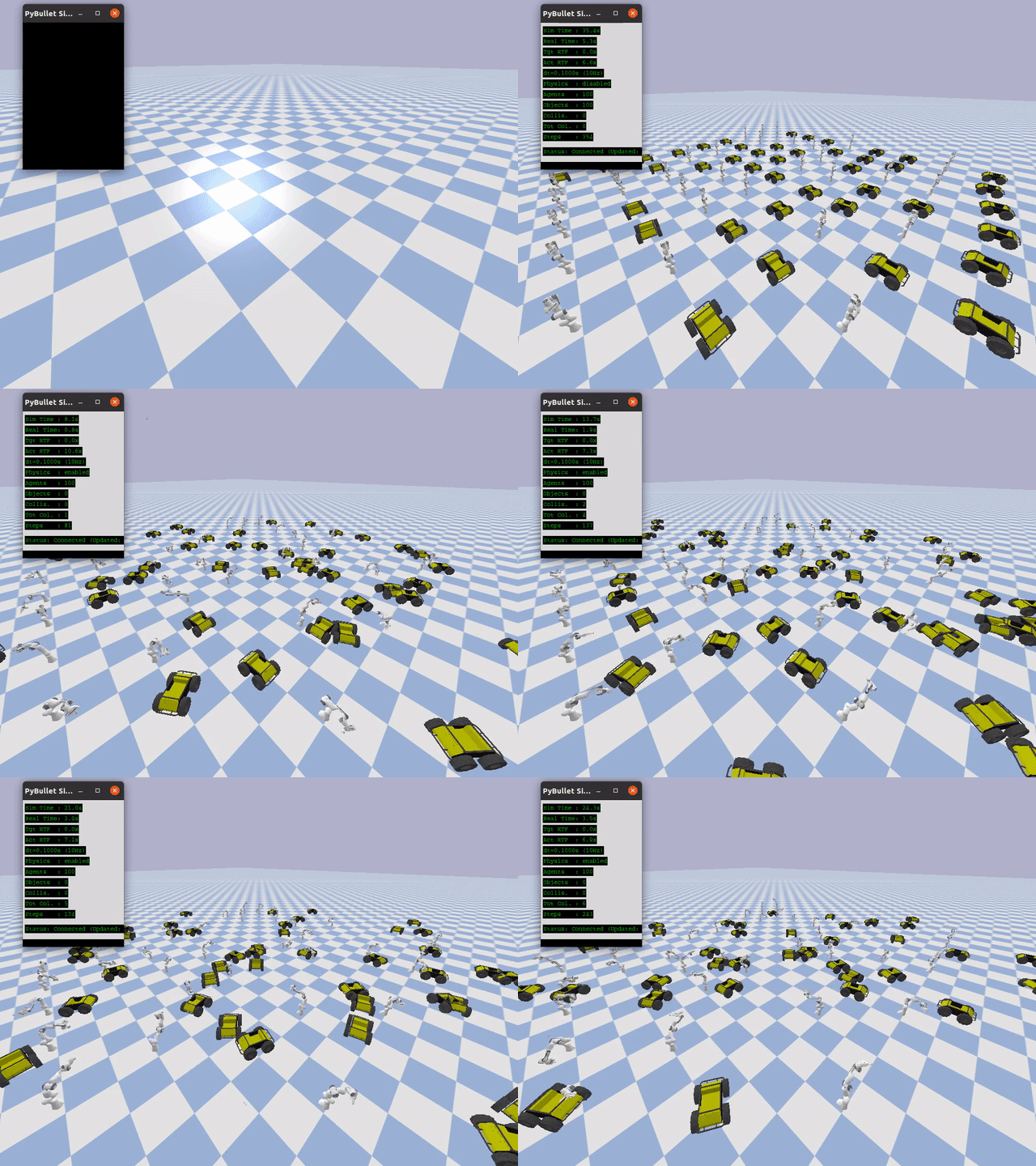
|
Cube Patrol 100robots_cube_patrol_demo.py 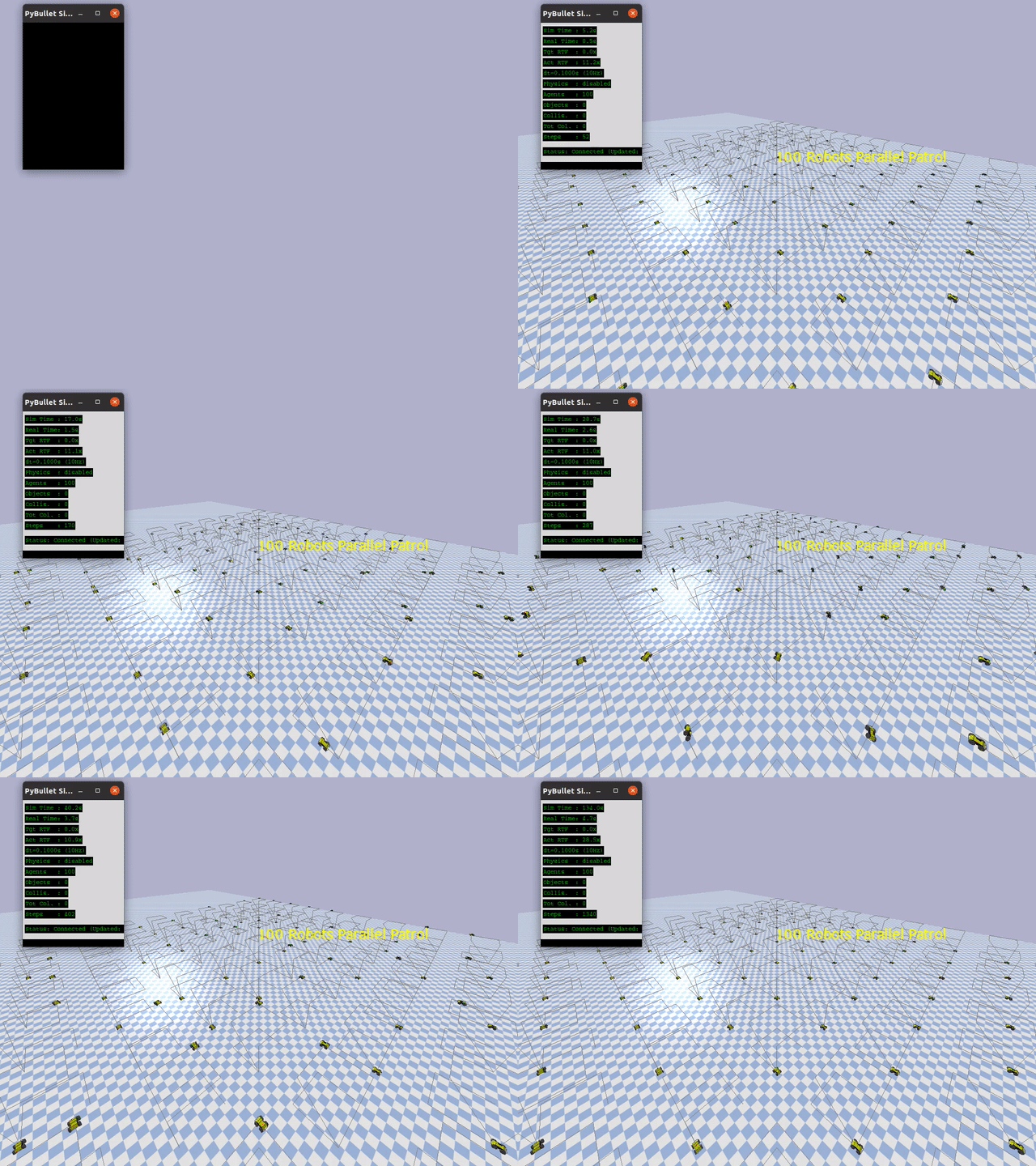
|
|
Mobile Pick & Drop pick_drop_mobile_100robots_demo.py 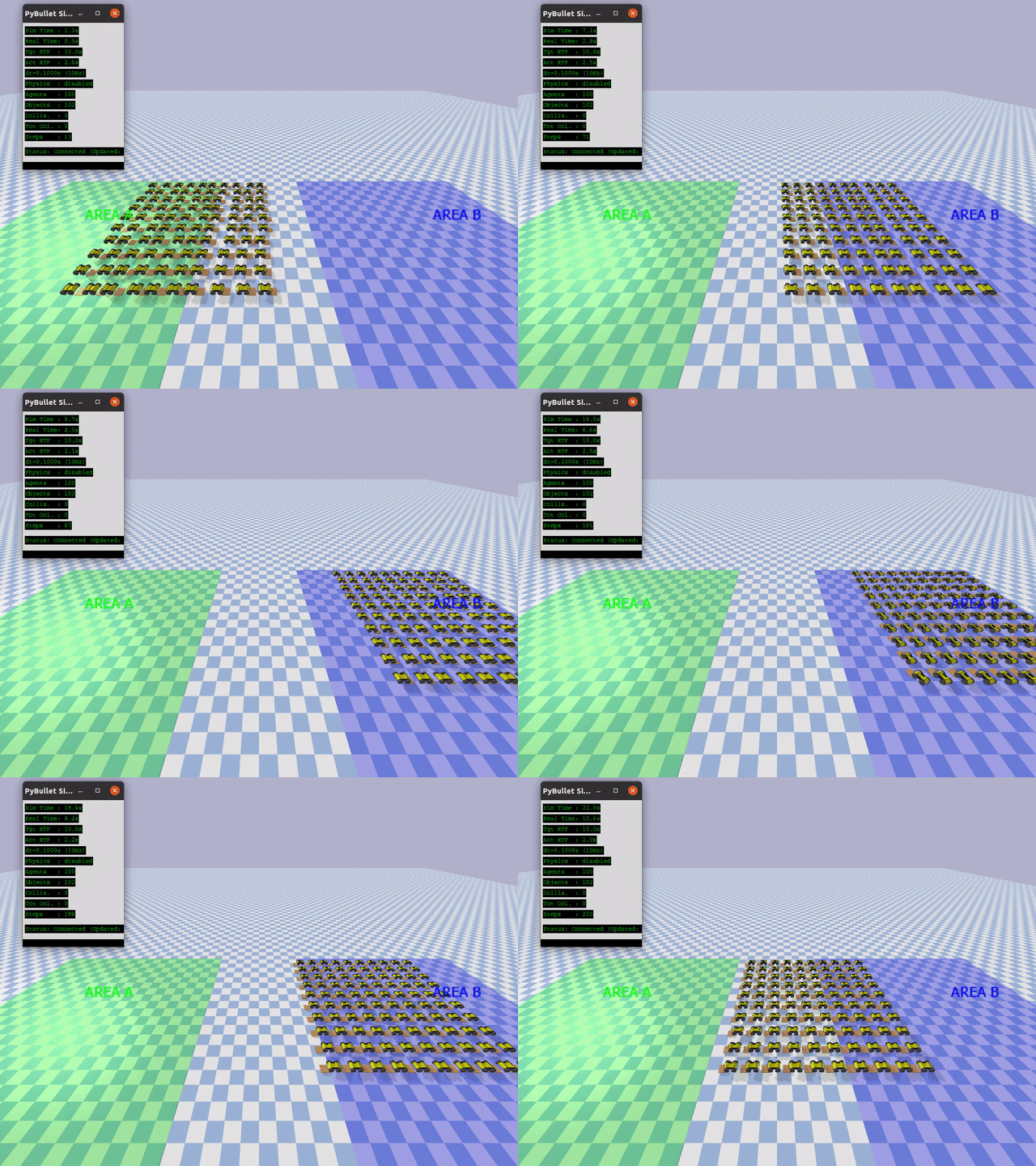
|
Arm Pick & Drop pick_drop_arm_100robots_demo.py 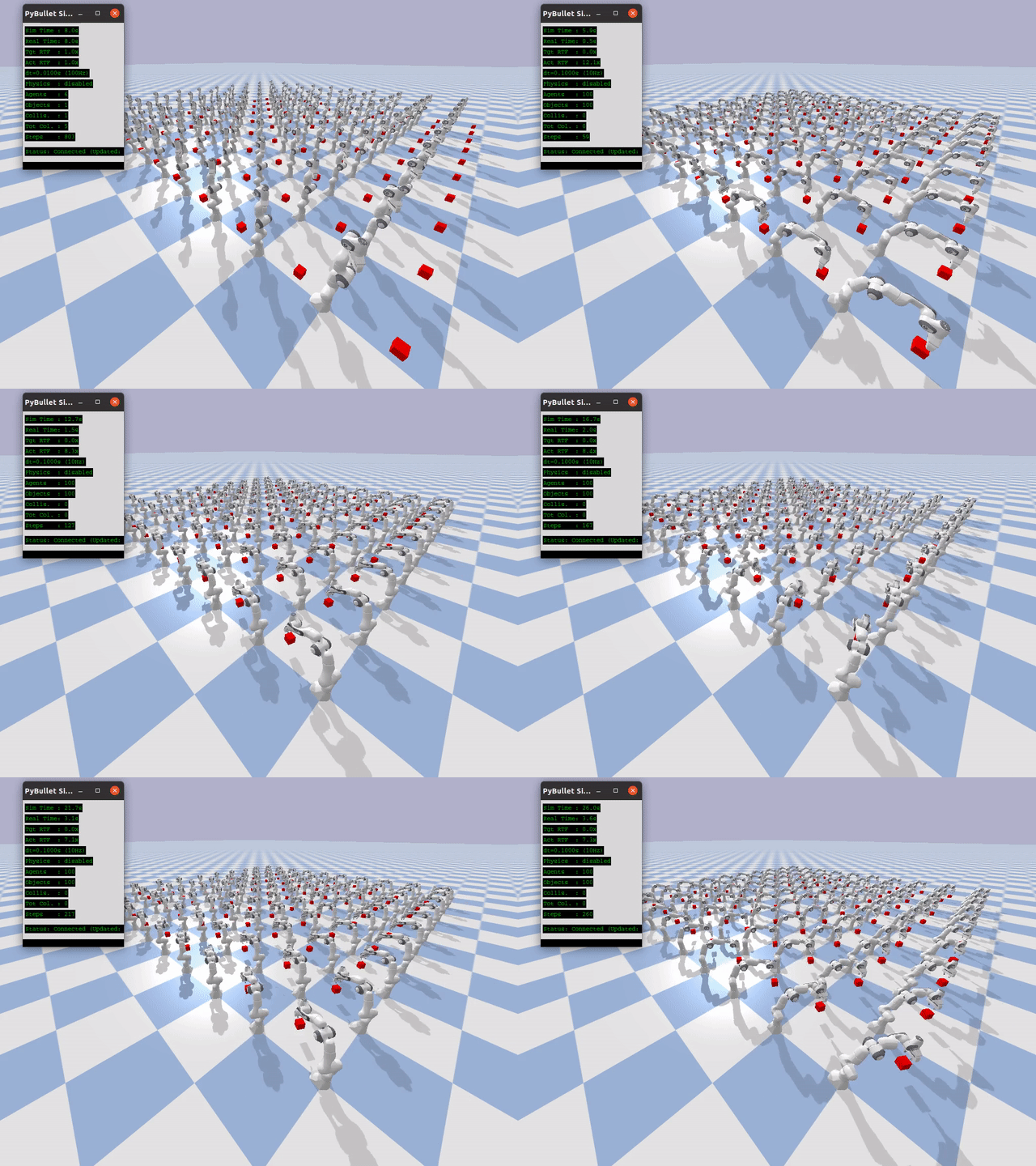
|
A kinematics-first simulation framework for large-scale multi-robot fleets, built on PyBullet and designed for fast N× real-time evaluation.
What is PyBulletFleet?
Different simulation goals call for different tools. Physics-focused simulators (Gazebo, Isaac Sim, MuJoCo, etc.) excel at accurate contact dynamics, sensor modelling, and single-robot control — but stepping a full physics engine for every robot becomes the bottleneck when you need to evaluate fleet-level systems at scale.
PyBulletFleet sits in a different part of the design space: it is a kinematics-first, fleet-scale simulation engine whose primary goal is to enable fast development and testing of the software that orchestrates robot fleets rather than the software that controls individual robots.
Design Priorities
-
Speed over fidelity — Fleet algorithms (task allocation, traffic control, path planning) must be tested with hundreds to thousands of robots running much faster than real time. Kinematics-based stepping — teleporting each robot to its next pose without calling
stepSimulation()— removes the physics bottleneck and enables N× real-time execution. - System integration over low-level control — The primary consumers are high-level systems: WMS (Warehouse Management Systems), task orchestrators, fleet managers, and monitoring dashboards. These systems issue goals, observe progress via state snapshots, and react to events — they do not need joint-level torque feedback.
- Scale over detail — Validating behaviour at 100+ robot scale matters more than modelling individual link dynamics or sensor noise.
- Interoperability — The simulation is designed around a callback-driven step loop and snapshot-friendly state model, so that it can be plugged into larger orchestration frameworks, replay pipelines, or external control systems (e.g., gRPC / ROS 2) as those interfaces are built out.
- Physics as an option — When physical interaction is needed (grasping, conveyor dynamics, contact verification), full PyBullet physics can be switched on per-scenario without changing the rest of the stack.
Target Use Cases
| Use Case | Description |
|---|---|
| Fleet algorithm evaluation | Test path planning, task allocation, and traffic control for large robot fleets at N× real-time speed |
| Warehouse simulation | Simulate pick-and-place, patrol, and transport operations with mobile robots and arms |
| Scalability benchmarking | Measure how fleet software scales from tens to thousands of agents |
| Rapid prototyping | Quickly iterate on multi-robot behaviors with minimal boilerplate |
Quick Start
Install from PyPI
pip install pybullet-fleet
Or install from source (for development)
git clone https://github.com/yuokamoto/PyBulletFleet.git
cd PyBulletFleet
sudo apt install python3-tk  # required for the optional DataMonitor tkinter GUI
pip install -e ".[dev]"
Run a demo
The examples ship inside the package, so after pip install pybullet-fleet you
can list and run them with the pybullet-fleet CLI — no clone needed:
pybullet-fleet examples --list                          # all demos
pybullet-fleet examples --run 100robots_grid_demo.py     # launch one (GUI)
pybullet-fleet examples --copy ./examples                # copy them out to read/edit
pybullet-fleet examples --path                           # where they're installed
--run takes the file name as shown by --list (the .py is optional).
Many demo scripts accept a --robot argument to swap the robot model (forwarded
through --run). Pass a model name (resolved via resolve_model()) or a direct
URDF path:
pybullet-fleet examples --run path_following_demo.py --robot racecar
pybullet-fleet examples --run pick_drop_arm_demo.py --robot kuka_iiwa
# (resolve_model_demo has its own --list; copy it out and run it directly)
From a source checkout you can also run the files directly, e.g.
python pybullet_fleet/examples/scale/100robots_grid_demo.py.
| Category | Demo (pass to --run) |
--robot default |
Alternatives |
|---|---|---|---|
| Arm demos |
pick_drop_arm_*.py, rail_arm_demo.py
|
panda |
kuka_iiwa, arm_robot
|
| Mobile demos | path_following_demo.py |
husky |
racecar, mobile_robot
|
| Scale demos (mobile) |
100robots_cube_patrol_demo.py, pick_drop_mobile_100robots_demo.py
|
husky |
racecar, mobile_robot
|
| Scale demos (mixed) | 100robots_mixed_demo.py |
husky + panda
|
config-driven entities[].grid
|
| Scale demos (arm) | pick_drop_arm_100robots_demo.py |
panda |
kuka_iiwa, arm_robot
|
| Model demos |
resolve_model_demo.py, robot_descriptions_demo.py
|
panda / tiago
|
any registered model |
100robots_grid_demo.py defaults to a 100 mobile robot entities[].grid scene.
Use --config to point it at another entities[].grid scene.
File truncated at 100 lines see the full file
CONTRIBUTING
Repository Summary
| Checkout URI | https://github.com/yuokamoto/PyBulletFleet.git |
| VCS Type | git |
| VCS Version | release/jazzy-0.1.0 |
| Last Updated | 2026-07-26 |
| Dev Status | DEVELOPED |
| Released | UNRELEASED |
| Contributing |
Help Wanted (-)
Good First Issues (-) Pull Requests to Review (-) |
Packages
| Name | Version |
|---|---|
| pybullet_fleet_msgs | 0.1.0 |
| pybullet_fleet_rmf | 0.1.0 |
| pybullet_fleet_ros | 0.1.0 |
README
PyBulletFleet
|
100 Robot Grid 100robots_grid_demo.py
|
Cube Patrol 100robots_cube_patrol_demo.py
|
|
Mobile Pick & Drop pick_drop_mobile_100robots_demo.py
|
Arm Pick & Drop pick_drop_arm_100robots_demo.py
|
A kinematics-first simulation framework for large-scale multi-robot fleets, built on PyBullet and designed for fast N× real-time evaluation.
What is PyBulletFleet?
Different simulation goals call for different tools. Physics-focused simulators (Gazebo, Isaac Sim, MuJoCo, etc.) excel at accurate contact dynamics, sensor modelling, and single-robot control — but stepping a full physics engine for every robot becomes the bottleneck when you need to evaluate fleet-level systems at scale.
PyBulletFleet sits in a different part of the design space: it is a kinematics-first, fleet-scale simulation engine whose primary goal is to enable fast development and testing of the software that orchestrates robot fleets rather than the software that controls individual robots.
Design Priorities
-
Speed over fidelity — Fleet algorithms (task allocation, traffic control, path planning) must be tested with hundreds to thousands of robots running much faster than real time. Kinematics-based stepping — teleporting each robot to its next pose without calling
stepSimulation()— removes the physics bottleneck and enables N× real-time execution. - System integration over low-level control — The primary consumers are high-level systems: WMS (Warehouse Management Systems), task orchestrators, fleet managers, and monitoring dashboards. These systems issue goals, observe progress via state snapshots, and react to events — they do not need joint-level torque feedback.
- Scale over detail — Validating behaviour at 100+ robot scale matters more than modelling individual link dynamics or sensor noise.
- Interoperability — The simulation is designed around a callback-driven step loop and snapshot-friendly state model, so that it can be plugged into larger orchestration frameworks, replay pipelines, or external control systems (e.g., gRPC / ROS 2) as those interfaces are built out.
- Physics as an option — When physical interaction is needed (grasping, conveyor dynamics, contact verification), full PyBullet physics can be switched on per-scenario without changing the rest of the stack.
Target Use Cases
| Use Case | Description |
|---|---|
| Fleet algorithm evaluation | Test path planning, task allocation, and traffic control for large robot fleets at N× real-time speed |
| Warehouse simulation | Simulate pick-and-place, patrol, and transport operations with mobile robots and arms |
| Scalability benchmarking | Measure how fleet software scales from tens to thousands of agents |
| Rapid prototyping | Quickly iterate on multi-robot behaviors with minimal boilerplate |
Quick Start
Install from PyPI
pip install pybullet-fleet
Or install from source (for development)
git clone https://github.com/yuokamoto/PyBulletFleet.git
cd PyBulletFleet
sudo apt install python3-tk  # required for the optional DataMonitor tkinter GUI
pip install -e ".[dev]"
Run a demo
The examples ship inside the package, so after pip install pybullet-fleet you
can list and run them with the pybullet-fleet CLI — no clone needed:
pybullet-fleet examples --list                          # all demos
pybullet-fleet examples --run 100robots_grid_demo.py     # launch one (GUI)
pybullet-fleet examples --copy ./examples                # copy them out to read/edit
pybullet-fleet examples --path                           # where they're installed
--run takes the file name as shown by --list (the .py is optional).
Many demo scripts accept a --robot argument to swap the robot model (forwarded
through --run). Pass a model name (resolved via resolve_model()) or a direct
URDF path:
pybullet-fleet examples --run path_following_demo.py --robot racecar
pybullet-fleet examples --run pick_drop_arm_demo.py --robot kuka_iiwa
# (resolve_model_demo has its own --list; copy it out and run it directly)
From a source checkout you can also run the files directly, e.g.
python pybullet_fleet/examples/scale/100robots_grid_demo.py.
| Category | Demo (pass to --run) |
--robot default |
Alternatives |
|---|---|---|---|
| Arm demos |
pick_drop_arm_*.py, rail_arm_demo.py
|
panda |
kuka_iiwa, arm_robot
|
| Mobile demos | path_following_demo.py |
husky |
racecar, mobile_robot
|
| Scale demos (mobile) |
100robots_cube_patrol_demo.py, pick_drop_mobile_100robots_demo.py
|
husky |
racecar, mobile_robot
|
| Scale demos (mixed) | 100robots_mixed_demo.py |
husky + panda
|
config-driven entities[].grid
|
| Scale demos (arm) | pick_drop_arm_100robots_demo.py |
panda |
kuka_iiwa, arm_robot
|
| Model demos |
resolve_model_demo.py, robot_descriptions_demo.py
|
panda / tiago
|
any registered model |
100robots_grid_demo.py defaults to a 100 mobile robot entities[].grid scene.
Use --config to point it at another entities[].grid scene.
File truncated at 100 lines see the full file
CONTRIBUTING
Repository Summary
| Checkout URI | https://github.com/yuokamoto/PyBulletFleet.git |
| VCS Type | git |
| VCS Version | release/jazzy-0.1.0 |
| Last Updated | 2026-07-26 |
| Dev Status | DEVELOPED |
| Released | UNRELEASED |
| Contributing |
Help Wanted (-)
Good First Issues (-) Pull Requests to Review (-) |
Packages
| Name | Version |
|---|---|
| pybullet_fleet_msgs | 0.1.0 |
| pybullet_fleet_rmf | 0.1.0 |
| pybullet_fleet_ros | 0.1.0 |
README
PyBulletFleet
|
100 Robot Grid 100robots_grid_demo.py
|
Cube Patrol 100robots_cube_patrol_demo.py
|
|
Mobile Pick & Drop pick_drop_mobile_100robots_demo.py
|
Arm Pick & Drop pick_drop_arm_100robots_demo.py
|
A kinematics-first simulation framework for large-scale multi-robot fleets, built on PyBullet and designed for fast N× real-time evaluation.
What is PyBulletFleet?
Different simulation goals call for different tools. Physics-focused simulators (Gazebo, Isaac Sim, MuJoCo, etc.) excel at accurate contact dynamics, sensor modelling, and single-robot control — but stepping a full physics engine for every robot becomes the bottleneck when you need to evaluate fleet-level systems at scale.
PyBulletFleet sits in a different part of the design space: it is a kinematics-first, fleet-scale simulation engine whose primary goal is to enable fast development and testing of the software that orchestrates robot fleets rather than the software that controls individual robots.
Design Priorities
-
Speed over fidelity — Fleet algorithms (task allocation, traffic control, path planning) must be tested with hundreds to thousands of robots running much faster than real time. Kinematics-based stepping — teleporting each robot to its next pose without calling
stepSimulation()— removes the physics bottleneck and enables N× real-time execution. - System integration over low-level control — The primary consumers are high-level systems: WMS (Warehouse Management Systems), task orchestrators, fleet managers, and monitoring dashboards. These systems issue goals, observe progress via state snapshots, and react to events — they do not need joint-level torque feedback.
- Scale over detail — Validating behaviour at 100+ robot scale matters more than modelling individual link dynamics or sensor noise.
- Interoperability — The simulation is designed around a callback-driven step loop and snapshot-friendly state model, so that it can be plugged into larger orchestration frameworks, replay pipelines, or external control systems (e.g., gRPC / ROS 2) as those interfaces are built out.
- Physics as an option — When physical interaction is needed (grasping, conveyor dynamics, contact verification), full PyBullet physics can be switched on per-scenario without changing the rest of the stack.
Target Use Cases
| Use Case | Description |
|---|---|
| Fleet algorithm evaluation | Test path planning, task allocation, and traffic control for large robot fleets at N× real-time speed |
| Warehouse simulation | Simulate pick-and-place, patrol, and transport operations with mobile robots and arms |
| Scalability benchmarking | Measure how fleet software scales from tens to thousands of agents |
| Rapid prototyping | Quickly iterate on multi-robot behaviors with minimal boilerplate |
Quick Start
Install from PyPI
pip install pybullet-fleet
Or install from source (for development)
git clone https://github.com/yuokamoto/PyBulletFleet.git
cd PyBulletFleet
sudo apt install python3-tk  # required for the optional DataMonitor tkinter GUI
pip install -e ".[dev]"
Run a demo
The examples ship inside the package, so after pip install pybullet-fleet you
can list and run them with the pybullet-fleet CLI — no clone needed:
pybullet-fleet examples --list                          # all demos
pybullet-fleet examples --run 100robots_grid_demo.py     # launch one (GUI)
pybullet-fleet examples --copy ./examples                # copy them out to read/edit
pybullet-fleet examples --path                           # where they're installed
--run takes the file name as shown by --list (the .py is optional).
Many demo scripts accept a --robot argument to swap the robot model (forwarded
through --run). Pass a model name (resolved via resolve_model()) or a direct
URDF path:
pybullet-fleet examples --run path_following_demo.py --robot racecar
pybullet-fleet examples --run pick_drop_arm_demo.py --robot kuka_iiwa
# (resolve_model_demo has its own --list; copy it out and run it directly)
From a source checkout you can also run the files directly, e.g.
python pybullet_fleet/examples/scale/100robots_grid_demo.py.
| Category | Demo (pass to --run) |
--robot default |
Alternatives |
|---|---|---|---|
| Arm demos |
pick_drop_arm_*.py, rail_arm_demo.py
|
panda |
kuka_iiwa, arm_robot
|
| Mobile demos | path_following_demo.py |
husky |
racecar, mobile_robot
|
| Scale demos (mobile) |
100robots_cube_patrol_demo.py, pick_drop_mobile_100robots_demo.py
|
husky |
racecar, mobile_robot
|
| Scale demos (mixed) | 100robots_mixed_demo.py |
husky + panda
|
config-driven entities[].grid
|
| Scale demos (arm) | pick_drop_arm_100robots_demo.py |
panda |
kuka_iiwa, arm_robot
|
| Model demos |
resolve_model_demo.py, robot_descriptions_demo.py
|
panda / tiago
|
any registered model |
100robots_grid_demo.py defaults to a 100 mobile robot entities[].grid scene.
Use --config to point it at another entities[].grid scene.
File truncated at 100 lines see the full file
CONTRIBUTING
Repository Summary
| Checkout URI | https://github.com/yuokamoto/PyBulletFleet.git |
| VCS Type | git |
| VCS Version | release/jazzy-0.1.0 |
| Last Updated | 2026-07-26 |
| Dev Status | DEVELOPED |
| Released | UNRELEASED |
| Contributing |
Help Wanted (-)
Good First Issues (-) Pull Requests to Review (-) |
Packages
| Name | Version |
|---|---|
| pybullet_fleet_msgs | 0.1.0 |
| pybullet_fleet_rmf | 0.1.0 |
| pybullet_fleet_ros | 0.1.0 |
README
PyBulletFleet
|
100 Robot Grid 100robots_grid_demo.py
|
Cube Patrol 100robots_cube_patrol_demo.py
|
|
Mobile Pick & Drop pick_drop_mobile_100robots_demo.py
|
Arm Pick & Drop pick_drop_arm_100robots_demo.py
|
A kinematics-first simulation framework for large-scale multi-robot fleets, built on PyBullet and designed for fast N× real-time evaluation.
What is PyBulletFleet?
Different simulation goals call for different tools. Physics-focused simulators (Gazebo, Isaac Sim, MuJoCo, etc.) excel at accurate contact dynamics, sensor modelling, and single-robot control — but stepping a full physics engine for every robot becomes the bottleneck when you need to evaluate fleet-level systems at scale.
PyBulletFleet sits in a different part of the design space: it is a kinematics-first, fleet-scale simulation engine whose primary goal is to enable fast development and testing of the software that orchestrates robot fleets rather than the software that controls individual robots.
Design Priorities
-
Speed over fidelity — Fleet algorithms (task allocation, traffic control, path planning) must be tested with hundreds to thousands of robots running much faster than real time. Kinematics-based stepping — teleporting each robot to its next pose without calling
stepSimulation()— removes the physics bottleneck and enables N× real-time execution. - System integration over low-level control — The primary consumers are high-level systems: WMS (Warehouse Management Systems), task orchestrators, fleet managers, and monitoring dashboards. These systems issue goals, observe progress via state snapshots, and react to events — they do not need joint-level torque feedback.
- Scale over detail — Validating behaviour at 100+ robot scale matters more than modelling individual link dynamics or sensor noise.
- Interoperability — The simulation is designed around a callback-driven step loop and snapshot-friendly state model, so that it can be plugged into larger orchestration frameworks, replay pipelines, or external control systems (e.g., gRPC / ROS 2) as those interfaces are built out.
- Physics as an option — When physical interaction is needed (grasping, conveyor dynamics, contact verification), full PyBullet physics can be switched on per-scenario without changing the rest of the stack.
Target Use Cases
| Use Case | Description |
|---|---|
| Fleet algorithm evaluation | Test path planning, task allocation, and traffic control for large robot fleets at N× real-time speed |
| Warehouse simulation | Simulate pick-and-place, patrol, and transport operations with mobile robots and arms |
| Scalability benchmarking | Measure how fleet software scales from tens to thousands of agents |
| Rapid prototyping | Quickly iterate on multi-robot behaviors with minimal boilerplate |
Quick Start
Install from PyPI
pip install pybullet-fleet
Or install from source (for development)
git clone https://github.com/yuokamoto/PyBulletFleet.git
cd PyBulletFleet
sudo apt install python3-tk  # required for the optional DataMonitor tkinter GUI
pip install -e ".[dev]"
Run a demo
The examples ship inside the package, so after pip install pybullet-fleet you
can list and run them with the pybullet-fleet CLI — no clone needed:
pybullet-fleet examples --list                          # all demos
pybullet-fleet examples --run 100robots_grid_demo.py     # launch one (GUI)
pybullet-fleet examples --copy ./examples                # copy them out to read/edit
pybullet-fleet examples --path                           # where they're installed
--run takes the file name as shown by --list (the .py is optional).
Many demo scripts accept a --robot argument to swap the robot model (forwarded
through --run). Pass a model name (resolved via resolve_model()) or a direct
URDF path:
pybullet-fleet examples --run path_following_demo.py --robot racecar
pybullet-fleet examples --run pick_drop_arm_demo.py --robot kuka_iiwa
# (resolve_model_demo has its own --list; copy it out and run it directly)
From a source checkout you can also run the files directly, e.g.
python pybullet_fleet/examples/scale/100robots_grid_demo.py.
| Category | Demo (pass to --run) |
--robot default |
Alternatives |
|---|---|---|---|
| Arm demos |
pick_drop_arm_*.py, rail_arm_demo.py
|
panda |
kuka_iiwa, arm_robot
|
| Mobile demos | path_following_demo.py |
husky |
racecar, mobile_robot
|
| Scale demos (mobile) |
100robots_cube_patrol_demo.py, pick_drop_mobile_100robots_demo.py
|
husky |
racecar, mobile_robot
|
| Scale demos (mixed) | 100robots_mixed_demo.py |
husky + panda
|
config-driven entities[].grid
|
| Scale demos (arm) | pick_drop_arm_100robots_demo.py |
panda |
kuka_iiwa, arm_robot
|
| Model demos |
resolve_model_demo.py, robot_descriptions_demo.py
|
panda / tiago
|
any registered model |
100robots_grid_demo.py defaults to a 100 mobile robot entities[].grid scene.
Use --config to point it at another entities[].grid scene.
File truncated at 100 lines see the full file
CONTRIBUTING
Repository Summary
| Checkout URI | https://github.com/yuokamoto/PyBulletFleet.git |
| VCS Type | git |
| VCS Version | release/jazzy-0.1.0 |
| Last Updated | 2026-07-26 |
| Dev Status | DEVELOPED |
| Released | UNRELEASED |
| Contributing |
Help Wanted (-)
Good First Issues (-) Pull Requests to Review (-) |
Packages
| Name | Version |
|---|---|
| pybullet_fleet_msgs | 0.1.0 |
| pybullet_fleet_rmf | 0.1.0 |
| pybullet_fleet_ros | 0.1.0 |
README
PyBulletFleet
|
100 Robot Grid 100robots_grid_demo.py
|
Cube Patrol 100robots_cube_patrol_demo.py
|
|
Mobile Pick & Drop pick_drop_mobile_100robots_demo.py
|
Arm Pick & Drop pick_drop_arm_100robots_demo.py
|
A kinematics-first simulation framework for large-scale multi-robot fleets, built on PyBullet and designed for fast N× real-time evaluation.
What is PyBulletFleet?
Different simulation goals call for different tools. Physics-focused simulators (Gazebo, Isaac Sim, MuJoCo, etc.) excel at accurate contact dynamics, sensor modelling, and single-robot control — but stepping a full physics engine for every robot becomes the bottleneck when you need to evaluate fleet-level systems at scale.
PyBulletFleet sits in a different part of the design space: it is a kinematics-first, fleet-scale simulation engine whose primary goal is to enable fast development and testing of the software that orchestrates robot fleets rather than the software that controls individual robots.
Design Priorities
-
Speed over fidelity — Fleet algorithms (task allocation, traffic control, path planning) must be tested with hundreds to thousands of robots running much faster than real time. Kinematics-based stepping — teleporting each robot to its next pose without calling
stepSimulation()— removes the physics bottleneck and enables N× real-time execution. - System integration over low-level control — The primary consumers are high-level systems: WMS (Warehouse Management Systems), task orchestrators, fleet managers, and monitoring dashboards. These systems issue goals, observe progress via state snapshots, and react to events — they do not need joint-level torque feedback.
- Scale over detail — Validating behaviour at 100+ robot scale matters more than modelling individual link dynamics or sensor noise.
- Interoperability — The simulation is designed around a callback-driven step loop and snapshot-friendly state model, so that it can be plugged into larger orchestration frameworks, replay pipelines, or external control systems (e.g., gRPC / ROS 2) as those interfaces are built out.
- Physics as an option — When physical interaction is needed (grasping, conveyor dynamics, contact verification), full PyBullet physics can be switched on per-scenario without changing the rest of the stack.
Target Use Cases
| Use Case | Description |
|---|---|
| Fleet algorithm evaluation | Test path planning, task allocation, and traffic control for large robot fleets at N× real-time speed |
| Warehouse simulation | Simulate pick-and-place, patrol, and transport operations with mobile robots and arms |
| Scalability benchmarking | Measure how fleet software scales from tens to thousands of agents |
| Rapid prototyping | Quickly iterate on multi-robot behaviors with minimal boilerplate |
Quick Start
Install from PyPI
pip install pybullet-fleet
Or install from source (for development)
git clone https://github.com/yuokamoto/PyBulletFleet.git
cd PyBulletFleet
sudo apt install python3-tk  # required for the optional DataMonitor tkinter GUI
pip install -e ".[dev]"
Run a demo
The examples ship inside the package, so after pip install pybullet-fleet you
can list and run them with the pybullet-fleet CLI — no clone needed:
pybullet-fleet examples --list                          # all demos
pybullet-fleet examples --run 100robots_grid_demo.py     # launch one (GUI)
pybullet-fleet examples --copy ./examples                # copy them out to read/edit
pybullet-fleet examples --path                           # where they're installed
--run takes the file name as shown by --list (the .py is optional).
Many demo scripts accept a --robot argument to swap the robot model (forwarded
through --run). Pass a model name (resolved via resolve_model()) or a direct
URDF path:
pybullet-fleet examples --run path_following_demo.py --robot racecar
pybullet-fleet examples --run pick_drop_arm_demo.py --robot kuka_iiwa
# (resolve_model_demo has its own --list; copy it out and run it directly)
From a source checkout you can also run the files directly, e.g.
python pybullet_fleet/examples/scale/100robots_grid_demo.py.
| Category | Demo (pass to --run) |
--robot default |
Alternatives |
|---|---|---|---|
| Arm demos |
pick_drop_arm_*.py, rail_arm_demo.py
|
panda |
kuka_iiwa, arm_robot
|
| Mobile demos | path_following_demo.py |
husky |
racecar, mobile_robot
|
| Scale demos (mobile) |
100robots_cube_patrol_demo.py, pick_drop_mobile_100robots_demo.py
|
husky |
racecar, mobile_robot
|
| Scale demos (mixed) | 100robots_mixed_demo.py |
husky + panda
|
config-driven entities[].grid
|
| Scale demos (arm) | pick_drop_arm_100robots_demo.py |
panda |
kuka_iiwa, arm_robot
|
| Model demos |
resolve_model_demo.py, robot_descriptions_demo.py
|
panda / tiago
|
any registered model |
100robots_grid_demo.py defaults to a 100 mobile robot entities[].grid scene.
Use --config to point it at another entities[].grid scene.
File truncated at 100 lines see the full file
CONTRIBUTING
Repository Summary
| Checkout URI | https://github.com/yuokamoto/PyBulletFleet.git |
| VCS Type | git |
| VCS Version | release/jazzy-0.1.0 |
| Last Updated | 2026-07-26 |
| Dev Status | DEVELOPED |
| Released | UNRELEASED |
| Contributing |
Help Wanted (-)
Good First Issues (-) Pull Requests to Review (-) |
Packages
| Name | Version |
|---|---|
| pybullet_fleet_msgs | 0.1.0 |
| pybullet_fleet_rmf | 0.1.0 |
| pybullet_fleet_ros | 0.1.0 |
README
PyBulletFleet
|
100 Robot Grid 100robots_grid_demo.py
|
Cube Patrol 100robots_cube_patrol_demo.py
|
|
Mobile Pick & Drop pick_drop_mobile_100robots_demo.py
|
Arm Pick & Drop pick_drop_arm_100robots_demo.py
|
A kinematics-first simulation framework for large-scale multi-robot fleets, built on PyBullet and designed for fast N× real-time evaluation.
What is PyBulletFleet?
Different simulation goals call for different tools. Physics-focused simulators (Gazebo, Isaac Sim, MuJoCo, etc.) excel at accurate contact dynamics, sensor modelling, and single-robot control — but stepping a full physics engine for every robot becomes the bottleneck when you need to evaluate fleet-level systems at scale.
PyBulletFleet sits in a different part of the design space: it is a kinematics-first, fleet-scale simulation engine whose primary goal is to enable fast development and testing of the software that orchestrates robot fleets rather than the software that controls individual robots.
Design Priorities
-
Speed over fidelity — Fleet algorithms (task allocation, traffic control, path planning) must be tested with hundreds to thousands of robots running much faster than real time. Kinematics-based stepping — teleporting each robot to its next pose without calling
stepSimulation()— removes the physics bottleneck and enables N× real-time execution. - System integration over low-level control — The primary consumers are high-level systems: WMS (Warehouse Management Systems), task orchestrators, fleet managers, and monitoring dashboards. These systems issue goals, observe progress via state snapshots, and react to events — they do not need joint-level torque feedback.
- Scale over detail — Validating behaviour at 100+ robot scale matters more than modelling individual link dynamics or sensor noise.
- Interoperability — The simulation is designed around a callback-driven step loop and snapshot-friendly state model, so that it can be plugged into larger orchestration frameworks, replay pipelines, or external control systems (e.g., gRPC / ROS 2) as those interfaces are built out.
- Physics as an option — When physical interaction is needed (grasping, conveyor dynamics, contact verification), full PyBullet physics can be switched on per-scenario without changing the rest of the stack.
Target Use Cases
| Use Case | Description |
|---|---|
| Fleet algorithm evaluation | Test path planning, task allocation, and traffic control for large robot fleets at N× real-time speed |
| Warehouse simulation | Simulate pick-and-place, patrol, and transport operations with mobile robots and arms |
| Scalability benchmarking | Measure how fleet software scales from tens to thousands of agents |
| Rapid prototyping | Quickly iterate on multi-robot behaviors with minimal boilerplate |
Quick Start
Install from PyPI
pip install pybullet-fleet
Or install from source (for development)
git clone https://github.com/yuokamoto/PyBulletFleet.git
cd PyBulletFleet
sudo apt install python3-tk  # required for the optional DataMonitor tkinter GUI
pip install -e ".[dev]"
Run a demo
The examples ship inside the package, so after pip install pybullet-fleet you
can list and run them with the pybullet-fleet CLI — no clone needed:
pybullet-fleet examples --list                          # all demos
pybullet-fleet examples --run 100robots_grid_demo.py     # launch one (GUI)
pybullet-fleet examples --copy ./examples                # copy them out to read/edit
pybullet-fleet examples --path                           # where they're installed
--run takes the file name as shown by --list (the .py is optional).
Many demo scripts accept a --robot argument to swap the robot model (forwarded
through --run). Pass a model name (resolved via resolve_model()) or a direct
URDF path:
pybullet-fleet examples --run path_following_demo.py --robot racecar
pybullet-fleet examples --run pick_drop_arm_demo.py --robot kuka_iiwa
# (resolve_model_demo has its own --list; copy it out and run it directly)
From a source checkout you can also run the files directly, e.g.
python pybullet_fleet/examples/scale/100robots_grid_demo.py.
| Category | Demo (pass to --run) |
--robot default |
Alternatives |
|---|---|---|---|
| Arm demos |
pick_drop_arm_*.py, rail_arm_demo.py
|
panda |
kuka_iiwa, arm_robot
|
| Mobile demos | path_following_demo.py |
husky |
racecar, mobile_robot
|
| Scale demos (mobile) |
100robots_cube_patrol_demo.py, pick_drop_mobile_100robots_demo.py
|
husky |
racecar, mobile_robot
|
| Scale demos (mixed) | 100robots_mixed_demo.py |
husky + panda
|
config-driven entities[].grid
|
| Scale demos (arm) | pick_drop_arm_100robots_demo.py |
panda |
kuka_iiwa, arm_robot
|
| Model demos |
resolve_model_demo.py, robot_descriptions_demo.py
|
panda / tiago
|
any registered model |
100robots_grid_demo.py defaults to a 100 mobile robot entities[].grid scene.
Use --config to point it at another entities[].grid scene.
File truncated at 100 lines see the full file
CONTRIBUTING
Repository Summary
| Checkout URI | https://github.com/yuokamoto/PyBulletFleet.git |
| VCS Type | git |
| VCS Version | release/jazzy-0.1.0 |
| Last Updated | 2026-07-26 |
| Dev Status | DEVELOPED |
| Released | UNRELEASED |
| Contributing |
Help Wanted (-)
Good First Issues (-) Pull Requests to Review (-) |
Packages
| Name | Version |
|---|---|
| pybullet_fleet_msgs | 0.1.0 |
| pybullet_fleet_rmf | 0.1.0 |
| pybullet_fleet_ros | 0.1.0 |
README
PyBulletFleet
|
100 Robot Grid 100robots_grid_demo.py
|
Cube Patrol 100robots_cube_patrol_demo.py
|
|
Mobile Pick & Drop pick_drop_mobile_100robots_demo.py
|
Arm Pick & Drop pick_drop_arm_100robots_demo.py
|
A kinematics-first simulation framework for large-scale multi-robot fleets, built on PyBullet and designed for fast N× real-time evaluation.
What is PyBulletFleet?
Different simulation goals call for different tools. Physics-focused simulators (Gazebo, Isaac Sim, MuJoCo, etc.) excel at accurate contact dynamics, sensor modelling, and single-robot control — but stepping a full physics engine for every robot becomes the bottleneck when you need to evaluate fleet-level systems at scale.
PyBulletFleet sits in a different part of the design space: it is a kinematics-first, fleet-scale simulation engine whose primary goal is to enable fast development and testing of the software that orchestrates robot fleets rather than the software that controls individual robots.
Design Priorities
-
Speed over fidelity — Fleet algorithms (task allocation, traffic control, path planning) must be tested with hundreds to thousands of robots running much faster than real time. Kinematics-based stepping — teleporting each robot to its next pose without calling
stepSimulation()— removes the physics bottleneck and enables N× real-time execution. - System integration over low-level control — The primary consumers are high-level systems: WMS (Warehouse Management Systems), task orchestrators, fleet managers, and monitoring dashboards. These systems issue goals, observe progress via state snapshots, and react to events — they do not need joint-level torque feedback.
- Scale over detail — Validating behaviour at 100+ robot scale matters more than modelling individual link dynamics or sensor noise.
- Interoperability — The simulation is designed around a callback-driven step loop and snapshot-friendly state model, so that it can be plugged into larger orchestration frameworks, replay pipelines, or external control systems (e.g., gRPC / ROS 2) as those interfaces are built out.
- Physics as an option — When physical interaction is needed (grasping, conveyor dynamics, contact verification), full PyBullet physics can be switched on per-scenario without changing the rest of the stack.
Target Use Cases
| Use Case | Description |
|---|---|
| Fleet algorithm evaluation | Test path planning, task allocation, and traffic control for large robot fleets at N× real-time speed |
| Warehouse simulation | Simulate pick-and-place, patrol, and transport operations with mobile robots and arms |
| Scalability benchmarking | Measure how fleet software scales from tens to thousands of agents |
| Rapid prototyping | Quickly iterate on multi-robot behaviors with minimal boilerplate |
Quick Start
Install from PyPI
pip install pybullet-fleet
Or install from source (for development)
git clone https://github.com/yuokamoto/PyBulletFleet.git
cd PyBulletFleet
sudo apt install python3-tk  # required for the optional DataMonitor tkinter GUI
pip install -e ".[dev]"
Run a demo
The examples ship inside the package, so after pip install pybullet-fleet you
can list and run them with the pybullet-fleet CLI — no clone needed:
pybullet-fleet examples --list                          # all demos
pybullet-fleet examples --run 100robots_grid_demo.py     # launch one (GUI)
pybullet-fleet examples --copy ./examples                # copy them out to read/edit
pybullet-fleet examples --path                           # where they're installed
--run takes the file name as shown by --list (the .py is optional).
Many demo scripts accept a --robot argument to swap the robot model (forwarded
through --run). Pass a model name (resolved via resolve_model()) or a direct
URDF path:
pybullet-fleet examples --run path_following_demo.py --robot racecar
pybullet-fleet examples --run pick_drop_arm_demo.py --robot kuka_iiwa
# (resolve_model_demo has its own --list; copy it out and run it directly)
From a source checkout you can also run the files directly, e.g.
python pybullet_fleet/examples/scale/100robots_grid_demo.py.
| Category | Demo (pass to --run) |
--robot default |
Alternatives |
|---|---|---|---|
| Arm demos |
pick_drop_arm_*.py, rail_arm_demo.py
|
panda |
kuka_iiwa, arm_robot
|
| Mobile demos | path_following_demo.py |
husky |
racecar, mobile_robot
|
| Scale demos (mobile) |
100robots_cube_patrol_demo.py, pick_drop_mobile_100robots_demo.py
|
husky |
racecar, mobile_robot
|
| Scale demos (mixed) | 100robots_mixed_demo.py |
husky + panda
|
config-driven entities[].grid
|
| Scale demos (arm) | pick_drop_arm_100robots_demo.py |
panda |
kuka_iiwa, arm_robot
|
| Model demos |
resolve_model_demo.py, robot_descriptions_demo.py
|
panda / tiago
|
any registered model |
100robots_grid_demo.py defaults to a 100 mobile robot entities[].grid scene.
Use --config to point it at another entities[].grid scene.
File truncated at 100 lines see the full file
CONTRIBUTING
Repository Summary
| Checkout URI | https://github.com/yuokamoto/PyBulletFleet.git |
| VCS Type | git |
| VCS Version | release/jazzy-0.1.0 |
| Last Updated | 2026-07-26 |
| Dev Status | DEVELOPED |
| Released | UNRELEASED |
| Contributing |
Help Wanted (-)
Good First Issues (-) Pull Requests to Review (-) |
Packages
| Name | Version |
|---|---|
| pybullet_fleet_msgs | 0.1.0 |
| pybullet_fleet_rmf | 0.1.0 |
| pybullet_fleet_ros | 0.1.0 |
README
PyBulletFleet
|
100 Robot Grid 100robots_grid_demo.py
|
Cube Patrol 100robots_cube_patrol_demo.py
|
|
Mobile Pick & Drop pick_drop_mobile_100robots_demo.py
|
Arm Pick & Drop pick_drop_arm_100robots_demo.py
|
A kinematics-first simulation framework for large-scale multi-robot fleets, built on PyBullet and designed for fast N× real-time evaluation.
What is PyBulletFleet?
Different simulation goals call for different tools. Physics-focused simulators (Gazebo, Isaac Sim, MuJoCo, etc.) excel at accurate contact dynamics, sensor modelling, and single-robot control — but stepping a full physics engine for every robot becomes the bottleneck when you need to evaluate fleet-level systems at scale.
PyBulletFleet sits in a different part of the design space: it is a kinematics-first, fleet-scale simulation engine whose primary goal is to enable fast development and testing of the software that orchestrates robot fleets rather than the software that controls individual robots.
Design Priorities
-
Speed over fidelity — Fleet algorithms (task allocation, traffic control, path planning) must be tested with hundreds to thousands of robots running much faster than real time. Kinematics-based stepping — teleporting each robot to its next pose without calling
stepSimulation()— removes the physics bottleneck and enables N× real-time execution. - System integration over low-level control — The primary consumers are high-level systems: WMS (Warehouse Management Systems), task orchestrators, fleet managers, and monitoring dashboards. These systems issue goals, observe progress via state snapshots, and react to events — they do not need joint-level torque feedback.
- Scale over detail — Validating behaviour at 100+ robot scale matters more than modelling individual link dynamics or sensor noise.
- Interoperability — The simulation is designed around a callback-driven step loop and snapshot-friendly state model, so that it can be plugged into larger orchestration frameworks, replay pipelines, or external control systems (e.g., gRPC / ROS 2) as those interfaces are built out.
- Physics as an option — When physical interaction is needed (grasping, conveyor dynamics, contact verification), full PyBullet physics can be switched on per-scenario without changing the rest of the stack.
Target Use Cases
| Use Case | Description |
|---|---|
| Fleet algorithm evaluation | Test path planning, task allocation, and traffic control for large robot fleets at N× real-time speed |
| Warehouse simulation | Simulate pick-and-place, patrol, and transport operations with mobile robots and arms |
| Scalability benchmarking | Measure how fleet software scales from tens to thousands of agents |
| Rapid prototyping | Quickly iterate on multi-robot behaviors with minimal boilerplate |
Quick Start
Install from PyPI
pip install pybullet-fleet
Or install from source (for development)
git clone https://github.com/yuokamoto/PyBulletFleet.git
cd PyBulletFleet
sudo apt install python3-tk  # required for the optional DataMonitor tkinter GUI
pip install -e ".[dev]"
Run a demo
The examples ship inside the package, so after pip install pybullet-fleet you
can list and run them with the pybullet-fleet CLI — no clone needed:
pybullet-fleet examples --list                          # all demos
pybullet-fleet examples --run 100robots_grid_demo.py     # launch one (GUI)
pybullet-fleet examples --copy ./examples                # copy them out to read/edit
pybullet-fleet examples --path                           # where they're installed
--run takes the file name as shown by --list (the .py is optional).
Many demo scripts accept a --robot argument to swap the robot model (forwarded
through --run). Pass a model name (resolved via resolve_model()) or a direct
URDF path:
pybullet-fleet examples --run path_following_demo.py --robot racecar
pybullet-fleet examples --run pick_drop_arm_demo.py --robot kuka_iiwa
# (resolve_model_demo has its own --list; copy it out and run it directly)
From a source checkout you can also run the files directly, e.g.
python pybullet_fleet/examples/scale/100robots_grid_demo.py.
| Category | Demo (pass to --run) |
--robot default |
Alternatives |
|---|---|---|---|
| Arm demos |
pick_drop_arm_*.py, rail_arm_demo.py
|
panda |
kuka_iiwa, arm_robot
|
| Mobile demos | path_following_demo.py |
husky |
racecar, mobile_robot
|
| Scale demos (mobile) |
100robots_cube_patrol_demo.py, pick_drop_mobile_100robots_demo.py
|
husky |
racecar, mobile_robot
|
| Scale demos (mixed) | 100robots_mixed_demo.py |
husky + panda
|
config-driven entities[].grid
|
| Scale demos (arm) | pick_drop_arm_100robots_demo.py |
panda |
kuka_iiwa, arm_robot
|
| Model demos |
resolve_model_demo.py, robot_descriptions_demo.py
|
panda / tiago
|
any registered model |
100robots_grid_demo.py defaults to a 100 mobile robot entities[].grid scene.
Use --config to point it at another entities[].grid scene.
File truncated at 100 lines see the full file
CONTRIBUTING
Repository Summary
| Checkout URI | https://github.com/yuokamoto/PyBulletFleet.git |
| VCS Type | git |
| VCS Version | release/jazzy-0.1.0 |
| Last Updated | 2026-07-26 |
| Dev Status | DEVELOPED |
| Released | UNRELEASED |
| Contributing |
Help Wanted (-)
Good First Issues (-) Pull Requests to Review (-) |
Packages
| Name | Version |
|---|---|
| pybullet_fleet_msgs | 0.1.0 |
| pybullet_fleet_rmf | 0.1.0 |
| pybullet_fleet_ros | 0.1.0 |
README
PyBulletFleet
|
100 Robot Grid 100robots_grid_demo.py
|
Cube Patrol 100robots_cube_patrol_demo.py
|
|
Mobile Pick & Drop pick_drop_mobile_100robots_demo.py
|
Arm Pick & Drop pick_drop_arm_100robots_demo.py
|
A kinematics-first simulation framework for large-scale multi-robot fleets, built on PyBullet and designed for fast N× real-time evaluation.
What is PyBulletFleet?
Different simulation goals call for different tools. Physics-focused simulators (Gazebo, Isaac Sim, MuJoCo, etc.) excel at accurate contact dynamics, sensor modelling, and single-robot control — but stepping a full physics engine for every robot becomes the bottleneck when you need to evaluate fleet-level systems at scale.
PyBulletFleet sits in a different part of the design space: it is a kinematics-first, fleet-scale simulation engine whose primary goal is to enable fast development and testing of the software that orchestrates robot fleets rather than the software that controls individual robots.
Design Priorities
-
Speed over fidelity — Fleet algorithms (task allocation, traffic control, path planning) must be tested with hundreds to thousands of robots running much faster than real time. Kinematics-based stepping — teleporting each robot to its next pose without calling
stepSimulation()— removes the physics bottleneck and enables N× real-time execution. - System integration over low-level control — The primary consumers are high-level systems: WMS (Warehouse Management Systems), task orchestrators, fleet managers, and monitoring dashboards. These systems issue goals, observe progress via state snapshots, and react to events — they do not need joint-level torque feedback.
- Scale over detail — Validating behaviour at 100+ robot scale matters more than modelling individual link dynamics or sensor noise.
- Interoperability — The simulation is designed around a callback-driven step loop and snapshot-friendly state model, so that it can be plugged into larger orchestration frameworks, replay pipelines, or external control systems (e.g., gRPC / ROS 2) as those interfaces are built out.
- Physics as an option — When physical interaction is needed (grasping, conveyor dynamics, contact verification), full PyBullet physics can be switched on per-scenario without changing the rest of the stack.
Target Use Cases
| Use Case | Description |
|---|---|
| Fleet algorithm evaluation | Test path planning, task allocation, and traffic control for large robot fleets at N× real-time speed |
| Warehouse simulation | Simulate pick-and-place, patrol, and transport operations with mobile robots and arms |
| Scalability benchmarking | Measure how fleet software scales from tens to thousands of agents |
| Rapid prototyping | Quickly iterate on multi-robot behaviors with minimal boilerplate |
Quick Start
Install from PyPI
pip install pybullet-fleet
Or install from source (for development)
git clone https://github.com/yuokamoto/PyBulletFleet.git
cd PyBulletFleet
sudo apt install python3-tk  # required for the optional DataMonitor tkinter GUI
pip install -e ".[dev]"
Run a demo
The examples ship inside the package, so after pip install pybullet-fleet you
can list and run them with the pybullet-fleet CLI — no clone needed:
pybullet-fleet examples --list                          # all demos
pybullet-fleet examples --run 100robots_grid_demo.py     # launch one (GUI)
pybullet-fleet examples --copy ./examples                # copy them out to read/edit
pybullet-fleet examples --path                           # where they're installed
--run takes the file name as shown by --list (the .py is optional).
Many demo scripts accept a --robot argument to swap the robot model (forwarded
through --run). Pass a model name (resolved via resolve_model()) or a direct
URDF path:
pybullet-fleet examples --run path_following_demo.py --robot racecar
pybullet-fleet examples --run pick_drop_arm_demo.py --robot kuka_iiwa
# (resolve_model_demo has its own --list; copy it out and run it directly)
From a source checkout you can also run the files directly, e.g.
python pybullet_fleet/examples/scale/100robots_grid_demo.py.
| Category | Demo (pass to --run) |
--robot default |
Alternatives |
|---|---|---|---|
| Arm demos |
pick_drop_arm_*.py, rail_arm_demo.py
|
panda |
kuka_iiwa, arm_robot
|
| Mobile demos | path_following_demo.py |
husky |
racecar, mobile_robot
|
| Scale demos (mobile) |
100robots_cube_patrol_demo.py, pick_drop_mobile_100robots_demo.py
|
husky |
racecar, mobile_robot
|
| Scale demos (mixed) | 100robots_mixed_demo.py |
husky + panda
|
config-driven entities[].grid
|
| Scale demos (arm) | pick_drop_arm_100robots_demo.py |
panda |
kuka_iiwa, arm_robot
|
| Model demos |
resolve_model_demo.py, robot_descriptions_demo.py
|
panda / tiago
|
any registered model |
100robots_grid_demo.py defaults to a 100 mobile robot entities[].grid scene.
Use --config to point it at another entities[].grid scene.
File truncated at 100 lines see the full file
CONTRIBUTING
Repository Summary
| Checkout URI | https://github.com/yuokamoto/PyBulletFleet.git |
| VCS Type | git |
| VCS Version | release/jazzy-0.1.0 |
| Last Updated | 2026-07-26 |
| Dev Status | DEVELOPED |
| Released | UNRELEASED |
| Contributing |
Help Wanted (-)
Good First Issues (-) Pull Requests to Review (-) |
Packages
| Name | Version |
|---|---|
| pybullet_fleet_msgs | 0.1.0 |
| pybullet_fleet_rmf | 0.1.0 |
| pybullet_fleet_ros | 0.1.0 |
README
PyBulletFleet
|
100 Robot Grid 100robots_grid_demo.py
|
Cube Patrol 100robots_cube_patrol_demo.py
|
|
Mobile Pick & Drop pick_drop_mobile_100robots_demo.py
|
Arm Pick & Drop pick_drop_arm_100robots_demo.py
|
A kinematics-first simulation framework for large-scale multi-robot fleets, built on PyBullet and designed for fast N× real-time evaluation.
What is PyBulletFleet?
Different simulation goals call for different tools. Physics-focused simulators (Gazebo, Isaac Sim, MuJoCo, etc.) excel at accurate contact dynamics, sensor modelling, and single-robot control — but stepping a full physics engine for every robot becomes the bottleneck when you need to evaluate fleet-level systems at scale.
PyBulletFleet sits in a different part of the design space: it is a kinematics-first, fleet-scale simulation engine whose primary goal is to enable fast development and testing of the software that orchestrates robot fleets rather than the software that controls individual robots.
Design Priorities
-
Speed over fidelity — Fleet algorithms (task allocation, traffic control, path planning) must be tested with hundreds to thousands of robots running much faster than real time. Kinematics-based stepping — teleporting each robot to its next pose without calling
stepSimulation()— removes the physics bottleneck and enables N× real-time execution. - System integration over low-level control — The primary consumers are high-level systems: WMS (Warehouse Management Systems), task orchestrators, fleet managers, and monitoring dashboards. These systems issue goals, observe progress via state snapshots, and react to events — they do not need joint-level torque feedback.
- Scale over detail — Validating behaviour at 100+ robot scale matters more than modelling individual link dynamics or sensor noise.
- Interoperability — The simulation is designed around a callback-driven step loop and snapshot-friendly state model, so that it can be plugged into larger orchestration frameworks, replay pipelines, or external control systems (e.g., gRPC / ROS 2) as those interfaces are built out.
- Physics as an option — When physical interaction is needed (grasping, conveyor dynamics, contact verification), full PyBullet physics can be switched on per-scenario without changing the rest of the stack.
Target Use Cases
| Use Case | Description |
|---|---|
| Fleet algorithm evaluation | Test path planning, task allocation, and traffic control for large robot fleets at N× real-time speed |
| Warehouse simulation | Simulate pick-and-place, patrol, and transport operations with mobile robots and arms |
| Scalability benchmarking | Measure how fleet software scales from tens to thousands of agents |
| Rapid prototyping | Quickly iterate on multi-robot behaviors with minimal boilerplate |
Quick Start
Install from PyPI
pip install pybullet-fleet
Or install from source (for development)
git clone https://github.com/yuokamoto/PyBulletFleet.git
cd PyBulletFleet
sudo apt install python3-tk  # required for the optional DataMonitor tkinter GUI
pip install -e ".[dev]"
Run a demo
The examples ship inside the package, so after pip install pybullet-fleet you
can list and run them with the pybullet-fleet CLI — no clone needed:
pybullet-fleet examples --list                          # all demos
pybullet-fleet examples --run 100robots_grid_demo.py     # launch one (GUI)
pybullet-fleet examples --copy ./examples                # copy them out to read/edit
pybullet-fleet examples --path                           # where they're installed
--run takes the file name as shown by --list (the .py is optional).
Many demo scripts accept a --robot argument to swap the robot model (forwarded
through --run). Pass a model name (resolved via resolve_model()) or a direct
URDF path:
pybullet-fleet examples --run path_following_demo.py --robot racecar
pybullet-fleet examples --run pick_drop_arm_demo.py --robot kuka_iiwa
# (resolve_model_demo has its own --list; copy it out and run it directly)
From a source checkout you can also run the files directly, e.g.
python pybullet_fleet/examples/scale/100robots_grid_demo.py.
| Category | Demo (pass to --run) |
--robot default |
Alternatives |
|---|---|---|---|
| Arm demos |
pick_drop_arm_*.py, rail_arm_demo.py
|
panda |
kuka_iiwa, arm_robot
|
| Mobile demos | path_following_demo.py |
husky |
racecar, mobile_robot
|
| Scale demos (mobile) |
100robots_cube_patrol_demo.py, pick_drop_mobile_100robots_demo.py
|
husky |
racecar, mobile_robot
|
| Scale demos (mixed) | 100robots_mixed_demo.py |
husky + panda
|
config-driven entities[].grid
|
| Scale demos (arm) | pick_drop_arm_100robots_demo.py |
panda |
kuka_iiwa, arm_robot
|
| Model demos |
resolve_model_demo.py, robot_descriptions_demo.py
|
panda / tiago
|
any registered model |
100robots_grid_demo.py defaults to a 100 mobile robot entities[].grid scene.
Use --config to point it at another entities[].grid scene.
File truncated at 100 lines see the full file
CONTRIBUTING
Repository Summary
| Checkout URI | https://github.com/yuokamoto/PyBulletFleet.git |
| VCS Type | git |
| VCS Version | release/jazzy-0.1.0 |
| Last Updated | 2026-07-26 |
| Dev Status | DEVELOPED |
| Released | UNRELEASED |
| Contributing |
Help Wanted (-)
Good First Issues (-) Pull Requests to Review (-) |
Packages
| Name | Version |
|---|---|
| pybullet_fleet_msgs | 0.1.0 |
| pybullet_fleet_rmf | 0.1.0 |
| pybullet_fleet_ros | 0.1.0 |
README
PyBulletFleet
|
100 Robot Grid 100robots_grid_demo.py
|
Cube Patrol 100robots_cube_patrol_demo.py
|
|
Mobile Pick & Drop pick_drop_mobile_100robots_demo.py
|
Arm Pick & Drop pick_drop_arm_100robots_demo.py
|
A kinematics-first simulation framework for large-scale multi-robot fleets, built on PyBullet and designed for fast N× real-time evaluation.
What is PyBulletFleet?
Different simulation goals call for different tools. Physics-focused simulators (Gazebo, Isaac Sim, MuJoCo, etc.) excel at accurate contact dynamics, sensor modelling, and single-robot control — but stepping a full physics engine for every robot becomes the bottleneck when you need to evaluate fleet-level systems at scale.
PyBulletFleet sits in a different part of the design space: it is a kinematics-first, fleet-scale simulation engine whose primary goal is to enable fast development and testing of the software that orchestrates robot fleets rather than the software that controls individual robots.
Design Priorities
-
Speed over fidelity — Fleet algorithms (task allocation, traffic control, path planning) must be tested with hundreds to thousands of robots running much faster than real time. Kinematics-based stepping — teleporting each robot to its next pose without calling
stepSimulation()— removes the physics bottleneck and enables N× real-time execution. - System integration over low-level control — The primary consumers are high-level systems: WMS (Warehouse Management Systems), task orchestrators, fleet managers, and monitoring dashboards. These systems issue goals, observe progress via state snapshots, and react to events — they do not need joint-level torque feedback.
- Scale over detail — Validating behaviour at 100+ robot scale matters more than modelling individual link dynamics or sensor noise.
- Interoperability — The simulation is designed around a callback-driven step loop and snapshot-friendly state model, so that it can be plugged into larger orchestration frameworks, replay pipelines, or external control systems (e.g., gRPC / ROS 2) as those interfaces are built out.
- Physics as an option — When physical interaction is needed (grasping, conveyor dynamics, contact verification), full PyBullet physics can be switched on per-scenario without changing the rest of the stack.
Target Use Cases
| Use Case | Description |
|---|---|
| Fleet algorithm evaluation | Test path planning, task allocation, and traffic control for large robot fleets at N× real-time speed |
| Warehouse simulation | Simulate pick-and-place, patrol, and transport operations with mobile robots and arms |
| Scalability benchmarking | Measure how fleet software scales from tens to thousands of agents |
| Rapid prototyping | Quickly iterate on multi-robot behaviors with minimal boilerplate |
Quick Start
Install from PyPI
pip install pybullet-fleet
Or install from source (for development)
git clone https://github.com/yuokamoto/PyBulletFleet.git
cd PyBulletFleet
sudo apt install python3-tk  # required for the optional DataMonitor tkinter GUI
pip install -e ".[dev]"
Run a demo
The examples ship inside the package, so after pip install pybullet-fleet you
can list and run them with the pybullet-fleet CLI — no clone needed:
pybullet-fleet examples --list                          # all demos
pybullet-fleet examples --run 100robots_grid_demo.py     # launch one (GUI)
pybullet-fleet examples --copy ./examples                # copy them out to read/edit
pybullet-fleet examples --path                           # where they're installed
--run takes the file name as shown by --list (the .py is optional).
Many demo scripts accept a --robot argument to swap the robot model (forwarded
through --run). Pass a model name (resolved via resolve_model()) or a direct
URDF path:
pybullet-fleet examples --run path_following_demo.py --robot racecar
pybullet-fleet examples --run pick_drop_arm_demo.py --robot kuka_iiwa
# (resolve_model_demo has its own --list; copy it out and run it directly)
From a source checkout you can also run the files directly, e.g.
python pybullet_fleet/examples/scale/100robots_grid_demo.py.
| Category | Demo (pass to --run) |
--robot default |
Alternatives |
|---|---|---|---|
| Arm demos |
pick_drop_arm_*.py, rail_arm_demo.py
|
panda |
kuka_iiwa, arm_robot
|
| Mobile demos | path_following_demo.py |
husky |
racecar, mobile_robot
|
| Scale demos (mobile) |
100robots_cube_patrol_demo.py, pick_drop_mobile_100robots_demo.py
|
husky |
racecar, mobile_robot
|
| Scale demos (mixed) | 100robots_mixed_demo.py |
husky + panda
|
config-driven entities[].grid
|
| Scale demos (arm) | pick_drop_arm_100robots_demo.py |
panda |
kuka_iiwa, arm_robot
|
| Model demos |
resolve_model_demo.py, robot_descriptions_demo.py
|
panda / tiago
|
any registered model |
100robots_grid_demo.py defaults to a 100 mobile robot entities[].grid scene.
Use --config to point it at another entities[].grid scene.
File truncated at 100 lines see the full file
CONTRIBUTING
Repository Summary
| Checkout URI | https://github.com/yuokamoto/PyBulletFleet.git |
| VCS Type | git |
| VCS Version | release/jazzy-0.1.0 |
| Last Updated | 2026-07-26 |
| Dev Status | DEVELOPED |
| Released | UNRELEASED |
| Contributing |
Help Wanted (-)
Good First Issues (-) Pull Requests to Review (-) |
Packages
| Name | Version |
|---|---|
| pybullet_fleet_msgs | 0.1.0 |
| pybullet_fleet_rmf | 0.1.0 |
| pybullet_fleet_ros | 0.1.0 |
README
PyBulletFleet
|
100 Robot Grid 100robots_grid_demo.py
|
Cube Patrol 100robots_cube_patrol_demo.py
|
|
Mobile Pick & Drop pick_drop_mobile_100robots_demo.py
|
Arm Pick & Drop pick_drop_arm_100robots_demo.py
|
A kinematics-first simulation framework for large-scale multi-robot fleets, built on PyBullet and designed for fast N× real-time evaluation.
What is PyBulletFleet?
Different simulation goals call for different tools. Physics-focused simulators (Gazebo, Isaac Sim, MuJoCo, etc.) excel at accurate contact dynamics, sensor modelling, and single-robot control — but stepping a full physics engine for every robot becomes the bottleneck when you need to evaluate fleet-level systems at scale.
PyBulletFleet sits in a different part of the design space: it is a kinematics-first, fleet-scale simulation engine whose primary goal is to enable fast development and testing of the software that orchestrates robot fleets rather than the software that controls individual robots.
Design Priorities
-
Speed over fidelity — Fleet algorithms (task allocation, traffic control, path planning) must be tested with hundreds to thousands of robots running much faster than real time. Kinematics-based stepping — teleporting each robot to its next pose without calling
stepSimulation()— removes the physics bottleneck and enables N× real-time execution. - System integration over low-level control — The primary consumers are high-level systems: WMS (Warehouse Management Systems), task orchestrators, fleet managers, and monitoring dashboards. These systems issue goals, observe progress via state snapshots, and react to events — they do not need joint-level torque feedback.
- Scale over detail — Validating behaviour at 100+ robot scale matters more than modelling individual link dynamics or sensor noise.
- Interoperability — The simulation is designed around a callback-driven step loop and snapshot-friendly state model, so that it can be plugged into larger orchestration frameworks, replay pipelines, or external control systems (e.g., gRPC / ROS 2) as those interfaces are built out.
- Physics as an option — When physical interaction is needed (grasping, conveyor dynamics, contact verification), full PyBullet physics can be switched on per-scenario without changing the rest of the stack.
Target Use Cases
| Use Case | Description |
|---|---|
| Fleet algorithm evaluation | Test path planning, task allocation, and traffic control for large robot fleets at N× real-time speed |
| Warehouse simulation | Simulate pick-and-place, patrol, and transport operations with mobile robots and arms |
| Scalability benchmarking | Measure how fleet software scales from tens to thousands of agents |
| Rapid prototyping | Quickly iterate on multi-robot behaviors with minimal boilerplate |
Quick Start
Install from PyPI
pip install pybullet-fleet
Or install from source (for development)
git clone https://github.com/yuokamoto/PyBulletFleet.git
cd PyBulletFleet
sudo apt install python3-tk  # required for the optional DataMonitor tkinter GUI
pip install -e ".[dev]"
Run a demo
The examples ship inside the package, so after pip install pybullet-fleet you
can list and run them with the pybullet-fleet CLI — no clone needed:
pybullet-fleet examples --list                          # all demos
pybullet-fleet examples --run 100robots_grid_demo.py     # launch one (GUI)
pybullet-fleet examples --copy ./examples                # copy them out to read/edit
pybullet-fleet examples --path                           # where they're installed
--run takes the file name as shown by --list (the .py is optional).
Many demo scripts accept a --robot argument to swap the robot model (forwarded
through --run). Pass a model name (resolved via resolve_model()) or a direct
URDF path:
pybullet-fleet examples --run path_following_demo.py --robot racecar
pybullet-fleet examples --run pick_drop_arm_demo.py --robot kuka_iiwa
# (resolve_model_demo has its own --list; copy it out and run it directly)
From a source checkout you can also run the files directly, e.g.
python pybullet_fleet/examples/scale/100robots_grid_demo.py.
| Category | Demo (pass to --run) |
--robot default |
Alternatives |
|---|---|---|---|
| Arm demos |
pick_drop_arm_*.py, rail_arm_demo.py
|
panda |
kuka_iiwa, arm_robot
|
| Mobile demos | path_following_demo.py |
husky |
racecar, mobile_robot
|
| Scale demos (mobile) |
100robots_cube_patrol_demo.py, pick_drop_mobile_100robots_demo.py
|
husky |
racecar, mobile_robot
|
| Scale demos (mixed) | 100robots_mixed_demo.py |
husky + panda
|
config-driven entities[].grid
|
| Scale demos (arm) | pick_drop_arm_100robots_demo.py |
panda |
kuka_iiwa, arm_robot
|
| Model demos |
resolve_model_demo.py, robot_descriptions_demo.py
|
panda / tiago
|
any registered model |
100robots_grid_demo.py defaults to a 100 mobile robot entities[].grid scene.
Use --config to point it at another entities[].grid scene.
File truncated at 100 lines see the full file
CONTRIBUTING
Repository Summary
| Checkout URI | https://github.com/yuokamoto/PyBulletFleet.git |
| VCS Type | git |
| VCS Version | release/jazzy-0.1.0 |
| Last Updated | 2026-07-26 |
| Dev Status | DEVELOPED |
| Released | UNRELEASED |
| Contributing |
Help Wanted (-)
Good First Issues (-) Pull Requests to Review (-) |
Packages
| Name | Version |
|---|---|
| pybullet_fleet_msgs | 0.1.0 |
| pybullet_fleet_rmf | 0.1.0 |
| pybullet_fleet_ros | 0.1.0 |
README
PyBulletFleet
|
100 Robot Grid 100robots_grid_demo.py
|
Cube Patrol 100robots_cube_patrol_demo.py
|
|
Mobile Pick & Drop pick_drop_mobile_100robots_demo.py
|
Arm Pick & Drop pick_drop_arm_100robots_demo.py
|
A kinematics-first simulation framework for large-scale multi-robot fleets, built on PyBullet and designed for fast N× real-time evaluation.
What is PyBulletFleet?
Different simulation goals call for different tools. Physics-focused simulators (Gazebo, Isaac Sim, MuJoCo, etc.) excel at accurate contact dynamics, sensor modelling, and single-robot control — but stepping a full physics engine for every robot becomes the bottleneck when you need to evaluate fleet-level systems at scale.
PyBulletFleet sits in a different part of the design space: it is a kinematics-first, fleet-scale simulation engine whose primary goal is to enable fast development and testing of the software that orchestrates robot fleets rather than the software that controls individual robots.
Design Priorities
-
Speed over fidelity — Fleet algorithms (task allocation, traffic control, path planning) must be tested with hundreds to thousands of robots running much faster than real time. Kinematics-based stepping — teleporting each robot to its next pose without calling
stepSimulation()— removes the physics bottleneck and enables N× real-time execution. - System integration over low-level control — The primary consumers are high-level systems: WMS (Warehouse Management Systems), task orchestrators, fleet managers, and monitoring dashboards. These systems issue goals, observe progress via state snapshots, and react to events — they do not need joint-level torque feedback.
- Scale over detail — Validating behaviour at 100+ robot scale matters more than modelling individual link dynamics or sensor noise.
- Interoperability — The simulation is designed around a callback-driven step loop and snapshot-friendly state model, so that it can be plugged into larger orchestration frameworks, replay pipelines, or external control systems (e.g., gRPC / ROS 2) as those interfaces are built out.
- Physics as an option — When physical interaction is needed (grasping, conveyor dynamics, contact verification), full PyBullet physics can be switched on per-scenario without changing the rest of the stack.
Target Use Cases
| Use Case | Description |
|---|---|
| Fleet algorithm evaluation | Test path planning, task allocation, and traffic control for large robot fleets at N× real-time speed |
| Warehouse simulation | Simulate pick-and-place, patrol, and transport operations with mobile robots and arms |
| Scalability benchmarking | Measure how fleet software scales from tens to thousands of agents |
| Rapid prototyping | Quickly iterate on multi-robot behaviors with minimal boilerplate |
Quick Start
Install from PyPI
pip install pybullet-fleet
Or install from source (for development)
git clone https://github.com/yuokamoto/PyBulletFleet.git
cd PyBulletFleet
sudo apt install python3-tk  # required for the optional DataMonitor tkinter GUI
pip install -e ".[dev]"
Run a demo
The examples ship inside the package, so after pip install pybullet-fleet you
can list and run them with the pybullet-fleet CLI — no clone needed:
pybullet-fleet examples --list                          # all demos
pybullet-fleet examples --run 100robots_grid_demo.py     # launch one (GUI)
pybullet-fleet examples --copy ./examples                # copy them out to read/edit
pybullet-fleet examples --path                           # where they're installed
--run takes the file name as shown by --list (the .py is optional).
Many demo scripts accept a --robot argument to swap the robot model (forwarded
through --run). Pass a model name (resolved via resolve_model()) or a direct
URDF path:
pybullet-fleet examples --run path_following_demo.py --robot racecar
pybullet-fleet examples --run pick_drop_arm_demo.py --robot kuka_iiwa
# (resolve_model_demo has its own --list; copy it out and run it directly)
From a source checkout you can also run the files directly, e.g.
python pybullet_fleet/examples/scale/100robots_grid_demo.py.
| Category | Demo (pass to --run) |
--robot default |
Alternatives |
|---|---|---|---|
| Arm demos |
pick_drop_arm_*.py, rail_arm_demo.py
|
panda |
kuka_iiwa, arm_robot
|
| Mobile demos | path_following_demo.py |
husky |
racecar, mobile_robot
|
| Scale demos (mobile) |
100robots_cube_patrol_demo.py, pick_drop_mobile_100robots_demo.py
|
husky |
racecar, mobile_robot
|
| Scale demos (mixed) | 100robots_mixed_demo.py |
husky + panda
|
config-driven entities[].grid
|
| Scale demos (arm) | pick_drop_arm_100robots_demo.py |
panda |
kuka_iiwa, arm_robot
|
| Model demos |
resolve_model_demo.py, robot_descriptions_demo.py
|
panda / tiago
|
any registered model |
100robots_grid_demo.py defaults to a 100 mobile robot entities[].grid scene.
Use --config to point it at another entities[].grid scene.
File truncated at 100 lines see the full file
CONTRIBUTING
Repository Summary
| Checkout URI | https://github.com/yuokamoto/PyBulletFleet.git |
| VCS Type | git |
| VCS Version | release/jazzy-0.1.0 |
| Last Updated | 2026-07-26 |
| Dev Status | DEVELOPED |
| Released | UNRELEASED |
| Contributing |
Help Wanted (-)
Good First Issues (-) Pull Requests to Review (-) |
Packages
| Name | Version |
|---|---|
| pybullet_fleet_msgs | 0.1.0 |
| pybullet_fleet_rmf | 0.1.0 |
| pybullet_fleet_ros | 0.1.0 |
README
PyBulletFleet
|
100 Robot Grid 100robots_grid_demo.py
|
Cube Patrol 100robots_cube_patrol_demo.py
|
|
Mobile Pick & Drop pick_drop_mobile_100robots_demo.py
|
Arm Pick & Drop pick_drop_arm_100robots_demo.py
|
A kinematics-first simulation framework for large-scale multi-robot fleets, built on PyBullet and designed for fast N× real-time evaluation.
What is PyBulletFleet?
Different simulation goals call for different tools. Physics-focused simulators (Gazebo, Isaac Sim, MuJoCo, etc.) excel at accurate contact dynamics, sensor modelling, and single-robot control — but stepping a full physics engine for every robot becomes the bottleneck when you need to evaluate fleet-level systems at scale.
PyBulletFleet sits in a different part of the design space: it is a kinematics-first, fleet-scale simulation engine whose primary goal is to enable fast development and testing of the software that orchestrates robot fleets rather than the software that controls individual robots.
Design Priorities
-
Speed over fidelity — Fleet algorithms (task allocation, traffic control, path planning) must be tested with hundreds to thousands of robots running much faster than real time. Kinematics-based stepping — teleporting each robot to its next pose without calling
stepSimulation()— removes the physics bottleneck and enables N× real-time execution. - System integration over low-level control — The primary consumers are high-level systems: WMS (Warehouse Management Systems), task orchestrators, fleet managers, and monitoring dashboards. These systems issue goals, observe progress via state snapshots, and react to events — they do not need joint-level torque feedback.
- Scale over detail — Validating behaviour at 100+ robot scale matters more than modelling individual link dynamics or sensor noise.
- Interoperability — The simulation is designed around a callback-driven step loop and snapshot-friendly state model, so that it can be plugged into larger orchestration frameworks, replay pipelines, or external control systems (e.g., gRPC / ROS 2) as those interfaces are built out.
- Physics as an option — When physical interaction is needed (grasping, conveyor dynamics, contact verification), full PyBullet physics can be switched on per-scenario without changing the rest of the stack.
Target Use Cases
| Use Case | Description |
|---|---|
| Fleet algorithm evaluation | Test path planning, task allocation, and traffic control for large robot fleets at N× real-time speed |
| Warehouse simulation | Simulate pick-and-place, patrol, and transport operations with mobile robots and arms |
| Scalability benchmarking | Measure how fleet software scales from tens to thousands of agents |
| Rapid prototyping | Quickly iterate on multi-robot behaviors with minimal boilerplate |
Quick Start
Install from PyPI
pip install pybullet-fleet
Or install from source (for development)
git clone https://github.com/yuokamoto/PyBulletFleet.git
cd PyBulletFleet
sudo apt install python3-tk  # required for the optional DataMonitor tkinter GUI
pip install -e ".[dev]"
Run a demo
The examples ship inside the package, so after pip install pybullet-fleet you
can list and run them with the pybullet-fleet CLI — no clone needed:
pybullet-fleet examples --list                          # all demos
pybullet-fleet examples --run 100robots_grid_demo.py     # launch one (GUI)
pybullet-fleet examples --copy ./examples                # copy them out to read/edit
pybullet-fleet examples --path                           # where they're installed
--run takes the file name as shown by --list (the .py is optional).
Many demo scripts accept a --robot argument to swap the robot model (forwarded
through --run). Pass a model name (resolved via resolve_model()) or a direct
URDF path:
pybullet-fleet examples --run path_following_demo.py --robot racecar
pybullet-fleet examples --run pick_drop_arm_demo.py --robot kuka_iiwa
# (resolve_model_demo has its own --list; copy it out and run it directly)
From a source checkout you can also run the files directly, e.g.
python pybullet_fleet/examples/scale/100robots_grid_demo.py.
| Category | Demo (pass to --run) |
--robot default |
Alternatives |
|---|---|---|---|
| Arm demos |
pick_drop_arm_*.py, rail_arm_demo.py
|
panda |
kuka_iiwa, arm_robot
|
| Mobile demos | path_following_demo.py |
husky |
racecar, mobile_robot
|
| Scale demos (mobile) |
100robots_cube_patrol_demo.py, pick_drop_mobile_100robots_demo.py
|
husky |
racecar, mobile_robot
|
| Scale demos (mixed) | 100robots_mixed_demo.py |
husky + panda
|
config-driven entities[].grid
|
| Scale demos (arm) | pick_drop_arm_100robots_demo.py |
panda |
kuka_iiwa, arm_robot
|
| Model demos |
resolve_model_demo.py, robot_descriptions_demo.py
|
panda / tiago
|
any registered model |
100robots_grid_demo.py defaults to a 100 mobile robot entities[].grid scene.
Use --config to point it at another entities[].grid scene.
File truncated at 100 lines see the full file
CONTRIBUTING
Repository Summary
| Checkout URI | https://github.com/yuokamoto/PyBulletFleet.git |
| VCS Type | git |
| VCS Version | release/jazzy-0.1.0 |
| Last Updated | 2026-07-26 |
| Dev Status | DEVELOPED |
| Released | UNRELEASED |
| Contributing |
Help Wanted (-)
Good First Issues (-) Pull Requests to Review (-) |
Packages
| Name | Version |
|---|---|
| pybullet_fleet_msgs | 0.1.0 |
| pybullet_fleet_rmf | 0.1.0 |
| pybullet_fleet_ros | 0.1.0 |
README
PyBulletFleet
|
100 Robot Grid 100robots_grid_demo.py
|
Cube Patrol 100robots_cube_patrol_demo.py
|
|
Mobile Pick & Drop pick_drop_mobile_100robots_demo.py
|
Arm Pick & Drop pick_drop_arm_100robots_demo.py
|
A kinematics-first simulation framework for large-scale multi-robot fleets, built on PyBullet and designed for fast N× real-time evaluation.
What is PyBulletFleet?
Different simulation goals call for different tools. Physics-focused simulators (Gazebo, Isaac Sim, MuJoCo, etc.) excel at accurate contact dynamics, sensor modelling, and single-robot control — but stepping a full physics engine for every robot becomes the bottleneck when you need to evaluate fleet-level systems at scale.
PyBulletFleet sits in a different part of the design space: it is a kinematics-first, fleet-scale simulation engine whose primary goal is to enable fast development and testing of the software that orchestrates robot fleets rather than the software that controls individual robots.
Design Priorities
-
Speed over fidelity — Fleet algorithms (task allocation, traffic control, path planning) must be tested with hundreds to thousands of robots running much faster than real time. Kinematics-based stepping — teleporting each robot to its next pose without calling
stepSimulation()— removes the physics bottleneck and enables N× real-time execution. - System integration over low-level control — The primary consumers are high-level systems: WMS (Warehouse Management Systems), task orchestrators, fleet managers, and monitoring dashboards. These systems issue goals, observe progress via state snapshots, and react to events — they do not need joint-level torque feedback.
- Scale over detail — Validating behaviour at 100+ robot scale matters more than modelling individual link dynamics or sensor noise.
- Interoperability — The simulation is designed around a callback-driven step loop and snapshot-friendly state model, so that it can be plugged into larger orchestration frameworks, replay pipelines, or external control systems (e.g., gRPC / ROS 2) as those interfaces are built out.
- Physics as an option — When physical interaction is needed (grasping, conveyor dynamics, contact verification), full PyBullet physics can be switched on per-scenario without changing the rest of the stack.
Target Use Cases
| Use Case | Description |
|---|---|
| Fleet algorithm evaluation | Test path planning, task allocation, and traffic control for large robot fleets at N× real-time speed |
| Warehouse simulation | Simulate pick-and-place, patrol, and transport operations with mobile robots and arms |
| Scalability benchmarking | Measure how fleet software scales from tens to thousands of agents |
| Rapid prototyping | Quickly iterate on multi-robot behaviors with minimal boilerplate |
Quick Start
Install from PyPI
pip install pybullet-fleet
Or install from source (for development)
git clone https://github.com/yuokamoto/PyBulletFleet.git
cd PyBulletFleet
sudo apt install python3-tk  # required for the optional DataMonitor tkinter GUI
pip install -e ".[dev]"
Run a demo
The examples ship inside the package, so after pip install pybullet-fleet you
can list and run them with the pybullet-fleet CLI — no clone needed:
pybullet-fleet examples --list                          # all demos
pybullet-fleet examples --run 100robots_grid_demo.py     # launch one (GUI)
pybullet-fleet examples --copy ./examples                # copy them out to read/edit
pybullet-fleet examples --path                           # where they're installed
--run takes the file name as shown by --list (the .py is optional).
Many demo scripts accept a --robot argument to swap the robot model (forwarded
through --run). Pass a model name (resolved via resolve_model()) or a direct
URDF path:
pybullet-fleet examples --run path_following_demo.py --robot racecar
pybullet-fleet examples --run pick_drop_arm_demo.py --robot kuka_iiwa
# (resolve_model_demo has its own --list; copy it out and run it directly)
From a source checkout you can also run the files directly, e.g.
python pybullet_fleet/examples/scale/100robots_grid_demo.py.
| Category | Demo (pass to --run) |
--robot default |
Alternatives |
|---|---|---|---|
| Arm demos |
pick_drop_arm_*.py, rail_arm_demo.py
|
panda |
kuka_iiwa, arm_robot
|
| Mobile demos | path_following_demo.py |
husky |
racecar, mobile_robot
|
| Scale demos (mobile) |
100robots_cube_patrol_demo.py, pick_drop_mobile_100robots_demo.py
|
husky |
racecar, mobile_robot
|
| Scale demos (mixed) | 100robots_mixed_demo.py |
husky + panda
|
config-driven entities[].grid
|
| Scale demos (arm) | pick_drop_arm_100robots_demo.py |
panda |
kuka_iiwa, arm_robot
|
| Model demos |
resolve_model_demo.py, robot_descriptions_demo.py
|
panda / tiago
|
any registered model |
100robots_grid_demo.py defaults to a 100 mobile robot entities[].grid scene.
Use --config to point it at another entities[].grid scene.
File truncated at 100 lines see the full file
CONTRIBUTING
Repository Summary
| Checkout URI | https://github.com/yuokamoto/PyBulletFleet.git |
| VCS Type | git |
| VCS Version | release/jazzy-0.1.0 |
| Last Updated | 2026-07-26 |
| Dev Status | DEVELOPED |
| Released | UNRELEASED |
| Contributing |
Help Wanted (-)
Good First Issues (-) Pull Requests to Review (-) |
Packages
| Name | Version |
|---|---|
| pybullet_fleet_msgs | 0.1.0 |
| pybullet_fleet_rmf | 0.1.0 |
| pybullet_fleet_ros | 0.1.0 |
README
PyBulletFleet
|
100 Robot Grid 100robots_grid_demo.py
|
Cube Patrol 100robots_cube_patrol_demo.py
|
|
Mobile Pick & Drop pick_drop_mobile_100robots_demo.py
|
Arm Pick & Drop pick_drop_arm_100robots_demo.py
|
A kinematics-first simulation framework for large-scale multi-robot fleets, built on PyBullet and designed for fast N× real-time evaluation.
What is PyBulletFleet?
Different simulation goals call for different tools. Physics-focused simulators (Gazebo, Isaac Sim, MuJoCo, etc.) excel at accurate contact dynamics, sensor modelling, and single-robot control — but stepping a full physics engine for every robot becomes the bottleneck when you need to evaluate fleet-level systems at scale.
PyBulletFleet sits in a different part of the design space: it is a kinematics-first, fleet-scale simulation engine whose primary goal is to enable fast development and testing of the software that orchestrates robot fleets rather than the software that controls individual robots.
Design Priorities
-
Speed over fidelity — Fleet algorithms (task allocation, traffic control, path planning) must be tested with hundreds to thousands of robots running much faster than real time. Kinematics-based stepping — teleporting each robot to its next pose without calling
stepSimulation()— removes the physics bottleneck and enables N× real-time execution. - System integration over low-level control — The primary consumers are high-level systems: WMS (Warehouse Management Systems), task orchestrators, fleet managers, and monitoring dashboards. These systems issue goals, observe progress via state snapshots, and react to events — they do not need joint-level torque feedback.
- Scale over detail — Validating behaviour at 100+ robot scale matters more than modelling individual link dynamics or sensor noise.
- Interoperability — The simulation is designed around a callback-driven step loop and snapshot-friendly state model, so that it can be plugged into larger orchestration frameworks, replay pipelines, or external control systems (e.g., gRPC / ROS 2) as those interfaces are built out.
- Physics as an option — When physical interaction is needed (grasping, conveyor dynamics, contact verification), full PyBullet physics can be switched on per-scenario without changing the rest of the stack.
Target Use Cases
| Use Case | Description |
|---|---|
| Fleet algorithm evaluation | Test path planning, task allocation, and traffic control for large robot fleets at N× real-time speed |
| Warehouse simulation | Simulate pick-and-place, patrol, and transport operations with mobile robots and arms |
| Scalability benchmarking | Measure how fleet software scales from tens to thousands of agents |
| Rapid prototyping | Quickly iterate on multi-robot behaviors with minimal boilerplate |
Quick Start
Install from PyPI
pip install pybullet-fleet
Or install from source (for development)
git clone https://github.com/yuokamoto/PyBulletFleet.git
cd PyBulletFleet
sudo apt install python3-tk  # required for the optional DataMonitor tkinter GUI
pip install -e ".[dev]"
Run a demo
The examples ship inside the package, so after pip install pybullet-fleet you
can list and run them with the pybullet-fleet CLI — no clone needed:
pybullet-fleet examples --list                          # all demos
pybullet-fleet examples --run 100robots_grid_demo.py     # launch one (GUI)
pybullet-fleet examples --copy ./examples                # copy them out to read/edit
pybullet-fleet examples --path                           # where they're installed
--run takes the file name as shown by --list (the .py is optional).
Many demo scripts accept a --robot argument to swap the robot model (forwarded
through --run). Pass a model name (resolved via resolve_model()) or a direct
URDF path:
pybullet-fleet examples --run path_following_demo.py --robot racecar
pybullet-fleet examples --run pick_drop_arm_demo.py --robot kuka_iiwa
# (resolve_model_demo has its own --list; copy it out and run it directly)
From a source checkout you can also run the files directly, e.g.
python pybullet_fleet/examples/scale/100robots_grid_demo.py.
| Category | Demo (pass to --run) |
--robot default |
Alternatives |
|---|---|---|---|
| Arm demos |
pick_drop_arm_*.py, rail_arm_demo.py
|
panda |
kuka_iiwa, arm_robot
|
| Mobile demos | path_following_demo.py |
husky |
racecar, mobile_robot
|
| Scale demos (mobile) |
100robots_cube_patrol_demo.py, pick_drop_mobile_100robots_demo.py
|
husky |
racecar, mobile_robot
|
| Scale demos (mixed) | 100robots_mixed_demo.py |
husky + panda
|
config-driven entities[].grid
|
| Scale demos (arm) | pick_drop_arm_100robots_demo.py |
panda |
kuka_iiwa, arm_robot
|
| Model demos |
resolve_model_demo.py, robot_descriptions_demo.py
|
panda / tiago
|
any registered model |
100robots_grid_demo.py defaults to a 100 mobile robot entities[].grid scene.
Use --config to point it at another entities[].grid scene.
File truncated at 100 lines see the full file
CONTRIBUTING
Repository Summary
| Checkout URI | https://github.com/yuokamoto/PyBulletFleet.git |
| VCS Type | git |
| VCS Version | release/jazzy-0.1.0 |
| Last Updated | 2026-07-26 |
| Dev Status | DEVELOPED |
| Released | UNRELEASED |
| Contributing |
Help Wanted (-)
Good First Issues (-) Pull Requests to Review (-) |
Packages
| Name | Version |
|---|---|
| pybullet_fleet_msgs | 0.1.0 |
| pybullet_fleet_rmf | 0.1.0 |
| pybullet_fleet_ros | 0.1.0 |
README
PyBulletFleet
|
100 Robot Grid 100robots_grid_demo.py
|
Cube Patrol 100robots_cube_patrol_demo.py
|
|
Mobile Pick & Drop pick_drop_mobile_100robots_demo.py
|
Arm Pick & Drop pick_drop_arm_100robots_demo.py
|
A kinematics-first simulation framework for large-scale multi-robot fleets, built on PyBullet and designed for fast N× real-time evaluation.
What is PyBulletFleet?
Different simulation goals call for different tools. Physics-focused simulators (Gazebo, Isaac Sim, MuJoCo, etc.) excel at accurate contact dynamics, sensor modelling, and single-robot control — but stepping a full physics engine for every robot becomes the bottleneck when you need to evaluate fleet-level systems at scale.
PyBulletFleet sits in a different part of the design space: it is a kinematics-first, fleet-scale simulation engine whose primary goal is to enable fast development and testing of the software that orchestrates robot fleets rather than the software that controls individual robots.
Design Priorities
-
Speed over fidelity — Fleet algorithms (task allocation, traffic control, path planning) must be tested with hundreds to thousands of robots running much faster than real time. Kinematics-based stepping — teleporting each robot to its next pose without calling
stepSimulation()— removes the physics bottleneck and enables N× real-time execution. - System integration over low-level control — The primary consumers are high-level systems: WMS (Warehouse Management Systems), task orchestrators, fleet managers, and monitoring dashboards. These systems issue goals, observe progress via state snapshots, and react to events — they do not need joint-level torque feedback.
- Scale over detail — Validating behaviour at 100+ robot scale matters more than modelling individual link dynamics or sensor noise.
- Interoperability — The simulation is designed around a callback-driven step loop and snapshot-friendly state model, so that it can be plugged into larger orchestration frameworks, replay pipelines, or external control systems (e.g., gRPC / ROS 2) as those interfaces are built out.
- Physics as an option — When physical interaction is needed (grasping, conveyor dynamics, contact verification), full PyBullet physics can be switched on per-scenario without changing the rest of the stack.
Target Use Cases
| Use Case | Description |
|---|---|
| Fleet algorithm evaluation | Test path planning, task allocation, and traffic control for large robot fleets at N× real-time speed |
| Warehouse simulation | Simulate pick-and-place, patrol, and transport operations with mobile robots and arms |
| Scalability benchmarking | Measure how fleet software scales from tens to thousands of agents |
| Rapid prototyping | Quickly iterate on multi-robot behaviors with minimal boilerplate |
Quick Start
Install from PyPI
pip install pybullet-fleet
Or install from source (for development)
git clone https://github.com/yuokamoto/PyBulletFleet.git
cd PyBulletFleet
sudo apt install python3-tk  # required for the optional DataMonitor tkinter GUI
pip install -e ".[dev]"
Run a demo
The examples ship inside the package, so after pip install pybullet-fleet you
can list and run them with the pybullet-fleet CLI — no clone needed:
pybullet-fleet examples --list                          # all demos
pybullet-fleet examples --run 100robots_grid_demo.py     # launch one (GUI)
pybullet-fleet examples --copy ./examples                # copy them out to read/edit
pybullet-fleet examples --path                           # where they're installed
--run takes the file name as shown by --list (the .py is optional).
Many demo scripts accept a --robot argument to swap the robot model (forwarded
through --run). Pass a model name (resolved via resolve_model()) or a direct
URDF path:
pybullet-fleet examples --run path_following_demo.py --robot racecar
pybullet-fleet examples --run pick_drop_arm_demo.py --robot kuka_iiwa
# (resolve_model_demo has its own --list; copy it out and run it directly)
From a source checkout you can also run the files directly, e.g.
python pybullet_fleet/examples/scale/100robots_grid_demo.py.
| Category | Demo (pass to --run) |
--robot default |
Alternatives |
|---|---|---|---|
| Arm demos |
pick_drop_arm_*.py, rail_arm_demo.py
|
panda |
kuka_iiwa, arm_robot
|
| Mobile demos | path_following_demo.py |
husky |
racecar, mobile_robot
|
| Scale demos (mobile) |
100robots_cube_patrol_demo.py, pick_drop_mobile_100robots_demo.py
|
husky |
racecar, mobile_robot
|
| Scale demos (mixed) | 100robots_mixed_demo.py |
husky + panda
|
config-driven entities[].grid
|
| Scale demos (arm) | pick_drop_arm_100robots_demo.py |
panda |
kuka_iiwa, arm_robot
|
| Model demos |
resolve_model_demo.py, robot_descriptions_demo.py
|
panda / tiago
|
any registered model |
100robots_grid_demo.py defaults to a 100 mobile robot entities[].grid scene.
Use --config to point it at another entities[].grid scene.
File truncated at 100 lines see the full file
CONTRIBUTING
Repository Summary
| Checkout URI | https://github.com/yuokamoto/PyBulletFleet.git |
| VCS Type | git |
| VCS Version | release/jazzy-0.1.0 |
| Last Updated | 2026-07-26 |
| Dev Status | DEVELOPED |
| Released | UNRELEASED |
| Contributing |
Help Wanted (-)
Good First Issues (-) Pull Requests to Review (-) |
Packages
| Name | Version |
|---|---|
| pybullet_fleet_msgs | 0.1.0 |
| pybullet_fleet_rmf | 0.1.0 |
| pybullet_fleet_ros | 0.1.0 |
README
PyBulletFleet
|
100 Robot Grid 100robots_grid_demo.py
|
Cube Patrol 100robots_cube_patrol_demo.py
|
|
Mobile Pick & Drop pick_drop_mobile_100robots_demo.py
|
Arm Pick & Drop pick_drop_arm_100robots_demo.py
|
A kinematics-first simulation framework for large-scale multi-robot fleets, built on PyBullet and designed for fast N× real-time evaluation.
What is PyBulletFleet?
Different simulation goals call for different tools. Physics-focused simulators (Gazebo, Isaac Sim, MuJoCo, etc.) excel at accurate contact dynamics, sensor modelling, and single-robot control — but stepping a full physics engine for every robot becomes the bottleneck when you need to evaluate fleet-level systems at scale.
PyBulletFleet sits in a different part of the design space: it is a kinematics-first, fleet-scale simulation engine whose primary goal is to enable fast development and testing of the software that orchestrates robot fleets rather than the software that controls individual robots.
Design Priorities
-
Speed over fidelity — Fleet algorithms (task allocation, traffic control, path planning) must be tested with hundreds to thousands of robots running much faster than real time. Kinematics-based stepping — teleporting each robot to its next pose without calling
stepSimulation()— removes the physics bottleneck and enables N× real-time execution. - System integration over low-level control — The primary consumers are high-level systems: WMS (Warehouse Management Systems), task orchestrators, fleet managers, and monitoring dashboards. These systems issue goals, observe progress via state snapshots, and react to events — they do not need joint-level torque feedback.
- Scale over detail — Validating behaviour at 100+ robot scale matters more than modelling individual link dynamics or sensor noise.
- Interoperability — The simulation is designed around a callback-driven step loop and snapshot-friendly state model, so that it can be plugged into larger orchestration frameworks, replay pipelines, or external control systems (e.g., gRPC / ROS 2) as those interfaces are built out.
- Physics as an option — When physical interaction is needed (grasping, conveyor dynamics, contact verification), full PyBullet physics can be switched on per-scenario without changing the rest of the stack.
Target Use Cases
| Use Case | Description |
|---|---|
| Fleet algorithm evaluation | Test path planning, task allocation, and traffic control for large robot fleets at N× real-time speed |
| Warehouse simulation | Simulate pick-and-place, patrol, and transport operations with mobile robots and arms |
| Scalability benchmarking | Measure how fleet software scales from tens to thousands of agents |
| Rapid prototyping | Quickly iterate on multi-robot behaviors with minimal boilerplate |
Quick Start
Install from PyPI
pip install pybullet-fleet
Or install from source (for development)
git clone https://github.com/yuokamoto/PyBulletFleet.git
cd PyBulletFleet
sudo apt install python3-tk  # required for the optional DataMonitor tkinter GUI
pip install -e ".[dev]"
Run a demo
The examples ship inside the package, so after pip install pybullet-fleet you
can list and run them with the pybullet-fleet CLI — no clone needed:
pybullet-fleet examples --list                          # all demos
pybullet-fleet examples --run 100robots_grid_demo.py     # launch one (GUI)
pybullet-fleet examples --copy ./examples                # copy them out to read/edit
pybullet-fleet examples --path                           # where they're installed
--run takes the file name as shown by --list (the .py is optional).
Many demo scripts accept a --robot argument to swap the robot model (forwarded
through --run). Pass a model name (resolved via resolve_model()) or a direct
URDF path:
pybullet-fleet examples --run path_following_demo.py --robot racecar
pybullet-fleet examples --run pick_drop_arm_demo.py --robot kuka_iiwa
# (resolve_model_demo has its own --list; copy it out and run it directly)
From a source checkout you can also run the files directly, e.g.
python pybullet_fleet/examples/scale/100robots_grid_demo.py.
| Category | Demo (pass to --run) |
--robot default |
Alternatives |
|---|---|---|---|
| Arm demos |
pick_drop_arm_*.py, rail_arm_demo.py
|
panda |
kuka_iiwa, arm_robot
|
| Mobile demos | path_following_demo.py |
husky |
racecar, mobile_robot
|
| Scale demos (mobile) |
100robots_cube_patrol_demo.py, pick_drop_mobile_100robots_demo.py
|
husky |
racecar, mobile_robot
|
| Scale demos (mixed) | 100robots_mixed_demo.py |
husky + panda
|
config-driven entities[].grid
|
| Scale demos (arm) | pick_drop_arm_100robots_demo.py |
panda |
kuka_iiwa, arm_robot
|
| Model demos |
resolve_model_demo.py, robot_descriptions_demo.py
|
panda / tiago
|
any registered model |
100robots_grid_demo.py defaults to a 100 mobile robot entities[].grid scene.
Use --config to point it at another entities[].grid scene.
File truncated at 100 lines see the full file
CONTRIBUTING
Repository Summary
| Checkout URI | https://github.com/yuokamoto/PyBulletFleet.git |
| VCS Type | git |
| VCS Version | release/jazzy-0.1.0 |
| Last Updated | 2026-07-26 |
| Dev Status | DEVELOPED |
| Released | UNRELEASED |
| Contributing |
Help Wanted (-)
Good First Issues (-) Pull Requests to Review (-) |
Packages
| Name | Version |
|---|---|
| pybullet_fleet_msgs | 0.1.0 |
| pybullet_fleet_rmf | 0.1.0 |
| pybullet_fleet_ros | 0.1.0 |
README
PyBulletFleet
|
100 Robot Grid 100robots_grid_demo.py
|
Cube Patrol 100robots_cube_patrol_demo.py
|
|
Mobile Pick & Drop pick_drop_mobile_100robots_demo.py
|
Arm Pick & Drop pick_drop_arm_100robots_demo.py
|
A kinematics-first simulation framework for large-scale multi-robot fleets, built on PyBullet and designed for fast N× real-time evaluation.
What is PyBulletFleet?
Different simulation goals call for different tools. Physics-focused simulators (Gazebo, Isaac Sim, MuJoCo, etc.) excel at accurate contact dynamics, sensor modelling, and single-robot control — but stepping a full physics engine for every robot becomes the bottleneck when you need to evaluate fleet-level systems at scale.
PyBulletFleet sits in a different part of the design space: it is a kinematics-first, fleet-scale simulation engine whose primary goal is to enable fast development and testing of the software that orchestrates robot fleets rather than the software that controls individual robots.
Design Priorities
-
Speed over fidelity — Fleet algorithms (task allocation, traffic control, path planning) must be tested with hundreds to thousands of robots running much faster than real time. Kinematics-based stepping — teleporting each robot to its next pose without calling
stepSimulation()— removes the physics bottleneck and enables N× real-time execution. - System integration over low-level control — The primary consumers are high-level systems: WMS (Warehouse Management Systems), task orchestrators, fleet managers, and monitoring dashboards. These systems issue goals, observe progress via state snapshots, and react to events — they do not need joint-level torque feedback.
- Scale over detail — Validating behaviour at 100+ robot scale matters more than modelling individual link dynamics or sensor noise.
- Interoperability — The simulation is designed around a callback-driven step loop and snapshot-friendly state model, so that it can be plugged into larger orchestration frameworks, replay pipelines, or external control systems (e.g., gRPC / ROS 2) as those interfaces are built out.
- Physics as an option — When physical interaction is needed (grasping, conveyor dynamics, contact verification), full PyBullet physics can be switched on per-scenario without changing the rest of the stack.
Target Use Cases
| Use Case | Description |
|---|---|
| Fleet algorithm evaluation | Test path planning, task allocation, and traffic control for large robot fleets at N× real-time speed |
| Warehouse simulation | Simulate pick-and-place, patrol, and transport operations with mobile robots and arms |
| Scalability benchmarking | Measure how fleet software scales from tens to thousands of agents |
| Rapid prototyping | Quickly iterate on multi-robot behaviors with minimal boilerplate |
Quick Start
Install from PyPI
pip install pybullet-fleet
Or install from source (for development)
git clone https://github.com/yuokamoto/PyBulletFleet.git
cd PyBulletFleet
sudo apt install python3-tk  # required for the optional DataMonitor tkinter GUI
pip install -e ".[dev]"
Run a demo
The examples ship inside the package, so after pip install pybullet-fleet you
can list and run them with the pybullet-fleet CLI — no clone needed:
pybullet-fleet examples --list                          # all demos
pybullet-fleet examples --run 100robots_grid_demo.py     # launch one (GUI)
pybullet-fleet examples --copy ./examples                # copy them out to read/edit
pybullet-fleet examples --path                           # where they're installed
--run takes the file name as shown by --list (the .py is optional).
Many demo scripts accept a --robot argument to swap the robot model (forwarded
through --run). Pass a model name (resolved via resolve_model()) or a direct
URDF path:
pybullet-fleet examples --run path_following_demo.py --robot racecar
pybullet-fleet examples --run pick_drop_arm_demo.py --robot kuka_iiwa
# (resolve_model_demo has its own --list; copy it out and run it directly)
From a source checkout you can also run the files directly, e.g.
python pybullet_fleet/examples/scale/100robots_grid_demo.py.
| Category | Demo (pass to --run) |
--robot default |
Alternatives |
|---|---|---|---|
| Arm demos |
pick_drop_arm_*.py, rail_arm_demo.py
|
panda |
kuka_iiwa, arm_robot
|
| Mobile demos | path_following_demo.py |
husky |
racecar, mobile_robot
|
| Scale demos (mobile) |
100robots_cube_patrol_demo.py, pick_drop_mobile_100robots_demo.py
|
husky |
racecar, mobile_robot
|
| Scale demos (mixed) | 100robots_mixed_demo.py |
husky + panda
|
config-driven entities[].grid
|
| Scale demos (arm) | pick_drop_arm_100robots_demo.py |
panda |
kuka_iiwa, arm_robot
|
| Model demos |
resolve_model_demo.py, robot_descriptions_demo.py
|
panda / tiago
|
any registered model |
100robots_grid_demo.py defaults to a 100 mobile robot entities[].grid scene.
Use --config to point it at another entities[].grid scene.
File truncated at 100 lines see the full file
CONTRIBUTING
Repository Summary
| Checkout URI | https://github.com/yuokamoto/PyBulletFleet.git |
| VCS Type | git |
| VCS Version | release/jazzy-0.1.0 |
| Last Updated | 2026-07-26 |
| Dev Status | DEVELOPED |
| Released | UNRELEASED |
| Contributing |
Help Wanted (-)
Good First Issues (-) Pull Requests to Review (-) |
Packages
| Name | Version |
|---|---|
| pybullet_fleet_msgs | 0.1.0 |
| pybullet_fleet_rmf | 0.1.0 |
| pybullet_fleet_ros | 0.1.0 |
README
PyBulletFleet
|
100 Robot Grid 100robots_grid_demo.py
|
Cube Patrol 100robots_cube_patrol_demo.py
|
|
Mobile Pick & Drop pick_drop_mobile_100robots_demo.py
|
Arm Pick & Drop pick_drop_arm_100robots_demo.py
|
A kinematics-first simulation framework for large-scale multi-robot fleets, built on PyBullet and designed for fast N× real-time evaluation.
What is PyBulletFleet?
Different simulation goals call for different tools. Physics-focused simulators (Gazebo, Isaac Sim, MuJoCo, etc.) excel at accurate contact dynamics, sensor modelling, and single-robot control — but stepping a full physics engine for every robot becomes the bottleneck when you need to evaluate fleet-level systems at scale.
PyBulletFleet sits in a different part of the design space: it is a kinematics-first, fleet-scale simulation engine whose primary goal is to enable fast development and testing of the software that orchestrates robot fleets rather than the software that controls individual robots.
Design Priorities
-
Speed over fidelity — Fleet algorithms (task allocation, traffic control, path planning) must be tested with hundreds to thousands of robots running much faster than real time. Kinematics-based stepping — teleporting each robot to its next pose without calling
stepSimulation()— removes the physics bottleneck and enables N× real-time execution. - System integration over low-level control — The primary consumers are high-level systems: WMS (Warehouse Management Systems), task orchestrators, fleet managers, and monitoring dashboards. These systems issue goals, observe progress via state snapshots, and react to events — they do not need joint-level torque feedback.
- Scale over detail — Validating behaviour at 100+ robot scale matters more than modelling individual link dynamics or sensor noise.
- Interoperability — The simulation is designed around a callback-driven step loop and snapshot-friendly state model, so that it can be plugged into larger orchestration frameworks, replay pipelines, or external control systems (e.g., gRPC / ROS 2) as those interfaces are built out.
- Physics as an option — When physical interaction is needed (grasping, conveyor dynamics, contact verification), full PyBullet physics can be switched on per-scenario without changing the rest of the stack.
Target Use Cases
| Use Case | Description |
|---|---|
| Fleet algorithm evaluation | Test path planning, task allocation, and traffic control for large robot fleets at N× real-time speed |
| Warehouse simulation | Simulate pick-and-place, patrol, and transport operations with mobile robots and arms |
| Scalability benchmarking | Measure how fleet software scales from tens to thousands of agents |
| Rapid prototyping | Quickly iterate on multi-robot behaviors with minimal boilerplate |
Quick Start
Install from PyPI
pip install pybullet-fleet
Or install from source (for development)
git clone https://github.com/yuokamoto/PyBulletFleet.git
cd PyBulletFleet
sudo apt install python3-tk  # required for the optional DataMonitor tkinter GUI
pip install -e ".[dev]"
Run a demo
The examples ship inside the package, so after pip install pybullet-fleet you
can list and run them with the pybullet-fleet CLI — no clone needed:
pybullet-fleet examples --list                          # all demos
pybullet-fleet examples --run 100robots_grid_demo.py     # launch one (GUI)
pybullet-fleet examples --copy ./examples                # copy them out to read/edit
pybullet-fleet examples --path                           # where they're installed
--run takes the file name as shown by --list (the .py is optional).
Many demo scripts accept a --robot argument to swap the robot model (forwarded
through --run). Pass a model name (resolved via resolve_model()) or a direct
URDF path:
pybullet-fleet examples --run path_following_demo.py --robot racecar
pybullet-fleet examples --run pick_drop_arm_demo.py --robot kuka_iiwa
# (resolve_model_demo has its own --list; copy it out and run it directly)
From a source checkout you can also run the files directly, e.g.
python pybullet_fleet/examples/scale/100robots_grid_demo.py.
| Category | Demo (pass to --run) |
--robot default |
Alternatives |
|---|---|---|---|
| Arm demos |
pick_drop_arm_*.py, rail_arm_demo.py
|
panda |
kuka_iiwa, arm_robot
|
| Mobile demos | path_following_demo.py |
husky |
racecar, mobile_robot
|
| Scale demos (mobile) |
100robots_cube_patrol_demo.py, pick_drop_mobile_100robots_demo.py
|
husky |
racecar, mobile_robot
|
| Scale demos (mixed) | 100robots_mixed_demo.py |
husky + panda
|
config-driven entities[].grid
|
| Scale demos (arm) | pick_drop_arm_100robots_demo.py |
panda |
kuka_iiwa, arm_robot
|
| Model demos |
resolve_model_demo.py, robot_descriptions_demo.py
|
panda / tiago
|
any registered model |
100robots_grid_demo.py defaults to a 100 mobile robot entities[].grid scene.
Use --config to point it at another entities[].grid scene.
File truncated at 100 lines see the full file